
How to Build an AI Knowledge Base: BibiGPT x Notion / Obsidian Video & Podcast 5-Step PKM Workflow (2026)
A complete PKM workflow from subscription sources to knowledge artifacts. Use BibiGPT to batch-summarize Bilibili / YouTube / podcasts, smart-tag into Notion / Obsidian, and run regular reviews to close the PKM loop.
How to Build an AI Knowledge Base: BibiGPT x Notion / Obsidian Video & Podcast 5-Step PKM Workflow (2026)
Quick answer: Building an AI knowledge base isn't about stacking tools — it's about closing the loop of "input → structured processing → storage → regular review." The lightest 2026 setup: use BibiGPT to process video / podcast / audio sources, use Notion or Obsidian for structured storage and review, and let AI handle the tedious middle. Here's a 5-step workflow you can run tonight.
Personal knowledge management (PKM) has been discussed to death in the last two years — Zettelkasten, Second Brain, graph tools. But the people who actually stick with it share one habit: they stop fighting about tools and focus on making the workflow run end-to-end. This post lays out a 5-step workflow that's practical enough to actually stick, for deep learners who consume video and podcasts daily.
AI Mind Map Preview

Let's build GPT: from scratch, in code, spelled out
Andrej Karpathy walks through building a tiny GPT in PyTorch — tokenizer, attention, transformer block, training loop.
Want to summarize your own videos?
BibiGPT supports YouTube, Bilibili, TikTok and 30+ platforms with one-click AI summaries
Try BibiGPT FreeThe 5-Step Panorama: From Subscription to Knowledge Artifact
Step 1: Choose subscription sources (information intake)
  ↓
Step 2: BibiGPT batch summarization (structured processing)
  ↓
Step 3: Smart-tag archiving (classification & retrieval)
  ↓
Step 4: Notion / Obsidian integration (storage & linking)
  ↓
Step 5: Regular review (output & compound interest)
Let's walk through each step.
Step 1: Choose Subscription Sources — Less Is More
The #1 reason PKM fails is "subscription bloat." Your attention budget is finite. Actively following 5-10 high-quality sources beats passively scrolling 100 subscriptions.
Suggested allocation (for 3-5 hours of weekly learning time):
| Type | Count | Purpose |
|---|---|---|
| Vertical expertise (YouTubers / creators) | 2-3 | Core skill growth |
| Industry podcasts | 1-2 | Macro awareness |
| Cross-discipline inspiration | 1 | Break cognitive comfort zone |
| Tools / productivity tips | 1 | Workflow improvement |
Collect all links into a single Notion Database or Obsidian Daily Note as your "processing queue."
Step 2: BibiGPT Batch Summarization — Compress 1 Hour of Video into 10 Minutes of Readable Structure
This is the core of the workflow. The classic pain point: you finished watching, but nothing stuck — two weeks later you've forgotten everything. BibiGPT's value is turning video / audio natively into readable, searchable, quotable text structure.
Single-video summary: four artifacts per run
Paste any video link into BibiGPT and get four outputs at once:
- Core summary (300 words, decide whether to deep-read)
- Chapter breakdown (with timestamps that jump back to source)
- Mindmap (expand/collapse, structure at a glance)
- Full subtitle (searchable, precise for quoting)
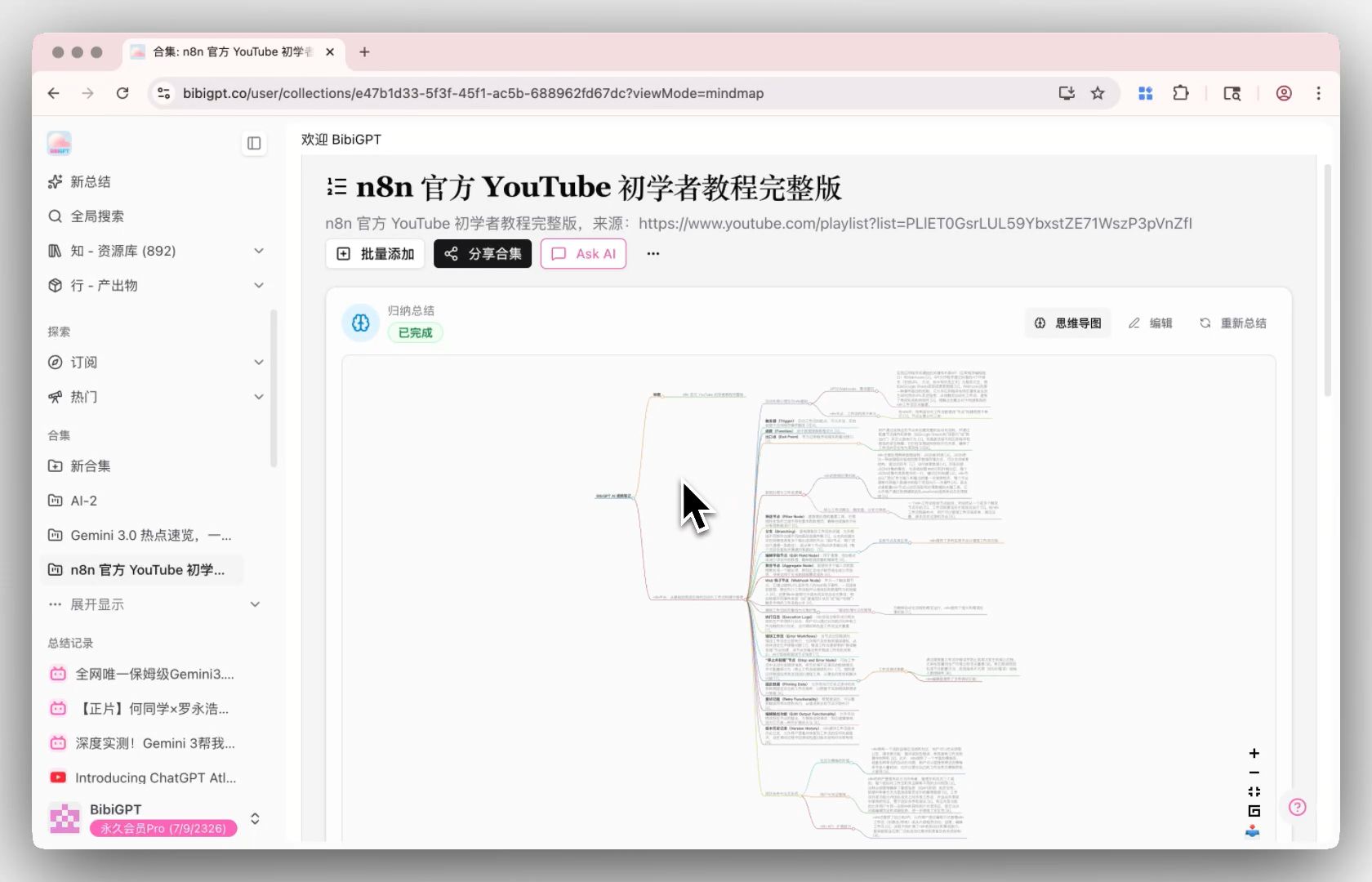 Collection summary mindmap
Collection Summary — PKM accelerator for series courses
For series courses (e.g., a 30-episode Java playlist, a creator's themed collection), BibiGPT's Collection Summary analyzes the entire set at once and generates a cross-video knowledge structure plus an interactive mindmap.
Example: Add 30 episodes of a Java tutorial to a "Java Learning" collection
→ Click "Summarize Now"
→ Get a structured knowledge map across all 30 episodes
→ Mindmap contains 23 core topics; each node jumps to the original video timestamp
A 25-hour course preview compresses to: 2 hours of reading the structured summary + targeted deep-read on key episodes.
Related reading: AI Video Learning 5-Step Method | AI Video Active Recall Learning Method
AI Conversation Follow-up — amplifier for deep understanding
For content you want to truly internalize, BibiGPT's AI conversation follow-up lets you ask the video directly — "I didn't follow the reasoning in this section, can you explain it another way?" or "Find me all the counter-examples in this video." This turns passive reception into active inquiry — the real key to long-term compounding.
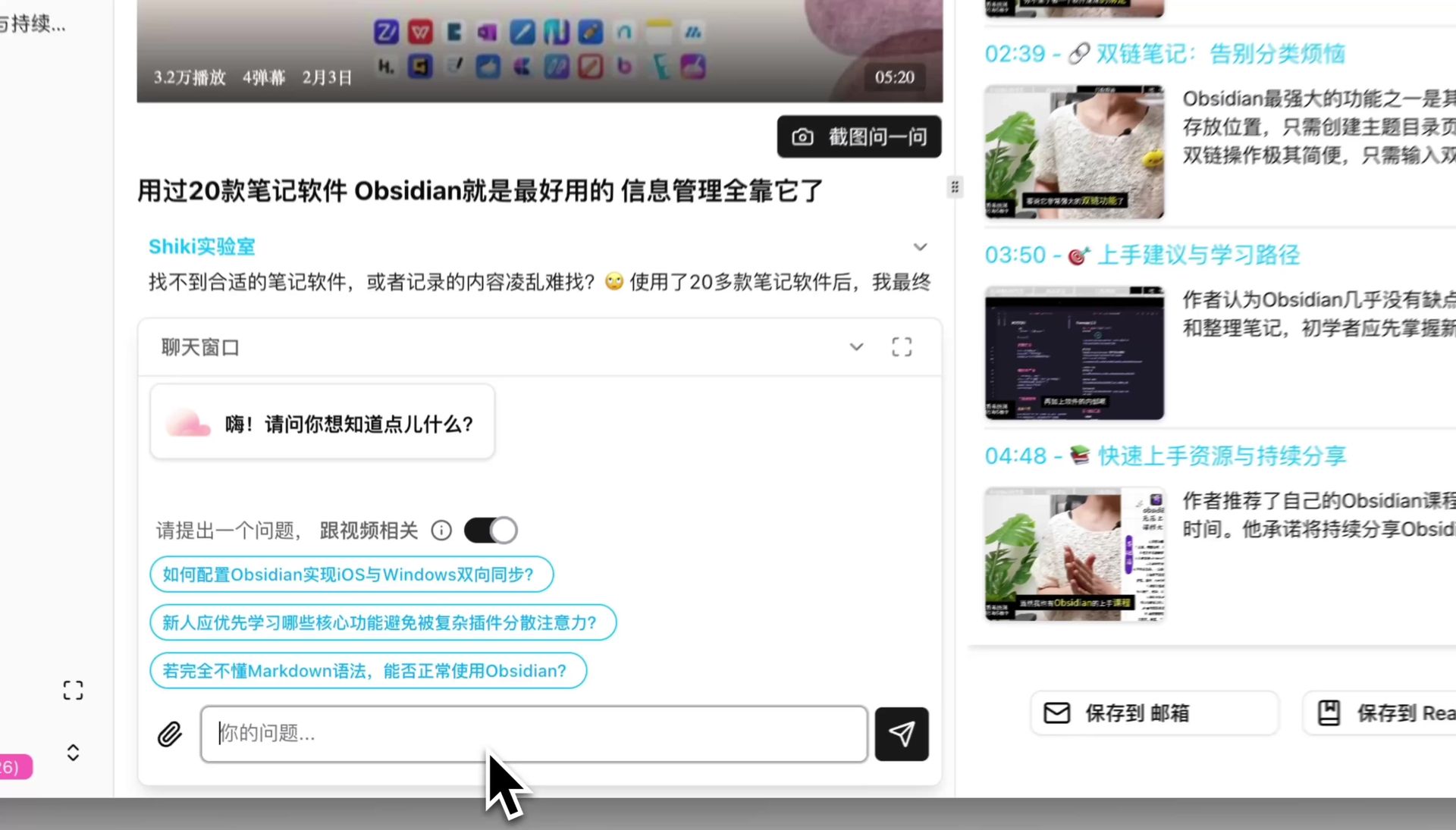 AI conversation window question input
Step 3: Smart-Tag Archiving — Make Knowledge Retrievable
After summarizing, attach 3-5 tags to each note. A three-dimensional tag system works well:
- Topic tags:
#MachineLearning#ProductDesign#PersonalGrowth - Type tags:
#Methodology#CaseStudy#Tool#Opinion - Action tags:
#ToPractice#Digested#Shareable
Tooling: in Notion use Database multi-select; in Obsidian use YAML frontmatter tags. Once you commit to a tag taxonomy, don't reshuffle constantly — human memory works with stable classifications, not ones that keep mutating.
Step 4: Notion / Obsidian Integration — Storage & Linking
Notion path: structured database + Relations
Build a Knowledge Database in Notion with fields: Title, Summary, Tags, Source Video URL, BibiGPT Summary Link, Related Topics, Key Takeaways (3 items).
After BibiGPT generates a summary, copy the core content as Markdown into the Notion Knowledge entry. BibiGPT's native integration with Notion and Obsidian saves you the copy-paste grind.
Obsidian path: bi-directional links + Graph View
If you prefer "bottom-up" knowledge networks (Zettelkasten style), Obsidian's bi-directional links are the killer feature: each knowledge point is one .md file, files connect via [[related-topic]] links. Graph View lets you see your knowledge evolve over time.
How to choose
| Which sounds more like you? | Pick |
|---|---|
| Prefer structured databases, clear taxonomy | Notion |
| Prefer networks, believe in "ideas bumping into each other" | Obsidian |
| Want both? | Notion for archival + Obsidian as your creation workspace |
Related: Bilibili to Notion Knowledge Base AI Workflow | Browser Plugin vs BibiGPT Video Knowledge Base
Step 5: Regular Review — Where PKM Compounds
A lot of people nail steps 1-4 but skip step 5, and their knowledge base quietly turns into a "digital warehouse" — stored but never revisited.
Weekly review (15 minutes)
- Skim all new titles added this week
- Deep-revisit 2-3 entries that resonate (pair with BibiGPT's chapter deep-read)
- Move digested items to
#Digested, leave unpracticed ones in#ToPractice
Monthly theme consolidation (30 minutes)
Pick the month's most-populated theme and use BibiGPT's AI video-to-article or AI conversation to consolidate everything into a single "thematic review" post. This step connects scattered dots into lines — the decisive turn from PKM input to PKM output.
Annual knowledge map (2 hours)
At year-end, use BibiGPT-generated mindmaps + Notion relation views to draw your year's knowledge map. Which domains deepened? Which ones only got surface taps? Visualization makes it obvious.
Flashcards + Anki for long-term memory
For content requiring long-term retention (exams, language learning), BibiGPT's Flashcards export directly as Anki CSV — pair with Anki's spaced-repetition algorithm for durable consolidation.
Full Workflow Example: What One Real Week Looks Like
Monday morning: A creator posts a new 45-min video
  → Paste link in BibiGPT, get summary + chapters + mindmap in 3 min
  → Decide "worth deep-read" in 5 min of skimming
  → Follow up on 3 key points via AI conversation

Monday evening:
  → Copy key takeaways to Notion Knowledge Database
  → Tag: #MachineLearning #Methodology #ToPractice
  → Link to existing topic "Model Fine-Tuning"

Wednesday:
  → Listen to a related podcast (BibiGPT processes it)
  → Notice the opinion conflicts with Monday's video
  → Create a "Comparison Note" in Notion linking both sources

Sunday review:
  → Skim 7 new entries this week
  → Upgrade the "Comparison Note" into a "Weekly Review"
  → Pick 1 item from #ToPractice for next week
Once this flow becomes habit, you'll notice your real knowledge retention goes up 3-5x per week, with the same time input.
AI Rewrite Preview
Let's build GPT: from scratch, in code, spelled out
Andrej Karpathy walks through building a tiny GPT in PyTorch — tokenizer, attention, transformer block, training loop.
Want to summarize your own videos?
BibiGPT supports YouTube, Bilibili, TikTok and 30+ platforms with one-click AI summaries
Try BibiGPT FreeFAQ
Q1: What's the difference between BibiGPT and tools like Reflect or Readwise?
A: The biggest gap is source breadth. Reflect / Readwise focus on YouTube and English podcasts, with limited support for Chinese sources (Bilibili, Xiaohongshu, Douyin, Chinese podcasts). BibiGPT natively covers 30+ platforms, matching Chinese users' primary information diet. Secondary difference: multimodal output — not just text summaries, but mindmaps, PPT decks, video-to-article, and more.
Q2: Do I have to pick between Notion and Obsidian?
A: No. Many serious PKM users run both: Notion for structured archival (Database, Relations, public sharing), Obsidian as a thinking workspace (bi-directional links, Graph View, local Markdown). BibiGPT's export covers both; no need to agonize.
Q3: How much daily time does this workflow take?
A: Once habituated, 20-30 minutes per day. Core principle: "AI does the grunt work, you make judgment calls." BibiGPT handles subtitle extraction, chapter splitting, and summary generation — mechanical work. You only decide "is this worth deep-reading" and "what topic should this link to."
Q4: How many episodes can Collection Summary handle in one run?
A: Up to 100 episodes for cross-video knowledge analysis. Empirically, under 50 per run gives the best quality. For longer series, split by theme into multiple collections.
Q5: I'm just starting — five steps feels like a lot. Which one first?
A: Just Step 2. Pick 1-2 of your highest-frequency video sources, batch-process a week's worth through BibiGPT, and experience the efficiency leap from "just watched" to "have a structured note." Add steps 3-4 (tagging, storage) next week. Step 5 (review) can start as simple as a weekly skim and grow into a habit over time.
Closing: PKM Is "Letting Future-You Thank Present-You"
In 2026, tools are no longer the bottleneck — attention is. The BibiGPT × Notion / Obsidian combo minimizes friction on the information-processing side. The only remaining question: Are you willing to spend 20 minutes per week actually letting what you consumed settle down?
That willingness determines how thick your knowledge base becomes in five years.
Have feedback or ideas?
We value your input! If you encounter issues or have suggestions, please let us know anytime.
Submit feedbackStart your AI efficient learning journey now:
- 🌐 Official Website: https://aitodo.co
- 📱 Mobile Download: https://aitodo.co/app
- 💻 Desktop Download: https://aitodo.co/download/desktop
- ✨ Learn More Features: https://aitodo.co/features
BibiGPT Team