
Bilibili Transcript Tools Compared: Best Subtitle Extractors in 2026
Looking for the best bilibili transcript tool? We compare 5 top subtitle extractors for Bilibili videos — from free downloaders to AI-powered tools like BibiGPT that handle transcription, translation, and summarization.
Bilibili Transcript Tools Compared: Best Subtitle Extractors in 2026
How do you get a transcript from a Bilibili video? The fastest way is BibiGPT: paste any Bilibili video link, and it automatically extracts the full subtitle script — whether the video has official captions or not. BibiGPT uses AI-powered transcription to generate accurate text from any Bilibili video, with export options including SRT, TXT, PDF, and Markdown. Trusted by over 1 million users with over 5 million AI summaries generated, BibiGPT supports 30+ platforms and offers the most comprehensive Bilibili transcript extraction available today.
Try pasting your video link
Supports YouTube, Bilibili, TikTok, Xiaohongshu and 30+ platforms
Why Demand for Bilibili Transcript Tools Is Surging
Search volume for "bilibili transcript" has surged from 8 to 52.5 — a 6x increase. The reason is clear: Bilibili's unique content ecosystem is attracting a rapidly growing global audience.
What's driving this trend?
From Chinese language learning tutorials and anime commentary to tech reviews and music covers, overseas users are discovering that Bilibili hosts content you simply cannot find elsewhere. But the language barrier and platform-specific quirks make it difficult to extract and use this content efficiently.
Common use cases for bilibili transcript extraction:
- Language learners studying Chinese who need full subtitle text for reading practice
- Academic researchers citing Bilibili lectures and documentaries
- Content creators translating and adapting Bilibili-exclusive content for English audiences
- Knowledge workers extracting key information from Chinese tech tutorials
Most international tools either have broken Bilibili support or none at all. That is exactly why we built this comprehensive comparison.
5 Best Bilibili Transcript Tools Compared
We evaluated 5 popular bilibili transcript tools across subtitle extraction quality, AI summarization, export formats, Bilibili compatibility, and pricing.
Comparison Overview
| Tool | Bilibili Subtitles | AI Summary | Export Formats | No-Subtitle Videos | Pricing |
|---|---|---|---|---|---|
| BibiGPT | Native support, auto BV/av detection | Deep summary + mind map + AI chat | SRT/TXT/PDF/Markdown | AI transcription | Free tier, Plus/Pro plans |
| DownSub | Official captions only | None | SRT/TXT | Not supported | Free |
| NoteGPT | Supported | Basic summary + mind map | Text | Limited | Free tier, paid upgrade |
| AITransDub | Supported | Basic summary | SRT/TXT | AI transcription | Free tier |
| Chrome Extension (json2srt) | Bilibili AI captions only | None | SRT | Not supported | Free |
1. BibiGPT — The All-in-One Bilibili Transcript Powerhouse
BibiGPT is an AI-powered audio and video assistant purpose-built for platforms like Bilibili and YouTube. For bilibili transcript extraction, it offers several unique advantages:
- Automatic BV/av link parsing: Paste any Bilibili URL format and it resolves automatically
- Three-tier subtitle extraction: Official captions first, then Bilibili AI captions, then BibiGPT AI transcription — ensuring every video gets a transcript
- Smart subtitle segmentation: Customize character count, word count, and duration per segment — merge 174 fragmented captions into 38 readable paragraphs
- Hard subtitle OCR extraction: Recognize burned-in subtitles from video frames in 6 languages (Chinese, English, Japanese, French, German, Spanish)
 BibiGPT Smart Subtitle Segmentation
Beyond transcript extraction, BibiGPT delivers a complete learning experience with AI summaries, mind maps, and interactive AI dialogue — turning subtitles into understanding.
2. DownSub — Simple and Free Subtitle Downloader
DownSub is a straightforward online tool for downloading existing subtitle files from Bilibili videos.
Pros: Completely free, simple interface, no registration required Cons: Only downloads existing official subtitles. No AI transcription, no summarization. If a video has no built-in captions, DownSub cannot help.
3. NoteGPT — AI Note-Taking Focused Tool
NoteGPT is a learning-oriented AI tool that supports generating summaries and mind maps from Bilibili videos.
Pros: Multi-language support, mind map feature, clean interface Cons: Bilibili subtitle extraction is less native than BibiGPT, with limited capability for videos without captions.
4. AITransDub — Translation-First Subtitle Tool
AITransDub focuses on subtitle extraction and translation, converting Bilibili videos into timestamped text.
Pros: Good subtitle translation features, intuitive workflow Cons: Basic AI summarization, lacks mind maps and AI dialogue features.
5. Chrome Extension (Bilibili subtitle json2srt)
This lightweight extension converts Bilibili's built-in AI subtitle JSON files into downloadable SRT format.
Pros: Completely free, lightweight Cons: Only works with Bilibili's own AI-generated subtitles. No support for videos without captions, no AI features.
AI Subtitle Extraction Preview

Let's build GPT: from scratch, in code, spelled out
Andrej Karpathy walks through building a tiny GPT in PyTorch — tokenizer, attention, transformer block, training loop.
Want to summarize your own videos?
BibiGPT supports YouTube, Bilibili, TikTok and 30+ platforms with one-click AI summaries
Try BibiGPT FreeHow to Extract Bilibili Transcripts with BibiGPT (3 Steps)
Getting a bilibili transcript with BibiGPT takes under a minute:
Step 1: Paste a Bilibili Video Link
Go to BibiGPT and paste your Bilibili video URL. All formats are supported: bilibili.com/video/BVxxxxxx, b23.tv/xxxxx short links, or even raw BV/av IDs.
Step 2: Automatic Extraction and Summarization
BibiGPT automatically:
- Detects the video metadata and subtitle source
- Extracts the complete timestamped transcript
- Generates an AI summary, key takeaways, and mind map
Step 3: Export or Continue Deep Learning
You can:
- Download subtitle files (SRT/TXT/PDF format)
- Sync summaries to Notion, Obsidian, or other note-taking tools
- Use the AI dialogue feature to ask follow-up questions about the video
- Enter Immersive Mode for a side-by-side video and transcript view
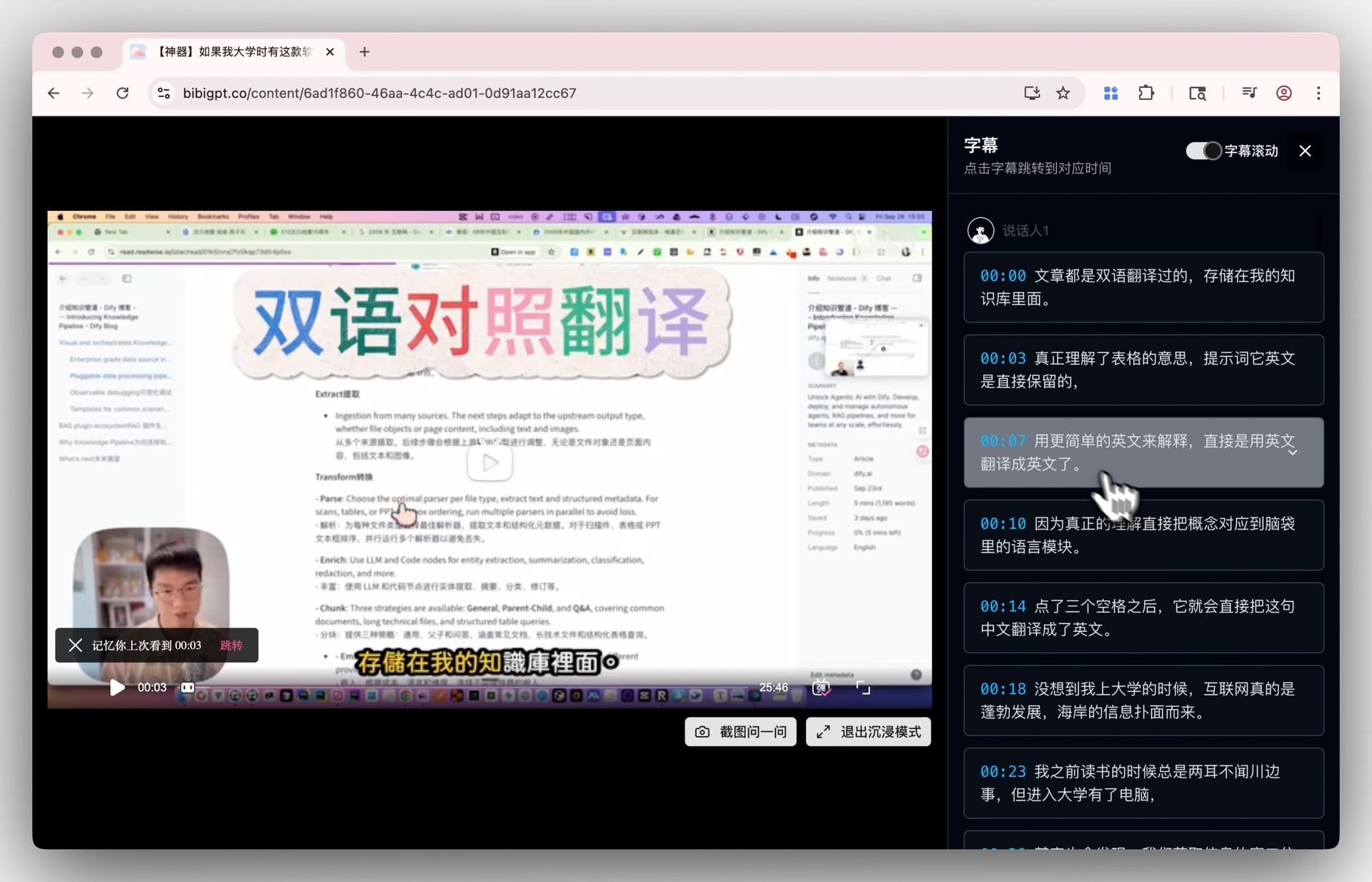 Immersive Mode Demo
Advanced Features: Beyond Basic Transcript Extraction
BibiGPT goes far beyond simple bilibili transcript extraction with a suite of advanced capabilities:
Hard Subtitle OCR Recognition
Many Bilibili videos — especially interviews, lectures, and online courses — have subtitles burned directly into the video frames without extractable subtitle tracks. BibiGPT's Hard Subtitle OCR reads text directly from video frames, supporting Chinese, English, Japanese, French, German, and Spanish. This solves the "no subtitle track" problem that stumps other tools.
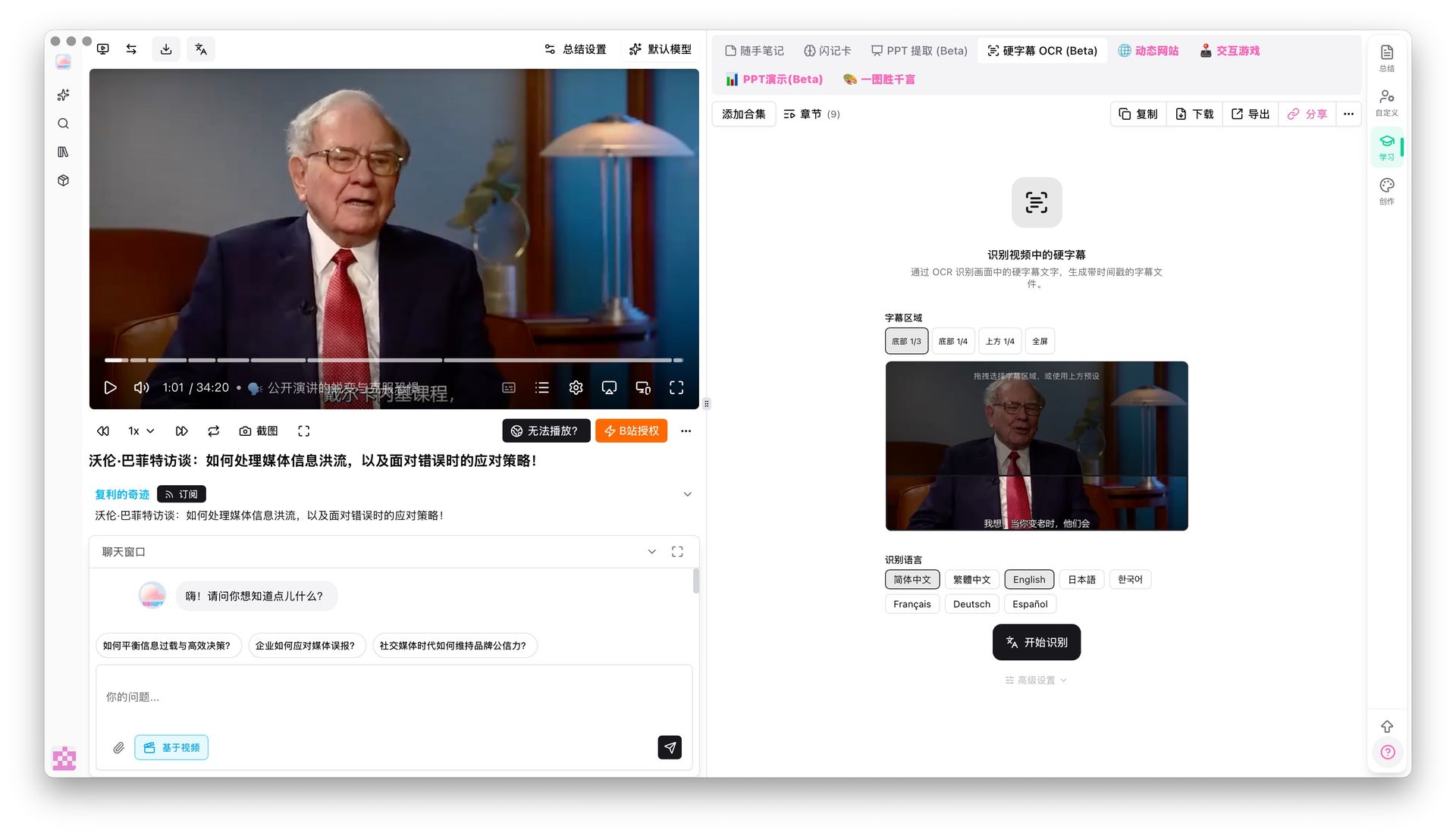 Hard Subtitle OCR Recognition
Subtitle Translation and Multilingual Support
Extracted Bilibili transcripts can be translated into multiple languages through BibiGPT's AI capabilities, helping overseas users break through language barriers. Generated summaries also support Chinese, English, Japanese, and Korean output.
Agent Skill Integration
For power users and developers, BibiGPT offers an Agent Skill that lets your AI agents directly call BibiGPT's transcript extraction and summarization capabilities. Through the bibi CLI tool (installed with the BibiGPT desktop app), you can automate video processing workflows on platforms like Claude Code and OpenClaw.
Frequently Asked Questions
Can I extract text from Bilibili videos that have no subtitles?
Yes. BibiGPT provides AI-powered transcription that generates high-quality text from any video, even without official or Bilibili AI captions. For videos with burned-in subtitles, you can also use the OCR feature for direct recognition.
What Bilibili URL formats does BibiGPT support?
All common formats: standard links (bilibili.com/video/BVxxxxxx), short links (b23.tv/xxxxx), and both av and BV IDs are automatically recognized.
What formats can I export the transcript in?
SRT (timestamped subtitle files), TXT (plain text), PDF, and Markdown. You can also sync directly to Notion, Obsidian, and other note-taking tools.
Is BibiGPT free?
BibiGPT offers a free tier. Videos with official subtitles can be extracted for free. AI transcription, deep summaries, mind maps, and other advanced features require a Plus or Pro subscription. Visit the features page for details.
What other platforms does BibiGPT support besides Bilibili?
BibiGPT supports 30+ platforms including YouTube, Douyin, TikTok, Xiaohongshu, podcasts (Apple Podcast/Spotify), and local audio/video file uploads. Check out the YouTube transcript generator to learn more.
Conclusion: Choosing the Right Bilibili Transcript Tool
If you only need to occasionally download official Bilibili subtitles, DownSub or a Chrome extension will do the job. But if you need to:
- Extract transcripts from Bilibili videos without captions
- Get AI-powered summaries and mind maps
- Work across platforms (Bilibili + YouTube + podcasts)
- Export to note-taking tools for knowledge management
- Have AI conversations about video content
Then BibiGPT is the most comprehensive choice available. It is not just a subtitle extractor — it is a complete AI audio and video learning assistant that helps you go from watching videos to truly using them.
Start your AI efficient learning journey now:
- 🌐 Official Website: https://aitodo.co
- 📱 Mobile Download: https://aitodo.co/app
- 💻 Desktop Download: https://aitodo.co/download/desktop
- ✨ Learn More Features: https://aitodo.co/features
BibiGPT Team