
Best AI Lecture Summarizer Tools 2026: Compared for Students, Teachers & Self-Learners
Looking for the best AI lecture summarizer in 2026? Compare 7 tools (BibiGPT, Otter, Fathom, NoteGPT, Tactiq, Glasp, Podium) for 90-minute-plus lectures, YouTube courses, Zoom seminars, and local recordings.
Best AI Lecture Summarizer Tools 2026: Compared for Students, Teachers & Self-Learners
What is the best AI lecture summarizer for students in 2026? If you need to turn a 60-180 minute university lecture, MIT OCW course, Zoom seminar, or local recording into structured, revision-ready notes, the most complete option today is BibiGPT: it supports YouTube, Bilibili, local MP4/MP3, cloud drive sync, and 30+ other sources, and generates timestamped chapter summaries, mind maps, and AI follow-up chat out of the box. BibiGPT is trusted by over 1 million users and has generated over 5 million AI summaries, making it one of the most long-lecture-friendly AI summarizers available. Below we compare 7 leading tools so you can pick the right one for your workflow.
Try pasting your video link
Supports YouTube, Bilibili, TikTok, Xiaohongshu and 30+ platforms
Why students need a dedicated AI lecture summarizer in 2026
Open courses and remote learning have exploded over the past two years: CS50, 3Blue1Brown, MIT OCW, Stanford CS229, Andrew Ng's ML, LeCun's lectures, plus more university course recordings and Coursera modules than ever. The volume of long videos a serious student has to digest every week has easily doubled.
The problem is that most students still take notes the 2019 way — pause, copy, rewatch, repeat. A 90-minute machine learning lecture can easily eat 3 hours of note-taking, and whenever you hit a confusing spot you end up scrubbing the timeline like it's 2005.
That is exactly what an AI lecture summarizer should fix: compress "watch + transcribe + organise" into one click — paste a link, get revision-ready notes. But most of the tools on the market only solve one slice of the problem — Otter is built for meetings, Tactiq lives inside Google Meet, NoteGPT is a light YouTube helper. Tools that truly cover "long lectures + multi-source input + deep notes + export for revision" are rare.
7 AI lecture summarizer tools compared (2026)
We compared the 7 most common lecture summarizer options on five axes: long-lecture support (90+ minutes), input sources (YouTube/Bilibili/local/cloud), note depth (chapters/mind maps/highlights/AI chat), export for revision (Notion/Obsidian/Anki), and student-friendly pricing.
Comparison at a glance
| Tool | Long lectures (90min+) | Input sources | Note depth | Revision export | Student pricing |
|---|---|---|---|---|---|
| BibiGPT | Native, auto chapters | YouTube/Bilibili/podcast/local/cloud drive 30+ | Chapter summary + mind map + highlights + AI chat + custom prompt | Notion/Obsidian/Markdown/PDF/Anki CSV | Free tier + Plus/Pro |
| Otter.ai | OK, meeting-centric | Live recording/upload | Transcript + basic summary | Notion/Slack | Free 300 min/month, Pro $8.33/mo |
| Fathom | Meeting-only | Zoom/Google Meet | Meeting summary + action items | CRM/Notion | Free personal, Team $19/mo |
| NoteGPT | Basic | YouTube/local | Summary + basic mind map | Text/image | Free + paid upgrades |
| Tactiq | Weak for YouTube | Meet/Zoom/YouTube | Transcript + AI summary | Notion/Confluence | Free 10/mo, Pro $12/mo |
| Glasp | Needs official captions | YouTube | Highlights + summary | Readwise/Obsidian | Free-first |
| Podium | Podcast-oriented | Podcast/YouTube | Chapters + summary | Markdown | Free start |
1. BibiGPT — the most complete option for long lectures
BibiGPT was designed from day one around the idea that "audio and video content should be watchable, searchable and usable", which maps perfectly to the student workflow:
- Widest source support: one link, a local MP4, or a cloud drive folder can all be input. BibiGPT handles YouTube, Bilibili, TikTok, Xiaohongshu, podcasts, and 30+ platforms — basically a must-have if you bounce between open courses
- Auto chapter split for long lectures: anything over 90 minutes is auto-split into chapters with timestamps and per-chapter summaries, so you get an "outline notebook" for free
- Mind map + timestamp jump: click any node on the mind map and it jumps to the matching timestamp in the video, turning Mindmap Timestamp Jump into a single-flow "review → locate → drill down" loop
- Custom prompts: save templates like "Feynman explanation", "Anki card generator" or "3-pass exam outline" and reuse them on any lecture
- Highlight notes: underline sentences in the AI summary like you would in an ebook; everything lands in a dedicated Highlights tab for exam prep
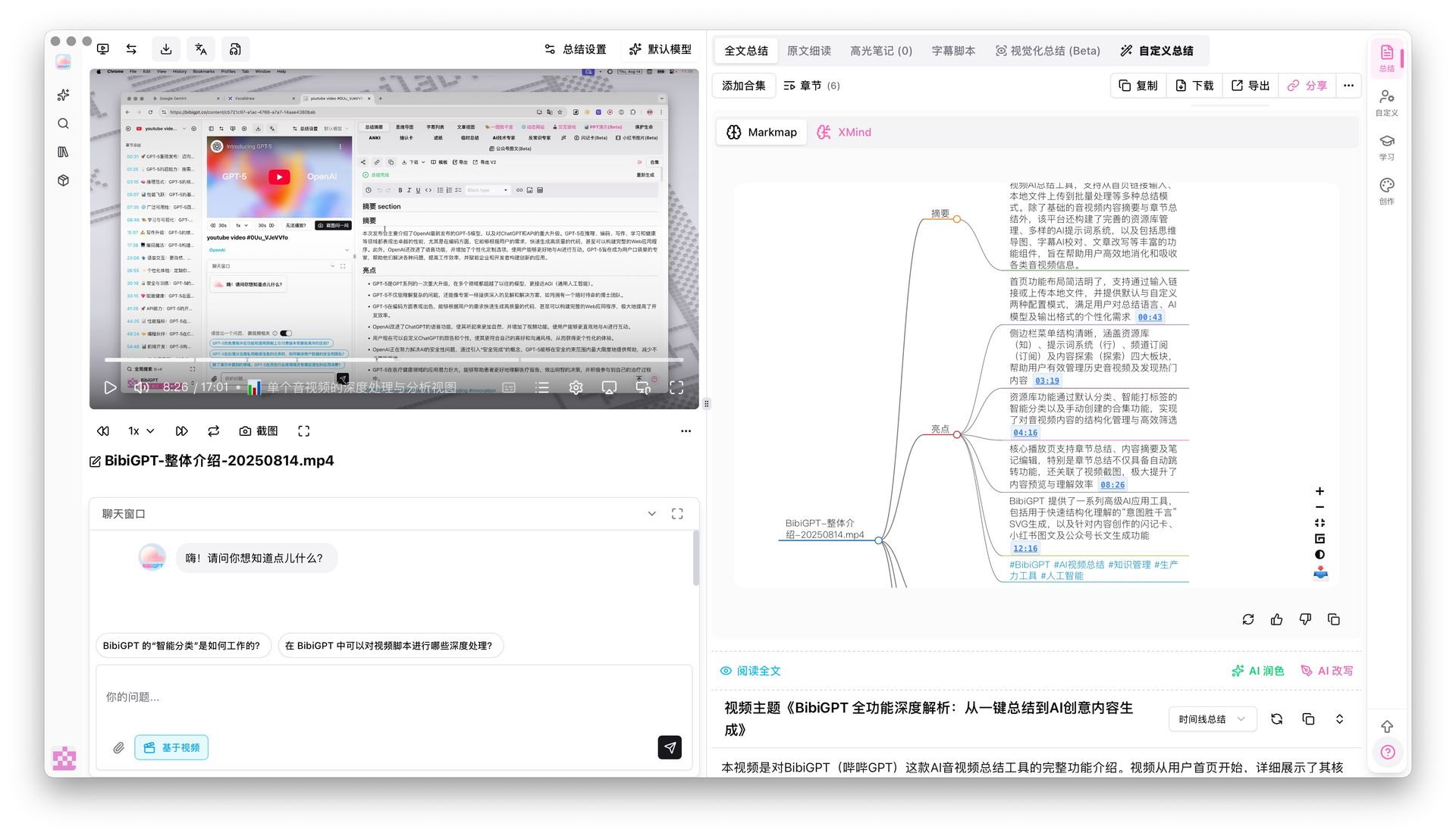 BibiGPT mindmap timestamp jump
For local course recordings, BibiGPT's desktop app also supports folder monitoring: point it at your OBS, Dropbox or Baidu Netdisk sync folder and new lectures get queued up automatically.
AI Mind Map Preview

Bilibili: GPT-4 & Workflow Revolution
A deep-dive explainer on how GPT-4 transforms work, covering model internals, training stages, and the societal shift ahead.
Want to summarize your own videos?
BibiGPT supports YouTube, Bilibili, TikTok and 30+ platforms with one-click AI summaries
Try BibiGPT Free2. Otter.ai — a meeting transcription king, lighter for lectures
Otter is the best-known real-time transcription tool in the English-speaking world and has excellent accuracy on English lectures. But its core use case is meeting notes:
- Pros: live captions, speaker detection, top-tier English accuracy, auto 30-second summary
- Cons: cannot directly ingest YouTube/Bilibili links (you need to download audio first), limited support for Chinese long lectures, no chapter mind map, thin export structure
Also, Otter charges by minutes, and 300 free minutes per month evaporate quickly when you routinely sit through 2-3 hours of lectures a day.
3. Fathom — meeting-only, overkill for lectures
Fathom isn't really a lecture tool at all — it's a Zoom/Google Meet debrief assistant.
- Pros: free personal plan, high-quality meeting summaries, automatic action item extraction
- Cons: Zoom/Meet only, cannot touch YouTube/Bilibili/local video. Fine for online seminars, useless for 95% of open-course scenarios.
4. NoteGPT — a lightweight YouTube companion
NoteGPT focuses on YouTube video summaries and is popular among casual student users.
- Pros: easy to use, basic mind map for free
- Cons: weak Bilibili support, limited local file handling, coarse chapter splits on long lectures, no AI follow-up chat when you actually want to "talk to the course".
5. Tactiq — for Google Meet diehards
Tactiq is another meeting-centric tool with native real-time captions inside Google Meet.
- Pros: smooth browser extension, solid AI summaries
- Cons: only 10 meetings per month on the free tier, weak YouTube support, expensive for long lectures.
6. Glasp — highlight-first "light notes" tool
Glasp started as a web highlighter and later added YouTube summaries.
- Pros: plays well with Readwise and Obsidian, nice if you already live in highlights
- Cons: relies on official captions, no AI transcription, no chapter split, no Bilibili support.
7. Podium — podcast / long-audio first
Podium is podcast-oriented and handles very long audio files with auto chapters and summaries.
- Pros: solid long-audio UX, clean chapter splits
- Cons: weak on video scenarios, not ideal if your stack is mostly YouTube/Bilibili lectures.
Three things BibiGPT does uniquely well for students
Advantage 1: built for 90-minute-plus lectures
Unlike Otter and Fathom, which are tuned for meetings, BibiGPT was built around long-form content from the start. Chapter Deep Reading folds chapter summaries, AI polishing, AI rewriting and full transcripts into a single distraction-free view. Clicking a transcript line jumps the video to the exact moment, and the transcript auto-scrolls and highlights as the video plays — effectively "reading a video like a textbook".
AI Chapter Summary Preview
Bilibili: GPT-4 & Workflow Revolution
A deep-dive explainer on how GPT-4 transforms work, covering model internals, training stages, and the societal shift ahead.
Want to summarize your own videos?
BibiGPT supports YouTube, Bilibili, TikTok and 30+ platforms with one-click AI summaries
Try BibiGPT FreeAdvantage 2: custom prompts let AI take notes your way
Students have their own note-taking frameworks: some prefer "concept → example → counterexample → self-question", others want Anki-style Q&A cards, others want an exam point checklist. BibiGPT's custom prompt summary lets you save these frameworks as templates and apply them to any lecture with one click.
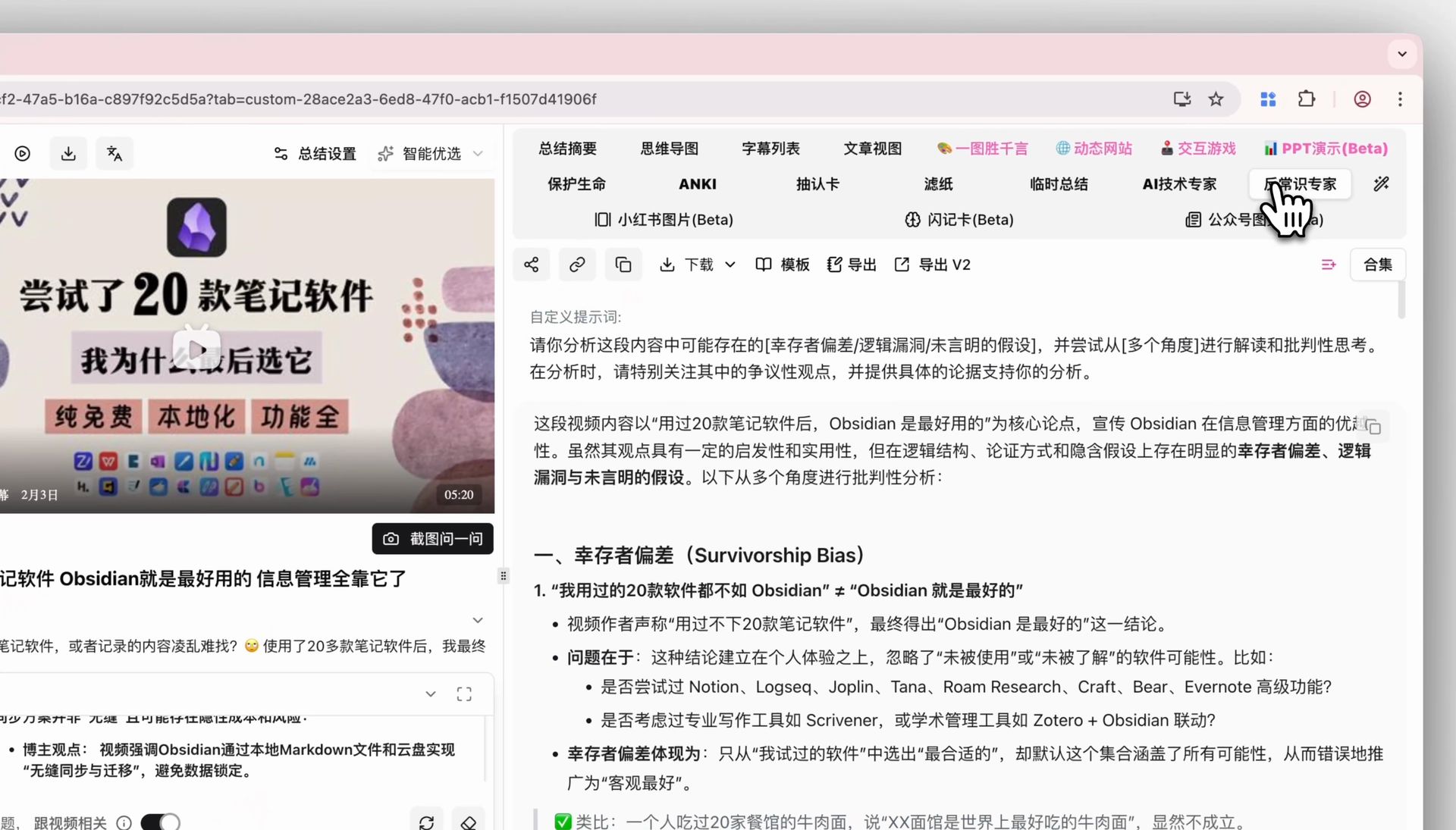 BibiGPT custom prompt selector
That effectively upgrades AI from "a generic note-taker" to "your personal study assistant".
Advantage 3: highlight notes → Notion / Obsidian / Anki
The last mile for students is "where do my notes live?" BibiGPT's highlight notes feature lets you drag-select key sentences from the AI summary like you would in an ebook, then every highlight is collected in a dedicated tab and one click sends them to Notion, Obsidian, Readwise or Anki (CSV) for spaced-repetition review.
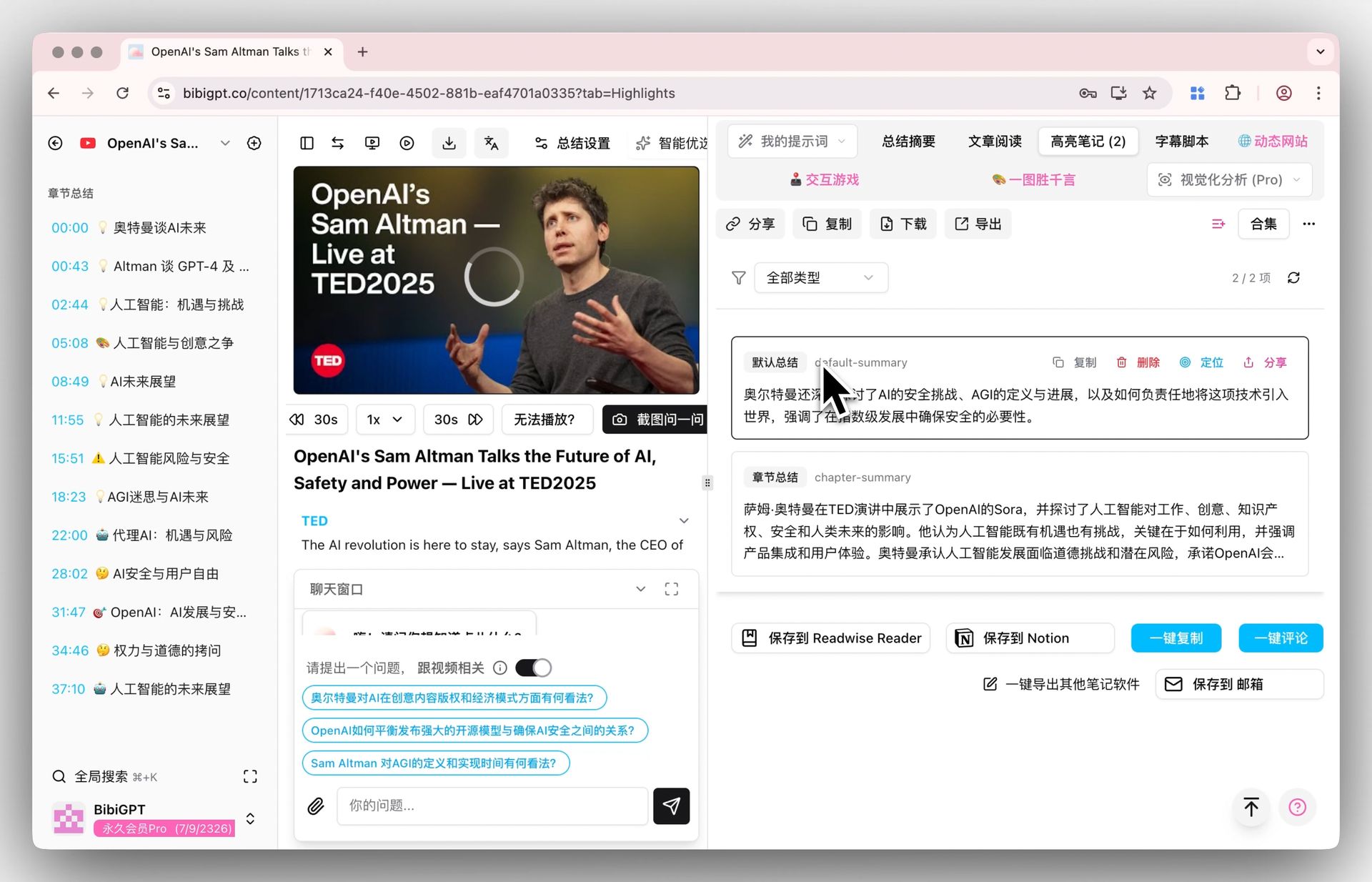 BibiGPT highlight notes tab
That closes the loop between "watching a lecture" and "actually remembering it".
Which tool fits which learning scenario?
- STEM open courses (CS50, MIT OCW, 3Blue1Brown): BibiGPT first — you want multi-source support, chapter mind maps and AI follow-up chat
- English live webinars: Otter.ai for live transcription, but pipe the recording into BibiGPT afterwards for structured notes
- Zoom/Google Meet study groups: Fathom or Tactiq as a real-time helper, BibiGPT later for chapters and exports
- Chinese Bilibili courses: BibiGPT has essentially no competitors, thanks to native BV/av support and a three-layer subtitle strategy
- Podcasts / interview-style long audio: Podium or BibiGPT; pick BibiGPT if you need Notion export
Budget tips for students
If you're on a student budget, here's the cheapest way to stack these tools:
- Start with BibiGPT's free tier for daily YouTube and Bilibili courses — it covers most light usage
- Upgrade to Plus during finals, then use batch export to clean up an entire semester of notes in one go
- Pair with Anki export for spaced-repetition revision — far faster than handwritten flashcards
Conclusion: what should a student actually pick?
If you are a student, teacher or self-learner who watches long lectures, open courses and seminars every week, BibiGPT is the most complete AI lecture summarizer in 2026. It unifies multi-source input (YouTube, Bilibili, local, cloud), delivers deep notes (chapters + mind map + highlights + AI chat + custom prompts), and exports cleanly to Notion, Obsidian and Anki for revision.
Try it now: head to aitodo.co, paste a link to the lecture you're currently watching, and within minutes you'll see a full set of structured chapter notes and a mind map. Let AI do the transcribing so you can spend your time actually thinking.
🎓 Want BibiGPT to become your learning assistant?
- 🔗 Visit: aitodo.co
- 🎁 Free tier available for new users
- 📚 Supports YouTube/Bilibili/local recordings/cloud drives — 30+ sources
BibiGPT Team