
NotebookLM April 2026 Update Explained: Three-Column Layout, 10 Infographics, Cross-Session Flashcards vs BibiGPT
NotebookLM's April 2026 release ships a three-column workspace, 10 infographic templates, and persistent flashcards. We break down each and compare with BibiGPT's edge on Chinese video sources (Bilibili / Xiaohongshu).
NotebookLM April 2026 Update Explained: Three-Column Layout, 10 Infographics, Cross-Session Flashcards vs BibiGPT
Quick answer: NotebookLM's biggest 2026 release lands in April with a three-column workspace, 10 new infographic templates, and persistent flashcards across sessions. For English learners and paper researchers it's a real step up, but for users whose primary sources are Bilibili, Xiaohongshu, Douyin, and Chinese podcasts, source-coverage gaps remain — which is exactly where BibiGPT fills in.
The most common question I'm getting this week: "After the April update, is NotebookLM already enough?" My answer: it depends on what you feed it. For English PDFs, academic papers, and English-language YouTube, this April update is genuinely excellent. For Bilibili course playlists, Chinese podcasts, or Xiaohongshu long-form notes, source ingestion and Chinese-language context understanding remain the bottleneck. This post breaks down the three new capabilities and compares with BibiGPT's differentiated value.
Try pasting your video link
Supports YouTube, Bilibili, TikTok, Xiaohongshu and 30+ platforms
NotebookLM April 2026: Three Headline Updates
Update 1: Three-Column Workspace — no more tab-hopping
NotebookLM used to be a two-panel app (Sources on the left, Chat on the right), which created a real workflow split — browsing sources while taking notes meant constantly switching panels. The April update introduces a third "Studio" column that unifies FAQs, Timelines, Audio Overviews, Infographics, Flashcards, and Briefing Docs. The new division of labor: Sources (material) + Chat (dialogue) + Studio (output). The information architecture finally makes sense.
The change isn't revolutionary in itself, but it signals that Google now treats NotebookLM's artifacts (Infographics, Flashcards) as first-class citizens alongside conversation, not as side products.
Update 2: 10 Infographic Templates — the "one picture is worth a thousand words" upgrade
This is the most viral part of the April release. NotebookLM's Studio infographic capability jumped from "one default style" to 10 templates: timeline, comparison, process, hierarchy, map, statistics, storyboard, pyramid, matrix, and relationship. Each template's layout logic is optimized for a specific information shape, so output quality is much higher than before.
For researchers, teachers, and knowledge bloggers, this is genuinely useful — structure charts that used to require hand-written Mermaid now just come out of source material.
Update 3: Cross-Session Flashcards — persistent study at last
Previously Flashcards were session-scoped — close the window and they're gone, making spaced repetition impossible. The April update makes Flashcards notebook-level persistent, so you can return days or weeks later and keep studying, and even aggregate flashcards across multiple notebooks.
This is the key step for NotebookLM transitioning from "one-shot Q&A tool" to "long-term learning companion."
NotebookLM vs BibiGPT: Source Coverage Is the Decisive Axis
The April update primarily improves NotebookLM's output artifacts. But its input still caps at a few specific formats:
| Source type | NotebookLM | BibiGPT |
|---|---|---|
| English PDF / Google Doc | Native | Supported |
| YouTube video link | Native (strongest in English) | Native (equally strong) |
| Bilibili video link | Not supported | Native, triple-subtitle sources |
| Xiaohongshu note / video | Not supported | Native |
| Douyin / TikTok | Not supported | Native |
| Chinese podcasts (Xiaoyuzhou) | Not supported | Native |
| Tencent Meeting / Feishu recording | Not supported | Upload supported |
| English web URL | Native | Supported |
| Chinese web URL | Partial | Native |
Core difference: NotebookLM is designed for English academic/research scenarios. Its Audio Overview podcasts, Infographic templates, and Flashcards shine in English contexts. But Chinese users' primary raw material — Bilibili course playlists, Xiaohongshu long-form posts, Chinese podcasts — isn't consumable by NotebookLM.
Related reading: NotebookLM 2026 Features vs BibiGPT Comparison | Gemini Notebooks vs NotebookLM 2026 | NotebookLM Gemini App Integration vs BibiGPT 2026
BibiGPT's Differentiated Value for Chinese Video
For Chinese users, BibiGPT's edge comes from three dimensions:
1. Source ingestion: paste Bilibili link and go
Paste any Bilibili / Xiaohongshu / Douyin link, and BibiGPT automatically extracts subtitles from three redundant sources (official subs + AI transcription + hard-subtitle OCR). For videos where "the uploader didn't provide official subs but burned hard subs into the video," hard-subtitle OCR succeeds over 98% of the time — a capability NotebookLM simply doesn't have.
2. Chinese-context understanding: AI chat without "translation voice"
BibiGPT's AI conversation follow-up is optimized on top of Chinese model ecosystems. Ask "is the logic in this section actually sound?" and you'll get a reply in the critical-thinking register native Chinese readers expect — not the "English-translated-into-Chinese" phrasing NotebookLM often produces.
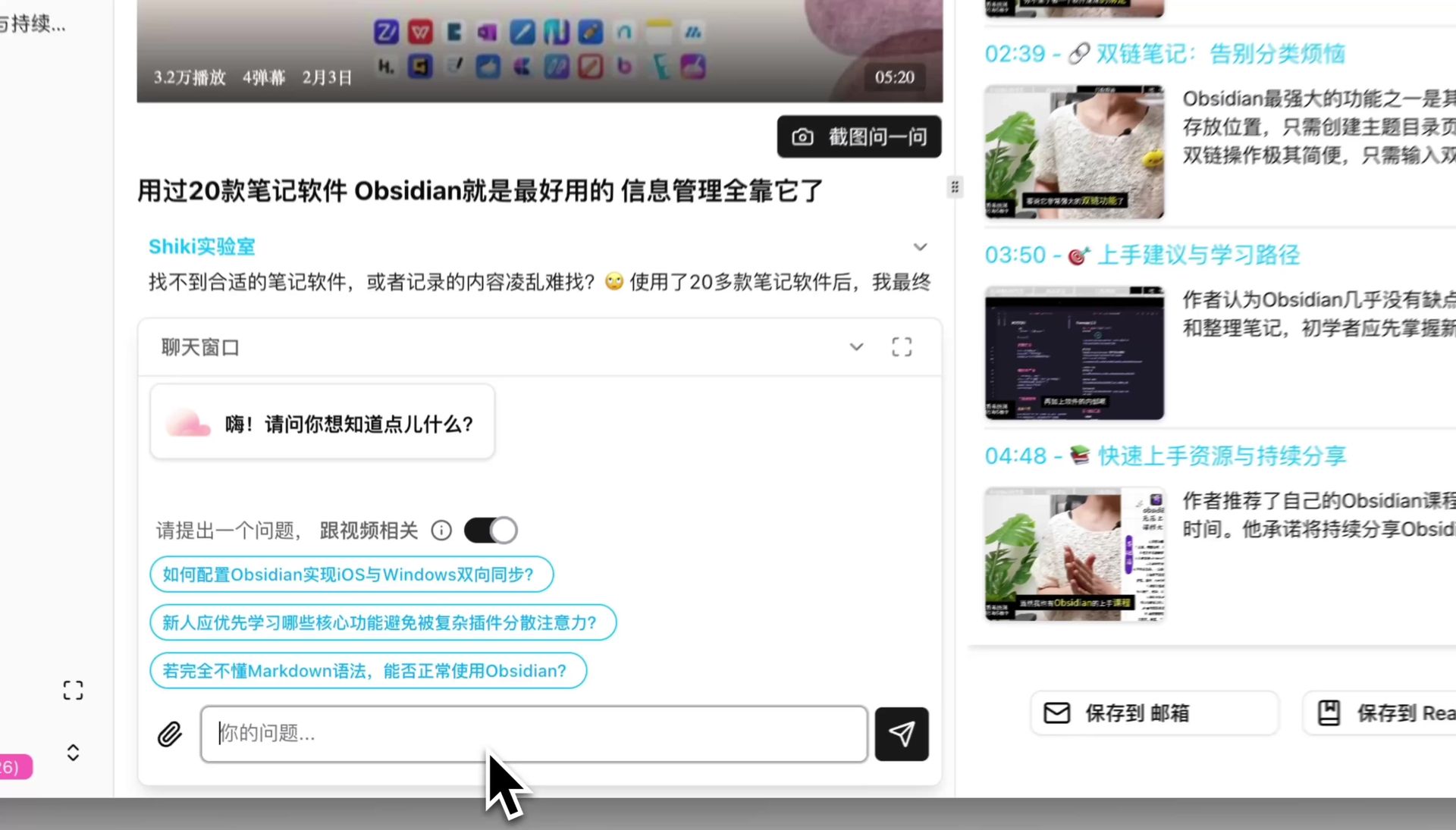 AI conversation window input
3. Multimodal artifacts: PPT, mindmaps, visual analysis
NotebookLM's April update adds 10 Infographic templates. BibiGPT actually goes further on this axis:
- PPT Presentation: one-click dynamic slide deck from any video
- Mindmap: interactive, expand/collapse, every node jumps back to the source video timestamp
- Visual analysis: analyzes video frames to generate carousels, Xiaohongshu cards, short-video scripts
- AI video-to-article: turns any video into a structured article with smart screenshots
When to Pick Which
It's not either/or. Pick the tool that fits your source type:
- English academic papers, English YouTube deep research → NotebookLM post-April is the strongest combo: Infographics + Flashcards + three-column workspace
- Chinese Bilibili courses, Xiaohongshu long-form, Chinese podcasts → BibiGPT is the only complete solution today
- Cross-source research + long-term review → Use both, each for its native source type
- Creator workflow: video → PPT / carousel / short video → BibiGPT's multimodal pipeline is smoother
FAQ
Q1: After April 2026, does NotebookLM support Chinese video links?
A: No. The April update focuses on output (Infographics, Flashcards) and workspace (three columns). The Sources side still accepts mainly English PDFs, Google Docs, YouTube, and web URLs. Chinese video platforms (Bilibili, Xiaohongshu, Douyin) remain unsupported.
Q2: Can BibiGPT make infographics too?
A: The functional analog is BibiGPT's visual analysis — analyzing video frames to produce carousels, Xiaohongshu image cards, and short-video scripts. The positioning differs slightly: NotebookLM's Infographics lean more toward "knowledge-structure diagrams," while BibiGPT's visual analysis leans toward "publishable content artifacts."
Q3: Cross-session Flashcards — does BibiGPT have this?
A: BibiGPT's Flashcards export to Anki CSV and import straight into Anki for spaced repetition. Anki is widely considered the best spaced-repetition tool, so BibiGPT exports instead of rebuilding it — delegate review to the specialist.
Q4: Can NotebookLM and BibiGPT import each other's content?
A: Indirectly, yes. BibiGPT's generated articles export as Markdown and can be pasted into NotebookLM as a source; NotebookLM's Briefing Doc can be saved and re-uploaded to BibiGPT. The two ecosystems are complementary, not closed.
Q5: If I only care about Chinese video learning, should I use both?
A: With a limited budget, pick BibiGPT — it covers the entire Chinese-content chain from source to AI chat to PPT to mindmap. NotebookLM's strongest value remains in English contexts.
Closing: NotebookLM Is English-World Milestone, BibiGPT Is the Chinese-Context Complete Solution
After the April update, NotebookLM is arguably the most polished AI-notebook product globally in terms of output artifacts. But for Chinese users whose primary raw material is Bilibili courses, Chinese podcasts, and Xiaohongshu long-form posts, BibiGPT remains the smoother tool — source ingestion, Chinese-context understanding, multimodal output. Trusted by over 1 million users, over 5 million AI summaries generated, supports 30+ platforms. They're not mutually exclusive — pick by source type.
See BibiGPT's AI Summary in Action

Let's build GPT: from scratch, in code, spelled out
Andrej Karpathy walks through building a tiny GPT in PyTorch — tokenizer, attention, transformer block, training loop.
Want to summarize your own videos?
BibiGPT supports YouTube, Bilibili, TikTok and 30+ platforms with one-click AI summaries
Try BibiGPT FreeStart your AI efficient learning journey now:
- 🌐 Official Website: https://aitodo.co
- 📱 Mobile Download: https://aitodo.co/app
- 💻 Desktop Download: https://aitodo.co/download/desktop
- ✨ Learn More Features: https://aitodo.co/features
BibiGPT Team