Ask YouTube's Conversational AI Search Rolls Out Wider This Summer: Can It Replace Video Summary Tools? (2026 Hands-On Review)

Direct answer: As of 2026-07-08, YouTube’s in-app “Ask YouTube” conversational AI search — previously in limited testing, now rolling out to more users — is essentially a “question-and-navigate” tool: you ask in natural language, it pulls together Shorts and long-form videos, gives you a short answer, and jumps you to the relevant clip. It’s great at “helping you figure out which video to watch and which minute to jump to,” but it doesn’t produce a complete summary you can take with you: verbatim transcripts, chapter-by-chapter takeaways, timestamped notes, mind maps, cross-platform aggregation, exporting to note-taking apps — all of that still requires a dedicated video summarization tool. Paste a link into BibiGPT once and the difference will be obvious.
The demo below shows what happens when you paste a video link and get a structured summary back:
Summarize any video in seconds
Pick a sample below to see the AI summary — TL;DR, key points, and jump-to timestamps.
TL;DR: Karpathy builds a GPT-style language model from scratch in code, explaining every piece — from a tiny character-level model up to the full Transformer.
Key points
- Start with a bigram model, then add self-attention so tokens can "talk" to each other
- A Transformer block = multi-head attention + feed-forward + residual connections + layer norm
- Training is just predicting the next token; scale and data do the rest
- The same architecture behind nanoGPT is what scales up to ChatGPT
Jump to
- 00:07 Why build GPT from scratch
- 08:23 Self-attention, intuitively
- 1:00:00 Assembling the Transformer block
- 1:35:00 From nanoGPT to ChatGPT
Demo: BibiGPT one-click video summary
1. What “Ask YouTube” Actually Is: The 60-Second Version
Let’s start with the facts (as of 2026-07-08, per YouTube’s official statements and multiple tech media reports): “Ask YouTube” brings conversational AI directly into YouTube’s in-app search — instead of just typing keywords, you ask questions the way you’d talk to a person, and it will:
- Aggregate on-platform content into an answer: pulling from both Shorts and long-form videos to give you a summary-style response;
- Attach clip jump-to links: relevant videos and specific timestamps appear below the answer, one click and you’re there;
- Roll out in phases: it was first tested with a subset of US Premium users, and YouTube says it’s expanding to a wider audience this summer.
One-line summary of what it is: it’s “the conversational-search version of video” — it helps you decide what to watch and where to start, not digest the whole thing for you.
To get a feel for what this looks like in practice, the video below walks through YouTube’s in-app conversational AI search tool from a user’s perspective:
Video source: YouTube · Introducing the in-app conversational AI tool
2. What Ask YouTube Can and Can’t Do
Laying its boundaries out on the table beats listening to the pitch. The table below lines up its strengths against its blind spots:
| Capability | Ask YouTube (in-app) | What You Actually Need |
|---|---|---|
| Find videos with natural language | ✅ Strength | Figure out which video to watch |
| Jump to relevant clips | ✅ Strength | Less scrubbing through the timeline |
| A short answer | ✅ Yes | But it’s just a “summary,” not the full picture |
| Chapter-by-chapter takeaways / verbatim summary | ❌ Not produced | Needed for review, writing, archiving |
| Full transcript / timestamped notes | ❌ Not exportable | Needed for citation, repurposing content |
| Mind map / structured overview | ❌ None | Grasp the throughline at a glance |
| Cross-platform (Bilibili, podcasts, local files) | ❌ In-app only | Content lives beyond YouTube |
| Export to Notion / Obsidian | ❌ None | Build a lasting knowledge base |
Look closely at this table and you’ll notice Ask YouTube solves for “search and discovery,” not “digestion and retention.” These two get conflated a lot, but for anyone who actually learns from video or creates content, the latter is where the real time goes every day.
Practical rule: The platform’s built-in AI gets you to the front door of the content; a dedicated summarization tool walks you through it and hands you something to keep. The two aren’t competing — they’re a relay.
3. Snippet Answers vs. Full Summaries: Where the Real Gap Is
Ask YouTube gives you a “clip-level answer” — a short segment pulled in response to your question. But in a 40-minute deep-dive interview or a two-hour product launch, the real value is often spread across the entire thing: setups planted early on, callbacks between chapters, conclusions at the end. Watching just a snippet is like feeling one part of an elephant and guessing the shape.
A full summary means reading through the entire piece once and giving you chapter-by-chapter takeaways + jump-to timestamps + notes you can actually keep. The product screenshot below shows deep search in action — searching straight into the full transcript instead of just the title or summary — finding a line that only shows up once in the body, never in any summary:
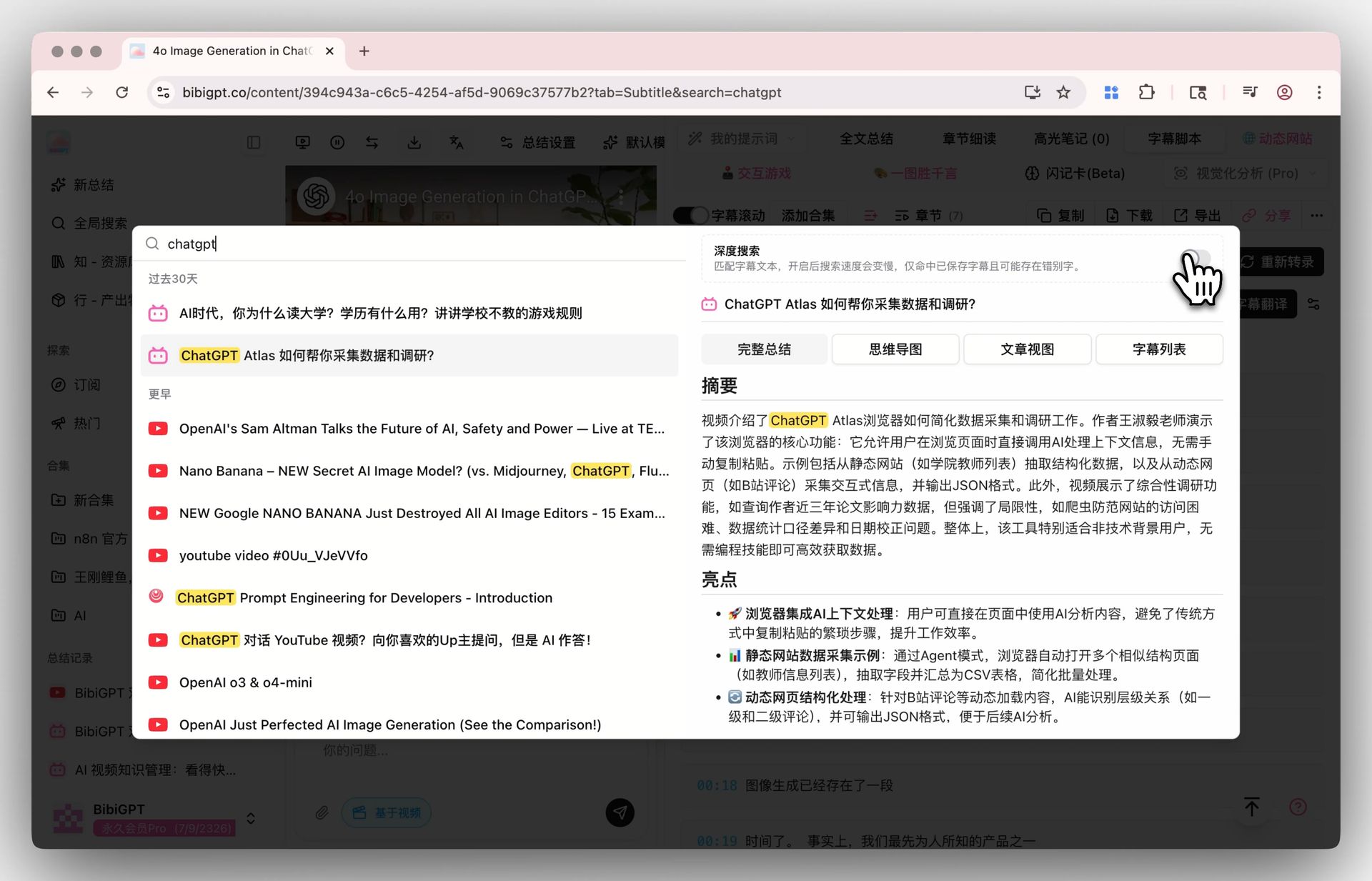
Screenshot: BibiGPT · Deep Search feature demo
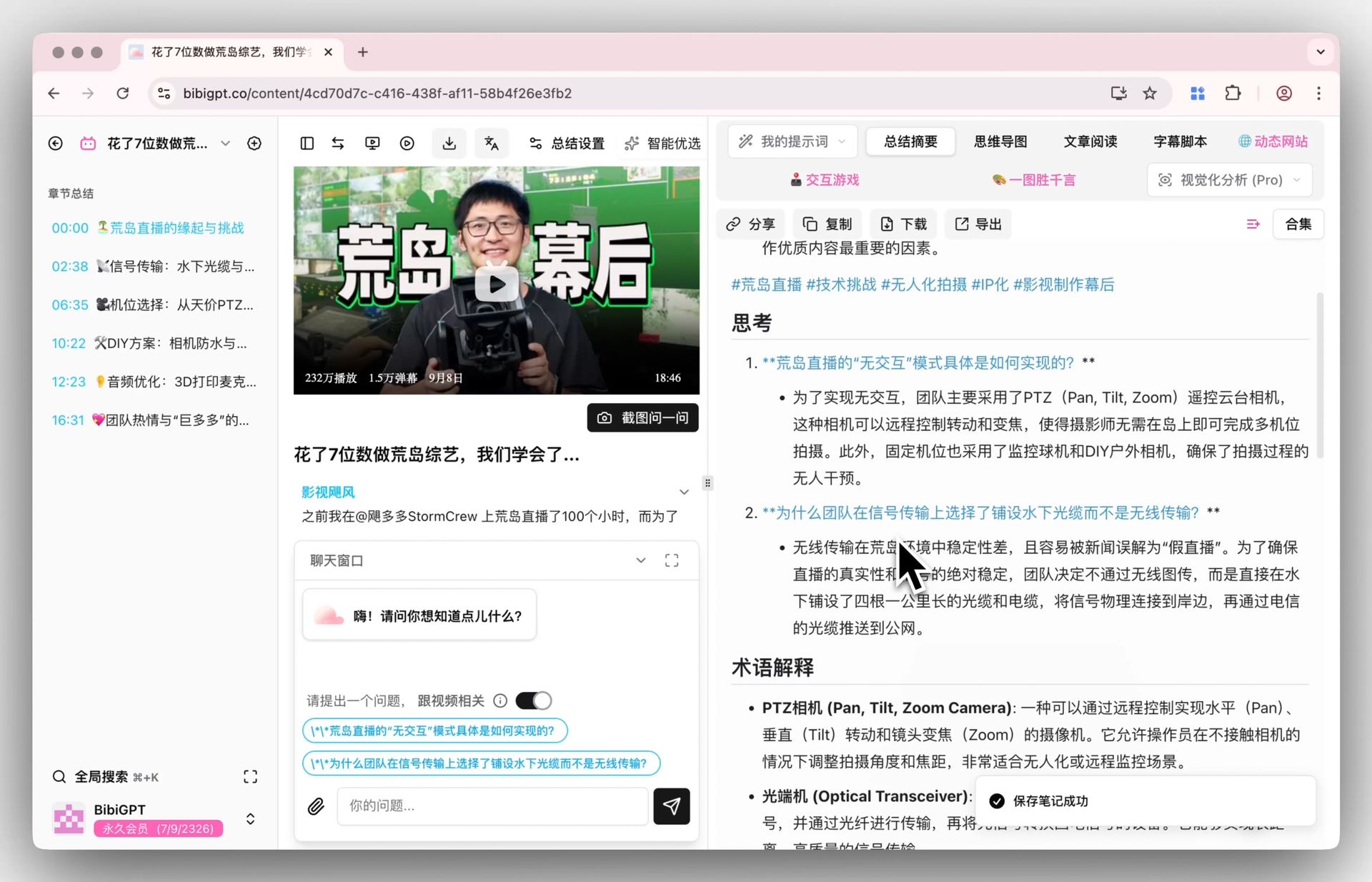
On the “digestion” side, it’s about breaking the whole video into a structured, chapter-by-chapter throughline — not a vague, general summary:
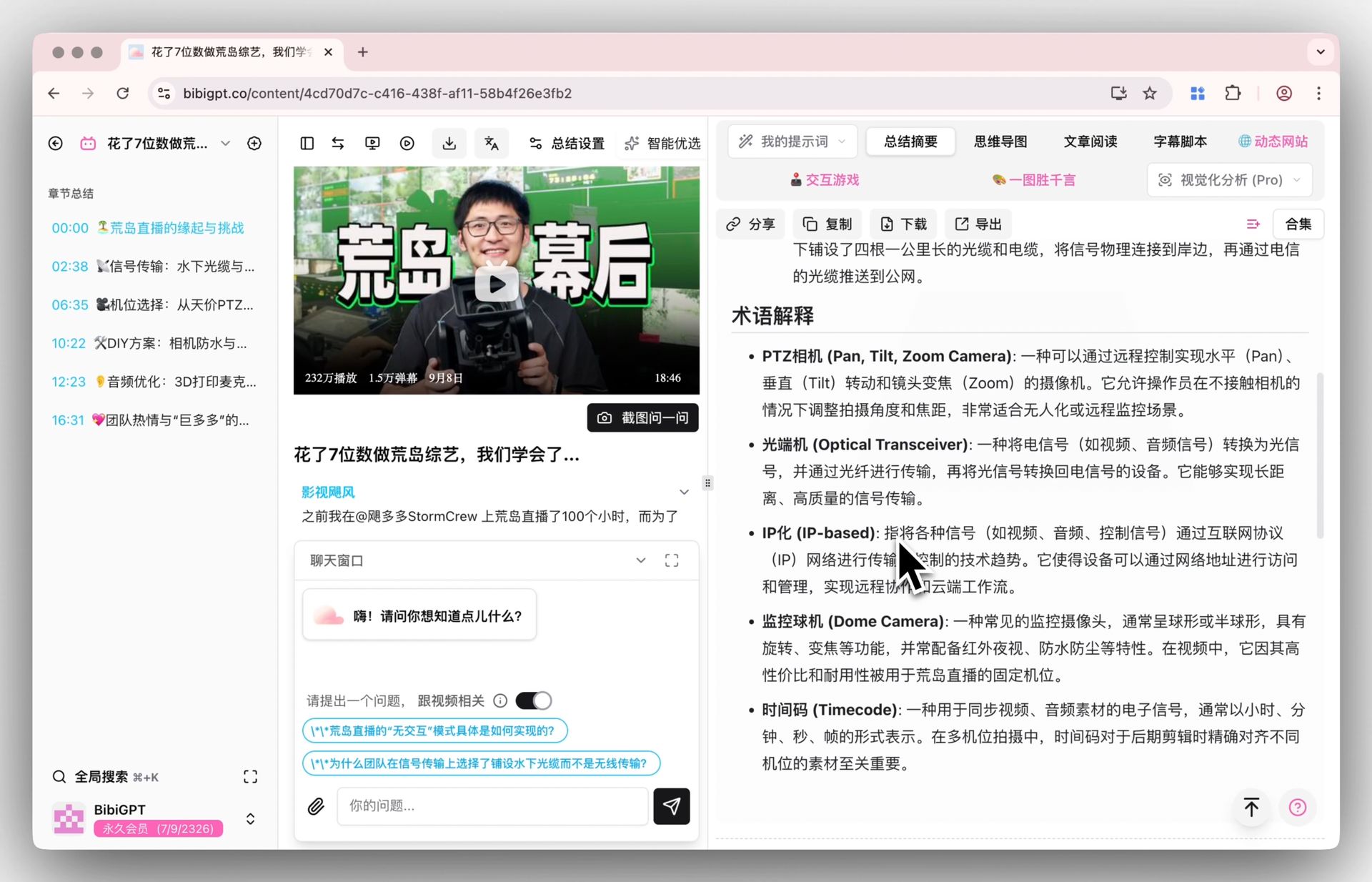
Screenshot: BibiGPT · Smart Deep Summary feature demo
For reference, YouTube users rack up watch time measured in “billions of hours” — in a flood of content like that, whether you can reliably compress a long video down into ten minutes of readable takeaways directly determines how much content you can actually get through in a day.
Practical rule: To tell whether a tool is “search” or “summarization,” check what you’re left holding afterward — something you can save, cite, and rewrite? If not, it’s just search.
4. Chaining Ask YouTube and BibiGPT Together
The smoothest way to use these isn’t picking one over the other — it’s letting them relay. A typical workflow:
- Use Ask YouTube to find what’s worth watching — ask in natural language on YouTube to quickly zero in on the long-form videos worth your time;
- Paste the link into BibiGPT to digest it — get chapter-by-chapter takeaways, timestamps, and a verbatim summary in seconds, then generate a mind map or rewrite it into an article if you need to;
- Save it and keep asking — export to Notion / Obsidian to archive, or ask the content AI follow-up questions to clear up anything unclear.
Flatten the whole video into a single overview map so you can grasp the throughline at a glance when reviewing:
Turn a video into a mind map
A linear talk becomes a structured tree. Drag to pan, click nodes to fold.
Demo: BibiGPT automatically turns a video into a structured overview
Every node on the mind map also carries a jump-to timestamp — click one and you’re back at the exact spot in the original video to double-check, much faster than scrubbing from the start:
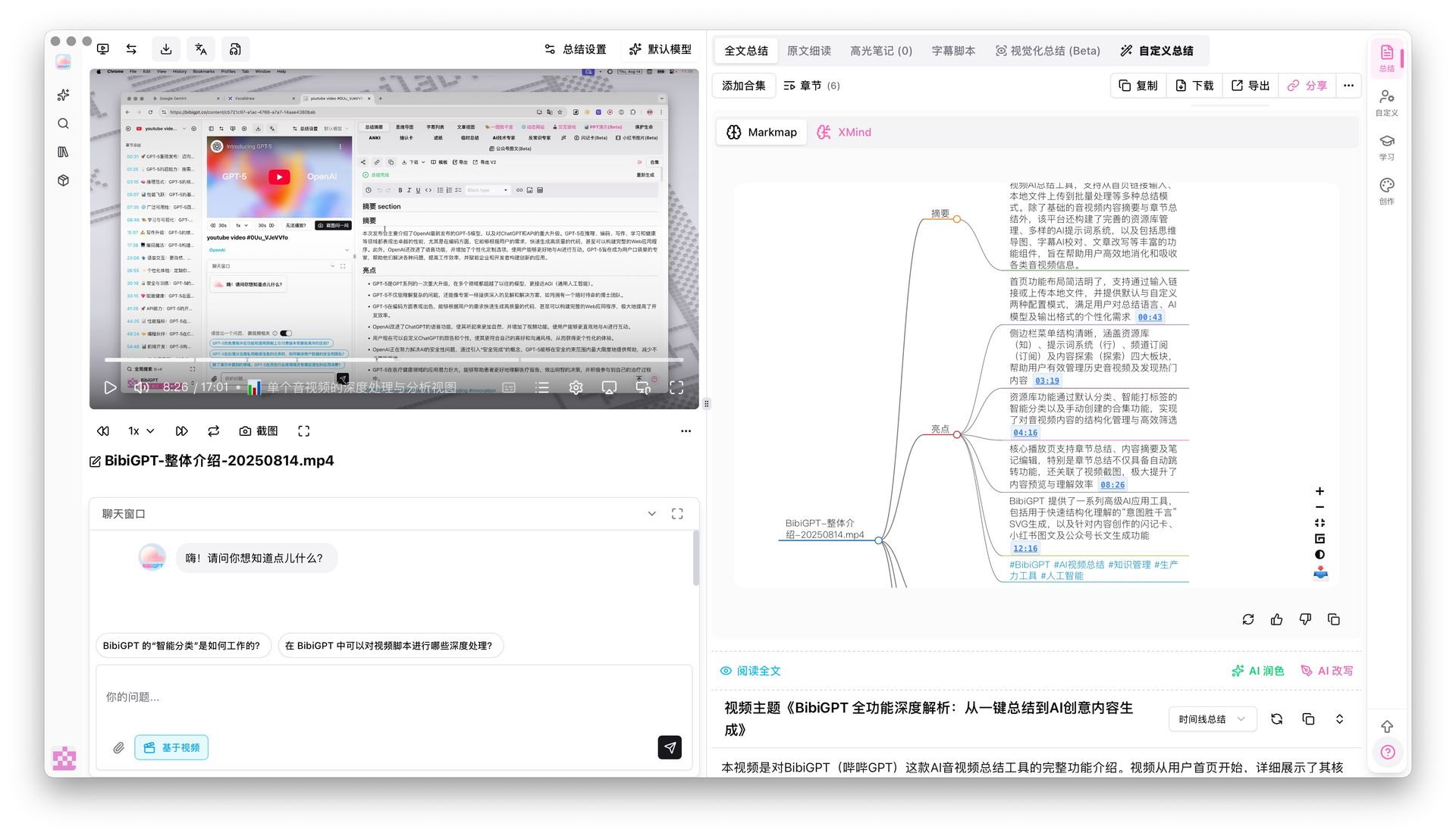
Screenshot: BibiGPT · Mind map timestamp jump demo
Creators who need to repurpose content can also turn an entire video into a written article with one click, exporting copy that’s ready to go straight to WeChat articles or Xiaohongshu/RED:
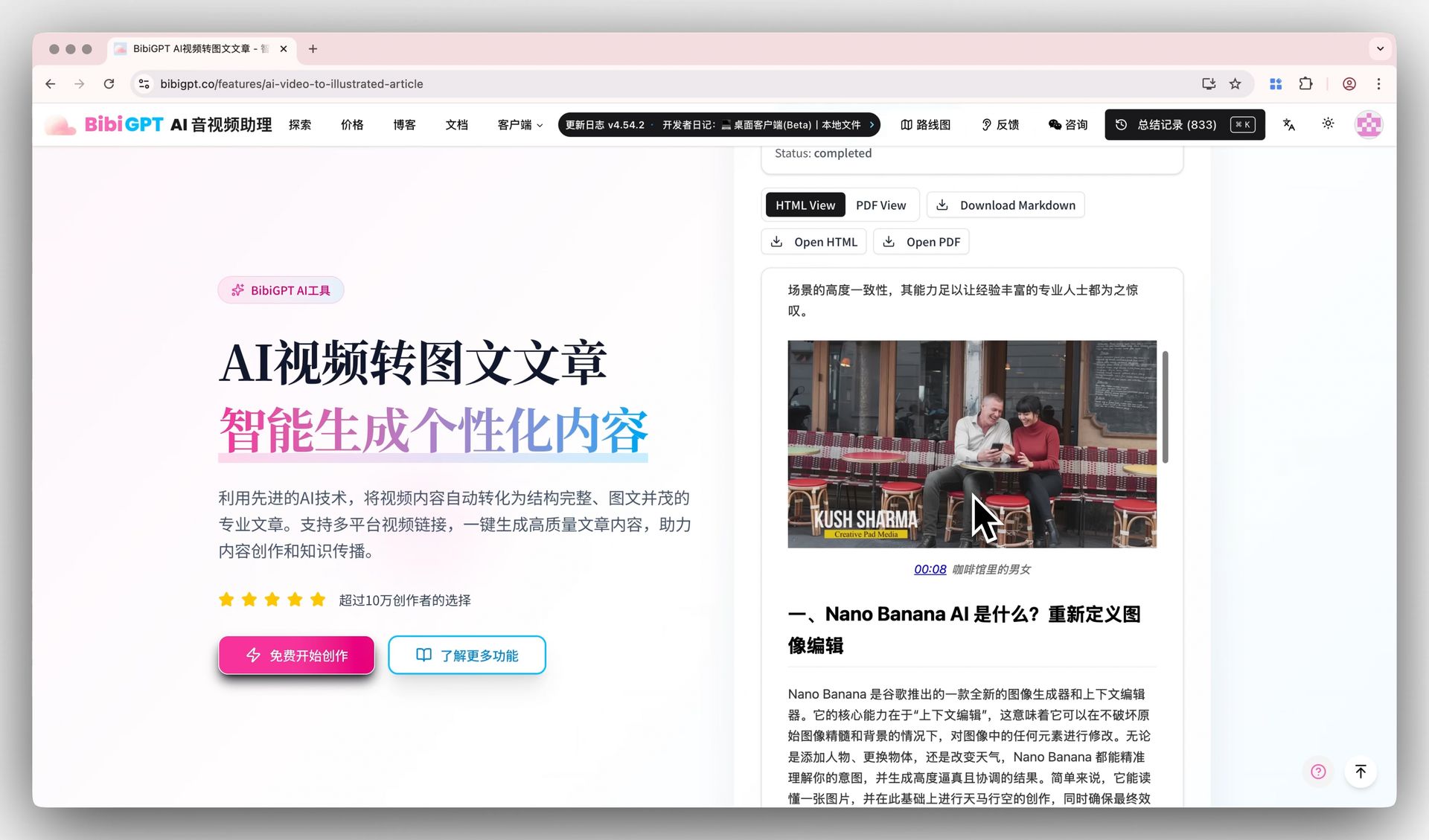
Screenshot: BibiGPT · AI Video-to-Article feature demo
Worth noting: BibiGPT isn’t just another “model aggregator” — it layers automatic routing across multiple leading AI models on top of a pipeline purpose-built for audio and video, and it has already served over 1 million users with more than 5 million AI summaries generated, supporting 30+ major audio and video platforms. You don’t need to worry about which model is running behind the scenes — you just need a summary you can use. Want to try it now? Pick a long video you haven’t had time to watch and paste it into BibiGPT to see for yourself.
5. What This Means for Different Kinds of People
Once Ask YouTube rolls out wider, three groups feel it most directly:
- Students / researchers: use the in-app AI to quickly find the lecture or course worth watching, then have BibiGPT summarize the entire long recording — slides included — so reviewing means scanning the throughline instead of scrubbing the timeline.
- Content creators / independent media: the in-app AI helps you spot topic sources, while BibiGPT digests the entire long interview or launch event into takeaways, then rewrites it into an article or short-video script — no more replaying footage to hunt for material.
- Working professionals: for long recordings of industry conferences or earnings calls, BibiGPT delivers a TL;DR + key decision points + timestamps in one pass, so you can jump back to the source to verify anything as needed.
For each of these groups, Ask YouTube can handle the answer-level questions; the moment you need something you can take away, use across platforms, or turn into a lasting knowledge base, that’s dedicated-tool territory. BibiGPT’s AI chat with source tracing attaches a clickable timestamp source to every answer, keeping information traceable:
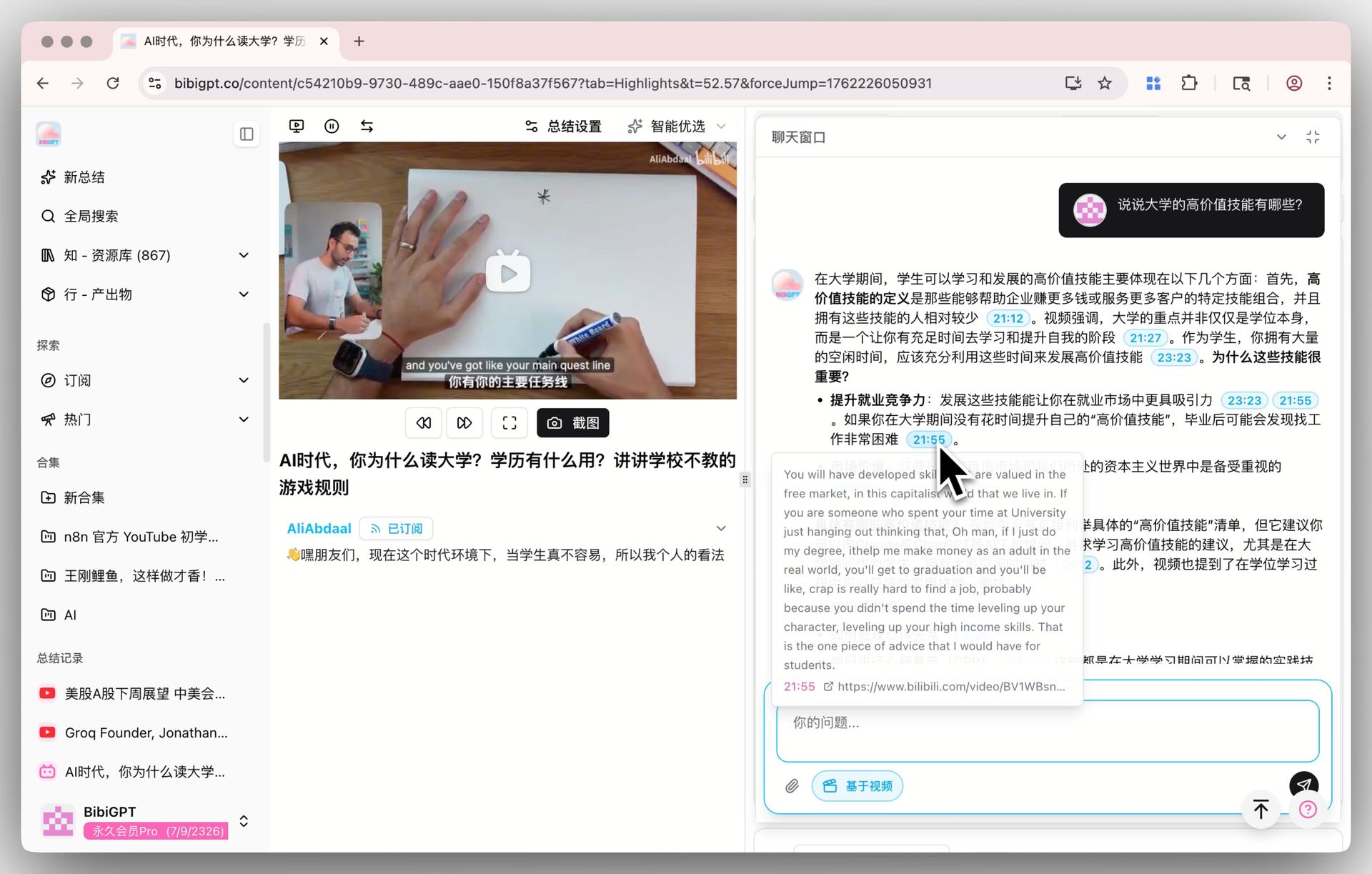
Screenshot: BibiGPT · AI video chat and source-tracing feature demo
Practical rule: As platforms get better and better at “search,” your time bottleneck shifts as a whole toward “digestion and retention.” Getting that workflow smooth matters more than chasing the platform’s newest button.
6. Frequently Asked Questions (FAQ)
Q1: Will Ask YouTube replace video summarization tools like BibiGPT? They’re solving different problems, so replacement is unlikely. Ask YouTube handles “search and discovery” and gives you snippet-level answers; BibiGPT handles “digestion and retention” and gives you a complete, portable summary, timestamps, mind maps, and exports. The more practical approach is to let the two work in sequence.
Q2: Where can I use Ask YouTube? As of 2026-07-08, it was first tested with a subset of US Premium users, and YouTube says it’s rolling out to a wider audience this summer — check YouTube’s official channels for exact availability.
Q3: Can Ask YouTube export transcripts or summaries? Right now it’s mainly in-app snippet answers plus jump-to links — it doesn’t produce downloadable full transcripts, chapter summaries, or mind maps. If you need those, just paste the link into BibiGPT.
Q4: Does BibiGPT only work with YouTube? No. BibiGPT supports 30+ major platforms — Bilibili, podcasts, and local files all work too, which is one of the biggest differences from a platform AI confined to its own app.
Q5: How long does it take BibiGPT to summarize a video? Usually anywhere from a few dozen seconds to a few minutes, depending on video length. Once it’s done, you can keep asking the AI follow-up questions, generate a mind map, rewrite it into an article, or export to Notion / Obsidian.
The Platform’s AI Finds It — You Still Need Something to Read It and Bring It Home
Ask YouTube is a genuinely good addition — it makes finding content on YouTube faster. But for anyone who actually learns from video or creates content, finding it is only step one; reading through it and turning it into something you can keep and use is where the time goes every day. That part isn’t something the in-app AI is built to handle, at least not yet.
Pick a long video or podcast you haven’t had time to watch, paste it into BibiGPT, and get a structured summary with timestamps in seconds — see what it feels like to let the platform handle search while a dedicated tool handles digestion. New users can try it for free.
Further reading: Breaking Down Google I/O 2026’s Trio and Ask YouTube · How to Summarize YouTube Videos with AI (2026 Guide)
BibiGPT Team
Popular tools
More in this series
- Adobe Acrobat Student Spaces vs BibiGPT: 2 เส้นทางเปลี่ยน PDF และวิดีโอเป็นพอดแคสต์ AI (เปรียบเทียบเครื่องมือเรียน AI สำหรับนักศึกษา 2026)
- AI Haoji vs BibiGPT 2026 Full Comparison: Use Case, Platform Coverage, Multilingual, Mind Map Depth, Pricing — Which Should You Pick?
- เปรียบเทียบเครื่องมือสร้าง PPT ด้วย AI 2026: Qwen vs Gamma vs BibiGPT vs Tome อันไหนเหมาะกับคุณ?
- AI Video Note Taker Comparison 2026: QuickQuill vs Mufal vs Memories.ai vs BibiGPT
- Bayt Podcast Translation vs BibiGPT: เครื่องมือ AI พอดแคสต์ตัวใดเหมาะกับคุณ?