7 Best NotebookLM Alternatives for Video Summarization in 2026 (Tested & Compared)

You paste a lecture recording into NotebookLM and get the error “Transcript not available.” You try an unlisted webinar link — refused, public videos only. A Bilibili tutorial or a podcast episode? There is no field to paste them into at all. The notebook that handles your PDFs so gracefully suddenly feels like it was built for a world where knowledge only arrives as text.
That gap matters more every year. According to Synthesia’s 2026 video statistics roundup, the average internet user now spends nearly 12 hours a week (11h 39m) watching online video — lectures, tutorials, interviews, product demos. If your AI research tool can’t genuinely process video, it is blind to the fastest-growing part of your knowledge diet.
Most “NotebookLM alternatives” lists rank note-taking apps. This one is different: we ranked 7 tools strictly by how well they handle video — platform coverage, transcription without captions, visual understanding, timestamps, and what the free tier actually lets you do.
Why Look Beyond NotebookLM for Video in 2026
What NotebookLM still does brilliantly
Let’s be fair first. NotebookLM remains the reference for source-grounded research: answers come only from documents you upload, with citations. And Google keeps investing — on June 8, 2026 it upgraded NotebookLM to a Gemini 3.5 + Antigravity backend, adding agentic research and a secure cloud computer per notebook; Google’s internal evaluations preferred the new engine 65% of the time. For educators, Google announced doubled notebook and source limits for Education Plus tiers back in April 2026, then expanded its classroom AI lineup around ISTE in late June.
If your sources are papers, reports, and web articles, none of the alternatives below will dethrone it.
Where it hits a wall with video
For video specifically, Google’s own support documentation draws hard boundaries:
- Public YouTube only. Private or unlisted videos are rejected, and there is no support for Bilibili, TikTok, or podcast platform links.
- Captions required. NotebookLM does not transcribe. It imports the existing YouTube transcript; a video without captions simply fails, and freshly uploaded videos may not import for up to 72 hours.
- Text-only understanding. Slides, demos, charts, on-screen code — anything that lives in the picture and not the transcript is invisible to it.
- Tight free limits. The free tier caps you at 50 chat queries and 3 Audio/Video Overviews per day, with paid tiers only available bundled into Google AI subscriptions.
Practical rule: NotebookLM treats video as a text file with extra steps. If the value of your video lives in the visuals — or on a platform other than YouTube — you need a tool that actually watches it.
The demand side makes this urgent: Coursera’s 2026 AI in Higher Education report found that over 95% of students and educators already use AI in their studies — and video lectures are the raw material most of that studying starts from.
Which Are the 7 Best NotebookLM Alternatives for Video?
The seven best NotebookLM alternatives for video in 2026 are BibiGPT, Recall, NoteGPT, Google AI Studio, wayin.ai, Eightify, and memories.ai — BibiGPT leads for video-first, multi-platform summarizing. We tested each tool against the same checklist: video input methods, caption dependence, timestamps, learning outputs, and honest free-tier value.
| # | Tool | Best for | Video input | Free tier | Paid from |
|---|---|---|---|---|---|
| 1 | BibiGPT | Video-first summarization across platforms | YouTube, Bilibili, TikTok, podcasts, local files — 30+ platforms | Free summaries to start | Subscription incl. transcription + summaries |
| 2 | Recall | Personal knowledge base with review | YouTube (up to 10h) + podcasts | 10 AI summaries/month | $10/month (annual) |
| 3 | NoteGPT | Study workflows (flashcards, mind maps) | YouTube + local files, no length cap | ~15 quotas/month | ~$9.99/month |
| 4 | Google AI Studio | Free true visual analysis (for tinkerers) | YouTube URL + file upload | Free UI; API free tier 8h video/day | Usage-based API |
| 5 | wayin.ai | Timestamped summaries + clip creation | YouTube, TikTok, Twitch, Vimeo, Facebook | 200 welcome credits + 30 transcription credits/day | ~$9.99–13.99/month |
| 6 | Eightify | One-click YouTube summaries in browser | YouTube only | ~1 summary/day | ~$4.99/month |
| 7 | memories.ai | Enterprise video libraries & search | File uploads, API pipelines | Limited free plan | ~$20/month (dated info) |
Quick picks if you’re in a hurry:
- Most complete video workflow: BibiGPT — the only one where Bilibili, podcasts, and local files are first-class citizens
- Best free option for developers: Google AI Studio — real frame-by-frame visual understanding at zero cost
- Best for spaced-repetition learners: Recall — summaries feed a knowledge graph and review queue
- Narrowest but fastest: Eightify — one click on any YouTube page
Prefer a second opinion in video form? This independent roundup walks through the strongest alternatives:
Video source: YouTube · ClickUp · “Best NotebookLM Alternatives for AI-powered Notes”
Practical rule: Don’t compare list prices — compare free tiers against one real week of your usage. A “cheaper” plan that meters summaries per month can cost more than a flat subscription once you binge one course.
#1 BibiGPT — Why Is It the Best Video-First Alternative?
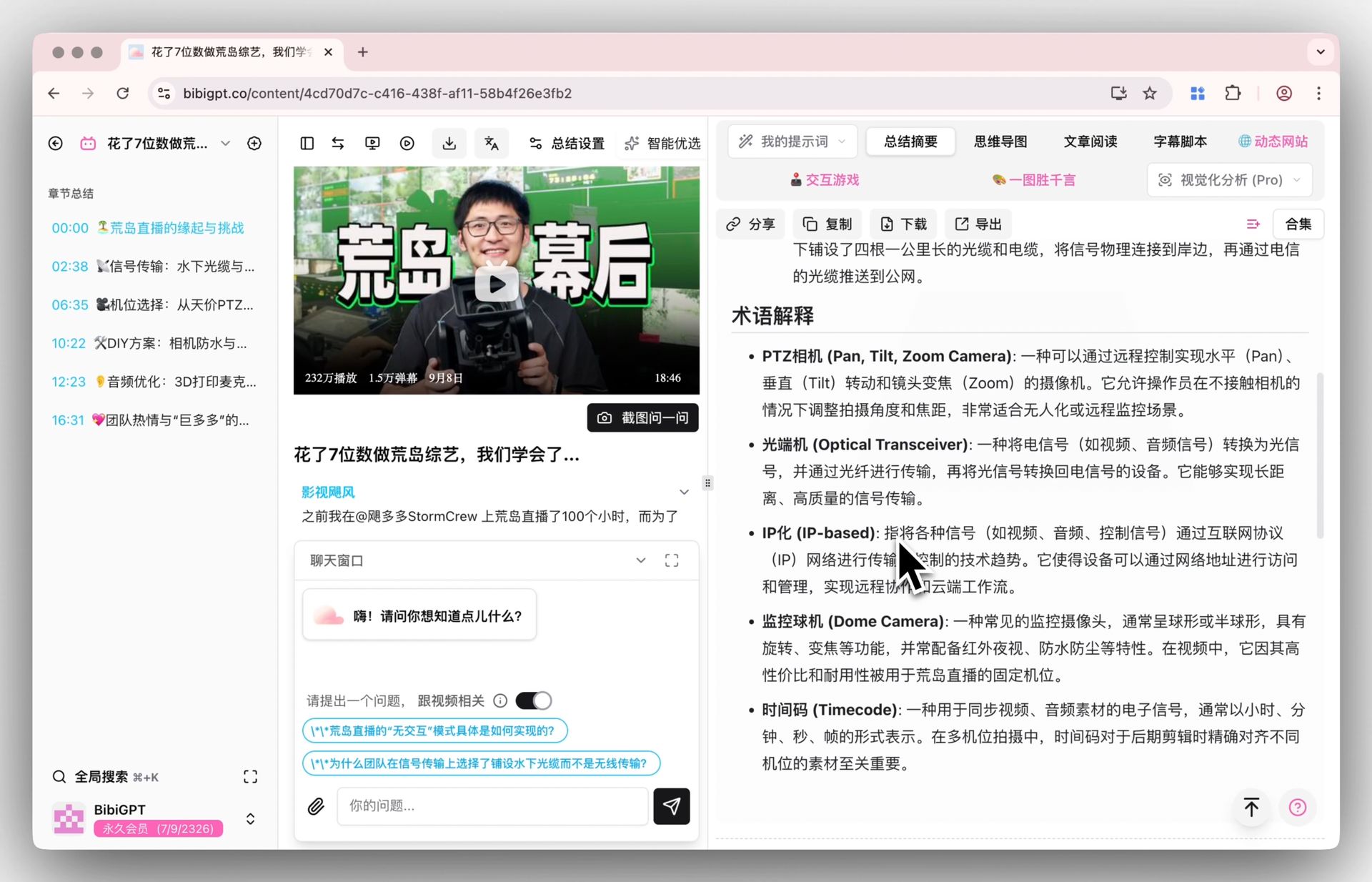
BibiGPT inverts NotebookLM’s priorities: instead of a document notebook that tolerates YouTube links, it is built around one gesture — paste any video or audio link, get a structured, timestamped summary. It has served 1M+ users and generated over 5M summaries across 30+ platforms, including YouTube, Bilibili, TikTok, Xiaohongshu, podcasts, and local audio/video files.
Three capabilities separate it from everything else on this list:
- Platform breadth with built-in transcription. No captions? BibiGPT transcribes the audio itself, so lecture recordings, podcasts, and Bilibili videos work the same as captioned YouTube uploads. Start with the free video summarizer or the dedicated AI YouTube summary workflow.
- Answers that jump back into the video. Ask a question in AI chat and the answer cites the exact moment; click it and the player seeks to that timestamp — the video equivalent of NotebookLM’s citation grounding.
- Batch processing. Queue an entire playlist or course and summarize it in one run, then export to Notion, Obsidian, or Markdown.
Here is the batch queue mid-run — each link becomes its own timestamped summary:
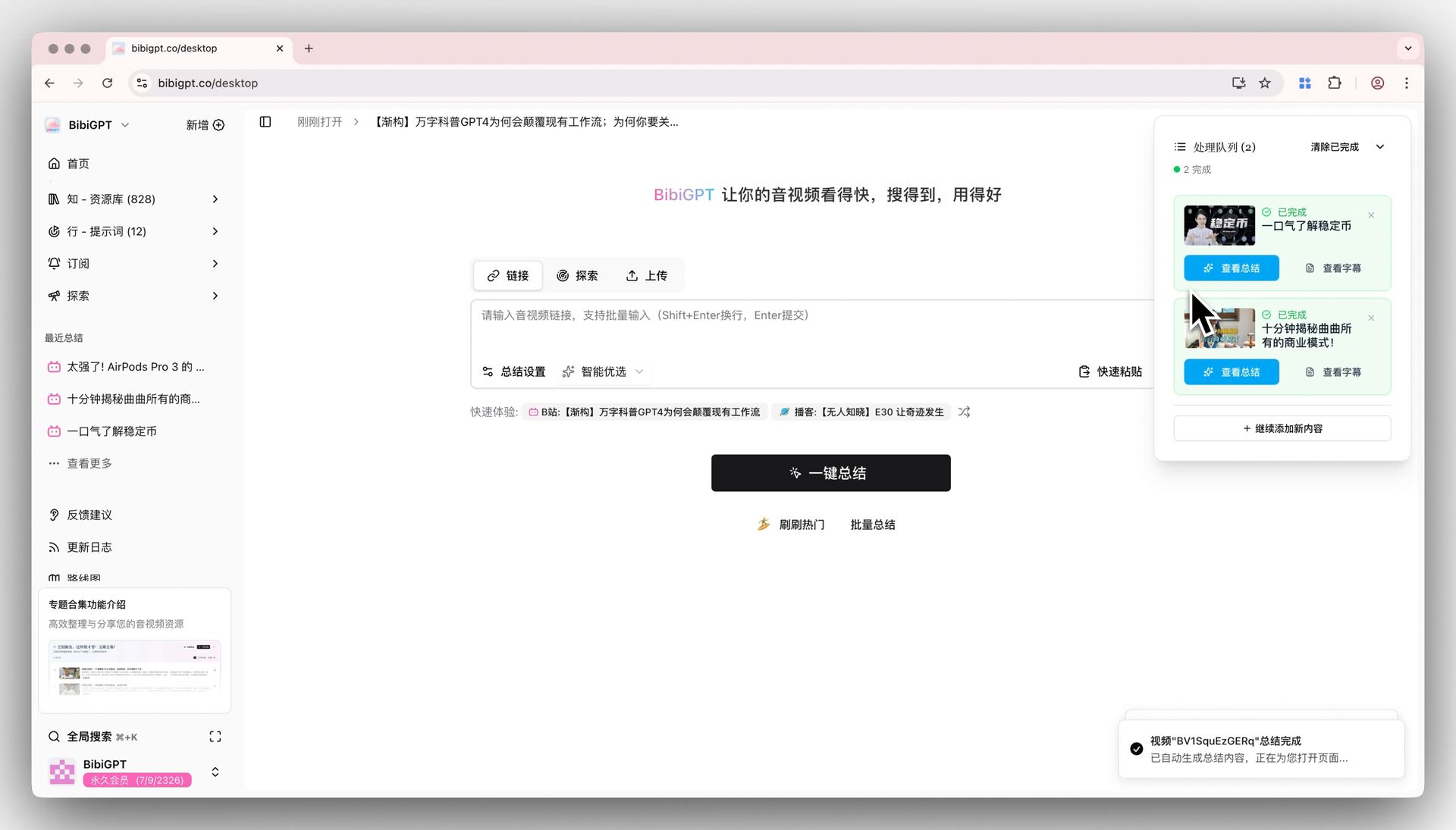
Screenshot: BibiGPT · multi-link batch summarize
And this is source tracing in action — every AI answer links back to the exact second it came from:
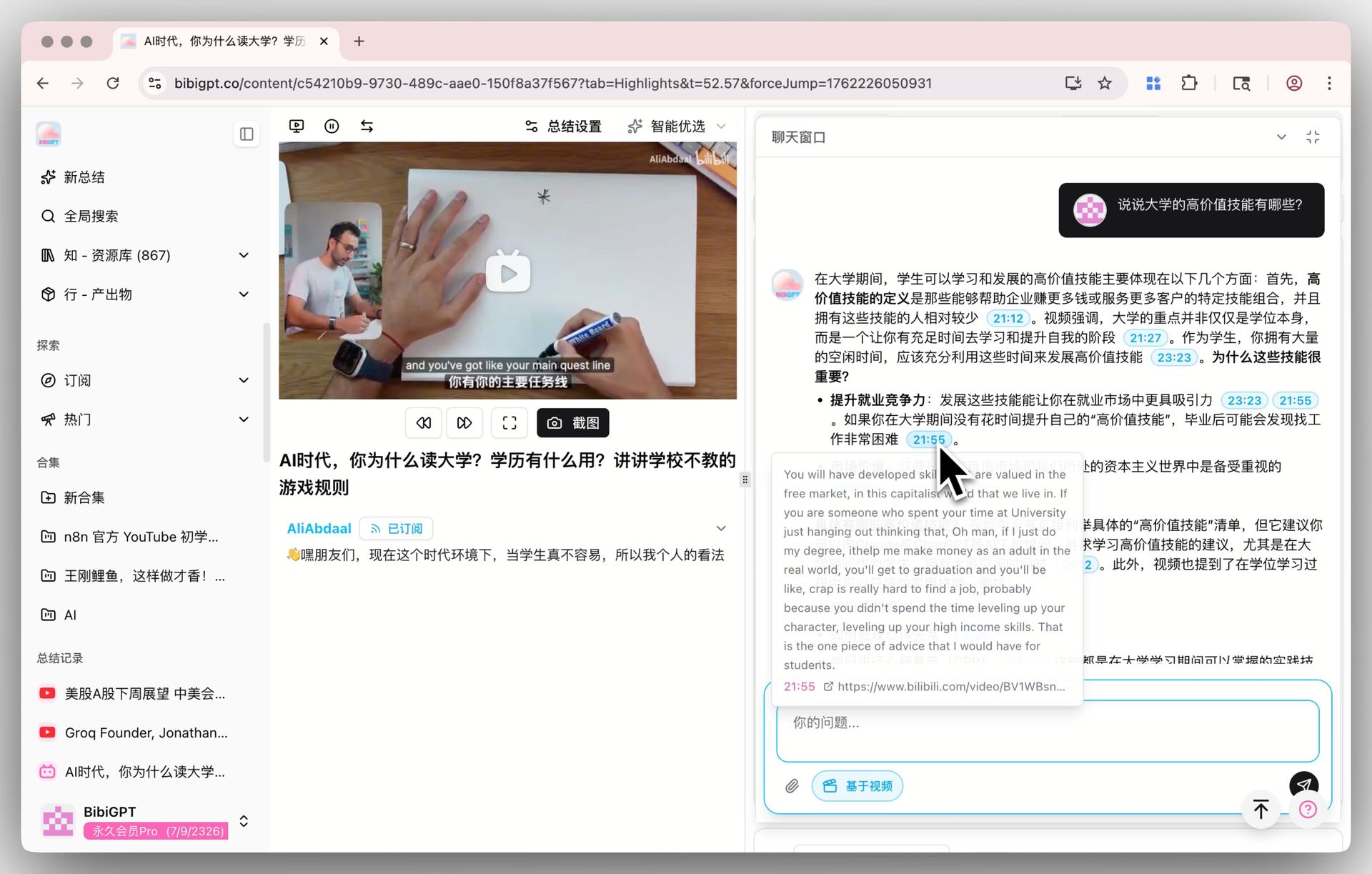
Screenshot: BibiGPT · AI dialog source tracing
Want to feel the core loop before installing anything? The demo below shows “paste one link → get a structured summary”:
Summarize any video in seconds
Pick a sample below to see the AI summary — TL;DR, key points, and jump-to timestamps.
TL;DR: Karpathy builds a GPT-style language model from scratch in code, explaining every piece — from a tiny character-level model up to the full Transformer.
Key points
- Start with a bigram model, then add self-attention so tokens can "talk" to each other
- A Transformer block = multi-head attention + feed-forward + residual connections + layer norm
- Training is just predicting the next token; scale and data do the rest
- The same architecture behind nanoGPT is what scales up to ChatGPT
Jump to
- 00:07 Why build GPT from scratch
- 08:23 Self-attention, intuitively
- 1:00:00 Assembling the Transformer block
- 1:35:00 From nanoGPT to ChatGPT
Where BibiGPT is not the right fit
Honesty builds better decisions: if your research is mostly PDFs, books, and web articles with the occasional video, NotebookLM or Recall will serve you better — BibiGPT’s document handling is functional but not its center of gravity. For a feature-by-feature head-to-head, see our BibiGPT vs NotebookLM comparison and the deeper NotebookLM vs BibiGPT video summary breakdown.
The Other Six, Ranked for Video Work
#2 Recall — summaries that feed a second brain
Recall saves YouTube videos (up to 10 hours), podcasts, articles, and PDFs into a personal knowledge base, auto-links related concepts into a graph, and quizzes you with spaced repetition. Its April 2026 “Recall 2.0” release added agentic chat and an API/MCP layer. The catch for video people: the free tier allows only 10 AI summaries per month, summaries lean on existing transcripts, and there’s no Bilibili or local-file workflow. Paid starts at $10/month, billed annually.
#3 NoteGPT — the study-artifact factory
NoteGPT turns YouTube links and uploaded files into summaries, transcripts, mind maps, flashcards, and even AI podcasts, with no video length cap and batch support on paid tiers. It claims to handle videos without captions, which puts it ahead of NotebookLM for raw lecture recordings. Weaknesses: the free allowance (~15 quotas/month) evaporates in one study session, and its dual quota/credit pricing takes a spreadsheet to understand. Paid starts at around $9.99/month.
#4 Google AI Studio — free true video understanding, some assembly required
Among all seven, Google AI Studio is the only free way to get genuine visual analysis: Gemini samples video at 1 frame per second, so it can describe slides, demos, and on-screen action — not just the transcript. Paste a public YouTube URL or upload a file, ask questions with MM:SS timestamps, and pay nothing in the browser UI (the API free tier allows up to 8 hours of YouTube video per day). The trade-off: it’s a developer playground, not a product — no library, no exports, no one-click summaries, and you write every prompt yourself.
#5 wayin.ai — timestamps plus clip production
wayin.ai covers the widest link support after BibiGPT — YouTube, TikTok, Twitch, Vimeo, Facebook — and outputs timestamped summaries, speaker-labeled transcripts, mind maps, and Q&A that jumps to the source moment. Its distinctive angle is turning long videos into short clips for creators. Downsides: credit-based pricing that doesn’t roll over (third-party sources put paid plans around $9.99–13.99/month), free users can’t upload local files, and there’s no macOS desktop app.
#6 Eightify — one click, YouTube only
Eightify is a browser extension that produces a timestamped key-point summary on any YouTube page in seconds, with 40+ translation languages. It’s the lowest-friction tool here — and the narrowest: YouTube only, roughly one free summary per day (30-minute videos, English), and its Chrome listing hasn’t shipped an update since November 2025. Fine as a casual speed-reader; not a system.
#7 memories.ai — enterprise-grade video memory
memories.ai builds “large visual memory models” that index entire video libraries for natural-language search and multi-speaker analysis — real visual understanding at massive scale, now moving on-device via a 2026 Qualcomm partnership. It ranks last here only because it isn’t aimed at individuals summarizing one lecture: entry is via uploads and APIs, and consumer pricing is opaque (dated third-party listings suggest ~$20/month). If you manage thousands of hours of footage, flip this ranking.
Practical rule: Free tiers on this list fall into two species — metered summaries (Recall, NoteGPT, Eightify) and metered horsepower (AI Studio’s daily hours). Pick metered horsepower for bursts, a flat subscription for habits.
How to Choose (and the Questions Everyone Asks)
How Do You Decide in 60 Seconds?
- Do your videos live outside YouTube (Bilibili, TikTok, podcasts, local recordings)? → BibiGPT, or wayin.ai for Western social platforms.
- Do you want study artifacts — mind maps, flashcards, review queues? → NoteGPT or Recall; BibiGPT for mind maps that jump to timestamps.
- Do you need the AI to literally see the frames and you don’t mind prompting? → Google AI Studio.
- Are you indexing a company video library, not studying? → memories.ai.
- None of the above, just faster YouTube? → Eightify.
For learners, the mind-map output is often the deciding factor — here is what a video becomes after one click in BibiGPT:
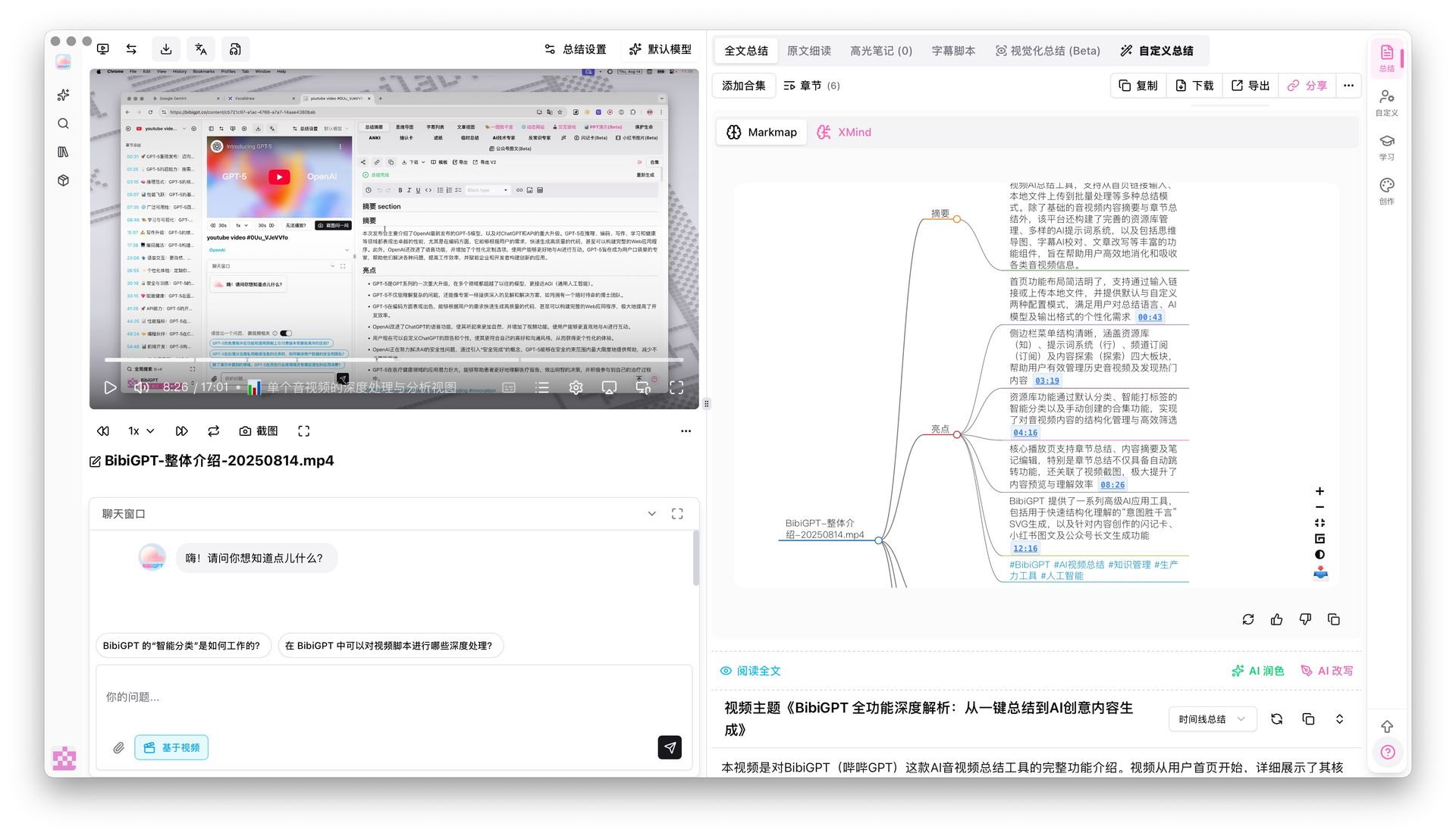
Screenshot: BibiGPT · mind map with timestamp jump
Practical rule: Choose by your worst-case video, not your best-case one. The tool that survives a two-hour uncaptioned lecture recording will handle everything else.
FAQ
Is NotebookLM free to use for video?
Yes, with limits: the free tier allows 50 chat queries and 3 Audio/Video Overviews per day, and video sources must be public YouTube links that already have captions. Paid upgrades come only bundled with Google AI subscriptions starting at $7.99/month.
Can NotebookLM summarize a video without captions?
No. Per Google’s documentation it imports existing YouTube transcripts rather than transcribing audio. For caption-less videos you need a tool with built-in transcription, such as BibiGPT, NoteGPT, or wayin.ai.
What’s the best free NotebookLM alternative for video?
For developers, Google AI Studio — genuine visual analysis with a generous free tier. For non-technical users, BibiGPT’s free summaries offer the fastest paste-link-get-summary loop; see the free video summarizer to start without an account commitment.
Which alternatives handle Bilibili, TikTok, or podcasts?
BibiGPT covers 30+ platforms including Bilibili, TikTok, and podcast feeds. wayin.ai covers YouTube, TikTok, Twitch, Vimeo, and Facebook. Every other tool on this list is effectively YouTube-first or upload-only.
Do any of these tools actually analyze the visuals?
Three do: Google AI Studio (1 FPS frame sampling), memories.ai (visual memory models), and BibiGPT (visual analysis for slides and scene understanding). NotebookLM, Recall, and Eightify work from transcripts alone.
Can I export summaries into my note system?
BibiGPT exports to Notion, Obsidian, and Markdown; Recall is itself the note system; NoteGPT exports notes and flashcards. If export is mission-critical, test it in the free tier before paying.
How Do You Go From Watching to Knowing? A Practical Workflow
The answer is a four-step repeatable loop — capture the link immediately, summarize it the same day, ask follow-up questions against the timestamps, then archive the output into your note system. Whichever tool you choose, the tools only pay off inside that loop. Here is the one we see power users converge on:
- Capture: paste the video, playlist, or podcast link the moment you meet it — don’t “save it for later.”
- Summarize: generate the timestamped summary and skim it in 2 minutes; decide whether the full video deserves your time.
- Interrogate: ask 2-3 questions in AI chat and follow the timestamp citations back to the source moments.
- Structure: turn keepers into a mind map or flashcards while context is fresh.
- Archive: export to Notion or Obsidian so next month’s you can search what this month’s you watched.
NotebookLM perfected steps 3-5 for documents. For video, start where the video actually is — try BibiGPT free and run this loop on the next lecture, podcast, or tutorial you were about to lose to your watch-later list. If you want the broader map of what AI video summarization can do first, our complete AI video summary guide covers it end to end.
BibiGPT Team
Popular tools
More in this series
- Adobe Acrobat Student Spaces vs BibiGPT: 2 เส้นทางเปลี่ยน PDF และวิดีโอเป็นพอดแคสต์ AI (เปรียบเทียบเครื่องมือเรียน AI สำหรับนักศึกษา 2026)
- AI Haoji vs BibiGPT 2026 Full Comparison: Use Case, Platform Coverage, Multilingual, Mind Map Depth, Pricing — Which Should You Pick?
- เปรียบเทียบเครื่องมือสร้าง PPT ด้วย AI 2026: Qwen vs Gamma vs BibiGPT vs Tome อันไหนเหมาะกับคุณ?
- AI Video Note Taker Comparison 2026: QuickQuill vs Mufal vs Memories.ai vs BibiGPT
- Ask YouTube's Conversational AI Search Rolls Out Wider This Summer: Can It Replace Video Summary Tools? (2026 Hands-On Review)