Best AI Meeting Transcription Tools 2026: Top 6 Hands-On Comparison + Buying Guide

AI meeting transcription tools are software that turn meeting speech into text — live or after the fact — and go further to generate summaries, action items, and searchable notes. By 2026 the category has split into three distinct routes: live in-meeting capture, local desktop recording, and post-recording structured processing. Picking the wrong route wastes more money than picking the wrong brand.
Here is the full comparison at a glance:
| Tool | Best for | Starting price | Free tier/trial |
|---|---|---|---|
| BibiGPT | Meeting recordings/videos + all-web audio/video (podcasts / YouTube / local files) in one place | Free + Plus from $19.8/mo | ✅ Free tier |
| Otter.ai | Live English meeting transcription | Pro $16.99/mo | ✅ Free tier |
| Fireflies.ai | Sales teams + CRM workflows | Pro $18/mo | ✅ Free tier |
| Granola | Privacy-sensitive local-recording meeting notes | From $18/mo | ⚠️ Paid-first |
| Tactiq | Budget-conscious Chrome users | Free + Pro $12/mo | ✅ Free tier |
| Read AI | Managers tracking many meetings automatically | Pro $19.75/mo | ✅ Free tier |
This review is based on actually running each tool through transcription, chapter segmentation, and note-export workflows with Chinese and English samples — not a copy-paste of vendor spec sheets.
Meetings come in three typical shapes: synchronous meetings (live Zoom / Meet / Teams discussions, needing a bot or system-audio capture), desktop recording (no bot, local system audio + mic), and post-recording processing (already-captured meetings, podcasts, YouTube, local files). 90% of bad tool choices come from confusing your scenario — if 80% of your time goes to pre-recorded podcasts / courses / meeting replays, a live-capture bot is overkill.
Practical rule: pick your route first (live capture vs local recording vs post-recording), then pick the brand — the route mismatch is what actually wastes money.
1. BibiGPT: Why Is It Best for Meeting Recordings Plus All-Web Audio/Video?
BibiGPT is the only tool on this list not limited to “meetings”: meeting recordings, videos, podcast links, YouTube/Bilibili videos, local files — drop any of them in and get structured knowledge in one click. The other 5 tools cover only the meeting source; BibiGPT pulls everything you “want to watch / want to listen to” into one workflow.
Core function: post-recording transcription + smart chapter segmentation — a 1-hour meeting auto-segments into 5-8 chapters, each with a summary, key quotes, and clickable timestamps.
Key features:
- 30+ platforms natively supported: YouTube, Bilibili, Douyin, TikTok, Xiaohongshu, Spotify, Apple Podcasts, local files
- One-click mind map (the only tool on this list that has it)
- AI conversation Q&A: ask open-ended questions over the meeting (“what specific pricing concerns did the customer raise?”, “list all action items”)
- Multilingual output: English / Chinese / Japanese / Korean / Traditional Chinese
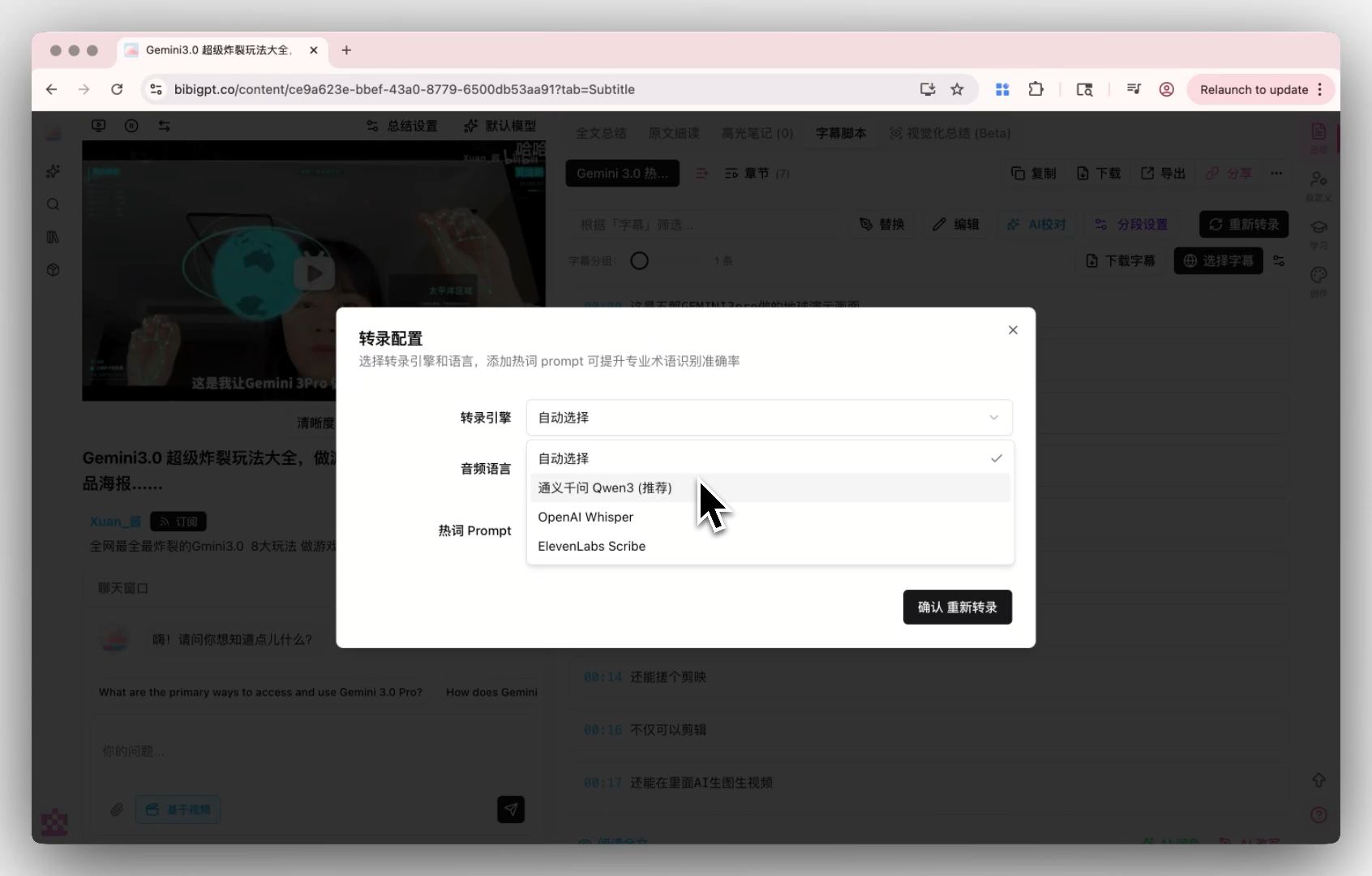
- Custom transcription engine: the custom transcription engine lets you switch between Whisper and ElevenLabs Scribe; pro users can BYOK for higher-precision engines
- Native Markdown export: works with Notion / Obsidian
The screenshot below shows the custom transcription engine selector in action:
BibiGPT’s custom transcription engine lets pro users switch engines for higher precision.
Pricing: free tier available; Plus from $19.8/mo.
Honest drawback: no live meeting bot — if you need a fully automated “Zoom bot auto-joins and live-captions” experience, that’s Otter / Fireflies / Read AI’s home turf. BibiGPT is the post-meeting route.
2. Otter.ai: Is It Still the Best for Live English Meeting Transcription?
Otter has been doing live English transcription since 2016 — the “live captions during the meeting + auto-summary at the end + action item extraction” pipeline is the most mature here.
Core function: live English transcription at 90%+ accuracy.
Key features:
- Full Zoom / Meet / Teams integration
- Post-meeting auto-summary + action item extraction
- Live captions scrolling as the meeting runs
Pricing: free tier + Pro $16.99/mo.
Honest drawback: Chinese / Japanese / Korean output is weaker than dedicated multilingual tools; it only handles meeting recordings — podcasts / videos / local files need a separate tool.
3. Fireflies.ai: Best for Sales Teams + CRM Workflows
Fireflies adds “collaboration + CRM integration” on top of what Otter offers: post-meeting summaries auto-sync to Salesforce / HubSpot / Slack, closing the loop for sales workflows.
Core function: live meeting capture + summaries flowing straight into CRM.
Key features:
- 60+ languages (Chinese works in practice)
- Salesforce / HubSpot / Slack integrations
- AI search across past meetings by topic / customer name
- Zoom / Meet / Teams / Webex coverage
Pricing: free tier + Pro $18/mo.
Honest drawback: the free tier is restrictive; it needs to be embedded into the meeting link to record.
4. Granola: What Makes It Best for Privacy-Sensitive Meeting Notes?
Granola rose in 2024 as a desktop meeting-recording tool. Its differentiator: “doesn’t join the meeting, records locally, outputs Markdown” — no bot ever shows up as a participant in your closed-door meetings.
Core function: desktop capture of system audio + microphone, auto-generating Markdown notes after the meeting.
Key features:
- No bot, no dependence on meeting-app APIs — strong privacy
- Markdown output, great for Notion / Obsidian users
- Clean UI, works with any meeting app
Pricing: from $18/mo.
Honest drawback: macOS only (Windows still in beta); relatively expensive; doesn’t process pre-recorded videos / podcasts. Further reading: Granola vs BibiGPT: meeting notes vs multi-platform audio/video summary.
5. Tactiq: Best for Budget-Conscious Chrome Users
Tactiq takes the Chrome-extension route: install once, and you get live captions and summaries inside Google Meet / Zoom Web / Teams — no meeting bot required.
Core function: in-browser live captions + highlight extraction.
Key features:
- Usable free tier and the lowest paid entry point (Pro is just $12/mo)
- No bot, invisible in the meeting, install once and go
- Highlights + action item extraction
Pricing: free tier + Pro $12/mo.
Honest drawback: tied to the Chrome ecosystem with a weak native desktop client; chapter structure is thinner than BibiGPT’s.
6. Read AI: Best for Managers Tracking Many Meetings Automatically
Read AI’s differentiator is full automation: auto-detects calendar meetings, auto-joins, then delivers post-meeting summaries and email digests — plus attendee sentiment analysis (the controversial part).
Core function: calendar-driven automatic meeting tracking + post-meeting overview.
Key features:
- Set once; all calendar meetings tracked automatically afterward
- Excellent email digests
- Deep Zoom + Meet + Teams + Slack cross-tool integration
Pricing: free tier + Pro $19.75/mo.
Honest drawback: sentiment analysis raises privacy and accuracy concerns; relatively expensive; mediocre handling of silent meetings.
Practical rule: every tool on this list has an honest drawback — including BibiGPT’s lack of a live bot. Match the drawback you can live with, not the feature list you’ll never use.
How to Choose: One-Line Verdicts by Scenario
- Sales manager, calls must flow into CRM → Fireflies
- English podcasts + YouTube learning notes / content creation → BibiGPT (AI video-to-article even turns interviews into publishable articles)
- Executive closed-door meetings, privacy-sensitive → Granola
- Student on a $0 budget → Tactiq free tier (+ BibiGPT free tier for post-recording material)
- Manager tracking many projects and meetings → Read AI
- Meetings + podcasts + YouTube + local files, mixed → BibiGPT, the broadest coverage of the bunch
FAQ
Q1: Are free tiers enough?
BibiGPT / Otter / Fireflies / Tactiq / Read AI all have free tiers — sufficient for light users (5-10 meetings/month). Heavy users (3+ meetings/day) should upgrade.
Q2: Which has the best Chinese transcription accuracy?
BibiGPT and Fireflies both perform well in Chinese; BibiGPT additionally adds chapter summaries + mind maps for Chinese workflows.
Q3: Can I keep the tool from appearing in the meeting?
Yes. Granola records locally without joining, Tactiq is an invisible browser extension, and BibiGPT works post-recording so it never enters the meeting; Otter / Fireflies / Read AI bots show up as participants.
Q4: Can I export notes to Notion / Obsidian?
BibiGPT natively supports Markdown export (works with Notion / Obsidian); Granola defaults to Markdown; Otter / Fireflies support export but in their own structures.
Q5: Meeting recordings + YouTube + podcasts — can one tool handle all?
Yes — BibiGPT. Other tools cover only meetings (Otter / Fireflies / Read AI), only the desktop (Granola), or only the browser (Tactiq).
Try it now: go to bibigpt.co, paste a recent meeting recording / podcast / video link, and see chapter summaries and a mind map in 30 seconds.
Further reading: Granola vs BibiGPT: meeting notes vs multi-platform audio/video summary | YouTube to mind map AI tools complete guide | YouTube video summarizer tools comprehensive guide
Popular tools
More in this series
- The AI Audio Briefing Wave: From Forbes Daily Top 3 to Turning Any Long Content Into a Listenable Podcast (2026)
- AI Podcast Summarizer Complete Guide 2026: From Transcript to Quote Cards
- AI Podcast Summarizer: 6 Tools Compared + BibiGPT Workflow (2026 Comprehensive Guide)
- AI Podcast Summary Workflow Guide 2026: From Transcription to Knowledge Management with BibiGPT
- AI Podcast Transcription Guide (2026): Turn Any Podcast Into Searchable Text With BibiGPT