
Free AI Video Summary Tools: Summarize YouTube, Bilibili & Local Videos With Timestamps (2026 Roundup)
Free AI Video Summary Tools: Summarize YouTube, Bilibili & Local Videos With Timestamps (2026 Roundup)
Short answer: When you want to summarize videos with free AI, what matters comes down to four things — supports the platforms you watch (YouTube, Bilibili, local files), instant structured key points, timestamps (jump back to the original when unclear), and exports. This roundup covers the handiest free AI video summary tools of 2026 and gives you criteria for picking one. Among them, BibiGPT covers all four in one place — paste a link, get key points in tens of seconds. To try it first, paste a YouTube or Bilibili link into BibiGPT.
This free-tools roundup is part of the complete AI video summarizer guide — see it for what a video summarizer is and how to choose one once you’re ready to go beyond the free tier.
The demo below shows “paste a video link → instant structured key points”:
Summarize any video in seconds
Pick a sample below to see the AI summary — TL;DR, key points, and jump-to timestamps.
TL;DR: Karpathy builds a GPT-style language model from scratch in code, explaining every piece — from a tiny character-level model up to the full Transformer.
Key points
- Start with a bigram model, then add self-attention so tokens can "talk" to each other
- A Transformer block = multi-head attention + feed-forward + residual connections + layer norm
- Training is just predicting the next token; scale and data do the rest
- The same architecture behind nanoGPT is what scales up to ChatGPT
Jump to
- 00:07 Why build GPT from scratch
- 08:23 Self-attention, intuitively
- 1:00:00 Assembling the Transformer block
- 1:35:00 From nanoGPT to ChatGPT
Demo: BibiGPT one-click video summary
1. Five Criteria for Picking a Free AI Video Summary Tool
There are many tools, but few you’ll actually use daily. Filter with these five before choosing:
- Platform coverage — can it handle YouTube and Bilibili directly, and upload local files? Many tools only do YouTube, leaving Bilibili and local a blank.
- Speed — does it return key points in tens of seconds after pasting, or make you queue and wait?
- Timestamps or not — does the summary carry timestamp anchors? If so, anything unclear jumps back to that exact second of the original — the watershed between “usable” and “just pretty.”
- Can it export — can key points export to text, Markdown, or sync to Notion / Obsidian? A summary you can only view on a web page is disposable.
- Is the free quota enough for daily use — “free” depends on how many videos you can summarize per day; a stingy quota won’t cut it.
Practical rule: Don’t be dazzled by the word “free.” First check whether it supports the platforms you watch, outputs timestamps, and can export — these three decide whether it really fits into your routine.
2. 2026 Free AI Video Summary Tools Compared
Using the criteria above, here’s a comparison of mainstream approaches (info from each tool’s public materials):
| Tool type | Platform coverage | Timestamps | Export | Best for |
|---|---|---|---|---|
| BibiGPT | YouTube / Bilibili / local / podcasts, 30+ platforms | ✅ with jump | ✅ text/Markdown/Notion/Obsidian | Those wanting one place for many platforms |
| Browser extensions | Mostly YouTube only | Some | Mostly copy | YouTube-only watchers |
| General AI chat tools | Need to feed subtitles manually | ❌ | Copy | Occasional, willing to do manual steps |
| Built-in platform summaries | That platform only | Some | ❌ | Light use on a single platform |
Most free tools stall on “single platform” or “no timestamps / no export.” If you watch both YouTube and Bilibili and also upload local recordings, a one-stop video summary saves the hassle of switching tools.
The video below demos what one-click summarizing of a long video actually looks like, so you can gauge the speed:
Video source: YouTube · AI video summary demo
3. Why “Timestamps + Export” Are the Two Things Free Tools Miss Most
The pitfalls people hit with free tools cluster on these two:
- No timestamps, and the summary stays “roughly” — for a two-hour class, the AI says “part three covers experiment design,” but you don’t know which minute, so confirming details means scrubbing the bar yourself. A timestamped summary jumps to that second with one click.
- No export, and the summary is “use once, gone” — you finally get a summary, can only view it on that page, and it’s gone when you close the tab — it never accumulates into your own library. Exporting to Notion / Obsidian turns scattered summaries into a searchable long-term knowledge base.

Screenshot: BibiGPT · chapter deep reading feature demo
For structurally complex content, generate a mind map to spread the whole video’s structure at a glance:
Turn a video into a mind map
A linear talk becomes a structured tree. Drag to pan, click nodes to fold.
Demo: BibiGPT auto-converts a long video into a structured outline
4. How to Use Free AI Video Summary Tools by Scenario
Tools prove themselves once mapped to concrete scenarios:
- Students / online courses: paste study videos or course recordings for chapter key points, revise with timestamps, jump back to the original when unclear.
- Work / industry: long meeting recordings or conferences — get a TL;DR + key decisions, grasping two hours in a few minutes.
- Creators: after summarizing a long video/podcast, rewrite into an article or export a script, skipping the replay-to-find-clips loop.
- Shows / interests: for long interviews and documentaries, read the summary first to decide whether the full two hours is worth it.
One-click export and batch packaging turn scattered video key points into your own library. The product screenshot below shows the batch-export entry:
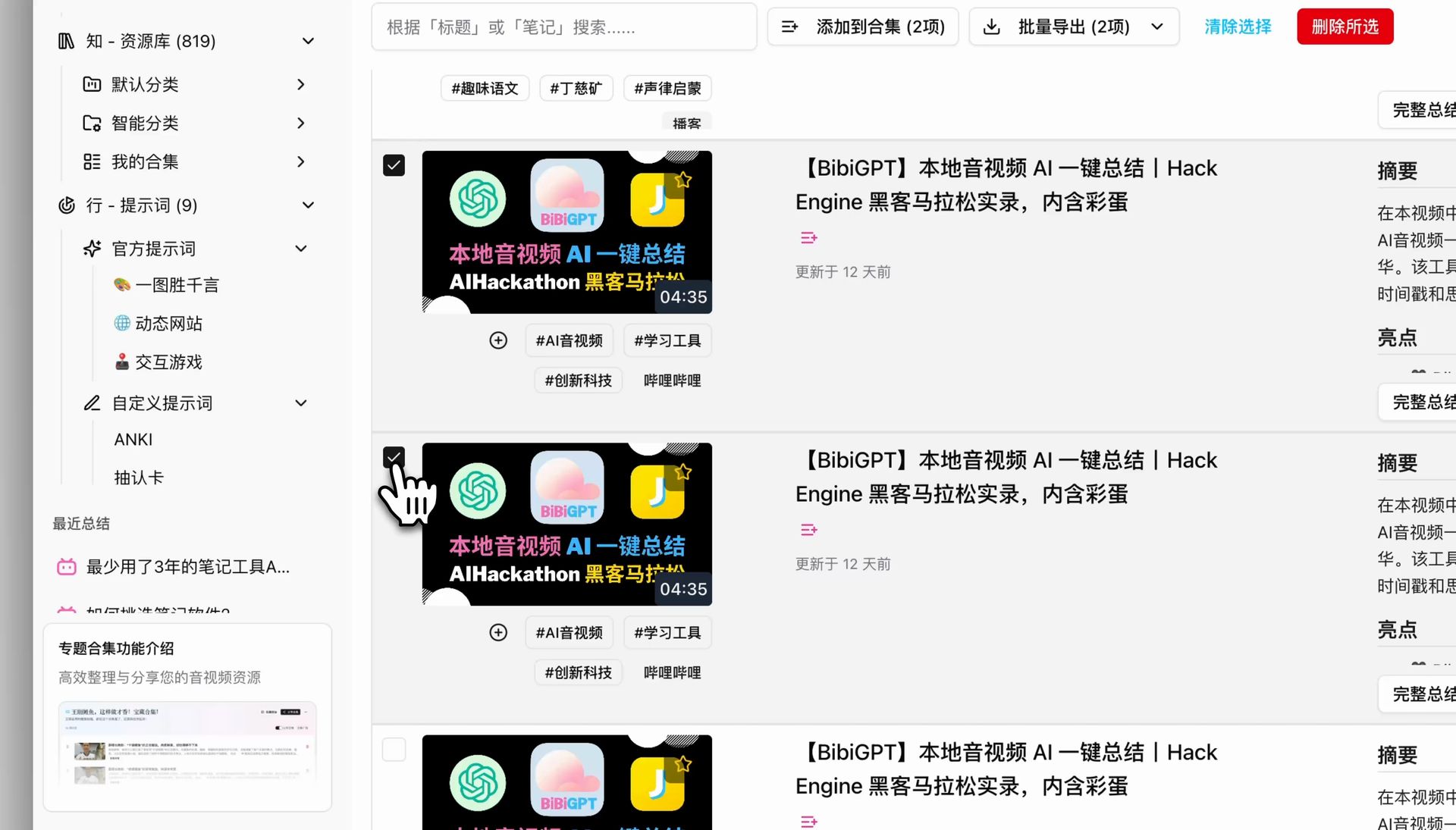
Screenshot: BibiGPT · batch export feature demo
Whatever the scenario, the core moves are the same: paste a link → get key points → jump/export as needed. Make it a habit to “summarize before watching a long video,” and you’ll free up a big chunk of time.
5. FAQ
Q1: Can free AI video summary tools summarize Bilibili videos directly? Depends on the tool. Many only support YouTube. BibiGPT supports Bilibili, YouTube, local files, and 30+ platforms — just paste a link.
Q2: Can local videos / recordings be summarized? Yes. Besides online links, local files can be uploaded and summarized — great for course recordings and meeting videos.
Q3: Do summaries come with timestamps, and can I jump back to unclear spots? Yes. Each key point carries an original timestamp; one click jumps back to that second to confirm details.
Q4: Can summaries be exported? Yes. Export to text and Markdown, and one-click sync to Notion / Obsidian to build your library.
Q5: How far does free go? New users can try the core features for free; heavy daily use can upgrade as needed. Run the flow for free first, then decide whether to go further.
Stop Watching Long Videos One by One — Try It Free First
A roundup is for using. Pick a long YouTube or Bilibili video you’ve wanted to watch but never had time for, paste it into BibiGPT, and get timestamped structured key points in tens of seconds — jumpable and exportable. One place covering YouTube, Bilibili, and local, no tool-switching. Free to try for new users.
Further reading: Million-token multimodal models and ultra-long video summaries · Cross-platform AI video summary guide
BibiGPT Team
Popular tools
More in this series
- Bilibili AI video özet aracı: BibiGPT 30+ platformu anında özetler (2026)
- Top 3 Douyin Video Summary Tools (2026 Update): AI-Powered Insights from Viral Clips
- Top 3 Xiaohongshu Video Summary Tools in 2026 (Paste Link, Get Notes in Seconds)
- 2026''s Best AI Video Summary Tool: How BibiGPT Covers Every Platform End-to-End
- Best Bilibili AI Video Summary Tool 2026: How BibiGPT Helps You Say Goodbye to "Hard Learning" Tutorials?