Best AI Meeting Transcription Tools 2026: 6-Way Comparison + Use-Case Buying Guide (with BibiGPT Positioning)
Best AI Meeting Transcription Tools 2026: 6-Way Comparison + Use-Case Buying Guide (with BibiGPT Positioning)
80-word direct answer (as of 2026-05-09): The best AI meeting transcription tool in 2026 depends on the scenario — for live meeting capture pick Otter / Fireflies / Granola; for post-meeting structured analysis (and when you also handle podcasts, YouTube, recorded interviews) pick BibiGPT (30+ platforms + chapter summaries + mind maps + multilingual); for auto-join via Zoom / Meet API pick Read AI / Tactiq. If your workflow spans “live meetings + recorded podcasts + YouTube + local files,” BibiGPT covers the broadest surface.
People often imagine “AI meeting transcription” as just “speech-to-text” — but 90% of the pain is downstream of the recording: how do you find that one important quote? How do you compress a 1-hour recording into 5 minutes of readable notes? How do you share with the team? This guide evaluates the full pre/during/post-meeting pipeline, not just transcription accuracy.
1. TL;DR: 2026 Tool Comparison
| Tool | Primary scenario | Live transcription | Post-meeting structure | Platform coverage | Multilingual | Starting price | Best fit |
|---|---|---|---|---|---|---|---|
| BibiGPT | Link + upload dual mode: YouTube / podcasts / meeting recordings / local files | ⚪️ Post-recording | ★★★★★ Chapter summary + mind map + AI chat | YouTube + Bilibili + Douyin + TikTok + Xiaohongshu + Spotify + Apple Podcasts + 30+ platforms | EN/ZH/JA/KO/zh-TW | Free + Plus from $19.8/mo | Cross-platform learners, content creators, anyone mixing meetings + podcasts + videos |
| Otter.ai | Live meeting capture | ★★★★★ | ★★★ Summary + action items | Zoom / Meet / Teams | English-first, limited multilingual | Free + Pro $16.99/mo | English meetings, sales / customer interviews |
| Fireflies.ai | Live meeting + collaboration | ★★★★★ | ★★★★ Summary + topic tagging + CRM integration | Zoom / Meet / Teams / Webex | 60+ languages | Free + Pro $18/mo | Sales teams, CRM workflows |
| Granola | Desktop recording (no bot joins meeting) | ★★★★ | ★★★★ Markdown notes + action items | macOS desktop + any meeting app | Multilingual | $18/mo | Privacy-sensitive, Mac users, personal meeting notes |
| Tactiq | Chrome extension live captions | ★★★★★ | ★★★ Highlights + action items | Meet / Zoom / Teams | Multilingual | Free + Pro $12/mo | Budget-sensitive, Chrome power users |
| Read AI | Auto-join meetings + AI summary | ★★★★★ | ★★★★ Summary + sentiment analysis + email digest | Zoom / Meet / Teams / Slack | Major languages | Free + Pro $19.75/mo | Managers, multi-meeting tracking |
Evaluation dimensions: transcription accuracy (Chinese / English samples), chapter segmentation quality, notes integration depth, pricing, privacy model. Concrete pricing per each vendor’s website.
2. Why “AI meeting transcription” must be evaluated by scenario
Meetings come in three typical shapes, and each demands different tooling:
- Synchronous meetings (live discussion in Zoom / Meet / Teams): Tool needs to join the call or capture system audio for live captions. Otter / Fireflies / Read AI represent this category.
- Desktop recording (no bot joining, capturing system audio + microphone locally): Privacy-sensitive scenario. Granola represents this category.
- Post-recording processing (already-captured meetings / podcasts / YouTube videos / local files): BibiGPT represents this category.
90% of bad tool choices come from confusing your scenario. If 80% of your time is consuming pre-recorded podcasts / courses / meeting replays, using Otter is overkill — Otter is built for sales reps live-capturing customer interviews.
3. Deep-dive on each of the 6 tools
3.1 BibiGPT: 30+ platforms + post-recording structuring
BibiGPT is positioned as “consume existing audio/video content” — you have a meeting recording, a podcast link, a YouTube video — drop it in, get knowledge in one click.
Core strengths:
- 30+ platform native support: YouTube, Bilibili, Douyin, TikTok, Xiaohongshu, Spotify, Apple Podcasts, local files — one tool for every “want to watch / want to listen” source.
- Smart chapter segmentation + mind map: A 1-hour meeting auto-segments into 5-8 chapters, each with summary + key quotes + clickable timestamps. Mind map generation built-in.
- AI conversation Q&A: After summary generation, ask open-ended questions (“what specific pricing concerns did the customer raise?”).
- Multilingual output: Chinese / English / Japanese / Korean / Traditional Chinese — friendly to cross-language workflows.
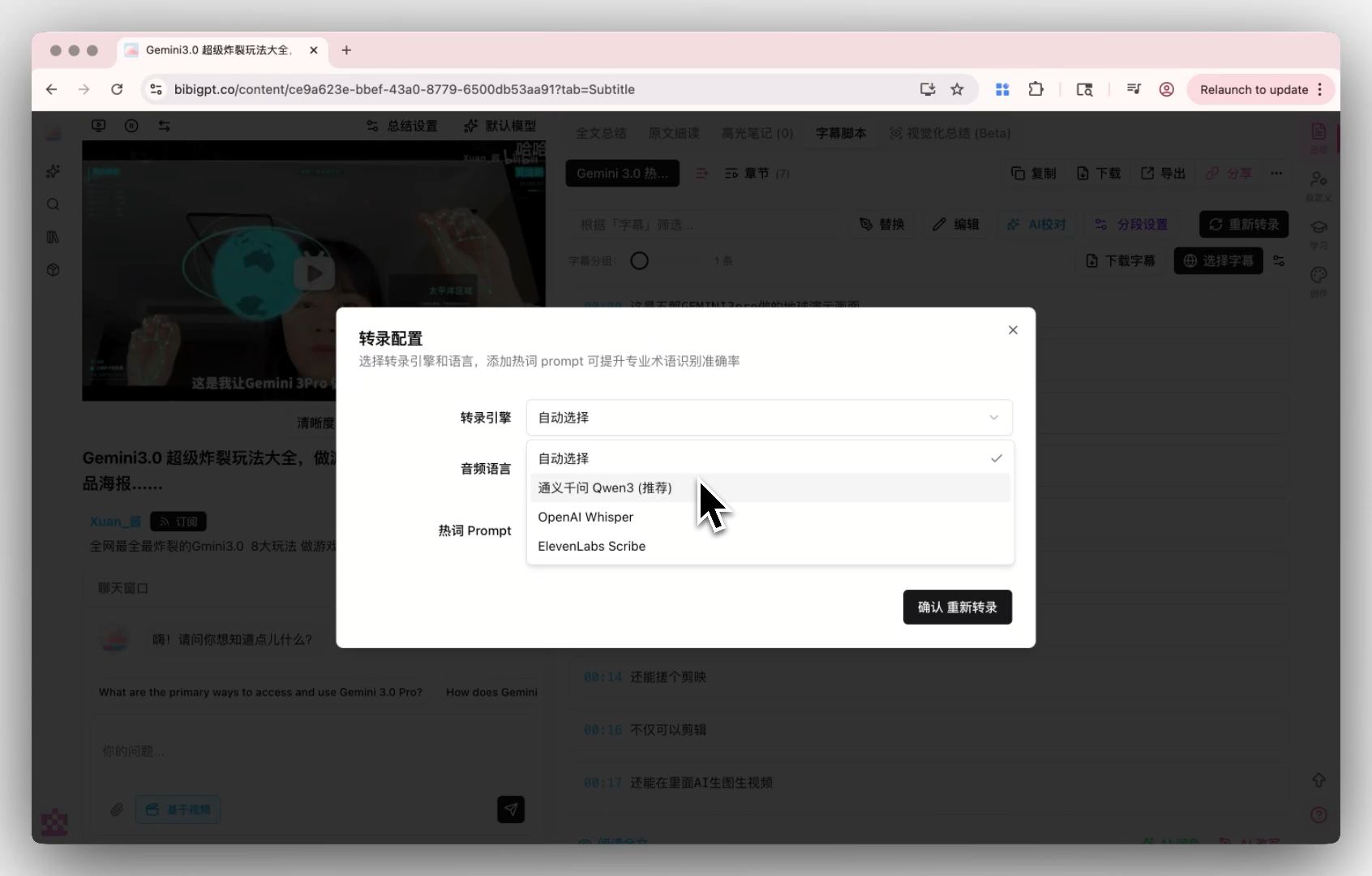
- Custom transcription engine: BibiGPT custom transcription engine supports Whisper and ElevenLabs Scribe switching. Pro users can BYOK to use higher-precision engines.
Best fit: learners / content creators / knowledge workers handling meetings + podcasts + YouTube + courses in the same workflow.
Not the best fit: if you need a fully automated “Zoom bot auto-joins and live-records” experience — that’s Otter / Fireflies / Read AI’s home turf.
3.2 Otter.ai: synonymous with live English meeting transcription
Otter has been doing live English transcription since 2016 — strong at “live captions during meetings + auto-summary at the end + action item extraction.”
Strengths: high English transcription accuracy (90%+), reliable action items, full Zoom / Meet / Teams integration.
Weaknesses: Chinese / Japanese / Korean output weaker than dedicated multilingual tools; only handles meeting recordings — separate tool needed for podcasts / videos / local files.
Best fit: English-first SaaS companies, North American sales teams, English customer interview workflows.
3.3 Fireflies.ai: sales team’s choice
Fireflies adds “collaboration + CRM integration” beyond what Otter offers. Post-meeting summaries auto-sync to Salesforce / HubSpot / Slack — a closed loop for sales workflows.
Strengths: 60+ languages (Chinese works in practice), mature CRM integrations, AI search across past meetings (by topic / customer name).
Weaknesses: free tier is restrictive; needs to be embedded into the meeting link to record.
Best fit: B2B sales teams, customer success teams, anyone who needs meeting notes flowing into CRM.
3.4 Granola: dark horse for privacy-sensitive scenarios
Granola rose in 2024 as a desktop meeting-recording tool — its differentiator is “doesn’t join the meeting, records locally, outputs Markdown.” User opens a recording session on the desktop, Granola captures system audio + microphone, generates Markdown notes after the meeting.
Strengths: strong privacy (no meeting bot needed, doesn’t depend on meeting app APIs), clean UI, Markdown output works great with Notion / Obsidian users.
Weaknesses: macOS only (Windows still in beta), relatively expensive, doesn’t process pre-recorded videos / podcasts.
Best fit: privacy-sensitive executives, individual Mac users, knowledge workers building Markdown knowledge bases. Further reading: Granola vs BibiGPT: meeting notes vs multi-platform audio/video summary.
3.5 Tactiq: Chrome extension route
Tactiq is a Chrome extension — install it once and you get live captions and summaries inside Google Meet / Zoom Web / Teams.
Strengths: free tier usable, no meeting bot needed, install once and keep using, never leave the browser.
Weaknesses: tied to Chrome ecosystem, weak native desktop client, chapter structure thinner than BibiGPT.
Best fit: budget-sensitive individual developers / students, Chrome power users.
3.6 Read AI: auto-join + sentiment analysis
Read AI’s differentiator is “auto-detects calendar meetings + auto-joins + post-meeting summary + attendee sentiment analysis (the latter is controversial).”
Strengths: full automation (set once, meetings tracked automatically), great email digests, deep cross-tool integrations (Zoom + Meet + Teams + Slack).
Weaknesses: sentiment analysis is controversial (privacy / accuracy), relatively expensive, mediocre handling of silent meetings.
Best fit: managers, people juggling multiple meeting tools, roles that need “post-meeting overview” without micro-detail.
4. 6-dimension comparison matrix
| Dimension | BibiGPT | Otter | Fireflies | Granola | Tactiq | Read AI |
|---|---|---|---|---|---|---|
| Live transcription | Post-recording | ★★★★★ | ★★★★★ | ★★★★ | ★★★★★ | ★★★★★ |
| Post-meeting structure | ★★★★★ | ★★★ | ★★★★ | ★★★★ | ★★★ | ★★★★ |
| Platform coverage | YouTube + Bilibili + Douyin + Xiaohongshu + podcasts + 30+ | Zoom/Meet/Teams | Zoom/Meet/Teams/Webex | macOS desktop | Meet/Zoom/Teams | Zoom/Meet/Teams |
| Chinese / Japanese / Korean | Native ★★★★★ | ★★★ | ★★★★ | ★★★ | ★★★★ | ★★★★ |
| Mind map | ✅ | ❌ | ❌ | ❌ | ❌ | ❌ |
| Chapter segmentation | ✅ Auto | ⚠️ Partial | ✅ | ✅ | ❌ | ✅ |
| AI conversation Q&A | ✅ | ⚠️ | ✅ | ⚠️ | ❌ | ✅ |
| Starting price | Free + Plus $19.8/mo | $16.99/mo | $18/mo | $18/mo | $12/mo | $19.75/mo |
5. Choose by scenario
Scenario 1: Sales manager, 5 customer calls per day, all need to flow into CRM
→ Fireflies. Deepest CRM integration, reliable action items.
Scenario 2: English self-media creator, watches 10 hours/week of English podcasts + YouTube, builds learning notes
→ BibiGPT. 30+ platform coverage (YouTube / Apple Podcasts / Spotify all supported), chapter summary + mind map + multilingual. Try bibigpt.co.
Scenario 3: Executive, runs sensitive closed-door meetings, but still needs notes
→ Granola. Local recording, no bot joins, Markdown output.
Scenario 4: Student, $0 budget, mostly online courses and group discussions
→ Tactiq (free tier) + BibiGPT (post-recording for already-captured videos / podcasts).
Scenario 5: Remote team manager, tracking 10 concurrent projects across many meetings
→ Read AI. Auto-tracking + email digest.
Scenario 6: Tech writer, turning industry interviews / podcasts into long-form articles
→ BibiGPT. AI video-to-article directly turns audio/video into publishable articles.
6. Six real buying questions
Q1: Are free tiers enough?
A: BibiGPT / Otter / Fireflies / Tactiq / Read AI all have free tiers — sufficient for light users (5-10 meetings/month). Heavy users (3+ meetings/day) should upgrade.
Q2: Which has the best Chinese accuracy?
A: BibiGPT and Fireflies both perform well in Chinese. BibiGPT additionally provides chapter summary + mind map enhancements for Chinese workflows.
Q3: Can I avoid the tool appearing in the meeting?
A: Yes. Granola doesn’t join (local recording), Tactiq is a browser extension (invisible), BibiGPT is post-recording (no need to enter the meeting). Otter / Fireflies / Read AI bots show up as participants.
Q4: Can I get executable action items right after the meeting?
A: Otter / Fireflies / Read AI extract action items most directly (purpose-built for meetings). BibiGPT can answer “list all action items from this meeting” via AI chat.
Q5: Can I export to Notion / Obsidian?
A: BibiGPT natively supports Markdown export (works with Notion / Obsidian); Granola defaults to Markdown; Otter / Fireflies support export but in their own structures.
Q6: I have meeting recordings + YouTube + podcasts simultaneously — can one tool handle all?
A: Yes — BibiGPT. Other tools cover only meetings (Otter / Fireflies / Read AI), or only desktop (Granola), or only the browser (Tactiq).
7. Conclusion: where does BibiGPT fit?
If you only record meetings, and meetings are English Zoom live discussions → choose Otter / Fireflies.
If you record meetings + need CRM flow → choose Fireflies.
If you’re a Mac user, privacy-sensitive, personal meetings → choose Granola.
If your content spans “meeting recordings + podcasts + YouTube + courses + local files” → BibiGPT covers the widest surface with the strongest structuring. Go to bibigpt.co, paste a recent recording / podcast / video link, and see results in 30 seconds.
Try BibiGPT: bibigpt.co. Further reading: Granola vs BibiGPT: meeting notes vs multi-platform audio/video summary | YouTube to mind map AI tools complete guide | YouTube video summarizer tools comprehensive guide