
Best YouTube AI Summarizer Chrome Extensions in 2026: BibiGPT & 4 Alternatives Tested
The best YouTube AI summarizer Chrome extension in 2026 is BibiGPT AI Watch Later, with in-page chapter summaries, smart subtitle search, and one-click translation. Compare 5 top extensions to find your perfect YouTube video summary tool.
Best YouTube AI Summarizer Chrome Extensions in 2026: BibiGPT & 4 Alternatives Tested
The best YouTube AI summarizer Chrome extension in 2026 is BibiGPT AI Watch Later — it delivers chapter summaries, smart subtitle search, and translation directly in the YouTube sidebar without leaving the page. Trusted by over 1 million users, here is the complete comparison and installation guide for the top 5 YouTube AI summary Chrome extensions.
Why You Need a YouTube AI Summarizer Chrome Extension
Billions of hours of YouTube content are watched daily. Yet most YouTube tutorials and talks run 30–90 minutes, forcing you to:
- Watch full videos just to decide if the content is worth your time
- Switch between the video and your notes app constantly
- Forget key insights shortly after watching
A YouTube AI summarizer Chrome extension solves this at the source — get video summaries, jump to key segments, and download transcripts without leaving YouTube.
Try pasting your video link
Supports YouTube, Bilibili, TikTok, Xiaohongshu and 30+ platforms
Top 5 YouTube AI Summarizer Chrome Extensions Compared (2026)
1. BibiGPT AI Watch Later — Best Overall
BibiGPT's Chrome extension "AI Watch Later" is the most feature-complete YouTube AI summarizer available. It appears directly in the YouTube sidebar — no tab-switching required.
Core Features:
- Chapter Summaries: Auto-splits long videos into chapters with key takeaways, so you can navigate in seconds
- Smart Subtitles: Searchable, timestamped subtitles with multi-language translation and click-to-jump
- AI Summary: One-click structured summary, deeply integrated with your BibiGPT account
- Exclusive Discount: Extension users get 30% off a BibiGPT subscription
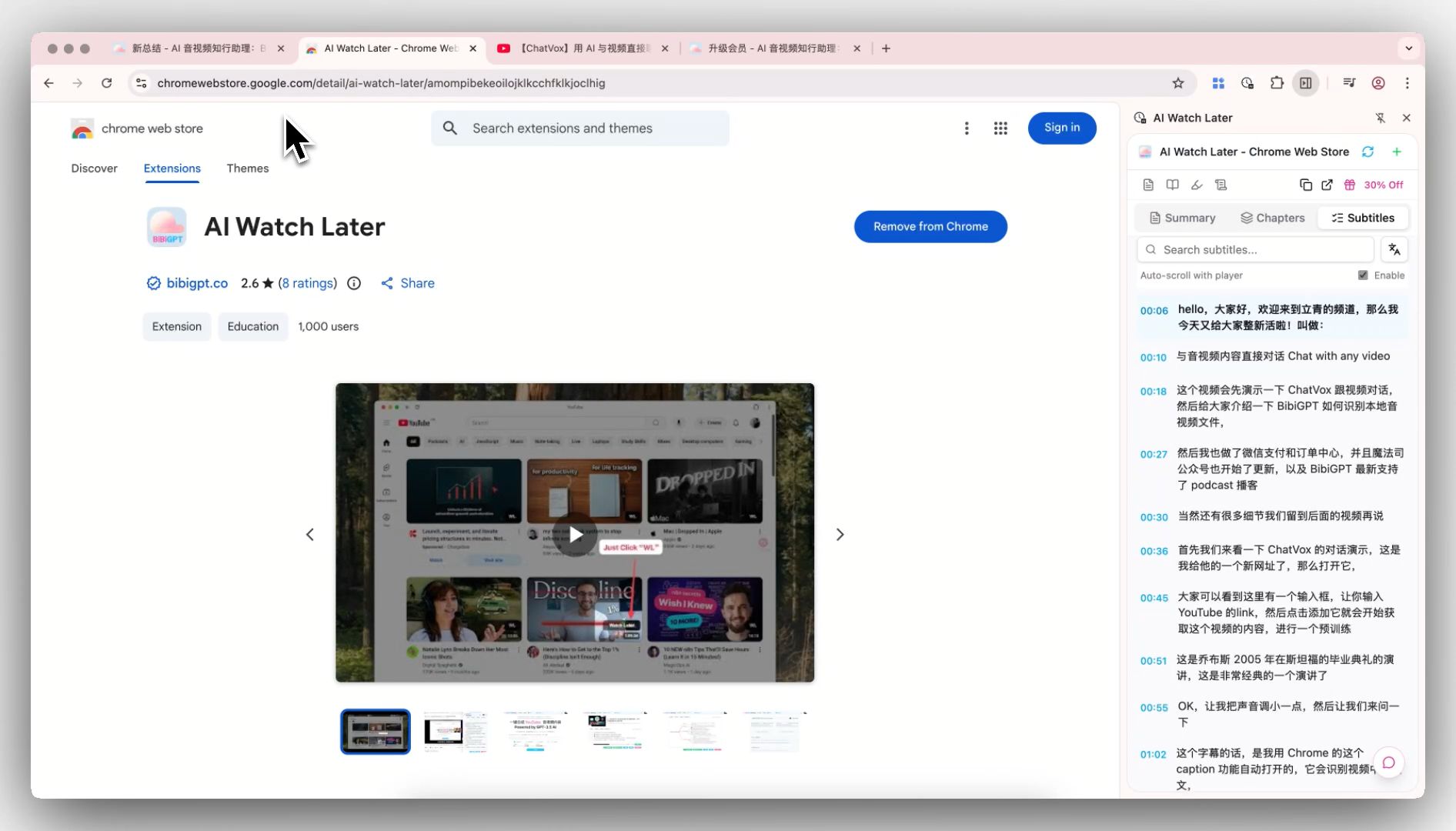 BibiGPT AI Watch Later Chrome Extension — Chrome Web Store listing
Best for: Learners, content creators, and professionals who need to absorb YouTube videos efficiently.
Install: Chrome Web Store — AI Watch Later
2. Eightify — Minimalist YouTube Summaries
Eightify distills any YouTube video into 8 key insights. Clean interface, fast performance, smooth Chrome extension experience.
Strengths: One-click 8-point summary, great for quickly evaluating video value
Limitations: YouTube-only; fixed output format; no chapter navigation or subtitle search
3. Glasp YouTube Summarizer — Highlights & Social Notes
Glasp is a social learning tool that lets you highlight YouTube subtitles, add notes, and share your learning with other users.
Strengths: Unique social sharing, ideal for researchers and academic users
Limitations: Basic AI summarization; limited to YouTube and select web pages
4. Merlin AI — All-in-One AI Browser Assistant
Merlin is a multi-model AI browser extension that can apply AI capabilities — including video summaries — across YouTube, Gmail, and other websites.
Strengths: Switch between AI models, broad use cases
Limitations: Wide coverage but shallow depth; video summarization is a side feature, not the core
5. YouTube Summary with ChatGPT — Basic Transcript Summary
This extension sends YouTube transcripts to ChatGPT for summarization — simple to use for anyone with a ChatGPT account.
Strengths: Leverages ChatGPT's summarization quality
Limitations: Requires ChatGPT Plus; no chapter splitting or subtitle search; struggles with videos without captions
See BibiGPT's AI Summary in Action

Let's build GPT: from scratch, in code, spelled out
Andrej Karpathy walks through building a tiny GPT in PyTorch — tokenizer, attention, transformer block, training loop.
Want to summarize your own videos?
BibiGPT supports YouTube, Bilibili, TikTok and 30+ platforms with one-click AI summaries
Try BibiGPT FreeBibiGPT AI Watch Later: Deep Feature Breakdown
Chapter Summaries: Navigate Any Long Video in Seconds
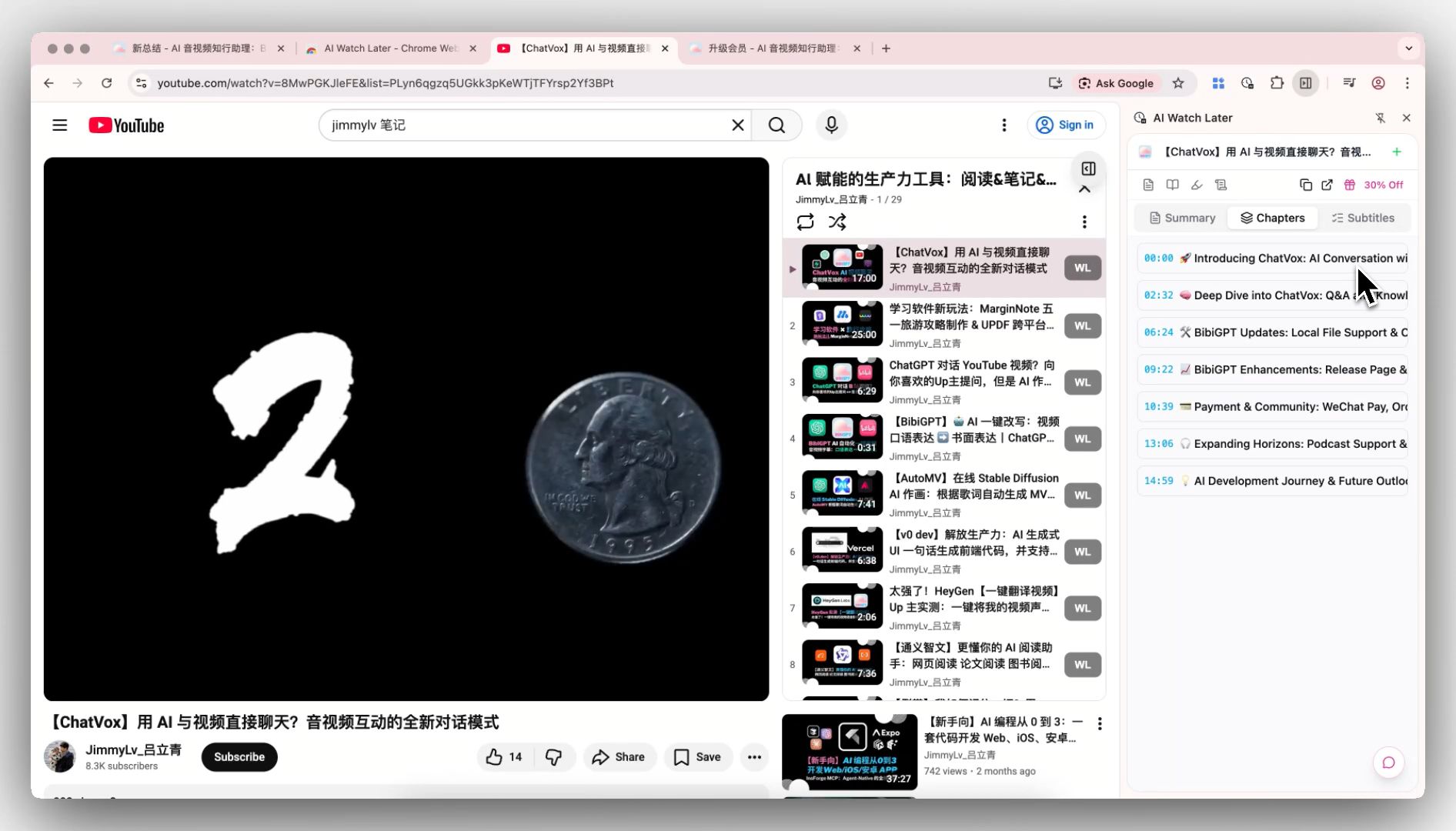 BibiGPT AI Watch Later chapter summary feature
Open a 60-minute YouTube talk and AI Watch Later automatically generates a chapter outline with key points per chapter. You can spot the most relevant segment in 3 seconds, jump directly to it, and export the summary to your YouTube video notes tool.
Smart Subtitles: Search Every Word
Smart subtitles let you:
- Keyword search: Find any phrase in the entire video transcript instantly
- Multi-language translation: Chinese ↔ English and more
- Click-to-jump: Click any subtitle line to jump to that exact video moment
This is exactly what researchers and content creators need when extracting YouTube transcripts.
Deep Integration with the BibiGPT Ecosystem
AI Watch Later connects seamlessly with BibiGPT's YouTube AI summary. After reviewing the in-page summary, jump to the BibiGPT web app for AI chat follow-up, mind map generation, and one-click sync to Notion, Obsidian, and 10+ other note-taking tools.
Feature Comparison: 5 YouTube AI Summary Chrome Extensions
| Feature | BibiGPT AI Watch Later | Eightify | Glasp | Merlin AI | YouTube+ChatGPT |
|---|---|---|---|---|---|
| Chapter summaries | ✅ | ❌ | ❌ | ❌ | ❌ |
| Smart subtitle search | ✅ | ❌ | ✅ (partial) | ❌ | ❌ |
| Subtitle translation | ✅ | ❌ | ❌ | ❌ | ❌ |
| Multi-platform support | ✅ (30+ platforms) | ❌ | ❌ | ✅ (partial) | ❌ |
| In-page (no tab switch) | ✅ | ✅ | ✅ | ✅ | ❌ |
| Free tier | ✅ | ✅ (limited) | ✅ | ✅ (limited) | Needs ChatGPT |
| Note-taking app sync | ✅ (10+ tools) | ❌ | ✅ (Glasp) | ❌ | ❌ |
| Mobile app | ✅ | ❌ | ❌ | ❌ | ❌ |
Install BibiGPT AI Watch Later in 3 Steps
- Open the Chrome Web Store: Search "AI Watch Later" or visit the direct install link
- Click "Add to Chrome": Installation takes about 10 seconds, no extra setup needed
- Connect your BibiGPT account: Click the extension icon, sign in or register, and unlock the full feature set
Once installed, the AI summary panel appears automatically in the sidebar whenever you open a YouTube video.
FAQ
Q1: Does BibiGPT AI Watch Later work on videos without captions?
A: It works best on videos with official or auto-generated captions. For caption-free videos, the BibiGPT web app handles speech recognition transcription. See also: YouTube subtitle download guide.
Q2: What is the difference between the extension and the BibiGPT web app?
A: The extension is purpose-built for the YouTube page — summaries and subtitles without switching tabs. The web app has a fuller feature set: 30+ platforms, AI chat, mind maps, and note sync. Both share the same account and data. For a full walkthrough of BibiGPT's YouTube capabilities, see the YouTube AI Skill guide.
Q3: Will installing these extensions slow down my browser?
A: These extensions are lightweight and non-intrusive. They add a sidebar panel to YouTube pages only — no impact on YouTube playback or other sites. You can disable or remove them at any time.
Q4: Does it support non-English YouTube videos?
A: Yes. BibiGPT AI Watch Later fully supports Chinese, Japanese, Korean, and other languages, including cross-language subtitle translation. Ideal for bilingual learners and international content consumers.
Conclusion
In 2026, YouTube content is expanding faster than anyone can keep up with — but your time is finite. Among the 5 leading YouTube AI summarizer Chrome extensions, BibiGPT AI Watch Later stands out with chapter navigation, smart subtitle search, and tight integration with the BibiGPT ecosystem. For anyone who also watches content on Bilibili, podcasts, or TikTok, combining the extension with BibiGPT's web app is the most complete setup available — trusted by over 1 million users worldwide.
Start your AI efficient learning journey now:
- 🌐 Official Website: https://aitodo.co
- 📱 Mobile Download: https://aitodo.co/app
- 💻 Desktop Download: https://aitodo.co/download/desktop
- ✨ Learn More Features: https://aitodo.co/features
BibiGPT Team