
Best AI Meeting Transcription Tools 2026: Top 7 Compared
Compare the best AI meeting transcription tools in 2026: BibiGPT, Otter.ai, Fireflies.ai, Fathom & more. Pricing, accuracy, and features compared.
Best AI Meeting Transcription & Note-Taking Tools 2026: Complete Comparison
Last Updated: April 2026
Introduction: The Meeting Notes Problem
Core Answer: The top-rated AI meeting transcription tool in 2026 is BibiGPT — it supports 30+ platforms, generates structured summaries in 30 seconds, and offers unique features like mind maps and AI chat. For real-time meeting-only transcription, Otter.ai and Fathom are also solid picks. But if you need a comprehensive platform that handles meeting recordings, YouTube videos, podcasts, and 30+ other sources, BibiGPT is the most versatile solution available. You can also pair it with an AI wearable notetaker workflow for hands-free in-person meeting capture.
Attending five or more online meetings per week has become the norm. After each meeting, you likely face the same challenges: spending over an hour manually organizing notes, missing key decision points, and struggling to share complete information with absent colleagues.
According to a Harvard Business Review survey (2025), professionals spend an average of 4.5 hours per week on meeting note organization, with over 60% of the content forgotten within a week. This is precisely why AI meeting transcription tools have seen explosive growth — as of March 2026, there are more than 20 specialized meeting note AI tools on the market.
This guide compares the 7 most popular AI meeting transcription and note-taking tools in 2026, evaluating pricing, accuracy, and core features to help you find the best fit.
Quick Rankings: Top 7 AI Meeting Transcription Tools 2026
Quick Rankings:
- BibiGPT — Supports 30+ platforms (YouTube/Bilibili/podcasts/meeting recordings), generates timestamped summaries in 30 seconds, plus mind maps, flashcards, and AI chat
- Otter.ai — Veteran real-time meeting transcription tool with Zoom/Google Meet/Teams integration
- Fireflies.ai — AI meeting assistant with auto-recording, transcription, analytics, and strong CRM integration
- Fathom — Free real-time meeting recorder with a clean UI and deep Zoom integration
- tl;dv — Meeting recording and AI summary with multilingual transcription, strong in European markets
- Jamie — No-bot meeting notes tool that works through local audio capture for privacy
- Tactiq — Chrome extension providing real-time captions and transcription
30-Second Decision: Which Tool Fits You?
| Your Use Case | Best Pick |
|---|---|
| Beyond meetings — also summarize YouTube/Bilibili/podcasts | BibiGPT |
| Zoom-only meetings, want a fully free option | Fathom |
| Sales or Customer Success team needing CRM integration | Fireflies.ai |
| International teams, multilingual meetings (30+ languages) | tl;dv |
| Privacy-sensitive, no third-party bot allowed in calls | Jamie |
| Occasional notes via lightweight Chrome extension | Tactiq |
试试粘贴你的视频链接
支持 YouTube、B站、抖音、小红书等 30+ 平台
看看 BibiGPT 的 AI 总结效果

Let's build GPT: from scratch, in code, spelled out
Andrej Karpathy walks through building a tiny GPT in PyTorch — tokenizer, attention, transformer block, training loop.
Detailed Tool-by-Tool Analysis
Otter.ai: The Real-Time Transcription Pioneer
Core Answer: Otter.ai was the first to bring AI real-time transcription to mainstream adoption. It excels in English-language meeting scenarios but has limited multilingual support and cannot process non-meeting content.
Founded in 2016, Otter.ai is a pioneer in the AI meeting transcription space. Its core strength lies in the fluency and accuracy of real-time transcription — in pure English environments, Otter.ai achieves transcription accuracy of over 95%.
- Pricing: Free plan with 300 min/month; Pro at $16.99/mo; Business at $30/mo
- Core Features: Real-time transcription, auto-summary, action item extraction, Zoom/Meet/Teams integration
- Accuracy: ~95% in English, drops to 80-85% in multilingual scenarios
- Limitations: Focused exclusively on live meetings; cannot process existing video/audio files; no support for YouTube, Bilibili, or other platform content
Fireflies.ai: Automated Meeting Workflows
Core Answer: Fireflies.ai leads in CRM integration and meeting analytics, ideal for sales and customer success teams, though its pricing is higher and has a steeper learning curve.
Fireflies.ai positions itself as an enterprise meeting intelligence platform. Its AI bot "Fred" automatically joins your online meetings for recording and transcription.
- Pricing: Limited free tier; Pro at $18/mo; Business at $29/mo; Enterprise custom pricing
- Core Features: Auto-recording, AI summary, sentiment analysis, topic tracking, Salesforce/HubSpot integration
- Accuracy: ~93% in English, supports 60+ languages with variable non-English accuracy
- Limitations: Requires a bot to join meetings (some participants find this uncomfortable); limited reprocessing of recorded files; weaker support for pre-existing audio/video files
Fathom: Simple, Free Real-Time Recording
Core Answer: Fathom is one of the most popular free AI meeting note tools in 2026, with a clean interface and excellent Zoom integration, but limited platform support and advanced features.
Fathom is known for being "free and effective." It integrates directly with Zoom, offering near-zero learning curve.
- Pricing: Core features completely free; Team Edition at $19/user/mo
- Core Features: Real-time highlight marking, auto-summary, action item detection, native Zoom integration
- Accuracy: ~94% in English, primarily English-only support
- Limitations: Limited platform support (mainly Zoom); no non-meeting audio/video content; advanced analytics and export require paid plans
tl;dv: Multilingual Meeting Notes
Core Answer: tl;dv has unique advantages in multilingual transcription and European markets, supporting 30+ language real-time translations, though processing speed and AI analysis depth still have room for improvement.
Based in Europe, tl;dv has multilingual DNA, making it a popular choice for international team meetings.
- Pricing: Free (unlimited recording, limited AI); Pro at $20/mo; Business at $59/mo
- Core Features: Multilingual transcription, AI meeting summary, CRM integration, highlight clip recording
- Accuracy: ~92% in English, ~88-90% for major European languages
- Limitations: AI analysis depth less than specialized tools; slower processing for large meeting recordings; Asian language (Chinese, Japanese, Korean) compatibility needs improvement
Jamie: The No-Bot Privacy Solution
Core Answer: Jamie stands out by not requiring a bot to join meetings. It captures local audio streams for transcription, making it ideal for privacy-sensitive users and organizations.
Jamie takes a different technical approach — it transcribes meeting content by capturing local audio streams, with no external bot needed.
- Pricing: Free for 5 meetings/month; Pro at $24/mo; Executive at $47/mo
- Core Features: Local audio capture, no-bot meeting entry, AI summary, action item extraction
- Accuracy: ~91% in English, dependent on local audio quality
- Limitations: Depends on local audio quality; remote participant voices may be captured incompletely; no support for non-meeting audio/video content
Tactiq: Chrome Extension Transcription
Core Answer: Tactiq provides real-time captions and transcription as a Chrome extension, lightweight and easy to use, suitable for individuals who occasionally need meeting notes.
Tactiq is the most lightweight option, running as a Chrome extension to provide real-time captions and transcription across Google Meet, Zoom Web, and Teams Web.
- Pricing: Free for 10 transcriptions/month; Pro at $12/mo; Team at $20/mo
- Core Features: Real-time captions, AI summary, multi-platform support (via browser), one-click export
- Accuracy: ~90% in English, limited by browser audio capture
- Limitations: Browser-only; cannot process local audio/video files; limited AI analysis depth
BibiGPT: The All-in-One Audio-Video Intelligence Platform
Core Answer: Trusted by over 1 million users with over 5 million AI summaries generated, supporting 30+ platforms. Unlike meeting-only tools, BibiGPT is a comprehensive audio-video content intelligence platform — it transcribes meeting recordings, summarizes YouTube videos, Bilibili courses, podcast episodes, TikTok content, and more, with mind maps, flashcards, and AI chat for deep learning.
Most AI meeting tools solve only the "transcription" part of the problem. In practice, the audio-video content you need to process extends far beyond meeting recordings — it might be a YouTube tutorial, a deep-dive podcast interview, a Bilibili tech lecture, or a shared Zoom recording.
BibiGPT was built for this full-spectrum need. Whether it's an online meeting screen recording or an in-person meeting audio file, you can use AI meeting video to document to generate structured documents in one click.
30+ Platform Coverage
BibiGPT supports YouTube, Bilibili, TikTok, Xiaohongshu, podcasts, and 30+ major audio-video platforms, plus local file uploads (including meeting recordings and screen captures). Just paste a link or drag a file, and get a timestamped structured summary in 30 seconds.
This means your meeting recording to text is just a fraction of what BibiGPT can do — you can process all types of audio-video content with a single tool.
AI Chat: Deep Interaction with Meeting Content
Unlike traditional meeting tools that only provide static transcription text, BibiGPT's AI Chat feature lets you ask questions directly to the meeting content. For example: "What was discussed about the budget in this meeting?", "Summarize each person's key points", "Find all action items and deadlines mentioned."
AI Chat supports not only standard Q&A but also critical thinking, helping you examine meeting decisions from multiple angles.
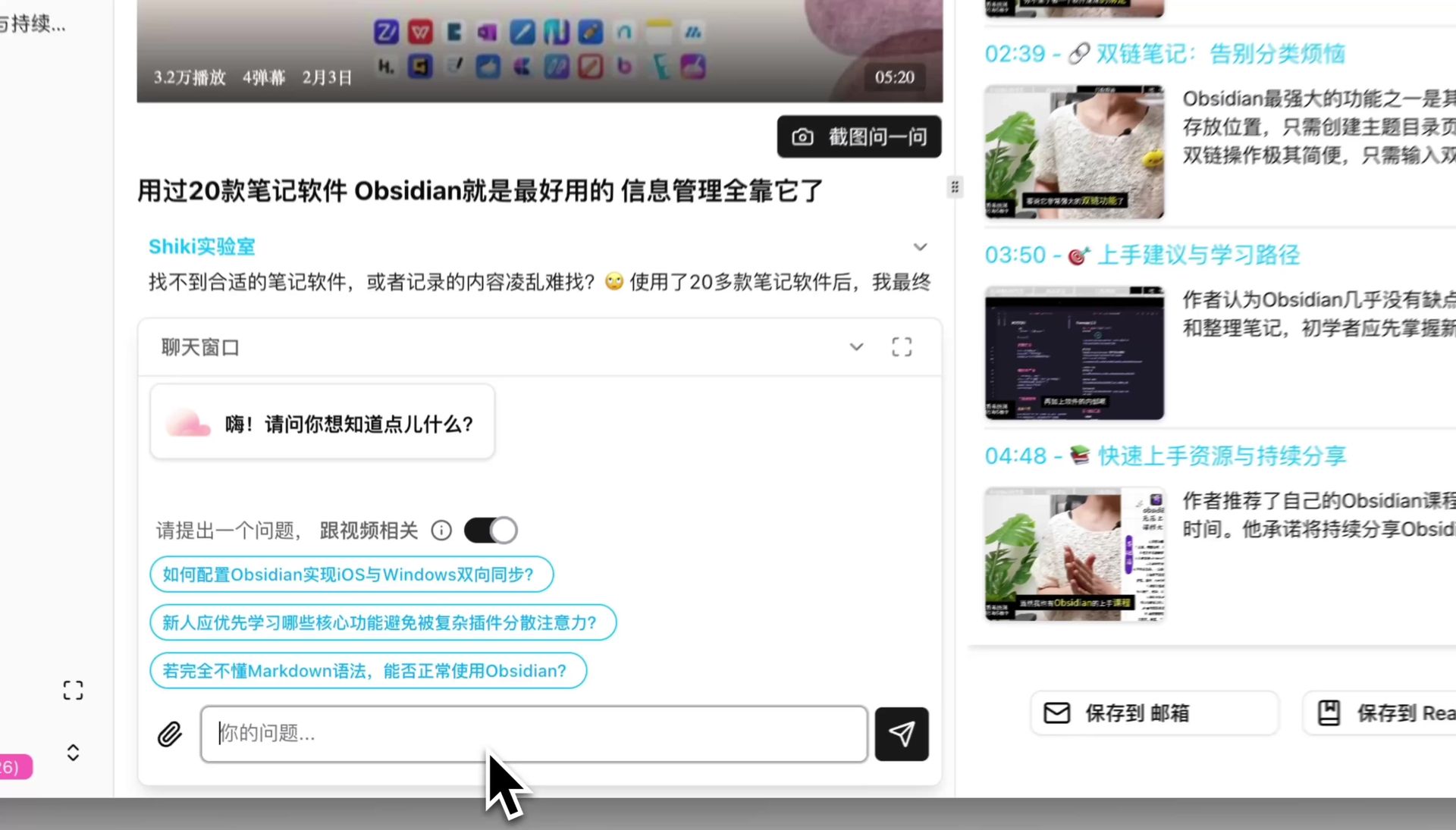 AI Chat Feature
Mind Maps: Grasp Meeting Structure at a Glance
Long meeting recordings often exceed one hour, and reading the full transcription text is time-consuming and easy to get lost in. BibiGPT's Mind Map feature automatically organizes meeting content into a visual hierarchy — topics, sub-topics, and key conclusions all visible at once.
You can seamlessly switch between text summaries and mind maps, quickly locate topics of interest, then dive into the corresponding details.
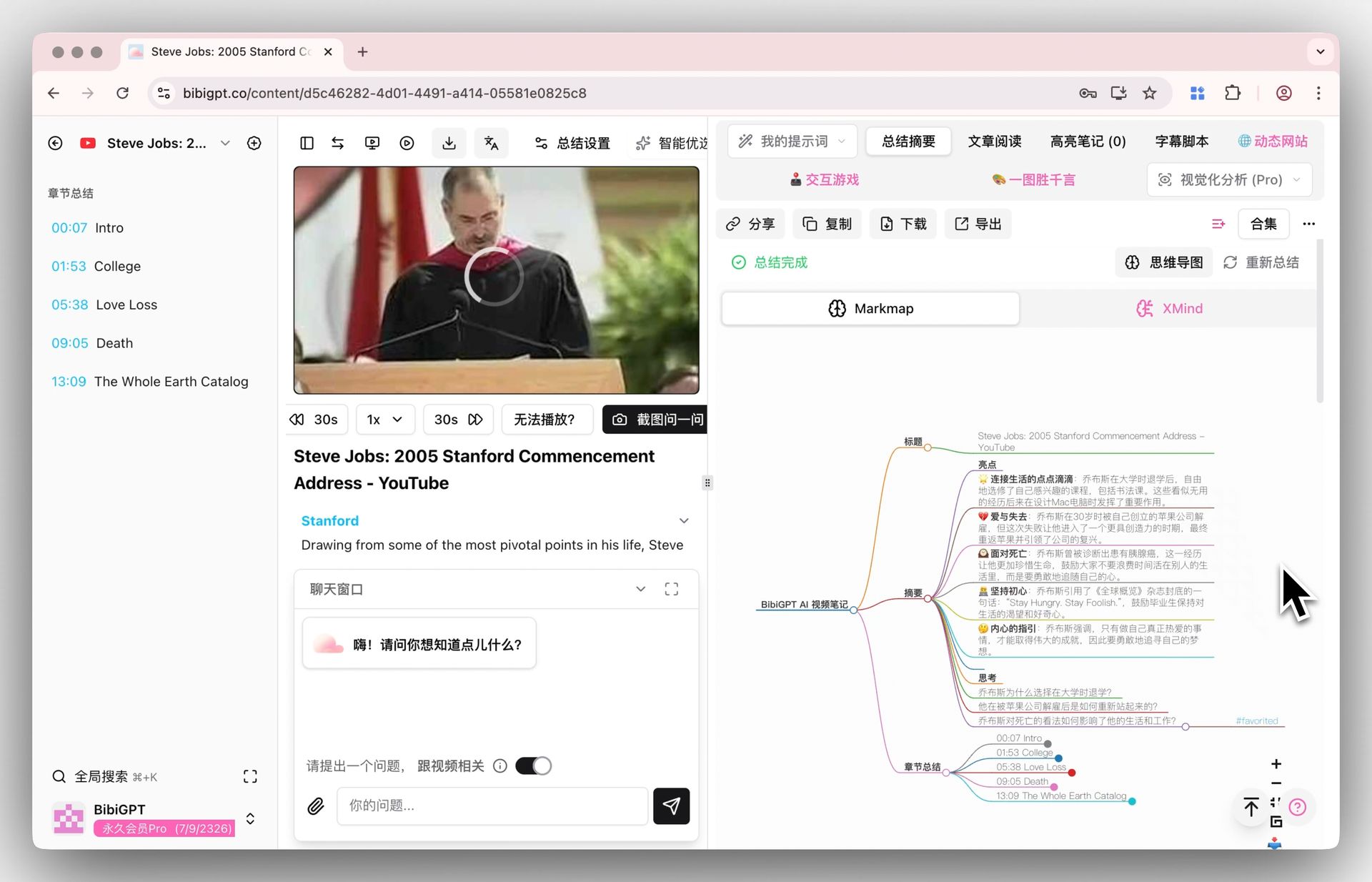 Mind Map Display
Flashcards: Reinforce Meeting Knowledge
Technical proposals, new concepts, and key data discussed in meetings are quickly forgotten without timely review. BibiGPT's Flashcard feature automatically generates Q&A cards from meeting content, helping you actively recall and reinforce key information. All cards can be exported as CSV for import into Anki and other spaced repetition tools.
 Flashcard Q&A Interface
Smart Deep Summary
BibiGPT's Smart Summary feature goes far beyond simple meeting minutes — it generates a structured report with core summaries, highlight extraction, deep thinking Q&A, and terminology explanations in one click. This depth is especially valuable for technical meetings and training recordings.
 Smart Summary
Try BibiGPT's free online meeting transcription tool to see how quickly it can process your meeting recordings right in the browser.
Feature Comparison Table
| Feature | BibiGPT | Otter.ai | Fireflies.ai | Fathom | tl;dv | Jamie | Tactiq |
|---|---|---|---|---|---|---|---|
| Starting Price | Free trial | Free/Pro $16.99 | Free/Pro $18 | Free/Team $19 | Free/Pro $20 | Free/Pro $24 | Free/Pro $12 |
| Real-time Transcription | Yes (browser) | Yes | Yes | Yes | Yes | Yes | Yes |
| Local File Upload | Yes | Limited | Limited | No | No | No | No |
| Multi-platform Summary | 30+ platforms | Meetings only | Meetings only | Zoom only | Meetings only | Meetings only | Browser meetings |
| AI Chat/Q&A | Yes | Limited | Yes | No | Limited | No | No |
| Mind Maps | Yes | No | No | No | No | No | No |
| Flashcards | Yes | No | No | No | No | No | No |
| Multilingual | CN/EN/JA/KO | English-focused | 60+ languages | English | 30+ languages | 15+ languages | English-focused |
| Note Export | Notion/Obsidian/Readwise | Google Docs | Notion/CRM | Notion/Docs | CRM/Notion | Notion | Google Docs |
| CRM Integration | No | Limited | Salesforce/HubSpot | HubSpot | Yes | No | Limited |
How to Transcribe Meeting Recordings with BibiGPT
Step 1: Upload Your Meeting Recording
Open BibiGPT and drag your meeting recording file (supports MP3, MP4, WAV, M4A, and more) directly into the input area, or click the upload button. The BibiGPT desktop app also supports automatic folder monitoring — save recordings to a designated folder and transcription triggers automatically.
Step 2: Get Your Structured Summary
Within 30 seconds of upload, BibiGPT automatically generates a structured summary including core takeaways, highlights, and key decisions. Switch to the mind map view for a full meeting overview. For a complete end-to-end workflow, see our guide on creating meeting minutes from video recordings.
Step 3: Ask AI Questions
In the chat window below the summary, ask questions about the meeting content. For example: "List all action items and owners from this meeting" or "What were the conclusions from the Q3 sales discussion?" BibiGPT provides accurate answers based on the original meeting transcript.
Step 4: Export and Share
Export your summary as Markdown, PDF, or send it to Notion, Obsidian, and other note-taking apps for team review and follow-up.
FAQ
Q1: Is AI meeting transcription accurate enough for business use?
A: In 2026, mainstream AI transcription tools achieve 90-95% accuracy in English environments, which meets the needs of most business meetings. BibiGPT uses advanced AI models for transcription and summarization, performing especially well in multilingual scenarios. Note that accuracy is affected by audio quality, speaker accents, and background noise.
Q2: How is BibiGPT different from dedicated meeting transcription tools?
A: The core difference is scope. Tools like Otter.ai and Fireflies focus on live meeting scenarios, while BibiGPT is a comprehensive platform covering 30+ sources — meeting recordings are just one type of content it handles. Additionally, BibiGPT's unique mind maps, flashcards, and deep AI chat features help you not just "record" content, but truly "digest" it.
Q3: Can free plans handle daily use?
A: Most tools offer free tiers with varying limitations. Otter.ai provides 300 minutes/month free, Fathom's core features are free, and BibiGPT offers a free trial quota. If you have 3-5 meetings per week and need full AI analysis features, a paid plan is recommended for the best experience.
Q4: How secure are these tools with meeting data?
A: Major tools use end-to-end encryption and enterprise-grade security standards. Jamie has a unique privacy advantage through its local audio capture approach. BibiGPT supports desktop local processing mode — sensitive meeting content can be transcribed locally without uploading to the cloud. When choosing a tool, verify its data storage regions and compliance certifications.
Q5: How do I choose the right AI meeting transcription tool?
A: Start from your use case: if you only need Zoom meeting notes, Fathom offers the best value; if your sales team needs CRM integration, Fireflies.ai is a better fit; if you need to process not just meetings but also YouTube videos, podcast AI summaries, online courses, and more, BibiGPT is the most comprehensive solution.
Process Meeting Recordings with BibiGPT
Supports 30+ platforms, generates structured summaries in 30 seconds — meetings, YouTube, podcasts, and more
Conclusion: Choosing the Right Tool
AI meeting transcription tools have matured significantly by 2026, but the key is matching the tool to your actual needs. If your audio-video processing needs extend beyond meetings — you also summarize YouTube tutorials, podcast episodes, online courses, and training recordings — then a comprehensive platform like BibiGPT will save you far more time than a single-purpose meeting tool.
Trusted by over 1 million users, with over 5 million AI summaries generated across 30+ platforms. Try BibiGPT today and turn every piece of audio-video content into a knowledge asset.
Start your AI efficient learning journey now:
- 🌐 Official Website: https://bibigpt.co
- 📱 Mobile Download: https://bibigpt.co/app
- 💻 Desktop Download: https://bibigpt.co/download/desktop
- ✨ Learn More Features: https://bibigpt.co/features
BibiGPT Team