
How to Build a Personal Video Knowledge Base with BibiGPT + Obsidian (2026 PKM Workflow, 3 Steps)
Hands-on methodology: use BibiGPT to process Bilibili / YouTube / podcast videos, auto-save into Obsidian, and build a sustainable personal video knowledge base in three steps. Includes note template and tag taxonomy.
How to Build a Personal Video Knowledge Base with BibiGPT + Obsidian (2026 PKM Workflow, 3 Steps)
80-word answer: Use BibiGPT as the AI reader for video, and Obsidian as the long-term note vault. Enable "auto-save summary to Obsidian" in the BibiGPT desktop client, and every video you watch becomes an entry in your local Vault. Add a tag taxonomy and backlink structure, and within three months you have a searchable, questionable private knowledge network.
This is a methodology article for knowledge workers, learners, and content creators — not a tool review, but a battle-tested PKM (Personal Knowledge Management) workflow.
1. Why plain note apps fail at video knowledge bases
If you have tried to build a video notebook in Notion, Obsidian, or Evernote, you've hit these issues:
- Captions aren't copy-pasteable: most platforms don't expose caption export.
- Timestamps break: hand-typed "10:24 mentioned X" becomes unsearchable later.
- Search misses: video keywords live in audio, not in your note text — full-text search finds nothing.
- Entry friction: 20 minutes of manual note-taking per video → you stop doing it.
The solution is: let AI deconstruct video into searchable text first, then hand it to your note vault for long-term management. BibiGPT handles the former; Obsidian handles the latter.
2. Three steps: from zero to a growing PKM system
Step 1: configure Obsidian auto-save in the BibiGPT desktop client
Open BibiGPT desktop → Settings → Note Integrations → enter your Obsidian Vault local path (e.g. /Users/you/Obsidian Vault/BibiGPT) → toggle on "auto-save to Obsidian after summary completes".
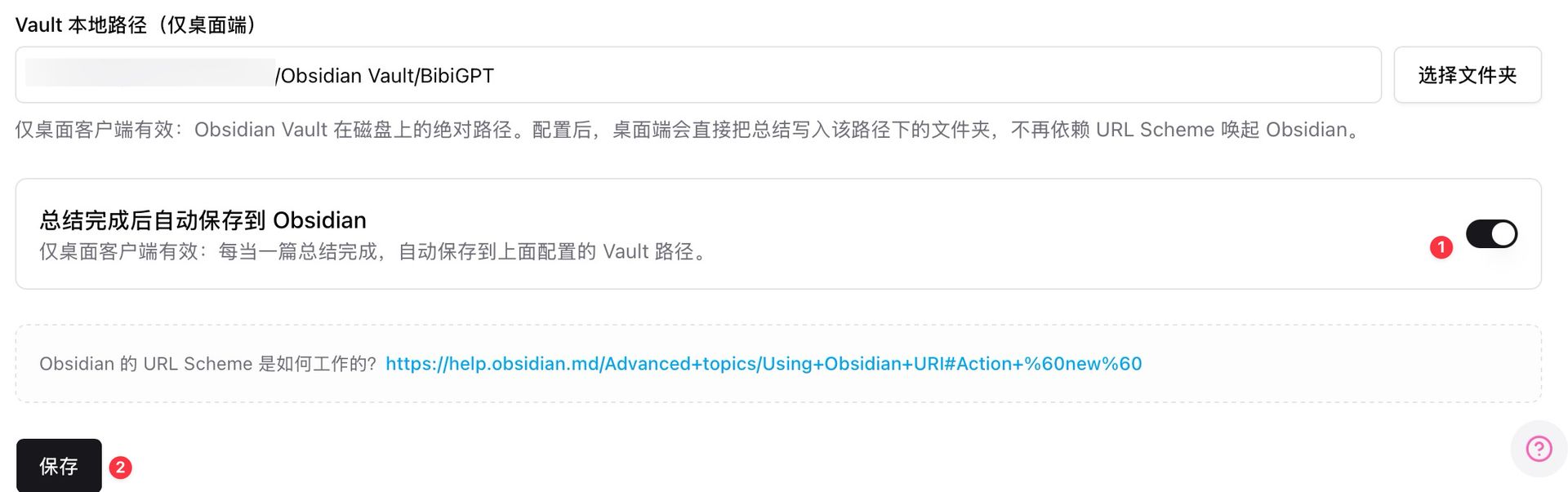 Obsidian Vault local path settings
Once configured, every video BibiGPT processes (Bilibili, YouTube, Xiaohongshu, Xiaoyuzhou podcast, local file) auto-generates a structured note into your local Obsidian Vault. No more URL-scheme dependency — the flow is stable.
Step 2: design the note structure (Frontmatter + chapters + follow-up section)
Recommended template for each BibiGPT export:
---
source: https://bilibili.com/video/xxx
platform: bilibili
author: creator name
duration: 12:34
processed_at: 2026-04-24
tags: [learning, AI, product-design]
---

# Video Title

## AI Summary
(auto-filled by BibiGPT)

## Chapter Timestamps
- 00:00 - Intro
- 02:15 - Core argument
- 07:40 - Case study
- 11:20 - Conclusion

## Raw Captions (collapsible)
(auto-filled by BibiGPT)

## My Follow-Up Questions
(manually jot 2-3 questions to chase later via BibiGPT AI chat)

## Backlinks
(auto-generated by Obsidian)
The key is separating "AI-generated" from "human-added" sections. AI parts can be regenerated on top; human parts are never overwritten.
Step 3: tag taxonomy + collection chat form the knowledge network
Use three tag layers in Obsidian:
- Layer 1 (topic):
#AI#product-design#business - Layer 2 (source type):
#video#interview#course - Layer 3 (processing state):
#followed-up#deep-dive-later#summarized
Pair this with BibiGPT's Collections AI Chat — group same-topic videos into one Collection. Once your vault grows past 50 videos, you can cross-video query inside the Collection. That depth of retrieval doesn't exist in Obsidian alone.
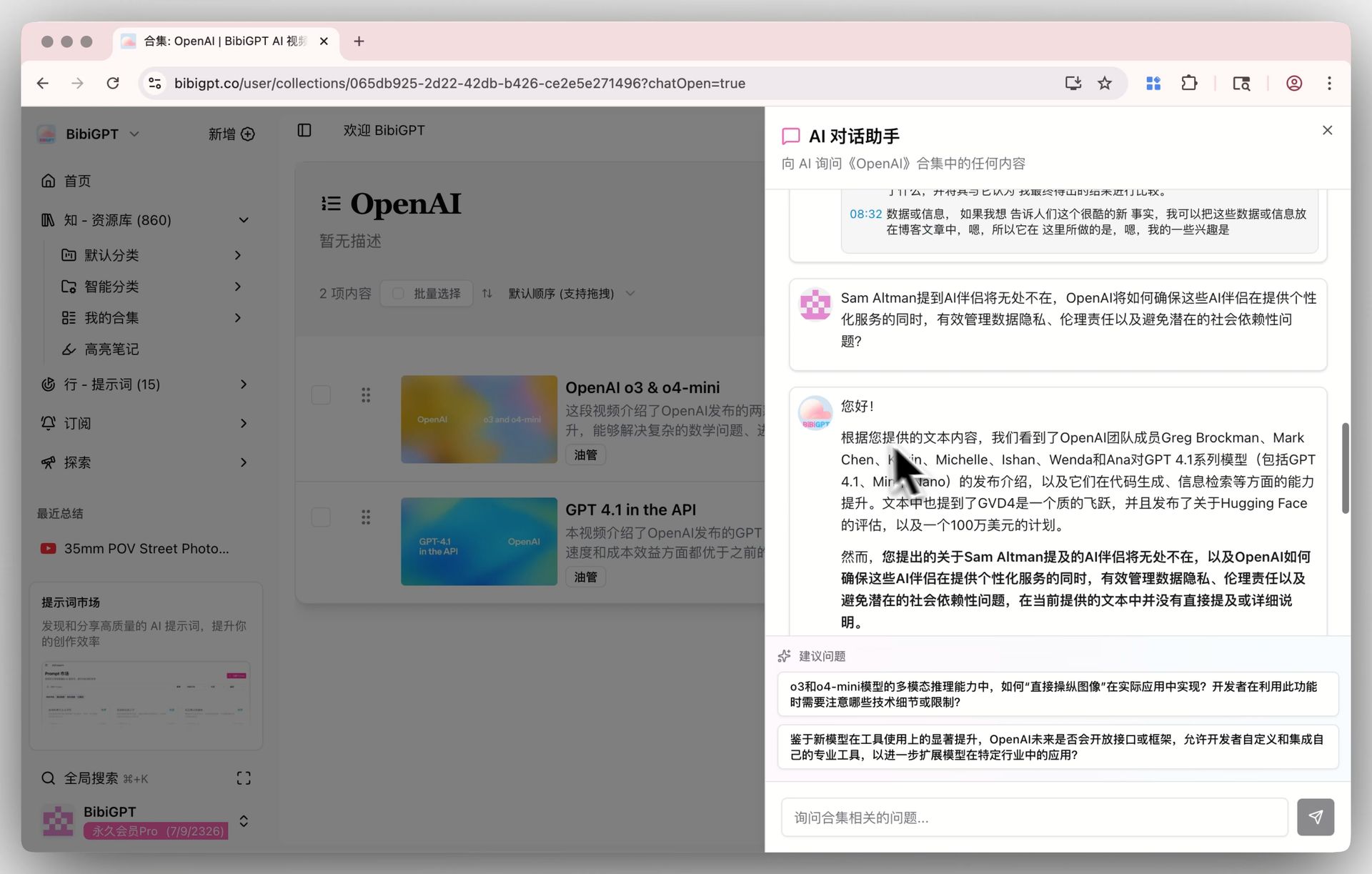 Collections AI chat
Obsidian stores; BibiGPT queries. That two-layer structure is the core of this methodology.
3. Advanced: make your vault "ask-able", not just "save-able"
Custom prompts for role-based re-processing
BibiGPT's Custom Prompt Summary lets you deconstruct the same video through different lenses: "explain this with Feynman technique", "extract all action items", "restructure by Minto pyramid principle".
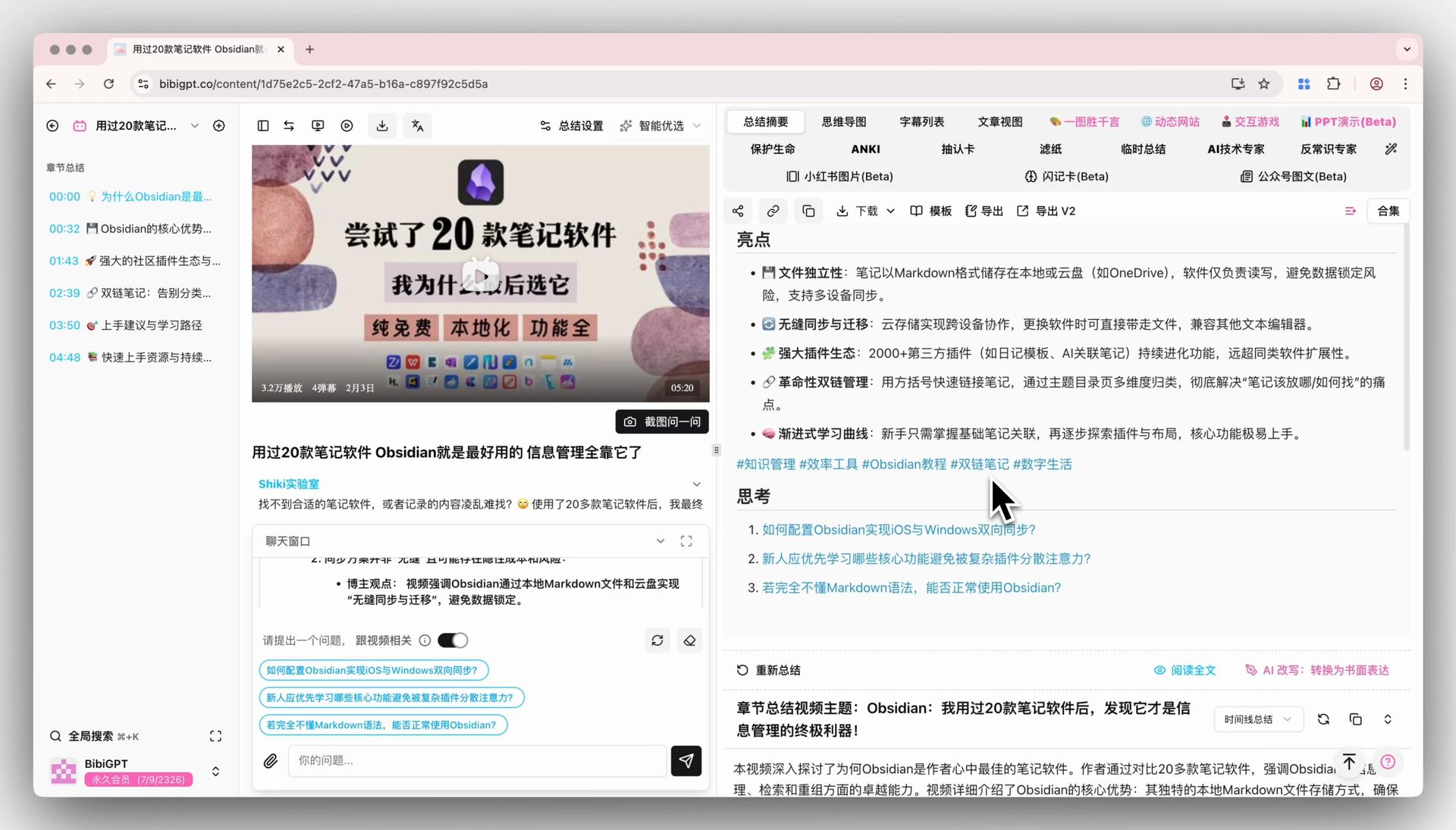 Custom prompt summary
Regenerated summaries auto-sync to Obsidian as new note cards — the backlink graph wires them together.
Dataview queries for topical views
Use the Dataview plugin in Obsidian:
TABLE platform, duration, processed_at
FROM #AI AND #video
WHERE processed_at > date("2026-01-01")
SORT processed_at DESC
Instant "AI videos I've watched in 2026" table — something you'd otherwise maintain by hand.
Cloud sync for team sharing
BibiGPT also exports to Lark, Yuque, Notion — perfect for team projects where "watch video → process via BibiGPT → share to Lark" becomes the new default.
4. Typical cadences (learner / creator / researcher)
Learner (student, professional upskilling)
30 min per day watching 1–2 knowledge videos → BibiGPT auto-saves to Obsidian → weekend Dataview review → Collections chat to chase concepts. In 3 months you have 50–100 structured video notes.
Content creator
Paste competitor / niche videos → re-process with a "hook formula" custom prompt → notes auto-save → when drafting, Dataview surfaces last 30 days' topic library. Content velocity compounds.
Researcher / PM
Pull every interview, talk, and course video for a theme (e.g. "AI Agents trend") into one Collection → Collections AI Chat lets you synthesize consensus and disagreements in 20 minutes. A compounding tool for research phases.
5. FAQ
Q1: Why not just use Notion?
Notion is cloud-first; search depends on the cloud. Obsidian offers local backlinks and Dataview queries that Notion doesn't. Use Obsidian for your personal long-term vault and Notion for cloud distribution — BibiGPT exports to both.
Q2: Must I use the desktop client for Obsidian auto-save?
Yes. Local Vault path access is a desktop-only capability. Web BibiGPT falls back to URL-scheme — less reliable. Download BibiGPT desktop.
Q3: What about local video files (meeting recordings)?
Desktop supports local upload and drag-and-drop. Meetings, recorded lectures — all auto-transcribed + summarized + saved.
Q4: Will Obsidian slow down with lots of notes?
Obsidian's local engine handles Markdown files generously; up to 5,000 is generally fine. Beyond that, shard by year or use Dataview aggregated views instead of real-time search.
Q5: Does this workflow support team collaboration?
Collaboration belongs in the cloud (Lark / Notion / Yuque). BibiGPT exports to all. Obsidian stays your private long-term vault. Public/private separation is a PKM golden rule.
Q6: Is it free?
Obsidian is free for personal use. BibiGPT has a free tier; Plus/Pro subscriptions unlock desktop features including Obsidian auto-save, custom prompt library, and more.
Try it: auto-save last week's videos into your vault
试试粘贴你的视频链接
支持 YouTube、B站、抖音、小红书等 30+ 平台
See an ingested example — what does a Bilibili course video look like after processing?
看看 BibiGPT 的 AI 总结效果

Let's build GPT: from scratch, in code, spelled out
Andrej Karpathy walks through building a tiny GPT in PyTorch — tokenizer, attention, transformer block, training loop.
Further reading:
- AI Video to Article Complete Guide 2026
- AI Video Summary Productivity Workflows
- NotebookLM x Classroom for Teachers vs BibiGPT
Core features: Obsidian Auto-Save, Custom Prompt Summary, Collections AI Chat.
BibiGPT Team