
Repurpose Video to Blog Post with AI: BibiGPT's 5-Step Workflow Guide
Learn how to repurpose YouTube and video content into SEO-friendly blog posts using BibiGPT's AI-powered 5-step workflow. Complete tutorial with practical tips.
Repurpose Video to Blog Post with AI: BibiGPT's 5-Step Workflow Guide
You have a great YouTube video packed with insights, but it lives only on one platform. Meanwhile, Google cannot index what is inside your video, readers who prefer text will never find it, and all that valuable content stays locked in a single format. What if you could turn that video into a fully structured, illustrated blog post in minutes instead of hours?
With BibiGPT, you can. Paste any video URL, and BibiGPT extracts the transcript, generates an AI summary, then uses its AI Video to Illustrated Article feature to produce a professional, image-rich blog post. After a round of AI polish and one-click export, your video content is ready to publish as a blog. Trusted by over 1 million users with over 5 million AI summaries generated, BibiGPT is the most efficient way to repurpose video content into blog articles.
试试粘贴你的视频链接
支持 YouTube、B站、抖音、小红书等 30+ 平台
Why Repurpose Video Content into Blog Posts?
Content repurposing is not just a productivity hack -- it is a proven growth strategy used by the most successful creators and marketing teams.
SEO Value: Make Search Engines Find You
Search engines cannot watch your videos. They crawl text. When you convert video content into a written article, every keyword, every insight, every how-to step becomes indexable. A single well-optimized blog post can drive organic traffic for months or even years after publication.
Content Efficiency: Create Once, Distribute Everywhere
A 30-minute video contains enough material for a 2,000-word article, several social media posts, an email newsletter, and multiple quote graphics. You already invested the effort to create the video -- repurposing extracts maximum value from that investment.
Audience Expansion: Reach Different Content Consumers
Not everyone prefers video. Commuters want to skim text on the train. Researchers need quotable written sources. Some users simply prefer reading over watching. By converting video to blog, you meet your audience wherever they are.
The 5-Step AI Workflow: Turn Video into Blog with BibiGPT
Here is the complete, actionable process from video URL to published blog post.
Step 1: Paste Your Video URL and Get AI Summary + Transcript
Open BibiGPT and paste your YouTube, Bilibili, or other video URL into the input field. BibiGPT supports 30+ platforms including TikTok, podcasts, and local file uploads.
After you submit, BibiGPT automatically:
- Extracts the transcript: Pulls official subtitles or generates AI-powered speech-to-text
- Generates an AI summary: Creates structured takeaways, bullet points, and key insights using top-tier AI models
- Adds timestamps: Every section maps back to the original video for easy verification
This output becomes the raw material for your blog article. With AI YouTube Summary, you get a complete transcript and intelligent summary in seconds.
Step 2: Generate a Structured Article with AI Video-to-Article
This is the core step. From the video summary detail page, click the AI Video to Illustrated Article feature, or go directly to bibigpt.co/article.
BibiGPT's AI Video to Illustrated Article feature will:
- Structure the content: Reorganize scattered transcript text into a logical article with headings, paragraphs, and sections
- Extract key frames: Automatically capture relevant screenshots from the video as article illustrations
- Enhance the writing: AI transforms spoken, conversational language into polished written prose
The result is not a simple transcript dump -- it is a genuinely readable, professionally structured article.
AI 改写预览

Bilibili: GPT-4 & Workflow Revolution
A deep-dive explainer on how GPT-4 transforms work, covering model internals, training stages, and the societal shift ahead.
Step 3: AI Polish and Edit
The generated draft is already solid, but professional blog posts benefit from an additional polish pass. BibiGPT's Article Reading - AI Polish view handles this.
Under the Article Reading tab, the AI polish feature will:
- Refine language: Transform any remaining conversational text into smooth written English
- Enrich visuals: Insert additional key frame screenshots to enhance the reading experience
- Optimize structure: Adjust paragraph flow for logical coherence and emphasis
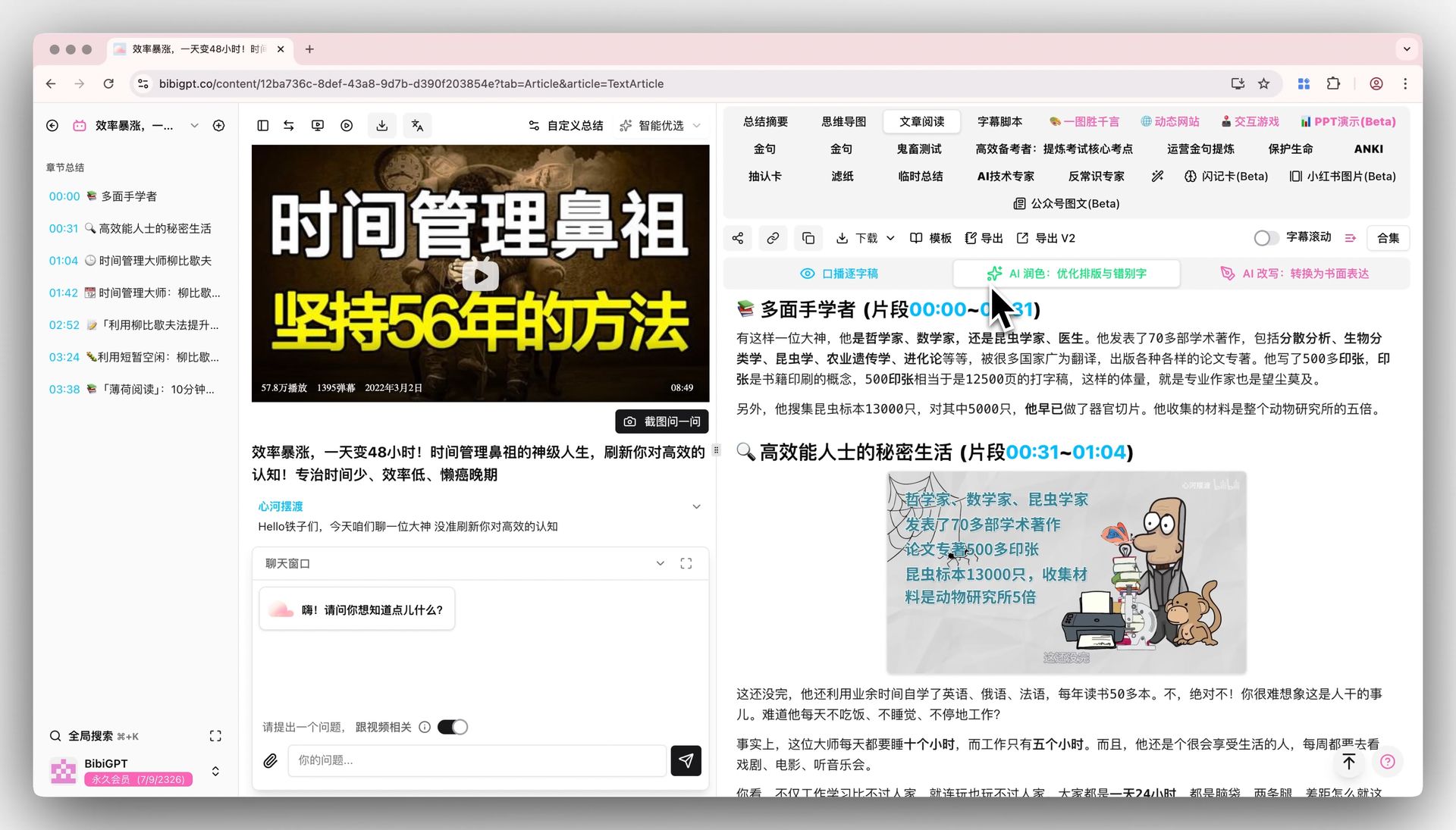 AI-polished illustrated article
You can also make manual edits at this stage -- add your own commentary, include additional examples, or adjust tone to match your brand voice.
Step 4: Add Images and Optimize Formatting
While BibiGPT automatically extracts key frame images, a standout blog post may need a few finishing touches:
- Cover image: Choose the most visually compelling key frame as your blog header
- Infographics: Use BibiGPT's mind map feature to turn video takeaways into visual diagrams
- Formatting: Add pull quotes, bullet lists, and code blocks where appropriate
- SEO elements: Write alt text for images, craft your meta description, and set the title tag
BibiGPT's visual analysis goes beyond audio transcription -- it understands on-screen content and narrative structure, so the extracted frames are genuinely informative, not random screenshots.
Step 5: Export in Your Preferred Format
With your article ready, the final step is export. BibiGPT offers multiple options:
- Markdown: Paste directly into Ghost, WordPress, Hugo, or any static site generator
- PDF: Generate a shareable document
- Notion: One-click export to Notion and integrate into your knowledge base
- Obsidian: Sync to your local knowledge graph
- HTML: Full-fidelity web format with all styling preserved
Enhanced export options also let you include AI thinking process, AI-rewritten content, and speaker identification for richer, more complete notes.
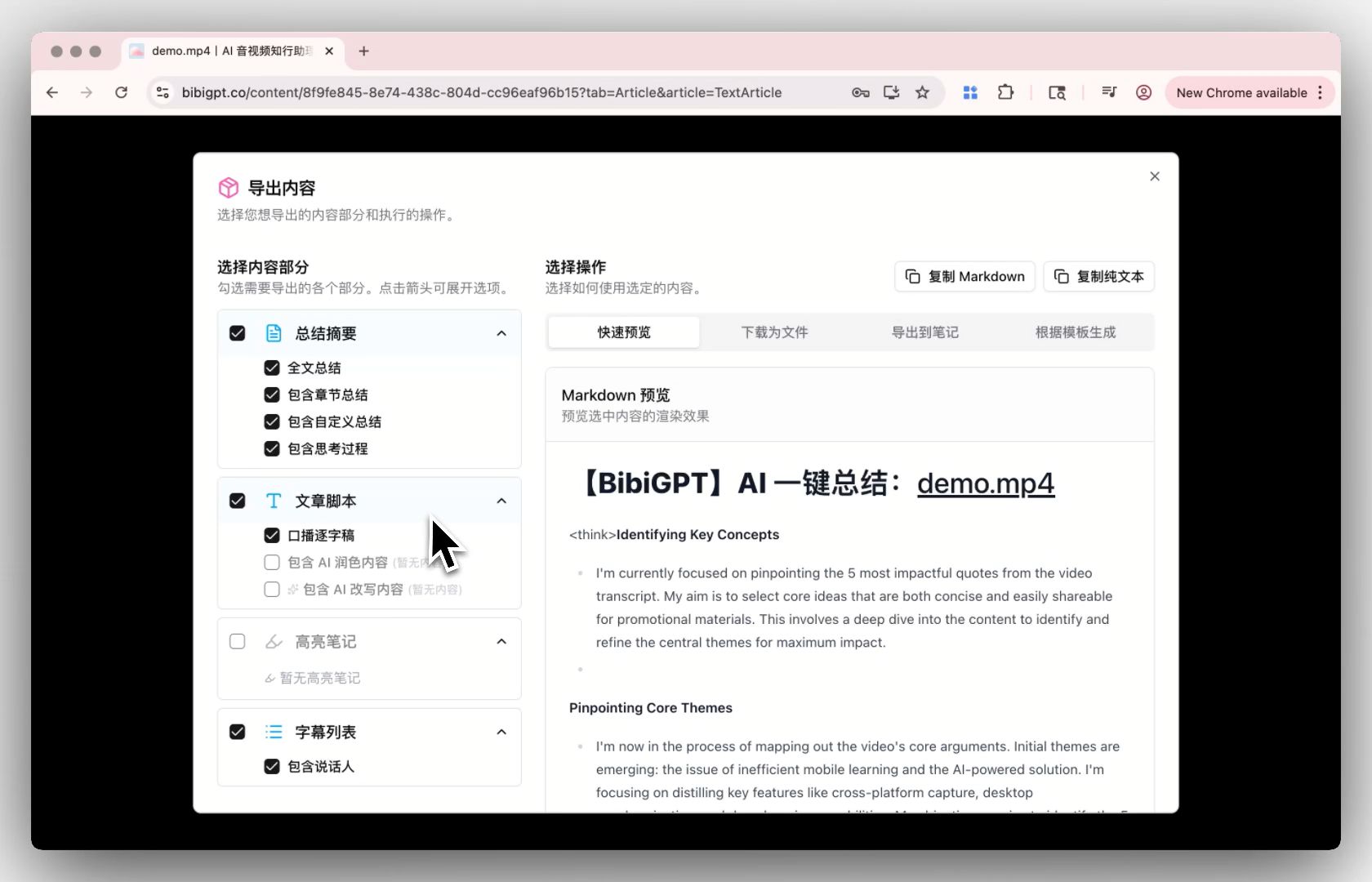 Export options dialog
Real-World Use Cases
Content Creators: The Secret to Content Multiplication
A YouTuber who publishes weekly tutorial videos used to spend 3 extra hours writing each accompanying blog post. With BibiGPT's video-to-article workflow, the same task takes 10 minutes, and organic search traffic to the blog increased by 40%.
Marketing Teams: The Content Matrix Engine
A marketing team recorded a product launch livestream and needed blog articles, social media summaries, and newsletter content fast. One video URL through BibiGPT produced a structured article that served as the foundation for all derivative content -- a 5x efficiency gain.
Educators: Efficient Knowledge Preservation
University professors convert recorded lectures into course notes and blog posts, giving students both video and text learning resources. BibiGPT's timestamp mapping lets students jump between the article and the exact video moment effortlessly.
Podcasters: Making Audio Content Visible
Podcast episodes are invisible to search engines without text. Using BibiGPT's Podcast to Notes feature, podcasters can convert episodes into blog articles, unlocking SEO visibility for audio content.
Tips for Better Results
Choose the Right Videos to Repurpose
Not every video converts equally well into a blog post. These types work best:
- Tutorials: Step-by-step structure translates naturally into blog format
- Interviews and conversations: High opinion density, easy to extract quotable insights
- Talks and presentations: Complete narrative arc with clear arguments and evidence
- Product reviews: High information density with strong reader demand for text format
Optimize AI-Generated Output
- Review the AI summary first: Before generating the article, verify the summary captures the core message accurately
- Use custom prompts: BibiGPT supports custom summary prompts to tailor output for specific industries or styles
- Layer your edits: Start with AI polish, then add your personal touch for best results
- Keep timestamp references: Embedding video timestamp links in your blog boosts engagement
SEO Optimization Checklist
- Include primary keywords in title and meta description
- Use H2/H3 heading hierarchy to structure content
- Add descriptive alt text to all images
- Place core keywords within the first 150 words
- Include internal links and authoritative external references
Frequently Asked Questions
Which video platforms does BibiGPT support for video-to-article?
BibiGPT supports 30+ platforms including YouTube, Bilibili, TikTok, Douyin, Xiaohongshu, podcasts, and more. It covers virtually every major video and audio content source you use daily.
How good is the AI-generated article quality? Do I need to edit it?
BibiGPT's AI video-to-article output comes with complete structure, fluent writing, and auto-generated illustrations. For quick-publish scenarios, the output is ready to use. For high-quality professional blogs, we recommend 10-15 minutes of manual refinement after AI polish for the best results.
Is the video-to-article feature free?
The AI Video to Illustrated Article feature is a Pro-tier exclusive. Basic AI summary and transcript extraction are available for free, so you can experience BibiGPT's core capabilities before upgrading.
How long of a video can BibiGPT process?
BibiGPT handles videos of various lengths, with long audio and video files processed automatically in the background. Whether it is a 5-minute clip or a 2-hour lecture, the conversion works.
Can I use the generated articles commercially?
Yes. Articles generated through BibiGPT are yours to edit, publish, and use commercially. We recommend appropriate manual review and fact-checking before publication.
Start Repurposing Your Videos Today
Turning video content into blog posts no longer requires hours of manual work. BibiGPT's 5-step AI workflow makes it simple and efficient: paste a link, generate an article, AI polish, add visuals, and export.
Whether you are a content creator, marketer, or educator, this workflow helps you maximize the value of your video assets while capturing long-tail SEO traffic.
Start your AI efficient learning journey now:
- 🌐 Official Website: https://aitodo.co
- 📱 Mobile Download: https://aitodo.co/app
- 💻 Desktop Download: https://aitodo.co/download/desktop
- ✨ Learn More Features: https://aitodo.co/features
BibiGPT Team