
Deep Dive: Manus Minutes vs. BibiGPT AI Summarizer – Unlocking New Heights in Meeting & Learning Efficiency
Compare Manus Minutes and BibiGPT AI audio-video summary tools to understand their positioning and boundaries, helping you choose the right tool to enhance meeting management and audio-video learning efficiency.
Deep Dive: Manus Minutes vs. BibiGPT AI Summarizer – Unlocking New Heights in Meeting & Learning Efficiency
In today's information-overloaded world, whether it's meeting management or audio-video learning, we often get stuck on two pain points: information overload and difficulty in execution. The value of AI tools is no longer just "copying everything for you," but compressing content into actionable, reusable structures. This article breaks down Manus's latest "Meeting Minutes" feature and the more comprehensive audio-video summary and knowledge management tool BibiGPT, helping you quickly clarify their positioning and boundaries, choose the right tool, and boost efficiency.
Part 1: Manus Minutes – Turn Offline Conversations into Actionable To-Do Lists
Manus Minutes is a tool launched by Manus AI for offline scenarios such as face-to-face meetings, interviews, and personal monologues. Its goal is clear: reduce the waste of "recorded but unused" and "meetings that end with no follow-up," directly converting real-time conversations into trackable results. For more details, refer to the Manus official blog.
Its core philosophy is "turns conversation into action." You simply click to start recording, and after the meeting ends, Manus automatically analyzes the content and produces structured minutes, usually including key conclusions, participants, and clear to-do item breakdowns.
Manus Minutes has several standout features: it supports intelligent speaker identification, can distinguish between different speakers, and automatically associates action items when names are mentioned in conversations, reducing the friction of manual assignment. It also emphasizes end-to-end execution: meeting minutes are not "static documents" but "living contexts" that can be continued. You can generate deliverables such as presentations, websites, and social media materials based on the minutes, achieving a coherent flow from discussion to output. Collaboration is also smoother: you can invite participants into the same task space to jointly advance results. There's also an engineering detail: its recording capability doesn't interrupt capture—even if the network is interrupted, recording continues, avoiding loss of key segments, though starting a session and generating minutes still require a network connection.
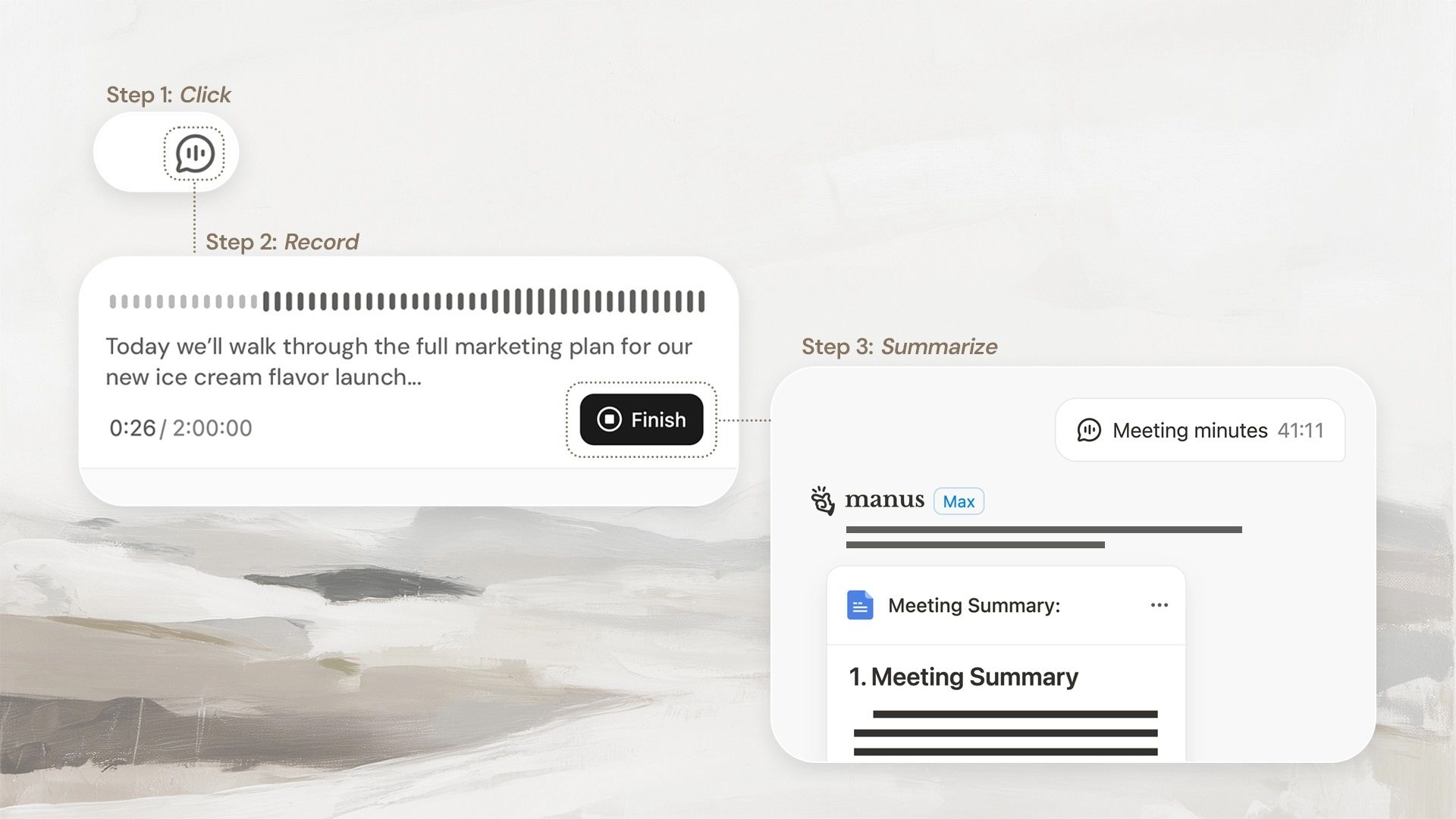 Manus Minutes vs. BibiGPT Comparison
Applicable scenarios: Internal corporate meetings, client interviews, training workshops, personal idea recording, and other pure offline interaction scenarios.
Limitations: Specifically designed for offline meetings and does not support online meetings; recording is free, but analysis and minute generation consume credits; features are still being iterated.
Part 2: BibiGPT Audio-Video Summary – A More Comprehensive "Audio-Video Content to Action/Knowledge" Closed-Loop System
BibiGPT is positioned more as an "audio-video knowledge processor": covering multiple sources such as online videos, podcasts, and offline local audio-video files, transforming content into searchable, reusable, and storable knowledge assets. More importantly, it not only summarizes but also directly pushes results into action through custom summaries: for example, generating To-Dos, review lists, learning plans, script outlines, and more.
Key capabilities include:
- Multi-platform compatibility + local files: Supports mainstream video platforms like YouTube and Bilibili, podcast content, and local audio-video file imports.
- Speaker distinction: Supports distinguishing between speakers, allowing offline interviews, training, and meeting recordings to be incorporated into the same summary and review workflow.
- Actionable summaries: Supports custom summaries that generate To-Dos and action items, turning output directly into next-step arrangements.
- Greater controllability: Supports custom prompts, suitable for "recalculating" the same content according to different goals, such as learning, creation, team synchronization, and project advancement.
1) Deep Content Understanding and Visualization: From "Understanding" to "Remembering"
-
Smart Preferred Summary (Deep Summary): One-click generation of structured deep summaries containing core summaries, highlights, deep thinking Q&A, and terminology explanations.
 Question and Answer
 -
Summary with Embedded Mind Maps: Switch between text summaries and mind maps in the same view, suitable for establishing a global structure first, then returning to details for verification.
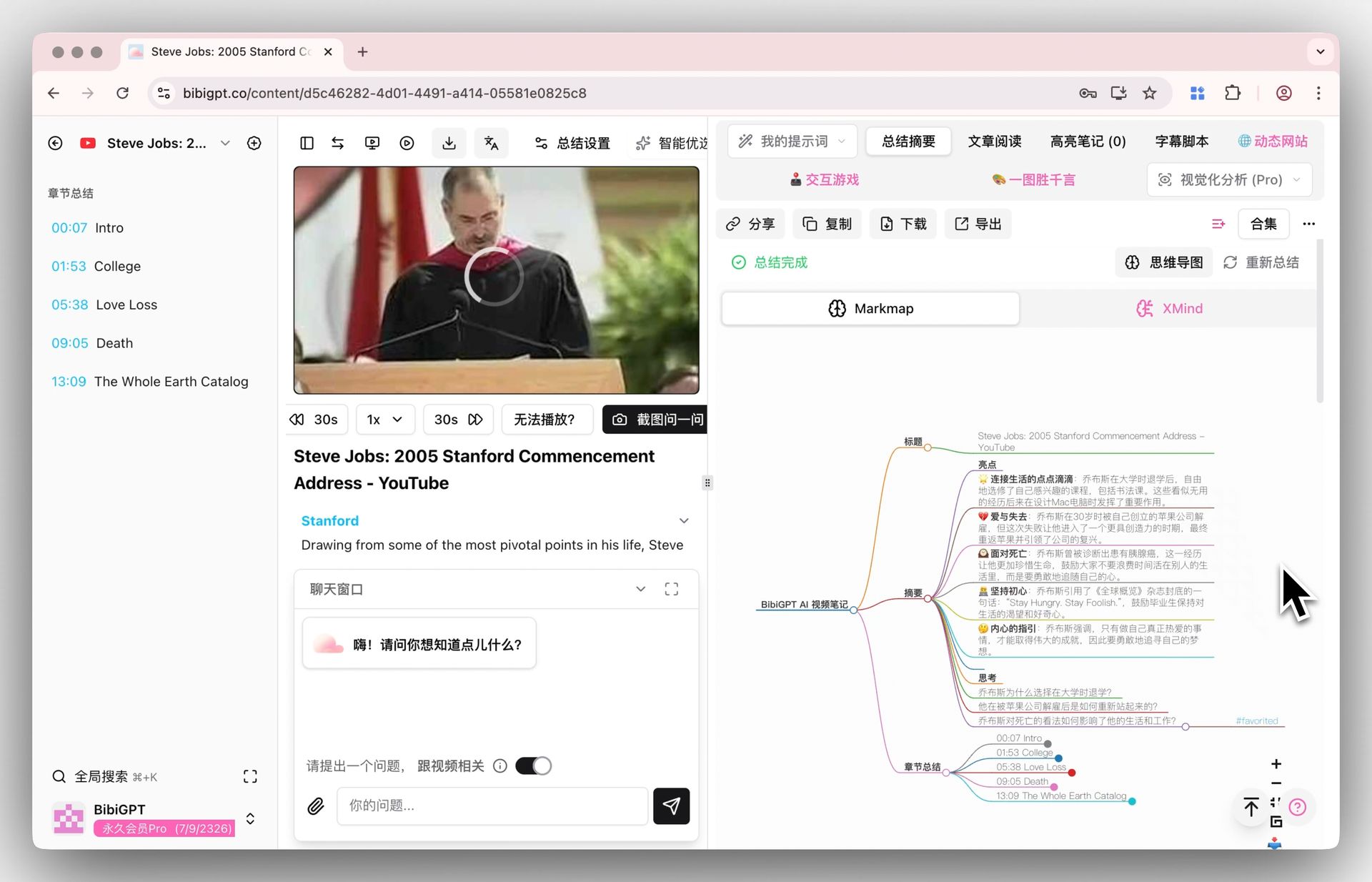 Mind Map Display
2) Prompt Market: Turn "Summary Capabilities" into Configurable, Reusable, and Tradeable Assets
The ceiling of many AI summary tools depends on "whether you know how to write prompts." BibiGPT's Prompt Market productizes this: you can directly use high-quality Prompts provided by official sources or other users (free or paid), or create your own Prompts and publish them, even pricing and selling them, realizing experience reuse and knowledge monetization.
The key change it brings is: summaries are no longer locked to "default summaries," but can be switched to the output format you need with one click. For example, learning notes version, project review version, marketing script version, meeting To-Do version, team synchronization version, etc., aligning output with goals rather than templates.
- Entry and usage: Integrated in the sidebar "Prompts" menu, supporting filtering by category, price, and sorting, with one-click application to summary tasks.
- Creator mode: Supports creating Prompts, publishing and sharing, and pricing for sale.
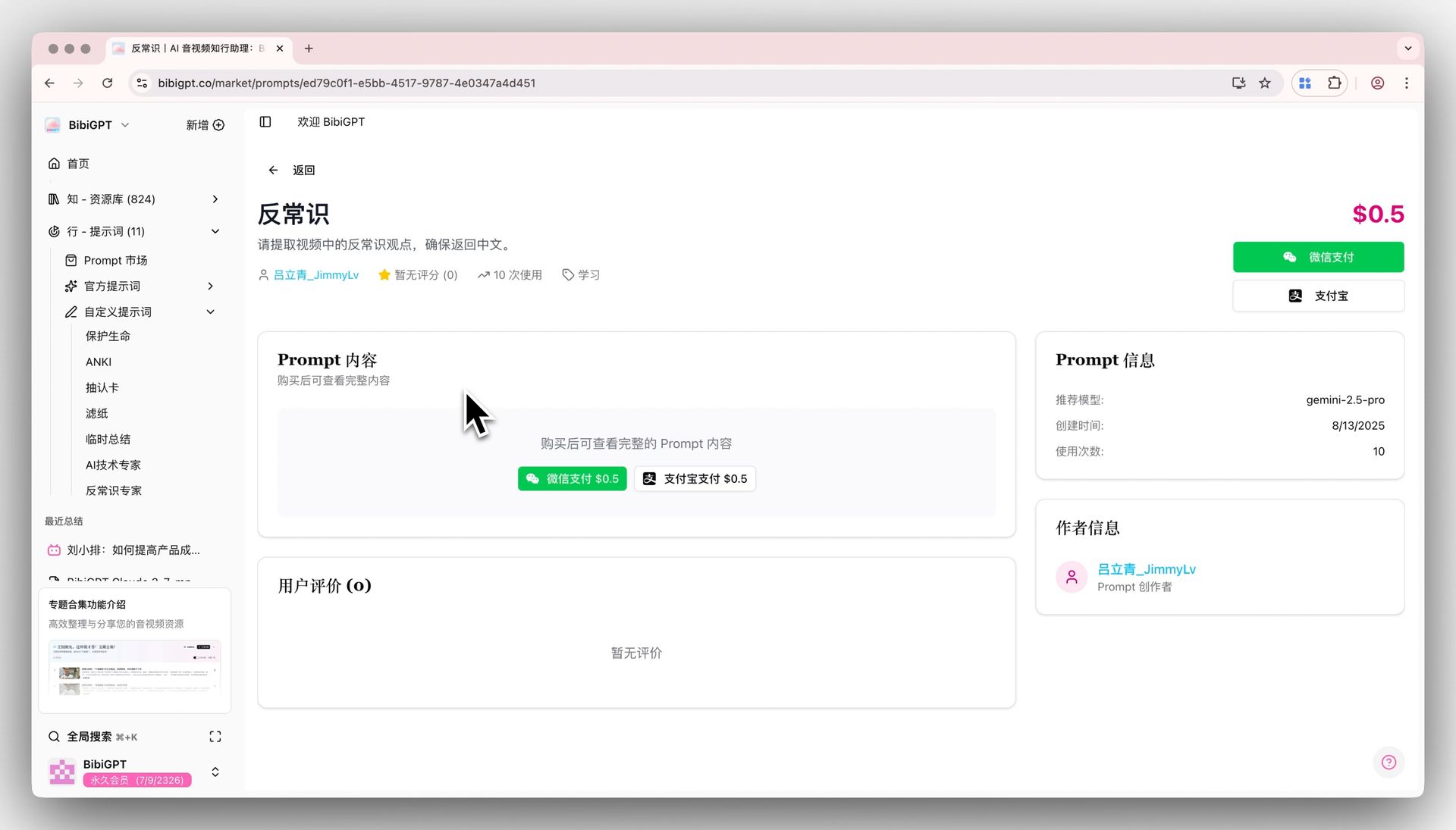 Prompt Market Demo Detail
3) Deep Knowledge Management Integration: Put Output into Your System
- Cubox notes integration: After summarization, one-click to save summaries, outlines, and timestamps to Cubox, with support for automatic sending configuration.
- Highlight notes export: Can specifically export highlight notes and send them to Notion, Readwise, Obsidian, etc., or download as Markdown, PDF, and other formats, forming searchable long-term assets. Learn how to export summaries to Notion or other knowledge management tools.
Applicable scenarios: Online course learning, technical tutorial analysis, industry podcast extraction, offline interview/training/meeting recording review, content creator secondary creation, team knowledge sharing and management, and "summary → action items (To-Do)"-driven project advancement.
Part 3: Manus Minutes vs. BibiGPT Audio-Video Summary – Key Differences at a Glance
| Feature Dimension | Manus Minutes | BibiGPT Audio-Video Summary |
|---|---|---|
| Primary Scenario | Offline meeting recording | Online audio-video learning and knowledge management + offline local file processing |
| Content Format | Meeting dialogue (transcription) | Video, audio (platform content + local files, multimodal content understanding) |
| Core Value | Efficient recording, action tracking, post-meeting collaboration | Deep understanding, knowledge accumulation, multimodal output + custom summary generating To-Dos/action items |
| AI Focus | Speech recognition, speaker identification, key information extraction | Semantic understanding, structured analysis, visualization, knowledge management integration + speaker distinction + Prompt configurability |
| Output Format | Structured minutes, action lists | Summaries, mind maps, articles, flash cards, highlight notes export, To-Dos, and various reusable content formats |
| Extensibility | Features centered around meeting minutes workflow | Prompt Market + custom prompts: turn output formats into reusable assets, adapting to more scenarios |
Part 4: How to Choose and Combine: Use "Result-Oriented" Rather Than "Feature Checklist" for Decision-Making
Choosing Manus or BibiGPT is essentially not about which is stronger, but about where you most often encounter bottlenecks, and whether you want output to stop at "minutes" or reach "reusable assets/actions."
- If your high-frequency task is offline meeting advancement, focusing more on on-site meeting recording, post-meeting assignment, and collaborative advancement, Manus Minutes is more suitable.
- If your high-frequency task is audio-video learning, research, and review, with content including both online and local sources, focusing more on turning content into knowledge assets, and directly generating To-Dos and action lists through custom summaries, while hoping to accumulate reusable output templates with the Prompt Market, BibiGPT is more suitable.
The two can also complement each other: use Manus for offline meetings to quickly turn discussions and decisions into actions; use BibiGPT for related learning videos, training recordings, and interview materials to do deep summaries, generate To-Dos, and accumulate them in the knowledge base. One is more focused on meeting advancement, the other on content assetization, and together they cover a more complete efficiency chain.
Part 5: Conclusion – Use AI as a "Result Accelerator," Not a "Note Taker"
The value of AI has evolved from recording to structured understanding, reusable templates, and action implementation. Manus Minutes is better at turning offline conversations into actions and collaboration; BibiGPT is more comprehensive: it can handle both online content and offline local files; it can distinguish speakers and generate To-Dos with custom summaries; the Prompt Market further turns "effective summary methods" into reusable assets, allowing efficiency to have the possibility of sustained compound interest.
As a professional AI audio-video assistant tool, BibiGPT is committed to helping users transform audio-video content into actionable knowledge assets. Whether you're a student, creator, or professional, you can improve work and learning efficiency through BibiGPT.
Start experiencing BibiGPT and begin your efficient audio-video learning journey! Try BibiGPT Now
BibiGPT Team