AI Video Dubbing & Translation Tools 2026: ElevenLabs vs HeyGen vs D-ID vs BibiGPT Subtitle Translation
AI Video Dubbing & Translation Tools 2026: ElevenLabs vs HeyGen vs D-ID vs BibiGPT Subtitle Translation
As of 2026-04-27, AI video dubbing has gone from “toy” to “daily tool.” Voice cloning is approaching human-level fidelity, multilingual coverage has crossed 100 languages, and pricing has dropped from $30/min in early years to $0.5-3/min today. But as the toolset explodes, picking the right one gets harder — AI dubbing, subtitle translation, voice replacement, lip-sync — which one is actually worth your money?
This guide covers ElevenLabs Dub, HeyGen Video Translate, D-ID Studio, Synthesia, CapCut AI Dubbing, and BibiGPT subtitle translation. We sort tools by use case, and we propose a money-saving path that fits long videos especially well: subtitle first, then decide whether to dub.
1. Concept first: AI dubbing vs. subtitle translation
Many users get this wrong on step one — they treat “subtitle translation” and “video dubbing” as the same thing. They solve very different problems.
Subtitle translation
- What it does: Transcribes the original audio, translates it, and overlays target-language text on screen
- Keeps: Original audio track, video frames, expressions, intonation, lip shape
- Common tools: BibiGPT, Trancy, immersive translators, Notta
- Typical cost: $0-1 per audio hour
- Best for: Just understanding the content, taking notes, learning
AI video dubbing
- What it does: Replaces the audio track with target-language synthetic voice, optionally with voice cloning + lip-sync
- Keeps: Frames, expressions
- Changes: The audio language (completely), and lip shape if lip-sync is on
- Common tools: ElevenLabs Dub, HeyGen Video Translate, D-ID Studio, CapCut AI Dubbing
- Typical cost: $0.5-3 per video minute
- Best for: Publishing the video to a target-language market where viewers won’t read subtitles
Core call: If your audience can read subtitles, subtitle translation is cheaper, faster, and more faithful. Only when “the audience won’t read subtitles, their hands are doing something else while watching” (TikTok, instructional videos going overseas) does dubbing pay for itself.
2. AI dubbing tool head-to-head (2026-04 update)
| Tool | Core capability | Voice cloning | Lip-sync | Price range | Best content type |
|---|---|---|---|---|---|
| ElevenLabs Dub | Translation + dubbing + voice cloning | Top-tier (Voice Library) | Via partners | $5-22/audio hour | High-quality marketing / creators |
| HeyGen Video Translate | Translation + dubbing + lip-sync | 30+ clones | Built-in lip-sync | $24-99/month | Marketing / training / brand |
| D-ID Studio | AI avatar + dubbing | Built-in voice library | AI avatar generation | $5.9-49/month | Avatar videos / training |
| Synthesia | Enterprise digital humans + dubbing | 70+ AI avatars | Digital-human level | $22-89/month | Enterprise training / B2B |
| CapCut AI Dubbing | Mobile-native dubbing | 269 TTS voices | Some templates | Free + subscription | Short videos / TikTok |
| BibiGPT subtitle translation | Subtitle gen + translation + bilingual overlay | Does not dub | N/A | Free + subscription | Long-form learning / summary |
Pricing source: official vendor pages (2026-04). Always confirm with the vendor.
ElevenLabs Dub
- Strengths: Voice cloning quality is still the industry ceiling in 2026; cloned voice can produce multilingual versions, so listeners hear “the same person” in different languages
- Weakness: Lip-sync needs an external tool
- Best for: High-quality YouTube creators, podcasters going global, brand films
HeyGen Video Translate
- Strengths: Built-in lip-sync is the key differentiator — most natural “translated version of the original video”
- Weakness: Long videos eat through monthly quotas fast
- Best for: Marketing videos going overseas, corporate brand films, instructional videos
D-ID Studio
- Strengths: Turn a photo into a talking AI avatar — perfect when there is no real-person camera
- Weakness: Not real video translation; it’s avatar synthesis
- Best for: Customer service videos, sales scripts, AI presenters
CapCut AI Dubbing
- Strengths: Easiest mobile workflow, low free-tier barrier, 269 TTS voices, TikTok template optimized
- Weakness: Voice cloning quality still trails ElevenLabs
- Best for: TikTok / Reels / Shorts creators
Synthesia
- Strengths: Enterprise-grade digital humans, 70+ avatars, mature compliance
- Weakness: Pricing is high; not for individual creators
- Best for: Corporate training, B2B product demos
3. How to evaluate voice cloning quality
Not all “voice cloning” is equal. In 2026, judge an AI dubbing tool’s cloning capability across 4 axes:
- Timbre fidelity (how close the cloned voice sounds to the original)
- Emotional range (smooth switching between happy / angry / calm)
- Cross-language consistency (a cloned English voice still sounds like the same person when speaking Chinese)
- Sample size required (how many minutes of source audio to produce a usable clone)
ElevenLabs leads all four axes today. HeyGen is close on cross-language consistency but a bit weaker on emotion. CapCut’s 269 voices are preset timbres, not clones. Casual user: HeyGen / CapCut. High-quality scenarios: ElevenLabs.
4. Pricing comparison and “the cheap path”
| Use case | Recommended tool | Monthly cost estimate |
|---|---|---|
| Occasional long-video translation for learning | BibiGPT subtitle translation | Free - $19 |
| 10 TikTok shorts/month going overseas | CapCut AI Dubbing | $9 |
| 4 marketing videos/month with lip-sync | HeyGen Video Translate | $29-99 |
| 20+ pieces/month with top voice quality | ElevenLabs Dub | $22-99 |
| Enterprise training translation at scale | Synthesia / D-ID | $89+ |
The cheap path: subtitles first, then decide
Many users actually want “I want to understand what this 1-hour English video is saying,” not “I want to publish this video to a Chinese-speaking market.” The cost gap between these two needs is 10-50x.
A reasonable path:
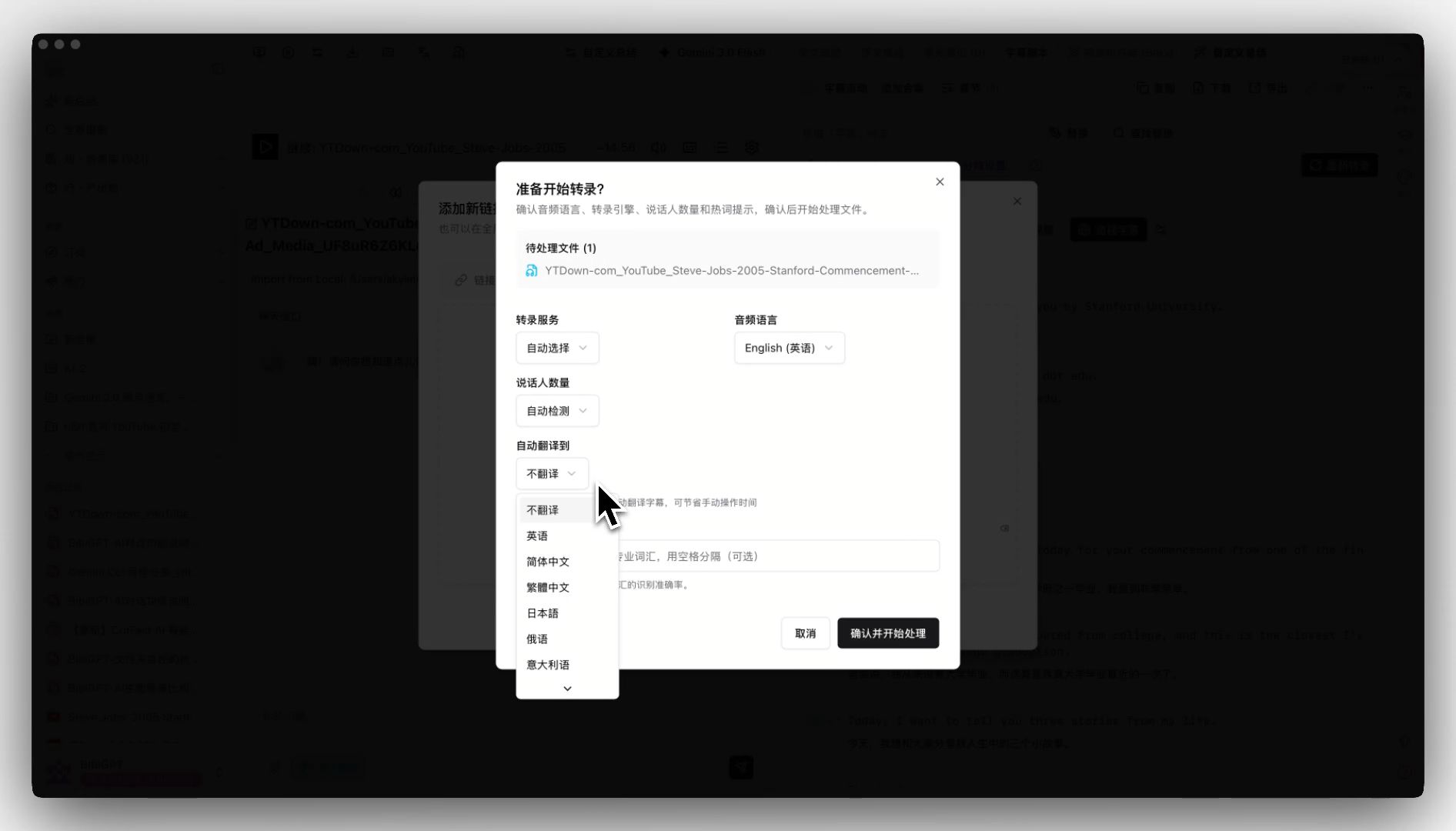
- Use BibiGPT subtitle translation first — get bilingual subtitles, summary, and chapter splits (near-zero cost)
- After watching, decide: is this for an audience that won’t read subtitles? Or just for me to learn / take notes?
- Only when you decide “this needs to ship overseas” do you spin up HeyGen / ElevenLabs for dubbing
- Avoid the classic waste: “spent $50 on dubbing, then realized I never needed the dubbed version”
5. Best content type matrix
Different content has very different dubbing needs:
Short videos (TikTok / Reels / Shorts)
- Subtitles are usually enough — viewers watch with sound off
- For dubbing, pick CapCut — fastest mobile-native workflow
Education / online courses
- Strongly recommend subtitle-first: educational content is information-dense; subtitles let learners pause and rewatch at their own pace
- For dubbing, pick HeyGen (lip-sync makes the instructor look multilingual)
Marketing / product videos
- Dubbing + lip-sync is mandatory — viewers won’t read subtitles
- Combine ElevenLabs (voice cloning) + HeyGen (lip-sync), or use HeyGen one-stop
Self-publishers / individual creators
- Depends on length: ≤10 min, one-stop tool works; ≥30 min, run BibiGPT subtitle translation first
Long videos / lectures / interviews (>1 hour)
- Almost never dub directly — long-form audiences are research-driven and want subtitles + chapters + searchable transcripts, not dubbing
- This is BibiGPT’s core capability zone — upload or paste URL, get multilingual subtitles, chapters, mind maps, AI chat follow-up automatically
6. BibiGPT subtitle translation’s positioning
Among “translation players,” BibiGPT does not chase the dubbing lane against ElevenLabs / HeyGen. It pushes subtitle translation to its limit instead:
- Long-video friendly: 1-3 hour podcasts, lectures, online courses processed end-to-end with auto chapter splits
- 30+ platforms with URL paste: YouTube, Bilibili, Xiaoyuzhou, TikTok and more — no download needed
- Bidirectional translation across Chinese / English / Japanese / Korean: set target language at upload time
- Companion deep features: AI chat follow-up, mind map with timestamp jumping, video-to-article, smart deep summary
BibiGPT is trusted by over 1 million users with 5+ million AI summaries generated. The “subtitle translation + deep content” pipeline is hard to replicate with a single-purpose tool.
7. Decision flowchart
What do you need?
├─ Understand / learn / take notes → BibiGPT subtitle translation (Free start)
├─ Short videos going overseas (<3 min)
│  ├─ TikTok / Reels → CapCut AI Dubbing
│  └─ High-quality marketing → HeyGen Video Translate
├─ Education / courses going overseas (3-30 min)
│  ├─ Need lip-sync → HeyGen
│  └─ Need top voice cloning → ElevenLabs Dub
├─ Long-video organization (>30 min)
│  └─ Almost always BibiGPT subtitle translation; don't waste money on dubbing
└─ Enterprise training / B2B
   └─ Synthesia / D-ID
8. Common pitfalls
Pitfall 1: “More expensive AI dubbing is always better”
Wrong. Voice cloning quality and price are not linear. HeyGen’s $29 lip-sync is fine for marketing; no need to default to a $99 plan.
Pitfall 2: “If I have budget, dub everything”
Wrong. Dubbing long videos has terrible ROI — long-form audiences read subtitles patiently, the marginal value of dubbing is near zero, but the cost is 50x.
Pitfall 3: “Subtitle translation is always lower quality than dubbing”
Wrong. Good subtitle translation preserves original tone, pacing, and emotion — it can feel more authentic. Dubbing always carries AI artifacts.
9. FAQ
Q1: 1-hour English YouTube course — should I subtitle first then decide on dubbing? Strongly recommended. Subtitles are near-free; 1 hour of dubbing costs $30+ minimum. After watching the subtitled version, most users find they don’t need dubbing.
Q2: Does BibiGPT do dubbing itself? Not directly today. BibiGPT focuses on “subtitle translation + content understanding”; pair it with ElevenLabs or HeyGen for dubbing.
Q3: How many minutes of voice sample for cloning? ElevenLabs Voice Cloning needs 1 minute minimum, 5-10 minutes for high quality. HeyGen’s 30+ cloning offering needs around 5 minutes.
Q4: How is HeyGen’s lip-sync on Chinese? English is best, Chinese is good but lips occasionally drift, especially on retroflex or “er-hua” sounds. If you’re translating into Chinese dialects, request a sample first.
Q5: Are CapCut’s 269 voices actual cloning? No. It’s a preset TTS voice library. To clone your own voice, use ElevenLabs or HeyGen.
Q6: How do I estimate long-video dubbing cost? Per-minute tools: 1 hour ≈ $30-180. Monthly plans: HeyGen $99 ≈ 60 minutes quota. Once you do the math, most long videos pencil out for subtitles only.
Q7: Can I run BibiGPT first and then dub? Yes. BibiGPT outputs bilingual subtitles and chaptered transcripts. Feeding the target-language subtitles (with timestamps) into ElevenLabs or HeyGen is a popular money-and-time-saving combo.
Conclusion: subtitle first, dub second
AI video dubbing tools in 2026 are genuinely impressive — but for the vast majority of users, the first stop should not be a dubbing tool, it should be a subtitle translation tool. BibiGPT pushes that segment to its industry-cheapest, most long-video-friendly state — let BibiGPT help you understand the video first, then decide whether dubbing is worth the spend.
Try BibiGPT subtitle translation now
- Visit: aitodo.co
- Bidirectional Chinese / English / Japanese / Korean
- 30+ platforms via URL paste, no download
- Built for 1-3 hour long videos
BibiGPT Team