
The Only AI Video Tool I Kept This Year: How BibiGPT Maximized My Learning Efficiency
Discover how BibiGPT transforms video learning into a two-step process: collecting content and absorbing knowledge. Learn how to use collection summaries, mind maps, highlight notes, and subtitle learning features to turn video content into reusable knowledge assets with AI audio-video summarization.
The Only AI Video Tool I Kept This Year: How BibiGPT Maximized My Learning Efficiency
This year, there's been an overwhelming amount of video content: product launches, new model releases, technical explanations, tutorials, breakdowns... If I tried to watch everything myself, I'd never finish. I tried many tools, but only one made the cut: BibiGPT. The reason is simple—it makes video learning effortless, organized, and incredibly efficient.
Its biggest help to me is breaking down "watching videos" into two steps: first, collect all relevant content and understand the big picture; then, break down the worthwhile content into digestible pieces that I can learn, remember, and reuse.
Let me walk you through how I use it.
Part One: Collect Relevant Content and Understand the Big Picture at Once
When chasing hot topics, I used to switch back and forth between Bilibili and YouTube, afraid of missing important information even at 2x speed. Now I use BibiGPT's "Explore" feature—I enter a keyword, and it pulls videos from both platforms. In seconds, I can add all the content I want to watch into a collection without opening multiple windows.
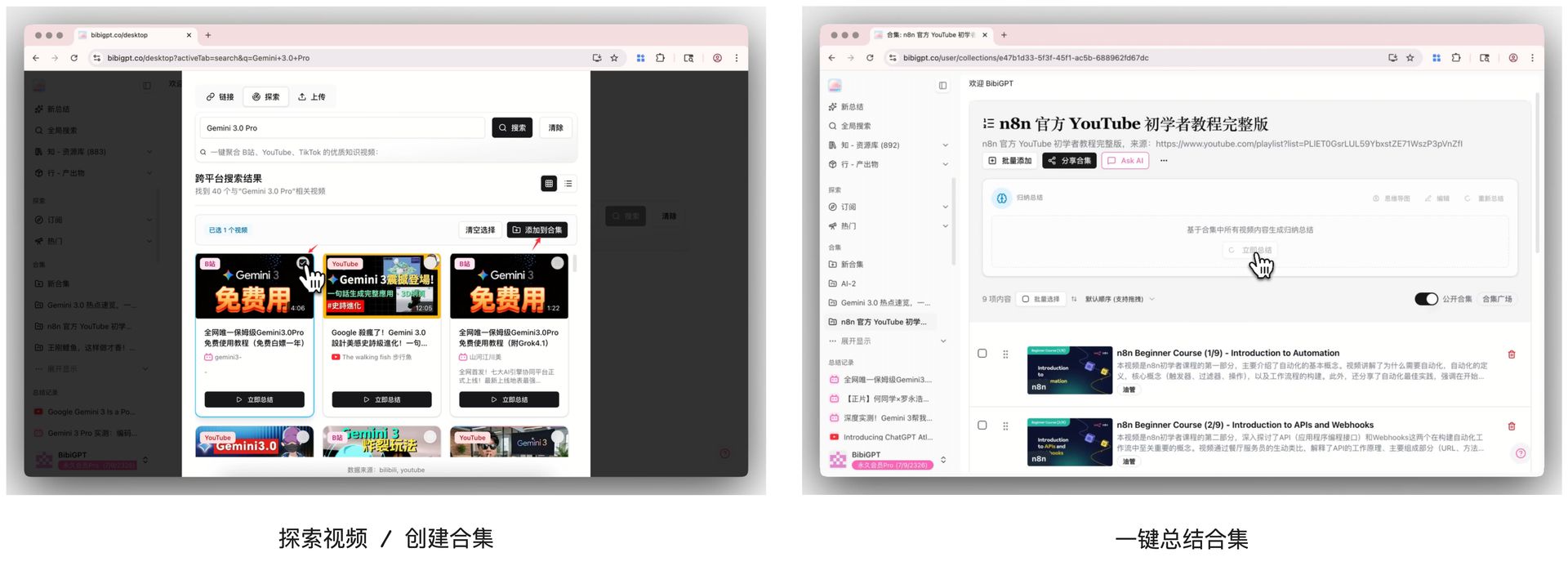 Explore and Create Collection
What's even better is the collection summary. When I open it, it doesn't just list videos individually. Instead, it automatically organizes the key points from all these videos into an "overall overview." I usually start with the collection summary, then check the collection mind map. In just three minutes, I know what everyone's talking about, what the consensus is, where there are differences, and which videos are worth my time.
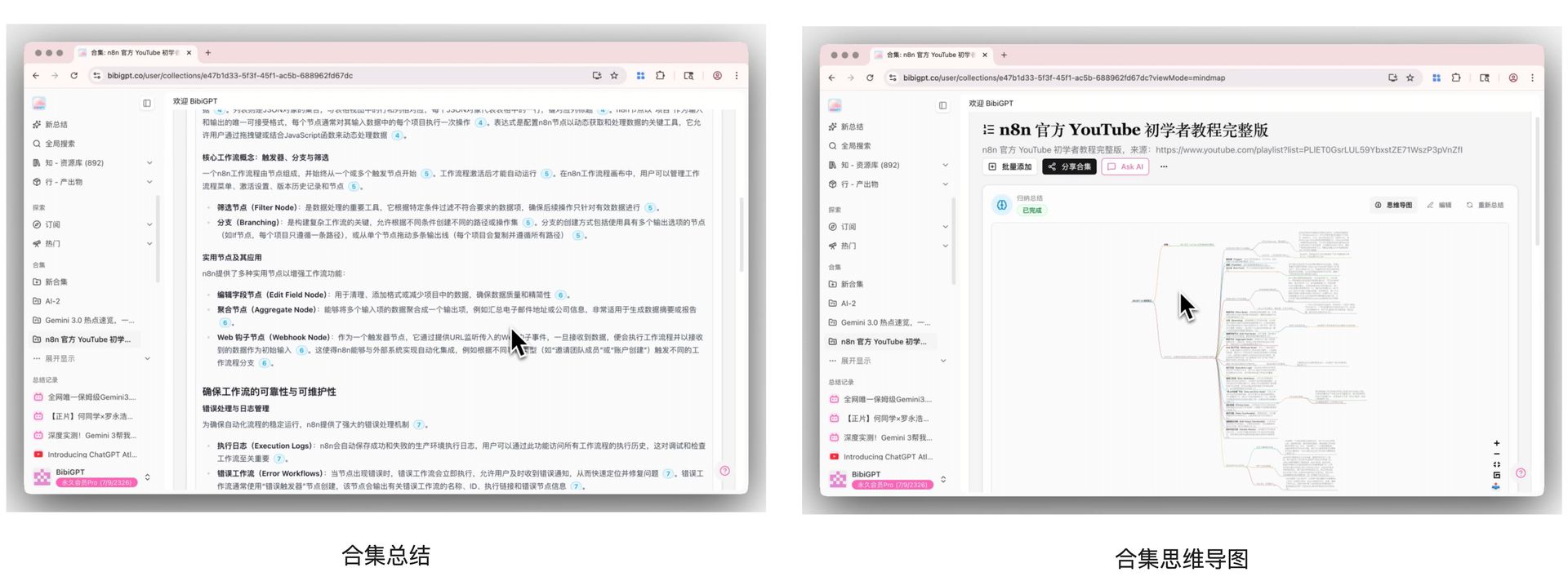 Collection Summary and Mind Map
By this point, I already have a sense of direction for the entire topic. Next comes the real work: "digesting" the content that's truly worth watching.
Part Two: Absorb the Key Content (Understand → Deep Dive → Remember)
The essence of BibiGPT lies in this step. It makes deep learning no longer rely on patience and willpower, but on the tool itself breaking down complex content into formats that can be directly absorbed. I think of this part as three stages.
① First, Understand: Use Summaries, Notes, and Sentence-by-Sentence Analysis to Clarify Video Content
When I select a video worth deep diving into, I don't blindly watch from start to finish. Instead, I directly check the sections BibiGPT provides: the full summary for overall structure, highlight notes for key points, detailed reading for crucial sentences, and subtitle scripts that let me jump to any segment. This is crucial—the subtitles aren't just "displayed for you to read," but are clickable and jumpable. Want to understand something? Just click and jump there.
With this combination, I can usually understand 80-90% of a 20-minute video in about five minutes.
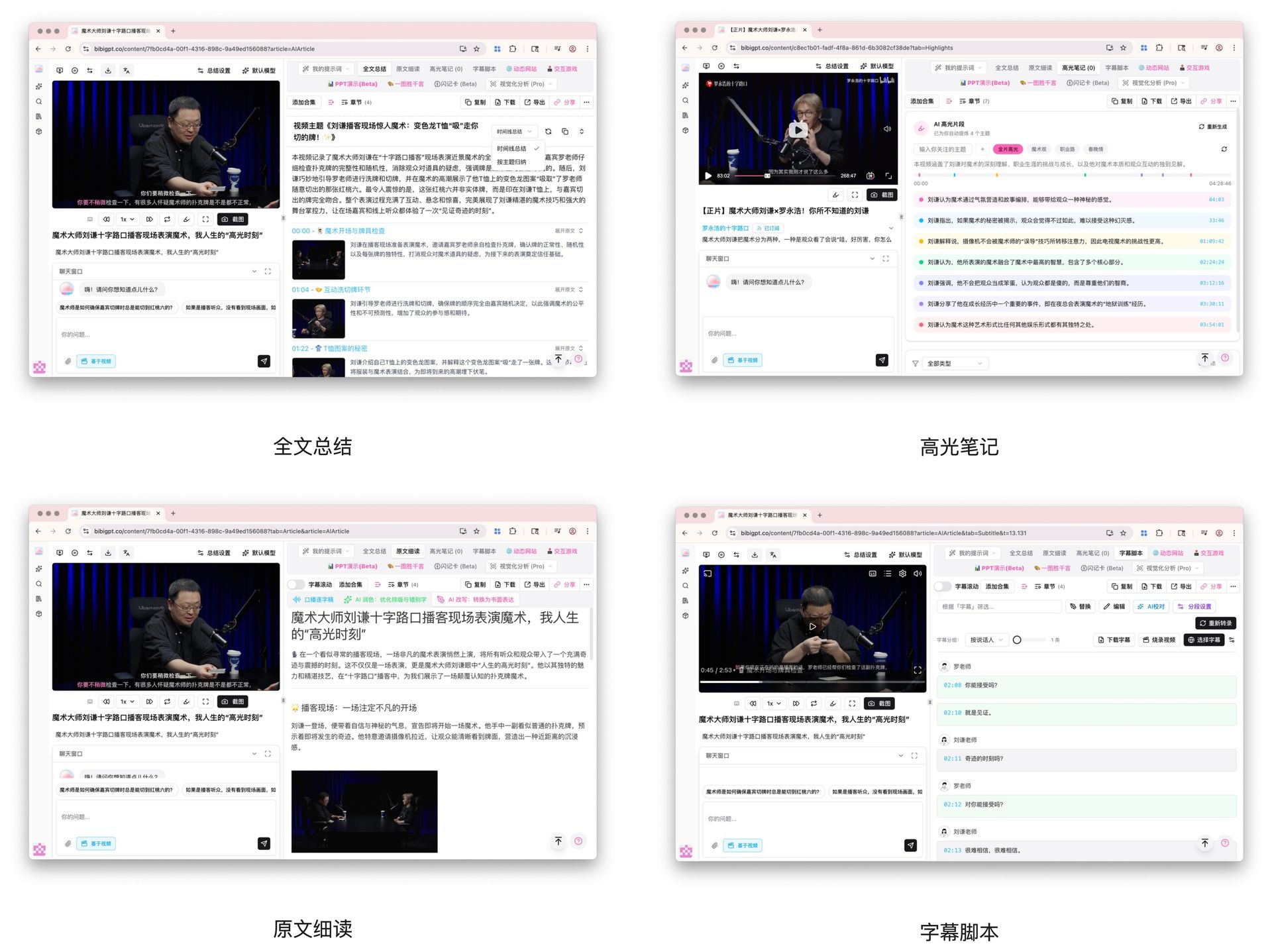 Full Summary, Highlight Notes, Detailed Reading, Clickable Subtitle Scripts
② Then, Deep Dive: Turn Content into Reusable Formats (Web Pages, PPTs, Interactive Content)
Some content I don't just want to understand—I want to reuse it, like for sharing, output, or work presentations. BibiGPT gives me one-click generation features: dynamic web pages, interactive games, PPT outlines, visual summaries... These all turn the structure from videos into "things I can directly use." This is far superior to ordinary summary tools.
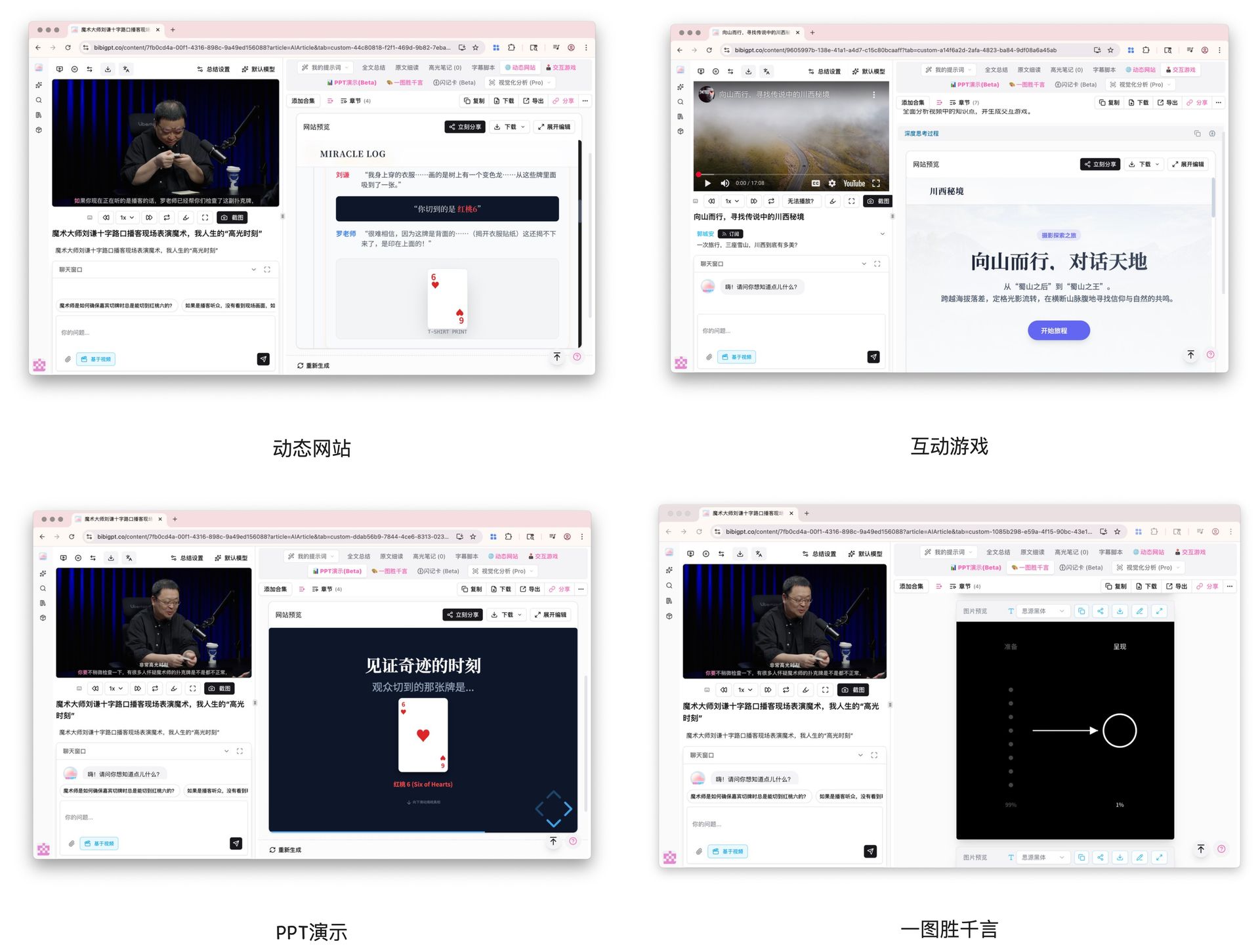 Dynamic Websites, Interactive Games, PPT Presentations, Visual Summaries
③ Finally, Remember: Subtitle Learning + Flash Cards, So Knowledge Actually Stays in Your Brain
After understanding and reusing, comes memorization. Two features in BibiGPT are particularly useful here: multilingual subtitle learning and flash cards. I often watch English tutorials, which used to be exhausting. Now with bilingual comparison + AI polishing, spoken language from videos is directly transformed into readable written language, and combined with flashcards, key knowledge points are basically unforgettable.
This combination makes learning feel like it has "echo," rather than disappearing after watching.
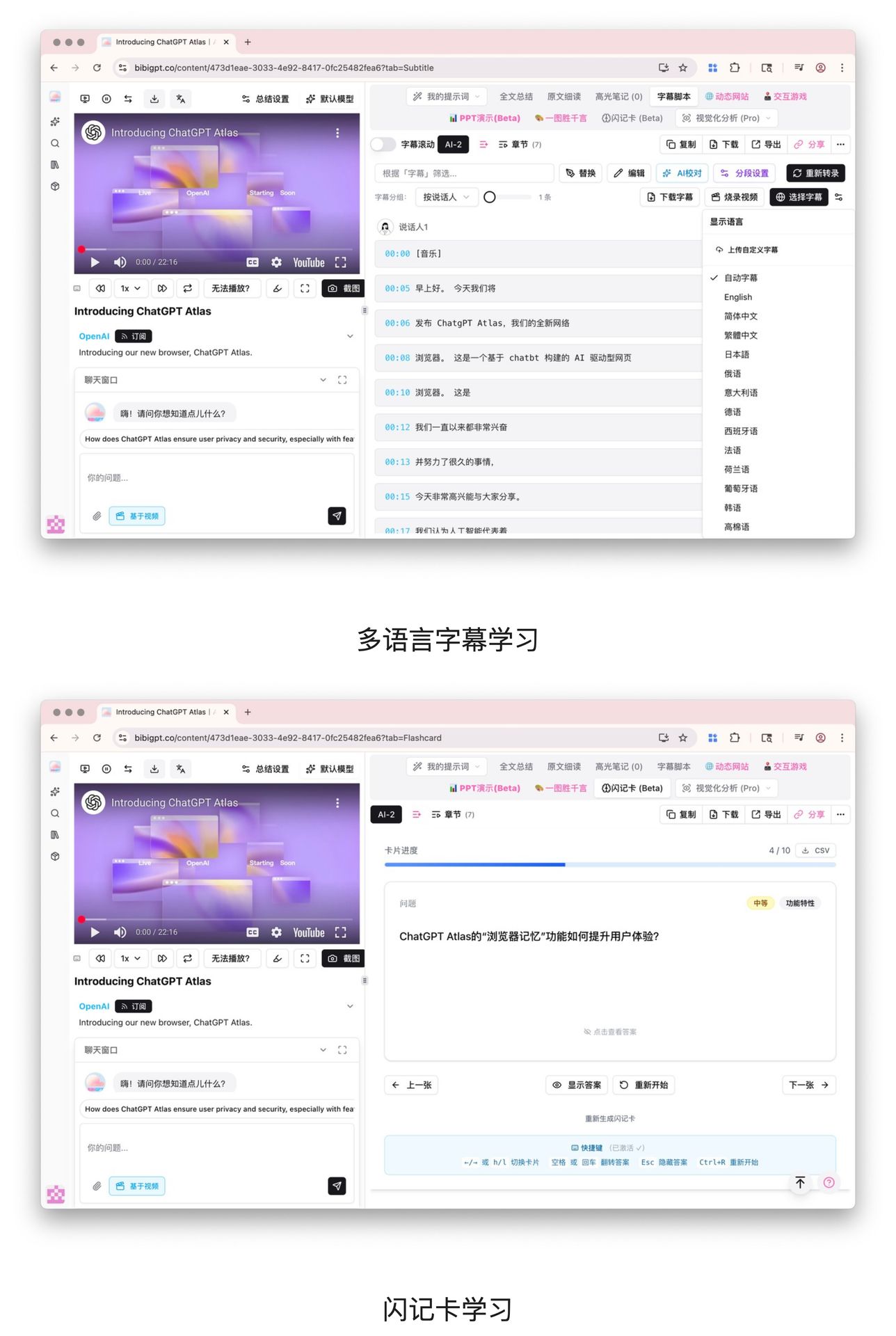 Multilingual Subtitle Learning + Flashcard Learning
Final Thoughts
The AI tool I've used most smoothly this year is BibiGPT, because it makes video learning effortless. First, collect all relevant content and see the big picture; then, break down the worthwhile parts into formats that are easy to understand, reuse, and remember. The efficiency improvement is visible.
If you're also often overwhelmed by piles of videos, this workflow might pleasantly surprise you. Once I got used to it, I could never go back.
Experience BibiGPT now
Ready to try these powerful features? Visit BibiGPT and start your intelligent audio/video summarization journey!
Get startedBibiGPT is a professional AI audio-video summarization tool that helps you quickly understand video content and transform complex audio-video information into structured knowledge assets. Whether you're a student, professional, or content creator, BibiGPT can be your powerful assistant for learning and work.
Experience BibiGPT's powerful features now and elevate your audio-video learning efficiency to new heights!
Have feedback or ideas?
We value your input! If you encounter issues or have suggestions, please let us know anytime.
Submit feedback