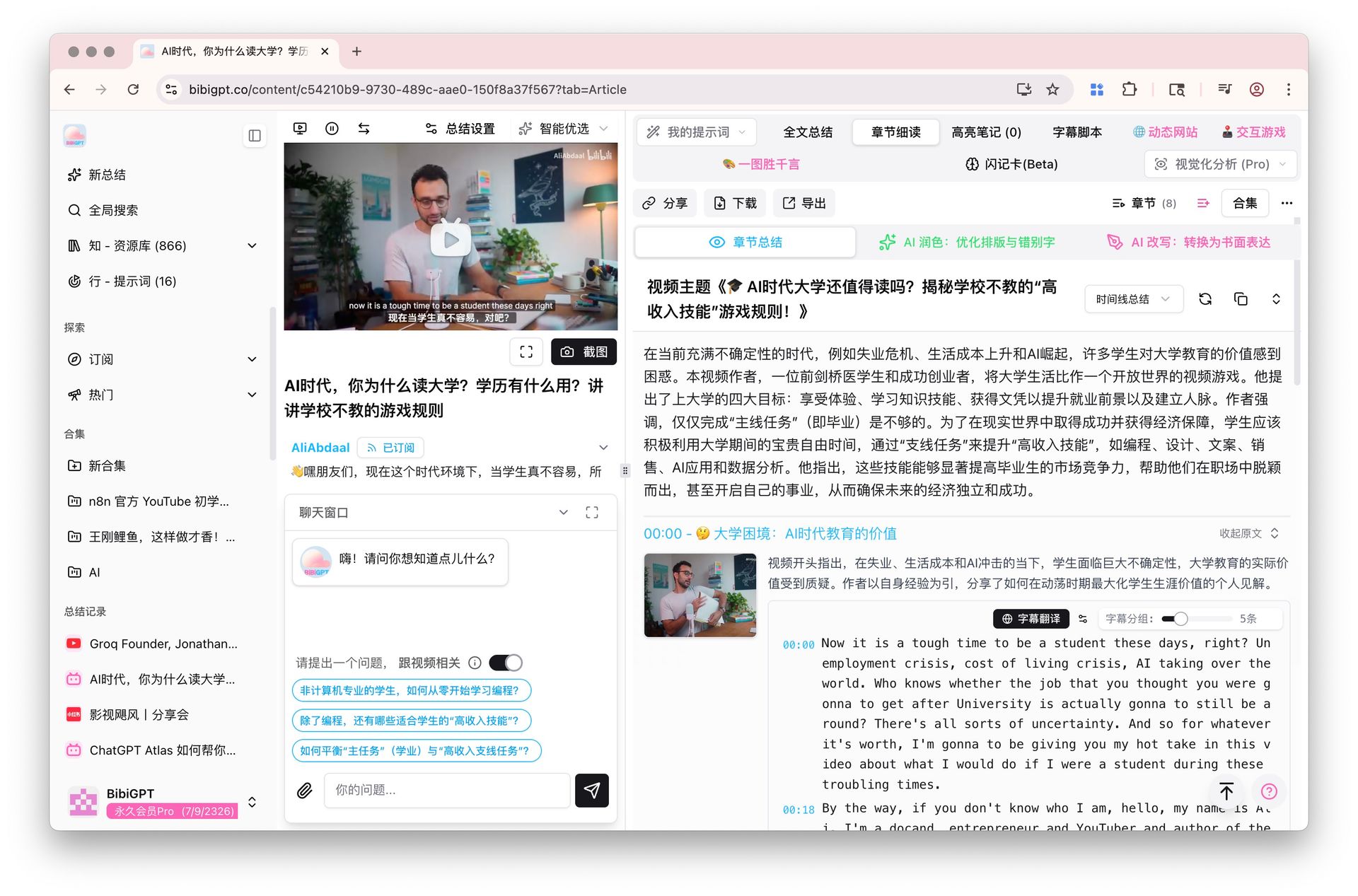
Microsoft Study and Learn Agent vs BibiGPT 2026: Which One for Video Learners
Microsoft Study and Learn Agent vs BibiGPT 2026: Which One for Video Learners
Last updated: 2026-05-18
100-word direct answer: As of Q2 2026 public info, Microsoft launched Study and Learn Agent in Microsoft 365 Copilot for students aged 13+. Its strengths are textbook PDF Q&A, learning path generation, and automatic Quiz creation. But the “video courses, podcasts, YouTube lectures, subtitle translation” stack isn’t its battlefield. If video and audio are >30% of your learning materials, BibiGPT is still the smoother pick. This guide is for video learners specifically.
30-Second Decision Guide (Jump by Your Scenario)
| Your scenario | Primary pick | Jump to |
|---|---|---|
| YouTube / Coursera / MIT OpenCourseWare lectures | BibiGPT | Overseas MOOC scenario |
| Podcast + audio learning | BibiGPT | Podcast learning scenario |
| Language listening + subtitle translation | BibiGPT | Language listening scenario |
| Textbook PDF Q&A + Quiz self-testing | Study Agent | Study Agent strengths |
| Exam prep / long-term knowledge systematization | BibiGPT + Notion | Exam prep scenario |
Event Recap: What Study and Learn Agent Is + Isn’t
Per Microsoft Education’s public blog and outlets like PR Newswire, the Study and Learn Agent under Microsoft 365 Copilot is now available to students 13+. What it’s good at:
- Textbook PDF / Word Q&A: upload a textbook and chat with it inside Copilot Chat
- Learning path generation: break course goals into knowledge points + recommended order
- Quiz auto-gen: multiple choice, true-false, short answer based on the source material
- Microsoft 365 ecosystem coupling: Word, PowerPoint, OneNote materials flow in seamlessly
What it doesn’t (or barely) do:
- Process YouTube / Coursera / MOOC video links
- Parse podcast audio
- Extract slide frames from video lectures
- Aggregate materials beyond the Microsoft 365 universe
Practical rule: Study Agent eats “Office documents + textbook PDFs.” BibiGPT eats “video/audio + cross-platform links.” They live on different content formats — pick the one that matches your material.
If video/audio is ≥30% of your learning materials, BibiGPT is your primary tool — Study Agent stays as a textbook Q&A side helper.
Real Video-Learner Scenarios: 5 Cases
Overseas MOOC Scenario: Chapter Deep Reading for Long Lectures
If your learning is internationally oriented:
- YouTube teaching channels (3Blue1Brown, Two Minute Papers, Khan Academy)
- Coursera / edX open courses
- MIT OpenCourseWare video lectures
BibiGPT’s YouTube AI Summary ships chapter-level summaries automatically. For long lectures (1–3 hours), Chapter Deep Reading is the killer feature — jump by topic without watching front to back.
Decision filter: Are your average lecture videos ≥30 minutes? If yes, chapter deep reading is irreplaceable. If no, any tool will do.
Podcast Learning Scenario: Audio to Structured Notes
Podcasts are core audio learning vehicles:
- Apple Podcasts / Spotify English podcasts (Lex Fridman, Tim Ferriss)
- Spotify language-learning shows
- Long-form interview audio
BibiGPT’s AI Podcast Summary turns 1–3 hour audio into structured notes with timestamp jumps. Study Agent doesn’t handle audio.
Language Listening Scenario: Subtitle Translation + Bilingual Display
Real language learning flows:
- Watch a YouTube English podcast → BibiGPT bilingual subtitles (Subtitle translation)
- Listen to NHK Japanese news → BibiGPT transcribes + glosses vocab
- Watch a French Netflix series → subtitle download + translation
- Korean drama for spoken practice → chapter splits by scene
- Shadowing practice → export subtitles back into Anki
Study Agent doesn’t process this content. None of it.
Practical rule: Language listening is dynamic information flow. Study Agent’s “text material stack” is the wrong tool — not bad, just mismatched.
Exam Prep: The Long-Loop Knowledge Stack
Two needs for long-term exam prep: knowledge systematization + retention.
- Lecture videos → BibiGPT chapter summaries
- Mind map export → Mindmap export into XMind for the full textbook outline
- Textbook PDFs → Study Agent for chapter Q&A + Quiz self-testing
- Mistake tracking → Notion database
- Review → Anki spaced repetition
Practical rule: Long video lectures are the lifeblood of exam prep. Study Agent can’t see them; BibiGPT is the real “exam-prep second brain.”
Study Agent’s Real Strengths: Office Ecosystem + Textbook Q&A
Fair credit — Study Agent is genuinely strong here:
- Word / PowerPoint textbooks: teachers distributing via Office formats, native Q&A
- OneNote class notes: ask the Agent while you take notes (“on-call TA”)
- Office 365 school account holders: zero friction
- Quiz generation: rapid self-test before exams
- Learning paths: works well for standardized international curricula (Cambridge, Pearson)
Fit: Overseas K12, overseas undergraduates, students whose schools deploy Microsoft 365 + distribute material in Office formats.
Comparison Table: 5 Dimensions for Real Decisions
| Dimension | Microsoft Study and Learn Agent | BibiGPT |
|---|---|---|
| Textbook PDF / Word Q&A | ✅ Strong (Office native) | ⚠️ Usable but not the focus |
| Video learning (YouTube/Coursera) | ❌ Not supported | ✅ Core (30+ platforms) |
| Podcast / audio learning | ❌ Not supported | ✅ One-click links to notes |
| Subtitle translation / language listening | ❌ Not supported | ✅ Bilingual + multilingual |
| Pricing model | Part of Microsoft 365 Copilot subscription | Free trial + subscription, see Pricing |
Decision filter: Is video/audio ≥30% of your learning materials? Yes → BibiGPT is irreplaceable. No → Study Agent may be enough.
Cross-Tool Workflow: It’s Not Either-Or
Most video learners’ best move is to use both, allocating by material type:
| Material type | Primary tool | Why |
|---|---|---|
| Textbook PDF / Word docs | Study Agent | Office-native |
| Teacher PPT / OneNote class notes | Study Agent | Seamless in Microsoft 365 |
| Video lectures / YouTube tutorials | BibiGPT | One-click chapter summaries |
| Language listening / subtitle translation | BibiGPT | Bilingual + multilingual |
| Podcast / audio learning | BibiGPT | 30+ platforms covered |
| Long-term note storage | Notion / Obsidian + BibiGPT sync | Sustainable knowledge management |
BibiGPT has served over 1 million users with over 5 million AI summaries generated. If video/audio is a meaningful share of your learning materials, paste your first link — you’ll know in a few minutes whether the loop fits.
FAQ
Can students outside the US use Study Agent?
You need a Microsoft 365 school account with a Copilot license. If your school has adopted it, yes. Coverage in Mainland China is still limited — confirm with your IT department first.
Does Study Agent handle video?
No. Its turf is Office documents (Word/PPT/OneNote) and PDFs. For video/audio learning, use BibiGPT or NotebookLM-class tools.
NotebookLM vs BibiGPT for video learners?
NotebookLM also leans document-first, and Chinese-language video coverage is limited. For B-station, TikTok, Xiaohongshu, podcasts, and many online courses, BibiGPT is the more direct fit. See our full breakdown: NotebookLM Moodle Integration vs BibiGPT.
Best strategy for long videos?
Use BibiGPT’s Chapter Deep Reading + Mindmap export. A 3-hour lecture becomes 8–12 jumpable chapters, each summarized — way more efficient than linear watching.
Can I use BibiGPT for thesis work?
Yes. Pipe defense presentations, literature review videos, and advisor recordings through BibiGPT for structured notes, then use Chat With Video for deep Q&A. BibiGPT + Notion is a common thesis stack.
Wrapping Up: Tool Choice Isn’t About Camps
From a “knowing-and-doing assistant” perspective, the “knowledge acquisition” step shouldn’t be hostage to tool tribalism. Study Agent’s textbook Q&A really is strong — but video learners’ core materials don’t live in Office documents. Forcing the fit is the wrong shape.
The real video-learner loop is:
- Entry: YouTube / Coursera / podcast / lecture links
- Parsing: BibiGPT chapter summaries + subtitle translation
- Storage: Notion / Obsidian note sync
- Review: Anki spaced repetition + mind maps
If your learning has a meaningful video/audio share, paste your first YouTube or Coursera link into BibiGPT — you’ll feel within minutes whether the loop fits.
Further reading: