
5 Best Douyin & TikTok Subtitle Download Tools 2026: BibiGPT Extracts Subtitles from 30+ Platforms
Compare the 5 best Douyin and TikTok subtitle download tools in 2026. From free caption extractors to AI-powered platforms like BibiGPT that summarize and translate subtitles across 30+ platforms.
5 Best Douyin & TikTok Subtitle Download Tools 2026: BibiGPT Extracts Subtitles from 30+ Platforms
Why You Need a Reliable TikTok Subtitle Downloader in 2026
Short-form video has become the dominant medium for information sharing worldwide. Whether you are watching educational content on Douyin, following trending creators on TikTok, or researching viral content strategies, there is one recurring pain point: extracting the spoken words from video into usable text.
The traditional approach involves replaying videos repeatedly, manually typing out captions, or relying on basic screen-recording transcription. These methods are slow, error-prone, and completely unsuitable for anyone who processes multiple videos daily. In 2026, downloading subtitles is just the starting point. What you really need is subtitle extraction + intelligent segmentation + AI comprehension + multi-format export in a single workflow.
This guide compares the five best Douyin and TikTok subtitle download tools available in 2026, evaluated across platform coverage, AI capabilities, format support, and value for money.
Try pasting your video link
Supports YouTube, Bilibili, TikTok, Xiaohongshu and 30+ platforms
Table of Contents
- Quick Ranking: Top 5 TikTok Subtitle Download Tools
- Why BibiGPT Is the Best Choice for TikTok Subtitle Downloads
- Detailed Tool Reviews
- Feature Comparison Table
- Step-by-Step: How to Extract TikTok Subtitles
- Frequently Asked Questions
- Conclusion
Quick Ranking: Top 5 TikTok Subtitle Download Tools
Bottom line: The best TikTok and Douyin subtitle download tool in 2026 is BibiGPT — it extracts subtitles from 30+ platforms with one click, then layers on AI summarization, multi-language translation, and mind map generation. Trusted by over 1 million users worldwide.
- BibiGPT — 30+ platform support, one-click extraction + AI summaries + multilingual translation
- TikNeuron — TikTok-specific subtitle downloader with SRT/VTT/TXT export
- GetSubs — Free online subtitle downloader for TikTok, YouTube, and more
- DownSub — Veteran subtitle downloader with auto-translated caption support
- Dictationer — Paste-and-transcribe tool with basic summarization features
Why BibiGPT Is the Best Choice for TikTok Subtitle Downloads
30+ Platforms in One Workspace
Unlike single-platform tools, BibiGPT supports over 30 mainstream video and audio platforms including TikTok, Douyin, YouTube, Bilibili, Xiaohongshu, Kuaishou, and major podcast platforms. Instead of juggling multiple tools, you paste any link into one input field and get instant subtitle extraction.
This means you can use the same workflow for analyzing Douyin viral content in Chinese and TikTok trends in English, Korean, or Japanese. Learn more: TikTok Subtitle Downloader
Smart Subtitle Segmentation and Formatting
Raw subtitles are typically an unformatted wall of text with no paragraph breaks or topic boundaries. BibiGPT uses advanced AI to perform intelligent sentence segmentation, automatically detecting topic transitions and generating cleanly structured transcript documents. Export options include SRT, TXT, Markdown, and more.
 Smart subtitle segmentation
AI Summaries Turn Subtitles into Knowledge
Downloading subtitles is step one. BibiGPT's real power lies in connecting subtitle extraction with a full AI knowledge processing pipeline:
- Structured AI summaries: Automatically extract key insights, highlights, and actionable takeaways
- AI-powered Q&A: Ask follow-up questions based on video content for deeper understanding
- Mind map generation: Visualize the knowledge structure of any video with one click
- TikTok AI Summary: Go beyond subtitle downloads to truly comprehend content
To date, BibiGPT has generated over 5 million AI summaries, making it the most popular AI video assistant in its category.
Detailed Tool Reviews
1. BibiGPT: The Most Complete Subtitle + AI Knowledge Platform
BibiGPT is not just a subtitle downloader — it is an AI-powered audio and video assistant built for knowledge workers. Subtitle extraction is the starting point for a full pipeline that includes AI summarization, interactive dialogue, mind mapping, article generation, and more.
Key Features:
- One-click subtitle extraction from 30+ platforms (TikTok, Douyin, YouTube, Bilibili, Xiaohongshu, Kuaishou, podcasts, and more)
- Advanced AI-driven structured summaries with highlight extraction
- Multi-language subtitle translation with bilingual side-by-side view
- Mind maps, articles, and social media cards as knowledge outputs
- Desktop app, mobile app, and browser extension for full coverage
Pros: Widest platform coverage, strongest AI capabilities, supports local file uploads Cons: Advanced AI features require Pro subscription Best for: Learners, creators, and operations professionals who need to efficiently extract knowledge from short videos
For a broader comparison of AI video-to-text tools, check out: Best Free AI Video to Text Converter Tools
2. TikNeuron: Purpose-Built TikTok Subtitle Downloader
TikNeuron is an online tool designed specifically for extracting subtitles from TikTok videos. It supports three export formats — TXT, VTT, and SRT — and requires no registration to use. The interface is clean and the process is straightforward: paste a TikTok URL, click download.
Key Features:
- TikTok subtitle download in TXT, VTT, and SRT formats
- Online subtitle preview before download
- Completely free and unlimited
Pros: Free, multi-format support, no registration required Cons: TikTok only, no AI features, no support for Douyin or other Chinese platforms Best for: Users who only need raw TikTok subtitle files
3. GetSubs: Free Multi-Platform Subtitle Downloader
GetSubs is a free online subtitle download platform that supports TikTok, YouTube, Dailymotion, and Facebook. It offers subtitle extraction in SRT, VTT, and TXT formats with no usage limits.
Key Features:
- Multi-platform subtitle download (TikTok, YouTube, Dailymotion, Facebook)
- SRT/VTT/TXT format export
- Free and unlimited usage
Pros: Free, multi-platform support, clean formats Cons: No AI features, no Douyin support, ads on the website Best for: Users who need free subtitle downloads from multiple international platforms
4. DownSub: Veteran Subtitle Download Tool
DownSub is a well-known online subtitle downloader that originally gained popularity for YouTube subtitle extraction. It now supports several additional platforms and offers auto-translated subtitle downloads via YouTube's built-in translation feature.
Key Features:
- YouTube and select platform subtitle download
- Auto-translated subtitle download (via platform translation)
- SRT and TXT format export
Pros: Established and stable, translation subtitle support, completely free Cons: No AI features, limited TikTok/Douyin support, translation quality depends on platform Best for: Users primarily working with YouTube subtitles who want translation options
5. Dictationer: Paste-Link Transcription Tool
Dictationer is a newer entrant that lets you paste a TikTok or other video URL to generate an editable transcript. It offers basic summarization and translation features, positioning itself between pure subtitle downloaders and full AI platforms.
Key Features:
- URL-based video transcription for TikTok and other platforms
- Basic AI summarization
- Transcript download in text and subtitle formats
Pros: Simple interface, basic AI features included, supports multiple platforms Cons: AI capabilities limited compared to BibiGPT, accuracy varies by platform Best for: Users who want a middle ground between free subtitle downloaders and full AI platforms
Feature Comparison Table
| Feature | BibiGPT | TikNeuron | GetSubs | DownSub | Dictationer |
|---|---|---|---|---|---|
| TikTok Subtitles | Yes | Yes | Yes | Limited | Yes |
| Douyin Subtitles | Yes | No | No | Limited | No |
| Platforms Supported | 30+ | TikTok only | 5+ | 5+ | 5+ |
| AI Summarization | Advanced AI | None | None | None | Basic |
| Subtitle Translation | Multi-language | None | None | Platform-based | Basic |
| Export Formats | SRT/TXT/MD/Mind Map | SRT/VTT/TXT | SRT/VTT/TXT | SRT/TXT | TXT/SRT |
| Mind Map | Yes | No | No | No | No |
| AI Q&A Dialogue | Yes | No | No | No | No |
| Free Tier | Daily free quota | Unlimited free | Unlimited free | Unlimited free | Limited free |
| Pricing | Free + Pro subscription | Free | Free | Free | Free + Premium |
Step-by-Step: How to Extract TikTok Subtitles
AI Subtitle Extraction Preview

Let's build GPT: from scratch, in code, spelled out
Andrej Karpathy walks through building a tiny GPT in PyTorch — tokenizer, attention, transformer block, training loop.
Want to summarize your own videos?
BibiGPT supports YouTube, Bilibili, TikTok and 30+ platforms with one-click AI summaries
Try BibiGPT FreeUsing BibiGPT as an example, you can extract and analyze subtitles in just four steps:
Step 1: Copy the Video Link
In the TikTok or Douyin app, tap the "Share" button on any video and select "Copy Link." Douyin share links are typically shortened URLs (like v.douyin.com/xxx), which BibiGPT automatically resolves.
Step 2: Paste the Link into BibiGPT
Open BibiGPT and paste the copied link into the input field. Click the "Extract" button. BibiGPT will automatically detect the platform and begin extracting subtitles.
Step 3: Review the Smart-Segmented Subtitles
Within seconds, BibiGPT displays the full subtitle text with intelligent paragraph segmentation. You can copy the text directly, download it as an SRT or TXT file, or proceed to AI processing.
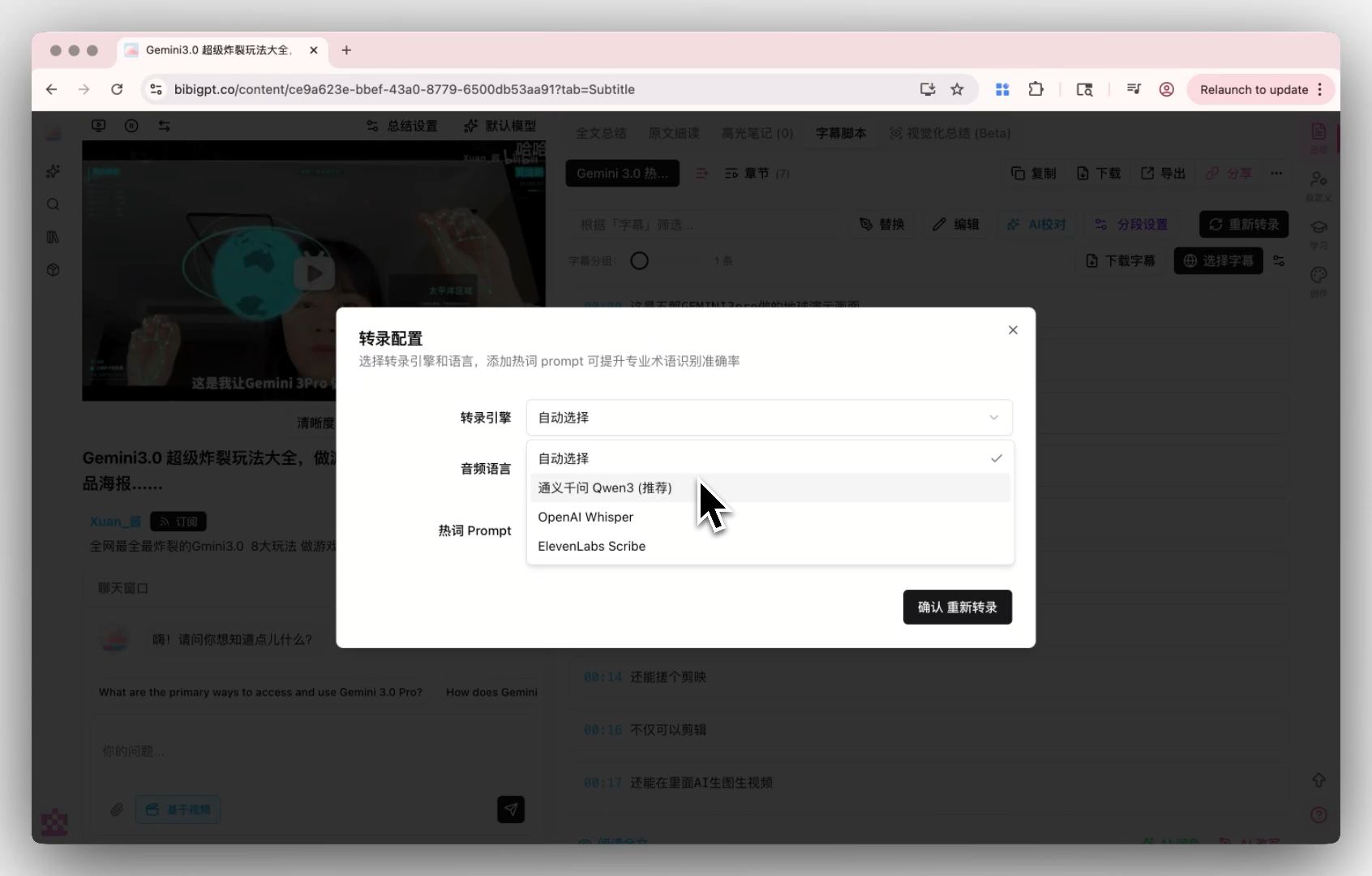 Subtitle extraction demo
Step 4: Generate AI Summary and Deep Analysis
Click the "AI Summary" button and BibiGPT will generate a structured summary based on the subtitle content, including core insights, highlighted quotes, and actionable recommendations. You can also use the AI dialogue feature to ask follow-up questions about the video.
For more on building an AI video note-taking workflow, read: AI Video Note-Taking Workflow: From Subtitles to Structured Knowledge
Frequently Asked Questions
Is downloading TikTok subtitles free?
BibiGPT offers a daily free quota for basic subtitle extraction. TikNeuron, GetSubs, and DownSub are also free to use with no limits. If you need AI summaries, batch processing, or translation features, BibiGPT Pro offers the best value.
What formats can I download TikTok subtitles in?
Most tools support SRT (with timestamps), TXT (plain text), and VTT (web subtitle format). BibiGPT additionally supports Markdown and mind map exports for knowledge-oriented workflows.
Can these tools extract subtitles from videos without captions?
If a video has no platform-generated captions, BibiGPT can use its built-in speech recognition engine to transcribe spoken content into text. Other tools like TikNeuron and GetSubs can only extract existing caption tracks and cannot process videos without subtitles.
Can I download Douyin subtitles with shortened links?
Yes. BibiGPT automatically resolves Douyin shortened share links (like v.douyin.com/xxx), so you can paste them directly without manual conversion.
What makes BibiGPT different from other subtitle downloaders?
The core difference is scope: other tools stop at "subtitle download," while BibiGPT treats subtitle extraction as the beginning of a knowledge workflow. It adds AI summarization, interactive Q&A, multi-language translation, and mind map generation, turning raw subtitles into actionable knowledge assets.
Conclusion
In 2026, the standard for choosing a TikTok or Douyin subtitle download tool has evolved from "can it download?" to "what can it do after downloading?" If you only need the occasional subtitle file, free tools will serve you well. But if you are a content creator, knowledge worker, or operations professional who processes short-form video content at scale, BibiGPT is the most comprehensive and intelligent option on the market.
Start using BibiGPT today and supercharge your video learning workflow:
- 🌐 Website: https://aitodo.co
- 📱 Mobile App: https://aitodo.co/app
- 💻 Desktop App: https://aitodo.co/download/desktop
- ✨ Explore Features: https://aitodo.co/features