Gemini 3.5 Live Translate Is Here: Do You Still Need a Dedicated Video Subtitle Translator? (2026 Trend Analysis)

Direct answer: In June 2026, Google launched Gemini 3.5 Live Translate, built around real-time voice-to-voice translation covering 70+ languages. The news immediately had many people asking, “Doesn’t that also solve video subtitle translation?” — it doesn’t. Real-time conversational translation and adding bilingual subtitles to a pre-recorded video or podcast, then hardcoding them into the video are two different scenarios: the former is about “understanding in the moment,” while the latter is about “watching, searching, exporting, and repurposing afterward.” This post breaks down the differences between the two, and shows how to use BibiGPT to translate a long video into bilingual subtitles with one click. Want to try it right away? Paste a link into BibiGPT and see for yourself.
The demo below shows the process of “pasting a foreign-language video link → getting bilingual subtitles”:
Translate captions into your language
Original and translation, line by line, with timestamps. Great for foreign-language talks.
| 00:07 | We're going to build GPT from scratch, together. | Vamos a construir GPT desde cero, juntos. |
| 08:23 | Self-attention is the heart of the Transformer. | La autoatención es el corazón del Transformer. |
| 45:10 | Each token emits a query and a key. | Cada token emite una consulta y una clave. |
| 1:35:00 | At its core, this is the same model behind ChatGPT. | En esencia, es el mismo modelo detrás de ChatGPT. |
Demo: BibiGPT video subtitle translation (bilingual)
1. What Happened with the Gemini 3.5 Live Translate Launch?
What happened is that Google shipped Gemini 3.5 Live Translate — real-time spoken conversation translation built into the Gemini app — and many users immediately assumed it also covers video subtitle translation, which it does not. Let’s start with the facts (as of 2026-07-10): according to Google’s official update, the core capabilities of Gemini 3.5 Live Translate are:
- Real-time voice-to-voice translation: translates near-simultaneously as you speak, designed for face-to-face conversations and cross-language calls — “in-the-moment communication” scenarios;
- Coverage of 70+ languages: broad enough for everyday travel and international meetings;
- An end-to-end voice experience: voice in, voice out, aiming to recreate the smoothness of “chatting with a local.”
This is genuinely a big leap for real-time translation. But note that it solves “understanding the other person right now” — once the conversation ends, the translation is gone with it. What content creators, students, and teams going global actually struggle with day to day is usually something else entirely: they have a pre-recorded foreign-language video, lecture, or podcast, and need accurate bilingual subtitles for it — subtitles they can study against the original text, search in full, and export as SRT for editing or hardcoding into the final video.
Practical rule: To judge whether a “translation” capability fits your needs, ask yourself first — do you need to “understand it right now,” or do you need to “watch it repeatedly, search it, and export it later”? The former calls for real-time voice translation; the latter calls for a dedicated video subtitle translation workflow.
2. How Is Real-Time Voice Translation Different from Video Subtitle Translation?
They differ in three key places: subtitle translation needs precise timeline alignment (real-time translation has no timestamps), produces a reusable file asset (a conversation evaporates), and must handle long-form structured content rather than short conversational turns. Treating one as the other usually runs into trouble in exactly these three places:
- You need side-by-side comparison, not replacement. People learning English or making bilingual content want the original text and the translation shown together on screen, not the original audio “replaced” by the translated language. Real-time translation naturally leans toward “replacing the source language,” which leaves the need for side-by-side comparison unmet.
- You need an editable subtitle file, not fleeting speech. Editing, hardcoding, and uploading to various platforms all require a downloadable subtitle file (such as SRT) whose timeline can be adjusted. Real-time voice output leaves no such “asset” behind.
- You need it to be searchable and reusable for further creation. A two-hour recording, once translated, should still let you jump to a keyword, generate key points, or rewrite it into an article — all of which rely on “structured subtitle text,” not a stream of conversation you hear once and forget.
In other words, real-time voice translation solves “communication,” while video subtitle translation solves “consumption and creation.” BibiGPT’s subtitle capabilities are built squarely for the latter — for example, smart subtitle segmentation lets you customize the character count, word count, and duration of each subtitle segment, keeping the translated subtitle script clean and readable:
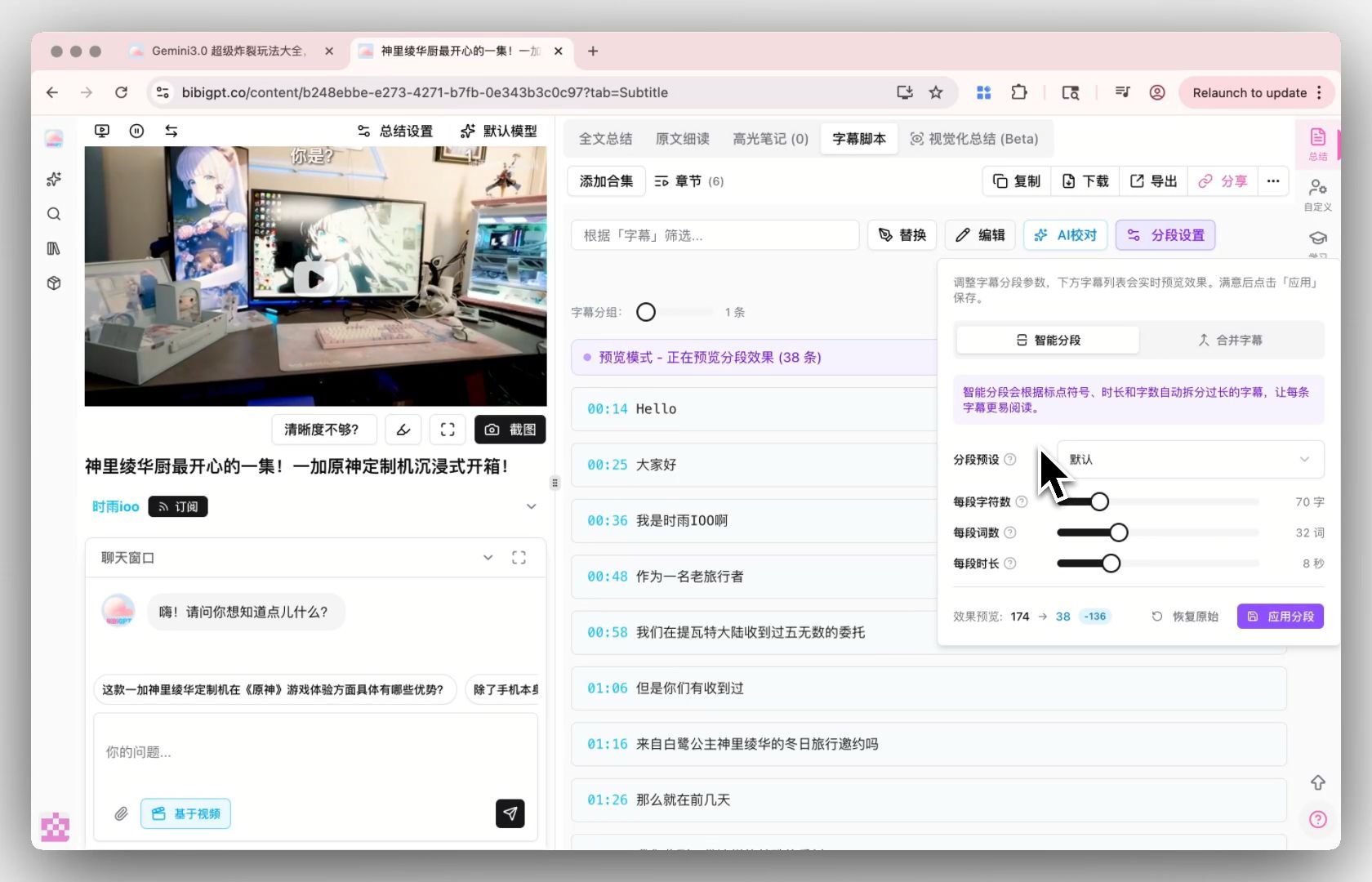
Screenshot: BibiGPT · Smart Subtitle Segmentation Settings
The video below confirms, from another angle, the broader trend that “AI subtitles/translation are covering more and more languages”:
Video source: YouTube · Industry observations on AI multilingual subtitle capabilities
Trend aside, what matters to each individual is still: “Can I get accurate bilingual subtitles for this foreign-language video with one click?”
3. What Does It Mean for Different People?
For creators, students, and professionals the practical takeaway is the same: real-time conversation translation doesn’t replace subtitle translation for recorded and long-form videos, which is what these three groups actually need daily. Gemini’s real-time translation is impressive, but for the following three groups, what they actually need every day is “subtitle translation for recorded/long videos”:
- Content creators / independent media: to repurpose or create derivative work from great foreign-language content, they need the whole video translated into bilingual subtitles first, then rewritten into an article or a short-video script — rather than transcribing and translating line by line themselves.
- Students / researchers: watching foreign-language lectures or paper explanations, they need the original text and translation side by side, plus the ability to jump back to a specific timestamp by keyword — reviewing the structure instead of dragging the progress bar.
- Teams going global / cross-border teams: adding multilingual subtitles to Chinese videos before publishing on overseas platforms, or translating a long video from an overseas competitor to summarize insights — both need an exportable, hardcode-ready subtitle file, not a one-off voice translation.
What these scenarios have in common: translation is just the first step — after that comes “watching, searching, exporting, and further creation.” It’s only after turning an entire foreign-language long video into searchable text that the real gap in learning and content-creation efficiency opens up.
4. How Do You Translate a Long Video into Bilingual Subtitles with BibiGPT?
The workflow takes three steps: paste the video link (or upload the file), let BibiGPT transcribe and translate with the target language set, then export the bilingual subtitle file or summary. A trending topic only counts once it’s put into practice. BibiGPT isn’t just another “model aggregator” — it layers model capabilities on top of a pipeline purpose-built for audio and video, and has already served over 1 million users, generated more than 5 million AI summaries, and supports 30+ mainstream audio/video platforms. Turning “translating a long foreign-language video into bilingual subtitles” into a repeatable daily action usually takes three steps:
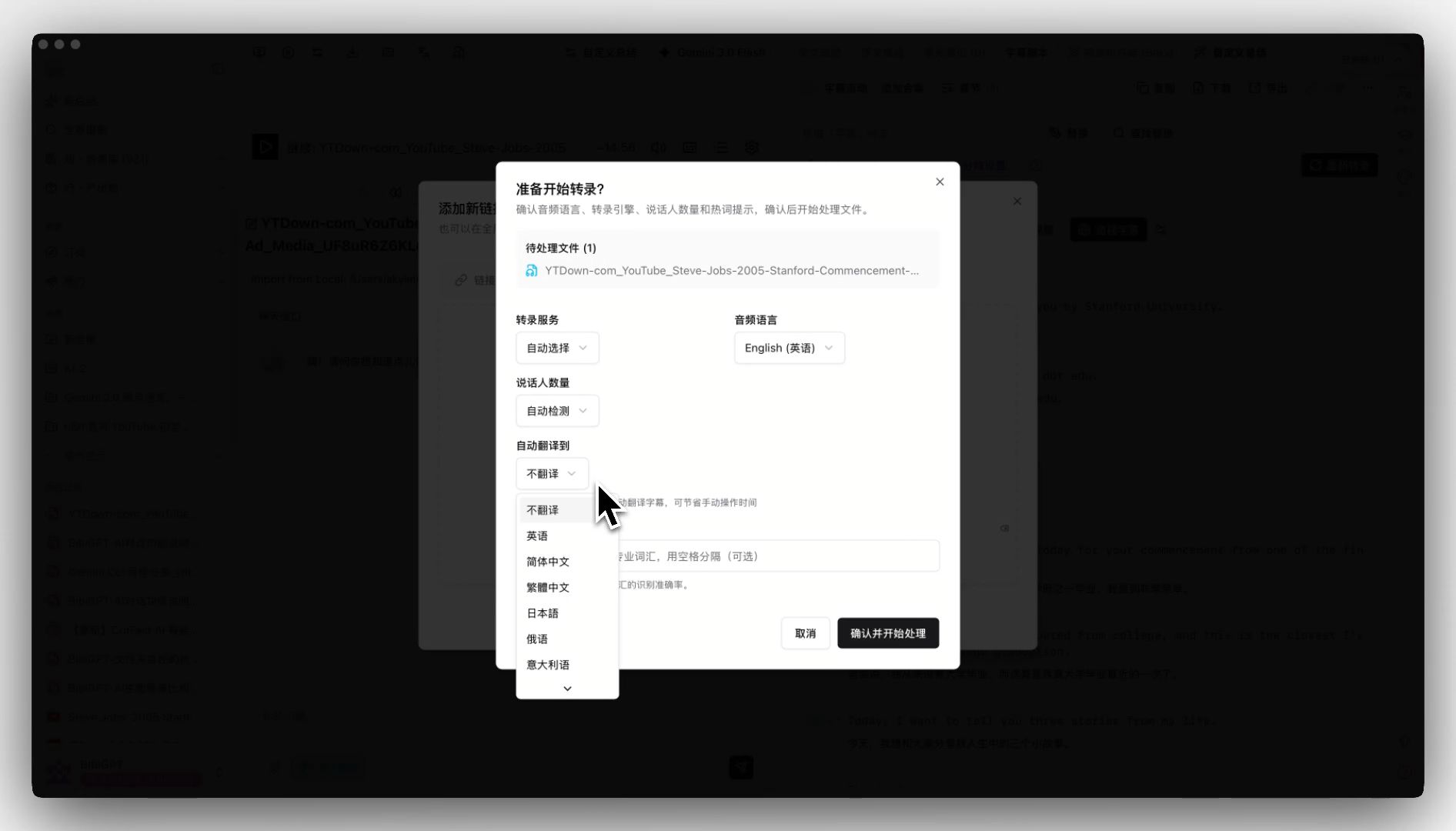
- Paste a link or upload a file — drop in a foreign-language video from Bilibili or YouTube, or a local audio/video file, no need to download or transcode first; when uploading, you can preset the target language for “auto-translate” in the popup, so translation happens alongside transcription and you get bilingual subtitles directly.
- Get bilingual subtitles + structured key points — within tens of seconds you get a bilingual subtitle script and chapter-by-chapter key points; subtitles can be neatly arranged according to smart segmentation rules.
- Export and repurpose — export SRT with one click for editing or hardcoding, or bring the subtitle text into your Notion / Obsidian notes, or keep asking the AI follow-up questions and rewrite it into an article.
Preset the target language at upload time, and by the time transcription finishes you already have bilingual subtitles — skipping the back-and-forth of “transcribe first, then manually click translate”:
Screenshot: BibiGPT · Auto-Translate on Upload
The translated subtitles can also be synced and exported as an SRT file with one click, ready to drop straight into your editing software for hardcoding:
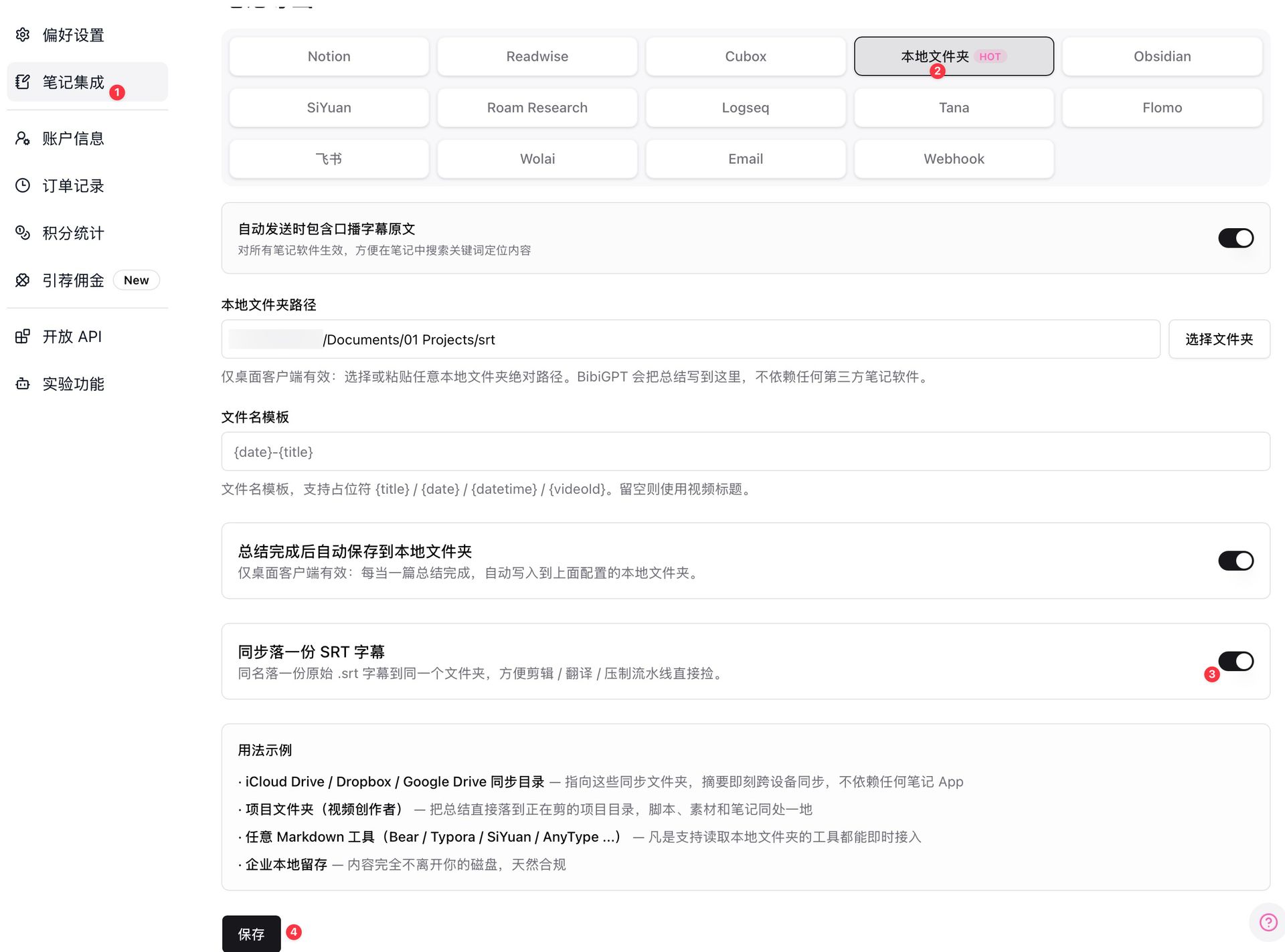
Screenshot: BibiGPT · SRT Subtitle Sync Export
It’s worth noting that BibiGPT supports automatic routing across multiple advanced AI models, and you’re free to switch between them — you don’t need to worry about which one is running behind the scenes, just get usable bilingual subtitles. Want to experience “translating a long foreign-language video into bilingual subtitles” for yourself? Pick a lecture you’ve never had time to watch and paste it into BibiGPT to give it a try.
5. Looking Ahead: The Stronger Real-Time Translation Gets, the More Valuable “Subtitle Assets” Become
At the current pace, here are three predictions:
- “Understanding in the moment” will become as commonplace as electricity or running water. Real-time voice translation will soon be built into phones and meeting software as a default capability; but the more widespread it becomes, the more it highlights that “recorded content needs subtitles that can be preserved and reused” — something it doesn’t cover.
- Subtitles will go from “accessory” to “asset.” Bilingual subtitles that support side-by-side comparison, search, export, and repurposing will be stored and retrieved long-term, just like documents — whoever can reliably turn long videos into structured subtitles holds a reusable knowledge foundation.
- Models will no longer be scarce; consumption speed will be. Translation capability will become a commodity, and the real battleground shifts to “who can help users consume long content faster.” This is exactly where BibiGPT has long positioned itself: making watching audio/video as fast as reading text.
Practical rule: Once translation capability is no longer the bottleneck, your bottleneck becomes “whether you have a smooth workflow that reliably turns long foreign-language videos into subtitles you can watch, search, and export.” Getting the workflow running matters more than chasing the latest model.
6. Frequently Asked Questions
Q1: Now that Gemini has real-time translation, do I still need a dedicated video subtitle translation tool? Yes. Real-time translation solves “understanding a conversation in the moment,” while video subtitle translation solves “adding bilingual subtitles to recorded content that you can watch, search, and export.” The two scenarios are different, and BibiGPT focuses on the latter.
Q2: Can BibiGPT produce “original text + translation” bilingual subtitles? Yes. Preset the target language when uploading, and once transcription is done you get bilingual subtitles and a summary — ideal for side-by-side study and bilingual content creation.
Q3: Can the translated subtitles be exported for editing/hardcoding? Yes. It supports one-click synced export of SRT subtitle files, which you can drop straight into your editing software for hardcoding.
Q4: Which platforms and languages are supported? It supports 30+ mainstream audio/video platforms including Bilibili, YouTube, and podcasts, as well as local file uploads; the target translation language is chosen at upload time.
Q5: How long does it take to translate a long video? Usually anywhere from tens of seconds to a few minutes, depending on the length — far faster than transcribing and translating it yourself line by line.
Q6: What else can I do after translation? You can jump to subtitles by keyword, generate chapter-by-chapter key points, rewrite the content into an article, or export it to Notion / Obsidian to build a long-term knowledge base.
Beyond the Trend: Actually “Get One Foreign-Language Video Fully Translated” Today
Gemini 3.5 Live Translate has genuinely made real-time translation stronger, but what’s actually useful to you isn’t remembering some model’s name — it’s actually turning a foreign-language video you’ve never had time to watch into bilingual subtitles you can watch, search, and use, today. Pick a foreign-language lecture or long podcast, paste it into BibiGPT, get bilingual subtitles and chapter key points in tens of seconds, and experience getting a long foreign-language video fully translated in one pass. New users can try it for free.
Further reading: A Roundup of Free AI Video-to-Text Tools · A Guide to AI Subtitle Translation Bilingual Workflows
BibiGPT Team
Popular tools
More in this series
- Video to Text Complete Guide (2026 Updated): YouTube Subtitle Download, Cloud Drives, Bilibili Courses & Multi-Source Solutions
- Best Xiaohongshu Video to Text Tool in 2026: BibiGPT Helps You Create Viral Posts Easily!
- AI Subtitle Translation Workflow Guide 2026: Extract, Translate & Hardcode with BibiGPT
- Ferramentas de tradução de legendas com IA 2026: 6 plataformas que traduzem + embutem em uma só passagem
- AI Video to SRT is Offline Only — BibiGPT Extracts Subtitles from 30+ Platforms with AI Summary