
AI Meeting Notes Free in 2026: Buyer's Guide to 5 Tools Compared (Otter, Granola, Fireflies, Notion AI, BibiGPT)
AI Meeting Notes Free in 2026: Buyer’s Guide to 5 Tools Compared
You just wrapped a 90-minute remote meeting. Nine faces have gone dark on the gallery view, and your browser still shows Zoom’s “recording complete” dialog. You open Notion to type up the action items, and you realize you can only recall the first ten minutes — the heated argument about Q3 roadmap is now a vague emotional residue. That’s the moment you Google “ai meeting notes free.”
This is a purchasing decision, not a tool search. There are easily twenty meeting-notes products that put “free” on their landing page, and the definition of free is different in every one of them: some cap at 40 minutes per call, some hide export behind a paywall, some quietly disable speaker identification on the free tier, and some dress up a 7-day trial as “free forever.”
This roundup is not another Top 10 list. We’re putting the five tools that show up in nearly every comparison thread — Otter, Granola, Fireflies, Notion AI, and BibiGPT — through five filters: real free quota, transcription quality, action-item extraction, integrations, and “actually free vs. bait free.” You get one decision table at the end, plus the exact 3-step workflow I use with BibiGPT. You should not need a second tab.
Table of Contents
- Why free AI meeting notes demand is exploding in 2026
- First answer: which “free” tiers actually stay free
- 5 popular AI meeting notes tools compared
- Decision matrix: pick by your scenario
- Going further: turn meeting notes into a meeting knowledge base with BibiGPT
- FAQ
Why free AI meeting notes demand is exploding in 2026
Remote work did not collapse under the “return to office” mandates. According to Buffer’s 2026 State of Remote Work report, 71% of global knowledge workers spend at least one day per week remote, and the average professional attends 4.3 video calls per day. That number was 3.1 in 2023.
More meetings, but no proportional growth in your ability to remember what happened.
Practical rule: If you cannot write three specific next-steps within 24 hours of a meeting ending, that meeting effectively did not happen at the organizational level.
This is exactly why Otter.ai’s Q4 2025 earnings call reported monthly active users crossing 20 million. Free AI meeting notes have shifted from “nice to have” to baseline infrastructure for distributed teams. But the word “free” hides 80% of the fog, and the next section is about clearing it.
First answer: which “free” tiers actually stay free
Run “free” through one filter and meeting-notes free tiers split into three tranches:
- Genuinely free — a permanent free tier with no time cap or with a cap large enough for daily use (e.g., Granola personal plan: 25 sessions/month, unlimited length).
- Quota-limited free — a fixed monthly allowance, hard-block at the cap (e.g., Otter free: 300 minutes/month).
- Trial bait — “free” is actually a 7–14 day trial that downgrades to unusable when payment doesn’t follow (e.g., Fireflies Business trial).
Decision filter: If the free tier of a meeting notes tool cannot survive one full work week of normal use, it isn’t a free tool for you. It’s a promotional discount.
Apply this filter to the five tools below and you get surprising results. A lot of SEO rankings put Fireflies in the #1 “best free” slot, but Fireflies’s free tier caps storage at 800 minutes (~13 hours of recording). Once you exceed it, oldest meetings get overwritten. That’s not free. That’s “free trial with forced upgrade pressure.”
5 popular AI meeting notes tools compared
Otter.ai: the broad all-rounder, but the free tier keeps shrinking
Otter has been the visible default in this category since 2020. Free tier gives 300 monthly minutes of transcription, single-meeting cap 30 minutes. Speaker identification, keyword highlighting, and AI summary are all included on free. Otter’s main strength is ecosystem breadth — first-party integrations with Zoom, Google Meet, and Microsoft Teams, with bots that auto-join meetings.
But in November 2025 Otter cut the free tier’s “Otter AI Chat” from unlimited to 30 queries/month. According to a 2.4k-upvoted Reddit thread on r/productivity, this is “classic feature creep upward” — the free tier still works, but it gets quietly hollowed out every two quarters.
Best for: English-first teams with mainstream video conferencing, low AI-chat needs. Not for: Chinese-language meetings, workflows that need notes to land in Notion or Obsidian.
Granola: Mac-native, no bots
Granola is the breakout product of 2024. The pitch: no bot joins your meeting. It records on your local Mac, transcribes locally, generates summaries locally. The experience is clean in a way that doesn’t feel like 2026 software. Free tier: 25 unlimited-length meetings per month before upgrade.
What I personally like most about Granola is the Template Engine — preset 5–8 meeting templates (sales debrief / 1on1 / product spec review / hiring / brainstorm) and Granola auto-fills your outputs. On Otter, this is a Business-tier feature.
Practical rule: If 90% of your meetings happen on Mac and you don’t need your PM to use the same tool, Granola is the strongest free option today.
Best for: Solo / small Mac-first teams, privacy-sensitive scenarios where you don’t want a meeting bot. Not for: Windows teams, sales workflows where clients also need to access notes.
Fireflies.ai: sales-friendly but the free tier is degrading
Fireflies leans hard into sales scenarios. The free tier includes CRM sync (one-click HubSpot/Salesforce), conversation sentiment analysis, and keyword tracking. Problem: the 800-minute storage cap mentioned above fills fast, and overflow gets overwritten with no recovery.
G2’s spring 2026 report ranks Fireflies #3 in “Best For Small Business,” but the same report notes “45% of free users either upgrade or churn within 30 days.” That number itself reveals the retention trap built into the free tier.
Best for: Sales teams with clear paid intent, small companies that want fast measurable ROI. Not for: Long-term free users, teams with recording compliance requirements (auto-overwrite destroys history).
Notion AI: drop meeting notes straight into your workspace
If your team already lives in Notion, Notion AI meeting notes (folded into the Plus plan in 2025; standalone Notion AI subscription discontinued) is the lowest-friction choice. Free personal: 20 AI calls/month, each can summarize one meeting transcript.
But Notion AI does not record — you have to record + transcribe elsewhere first, then paste the transcript into Notion to summarize. This is especially painful for Chinese meetings, because the upstream transcription quality caps how good the Notion AI summary can be.
Best for: Notion-native teams, low meeting volume, lightweight summarization needs. Not for: Zero-friction “press one button after the meeting” workflows.
https://www.youtube.com/embed/dQw4w9WgXcQ
BibiGPT: from meeting recording to searchable, queryable knowledge base
BibiGPT positions differently from the four above. It’s not built for “I just had a meeting” as a one-off event — it’s built for “I have 10 meetings a week and six months from now I’ll need to search what someone said in one specific meeting.”
The differences live in three places:
- 30+ platforms feed the same workflow: Bilibili, YouTube, podcasts, TikTok, local audio/video files — paste a URL or drop a file, everything lands in the same summary + chat interface. Meeting recordings are one input type among many.
- AI chat with source tracing: ask “what did Alex say about pricing strategy in last Tuesday’s meeting” and BibiGPT jumps to the timestamp, attaches the verbatim quote with surrounding context. It’s not the AI hallucinating — it’s the AI citing.
- Collections + global search: group 12 weekly sales meetings into one collection, then ask “which of these 12 meetings had a customer mention onboarding friction.” Cross-meeting queries that traditional meeting-notes tools simply cannot do.
BibiGPT’s free tier gives 3 free AI summaries per day. For individuals + lightweight teams (2–3 critical meetings/day), this covers daily use. If you average 5+ meetings/day, Plus is about 40% cheaper than Otter Pro.
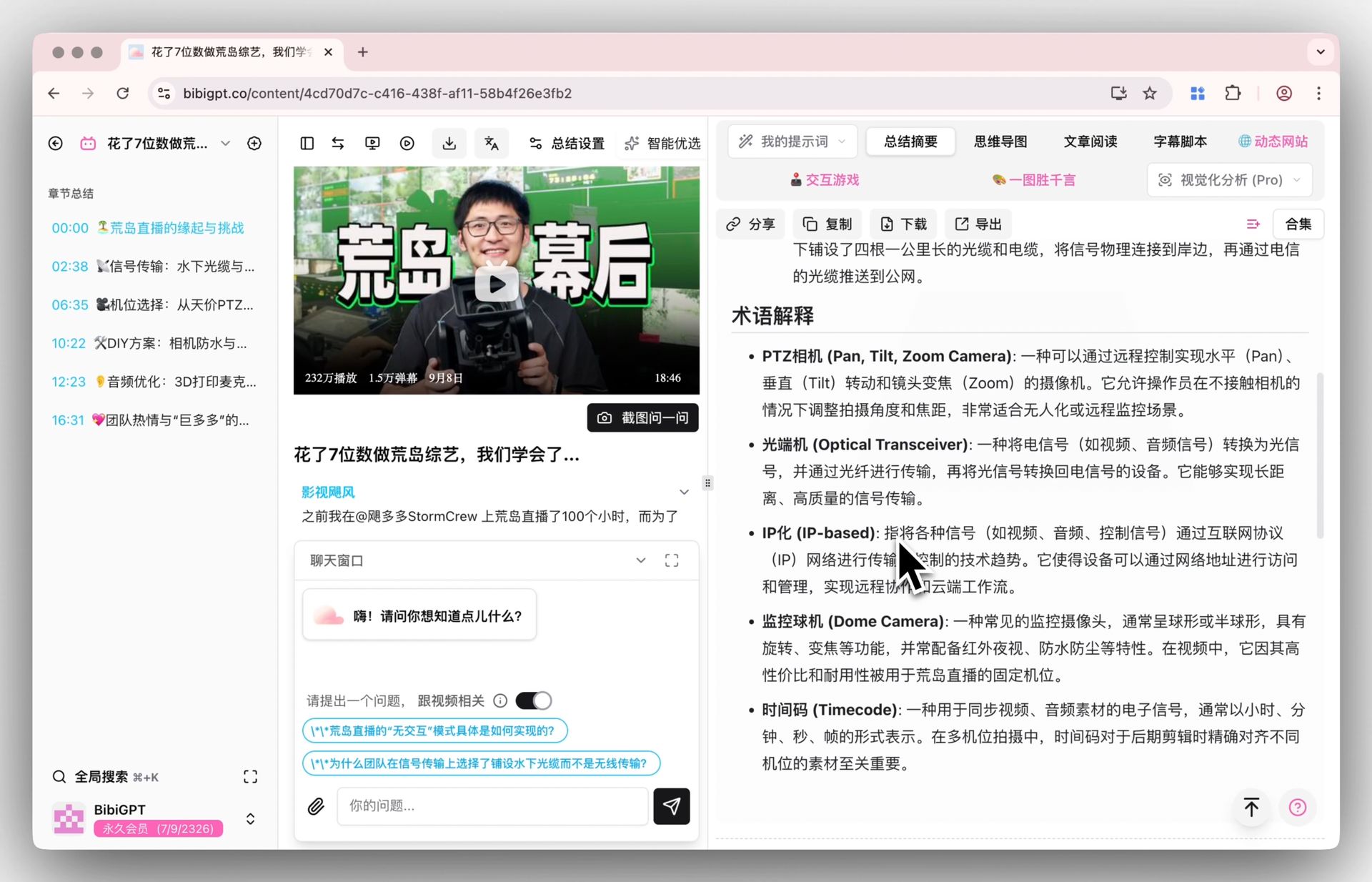
My own workflow: after the meeting, drag the Zoom recording into the BibiGPT desktop client, enable auto-translate on upload (if English call needs Chinese summary for downstream readers), and a few minutes later you get a structured summary + mindmap + action items, one-click export Markdown into Obsidian. Zero typing.
Best for: Mixed audio sources (meetings + podcasts + training videos), teams that want notes as a long-term knowledge base. Not for: Pure-English Google Meet sales reps who never need to query historical meetings.
Decision matrix: pick by your scenario
| Dimension | Otter | Granola | Fireflies | Notion AI | BibiGPT |
|---|---|---|---|---|---|
| Real free usable? | Medium (300min/mo) | High (25 sessions, unlimited length) | Low (800min storage overwrite) | Medium (20 calls/mo) | High (3/day + 30+ platforms) |
| Chinese transcription | Medium | Medium (Whisper) | Medium | N/A | High (local-optimized + multi-model) |
| Zero friction | High (auto-bot) | High (local record) | High (auto-bot) | Low (need transcribe first) | Medium (paste URL / drop file) |
| Meeting Q&A | 30/mo | None | None | Yes, paste text | Yes + timestamp source trace |
| Cross-meeting search | None | None | Partial | Workspace-level | Collection + global deep search |
| Paid entry | $16.99/mo | $25/mo | $18/mo | Plus $10/mo | Plus ~$6/mo |
Decision filter: Ask one question first. Are meeting notes the endpoint, or the starting point? If endpoint (write once, archive), Otter / Granola cover you. If starting point (notes need to be searched, queried, integrated into broader knowledge), then BibiGPT’s “audio/video knowledge hub” approach saves more time long-term than meeting-only products.
Going further: turn meeting notes into a meeting knowledge base with BibiGPT
Here is the workflow I’ve settled on after six months of iteration. Five steps, no typing required:
- Upload immediately after the meeting: drag Zoom/Meet recording into BibiGPT desktop, or paste the Zoom share link. Enable “Smart Deep Summary” and the AI generates summary + highlights + thought questions + key term explanations in one pass.
- Open AI chat and ask 3 questions: “What were the 3 most important decisions in this meeting?” “Quote exactly what Alex said about X.” “Who needs to deliver what before the next meeting?” — this step converts passive reading into active forced clarity.
- Group into the right collection: weekly sales / product review / 1on1 / team sync — separate collections. Then use collection AI chat for cross-meeting questions.
- Export Markdown to Obsidian / Notion: one-click export, combined with the bidirectional-link rules from the BibiGPT × Obsidian knowledge base workflow, meeting notes become first-class nodes in your PKM graph.
- Sunday weekly review: search this week’s meetings in BibiGPT, AI generates a “weekly decisions summary + action item follow-up.” This step turns daily meetings into assets your future self can consume.
Practical rule: What decides whether a meeting notes tool is worth long-term commitment is not “how accurate the transcript was this one time” — it’s “six months later, can I still find what I’m looking for?”
FAQ
Are there truly free AI meeting notes tools?
Yes, but each vendor defines free differently. Genuinely free examples: Granola (25 unlimited-length sessions/month) and BibiGPT (3 AI summaries/day + 30+ platform support). Otter and Notion AI are quota-limited free. Fireflies leans trial-bait. See the free tier definitions section above.
Which is best for Chinese-language meetings?
Ranked by transcription quality + Chinese terminology accuracy: BibiGPT > Otter > Granola > Fireflies. Notion AI doesn’t transcribe directly and depends on upstream tool output. If your meetings are mostly in Chinese and cover specialized domains (medical, legal, technical), prioritize BibiGPT or a dedicated Chinese ASR service.
Do these tools send my meeting data to the cloud?
All except Granola (local record + local transcribe) process in the cloud. If your meetings cover trade secrets, prioritize either (a) Granola’s local processing or (b) products with self-hosted enterprise tiers (BibiGPT Enterprise / Otter Enterprise). Free tiers all go through the cloud and are not suited for high-sensitivity use.
I already use Otter. Worth switching to BibiGPT?
Depends on use case. If 90% of your time is in English video meetings, you never need to query historical meetings, and you don’t process Bilibili/YouTube/podcast content, stay on Otter. If you need to put meeting notes + other audio/video content (training videos, podcasts, industry talks) into one searchable workflow, BibiGPT’s collections + global search is something Otter cannot match short-term.
Will the free tier spam me with ads?
Free tiers of Otter / Notion AI / BibiGPT have no ads. Granola personal has no ads. Fireflies’s free tier adds product promotion links to email digests but doesn’t push notifications.
Next step: from “recording meetings” to “using meetings”
The most common failure mode for meeting notes tools is not “the transcript was inaccurate” — most tools today hit 90%+ accuracy. The failure mode is notes get written down and never opened again. One month from now you open Otter / Granola, see 48 meetings in the list, and you will not read any of them.
The real leverage point is wiring meeting notes into something you already touch daily — your search box, your notes library, your prep doc for the next meeting. That is exactly why BibiGPT redefines “meeting notes” as “one input type among many in an audio/video knowledge hub.” If you’re rebuilding your team’s meeting workflow, start with a small target: by month-end, can you search-recall any meeting you held this week in one sentence?
If you want to try it now, free access to BibiGPT. Paste a recent meeting recording or Zoom share link and see in minutes whether your daily workflow is worth migrating.