NotebookLM's Biggest Update vs BibiGPT: What's New (2026)
NotebookLM Biggest Update Ever: Gemini 3.5 + Antigravity Explained — and Where BibiGPT Fills the Gap
On June 8, 2026, Google pushed what multiple outlets called the “biggest update since launch” to NotebookLM: the underlying model migrated to Gemini 3.5 and Antigravity, every notebook now comes with a secure cloud computer that can write and execute code, over 100 software skills are built in, users can invoke Google Search directly in conversation to build a source library, and results can be exported to PDF, Word, Excel, and more.
Try BibiGPT first: paste a video link and get a timestamped summary in seconds
This NotebookLM update genuinely raises the ceiling for document-based research — but it is still a tool centered on “sources you upload.” This article first lays out the facts of the upgrade, then answers a more practical question: when it comes to understanding and organizing audio and video content, what piece of the puzzle is still missing? The answer lies in how two different types of tools complement each other — paste any video link into BibiGPT and see for yourself.
1. Timeline: What Exactly Changed in This Update
According to the official Google Blog, the core changes in this release as of 2026-06-11 include:
- 2026-06-08: NotebookLM officially migrated to Gemini 3.5 and Antigravity. Google says answers are more accurate and reliable, and the reasoning process is now more transparent.
- Cloud Computer: Every notebook is equipped with a secure cloud computer that can write and run code in the background, enabling deeper research and complex analysis with over 100 curated software skills built in.
- In-Chat Source Building: According to TechCrunch, users can describe a project in chat and NotebookLM will proactively recommend sources by combining research skills with Google Search, helping build a knowledge base from scratch.
- Expanded Export Formats: Export support now covers PDF, Word, Markdown, charts, CSV, Excel, PowerPoint, and more.
- Rollout Pace: Initially available to Google AI Ultra subscribers and Workspace enterprise tiers (AI Ultra Access / AI Expanded Access), then gradually expanding to other plans.
The YouTube demo below shows the new “write and run code” capability in action — worth a few minutes of your time before reading on.
Video source: YouTube · NotebookLM new features hands-on demo
2. Deep Dive: Why This Is Called the “Biggest” Update
Technical Perspective: From “Q&A Tool” to “Research Assistant That Gets Things Done”
Previously NotebookLM could only answer questions and generate summaries based on your uploaded sources. Now it can write code to slice data, run statistics, and produce charts. According to benchmarks cited by 9to5Google, the new system achieves an average win rate above 65% across several core evaluation dimensions, with advanced web research and source discovery reaching 78.2% — two numbers that explain why Google is comfortable calling this the biggest upgrade yet.
Market Perspective: Research Tools Going “All-in-One”
Export to PDF, Excel, and PowerPoint means NotebookLM is now reaching into downstream office-suite territory: research outputs no longer stop at the chat window. According to Tom’s Guide’s hands-on review, automated search-based source discovery, code analysis, and multi-format export are the three changes that everyday users notice most.
Ecosystem Perspective: The Source-Centric Model Has Not Changed
Regardless of how large the upgrade is, NotebookLM’s starting point remains “sources”: documents, web links, slides. Audio and video content still needs to be “translated” into text sources it can digest — and that translation step is exactly where most researchers spend the most time. For users dealing with non-English content, the gap is even more visible: dense information sources like online course recordings and industry podcast episodes fall outside its comfort zone.
Practical rule: When evaluating any research tool, look at its “input origin” first. A document-centric tool will always require one extra conversion step to handle audio and video.
3. Comparison: NotebookLM New Version vs BibiGPT
The positioning difference between the two tools is easy to see in a single table:
| Dimension | NotebookLM (2026 Update) | BibiGPT |
|---|---|---|
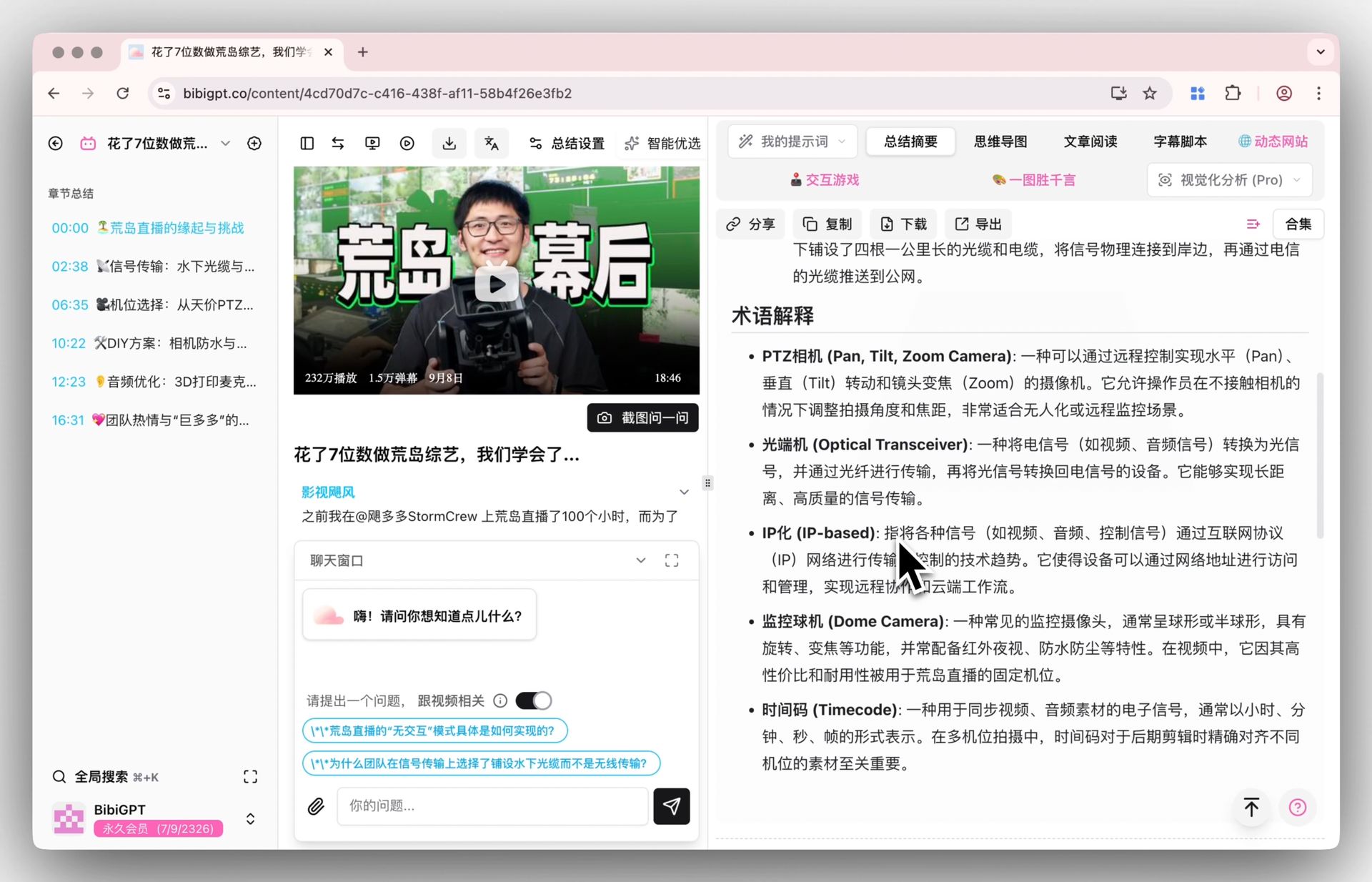
| Starting Point | Sources you upload or search (primarily documents and web pages) | Audio/video links themselves — paste and summarize instantly |
| Audio/Video Support | Can add YouTube links as sources | 30+ platforms including YouTube, Bilibili, and podcasts — natively understood |
| Source Tracing | Cites to source document paragraphs | Timestamp-based tracing — click any point to jump to the exact moment in the video |
| Structured Output | Reports, charts, PDF/Excel export | Summaries, mind maps, article rewrites, AI follow-up Q&A |
| Best Fit | Research librarian: deep diving into a source repository | Audio/video first entry point: turn content into notes before anything else |
| User Scale | No segmented data disclosed | 1M+ users, 5M+ summaries generated |
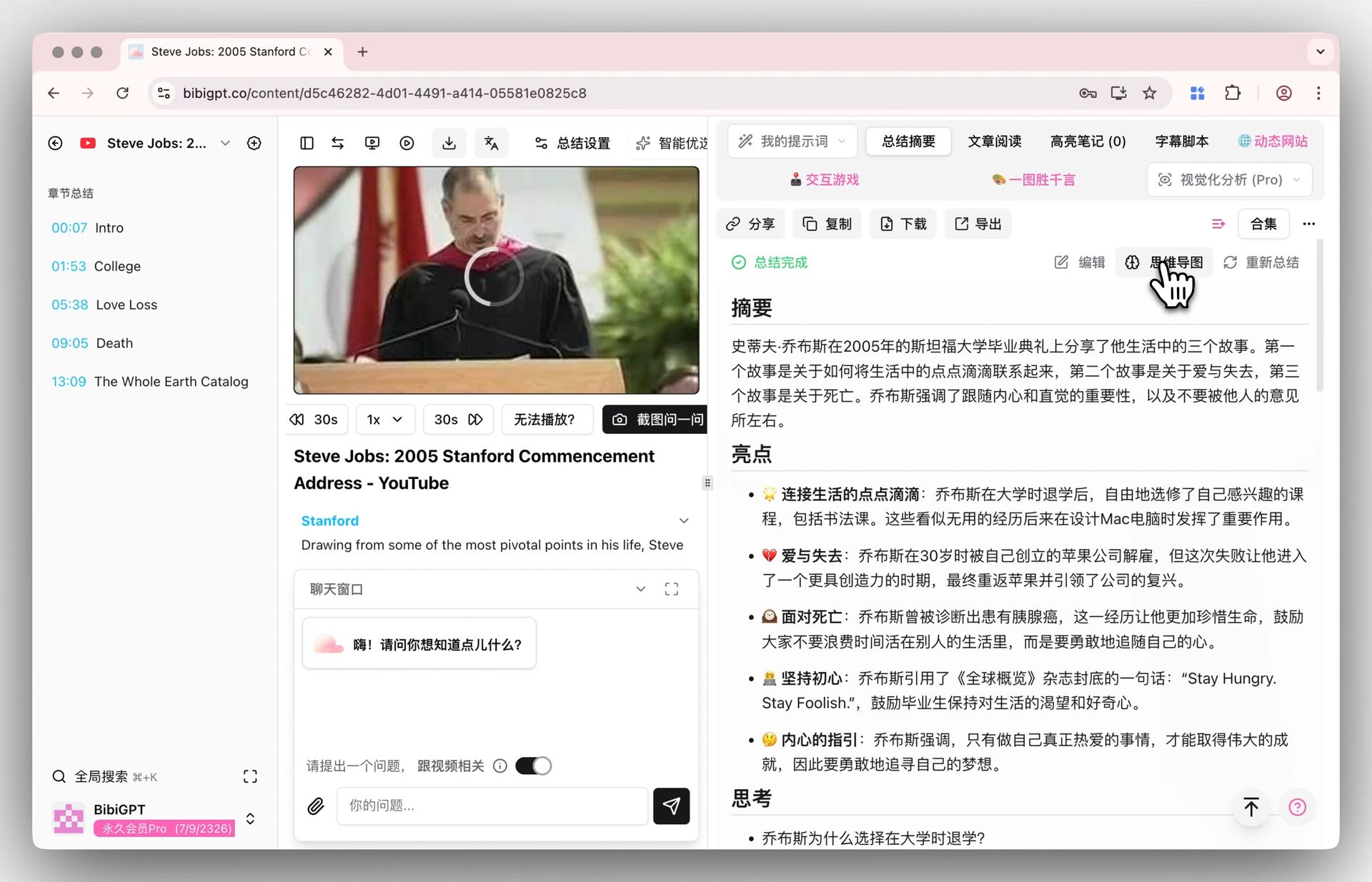
Differentiated advantage: BibiGPT is “audio/video native” — you do not need to convert a video into a document source first. Paste the link and get a structured summary with timestamps; every key point links back to the exact second in the original video for verification. This is especially valuable when fact-checking spoken opinions or consolidating course highlights. With the AI YouTube Video Summary feature, a 40-minute video typically turns into a searchable set of notes in tens of seconds. The screenshot below shows timestamp tracing in action:
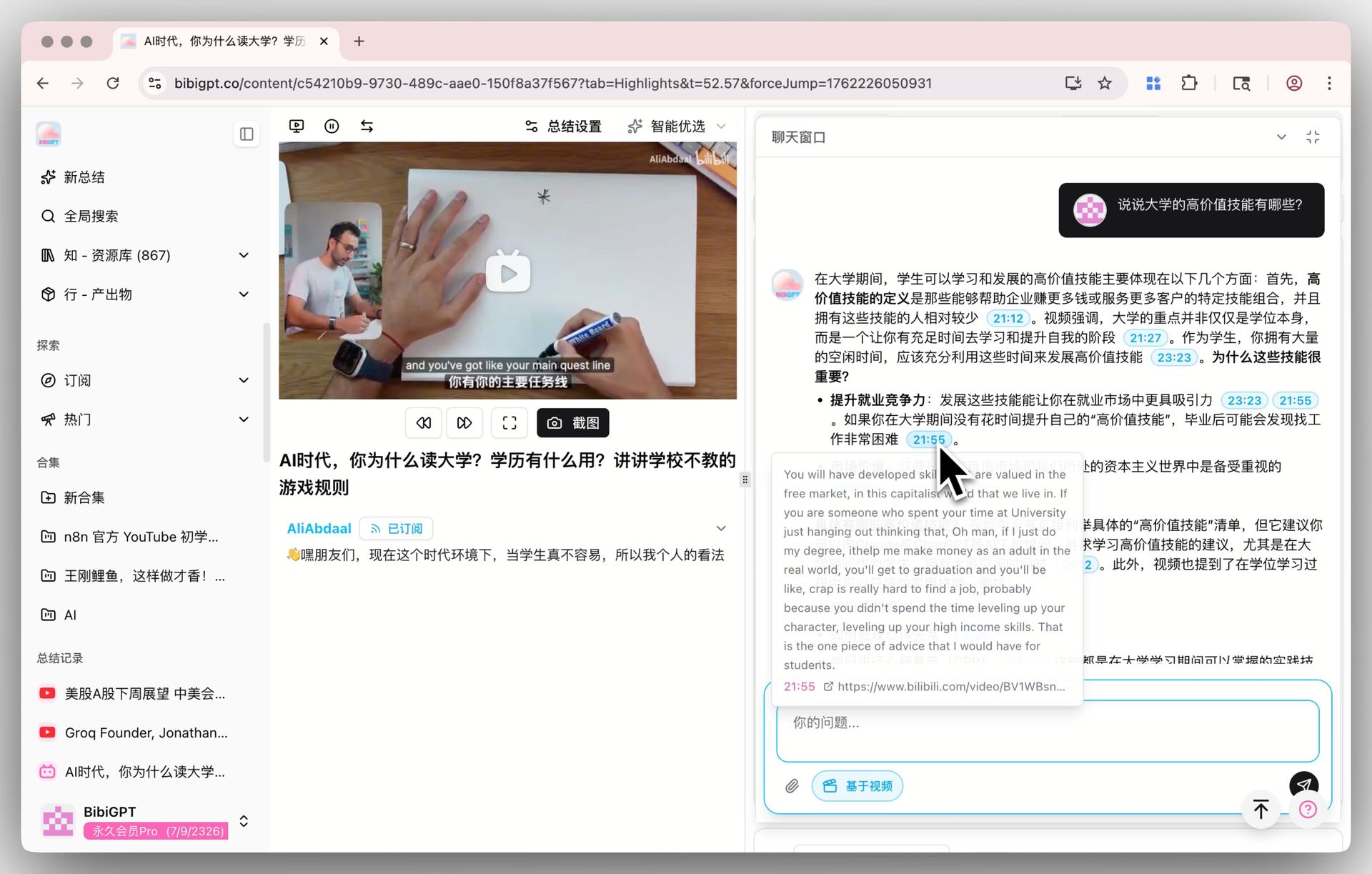
Screenshot: BibiGPT · Timestamp source-tracing demo
Practical rule: For any research involving audio or video, ask “can this conclusion be traced back to a specific minute and second in the original?” Notes that trace to timestamps are the only ones that hold up under review.
4. BibiGPT + NotebookLM Complementary Workflow: Video In, Research Library Out
The two tools are not an either/or choice — they form a pipeline. BibiGPT handles “dimensionality reduction” from audio/video to structured notes; NotebookLM turns those notes into a lasting research library. Here is the recommended complementary workflow:
- Collect: Gather the videos and podcast links you want to research into a list (online courses, industry interviews, product launch recordings, anything goes).
- Summarize: Paste each one into BibiGPT to generate timestamped summaries and key points. Podcasts have dedicated summarization support too.
- Mind Map: Use BibiGPT’s mind map feature to lay out the argumentative structure of a long video as a single diagram, making it quick to judge which parts are worth digging into.
- Import: Feed the structured notes BibiGPT produced into NotebookLM as sources, letting its cloud computer run cross-source comparisons and data analysis.
- Deliver: Generate reports in NotebookLM and export to PDF or PowerPoint; for any cited claim, jump back to the BibiGPT timestamp to verify against the original video.
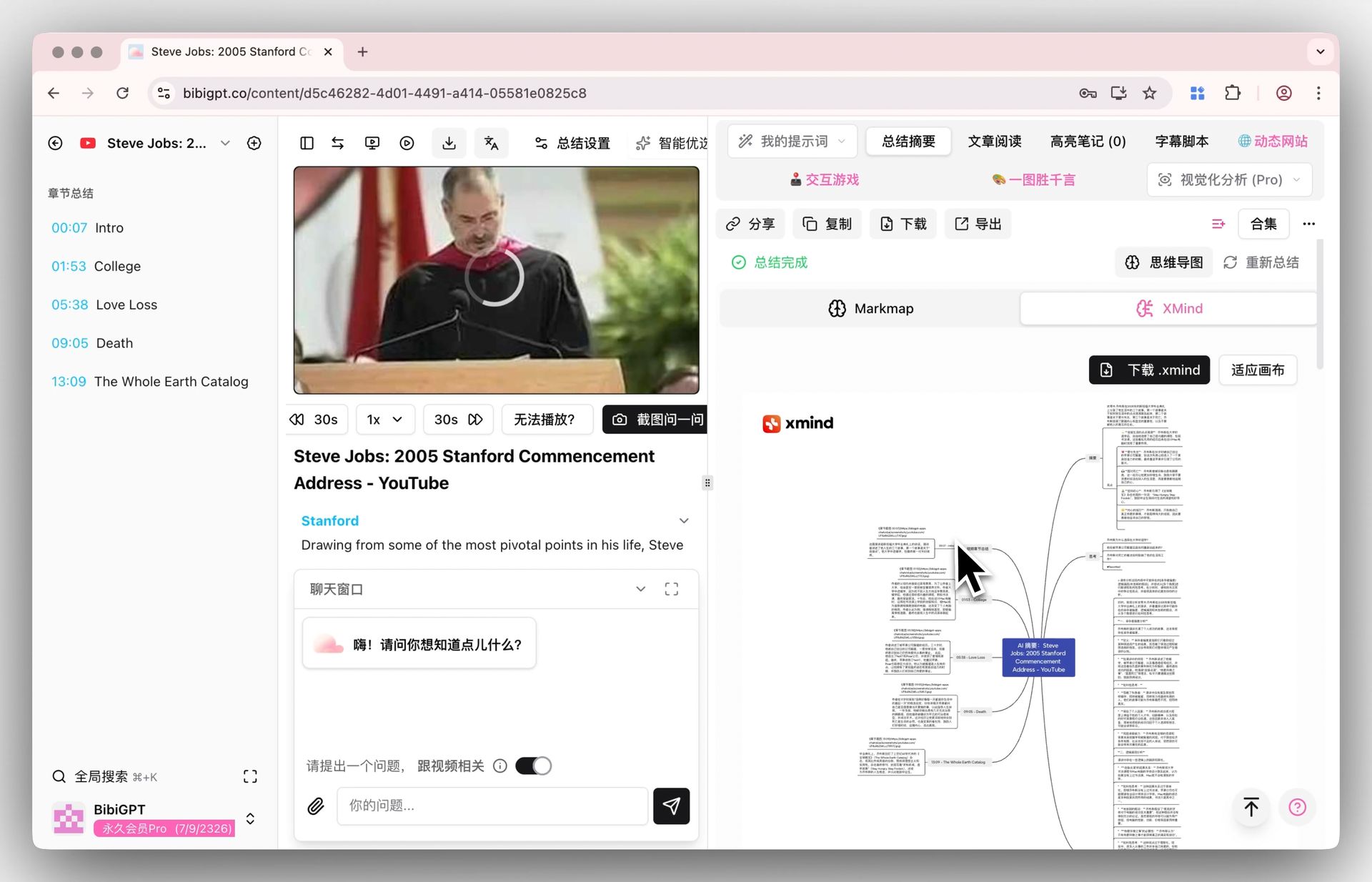
Step 3 is the one most people underestimate. The image below is a screenshot of a video mind map generated directly inside BibiGPT’s summary page — each branch corresponds to a chapter in the video, and clicking opens that segment for review:
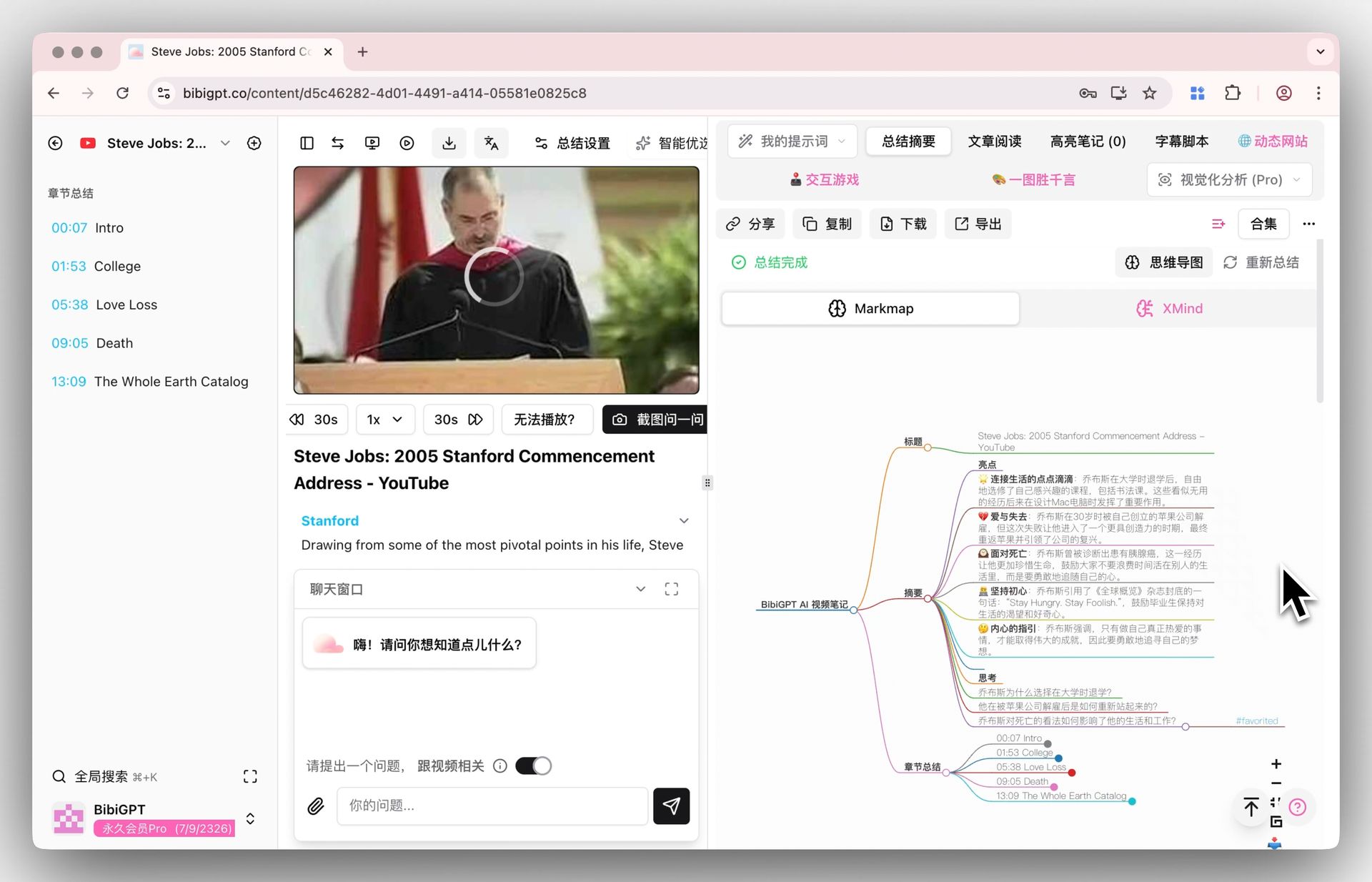
Screenshot: BibiGPT · Inline mind map on the summary page
Practical rule: Use an audio/video tool to “reduce” content into structured text first, then feed it to a source-centric research tool. Reverse the order and you will spend all your time on transcription.
Want to try it hands-on rather than just read about it? The interactive demo below lets you experience the complete “paste a link, get a summary” flow right now:
Summarize any video in seconds
Pick a sample below to see the AI summary — TL;DR, key points, and jump-to timestamps.
TL;DR: Karpathy builds a GPT-style language model from scratch in code, explaining every piece — from a tiny character-level model up to the full Transformer.
Key points
- Start with a bigram model, then add self-attention so tokens can "talk" to each other
- A Transformer block = multi-head attention + feed-forward + residual connections + layer norm
- Training is just predicting the next token; scale and data do the rest
- The same architecture behind nanoGPT is what scales up to ChatGPT
Jump to
- 00:07 Why build GPT from scratch
- 08:23 Self-attention, intuitively
- 1:00:00 Assembling the Transformer block
- 1:35:00 From nanoGPT to ChatGPT
5. Forward-Looking: Three Trend Predictions
- Prediction 1: Research tools will keep gaining “arms.” The combination of cloud computers and software skills will not stop at NotebookLM. Research assistants that can execute tasks are becoming table stakes for every major player in the second half of 2026; the competition is shifting from “answers well” to “gets things done.”
- Prediction 2: Native audio/video understanding becomes the next battleground. The document research experience has nearly hit its ceiling, but native comprehension of podcasts, online courses, and recorded events still has a significant gap — whoever can deliver “paste a link and get a traceable, timestamped summary” will own the first entry point in the knowledge workflow.
- Prediction 3: “Pipeline collaboration” between tools becomes the norm. Users are no longer loyal to a single all-in-one suite; instead they chain specialized tools together: an audio/video entry point for dimensionality reduction, a research library for deep analysis, and an office suite for final delivery.
Practical rule: Rather than waiting for one all-capable tool, chain two specialized tools into a pipeline today — the cost of switching is far lower than the cost of waiting.
For a full feature-by-feature comparison between NotebookLM and BibiGPT, see this extended read: NotebookLM 2026 Full Feature Comparison vs BibiGPT.
6. FAQ: Common Questions About the NotebookLM Update and BibiGPT
Q1: Is this NotebookLM update free for everyone? A: Not immediately for all users. According to Google’s official announcement, the new capabilities are rolling out first to Google AI Ultra subscribers and select Workspace enterprise tiers, with other plans receiving access “over time.”
Q2: Can NotebookLM now summarize videos directly? A: NotebookLM is centered on document and web-page sources and does not offer native support for audio/video platforms. For video and podcast content, the recommended approach is to generate a timestamped summary in BibiGPT first, then import the notes into NotebookLM as a source.
Q3: What does the “cloud computer” actually mean for regular users? A: It means NotebookLM can run data analysis, generate charts, and convert file formats on your behalf — not just answer questions. The prerequisite is that your sources contain structured content worth analyzing.
Q4: What AI models does BibiGPT use? A: BibiGPT uses automatic routing across multiple advanced AI models. Users can freely switch the summarization model, and the goal is to deliver consistent, structured results across different platforms and languages.
Q5: Is using both tools together complicated? A: Not at all. BibiGPT produces a summary the moment you paste a link; the structured notes it exports can go straight into NotebookLM as a source. The entire pipeline adds only one copy-paste step.
Leave document research to the upgraded NotebookLM, and give the first pass on audio and video to a tool that truly understands them — find a long video you have been meaning to watch but never had time for, and try it now: paste the link into BibiGPT and see what comes out
BibiGPT Team