Notta vs BibiGPT 2026: For Lecture and YouTube Video Summaries, Which Should Students Pick?
Notta vs BibiGPT 2026: For Lecture and YouTube Video Summaries, Which Should Students Pick?
As of May 31, 2026: In May 2026 Notta added 5 AI note templates covering lecture notes and YouTube content summaries, and its Notta Brain can query past records and generate slides. This step puts Notta and BibiGPT head-to-head on “lecture + YouTube summaries.” If you’re an international student or someone who learns from video, this comparison lays both out so you can see who each suits.
1. Why this comparison is worth reading
Many people choosing a summary tool look at just one thing — “can it turn audio into text?” But for people who genuinely learn from video, the key questions are finer: can it summarize a whole lecture recording? Does it support YouTube open courses? Can it produce key points in my language from foreign-language video? Is the price sustainable?
Notta has long excelled at meeting transcription; after adding lecture notes and YouTube summary templates in May 2026, it extended into the learning scenario. BibiGPT has always focused on “audio/video content summaries,” supporting 30+ platforms including Bilibili, YouTube, and podcasts. Their overlap in the learning scenario keeps growing, but their emphasis differs.
Practical rule: Don’t pick a summary tool by “can it transcribe” alone; pick by “after transcribing, is the output a form you can use directly?“
2. Dimension 1: lecture recording summaries
The most frequent need for international students is getting through lecture recordings fast.
How Notta does it
Per Notta’s official changelog, its May 2026 update added templates covering lecture notes, and Notta Brain can query past records and generate slides or infographics. Its strength has always been “real-time recording transcription + structured notes,” with solid verbatim records for meetings and lectures.
How BibiGPT does it
BibiGPT takes the route of “compressing a whole video into structured key points” — paste a lecture recording link or upload a file, and get an AI summary with chapter timestamps plus the full transcript. The demo below shows the effect directly:
Summarize any video in seconds
Pick a sample below to see the AI summary — TL;DR, key points, and jump-to timestamps.
TL;DR: Karpathy builds a GPT-style language model from scratch in code, explaining every piece — from a tiny character-level model up to the full Transformer.
Key points
- Start with a bigram model, then add self-attention so tokens can "talk" to each other
- A Transformer block = multi-head attention + feed-forward + residual connections + layer norm
- Training is just predicting the next token; scale and data do the rest
- The same architecture behind nanoGPT is what scales up to ChatGPT
Jump to
- 00:07 Why build GPT from scratch
- 08:23 Self-attention, intuitively
- 1:00:00 Assembling the Transformer block
- 1:35:00 From nanoGPT to ChatGPT
Demo: BibiGPT compresses a lecture recording into structured key points
The difference: Notta leans toward “recording,” BibiGPT toward “understanding + skimming.” If you want a transcript, Notta’s transcription is solid; if you want “understand in 3 minutes what this class covered,” BibiGPT’s structured key points are more direct.
Practical rule: The bottleneck of lecture review isn’t “whether there’s text,” it’s “whether you can quickly locate the segment to rewatch.” Timestamped structured key points are designed for exactly that.
3. Dimension 2: YouTube open courses and content summaries
Open courses, lectures, and tutorials on YouTube are another major learning source.
The video below is itself a typical piece of YouTube learning content — use it to feel “what the thing being summarized looks like”:
Video source: YouTube · Andrej Karpathy
In May 2026 Notta added a YouTube content summary template, bringing YouTube into its summary scope. BibiGPT has always had YouTube as one of its core supported platforms — paste a link to get a timestamped structured summary, and go further to generate a mind map:
Turn a video into a mind map
A linear talk becomes a structured tree. Drag to pan, click nodes to fold.
Demo: BibiGPT turns a YouTube video into an interactive mind map
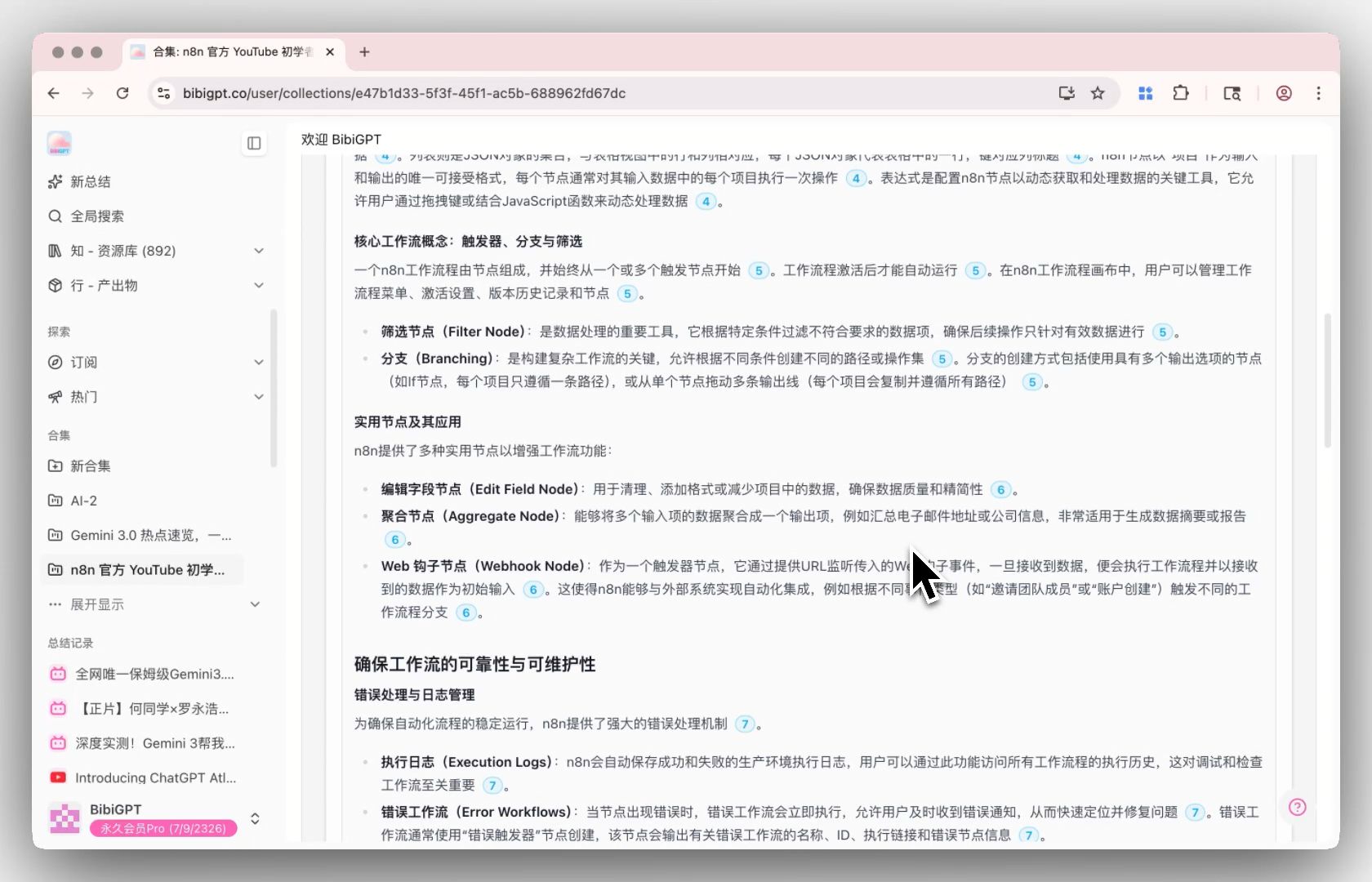
The image below shows BibiGPT’s collection summary in action — an entire course series can be processed in batch:
Screenshot: BibiGPT · collection summary feature demo
For learners, BibiGPT’s “collection batch summary” is less work in the series-open-course scenario — processing a whole playlist at once instead of one by one. If you regularly follow YouTube open courses, try BibiGPT smart video summary.
4. Dimension 3: multilingual and foreign-language video
What international students watch is often in a foreign language, so this dimension is key.
BibiGPT supports output in Chinese, English, Japanese, and Korean, can produce key points in your language directly from foreign-language video, and supports side-by-side source/target subtitles. That’s practical for learners watching English lectures or Japanese/Korean content.
Notta also covers multilingual transcription, with strengths leaning toward “transcribe + translate.” The difference is in presentation form: BibiGPT compresses foreign-language content directly into structured key points in your native language, while Notta leans toward sentence-by-sentence transcription and translation.
| Dimension | Notta | BibiGPT |
|---|---|---|
| Multilingual output | Transcribe + translate | Structured points in zh/en/ja/ko |
| Foreign-language video | Sentence-by-sentence transcription | Native-language points + comparison |
| Presentation form | Verbatim-leaning | Structured-skim-leaning |
Decision filter: Ask yourself — do you want a “sentence-aligned transcription” or “readable points in your native language”? The former leans Notta, the latter leans BibiGPT.
5. Dimension 4: price and who it suits
However good a tool is, it won’t last if the price doesn’t.
BibiGPT uses a subscription + on-demand top-up model, friendly to individual users (professionals, students, creators, freelancers), with a budget international students can accept. For specifics, see the official pricing page.
Notta has long positioned around meeting transcription, with many enterprise and team users, and pricing geared toward professional transcription scenarios.
Who suits you better
- International students / video learners → BibiGPT. Lecture recordings, YouTube open courses, and foreign-language video in one place, with structured points + timestamps serving review directly.
- Verbatim meeting record needs → Notta. Solid real-time transcription, suited to scenarios needing a complete meeting transcript.
- Content creators → BibiGPT. 30+ platform coverage + mind maps + rewriting, an all-in-one path from “watch” to “produce.”
| User type | Better fit | Core reason |
|---|---|---|
| Students | BibiGPT | Lecture + foreign-language + timestamp review |
| Meeting recorders | Notta | Solid real-time verbatim transcription |
| Content creators | BibiGPT | 30+ platforms + creative output |
Practical rule: There’s no “best tool,” only “the tool that best fits your scenario.” Figure out what content you spend 80% of your time on, then choose.
6. FAQ
Q1: What’s the biggest difference between Notta and BibiGPT?
Positioning. Notta started in meeting transcription and is strong at verbatim records; BibiGPT focuses on audio/video content summaries and is strong at compressing a whole video into structured key points.
Q2: For lecture recordings, which saves international students more time?
BibiGPT. It gives timestamped structured key points directly, letting you quickly locate the segment to rewatch instead of reading a transcript.
Q3: Do both support YouTube open courses?
Yes, both support YouTube summaries. BibiGPT additionally supports collection batch summaries and mind maps, which is less work for course series.
Q4: Can foreign-language video produce summaries in my language?
BibiGPT supports zh/en/ja/ko output, producing native-language points from foreign-language video with subtitle comparison.
Q5: Which is friendlier on price?
BibiGPT is friendly to individual users with a budget international students can accept; Notta leans toward enterprise transcription. Check each official pricing page for specifics.
7. Conclusion: from “recording video” to “understanding video”
Notta extending into the learning scenario is a good thing, and it remains solid at verbatim meeting transcription. But for people who genuinely learn from video — especially international students — “getting it recorded” is just the start; “understanding fast + easy review” is the destination.
The back half is what BibiGPT does: compressing a lecture, an open course, or a foreign-language video into structured key points you can use directly.
A way to decide:
- If you spend 80% of your time taking verbatim meeting transcripts → Notta is smoother.
- If you spend 80% of your time learning from lectures / YouTube / foreign-language video → BibiGPT is the better fit.
Models are no longer scarce; what’s scarce is the speed to understand, file, and recall a class or a video on demand.
To see how BibiGPT compresses lecture and YouTube videos into reviewable key points, paste a link to try it now and watch it compress an hour into three minutes.
BibiGPT Team