Otter.ai vs BibiGPT 2026: Which One Should Students Use for Lecture Recording Notes?
Otter.ai vs BibiGPT 2026: Which One Should Students Use for Lecture Recording Notes?
As of June 2, 2026: June is finals season for international students — US finals week, UK dissertation week, and Australian final exams all hit at once, making fast revision from lecture recordings the most urgent need of the year. Otter.ai is known for real-time meeting and class transcription; BibiGPT focuses on summarizing audio/video content into usable key points. If you’re staring down a pile of Zoom lecture recordings and office-hour audio, this comparison lays both side by side so you can see which fits a student’s revision better.
Want to try turning a lecture recording into structured notes with BibiGPT first? Open BibiGPT and turn lecture recordings into revision notes.
1. Why this comparison matters specifically for students
The video below ties the section above together with a more concrete demo:
Video source: YouTube · Tutorials With Nathan · How to Use Otter.ai for Proxy Interview (Complete Guide 2026)
Students’ pain points when choosing a revision tool differ from a regular office worker’s:
- US students: F1 required-course recordings pile up; you need to get through 12 weeks of content in the week before midterms
- UK students: PgDip seminar recordings come without full slides, tutors’ accents are hard to follow, and you need a transcript
- Australian students: final exams hit all at once; time zones make it hard to follow live lectures, so it’s all about rewatching recordings faster
- Canadian students: co-op work clashes with online classes, leaving only fragments of time to rewatch quickly
The shared need across these: turn a recording of tens of minutes quickly into key-point notes you can revise from directly — ideally cross-language too. Both Otter.ai and BibiGPT touch on this, but their emphases differ a lot.
Practical rule: Don’t pick a revision tool just for “can it transcribe” — look at whether what comes out is something you can memorize for the exam.
2. Where Otter.ai is strong, where it stalls
According to Otter.ai’s website, its core is real-time speech transcription: live transcripts during meetings or classes, speaker separation, and keyword search afterward. For “capture as it happens,” it does this solidly.
But for the student scenario of “revise from recordings,” there are a few snags:
- Transcript ≠ revision notes: it gives you a word-for-word transcript, but before an exam you want distilled key points — the transcript still needs another read to digest
- Meeting-centric: templates and features are built around meetings; class recordings and open-course videos — “content learning” — aren’t its home turf
- Weaker on foreign-language video: students often hit foreign-language lectures and academic videos; Otter’s strength is English meeting transcription, while producing cross-language key points isn’t its forte
In short: Otter.ai suits “I need a live word-for-word record,” not so much “I need to digest a pile of recordings into exam points.”
3. Where BibiGPT is strong: from recording to exam points
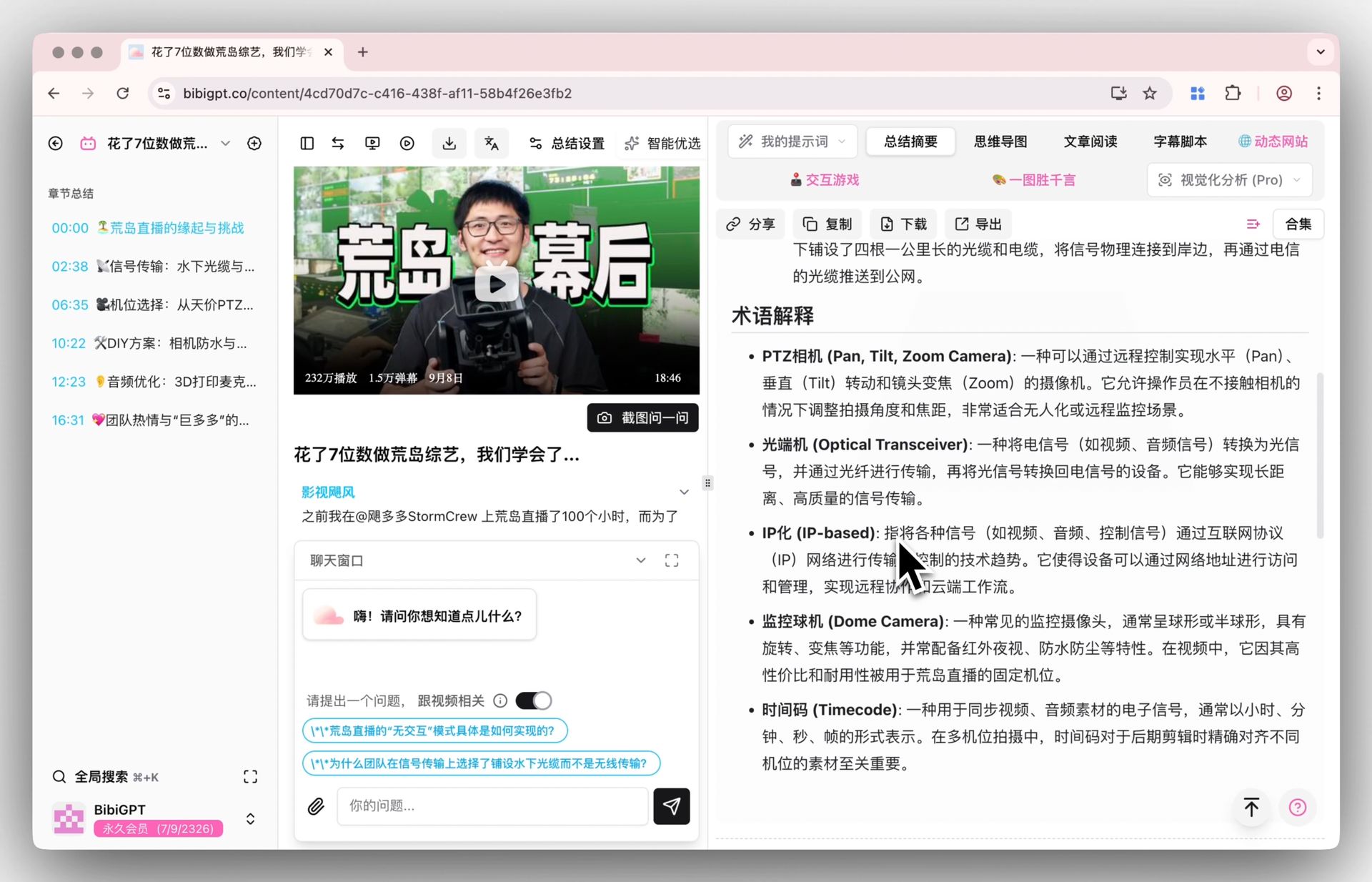
BibiGPT is positioned to “summarize audio/video content into usable key points.” It already serves over 1 million users, has generated over 5 million summaries, and supports 30+ platforms. For student revision, three key advantages:
① Distilled points, not a dumped transcript. Paste a lecture recording link, and in seconds it produces structured key points — split by chapter, focused on what matters. Memorize this before the exam.
Screenshot: BibiGPT · smart deep summary feature demo
② Foreign-language lectures → key points in your language. Hard-to-follow accent or a foreign-language video? BibiGPT supports subtitle translation, turning a foreign-language lecture directly into key points you can read. This demo shows the subtitle-translation effect:
Translate captions into your language
Original and translation, line by line, with timestamps. Great for foreign-language talks.
| 00:07 | We're going to build GPT from scratch, together. | Vamos a construir GPT desde cero, juntos. |
| 08:23 | Self-attention is the heart of the Transformer. | La autoatención es el corazón del Transformer. |
| 45:10 | Each token emits a query and a key. | Cada token emite una consulta y una clave. |
| 1:35:00 | At its core, this is the same model behind ChatGPT. | En esencia, es el mismo modelo detrás de ChatGPT. |
③ Chapter-level deep reading + timestamp jump-back. Long recordings split by chapter, and each key point jumps back to its original timestamp — want to verify a detail, jump straight there instead of scrubbing from the start.
This interactive demo lets you feel “paste one link → get structured key points”:
Summarize any video in seconds
Pick a sample below to see the AI summary — TL;DR, key points, and jump-to timestamps.
TL;DR: Karpathy builds a GPT-style language model from scratch in code, explaining every piece — from a tiny character-level model up to the full Transformer.
Key points
- Start with a bigram model, then add self-attention so tokens can "talk" to each other
- A Transformer block = multi-head attention + feed-forward + residual connections + layer norm
- Training is just predicting the next token; scale and data do the rest
- The same architecture behind nanoGPT is what scales up to ChatGPT
Jump to
- 00:07 Why build GPT from scratch
- 08:23 Self-attention, intuitively
- 1:00:00 Assembling the Transformer block
- 1:35:00 From nanoGPT to ChatGPT
4. Four-dimension comparison table
| Dimension | Otter.ai | BibiGPT |
|---|---|---|
| Core focus | Real-time word-for-word meeting/class transcription | Summarizing audio/video content into key points |
| Lecture recording revision | Transcript, needs further digesting | Structured key points you can memorize directly |
| Foreign-language lectures | English-meeting leaning, weaker cross-language | Subtitle translation, foreign-language → your language |
| Content platforms | Mainly meeting audio | YouTube, Bilibili, podcasts, and 30+ platforms |
| Timestamp jump-back | Transcript locating | Chapter-level points jump back to original timestamp |
Practical rule: Revision time is scarce during finals — every transcript you don’t have to read is another evening of studying.
5. How students should choose
A simple decision guide:
- If you want “a live word-for-word record during class/meetings” — Otter.ai’s real-time transcription is smoother
- If you want “to digest a pile of lecture recordings into exam points, cross-language too” — BibiGPT is the better fit
Many students use both: a transcription tool live, then BibiGPT at home to batch-digest recordings into key points. But if you can only pick one to carry your finals, turning recordings into points you can memorize is closer to most people’s real need.
6. FAQ
Q1: Can Otter.ai and BibiGPT be used together? Yes. Using one for live transcription and the other for recording revision doesn’t conflict. But if the goal is “quickly digest recordings before an exam,” BibiGPT’s point distillation saves more time.
Q2: Can BibiGPT handle Zoom lecture recordings? Yes. Upload the recording or paste a link, and it extracts the content and summarizes it into key points, with chapter splitting and timestamp jump-back.
Q3: Can foreign-language lectures produce notes in my language? Yes. BibiGPT supports subtitle translation, turning foreign-language videos directly into readable key points — ideal for hard-to-follow accents or non-native lectures.
Q4: How far can the free tier go? BibiGPT offers a free quota; paste a link to experience the summary effect — handy for last-minute exam prep.
Q5: Can it handle two-hour recordings? Yes. Chapter-level deep reading splits long recordings into segments, each with key points, so nothing is lost just because it’s long.
Try it now
Time is tight during finals — instead of reading the transcript word for word, let AI turn lecture recordings into points you can memorize.
Open BibiGPT and turn lecture recordings into revision notes
BibiGPT Team