Build a Video Second Brain for Learning: Turn Scattered Study Videos into a Searchable Knowledge System (2026)
Build a Video Second Brain for Learning: Turn Scattered Study Videos into a Searchable Knowledge System (2026)
Short answer: Turning scattered study videos into a “second brain” takes just three steps — first, use AI to convert each video (lectures, podcasts, explainers) into structured notes; second, archive by topic and tag each note to build a searchable index; third, use AI follow-up questions for cross-video synthesis and scheduled review to convert short-term impressions into long-term knowledge. The core idea: don’t let watched videos gather dust in your watch-later list — turn them into a knowledge base you can search and query whenever you need.
Ready to start right now? Paste a recent study video into BibiGPT and get structured notes in about a minute — that’s your second brain’s first entry. This guide walks through the full method using BibiGPT, which supports 30+ platforms and local files and has already generated 5 million+ summaries for over 1 million users.
1. Why You Should Build a Video Second Brain
When you’re studying intensively, knowledge arrives in fragments: a YouTube lecture today, an academic podcast tomorrow, a subject explainer the day after. Each one feels valuable in the moment, but a week later you’re left with a hazy impression — and when you actually need that insight for an essay or presentation, you can’t remember which video it came from.
This isn’t a memory problem — it’s how memory works. According to memory research from the University of Waterloo, without any reinforcement we forget roughly 70% of new information within 24 hours and about 90% within a week. The two most effective countermeasures are active recall and spaced repetition — a finding well-established in cognitive science, covered in depth in Scientific American’s reporting on the testing effect.
The catch: your source is video, and video is inherently difficult to “recall” or revisit — it’s linear, you can’t skim it, you can’t search it. A second brain solves exactly this: it transforms unsearchable videos into notes you can retrieve, recall, and synthesize.
Practical rule: A video you watched but never converted into searchable notes is effectively a video you didn’t watch — three days later you can’t remember the content, and you can’t find it again either.
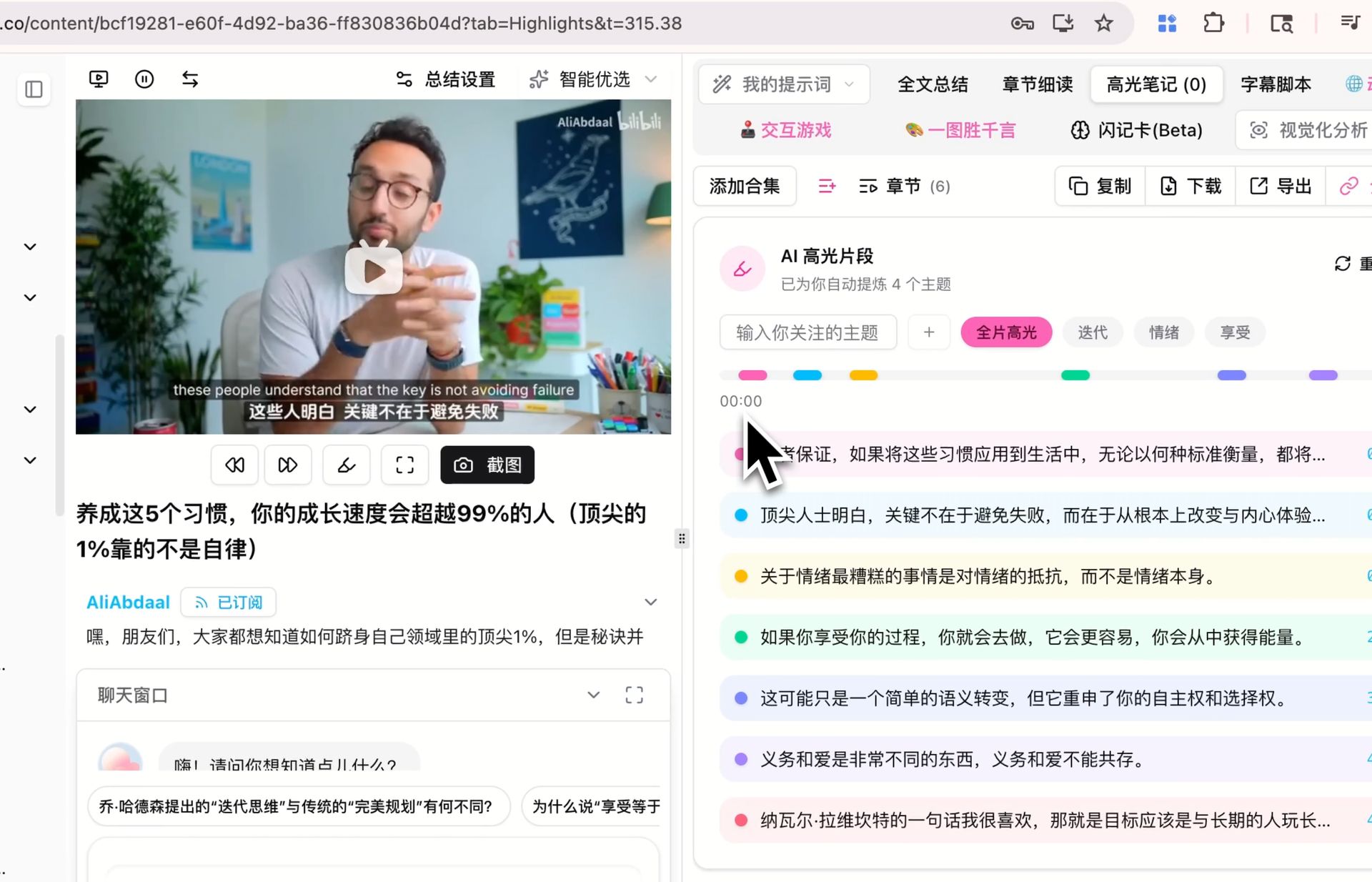
Screenshot: BibiGPT · AI Highlight Notes
2. Step 1 — Convert Each Video into Structured Notes
The atomic unit of your second brain is “one video → one structured note.” Stop relying on jotting down impressions after you finish watching — that approach is both slow and incomplete. Use AI to convert every video into a consistent, structured format:
- Paste the video link into BibiGPT, or upload a local file using the local audio/video to text feature;
- Get a timestamped, structured summary in about a minute: core arguments, section-by-section takeaways, and key terminology;
- Use AI Highlight Notes to let AI automatically surface the sentences most worth remembering — you only need to add one line of your own understanding on top;
- Give the note a descriptive title you’ll recognize at a glance (e.g., “Machine-Learning-Gradient-Descent-Andrew-Ng-Lecture”).
Why insist on a consistent format? Because the power of a second brain comes from scale — when you have 50 notes in the same format, they can be searched, compared, and synthesized. A pile of free-form jottings can’t do that.
Want to see the result before signing up? Try the interactive demo below to experience turning a video into structured notes:
Summarize any video in seconds
Pick a sample below to see the AI summary — TL;DR, key points, and jump-to timestamps.
TL;DR: Karpathy builds a GPT-style language model from scratch in code, explaining every piece — from a tiny character-level model up to the full Transformer.
Key points
- Start with a bigram model, then add self-attention so tokens can "talk" to each other
- A Transformer block = multi-head attention + feed-forward + residual connections + layer norm
- Training is just predicting the next token; scale and data do the rest
- The same architecture behind nanoGPT is what scales up to ChatGPT
Jump to
- 00:07 Why build GPT from scratch
- 08:23 Self-attention, intuitively
- 1:00:00 Assembling the Transformer block
- 1:35:00 From nanoGPT to ChatGPT
Give it a try — paste your first video to generate structured notes.
3. Step 2 — Archive by Topic and Build a Searchable Index
Once you have a collection of structured notes, the next step is organizing them so you can actually find what you need when you need it. Here’s a recommended approach:
| Dimension | How to do it | What it solves |
|---|---|---|
| By topic | Group notes from the same course or subject area | Review an entire topic in one session |
| By tag | Add 2–3 keyword tags to each note | Cross-topic retrieval (e.g., all notes mentioning “Bayesian”) |
| By purpose | Mark as “exam prep / essay / interest” | Manage different goals separately |
In practice, export BibiGPT’s summaries and highlights and archive them in a note app that supports backlinks and full-text search — Obsidian or Notion are natural fits. Your second brain now has a real search box: type a keyword and jump directly to the specific video and timestamp where that idea appeared.
The screenshot below shows AI Highlight Notes in action — key sentences are automatically surfaced, ready to drop straight into your archive:
If you want a complete archiving workflow, check out How to Build a Video Knowledge Base with BibiGPT (Obsidian PKM Workflow), which covers concrete folder structures and bidirectional linking.
Practical rule: The value of a second brain isn’t how much you store — it’s how fast you can find it. When tagging, think first about what keywords you’ll search for in the future, then decide what tags to apply.
4. Step 3 — Use Follow-Up Questions for Cross-Video Synthesis and Active Recall
Once your notes are stored and organized, the second brain starts compounding in value through two practices: cross-video synthesis and active recall.
Cross-video synthesis: After watching several videos on the same topic, use AI conversation follow-ups to compare their perspectives — “How do these three videos explain this concept differently?” “Taken together, what’s the full picture on this topic?” A single video can’t give you that panoramic view; cross-video synthesis fills the gap.
Active recall: Periodically close your notes and ask AI to quiz you based on the video content — “Explain this concept in a paragraph, assuming I’ve never seen this video” or “What are the three most important takeaways from this video?” According to the widely cited Roediger & Karpicke 2006 study (reported in Scientific American), students who practiced recall retained roughly 80% of material after a week, compared to only about 34% for students who simply reread — active recall is the critical step that converts short-term impressions into long-term knowledge.
The video below demonstrates the principles of active recall and spaced repetition from a learning-science perspective — useful for understanding why “testing yourself” outperforms “rewatching”:
Video source: YouTube · Learning Science and Memory Principles
Make both practices a habit, and your video second brain stops being a static note archive and becomes a living learning system that thinks alongside you.
Give it a try — paste a video to create your first note.
5. Advanced Tips and Common Pitfalls
Process on the same day — don’t batch. Convert a video into notes on the day you watch it, while the impression is still fresh enough to add your own one-line takeaway. By the time the weekend comes and you try to batch-process a week’s worth of videos, you’ll have forgotten why you thought each one was worth watching.
Generate notes in your native language. Your summary language doesn’t have to match the video language. Getting English-language lecture content summarized in your first language makes comprehension and recall significantly faster; when you need to quote the original for an essay, go back to the English source then.
Quality over quantity — be selective. A bigger second brain isn’t always better. Only capture videos you’ll genuinely use, and tag every entry properly — 50 well-tagged notes you can actually retrieve beat 500 entries you can’t find.
Review regularly, or you’ll still forget. Building an index is just the beginning. Follow a spaced-repetition rhythm — review a note a week after you created it, then again a month later — so the content moves into long-term memory rather than sitting idle in your archive.
6. FAQ
Q1: How long does it take to convert one video into a note? A: Transcription plus structured summary typically takes about a minute. Highlights and follow-up questions are near-instant. From finishing a video to having it archived usually takes just a few minutes.
Q2: Do I have to use Obsidian or Notion for my second brain? A: Not at all. Any note app that supports search works. The key features are “searchable and taggable.” BibiGPT’s summaries and highlight notes are exportable, so you can archive them in whatever tool fits your workflow.
Q3: Can I get notes in a different language from the video? A: Yes. Getting notes in your first language from a foreign-language video is one of the most popular use cases — it makes retention and recall much faster.
Q4: Are short-form videos (quick explainers, podcast clips) worth capturing? A: Yes, but be selective. Only capture content that’s relevant to your learning goals and that you’ll actually reuse. Pure entertainment doesn’t need to go into your second brain.
Q5: Can I try it for free? A: Yes. After registering, you can experience the full transcription, summarization, and highlight-notes workflow right away. Try capturing a few videos to see the results, then decide whether to upgrade for higher usage limits.
Try It Now
A second brain isn’t built in a day, but you can add your first note today. Paste that study video you’ve been meaning to revisit — the one you watched recently and thought was valuable — and get structured notes and highlights in about a minute. That’s where your knowledge base begins:
Paste a video, get structured notes in a minute, and start building your video second brain.
Paste a video and create your first note
BibiGPT Team
Popular tools
More in this series
- ИИ-инструмент для краткого содержания видео Bilibili: BibiGPT мгновенно суммирует 30+ платформ (2026)
- Top 3 Douyin Video Summary Tools (2026 Update): AI-Powered Insights from Viral Clips
- Top 3 Xiaohongshu Video Summary Tools in 2026 (Paste Link, Get Notes in Seconds)
- 2026''s Best AI Video Summary Tool: How BibiGPT Covers Every Platform End-to-End
- Best Bilibili AI Video Summary Tool 2026: How BibiGPT Helps You Say Goodbye to "Hard Learning" Tutorials?