
Best AI Subtitle Translation Tools 2026: Trancy vs ViiTor vs BibiGPT Comparison
A comprehensive comparison of the best AI subtitle translation tools in 2026, including Trancy, ViiTor, Kuaizhuan, and BibiGPT's one-click bilingual subtitle workflow.
Best AI Subtitle Translation Tools 2026: Trancy vs ViiTor vs BibiGPT Comparison
Table of Contents
- Why You Need an AI Subtitle Translation Tool
- Four Top AI Subtitle Translators Compared
- Trancy: Browser-Based Bilingual Subtitles
- ViiTor: Real-Time Translation Pioneer
- Kuaizhuan Subtitles: Multi-Modal Subtitle Platform
- BibiGPT: One-Click Translate-on-Upload Solution
- Comparison Summary: Which Tool Is Right for You?
- FAQ
- Conclusion
Why You Need an AI Subtitle Translation Tool
Watching foreign-language videos for learning and work is now a daily reality for millions of professionals and students, but the language barrier remains the biggest obstacle. Manually translating subtitles is time-consuming, and traditional machine translation often falls short in quality. In 2026, breakthroughs in AI models like GPT-4o, Claude, and Gemini have elevated subtitle translation tools to a new level -- delivering higher accuracy, real-time bilingual output, and seamless workflow integration.
If you are looking for a reliable AI subtitle translation tool, the market is crowded. But four tools stand out for distinct use cases: Trancy (browser extension for bilingual subtitles), ViiTor (real-time translation), Kuaizhuan Subtitles (multi-modal subtitle adaptation), and BibiGPT (integrated translate-on-upload platform). This guide compares all four across features, use cases, and real-world experience to help you pick the best fit.
AI Subtitle Extraction Preview

Let's build GPT: from scratch, in code, spelled out
Andrej Karpathy walks through building a tiny GPT in PyTorch — tokenizer, attention, transformer block, training loop.
Want to summarize your own videos?
BibiGPT supports YouTube, Bilibili, TikTok and 30+ platforms with one-click AI summaries
Try BibiGPT FreeFour Top AI Subtitle Translators Compared
Let us break down each tool's core capabilities, ideal use cases, and trade-offs so you can quickly identify the right choice for your workflow.
Trancy: Browser-Based Bilingual Subtitles
Trancy is a Chrome/Edge browser extension that overlays bilingual subtitles on platforms like YouTube, Netflix, and Coursera. It is designed primarily for language learners who want an immersive reading experience without leaving their browser.
Key Strengths:
- Immersive in-browser experience: Displays bilingual subtitles directly on YouTube, Netflix, and other platforms with no page switching
- Sentence-by-sentence reading mode: Pause and follow along sentence by sentence, perfect for language practice
- Instant word lookup: Click any word in the subtitle overlay for an instant definition
Limitations:
- Browser-only -- cannot process local video or audio files
- Depends on the platform having existing subtitle tracks; cannot handle videos without subtitles
- Translation quality is bounded by the accuracy of the platform's original captions
Trancy is best for casual YouTube language learners, but if you need to process local files or handle batch translation workflows, you will need a more comprehensive tool.
ViiTor: Real-Time Translation Pioneer
ViiTor focuses on live, real-time video translation. It generates translated subtitles in sync with video playback, making it a strong choice for meetings, live streams, and webinars that demand instant cross-language communication.
Key Strengths:
- Real-time subtitle translation: Low-latency translation during live video playback
- Multi-scenario support: Works with online meetings, live streams, and recorded video
- Broad language coverage: Supports major language pairs for real-time translation
Limitations:
- Real-time accuracy can fluctuate with heavy slang, accents, or domain-specific terminology
- No subtitle file export or post-editing capabilities
- Lacks deeper content processing features such as AI summaries, notes, or knowledge management
ViiTor is ideal for real-time cross-language meeting scenarios, but its capabilities for video-to-text conversion or long-term knowledge retention are limited.
Kuaizhuan Subtitles: Multi-Modal Subtitle Platform
Kuaizhuan Subtitles is a comprehensive subtitle processing platform supporting speech recognition, subtitle translation, and format conversion. It covers nearly 100 languages and targets professional content creators with batch subtitle processing needs.
Key Strengths:
- Nearly 100 languages supported: Extensive language coverage including less common languages
- Multi-format compatibility: Converts between SRT, ASS, VTT, and other major subtitle formats
- Batch processing: Process multiple files simultaneously, suitable for team workflows
Limitations:
- Traditional workflow requiring separate transcription and translation steps
- No AI-powered summarization or dialogue features
- No deep integration with note-taking tools like Notion or Obsidian
Kuaizhuan is best for professional subtitle production teams and localization specialists, but individual users may find the multi-step workflow cumbersome. If you need a more streamlined subtitle extraction and translation experience, a more integrated solution may serve you better.
Try pasting your video link
Supports YouTube, Bilibili, TikTok, Xiaohongshu and 30+ platforms
BibiGPT: One-Click Translate-on-Upload Solution
BibiGPT, with over 1 million users and 5 million+ summaries processed across 30+ platforms, offers a unique translate-on-upload experience for subtitle translation. Unlike other tools that require you to manually trigger translation after transcription, BibiGPT integrates the translation step directly into the upload and transcription workflow.
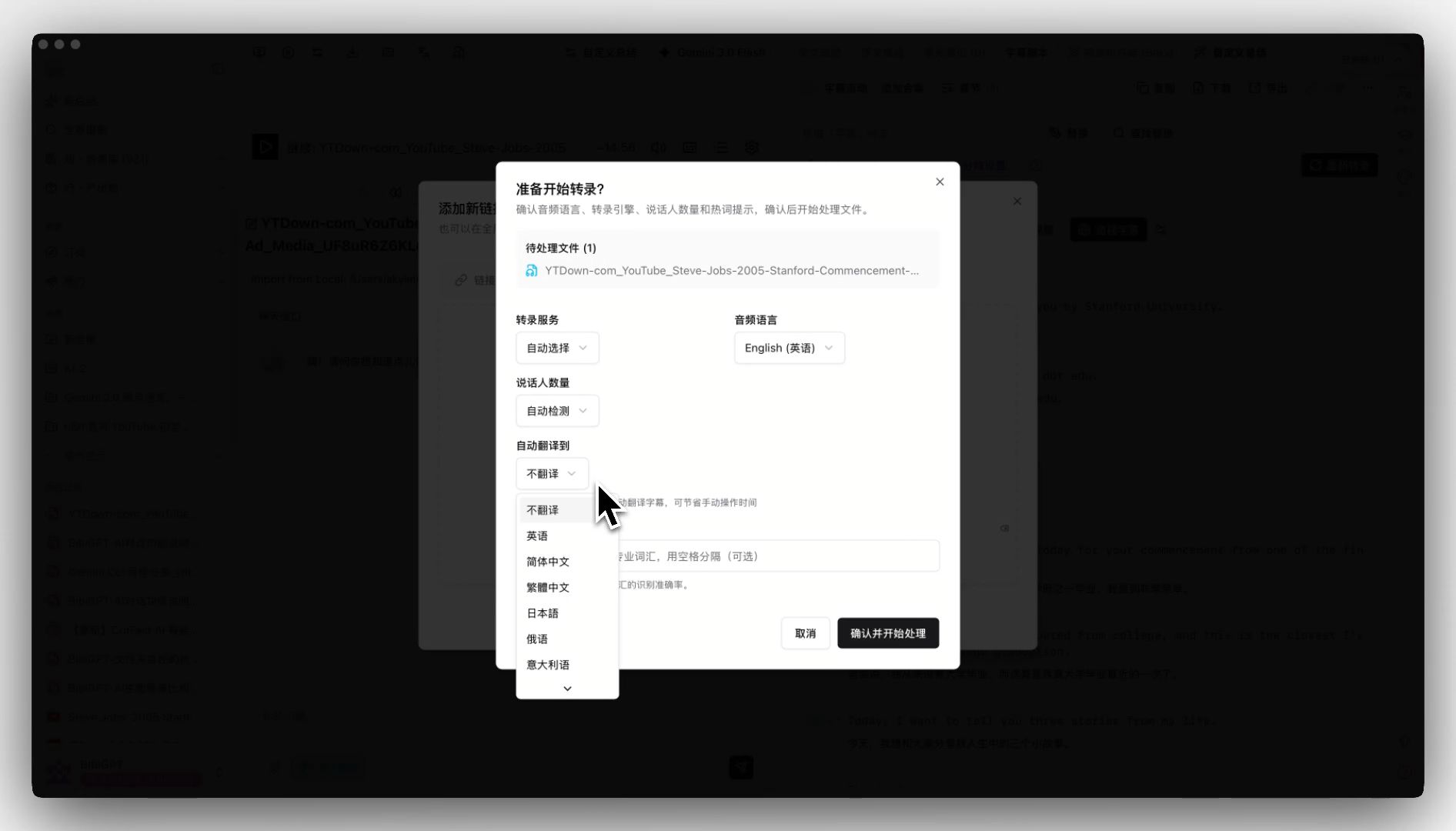 BibiGPT auto-translate on upload interface
Key Strengths:
- Translate on upload: Set your target language in the upload dialog, and the system automatically translates during transcription -- delivering bilingual subtitles and summaries in one step
- 30+ platform coverage: Beyond local files, it processes links from YouTube, Bilibili, TikTok, podcasts, and 30+ other platforms
- AI-powered deep understanding: Goes beyond translation to generate AI video summaries, mind maps, chapter breakdowns, and more
- Note-taking integrations: One-click export to Notion, Obsidian, Readwise, and other popular tools
Why is BibiGPT's approach more efficient?
The traditional workflow requires: upload, wait for transcription, manually click translate, wait for translation, then view results. BibiGPT simplifies this to: upload (check auto-translate) and receive bilingual results. One step, no manual intervention in between.
Whether you regularly process foreign-language videos for learning, create cross-language content, or translate meeting recordings, BibiGPT's integrated approach saves significant time. Learn more in the detailed AI subtitle translation bilingual workflow tutorial.
Comparison Summary: Which Tool Is Right for You?
| Feature | Trancy | ViiTor | Kuaizhuan | BibiGPT |
|---|---|---|---|---|
| Primary Use Case | Browser bilingual subtitles | Real-time translation | Batch subtitle processing | One-click translate-on-upload |
| Local File Support | No | Limited | Yes | Yes |
| Online Platform Coverage | YouTube/Netflix | Meetings/Streams | Limited | 30+ platforms |
| Bilingual Output | Yes | Yes | Yes | Yes |
| AI Summary | No | No | No | Yes |
| Note-Taking Integration | No | No | No | Notion/Obsidian etc. |
| Ease of Use | Easy | Easy | Moderate | Easy |
Recommendations:
- Casual language learners: Trancy handles daily YouTube bilingual subtitle needs well
- Real-time meeting translation: ViiTor is the go-to for live translation scenarios
- Professional subtitle teams: Kuaizhuan's batch processing and format conversion capabilities are stronger
- Efficiency-focused individuals and content creators: BibiGPT's translate-on-upload plus AI summarization plus note integration delivers the most time-efficient all-in-one workflow
FAQ
Q1: Can AI subtitle translation tools match human translation quality?
A: In 2026, advanced AI models have significantly improved subtitle translation quality. For everyday learning and content consumption, AI translation accuracy is highly reliable. However, for highly specialized domains (medical, legal) or content heavy with cultural nuances, human review is still recommended. BibiGPT's advantage here is that it not only provides translation but also supports follow-up questions and source tracing through its AI Q&A assistant feature, helping you verify critical information accuracy.
Q2: What languages do these tools support?
A: Language support varies. Trancy primarily covers English and major languages; Kuaizhuan supports nearly 100 languages; BibiGPT supports dozens of languages with deep optimization for high-frequency pairs like English-Chinese, English-Japanese, and English-Korean. If you need rare language translation, Kuaizhuan or BibiGPT would be your best options.
Q3: Is BibiGPT's auto-translate feature free?
A: BibiGPT offers free trial credits so you can fully experience the product before committing. The subtitle translation feature is included in Plus/Pro subscription plans and is also available through pay-as-you-go top-ups. Free users can start by trying the basic video subtitle extraction feature to experience the AI processing efficiency firsthand.
Q4: Can I export the translated subtitles as SRT or VTT files?
A: Yes. BibiGPT supports exporting translated subtitles in multiple formats including SRT and VTT. You can also use the free online subtitle converter tool to convert between different subtitle formats as needed.
Conclusion
AI subtitle translation tools in 2026 have evolved from "functional" to "genuinely useful." Whether you are a language learner, content creator, or working professional, there is a tool that fits your needs. If what you are looking for is a one-step bilingual subtitle experience where translation is just the starting point of a deeper knowledge workflow -- not the end -- BibiGPT's translate-on-upload approach combined with AI understanding is worth trying.
Start your AI efficient learning journey now:
- 🌐 Official Website: https://aitodo.co
- 📱 Mobile Download: https://aitodo.co/app
- 💻 Desktop Download: https://aitodo.co/download/desktop
- ✨ Learn More Features: https://aitodo.co/features
BibiGPT Team