
Best AI Live Audio Transcription Tools 2026: Complete Comparison Guide
Compare the 5 best AI live audio transcription tools in 2026 including BibiGPT, Otter.ai, Notta, Read AI, and Fireflies.ai. Full breakdown of pricing, accuracy, features, and use cases to find your ideal speech-to-text solution.
Best AI Live Audio Transcription Tools 2026: Complete Comparison Guide
Last Updated: April 2026
- Quick Rankings
- Detailed Comparison
- BibiGPT: Beyond Transcription
- Feature Comparison Table
- Tutorial
- FAQ
- Conclusion
Quick Rankings: Top 5 AI Live Audio Transcription Tools 2026
Core Answer: The top-rated AI audio transcription tool in 2026 is BibiGPT — it supports 30+ platforms, offers dual-engine transcription (Whisper + ElevenLabs Scribe), and goes far beyond basic transcription with structured summaries, mind maps, and AI chat. For meeting-only transcription, Otter.ai and Notta are solid picks. But if you need a comprehensive platform that handles meeting recordings, YouTube videos, podcasts, and 30+ other audio-video sources, BibiGPT is the most versatile solution available.
試試貼上你的影片連結
支援 YouTube、B站、抖音、小紅書等 30+ 平台
Quick Rankings:
- BibiGPT — 30+ platform support, dual-engine transcription (Whisper + ElevenLabs Scribe), structured summaries in 30 seconds, mind maps, AI chat, exports to Notion/Obsidian
- Otter.ai — Real-time meeting transcription pioneer, ~95% English accuracy, deep Zoom/Meet/Teams integration
- Notta — 58-language transcription with bilingual support, most affordable Pro plan at $8.25/mo
- Read AI — Meeting analytics with engagement scoring, sentiment analysis, and cross-platform search
- Fireflies.ai — Enterprise meeting intelligence, unlimited transcription on paid plans, 100+ languages, strong CRM integration
With the rapid advancement of AI models like Gemini 3.1 Flash Live enabling native real-time audio processing, 2026's transcription landscape has evolved dramatically. Tools now offer far more than simple speech-to-text — they deliver structured insights, multilingual processing, and deep integrations. This guide compares the 5 leading AI live audio transcription tools across pricing, accuracy, feature depth, and use cases to help you find the best fit.
Detailed Tool-by-Tool Comparison
Otter.ai: The Real-Time Transcription Pioneer
Core Answer: Otter.ai pioneered mainstream AI real-time transcription and still delivers excellent English accuracy at ~95%, with a generous free tier of 300 minutes per month. However, it only supports English, French, and Spanish, and cannot process pre-recorded video or audio files from platforms like YouTube.
Founded in 2016, Otter.ai remains a household name in meeting transcription. Its real-time transcription fluency in English environments is best-in-class, and the free plan is among the most generous in the market.
- Pricing: Free (300 min/mo); Pro $8.33/user/mo (annual); Business $20/user/mo
- Core Features: Real-time transcription, auto-summary, action items, speaker identification, Zoom/Meet/Teams integration
- Accuracy: ~95% in English, 85-90% in supported multilingual scenarios
- Limitations: Only 3 languages (English/French/Spanish); cannot process existing audio/video files; no YouTube, podcast, or platform content support; Pro plan capped at 1,200 min/mo
Notta: Best Value for Multilingual Transcription
Core Answer: Notta stands out with 58-language transcription and bilingual output at just $8.25/mo for Pro, making it the most cost-effective option for multilingual teams. Its AI analysis features are still maturing but the transcription core is solid.
Notta excels in multilingual scenarios with 58-language transcription and 42-language translation support. It is particularly well-suited for global teams, multilingual interviews, and cross-border content processing.
- Pricing: Free (200 min/mo); Pro $8.25/user/mo (annual); Business $13.50/user/mo
- Core Features: 58-language real-time transcription, bilingual transcription, Notta Bot auto-join, file upload, AI speaker identification (up to 10 speakers)
- Accuracy: ~95% in English, 90-93% in major languages
- Limitations: Notta Brain AI features still evolving; limited non-meeting audio-video support; free tier only 200 min/mo
Read AI: Deep Meeting Analytics
Core Answer: Read AI uniquely focuses on meeting intelligence — engagement scoring, sentiment analysis, and talk-time distribution — making it ideal for managers who need to quantify meeting effectiveness. However, privacy concerns and polarized user reviews (1.5/5 on Trustpilot) are significant drawbacks.
Read AI goes beyond transcription into meeting analytics territory. It scores each meeting on engagement, analyzes sentiment trends, and tracks speaking time distribution across participants.
- Pricing: Free (5 meetings/mo); Pro $19.75/mo (monthly) or $15/mo (annual); Enterprise $29.75/mo
- Core Features: Meeting engagement scoring, sentiment analysis, action item extraction, cross-platform meeting search, Asana/Jira/Notion integration
- Accuracy: ~93% in English, relies primarily on native platform transcription
- Limitations: Multiple organizations have blocked its meeting bot over privacy concerns; heavily polarized reviews (1.5/5 Trustpilot vs 4.0/5 AppSource); free tier severely limited (5 meetings/mo); meeting-only focus
Fireflies.ai: Enterprise Meeting Intelligence
Core Answer: Fireflies.ai leads in CRM integration and meeting workflow automation with 100+ language support and unlimited transcription on all paid plans. It is best suited for sales and customer success teams, though its meeting bot requirement and steeper learning curve are trade-offs.
Fireflies.ai positions itself as an enterprise meeting intelligence platform. Its AI bot "Fred" automatically joins meetings for recording and transcription, and all paid plans include unlimited transcription minutes — a unique advantage over competitors.
- Pricing: Limited free tier; Pro $18/mo; Business $29/mo; Enterprise custom
- Core Features: Auto-recording, AI summary, sentiment analysis, topic tracking, Salesforce/HubSpot deep integration, 100+ language support
- Accuracy: ~95% in English, 88-92% in other major languages
- Limitations: Meeting bot required (may concern participants); steeper learning curve; limited processing of pre-recorded audio-video files
看看 BibiGPT 的 AI 總結效果

Bilibili: GPT-4 & Workflow Revolution
A deep-dive explainer on how GPT-4 transforms work, covering model internals, training stages, and the societal shift ahead.
BibiGPT: The All-in-One Audio-Video Platform
Core Answer: BibiGPT has served over 1 million users and generated over 5 million AI summaries across 30+ platforms. Unlike meeting-focused tools, BibiGPT is a full audio-video intelligence platform — it transcribes, generates structured summaries with timestamps, creates mind maps, enables AI Q&A, and exports to Notion/Obsidian. Its dual-engine transcription (Whisper + ElevenLabs Scribe) lets you choose the optimal engine for each scenario.
Most AI transcription tools solve just one piece of the puzzle: converting speech to text. But in real-world work and learning, the audio-video content you need to process extends far beyond meetings — YouTube tutorials, in-depth podcasts, online courses, training recordings, and more. BibiGPT is built for this full-spectrum need.
Dual-Engine Transcription: Choose Your Best Fit
BibiGPT offers a custom transcription engine feature, letting you switch between Whisper and ElevenLabs Scribe depending on your content. Whisper excels for general-purpose transcription, while ElevenLabs Scribe delivers superior multi-speaker identification and performance in low-noise environments.
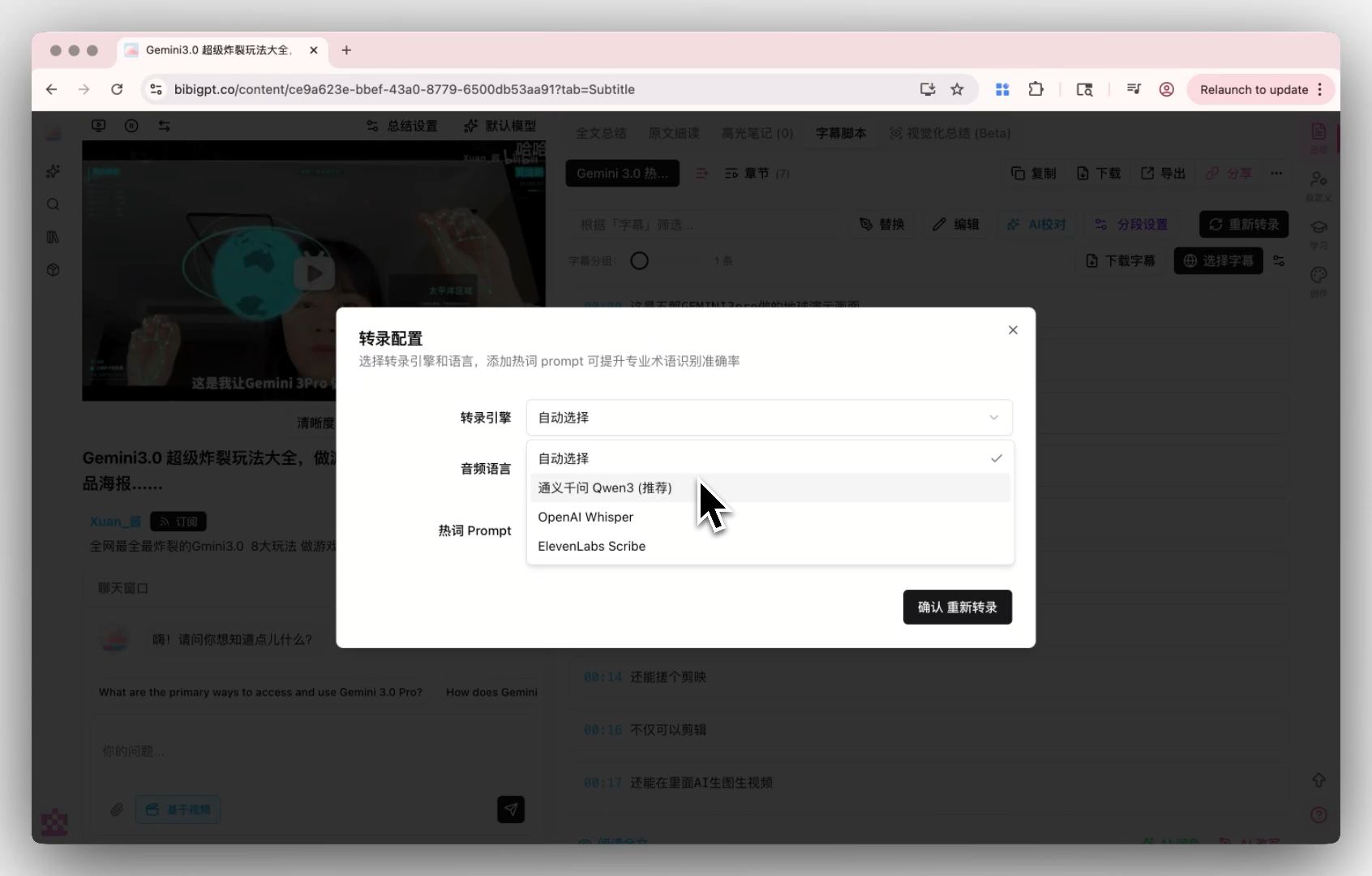 Custom transcription engine display
30+ Platform Coverage
BibiGPT supports YouTube, Bilibili, TikTok, podcasts, and 30+ other major audio-video platforms, plus local file uploads (meeting recordings, screen captures, etc.). Paste a link or drag a file, and get a timestamped structured summary in 30 seconds.
Your podcast transcription and meeting recordings can all be handled with one tool. For more podcast tool comparisons, see our podcast transcription tools guide.
Smart Deep Summary: From Transcription to Insight
BibiGPT's Smart Summary feature goes far beyond basic transcription — it generates structured reports with core summaries, highlight extraction, deep-thinking Q&A, and terminology explanations. This is especially valuable for technical talks and educational content.
 Smart summary question
Chapter Deep Reading
After transcribing long audio, BibiGPT's Chapter Deep Reading feature automatically segments content by topic, letting you dive into specific chapters instead of scrolling through a wall of text. This is particularly useful for podcast AI summaries or lectures over an hour long.
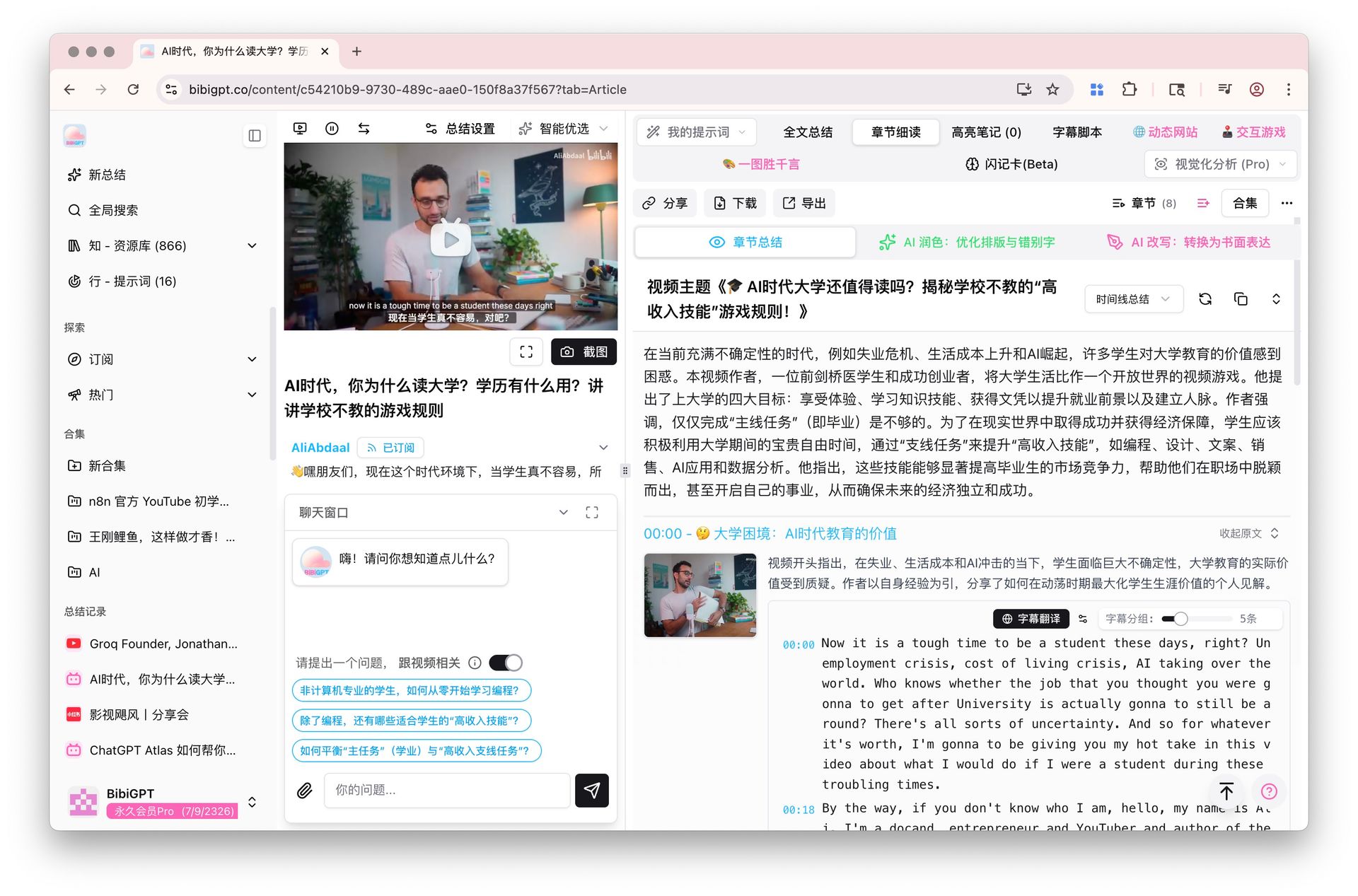 Chapter deep reading feature
Feature Comparison Table
| Feature | BibiGPT | Otter.ai | Notta | Read AI | Fireflies.ai |
|---|---|---|---|---|---|
| Starting Price | Free trial | Free/Pro $8.33 | Free/Pro $8.25 | Free/Pro $15 | Free/Pro $18 |
| Real-Time Transcription | Yes | Yes | Yes | Yes | Yes |
| Local File Upload | Yes | Limited | Yes | No | Limited |
| Multi-Platform Content | 30+ platforms | Meetings only | Meetings only | Meetings only | Meetings only |
| Language Support | ZH/EN/JA/KO | EN/FR/ES | 58 languages | English primary | 100+ languages |
| AI Chat/Q&A | Yes | Limited | Limited | Limited | Yes |
| Mind Maps | Yes | No | No | No | No |
| Structured Summary | Deep summary | Basic summary | Basic summary | Meeting analytics | AI summary |
| Note Export | Notion/Obsidian/Readwise | Google Docs | Notion/Docs | Asana/Jira/Notion | Notion/CRM |
| CRM Integration | No | Limited | Limited | Limited | Salesforce/HubSpot |
| Engine Selection | Whisper/ElevenLabs | Single engine | Single engine | Platform-dependent | Single engine |
Hands-On Tutorial: Audio Transcription with BibiGPT
Step 1: Upload Audio or Paste a Link
Open BibiGPT and drag your audio file (MP3, MP4, WAV, M4A supported) into the input field, or paste a YouTube/podcast/Bilibili link directly. The desktop app also supports folder monitoring for automatic import.
Step 2: Choose Your Transcription Engine
Select the optimal engine for your scenario. Whisper works great for general content; ElevenLabs Scribe is better for multi-speaker meeting recordings. You will get a full timestamped transcript in under 30 seconds.
Step 3: Get Structured Summary and Mind Map
After transcription, BibiGPT automatically generates a structured summary with core insights, highlights, and key takeaways. Switch to the mind map view for a visual overview of the entire content.
Step 4: AI Chat for Deep Q&A
Use the chat window below the summary to ask questions about the content. For example: "What were the key technical decisions discussed?" or "Summarize the action items." BibiGPT provides precise answers grounded in the source material.
Step 5: Export and Share
Export your transcript and summary as Markdown or PDF, or push them to Notion, Obsidian, and other note-taking apps. For more meeting-specific comparisons, check our meeting transcription tools guide.
Frequently Asked Questions (FAQ)
Q1: How accurate are AI live audio transcription tools in 2026?
A: In 2026, mainstream AI transcription tools achieve 93-95% accuracy in English environments. The best engines (such as Voxtral Mini Transcribe V2) reach word error rates as low as 4% on the FLEURS benchmark. Multilingual scenarios typically range from 88-93%. Accuracy depends on audio quality, accent, and background noise. BibiGPT's dual-engine approach lets you switch engines based on specific conditions for optimal results.
Q2: What makes BibiGPT different from meeting-focused tools like Otter.ai or Fireflies?
A: The core difference is scope. Otter.ai and Fireflies focus on live meeting transcription, while BibiGPT processes content from 30+ platforms — meetings are just one use case. BibiGPT also offers unique features like structured deep summaries, mind maps, chapter-based reading, and dual-engine transcription that help you not just transcribe but truly understand your audio-video content.
Q3: Which tool is best for multilingual transcription?
A: For sheer language count, Fireflies.ai supports 100+ languages and Notta covers 58. For Chinese, Japanese, and Korean accuracy, BibiGPT delivers the strongest results. If your primary need is CJK or bilingual transcription, BibiGPT is the better choice. For niche European languages, Notta or Fireflies may be more suitable.
Q4: Can the free plans handle daily use?
A: Free tier limits vary significantly: Otter.ai offers 300 min/mo, Notta gives 200 min/mo, Read AI allows only 5 meetings/mo, and Fireflies severely limits features. BibiGPT offers a free trial quota sufficient for evaluating whether the tool fits your workflow. For daily transcription needs, a paid plan is recommended for the full experience.
Q5: How do I choose the right AI audio transcription tool?
A: Start from your use case: for English-only meeting transcription, Otter.ai offers the best value; for sales teams needing CRM integration, Fireflies.ai is the strongest; for multilingual transcription on a budget, Notta wins on price; for meeting analytics and management insights, Read AI is unique. But if you need to process not just meetings but also YouTube videos, podcasts, online courses, and other audio-video content, BibiGPT is the most comprehensive solution.
Q6: How has Gemini 3.1 Flash Live changed the transcription landscape?
A: Google's Gemini 3.1 Flash Live, released in March 2026, represents a paradigm shift — it enables native real-time bidirectional audio processing without the traditional STT-to-LLM-to-TTS pipeline. It recognizes pitch, pace, and environmental sounds with unprecedented accuracy. BibiGPT stays at the technology frontier, continuously integrating the latest transcription engines to ensure users always get industry-leading transcription quality.
Transcribe Audio with BibiGPT
30+ platforms, dual-engine transcription, structured summaries in 30 seconds
Conclusion: Choosing the Right Tool
AI audio transcription tools in 2026 have reached remarkable maturity, but the key is matching the tool to your actual needs. If your audio-video processing goes beyond meetings — you also need to transcribe and summarize YouTube tutorials, podcast content, online courses, and training recordings — then BibiGPT's full-platform coverage will save you significantly more time than any single-purpose meeting tool. Also check our podcast summarizer tools comparison for more options.
With 1M+ active users, 5M+ AI summaries generated, and 30+ platforms supported, BibiGPT is the most comprehensive audio-video intelligence platform available. Try BibiGPT today and turn every piece of audio into a knowledge asset.
Get started with BibiGPT now:
- 🌐 Website: https://aitodo.co
- 📱 Mobile App: https://aitodo.co/app
- 💻 Desktop App: https://aitodo.co/download/desktop
- ✨ Explore Features: https://aitodo.co/features
BibiGPT Team