Pomodoro × AI Video Learning: A 4-Step Method to Absorb a Long Video in 25 Minutes (2026 BibiGPT Method)
Pomodoro × AI Video Learning: A 4-Step Method to Absorb a Long Video in 25 Minutes (2026 BibiGPT Method)
TL;DR: You can’t apply Pomodoro directly to long-form video — 25 minutes isn’t even enough to watch a 60-minute lecture. But if you compress the video into a structured BibiGPT summary first, then spend the Pomodoro on focused reading + mind-map navigation + AI follow-up + note export, one Pomodoro (25 minutes) is enough to truly absorb a 60-minute video. This article gives you the 4-step method + 5 real scenarios.
If you’ve tried applying the Pomodoro Technique to long-form video learning, you probably gave up the first time — 25 minutes isn’t enough to even finish watching a 60-minute lecture, let alone take notes.
But the genius of Pomodoro isn’t “focus for 25 minutes.” It’s “split work into measurable minimal completion units.” So the real question is: what should the minimum unit be for video learning?
The answer isn’t “watch 25 minutes of video.” It’s “produce a referenceable learning note in 25 minutes.” When you use BibiGPT to first compress the video into a readable structured form, Pomodoro suddenly applies to long-form video learning for the first time.
The 4 Steps at a Glance
Pomodoro starts (25 minutes)
   ↓
Step 1 (5 min): Targeted reading of the AI video summary
   ↓
Step 2 (10 min): Read the mind map closely + jump to key chapters
   ↓
Step 3 (5 min): Ask AI follow-up questions to plug understanding gaps
   ↓
Step 4 (5 min): Export to Notion / Obsidian for permanent storage
   ↓
Pomodoro ends — one referenceable learning note done
Step 1: Targeted reading of the AI video summary (5 min)
Paste the video link (Bilibili / YouTube / Xiaohongshu / TikTok / etc.) into the BibiGPT homepage, wait 30-60 seconds for the structured summary.

The point of targeted reading isn’t reading top to bottom — it’s scanning with questions in mind:
- What is the core argument?
- How many supporting points are there? What are they?
- Which parts do I already know? Which do I need to focus on?
Practical tip: Use the “learning-objective-first” scan-read approach. For example, learning a 60-minute “Intro to Machine Learning” lecture, your goal might be “understand the difference between supervised and unsupervised learning.” Skip the intro, skip the case studies, jump straight to the “core concept comparison” section in the structured summary.
Step 2: Read the mind map closely + jump to key chapters (10 min)
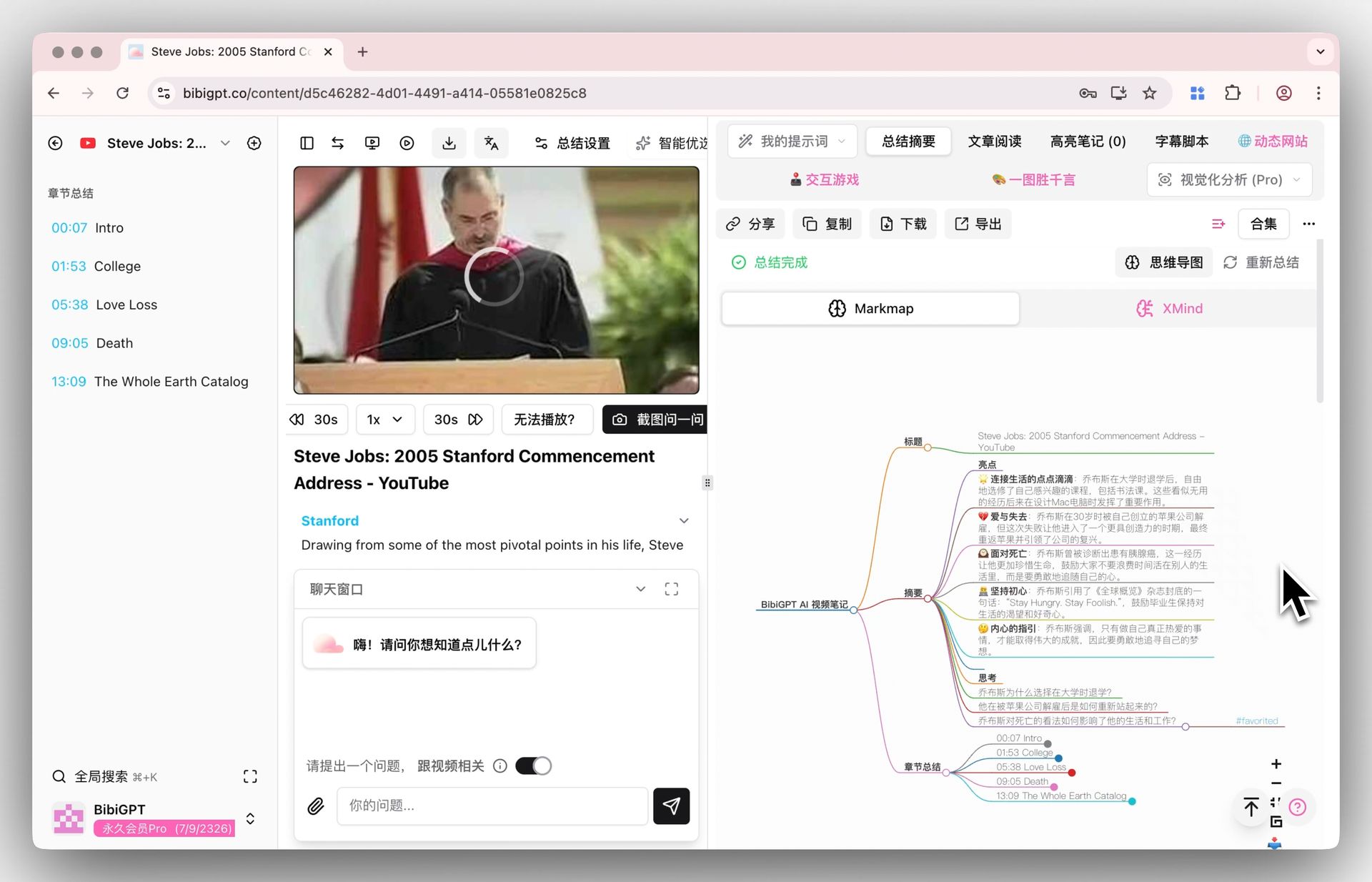
BibiGPT’s mind map compresses a long video into a clickable knowledge graph — every node is timestamped, click to jump back to that point in the original video.
Three principles for close reading:
- Hierarchical expansion: trunk first (H1/H2 nodes), then expand only the unfamiliar children
- Inspect node relationships: causal? parallel? progressive?
- Timestamp verification: for key claims, click the timestamp and jump back to the original video to confirm AI didn’t drift
Concrete example: Learning a “Transformer architecture” video — the trunk is “Encoder / Decoder / Attention Mechanism / Position Encoding.” You already understand Encoder/Decoder, so expand the Attention subtree. When you hit “Q, K, V matrices,” click the timestamp to jump back and confirm the AI summary aligns with the speaker’s words.
Step 3: Ask AI follow-up questions (5 min)
After close reading, your brain will surface questions: “What’s a counterexample to this claim?” “How does this connect to concept X I learned before?” “What does that code snippet actually mean?”
Ask AI directly inside the BibiGPT summary page — AI will go back to the source video context for the answer.
Follow-up templates:
- Probe evidence: “Why does the speaker say X is wrong? On what grounds?”
- Probe contrast: “How is this method different from method Z I saw in another video?”
- Probe application: “How would I apply this principle to [my specific scenario]?”
Concrete example: After watching a Transformer video, ask: “What’s the fundamental difference between Self-Attention and the attention I learned in RNNs?” AI gives a comparison table combining video content + general knowledge — a deeper understanding than the video alone could give you.
Step 4: Export to Notion / Obsidian (5 min)
If your learning note only lives on BibiGPT’s page, you’ll lose track of it in 3 days. Step 4 archives today’s learning into your Second Brain.
Three export options:
- Notion: knowledge-base lovers, BibiGPT one-click export with category tags
- Obsidian: bidirectional-link lovers, Markdown export then [[link]] in Obsidian
- Lark / WeChat draft: content creators, direct convert to publishable form
Storage checklist:
- Title contains the core concept (for future search)
- Summary in 100 words or less (self-test you actually understood)
- At least one “open question” (drives the next learning session)
- At least one back-link to a previous related note
The 5-minute break: deliberate context switch
The 5-minute break in classic Pomodoro is often skipped — but it matters most for learning. Use these 5 minutes to:
- Don’t scroll your phone (avoid context-switch overload)
- Stand up and walk (visual break + circulation)
- Verbally summarize one core concept from this Pomodoro (lightweight Feynman)
If you can explain it in one sentence to someone who doesn’t know it, you’ve truly absorbed it.
5 real-world scenarios
Scenario 1: Grad school student watching online classes
Pain: 4-6 hours of online classes daily, retention close to zero. Solution: Paste each lecture into BibiGPT, use Pomodoro to “study” the summary instead of “watch” the original. 1 Pomodoro = 1 lecture absorbed. 4 Pomodoros = 4 lectures. Use remaining time for problem sets. Outcome: From “watched everything, remembered nothing” to “every lecture has a reusable note.”
Scenario 2: Product manager listening to industry podcasts
Pain: Subscribed to 10+ podcasts, can’t fit 5 hours/week. Solution: BibiGPT auto-summarizes each podcast, Pomodoro for scan-read + follow-up on key claims. Outcome: 10 podcasts in a week + 5 distilled notes, time compressed from 10 hours to 2.5.
Scenario 3: Content creator researching topics
Pain: Writing a deep review of a new product requires watching 5+ related videos. Solution: 5 videos = 5 Pomodoros, each producing a structured note. 6th Pomodoro to merge into an outline. Outcome: “Watch videos → write article” cycle compressed from 2 days to 1 day.
Scenario 4: PhD student literature search
Pain: Reading a paper takes 2 hours, plus the author has a 1-hour lecture video. Solution: Use BibiGPT for the video (1 Pomodoro) to build intuition, then read the PDF. Video provides “overall picture,” paper provides “detailed proof.” Outcome: Comprehension efficiency up 50%+.
Scenario 5: Lawyer studying courtroom analysis
Pain: YouTube has tons of classic courtroom analysis videos, each 1-2 hours. Solution: Pomodoro + BibiGPT generates case points + legal reasoning summary. One Pomodoro per case. Outcome: 5+ cases archived per week.
Pomodoro tools
You don’t need anything fancy:
- iOS / macOS: built-in Focus mode + 25-min timer
- Android: Forest
- Web: Pomofocus.io
- Minimalist: phone’s built-in timer
The tool isn’t the point — the rhythm is. Start when you start, stop when you stop.
FAQ
Q1: Can a 60-minute video really be absorbed in one Pomodoro?
Depends on your definition of “absorbed.” If it means “produce a referenceable note + explain the core argument to someone else,” yes — 25 minutes is enough. If it means “remember every detail,” no — but human brains shouldn’t try to remember every detail anyway.
Q2: What about ultra-long videos (2-3 hours)?
Split into multiple Pomodoros. BibiGPT auto-generated chapters are natural break points: 1 chapter = 1 Pomodoro.
Q3: Am I “skipping the actual video” by reading the summary?
Yes — and that’s a good thing. Video learning isn’t bottlenecked by “not enough time to watch.” It’s bottlenecked by “watched but didn’t internalize.” AI summary + Pomodoro shifts the time from “watching” to “internalizing.”
Q4: How accurate is BibiGPT’s summary?
Main argument extraction 95%+, timestamp accuracy 92%+. Build a habit of “click the timestamp to verify key claims” — you’ll rarely be misled.
Q5: Is Step 4 (export) really necessary?
Yes. Learning without storage = didn’t really learn. The 5 minutes seem “unnecessary” but are the critical step turning short-term memory into a long-term asset.
Closing: turn “video learning” from consumption into production
The essence of Pomodoro isn’t “focus for 25 minutes.” It’s “split work into measurable minimum completion units + forced interruption + rhythm.”
The minimum unit for video learning should be “one referenceable note,” not “watched one video.” BibiGPT compresses video into a readable structured form, and for the first time Pomodoro genuinely applies to long-form video learning. One Pomodoro a day → 365 high-quality learning notes a year.
Further reading:
- Feynman Technique + AI Video Deep Learning Guide
- AI Video Spaced Repetition Methodology
- Active Recall + AI Video Learning Guide
- Second Brain AI Video Podcast Workflow Methodology
- Complete Guide to AI Video Summarization
Authoritative sources:
BibiGPT Team