
Adobe Acrobat Student Spaces vs BibiGPT: Two Paths to Turn PDFs and Videos into AI Podcasts (2026 Student AI Study Comparison)
Adobe launched Acrobat Student Spaces beta on 2026-04-07, giving students a free AI tutor and two-host podcast generator. This post compares Acrobat Student Spaces and BibiGPT across PDF/video-to-podcast, AI study, and multilingual learning, and recommends which one 2026 students should pick.
Adobe Acrobat Student Spaces vs BibiGPT: Two Paths to Turn PDFs and Videos into AI Podcasts (2026 Student AI Study Comparison)
TL;DR (as of 2026-04-26): Adobe Acrobat Student Spaces is a free AI study platform for college students that handles PDFs, links, and notes, with two-host AI podcast, AI tutor, flashcards, quizzes, and mind maps. BibiGPT covers 30+ video/audio platforms (YouTube, Apple Podcasts, Coursera, TikTok, Bilibili, etc.) plus local files, and turns any video or audio into a listenable podcast, a readable article, or a searchable note. The two are complementary, not competitive — use Acrobat for PDF textbooks in class, and BibiGPT for recorded lectures and YouTube long-form your professor recommended.
试试粘贴你的视频链接
支持 YouTube、B站、抖音、小红书等 30+ 平台
Table of Contents
- Why Adobe opened a second front against NotebookLM
- What Acrobat Student Spaces actually does
- Where BibiGPT differentiates on video and podcast learning
- 3 comparison tables: source coverage / output formats / study scenarios
- How 2026 students should combine them
- FAQ
Why Adobe opened a second front against NotebookLM
On 2026-04-07, Adobe launched Acrobat Student Spaces beta — a free AI study platform on a separate URL that does not even require sign-in, TechCrunch reports. 500 students at Harvard, Berkeley, and Brown joined the closed beta.
The signal here matters more than the tool itself:
- Adobe is now directly competing with NotebookLM: last year NotebookLM made "two-host AI podcasts" a viral feature; Adobe didn't dodge — it copied the format straight into the student tier
- Free and no login: this is one of the most aggressive growth moves in Adobe's history, packaging PDF editing + AI tutor + podcast generation entirely free
- The target persona is the college student: Adobe is betting today's undergrads become tomorrow's Acrobat Pro subscribers
For students worldwide, this means English textbook PDFs finally have a free first-party tool. But the YouTube long-form your professor links, TED talks, Coursera replays, and the professor's own podcast — all the non-PDF content that consumes most study hours — Acrobat does not touch yet.
That is exactly what BibiGPT has been doing for the last 4 years.
What Acrobat Student Spaces actually does
Per the official Adobe page and Adobe Blog, the beta currently provides:
| Module | Function | Comparable to |
|---|---|---|
| Study Hub | Bundle PDFs / links / notes into a "study space" | NotebookLM Notebook |
| AI Tutor | 24/7 Q&A with citation jumps | Khanmigo + NotebookLM Chat |
| Audio Overviews | Two-host AI podcast (short summary + deep dive) | NotebookLM Audio Overview |
| Flashcards | One-click flashcard generation | Quizlet AI |
| Quizzes | Auto-generated questions with explanations | Knowt |
| Mind Maps | Visual knowledge structure | Heptabase / Whimsical |
Best fit:
- US/UK/AU undergrads whose primary material is English PDF textbooks
- Students who cannot afford paid alternatives (NotebookLM Plus $20/mo, Quizlet Premium $35/yr)
- GRE/SAT/CFA candidates compressing thick textbooks into flashcards
Where Acrobat Student Spaces is blind today:
- YouTube long-form, TikTok, Bilibili, RedNote
- Native Apple Podcasts / Spotify / Xiaoyuzhou podcast support
- Non-English study materials (Chinese, Japanese, Korean, etc.)
- Recorded lectures, Zoom recordings, local video files
- Re-publishing what you learned as articles, social posts, or short videos
Where BibiGPT differentiates on video and podcast learning
In 2026, students spend roughly 70% of their study time on video and audio — MOOCs, YouTube, podcasts, recorded lectures, TED, industry webinars. That is exactly BibiGPT's home turf.
1. Native support for 30+ platforms, not only PDFs
Paste a link (YouTube / Bilibili / Apple Podcasts / TikTok / RedNote / Coursera / your school's LMS recording) and get full transcripts + structured summaries + timestamp jumps in 30 seconds. Acrobat Student Spaces today only digests PDFs and text notes.
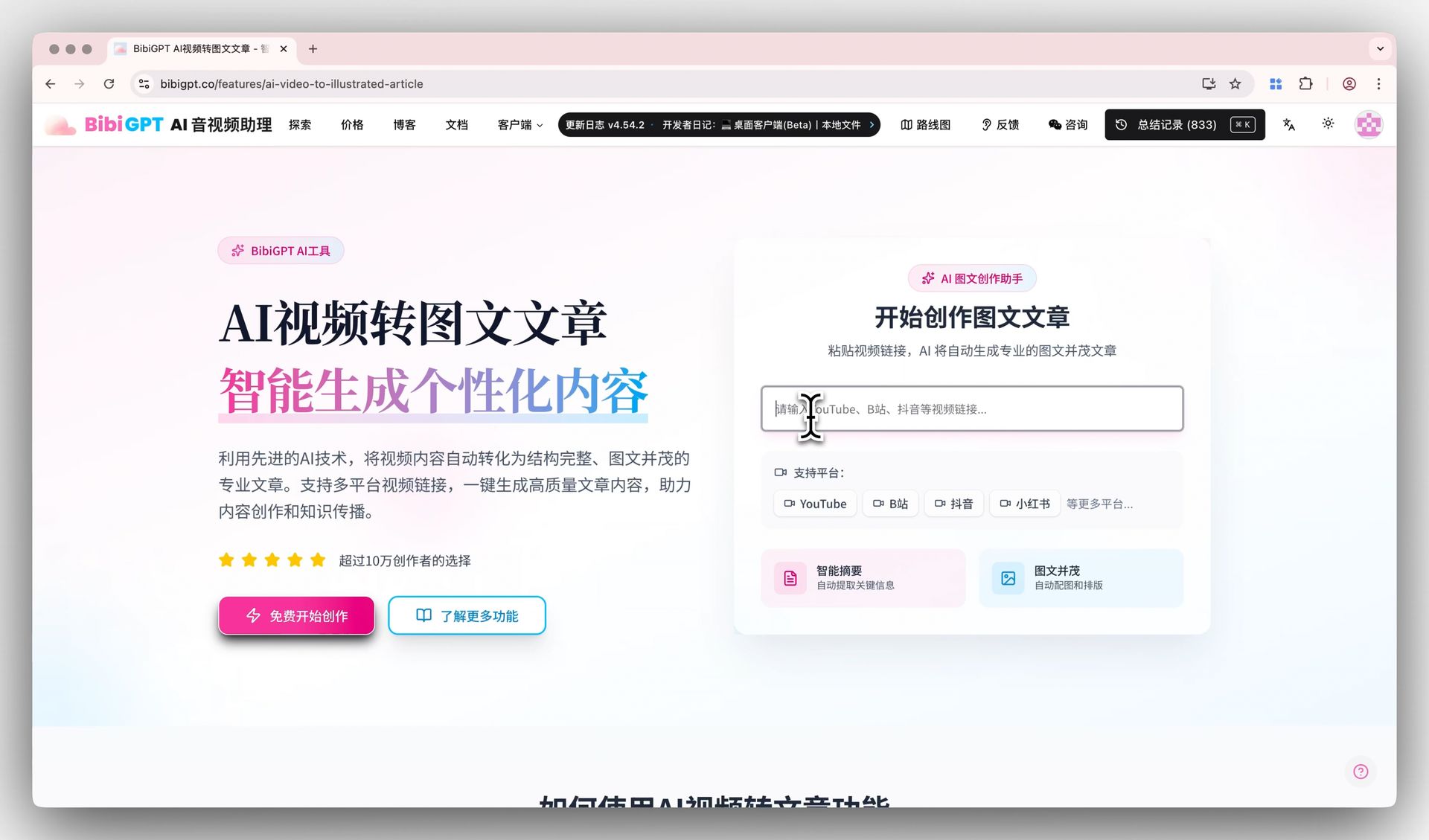 BibiGPT video-to-article demo
2. Bidirectional video/podcast → listenable podcast
Adobe's hero feature is the "two-host AI podcast" — but its input is PDF. BibiGPT can turn any video or audio back into:
- Short summary podcast (3-5 minutes, commute-friendly)
- Deep-dive podcast (15-20 minutes, run-friendly)
- Multilingual podcast (English / Chinese / Japanese / Korean)
Real workflow our users follow for a 90-minute English lecture: paste link → get bilingual subtitles → generate a 5-minute Chinese summary podcast → listen on the bus → attend class with focused questions.
3. AI Q&A with timestamp citations
Beyond AI tutor answers, every BibiGPT response jumps directly to the exact second in the source video (ai-video-dialog-tracing). When a student writes a paper citing an interview line, one click jumps to 7m23s for verification.
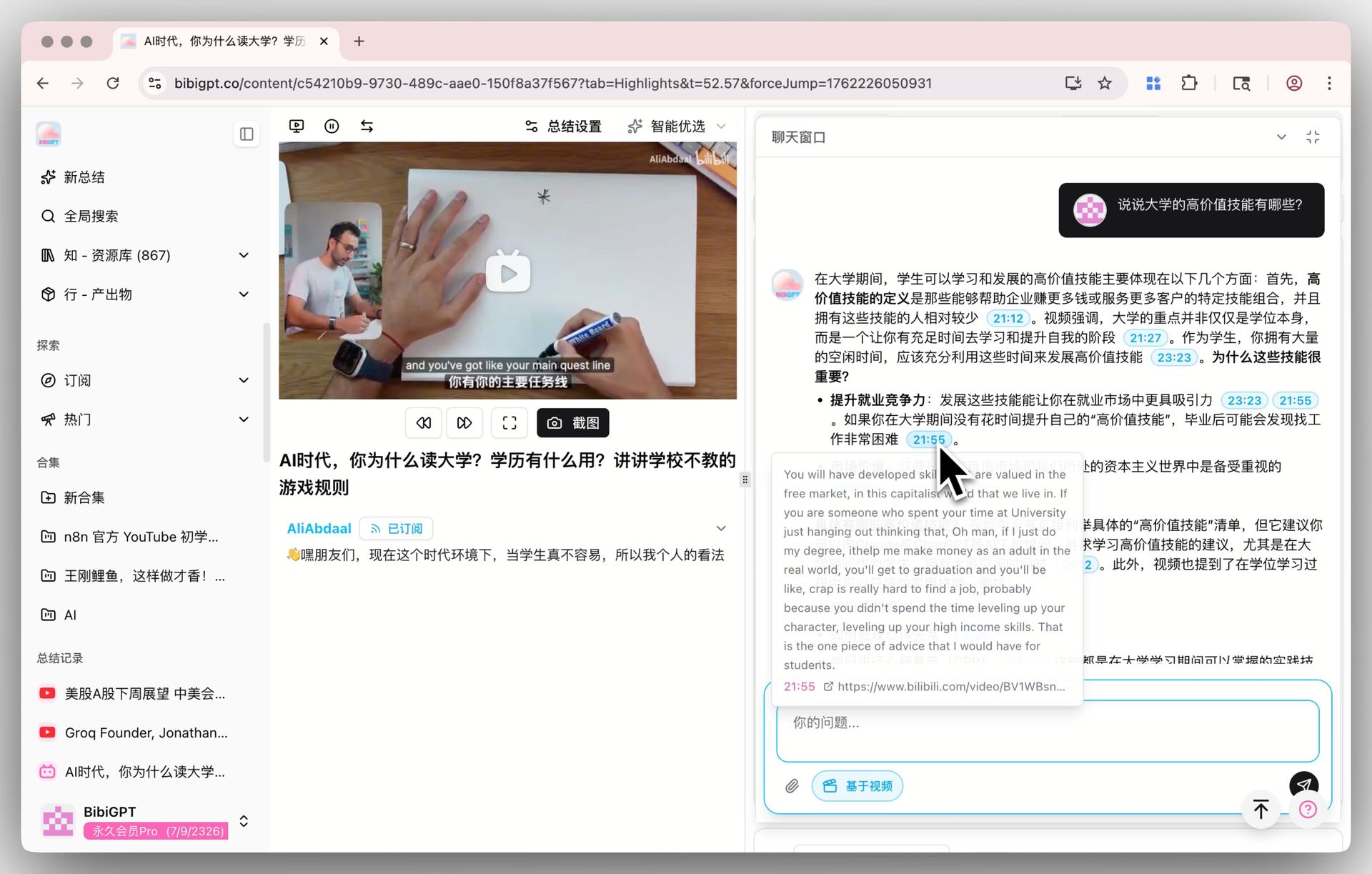 AI dialog tracing demo
4. Knowledge production: from consumption to creation
Adobe Student Spaces stops at "study aids" — flashcards, mind maps, quizzes. BibiGPT goes one step further: turn video content into publish-ready articles / social posts / short-video scripts / slide decks (via ai-video-to-article + ai-video-summary-visual-content and friends). Useful when you write reading notes, run a creator account, or TA a course.
5. Native multilingual support
Whether you study English textbooks as a Chinese international student, or Japanese/Korean original courses as an English speaker, BibiGPT serves over 1 million users with 5M+ summaries generated. Acrobat Student Spaces today is English-first.
看看 BibiGPT 的 AI 总结效果

Let's build GPT: from scratch, in code, spelled out
Andrej Karpathy walks through building a tiny GPT in PyTorch — tokenizer, attention, transformer block, training loop.
3 comparison tables: source coverage / output formats / study scenarios
Source coverage
| Material | Acrobat Student Spaces | BibiGPT |
|---|---|---|
| PDF textbooks | ✅ Native | ✅ Upload supported |
| Web articles / links | ✅ | ✅ |
| YouTube videos | ❌ | ✅ |
| Bilibili / TikTok / RedNote | ❌ | ✅ |
| Apple Podcasts / Spotify / Xiaoyuzhou | ❌ | ✅ |
| Coursera / Udemy / MOOC recordings | ❌ | ✅ |
| Local video / audio files | ❌ | ✅ |
| Academic papers / arXiv | ⚠️ (PDF upload) | ✅ |
Output formats
| Output | Acrobat Student Spaces | BibiGPT |
|---|---|---|
| Text summary | ✅ | ✅ |
| Two-host AI podcast | ✅ (PDF→podcast) | ✅ (video/audio→podcast) |
| Flashcards | ✅ | ⚠️ via summary export |
| Auto quizzes | ✅ | ⚠️ via AI chat |
| Mind map | ✅ | ✅ |
| Article / social post format | ❌ | ✅ |
| Notion / Obsidian export | ⚠️ | ✅ |
Study scenarios
| Scenario | Recommended |
|---|---|
| Crunching English PDF textbooks, need flashcards | Acrobat Student Spaces |
| Watching a YouTube long-form lecture, want to listen on a walk | BibiGPT |
| Processing podcast episodes for reading notes | BibiGPT |
| Generating quizzes from Chinese PDF textbooks | Acrobat short-term wins on English |
| Turning video learning into publish-ready articles | BibiGPT |
| Multilingual textbooks (zh/en/ja/ko mix) | BibiGPT |
How 2026 students should combine them
Short answer: Acrobat handles PDFs, BibiGPT handles video/podcast and creation.
Concrete workflow:
- Professor's PDF textbook → Acrobat Student Spaces, generate flashcards + ask the AI tutor
- Professor's recommended YouTube long-form / Coursera replay → BibiGPT, check the summary first then decide whether to watch in full
- Industry podcast (Apple Podcasts / Spotify / Xiaoyuzhou) → BibiGPT podcast summary, turn into illustrated notes
- Exam crunch: export BibiGPT's video summary as PDF → drop back into Acrobat Student Spaces to generate flashcards
If you can only pick one: pick Acrobat for English PDF-first study; pick BibiGPT for video/podcast/multilingual learning and creator output.
FAQ
Q1: Is Acrobat Student Spaces really free?
Yes. As of 2026-04-26, the beta is free and login-free. Adobe is betting that today's college students become tomorrow's paid Acrobat Pro users.
Q2: Does BibiGPT offer a student discount?
Yes. BibiGPT verifies education emails and offers Plus trial access. See aitodo.co.
Q3: Can I use Acrobat Student Spaces in mainland China?
Some features work, but AI service connectivity varies. For Chinese-language video/podcast learning, BibiGPT is the smoother choice.
Q4: Can I mix Acrobat and BibiGPT podcasts?
Absolutely. Both produce standard mp3/wav. Drop them into Spotify / Pocket Casts / Xiaoyuzhou's "custom feed" to build a 30-minute "today's study feed".
Q5: Will professors push back on AI study tools?
The 2026 Stanford education report shows more professors actively recommending AI study tools — as long as students use them for understanding and review, not for ghostwriting assignments.
Q6: Will Acrobat Student Spaces support videos eventually?
Adobe has not announced a roadmap. Given Adobe Premiere already has transcription, future integration is possible — but short-term, BibiGPT's 4-year engineering investment in 30+ platforms is a real moat.
Want to turn today's podcast or YouTube video into a listenable podcast or readable note right now?
- Global: aitodo.co
- China: bibigpt.co
BibiGPT Team