
AI Video Research × Building Second Brain: BibiGPT + Notion/Obsidian CODE Workflow (2026)
Tiago Forte's Building Second Brain (BASB) turns information into reusable assets via CODE: Capture / Organize / Distill / Express. This post gives video researchers a BibiGPT × Notion/Obsidian workflow, with a focus on how Express (publishing-ready outputs) closes the loop.
AI Video Research × Building Second Brain: BibiGPT + Notion/Obsidian CODE Workflow (2026)
TL;DR: To apply Tiago Forte's Building Second Brain (BASB) to video research, the key is the CODE four-step — Capture / Organize / Distill / Express. Video research is unusual: high raw density, high consumption cost, high search cost. BibiGPT compresses videos into reusable assets in the Capture and Distill stages, while Notion/Obsidian handle Organize and long-term archive. The Express stage uses BibiGPT's article rewriting to produce consumables (articles / decks / short-form), forming a consumption-to-creation loop — that is the fundamental difference from Zettelkasten.
AI 思维导图预览

Let's build GPT: from scratch, in code, spelled out
Andrej Karpathy walks through building a tiny GPT in PyTorch — tokenizer, attention, transformer block, training loop.
Table of Contents
- BASB in 60 seconds: CODE and PARA
- BASB vs Zettelkasten: the difference is at Express, not at note-taking
- CODE for video research: which tool at which step
- Express: how BibiGPT article rewrite closes the loop
- End-to-end example: from a 90-minute interview to 1 newsletter + 1 long Twitter + 1 deck
- Common anti-patterns
- FAQ
BASB in 60 seconds: CODE and PARA
Tiago Forte's 2022 book Building a Second Brain introduces two frameworks:
CODE — information processing flow:
| Step | Meaning | Video research mapping |
|---|---|---|
| Capture | Pull in everything potentially useful | Save interesting videos/podcasts to a queue |
| Organize | Sort by actionability into PARA | Categorize by Project / Area / Resource / Archive |
| Distill | Progressively summarize the essence | AI summary + chapter splits + mind maps |
| Express | Use the distilled output to create | Articles / decks / short-form / threads |
PARA — organize by actionability:
- Projects: time-bound output (the article you ship this week)
- Areas: ongoing domains (your personal brand / industry watch)
- Resources: things you might use later (the cool video you just saw)
- Archive: completed projects and dormant areas
Core insight: information value depends on whether you can withdraw it during a future Project. Resources that never get Distilled never get withdrawn.
BASB vs Zettelkasten: the difference is at Express, not at note-taking
People often conflate BASB and Zettelkasten. They are very different:
| Dimension | Zettelkasten | BASB |
|---|---|---|
| Origin | Academic (Niklas Luhmann) | Personal productivity (Tiago Forte) |
| Core action | Atomized cards + bidirectional links | CODE four-step process |
| Long-term goal | Knowledge emergence | Creative output (articles / courses / products) |
| Note structure | Atomized card network | PARA project-oriented archive |
| Express stage | Weak (default byproduct) | Strong (core goal) |
| Best for | Scholars, researchers, long-form writers | Creators, knowledge workers, indie publishers |
Yesterday's post covered Zettelkasten × AI video notes. Today we focus on BASB because the Express stage maps directly to "knowledge → revenue" for creators and knowledge workers.
CODE for video research: which tool at which step
Capture
What enters the second brain?
Tiago Forte's "12 Favorite Problems" — everyone should keep 12 long-running questions. When you see any material, ask: "does this video/podcast help any of my 12 problems?" Only Capture if yes.
Tools:
- Original video/podcast URL: browser bookmarks / Raindrop / Pocket
- Video gist quick-grab: BibiGPT browser extension one-click pushes the current video's subtitles + summary to Notion / Obsidian
Organize (PARA)
Videos usually land in R (Resource). But R alone is not enough — every Project should maintain a manual list of "which Rs I'll pull from" ("P indexes R"). Otherwise R never gets withdrawn.
Notion implementation:
- One Database for all video entries, fields: URL / Title / Speaker / Topic Tags / 12 Favorite Problems / Linked Project
- Project page uses a Relation field to reverse-lookup "videos relevant to this project"
Obsidian implementation:
- Use Map of Content (MOC): one MOC page per Favorite Problem, backlinks gather all related video notes
Distill (Progressive Summarization)
Tiago proposes 4 layers of progressive distillation: source → highlights → bold → personal summary. BibiGPT's chapter summary naturally completes the first two:
| Layer | Video equivalent | Tool |
|---|---|---|
| L1 Source | Full transcript | BibiGPT subtitle extraction |
| L2 Highlights | AI chapter splits + key quotes | BibiGPT AI summary |
| L3 Bold | Mind map main branches | BibiGPT mind map |
| L4 Personal summary | Restate in your own words + link to 12 Favorite Problems | Manual, but BibiGPT AI chat assists |
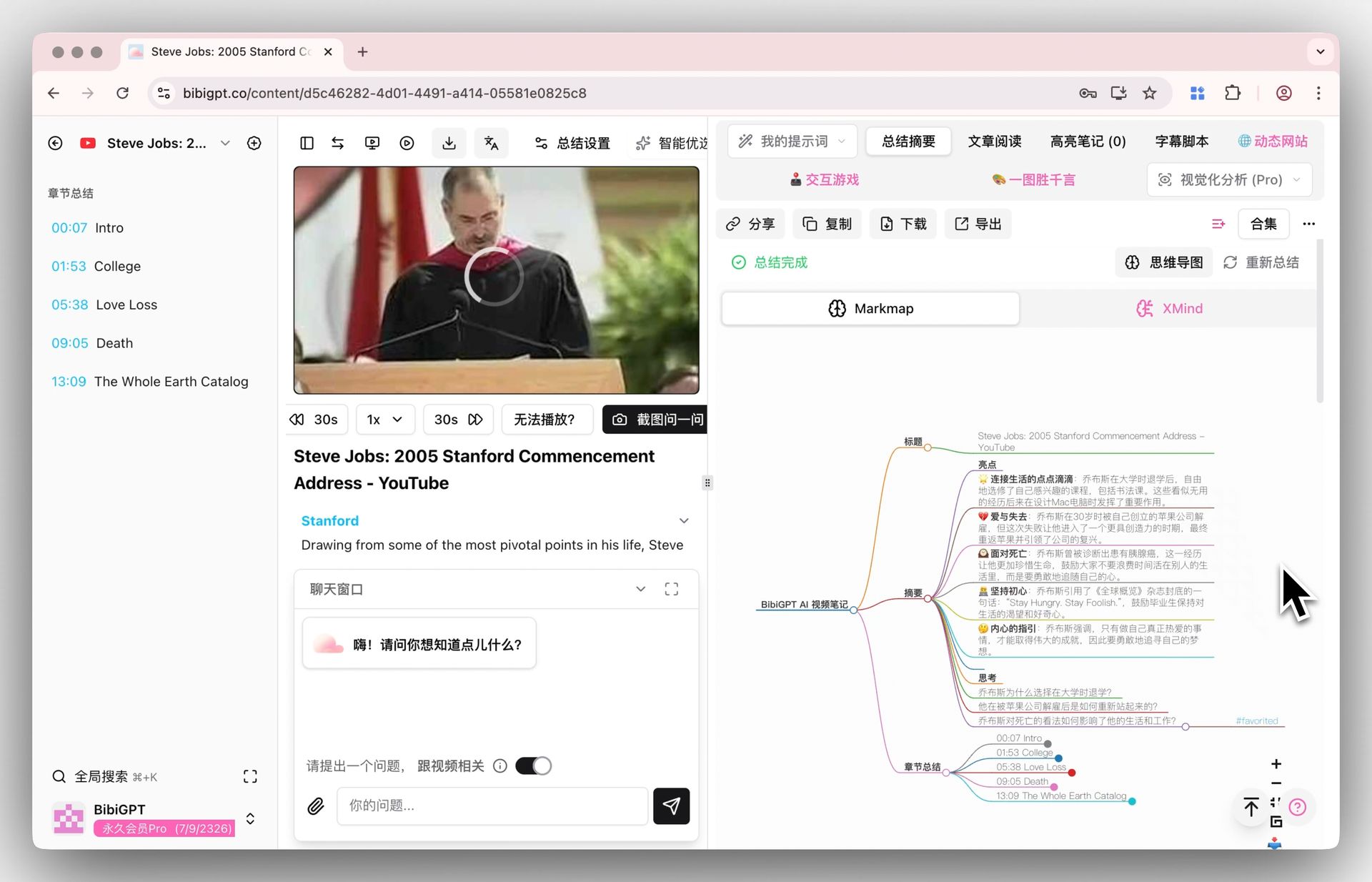 BibiGPT mind map
L4 is the highest-value layer and must be manual — that is where you turn someone else's view into your own thinking. But BibiGPT's AI chat with timestamp citations compresses this from "rewatch the video" to "ask AI to retrieve."
Express
This is what separates BASB from pure note-taking. Covered separately below.
Express: how BibiGPT article rewrite closes the loop
Tiago emphasizes "Intermediate Packets" — don't aim for "finish a 5000-word magnum opus"; accumulate many 1000-word "small packets" that can be assembled later.
Best video-research intermediate packets:
| Output format | Trigger | BibiGPT path |
|---|---|---|
| 1500-word newsletter | After a podcast, extract one core argument | Video to article |
| 5-slide deck summary | Industry report video, internal share | Visual analysis → SVG infographic → drop into Keynote |
| Long-form Twitter thread | Break a deep view into 8-10 beats | AI summary + rewrite as short lines |
| Short-form video script | Turn a 1-hour academic interview into a 3-minute explainer | Chapter splits + AI rewrite to spoken script |
| Notion knowledge note | Long-term archive in second brain | Notion integration |
| Obsidian linked card | Tied to 12 Favorite Problems | Obsidian integration |
Key insight: BibiGPT has no break between Distill and Express — the same video summary feeds both "article rewrite" and "deck generator" without re-prompting. That is the efficiency edge over a pure ChatGPT workflow.
End-to-end example: from a 90-minute interview to 1 newsletter + 1 long Twitter + 1 deck
Take a 90-minute Lex Fridman AI interview:
Step 1 - Capture (5 minutes) Right-click in browser → BibiGPT extension → auto-push to Notion "Resource - AI Industry" Database.
Step 2 - Organize (2 minutes) In Notion, set Relation: link to 12 Favorite Problems "Q3: AI business models in the next 5 years", and to Project "2026-Q2 AI Industry Report".
Step 3 - Distill (10 minutes)
- L1-L3 by BibiGPT (chapter splits + key quotes + mind map)
- L4 manual: pick 3 of the 12 mind-map nodes most relevant to Q3, write 3 Permanent-Notes-style cards in your own words into Obsidian
Step 4 - Express (30 minutes, 3 outputs in parallel)
a) 1500-word newsletter: use BibiGPT video-to-article on the strongest of the 3 cards; 5-minute draft + 10-minute polish + ship.
b) 8-tweet thread: use BibiGPT to break a second card into 8 punchy lines, 10 minutes.
c) 5-slide internal deck: use visual analysis for the 3rd card, output SVG infographic, 5 minutes into Keynote.
Total 47 minutes, 3 different output formats, 3 different consumption channels. That is the core BASB value — same input, multiple withdrawals.
看看 BibiGPT 的 AI 总结效果
Let's build GPT: from scratch, in code, spelled out
Andrej Karpathy walks through building a tiny GPT in PyTorch — tokenizer, attention, transformer block, training loop.
Common anti-patterns
- R bucket fills up but never gets withdrawn — every Project must build a manual "which Rs I'll pull from" list at kickoff
- Chasing perfect L4 personal summaries — Tiago says "7/10 is enough"; 3 cards/week beats 1 perfect card
- Waiting until you have "enough material" to Express — invert it: Express drives Distill. Decide what you'll write, then go back and refine relevant Rs
- Treating Notion/Obsidian as Capture tools — their strength is Organize and long-term archive. Capture with lighter tools (browser bookmarks / BibiGPT extension / Raindrop)
- Tool-switching fatigue — 1 Capture tool + 1 Distill tool + 1 Organize tool is enough; no need to collect tools
FAQ
Q1: Notion or Obsidian — which to pick?
- Collaboration / multi-device / database views → Notion
- Local-first / bidirectional links / Markdown-native / offline → Obsidian
- Both work for BASB; BibiGPT exports to both
Q2: How do I define my 12 Favorite Problems?
Write down "questions I keep returning to over the past 1 / 5 / 10 years". Start with 5 and grow to 12. The list is not fixed — rotate 1-3 per year.
Q3: Should I Capture the original video or only the summary?
Summary into Notion/Obsidian, original URL preserved — for future verification. Every BibiGPT summary point includes source timestamps, which is the verification key.
Q4: Can I mix BASB and Zettelkasten?
Yes. Use Zettelkasten thinking at Distill (atomic cards + bidirectional links), and PARA project-orientation at Organize. This is the best combo: Zettelkasten for depth, BASB for output velocity.
Q5: How do I sync BibiGPT outputs into the second brain?
Three paths:
- Web export Markdown / OPML, manual drop into Obsidian Vault
- Notion integration auto-push to a chosen Database
- Browser extension live-syncs the current video note
Q6: How to Distill a 4-hour long video?
Use BibiGPT chapter splits to break it into 8-12 segments of 15-30 minutes each (the human attention unit). Distill only segments strongly tied to your 12 Favorite Problems; leave the rest in R.
Want your video research to produce a steady flow of Express outputs?
- Global: aitodo.co
- China: bibigpt.co
BibiGPT Team