
BiliNote Only Supports Bilibili? BibiGPT AI Notes Cover 30+ Platforms in One Click
BiliNote vs BibiGPT full comparison: BiliNote is an open-source Bilibili AI note tool, while BibiGPT covers 30+ platforms. We compare platform support, AI capabilities, and deployment complexity to help you choose the best bilibili note taking tool.
BiliNote Only Supports Bilibili? BibiGPT AI Notes Cover 30+ Platforms in One Click
BiliNote Is Trending on GitHub — But Is It Enough?
试试粘贴你的视频链接
支持 YouTube、B站、抖音、小红书等 30+ 平台
A new open-source project called BiliNote has been rapidly gaining traction on GitHub. It automatically extracts content from Bilibili videos and generates structured Markdown notes, complete with video screenshots and timestamp navigation. For the Chinese developer community, it has been a hit.
But here is the reality: if your video consumption extends beyond Bilibili — if you watch YouTube, listen to podcasts, browse Xiaohongshu (RED), or work with local audio/video files — BiliNote quickly runs into its limits.
This article provides a comprehensive comparison between BiliNote and BibiGPT across platform coverage, AI capabilities, and ease of use, helping you choose the right AI note-taking tool for your workflow.
Table of Contents
- Quick Comparison Overview
- What Is BiliNote and Why Is It Trending?
- BiliNote vs BibiGPT: Full Comparison
- Where BibiGPT Goes Beyond BiliNote
- Which Tool Should You Choose?
- Frequently Asked Questions
- Conclusion
Quick Comparison Overview
BiliNote is an open-source AI video note tool primarily designed for Bilibili. It supports a handful of platforms (Bilibili, YouTube, Douyin), requires local Python deployment with Fast-Whisper for audio transcription, and uses LLMs like DeepSeek or OpenAI for summarization. It is best suited for developers comfortable with self-hosting.
BibiGPT is a commercial AI audio/video assistant trusted by over 1 million users, with over 5 million AI summaries generated. It supports 30+ mainstream platforms with zero deployment required — just paste a link on the web, browser extension, desktop app, or mobile app. Beyond basic summaries, it offers mind maps, AI highlight notes, flashcards, collection summaries, subtitle translation, and more.
What Is BiliNote and Why Is It Trending?
BiliNote (GitHub: JefferyHcool/BiliNote) is an open-source AI video note generator created by developer JefferyHcool, released under the MIT license.
Core Capabilities
- Video content extraction: Input a video link, automatically extract and transcribe audio to text
- AI note generation: Use large language models to organize transcripts into structured Markdown notes
- Screenshot insertion: Embed key video frames with timestamp-based navigation
- Multiple note styles: Academic, conversational, and focused extraction modes
- Local transcription: Uses Fast-Whisper models for privacy-conscious local processing
Why Did It Go Viral?
BiliNote hit several pain points: it is free and open-source, targets the massive Bilibili user base, and supports local deployment for data privacy. Tech influencers like GitHub Daily amplified its reach, driving rapid adoption within the developer community.
BiliNote's Limitations
However, deeper use reveals notable constraints:
- Limited platform support: While it lists Bilibili, YouTube, and Douyin, the core experience is optimized primarily for Bilibili
- Technical barriers: Requires Python environment setup, API key configuration, and potentially downloading Whisper models
- Feature depth: It does one thing — video-to-notes — without mind maps, AI chat, collection summaries, or other advanced features
- Maintenance uncertainty: As a solo developer project, long-term stability and updates are not guaranteed
- No mobile or browser extension: Only offers a web interface and Docker deployment
BiliNote vs BibiGPT: Full Comparison
Platform Support
This is the biggest differentiator. BiliNote focuses on Bilibili with basic support for a few other platforms. BibiGPT covers 30+ platforms including YouTube, Bilibili, Xiaohongshu, TikTok/Douyin, podcasts, Baidu Drive, Alibaba Cloud Drive, Dropbox, and local files.
AI Capability Depth
BiliNote provides a basic "transcribe + summarize" pipeline. BibiGPT builds on this foundation with multiple layers of AI intelligence:
- Smart summaries: Multiple summarization modes powered by advanced AI models
- AI Highlight Notes: Automatically identifies key insights, quotes, and turning points with timestamps
- Mind maps: Transforms video content into visual knowledge structures
- AI Q&A dialogue: Ask follow-up questions about the video content after summarization
- Collection summaries: Batch-process entire video series into systematic notes
Deployment and Ease of Use
| Dimension | BiliNote | BibiGPT |
|---|---|---|
| Access method | Local deployment (Python/Docker) | Web / Extension / Desktop / Mobile |
| Technical requirement | Python, API keys, Whisper models | Zero setup — sign up and go |
| Time to first result | 30 min to 1 hour (with env setup) | Under 1 minute (paste a link) |
| Updates | Manual git pull | Automatic |
Feature Comparison Table
| Feature | BiliNote | BibiGPT |
|---|---|---|
| Bilibili video summary | ✅ | ✅ |
| YouTube video | ✅ (basic) | ✅ (full support) |
| TikTok/Douyin | ✅ (basic) | ✅ |
| Xiaohongshu (RED) | ❌ | ✅ |
| Podcasts | ❌ | ✅ |
| Local audio/video files | ❌ | ✅ |
| Cloud drive videos | ❌ | ✅ (Baidu/Alibaba/Dropbox) |
| Mind maps | ❌ | ✅ |
| AI highlight notes | ❌ | ✅ |
| Flashcards | ❌ | ✅ |
| AI Q&A dialogue | ❌ | ✅ |
| Collection batch summary | ❌ | ✅ |
| Subtitle download | ❌ | ✅ |
| Subtitle translation | ❌ | ✅ |
| Notion/Obsidian export | ❌ | ✅ |
| Browser extension | ❌ | ✅ |
| Mobile app | ❌ | ✅ |
| Desktop client | ❌ (Windows only) | ✅ (macOS/Windows) |
Where BibiGPT Goes Beyond BiliNote
Automatic AI Highlight Note Extraction
BibiGPT's AI Highlight Notes go far beyond simple text summaries. The system precisely identifies key knowledge points, memorable quotes, and critical turning points in videos, generating timestamped highlight markers.
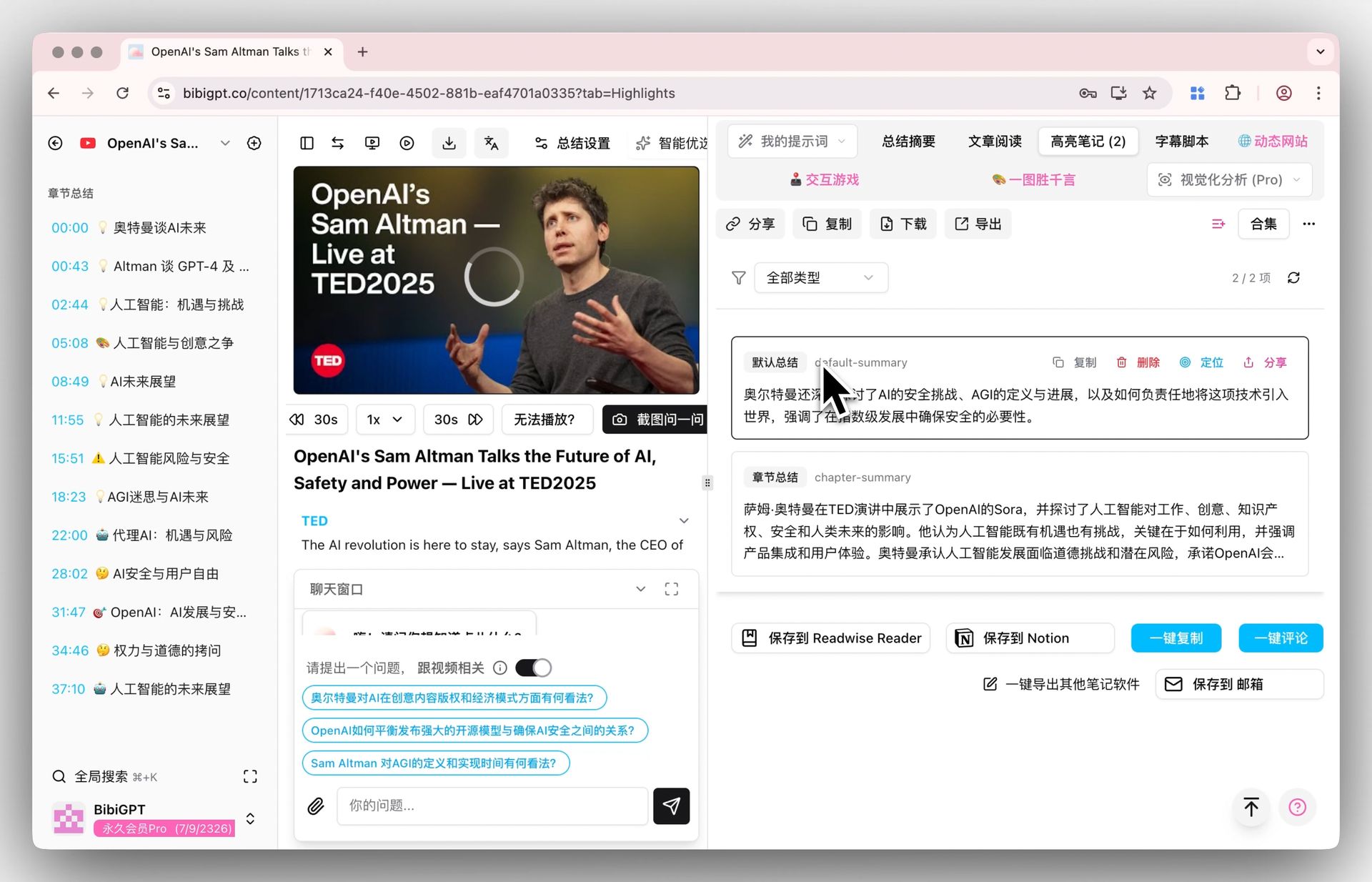 AI Highlight Notes Display
You can jump directly to the segments that interest you most, eliminating the need to watch entire hour-long lectures or tutorials from start to finish.
Intelligent Subtitle Segmentation and Translation
BibiGPT supports smart subtitle extraction and download, transforming raw word-by-word transcripts into logically structured paragraphs. Combined with multi-language translation, you can create notes from foreign-language videos without barriers.
Multi-Format Export to Notion and Obsidian
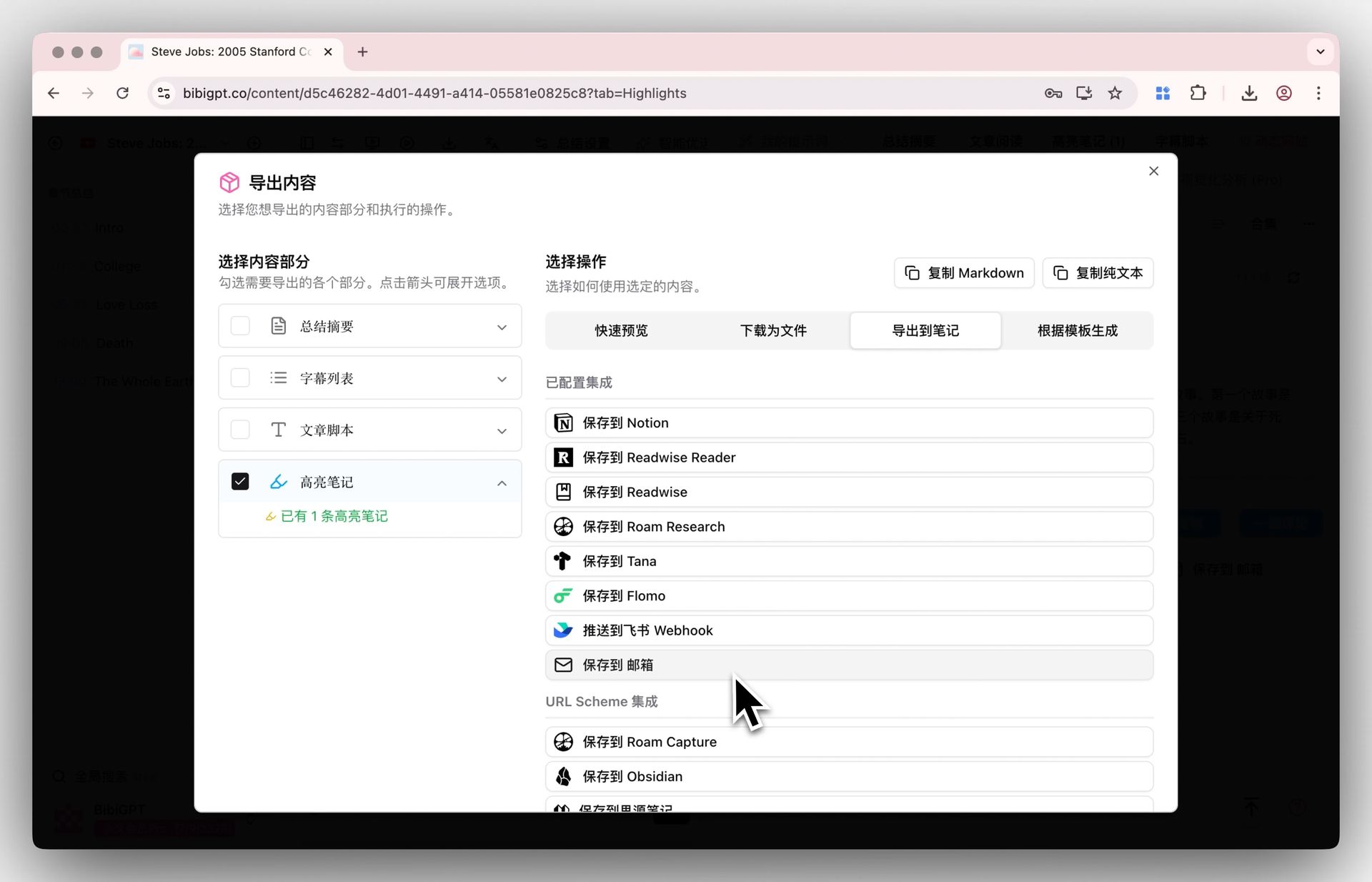 Export Feature Display
BiliNote generates Markdown notes that you need to manually copy and paste. BibiGPT natively supports one-click export to Notion, Obsidian, and other popular knowledge management tools, automatically integrating your video learning notes into your personal knowledge system.
Related reading:
- AI Video Note-Taking Workflow: Building Structured Knowledge
- Best Free AI Video to Text Converter Tools
Which Tool Should You Choose?
Choose BiliNote If:
- You are a developer who enjoys building and maintaining your own tools
- You exclusively watch Bilibili and do not need other platforms
- You have strict data privacy requirements and want everything running locally
- You are comfortable with Python environments and ongoing project maintenance
Choose BibiGPT If:
- Your content sources span beyond Bilibili — YouTube, Xiaohongshu, podcasts, local files
- You want zero-configuration, paste-a-link simplicity
- You need advanced learning features like mind maps, AI dialogue, and highlight notes
- You use Notion or Obsidian and want seamless one-click export
- You need multi-device access across phone, browser, and desktop
- You are a content creator who needs to repurpose video into articles, slides, or other formats
Bottom line: BiliNote is a developer's open-source experiment; BibiGPT is a productivity tool built for everyone. They are not mutually exclusive — BiliNote is a fine starting point for Bilibili-only use, but if you need a full-featured AI audio/video assistant covering all platforms, BibiGPT is the proven choice.
Frequently Asked Questions
Is BiliNote completely free?
Yes, BiliNote is MIT-licensed and the code is free. However, you need to provide your own LLM API keys (DeepSeek, OpenAI, etc.), which incur API usage costs. Local deployment also requires GPU compute resources, adding hidden costs.
Does BibiGPT offer a free tier?
BibiGPT provides free trial credits upon registration, giving you access to core features. For heavier usage or premium features like collection summaries and advanced AI models, Plus or Pro subscription plans are available.
Can BiliNote be used on mobile?
Currently, BiliNote does not have a mobile app. It operates through a web interface that requires desktop access. BibiGPT offers dedicated mobile apps for both iOS and Android.
Can I use both tools together?
Absolutely. Developers might use BiliNote for privacy-sensitive Bilibili content processing while relying on BibiGPT for everyday multi-platform usage. The two tools complement rather than compete with each other.
What Bilibili content types does BibiGPT support?
BibiGPT provides comprehensive Bilibili support: regular videos, multi-part videos, anime/drama, classroom content, and livestream replays. It also supports batch summarization of entire Bilibili collections for processing complete course series at once.
Conclusion
BiliNote's viral success highlights a clear trend: more people want AI to accelerate their video learning. As an open-source project, BiliNote has lowered the entry barrier and brought wider awareness to the "AI video notes" category.
But if your goal is genuine productivity gains rather than just experimentation, a mature tool supporting 30+ platforms with a complete AI feature set and multi-device coverage is the pragmatic choice. BibiGPT has been trusted by over 1 million users with over 5 million AI summaries generated — a market-validated product in this space.
Start your AI-powered learning journey with BibiGPT today:
- 🌐 Website: https://aitodo.co
- 📱 Mobile App: https://aitodo.co/app
- 💻 Desktop App: https://aitodo.co/download/desktop
- ✨ Explore Features: https://aitodo.co/features