
NotebookLM Can't Summarize Multi-Platform Videos? BibiGPT AI Summary Fixes That for 30+ Platforms
NotebookLM 2026 launches Cinematic Video Overviews and PPTX export, but still lacks support for Bilibili, Douyin, TikTok, and podcasts. BibiGPT covers 30+ platforms with mindmaps, AI chat, and video-to-article features.
NotebookLM Can't Summarize Multi-Platform Videos? BibiGPT AI Summary Fixes That for 30+ Platforms
NotebookLM 2026 Major Update: Cinematic Video Overviews Are Here
试试粘贴你的视频链接
支持 YouTube、B站、抖音、小红书等 30+ 平台
In March 2026, NotebookLM received its biggest upgrade since launch. The headline feature is Cinematic Video Overviews — an AI-powered video generation capability that transforms your notes and documents into cinema-quality video summaries.
Key highlights of this update:
- Cinematic Video Overviews: Using a multi-model pipeline (including Gemini 3, advanced video generation, and language models), NotebookLM converts document content into short videos with fluid animations and rich visuals. The AI acts as a creative director, making hundreds of structural and stylistic decisions automatically
- PPTX Export: Users can now export generated slide decks as PowerPoint files, with prompt-based slide editing support
- 10 Infographic Styles: Predefined templates including Sketch Note, Professional, Scientific, Anime, Editorial, and more
- EPUB File Upload: eBook format now supported as a source type
- Flashcard and Quiz Progress Saving: Study progress persists across sessions
These updates push NotebookLM further into "document-to-visual-content" territory. But here is the question — what if your content source is video, not documents?
NotebookLM's Limitation: Video Processing Remains a Gap
Despite the impressive updates, NotebookLM's core logic hasn't changed: it's document-centric. You upload PDFs, Google Docs, web links, or YouTube videos, then AI analyzes and transforms them.
This creates several critical limitations:
Limited Platform Coverage
NotebookLM only supports YouTube videos, Google Drive files, and web links. If you need to summarize content from Bilibili, Douyin, Xiaohongshu, TikTok, podcast platforms, or local files, NotebookLM simply cannot process them.
English-First Design
Cinematic Video Overviews are currently English-only, available exclusively to Google AI Ultra subscribers. For users working with Chinese, Korean, or Japanese content, the most exciting new feature is temporarily off-limits.
Opposite Direction
NotebookLM's direction is documents to visual content (notes to video, notes to podcast). But many users need the exact opposite — video to structured knowledge (extracting key points from videos, generating notes, asking follow-up questions).
This is precisely what BibiGPT is built for.
BibiGPT's Differentiators: The Complete Video-to-Knowledge Pipeline
BibiGPT was designed from day one around audio and video content understanding, complementing NotebookLM's document-centric approach. Here are the core differentiators:
30+ Platform Coverage
BibiGPT supports over 30 mainstream audio and video platforms:
- Global platforms: YouTube, TikTok, Twitter Spaces
- Chinese platforms: Bilibili, Douyin, Xiaohongshu, WeChat Channels
- Podcast platforms: Apple Podcast, Spotify, Xiaoyuzhou, and 6 more
- Local files: Upload audio and video files directly
Paste any link and get an AI summary instantly. Trusted by over 1 million users with over 5 million AI summaries generated.
Mindmaps with Timestamp Navigation
BibiGPT's mindmaps aren't static content overviews. Each node is linked to a video timestamp — click any node and the video jumps to that exact moment, creating a seamless mindmap-to-video navigation experience.
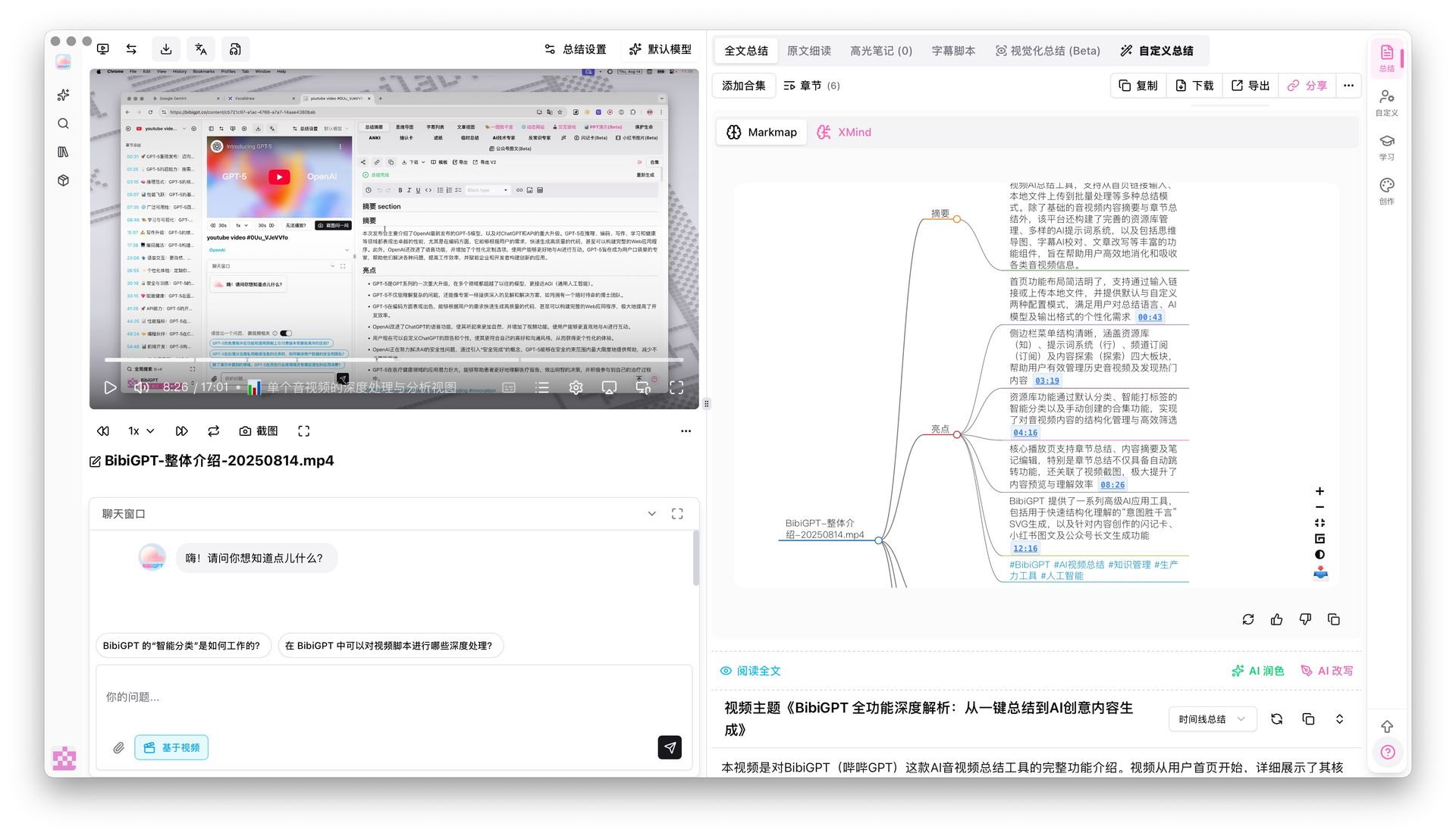 Mindmap timestamp jump
For anyone learning from long-form video, this is more practical than NotebookLM's Cinematic Video — you don't need AI to regenerate a new video. You need to quickly locate key moments in the original.
AI Video Chat with Source Tracing
Have questions after watching a video? BibiGPT's AI chat lets you directly "ask the video." Every key information point in the AI's response includes a clickable timestamp. Hover to preview the original transcript, ensuring answers are accurate and traceable.
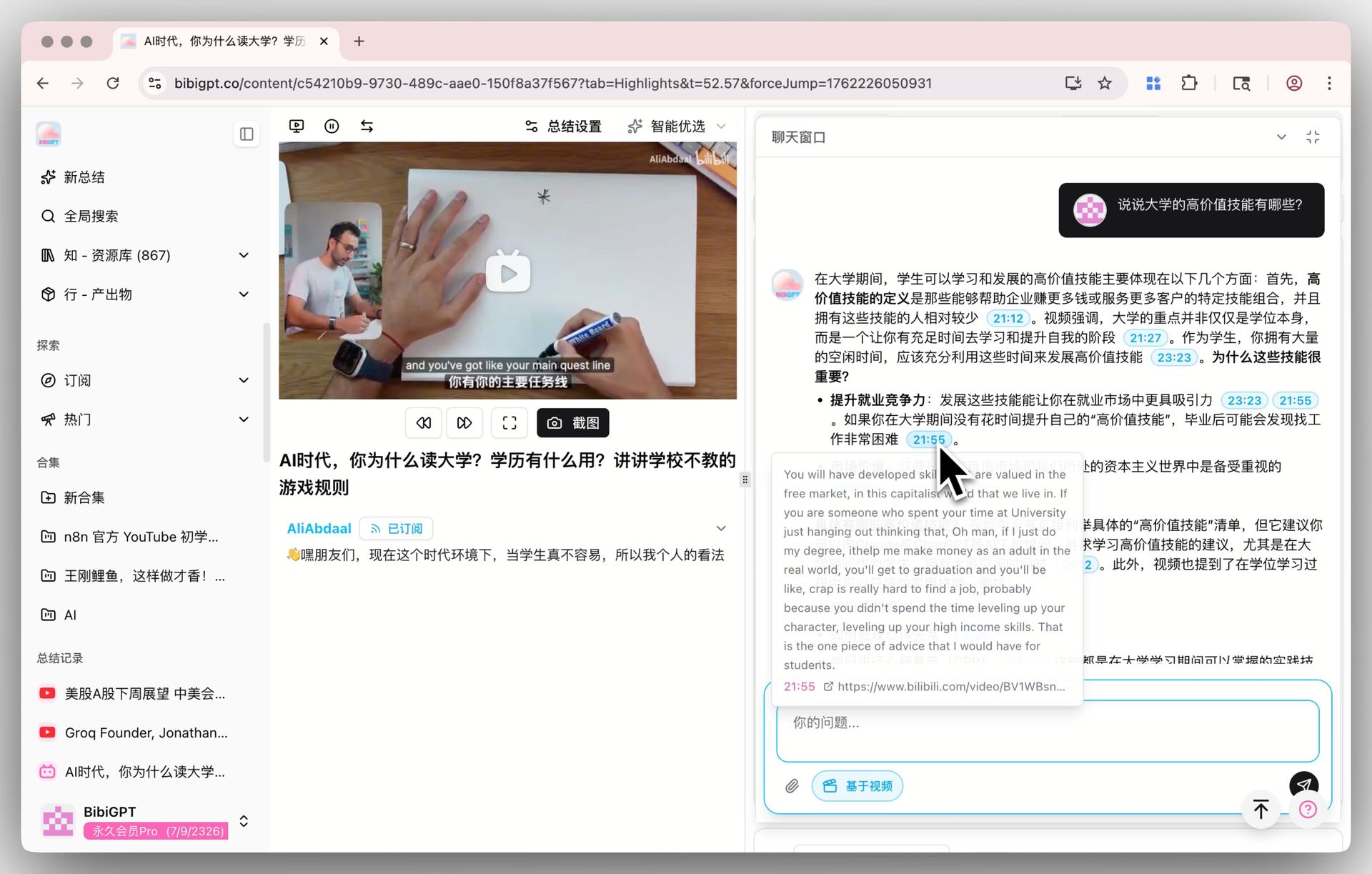 AI video dialog tracing
This solves a fundamentally different problem from NotebookLM's Interactive Audio Mode: NotebookLM lets you "listen" to documents, while BibiGPT lets you "interrogate" videos.
Video-to-Article Generation
BibiGPT's "AI Video to Article" feature transforms any video link into a professionally formatted article with intelligent keyframe extraction, supporting HTML, PDF, and Markdown export.
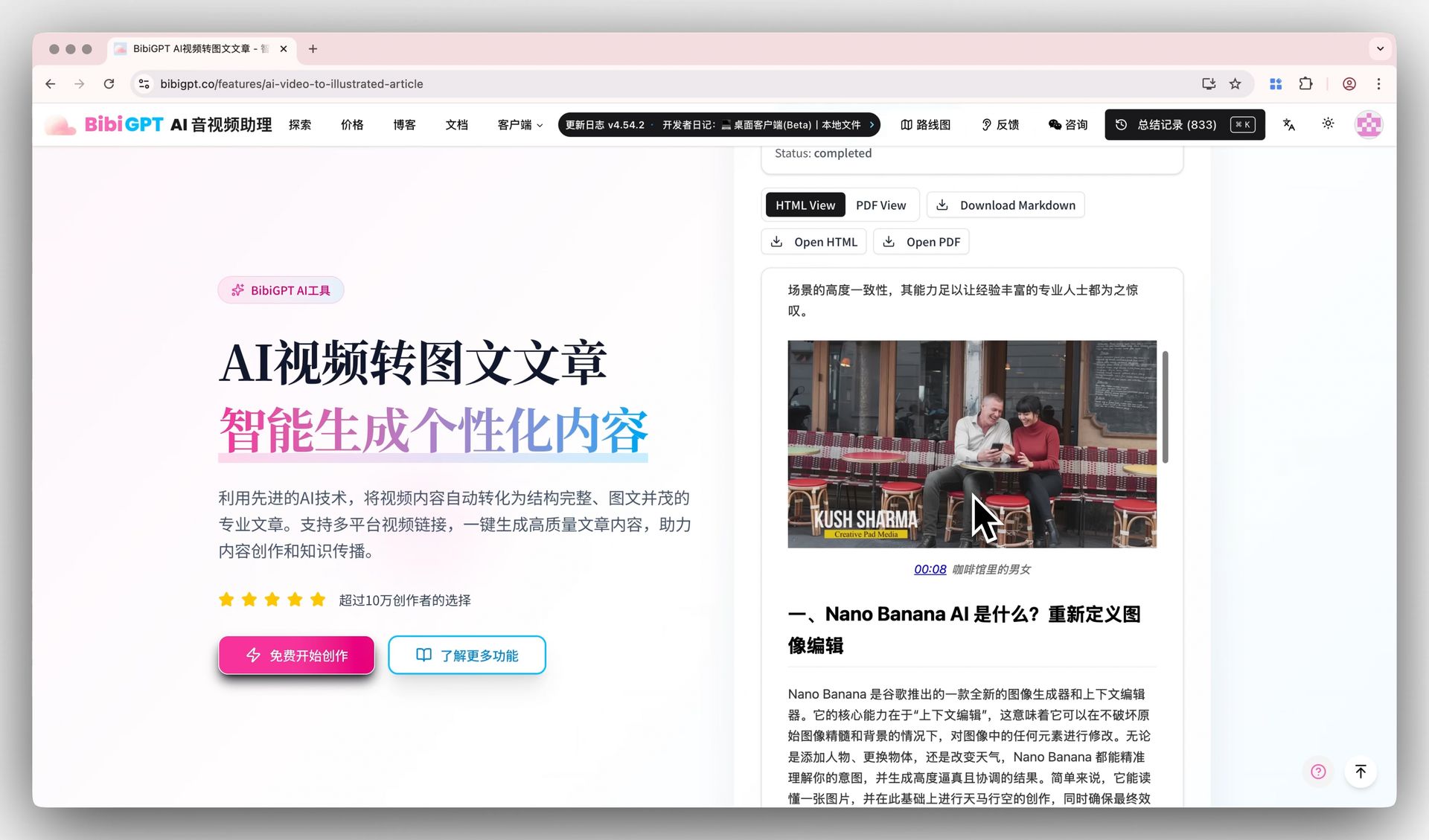 Video to article demo
NotebookLM's PPTX export is useful but only generates presentations from existing documents. BibiGPT generates publishable articles directly from video content — ideal for content creators who need to repurpose video into written format.
NotebookLM vs BibiGPT: Feature Comparison
| Dimension | NotebookLM 2026 | BibiGPT |
|---|---|---|
| Core Direction | Documents to visual content | Audio/video to structured knowledge |
| Platform Coverage | YouTube + Google Drive + web links | 30+ platforms (YouTube, Bilibili, Douyin, TikTok, etc.) |
| Multilingual Support | Limited; core features English-only | Native Chinese, English, Japanese, Korean support |
| Video Generation | Cinematic Video Overviews | N/A (focused on video understanding, not generation) |
| AI Chat | Interactive Audio Mode | Video Q&A with timestamp source tracing |
| Mindmaps | Not supported | Supported with video timestamp navigation |
| Export | PPTX export (image layers) | Video-to-article (HTML/PDF/Markdown) |
| Clients | Web + mobile | Web + desktop + mobile + browser extension |
| Pricing | Free / AI Ultra subscription | Free tier + Plus/Pro subscriptions |
When to Choose NotebookLM vs BibiGPT
Choose NotebookLM when:
- Your content is primarily English PDFs, papers, and Google Docs
- You want to turn document notes into podcast audio or cinematic video
- You only need to process YouTube videos
- You prefer free tools
Choose BibiGPT when:
- You need to process videos from Bilibili, Douyin, Xiaohongshu, TikTok, podcasts, and more
- You work with Chinese, Japanese, or Korean content
- You want to quickly extract video insights and generate notes or mindmaps
- You need AI-powered video Q&A with timestamp-level source tracing
- You want to convert video content into publishable articles
Best practice: use both together. Let NotebookLM handle document notes and visual content generation, and let BibiGPT process all audio and video content. The two tools address different stages of the knowledge workflow.
For a comprehensive 7-dimension deep comparison published yesterday, read: NotebookLM vs BibiGPT 2026 Full Comparison.
More NotebookLM and BibiGPT feature comparison: NotebookLM 2026 vs BibiGPT Complete Comparison.
FAQ
Are NotebookLM Cinematic Video Overviews free?
No. Cinematic Video Overviews are exclusive to Google AI Ultra subscribers, with a daily limit of 20 generated videos. Free users can access basic Video Overviews.
What platforms does BibiGPT support?
BibiGPT supports over 30 audio and video platforms including YouTube, Bilibili, Douyin, TikTok, Xiaohongshu, WeChat Channels, Apple Podcast, Spotify, and more, plus local file uploads.
Can you edit NotebookLM PPTX exports?
Currently, NotebookLM's exported PPTX files contain slides as image layers rather than fully editable objects. Complex layout modifications still require external tools.
Can BibiGPT generate videos?
BibiGPT focuses on audio/video understanding and transformation (video to knowledge), not video generation. You can convert videos into summaries, mindmaps, AI chat sessions, and formatted articles.
Conclusion: Find the Right AI Tool for Your Workflow
NotebookLM's 2026 Cinematic Video Overviews are genuinely impressive, showcasing the potential of AI in content transformation. But for users who need to process multi-platform, multilingual audio and video content, BibiGPT provides a more complete solution.
The question isn't "which is better" but "which fits your workflow." If your core need is extracting knowledge from video, BibiGPT is the more precise choice.
Try BibiGPT's AI video summary now:
- 🔗 aitodo.co — Paste a link, get an AI summary
- 🧠 AI Mindmaps — Turn videos into knowledge maps
- 💬 AI Video Chat — Ask videos questions, trace to the second