Apple iOS 27 Opens Third-Party AI: The Era of Switchable Assistants Is Here — How to Choose for Audio and Video (2026)
Apple iOS 27 Opens Third-Party AI: The Era of Switchable Assistants Is Here — How to Choose for Audio and Video (2026)
Quick answer (as of 2026-06-12): At WWDC on June 8, 2026, Apple introduced the Extensions framework in iOS 27, opening up three core system capabilities — Siri, Writing Tools, and Image Playground — to third-party AI. Users can now set Claude, ChatGPT, Gemini, Grok, and others as their default in Settings, ending the era where you were locked into a single AI. For everyday users, the real signal here is this: “freely switching AI” has moved from a power-user trick to mainstream expectation. But system-level general assistants are built for everyday Q&A and writing — when it comes to vertical use cases like “quickly making sense of a two-hour video or podcast,” an assistant that auto-routes across multiple advanced AI models and is purpose-built for deep audio/video understanding is the better fit.
The logic behind this is worth unpacking. This post starts by clarifying what Apple actually opened up and why it’s a turning point, then covers what it means for creators and learners in practice, and ends with a practical pairing of “system assistant + vertical assistant.” If you want to feel what it’s like to paste a link and get a structured summary, try BibiGPT’s video summarizer now — you’ll have a result in under a minute.
1. What Apple Actually Opened Up: From “Single Lock-in” to “Open Market”
For the past year, Apple Intelligence only connected to one external AI, leaving users with no choice. iOS 27’s Extensions framework blows that door wide open. According to MacRumors’ WWDC 2026 coverage, users can pick their preferred third-party AI service under Settings → Apple Intelligence & Siri, and App Store will feature a dedicated Extensions section where you can browse and install different AI assistants just like apps.
The openness goes beyond Siri. According to Tom’s Guide’s on-the-ground WWDC 2026 analysis, system features like Writing Tools and Image Playground can also be swapped for third-party AI — you can even choose a third-party voice for your assistant so you immediately know which provider is speaking.
In short, Apple has shifted from being an “AI provider” to being an “AI distribution platform.” This follows the same playbook as allowing you to replace the default browser or default email app — choice goes back to you.
Practical rule: When a platform starts letting you “swap out the default,” it means that capability has graduated from novelty to necessity. AI assistants are following exactly that path.
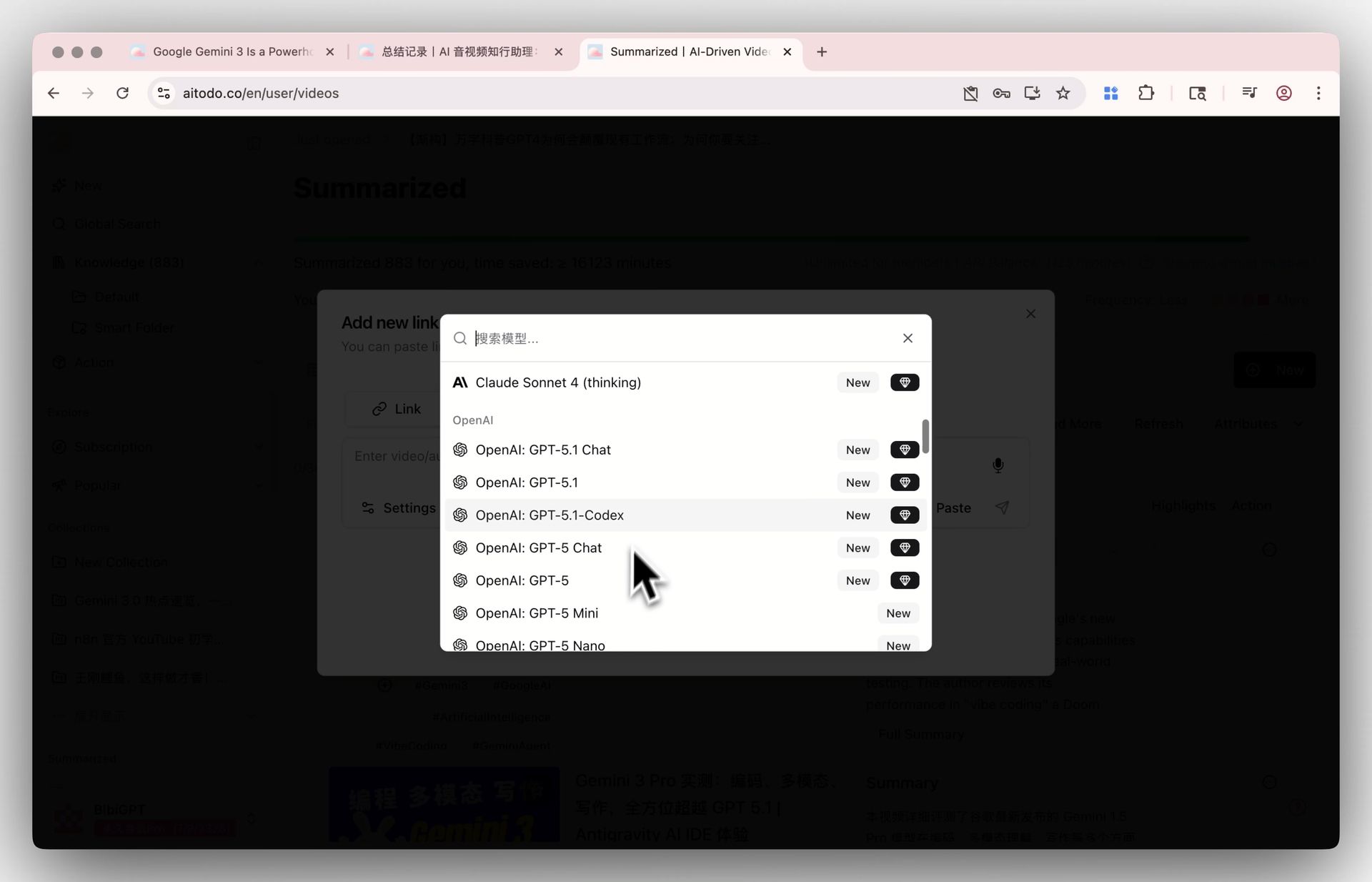
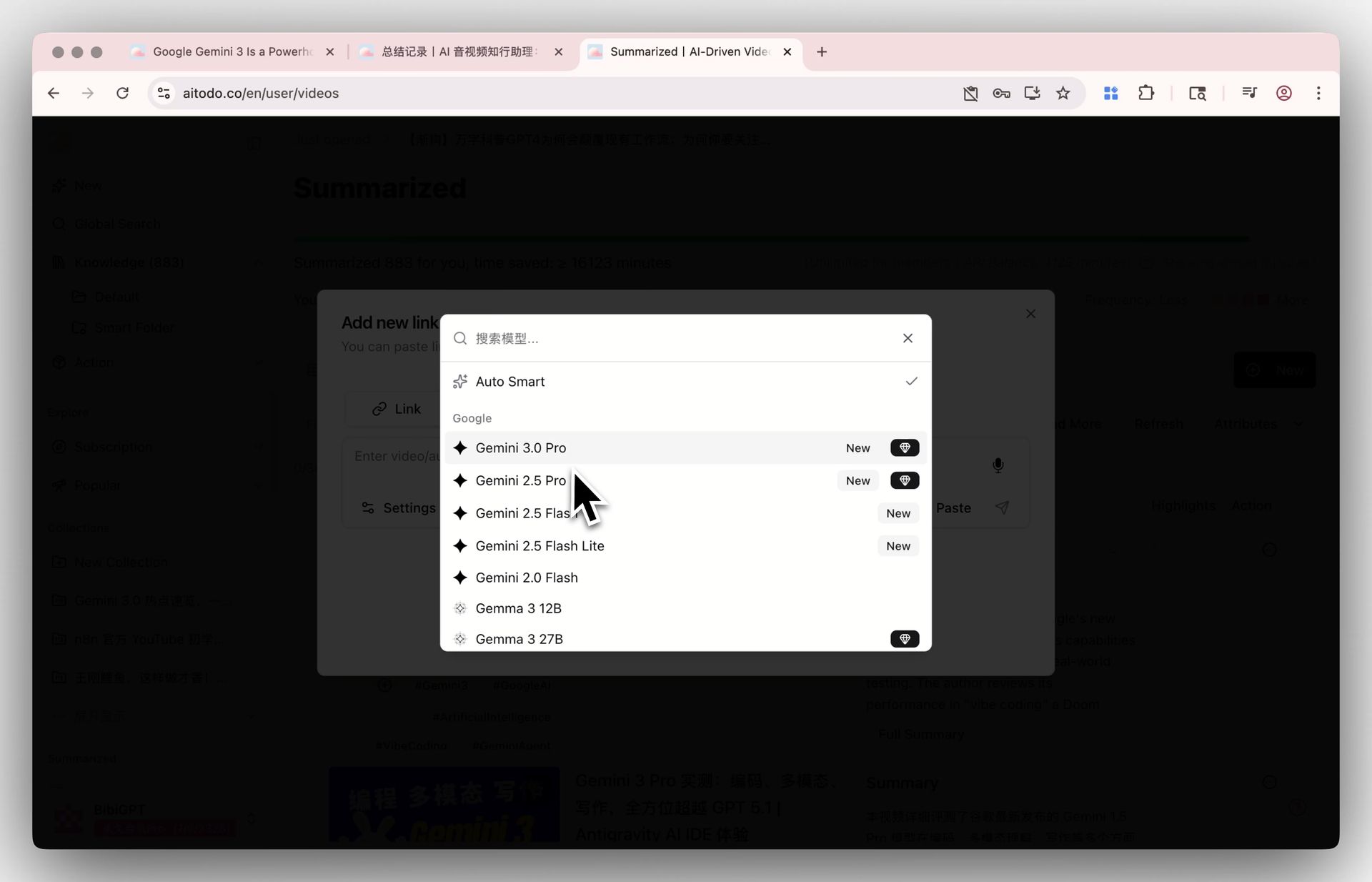
Image: BibiGPT · Freely switchable multi-model library interface
2. Why This Is a Turning Point: Switchability Becomes the Default Expectation
Apple’s scale is large enough that its product decisions often redefine “what users take for granted.” The deepest impact of this opening isn’t that any one AI gained a new entry point — it’s that Apple has baked “AI should be switchable” into the default experience of hundreds of millions of devices.
The Shift in User Mindset
In the past, if you told someone “our assistant lets you switch between different models,” they’d often look confused — “why would I switch? Aren’t they all the same?” Now Apple has used a system-level toggle to tell everyone: different AIs have different strengths, and users should be able to choose. That’s essentially a free user-education campaign for the entire industry.
Why “Single Model” Is a Risk
Different models perform very differently across tasks: some excel at long-form reasoning, some are more attuned to specific languages, some are more consistent at structured output. Betting all your tasks on one model is like using a Swiss Army knife for everything — whether you’re fixing a car or cooking a meal. According to Tom’s Guide’s observations, Apple shifted toward openness precisely because it recognized that single-supplier lock-in was limiting both the user experience and competition.
Practical rule: To judge whether an AI tool is worth sticking with long term, first check whether it’s bottlenecked by a single model — a tool that can upgrade as models improve is one that compounds in value.
For an audio/video assistant, this logic is especially true. BibiGPT routes across multiple advanced AI models automatically under the hood: different tasks go to the most suitable model, and as models improve, so does the product — users can also manually switch their preferred summarization model. This aligns with what Apple is doing here: no locking users to a single provider.
3. What This Means for Creators and Learners
Apple opening up third-party AI means different things to different people.
- Content creators: For everyday copywriting and headline drafting, swapping the system Writing Tools for your preferred AI is plenty. But turning a podcast episode into a long-form article, or breaking a long video into short-video scripts, requires the ability to “understand the full audio/video content” — that’s not a general assistant’s strong suit.
- Students and researchers: Writing emails and looking up concepts — a system assistant handles that well. But quickly digesting a two-hour recorded lecture or a conference talk into notes requires a tool specifically built for audio/video understanding.
- Professionals: Meeting notes and to-do organization — a system assistant can help. But organizing a recording by speaker, or pinpointing “the key conclusion at minute 47,” is where a vertical tool saves you more time.
The common thread: system-level general assistants cover the “grab-it-anytime” everyday tasks; vertical assistants handle the hard-save-hours use cases. They’re not replacing each other — they’re dividing labor.
The screenshot below shows what a structured summary looks like after you paste a video link to an AI: the video is on the left, and on the right is a summary with key points and follow-up prompts — you know what the segment covers at a glance.

Screenshot: BibiGPT · Smart deep summary interface
Want to see it in action before you sign up? The interactive demo below lets you experience what a summary looks like:
Summarize any video in seconds
Pick a sample below to see the AI summary — TL;DR, key points, and jump-to timestamps.
TL;DR: Karpathy builds a GPT-style language model from scratch in code, explaining every piece — from a tiny character-level model up to the full Transformer.
Key points
- Start with a bigram model, then add self-attention so tokens can "talk" to each other
- A Transformer block = multi-head attention + feed-forward + residual connections + layer norm
- Training is just predicting the next token; scale and data do the rest
- The same architecture behind nanoGPT is what scales up to ChatGPT
Jump to
- 00:07 Why build GPT from scratch
- 08:23 Self-attention, intuitively
- 1:00:00 Assembling the Transformer block
- 1:35:00 From nanoGPT to ChatGPT
4. A Practical Pairing: System Assistant Handles Daily Tasks, Vertical Assistant Owns Audio/Video
Pairing Apple’s system assistant with a dedicated audio/video assistant is the smoothest setup for 2026. BibiGPT has already generated 5 million+ summaries for 1 million+ users, supporting YouTube, Bilibili, Douyin, TikTok, Xiaohongshu, podcasts, and 30+ other platforms plus local audio/video files. Here’s a typical workflow:
- Get your material: You scroll past a long video on your phone, or you have a recorded lecture saved on your computer — first, pick what you want to digest;
- Paste the link or upload the file: Paste the link into BibiGPT, or drag and drop via the local audio/video file transcription entry point;
- One-click summary: Get a structured summary with timestamps in about a minute — click a timestamp to jump back to that moment in the original;
- Dig deeper with follow-ups: Use AI conversation follow-ups to clarify anything you didn’t understand, like having a teaching assistant who watched the whole thing sitting next to you;
- Turn it into something: Process the summary further into a mind map, illustrated article, or short-video script for direct use in your creative work.
The screenshot below shows a video summary turned into a mind map in one click — the hierarchy and relationships between concepts become obvious at a glance, which is ideal for untangling long, structurally complex content:
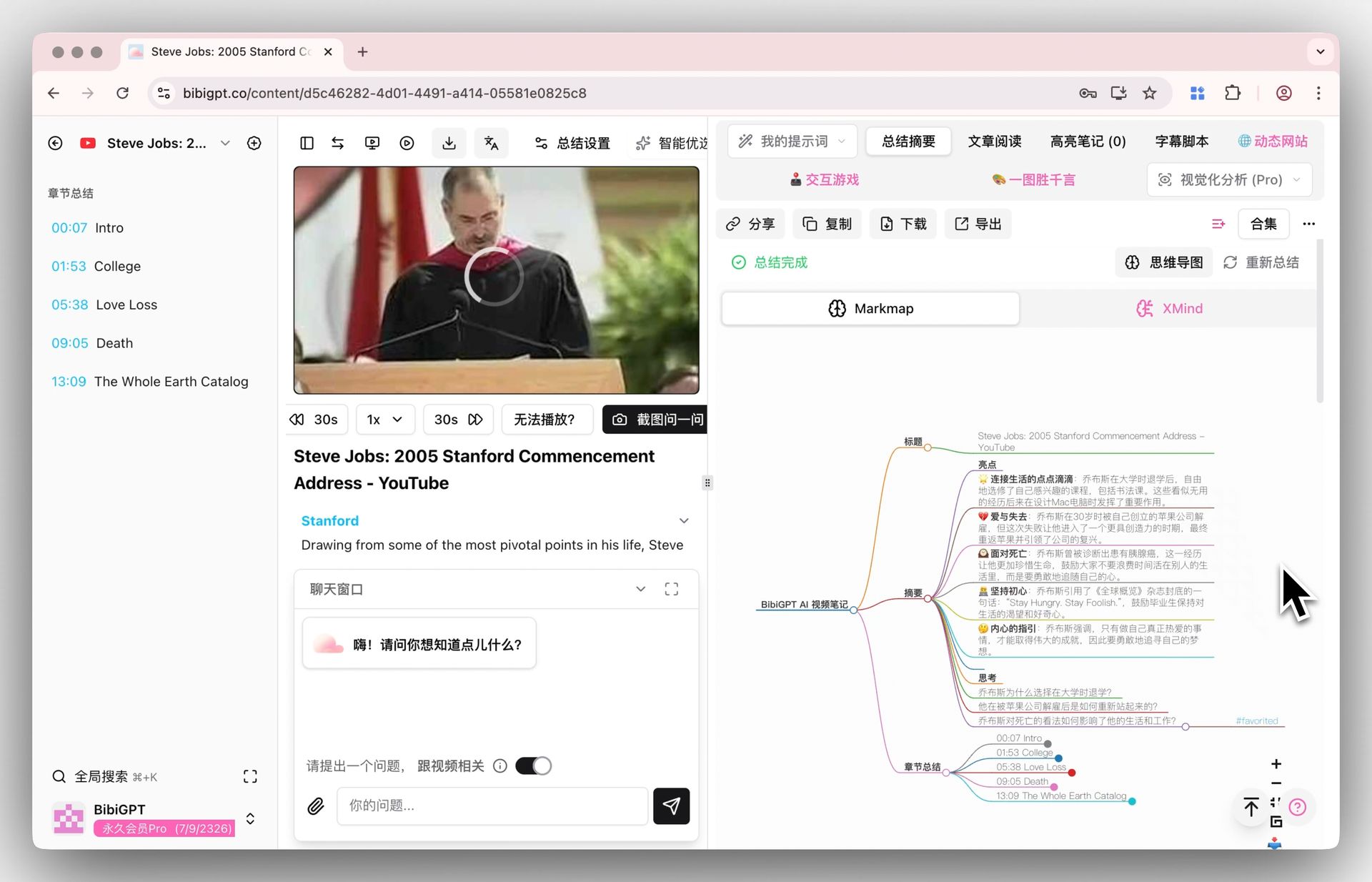
Screenshot: BibiGPT · video summary to mind map
One key difference worth calling out: when a general assistant answers your questions, it draws on knowledge it has “memorized.” Every answer from BibiGPT, by contrast, is grounded in the actual content of your specific video — no generic hedging. Let the system assistant handle everyday Q&A; let BibiGPT do the deep audio/video work. That’s the cleanest division of labor.
The video below demonstrates from another angle how AI can quickly summarize meetings and long-form content — worth a quick look to see the result firsthand:
Video source: YouTube · AI content summarization demo
Trying it yourself is more intuitive — paste a video link to generate a summary and have your first result in one minute.
5. Three Predictions About What’s Next
Apple’s opening is just the starting line. Here are three trends worth thinking about ahead of time:
- “Switchable” will become table stakes for every AI product. Once system-level assistants all support model switching, single-lock tools will have an increasingly hard time explaining “why can’t I choose.” Products that auto-route and open preference choices to users will win.
- The value of vertical use cases will become even more visible. The more pervasive general assistants become, the more conspicuous “what general assistants can’t do well” becomes — deep audio/video understanding, cross-video synthesis, source-traceable answers are exactly the moats vertical tools own.
- Models are no longer scarce; what’s scarce is the speed at which you can consume content. When anyone can summon advanced AI from their pocket, the real bottleneck isn’t “do I have access to AI?” — it’s “can I make sense of two hours of content in a few minutes?”
Practical rule: Models will keep multiplying and improving, but you only have 24 hours in a day — what’s valuable isn’t “which AI you can use” but “how fast you can digest content with it.”
This is also the long-term position BibiGPT has always anchored to: making consuming audio/video as fast as consuming text. Apple pushing “switchable AI” into the mainstream has brought exactly that value into the spotlight.
6. FAQ
Q1: Can you completely replace Siri with another AI in iOS 27? A: According to MacRumors’ reporting, users can select a third-party AI as the default for Siri, Writing Tools, and Image Playground in Settings, and App Store has a dedicated Extensions section for browsing and installing them.
Q2: After Apple opens up, do I still need a separate audio/video summary tool? A: Yes. System-level assistants are great for everyday Q&A and writing, but “quickly making sense of a long video or podcast” is a vertical use case — it requires a tool that can understand entire audio/video segments, locate timestamps, and synthesize across multiple videos. The two serve different jobs; they don’t conflict.
Q3: Why is “being able to switch models” more important than “using the single best model”? A: Because no one model is best at every task. A tool that auto-routes across multiple advanced models and lets users set their preferences can keep improving as models improve — it’s never bottlenecked by a single model.
Q4: Which model does BibiGPT use? A: BibiGPT auto-routes across multiple advanced AI models and gives users the ability to switch their summarization model. You don’t need to know what’s under the hood — just know that each task goes to the most suitable model available, and the product upgrades as those models iterate.
Q5: Is it free to use? A: After signing up, you can try the core summarization flow right away — run one video through it to validate the quality, then decide whether to upgrade for higher usage limits.
Try It Now
Apple has made “freely switchable AI” mainstream, but what actually saves you time is the ability to quickly make sense of long content. Paste a video or podcast link, get a structured summary in one minute, and experience the “switchable + deep vertical” combination today:
Paste a video link to generate a summary
BibiGPT Team