Best AI Podcast Transcript Generators in 2026: 8 Free and Paid Options Compared

You just finished a 90-minute in-depth interview podcast. The guest dropped three key insights, mentioned two must-read books, and delivered a quote you want to revisit again and again. But when you sit down to organize your notes, you realize you can only recall a vague outline — everything else has been swallowed by the long audio stream.
You’re not alone. According to the Edison Research “Infinite Dial 2026” report, global weekly active podcast listeners have surpassed 500 million, and the Chinese podcast market has grown over 35% year-over-year. Yet the inherently linear nature of podcasts means “listened a lot, retained very little” remains a universal pain point for power listeners.
The solution lies in a reliable AI podcast transcription tool. It doesn’t just convert speech to text — it transforms “listened and forgot” into a searchable, quotable, repurposable knowledge asset. This article compares 8 leading solutions in 2026 to help you find the perfect fit.
Why Podcast Transcription Matters More Than Ever in 2026
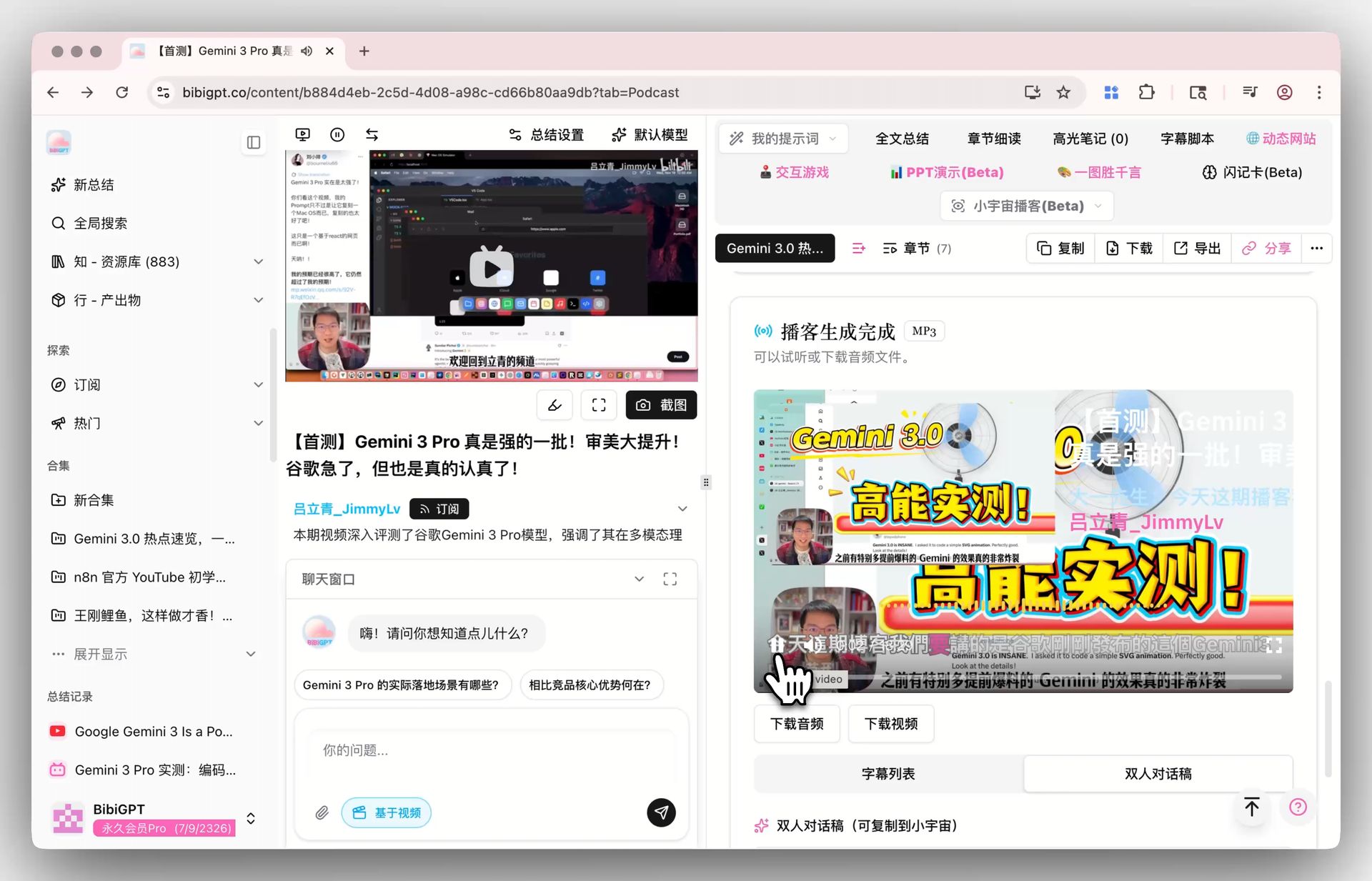
Here is what a podcast episode looks like once it has been transcribed and summarized — a searchable, structured document instead of an opaque audio stream:
A podcast episode turned into a structured transcript with an AI summary — ready to search, quote, and reuse.
Podcasts are evolving from casual entertainment into knowledge infrastructure. More and more business decision-makers, researchers, and content creators rely on podcasts as a primary channel for first-hand information — the problem is, audio can’t be searched, can’t be cited, and can’t be quickly skimmed.
Practical rule: A podcast without a transcript is like a private library you can’t search — you know the answer is in there somewhere, but you can never find which page it’s on.
Podcast transcription doesn’t just solve the “easier to read” problem — it unlocks three critical workflows:
- Knowledge retention: Transcripts can be imported into note-taking tools like Notion and Obsidian to build a personal knowledge base
- Content repurposing: A single episode transcript can be broken into articles, social media posts, and newsletter material
- Cross-language consumption: Combined with AI auto-translation, a Chinese podcast can be read by English and Japanese audiences
According to Podcast Index open data, there are now over 4.5 million active podcast shows worldwide in 2026. At this scale, manual note-taking is no longer realistic — AI transcription isn’t a nice-to-have, it’s a baseline capability.
8 Leading AI Podcast Transcription Tools Compared
We evaluated the 8 most representative tools on the market in 2026. Here is the full comparison at a glance:
| Tool | Best for | Pricing | Free tier |
|---|---|---|---|
| BibiGPT | All-in-one transcript + summary + knowledge base; Chinese podcasts | Subscription (includes transcription + summaries) | Free quota + paid plans |
| Otter.ai | English real-time meetings | Pro $16.99/mo | 300 min/mo |
| Notta | Chinese/Japanese/English multilingual | Pro $14.99/mo | 120 min/mo |
| Happy Scribe | Broad language coverage + subtitle export | $0.20/min (auto); $2/min (human) | Pay-per-use |
| Descript | Video creators editing from text | Pro $24/mo | 1 hr/mo |
| Sonix | Enterprise API and auto-translation | $10/hr or from $22/mo | Pay-per-use |
| Rev | Legal/medical-grade precision | AI $0.25/min; Human $1.50/min | Pay-per-use |
| Trint | Media team collaboration | From $52/mo | Subscription only |
Practical rule: Don’t choose a tool based on price alone — the time limits and accuracy trade-offs of free plans may cost you more time on manual proofreading later. Calculate “total cost = tool fee + proofreading time × your hourly rate” first.
1. BibiGPT — Best for an all-in-one transcript-to-knowledge workflow
Best for: listeners and creators who want transcription, AI summary, mind maps, and knowledge management integrated in a single pipeline — the only tool on this list that covers Chinese-native platforms like Xiaoyuzhou and Ximalaya alongside Apple Podcasts and Spotify, 30+ platforms in total.
- Key features: one-click transcript + structured summary, speaker labeling, mind map export, batch processing of whole channels, one-click export to Notion/Obsidian/Readwise
- Pricing: subscription that bundles transcription and summaries, with a free quota to start
- Honest drawback: it is built around the “paste a link, get knowledge” workflow — if all you need is live meeting transcription, a meeting-first tool like Otter.ai fits better
2. Otter.ai — Best for English real-time meetings
Best for: English-first teams that need live transcription and multi-speaker identification during meetings.
- Key features: real-time transcription, meeting collaboration, speaker identification
- Pricing: free plan with 300 min/mo; Pro $16.99/mo
- Honest drawback: Chinese support is limited
3. Notta — Best for Chinese/Japanese/English multilingual use
Best for: users who work across Chinese, Japanese, and English and want real-time translation.
- Key features: multilingual transcription, real-time translation
- Pricing: free plan with 120 min/mo; Pro $14.99/mo
- Honest drawback: the free tier (120 min/mo) runs out quickly for regular podcast listeners
4. Happy Scribe — Best for broad language coverage
Best for: one-off jobs in less common languages, with subtitle export needs.
- Key features: 120+ languages, subtitle export, optional human transcription
- Pricing: $0.20/min automatic; $2/min human — pay-per-use
- Honest drawback: per-minute pricing adds up fast for heavy, recurring use
5. Descript — Best for video creators
Best for: creators who want to edit video directly by editing the transcript text.
- Key features: built-in editor transcription, text-based video editing
- Pricing: free plan with 1 hr/mo; Pro $24/mo
- Honest drawback: Chinese support is limited, and it is overkill if you never edit video
6. Sonix — Best for enterprise API workflows
Best for: teams that need automated transcription plus translation wired into their own systems.
- Key features: 35+ languages, auto-translation, enterprise API
- Pricing: $10/hr or from $22/mo
- Honest drawback: oriented toward enterprise workflows rather than individual listeners
7. Rev — Best for legal-grade precision
Best for: zero-error-tolerance scenarios such as legal and medical records.
- Key features: human + AI dual mode; human mode reaches 99% accuracy
- Pricing: AI $0.25/min; human $1.50/min
- Honest drawback: Chinese support is limited, and human mode takes 12–24 hours
8. Trint — Best for media team collaboration
Best for: newsrooms and media teams with collaborative editing workflows.
- Key features: collaborative editing, media workflow integration
- Pricing: from $52/mo
- Honest drawback: the entry price is the highest on this list — hard to justify for individual use
How to Choose the Right Transcription Tool for You
With 8 tools to choose from, the decision framework is actually simple — just answer three questions:
Question 1: What language are your podcasts primarily in?
If your content is in Chinese or a mix of Chinese and English, prioritize tools with deep Chinese optimization. BibiGPT and Notta are significantly ahead in this dimension. For pure English content, Otter.ai and Rev are more mature choices.
Question 2: What’s your purpose for transcription?
- Just need a transcript → Happy Scribe, Sonix (pay-per-use, straightforward)
- Need transcript + AI summary + knowledge management → BibiGPT (transcription is just the starting point — it also generates AI-powered summaries, mind maps, and key quote cards)
- Need transcript + video editing → Descript
- Need legal-grade verbatim accuracy → Rev human mode
Question 3: What’s your budget and usage volume?
Practical rule: For fewer than 10 episodes per month, free plans are sufficient; for 10–50 episodes, go with a monthly subscription; for 50+ episodes, you must consider batch processing capabilities and API access.
Light users processing fewer than 10 episodes per month can get by with Otter.ai or Notta’s free tier. If you’re a power user or team processing podcast content daily, BibiGPT’s subscription plan (unlimited transcription + summaries) and bulk export capabilities are the more economical choice.
Complete Guide to Transcribing Podcasts with BibiGPT
Using a Xiaoyuzhou (小宇宙) podcast episode as an example, the entire process takes less than 3 minutes:
Step 1: Paste the podcast link
Open BibiGPT and paste your podcast link into the input field. It supports Xiaoyuzhou, Apple Podcasts, Spotify, Ximalaya, NetEase Cloud Music, and 30+ other platforms — or you can upload a local audio file directly.
The podcast entry lives right in the creation panel — paste a link or pick an episode directly:
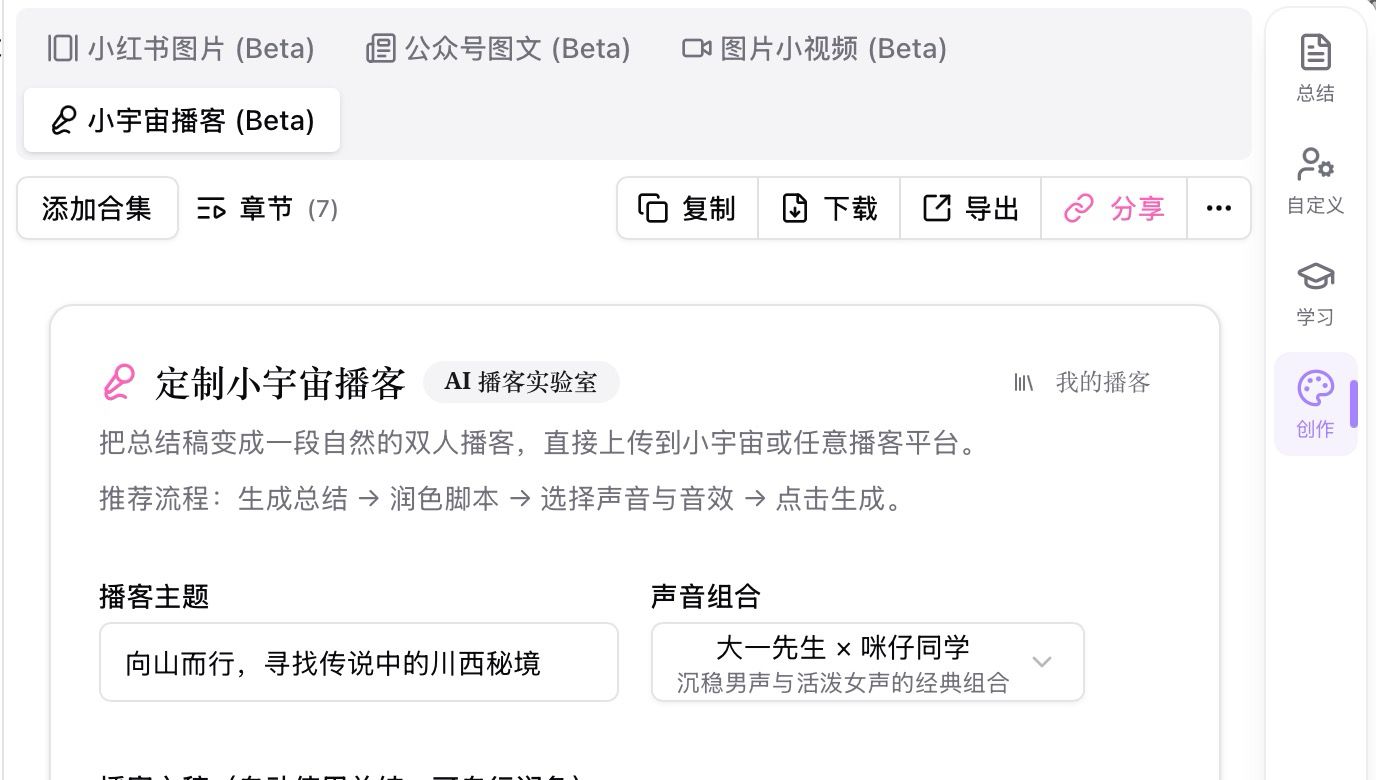
The podcast entry in BibiGPT’s creation panel — paste a link and the rest is automatic.
Step 2: AI auto-transcription + summary
After submitting, BibiGPT automatically handles audio extraction, speech-to-text conversion, speaker diarization, and AI summary generation. A typical 60-minute podcast episode is processed in about 60–90 seconds.
Step 3: Get structured results
Once transcription is complete, you’ll receive:
- Full verbatim transcript (with timestamps)
- Section-by-section structured summary
- Exportable mind map
- Key quotes and insights extraction
The mind map view alone often replaces an hour of manual outlining:
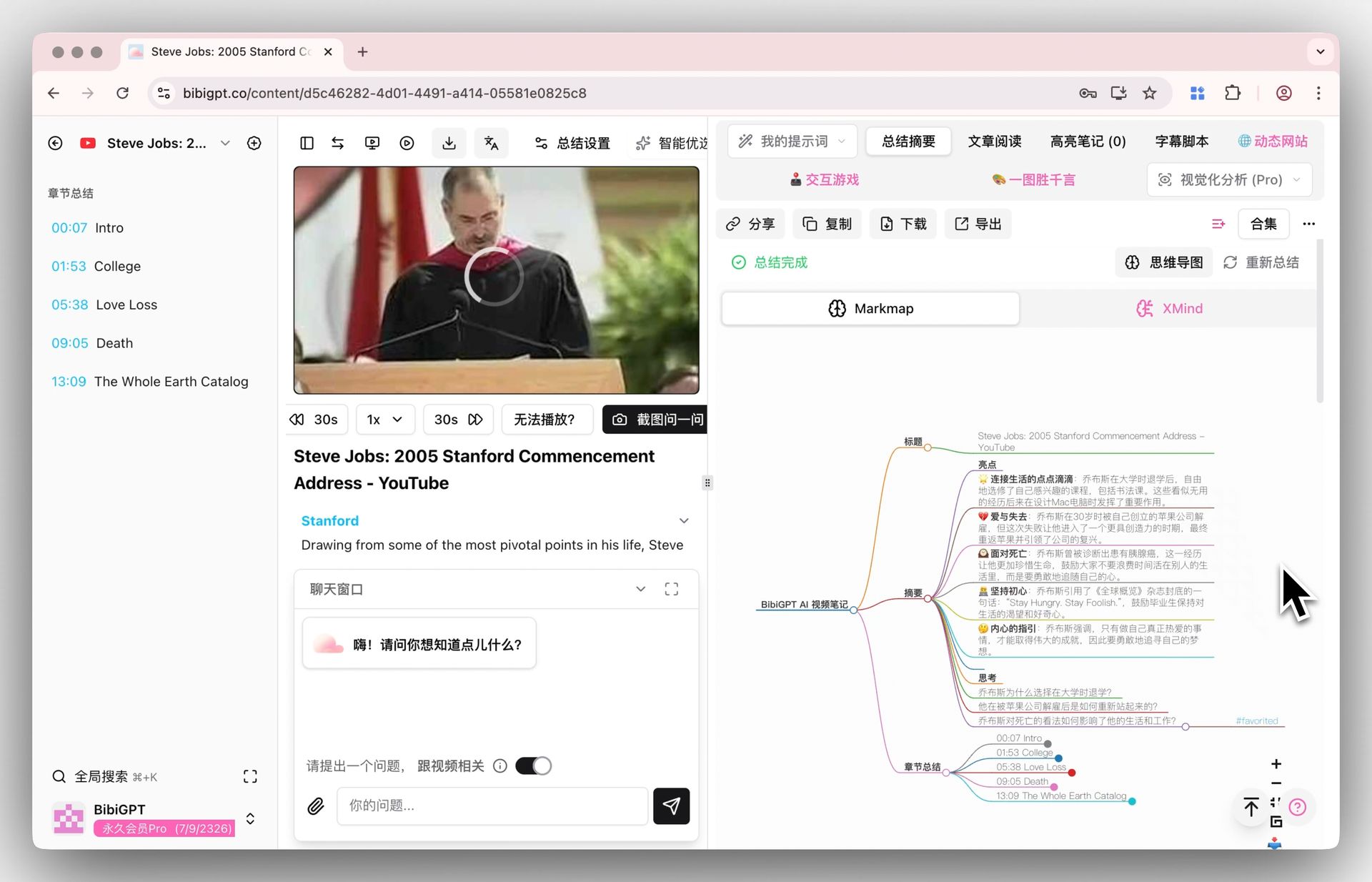
An exportable mind map generated automatically from the episode’s transcript.
Step 4: Export and repurpose
Transcription results can be exported with one click to Notion, Obsidian, and other note-taking tools. You can also use the AI article rewriting feature to turn podcast content directly into a blog post or article.
Practical rule: Build the habit of “listen and paste” — when you hear a great podcast during your commute, send the link to BibiGPT right away, and a complete set of notes will be waiting for you when you arrive.
Advanced Tips: Batch Processing and Multilingual Transcription
When your transcription needs evolve from “occasional use” to “systematic workflow,” these advanced techniques can take your efficiency to the next level:
Batch Processing: Handle an entire podcast season at once
If you want to transcribe every episode of a podcast channel, BibiGPT’s collection batch processing feature lets you import an entire channel at once and generate transcriptions and summaries in bulk. For teams doing podcast research or competitive analysis, this feature can save dozens of hours of manual work.
Multilingual Transcription: Break through language barriers
In 2026, more and more listeners are consuming podcasts in non-native languages. BibiGPT supports generating bilingual side-by-side transcripts on top of the base transcription — you can read the English original alongside the Chinese translation, leveraging the AI translation feature so that language is no longer a barrier to learning.
Knowledge Base Integration: Turn podcasts into searchable assets
Transcription is just step one — the real value lies in making this content searchable and citable for your future self. Export transcription results regularly to your note-taking system, and tag and categorize each episode. BibiGPT’s AI follow-up Q&A feature even lets you ask questions across multiple episodes — for example, “Over the past three months, which guests discussed the commercialization path of AI Agents?”
Asking follow-up questions against your transcribed episodes looks like this:
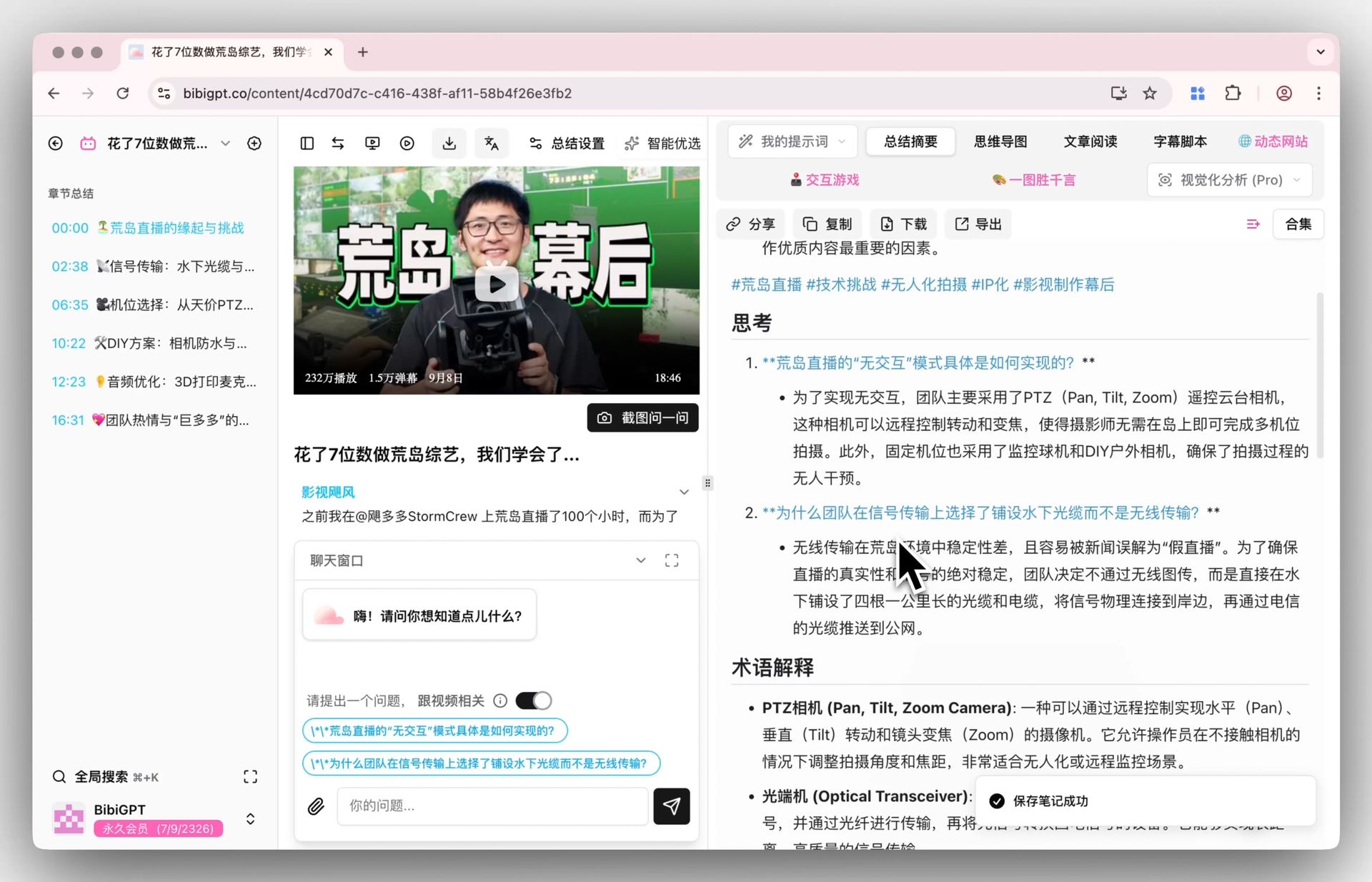
AI follow-up Q&A lets you interrogate your podcast library like a personal research assistant.
Frequently Asked Questions
How accurate is AI podcast transcription?
In 2026, mainstream AI transcription tools achieve over 95% accuracy for standard Mandarin and English. Accuracy may decrease in scenarios involving dialects, multiple simultaneous speakers, or heavy background music, but speaker diarization technology in tools like BibiGPT can already handle multi-speaker conversations quite well.
Are free podcast transcription tools good enough?
It depends on your usage volume. Otter.ai’s free plan offers 300 minutes per month and Notta’s offers 120 minutes — sufficient for light users who listen to just a few episodes per month. However, free plans typically limit export formats and don’t support batch processing. If you’re a content creator or researcher, the efficiency gains from paid plans far outweigh the cost.
Can I publish the transcript directly?
Not recommended. There’s a natural gap between spoken and written language — filler words, verbal tics, and misspoken phrases appear frequently in raw transcripts. We recommend first using AI-powered article rewriting to transform the conversational transcript into a more readable article.
How do I handle transcription for multi-speaker podcasts?
Choose a tool that supports “speaker diarization.” BibiGPT, Otter.ai, and Rev all have this capability. Among them, BibiGPT can automatically identify and label different speakers, so you know exactly who said what.
What languages does podcast transcription support?
This varies significantly by tool. Happy Scribe and Sonix support 35–120 languages, offering the broadest coverage. BibiGPT is deeply optimized for Chinese, English, Japanese, and Korean, with particularly strong performance in Chinese-English code-switching scenarios. If you primarily consume Chinese and English podcasts, BibiGPT is the most balanced choice.
How long does it take to transcribe a podcast episode?
Most AI tools can transcribe a 60-minute podcast episode in 1–3 minutes. BibiGPT typically completes the full transcription + summary pipeline in under 90 seconds. Human transcription (such as Rev’s human mode) takes 12–24 hours.
Can I export transcription results to note-taking tools?
BibiGPT supports one-click export to Notion, Obsidian, Readwise, and other popular note-taking tools. Other tools generally support TXT, SRT, and DOCX format exports, which you can manually import into your knowledge management system.
Start Your Podcast Transcription Workflow
If you’re looking for an all-in-one tool that handles transcription, summarization, and knowledge management, BibiGPT has already helped over 1 million users process 5 million+ audio and video files from 30+ platforms.
Practical rule: The best tool isn’t the one with the most features — it’s the one that fits best into your existing workflow. Trying one for 3 days is worth more than researching for 3 weeks.
Try it now: paste a link to a podcast you recently saved into BibiGPT, and in 60 seconds you’ll have a complete transcript and AI summary. The distance from “listened and forgot” to “listened and kept” is just one link away.
Explore more of BibiGPT’s podcast capabilities: Free AI Summarizer | Bulk Export | AI Article Rewriting
Popular tools
More in this series
- The AI Audio Briefing Wave: From Forbes Daily Top 3 to Turning Any Long Content Into a Listenable Podcast (2026)
- AI Podcast Summarizer Complete Guide 2026: From Transcript to Quote Cards
- AI Podcast Summarizer: 6 Tools Compared + BibiGPT Workflow (2026 Comprehensive Guide)
- AI Podcast Summary Workflow Guide 2026: From Transcription to Knowledge Management with BibiGPT
- AI Podcast Transcription Guide (2026): Turn Any Podcast Into Searchable Text With BibiGPT