Finish Coursera Fast: A 3-Step AI Summary Method (2026)
Finish Coursera Courses Fast: A 3-Step Method Starting with AI Coursera Summary
When exam season hits and you need to finish a Coursera or MOOC course in limited time, the key is not watching faster — it is building a panoramic map first and then allocating your time wisely. Compress the entire course into a map of key points, decide which videos genuinely deserve focused attention, and replace the rest with summaries. Spend time where it matters, and you can handle both completion and exam prep at once.
The approach comes down to three steps: AI summary first (build the panoramic map) → selective deep-watching (only focus on high-value videos) → note system (turn summaries into mind maps and flashcards). If you want to try it as you read, paste a Coursera video link to generate an English summary right now, then follow the rest of this guide to build your own MOOC workflow.
1. Why Watching from Start to Finish Is the Biggest MOOC Trap
Coursera is one of the world’s largest online learning platforms — according to DMR’s statistics page, it had reached 197 million registered learners by the end of 2025. But registering is not the same as finishing: a large-scale study of edX courses by MIT and Harvard, reported by Inside Higher Ed, found that MOOC completion rates for the 2017–18 academic year were just 3.13%, and 52% of registrants never even started. Subsequent academic research — including a completion-rate comparison study in Open Praxis — consistently confirms that MOOC completion rates have remained in the single digits.
Why so low? The most common failure mode is starting with Week 1, Video 1 and watching in order: full enthusiasm for the first two weeks, backlog by week three, complete dropout by week four. For international students, this trap is even more dangerous — someone doing a Co-op in Canada has to juggle full-time work with MOOC credit requirements, and a student in the US rushing through finals week may need to catch up on a semester’s worth of content in two weeks. Linear watching simply does not fit the time budget.
Practical rule: When time is short, cut watching time before cutting knowledge coverage — you need the key points from every video, but not every video deserves your full attention in front of the screen.
2. Method Overview: AI Summary First → Selective Watching → Note System
The core of this method is decoupling “watching videos” from “acquiring knowledge.” Each of the three steps has its own job:
| Step | What to do | Problem it solves | Time share |
|---|---|---|---|
| ① AI Summary First | Generate structured summaries for every video in the course | Build a panoramic map — know what the course covers | ~20% |
| ② Selective Watching | Use the map to decide which videos deserve 2x-speed focused viewing | Focus watching time only on high-value content | ~50% |
| ③ Note System | Convert summaries into mind maps and flashcards; use AI follow-up Q&A | Handle assignments and exams; retain knowledge long-term | ~30% |
Note what the time shares mean in practice: if your total budget for a course is 20 hours, roughly 4 hours go to generating and reading all summaries, 10 hours to focused watching of a few high-value videos, and 6 hours to building maps, reviewing flashcards, and completing assignments. You can adjust the budget based on course difficulty, but keep the order — map first, then watch, then review — unchanged.
This idea is not new; many learners who complete courses with high marks use a similar “global before local” strategy. The video below shares effective approaches for taking Coursera courses — worth pairing with the three-step method in this article.
Video source: YouTube · Coursera study method sharing
Practical rule: Use one weekend to complete Step ① before starting Steps ② and ③ — do not open any video to “take a quick look” until the panoramic map is ready.
3. Step One: Compress the Entire Course Into a Panoramic Map
The goal of Step 1 is to get a structured set of key points for the whole course before watching anything. Here is how:
- Open the course outline and list the video links for each week (publicly available courses on YouTube can use the playlist directly).
- Paste the links into an AI video summary tool, and generate summaries one by one or in batch via playlist — BibiGPT supports links from 30+ platforms, including open courseware, recorded lectures, and podcasts.
- For each video, collect a “one-sentence main point + section-by-section key points + important timestamps,” organize them by week into a single document, and that is your panoramic map.
If the course videos are in a playlist, batch-selecting them is far faster than pasting links one at a time. The screenshot below shows the checkbox interface for batch summarizing a playlist:
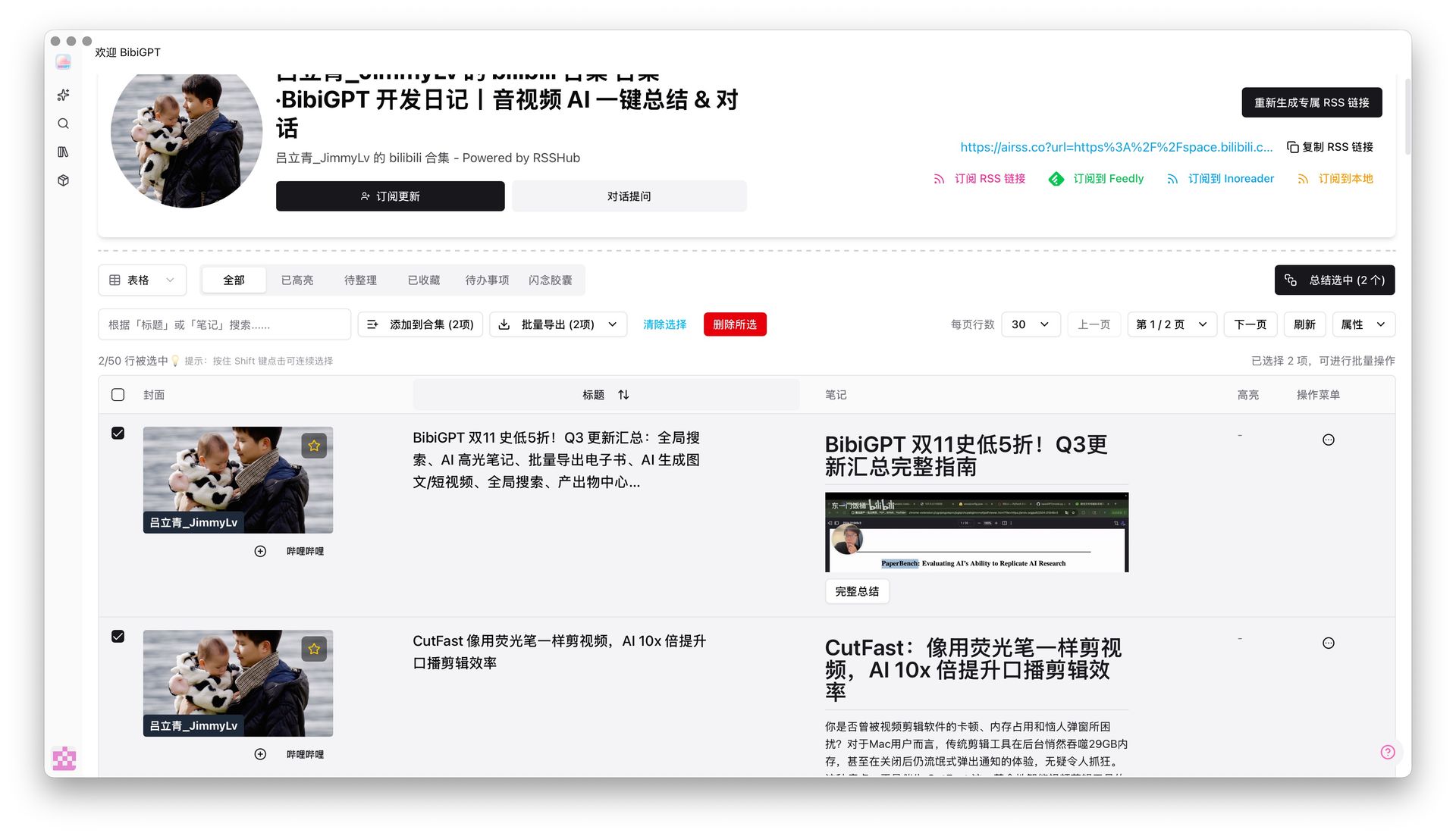
Select multiple videos from a playlist and generate summaries in one go
Students who find English courses challenging can set the summary output to their preferred language — this single step solves both the language barrier and the time budget problem at once. For a detailed walkthrough, see the guide on adding subtitles and generating summaries for English MOOC courses.
Practical rule: The panoramic map phase does not require “understanding” — only “knowing what each lesson covers.” Mark anything you do not understand and save it for Step 2.
4. Step Two: Selective Watching — Spend Time Where It Matters
With the panoramic map in hand, you will find that the videos truly worth watching frame by frame are usually fewer than half the total. Use these three criteria to decide whether a video deserves 2x-speed focused viewing:
- Assignment-critical: Any video directly required for this week’s assignment, quiz, or project — you must watch it. Summaries give you the key points, but solving problems requires the full reasoning process.
- Exam-point dense: Videos whose summaries are packed with formulas, definitions, and comparison tables tend to be the heaviest testing ground — worth focused viewing with pauses for note-taking.
- Marked “unclear” in Step 1: Content you could not understand from the summary alone means you need the instructor’s full explanation — jump to the relevant segment using the timestamp and watch carefully.
On the flip side, introductions, course overviews, guest interviews, and sections that overlap with knowledge you already have can be skipped after reading the summary. A realistic reference: a six-week course with eight videos per week, filtered by these three criteria, typically leaves 15 to 20 videos needing focused viewing. At 2x speed, total watch time shrinks from 12 hours to under 4 hours — the saved time goes straight into assignments and self-testing. You can run this entire workflow within the free tier — try the free video summarizer on a few lessons to get a feel for it before deciding whether to batch-process the whole course.
Practical rule: Always keep the summary open as a “map” while watching — read the key points first, then watch the video. With a framework already in your head, 2x speed is easy to follow.
5. Step Three: Note System — Mind Maps, Flashcards, and AI Follow-Up Q&A
Getting the knowledge is only the beginning — exams require you to recall it. Research compiled by the cognitive science site Retrieval Practice shows that active recall (retrieval practice) strengthens long-term memory far more effectively than re-reading. So Step 3 transforms summaries into three reviewable formats.
Mind maps: Convert each week’s summary key points into a map; scanning it before the exam rebuilds the knowledge structure of the entire course. Below is an interactive mind map demo — click the nodes to experience “one course, one map”:
Turn a video into a mind map
A linear talk becomes a structured tree. Drag to pan, click nodes to fold.
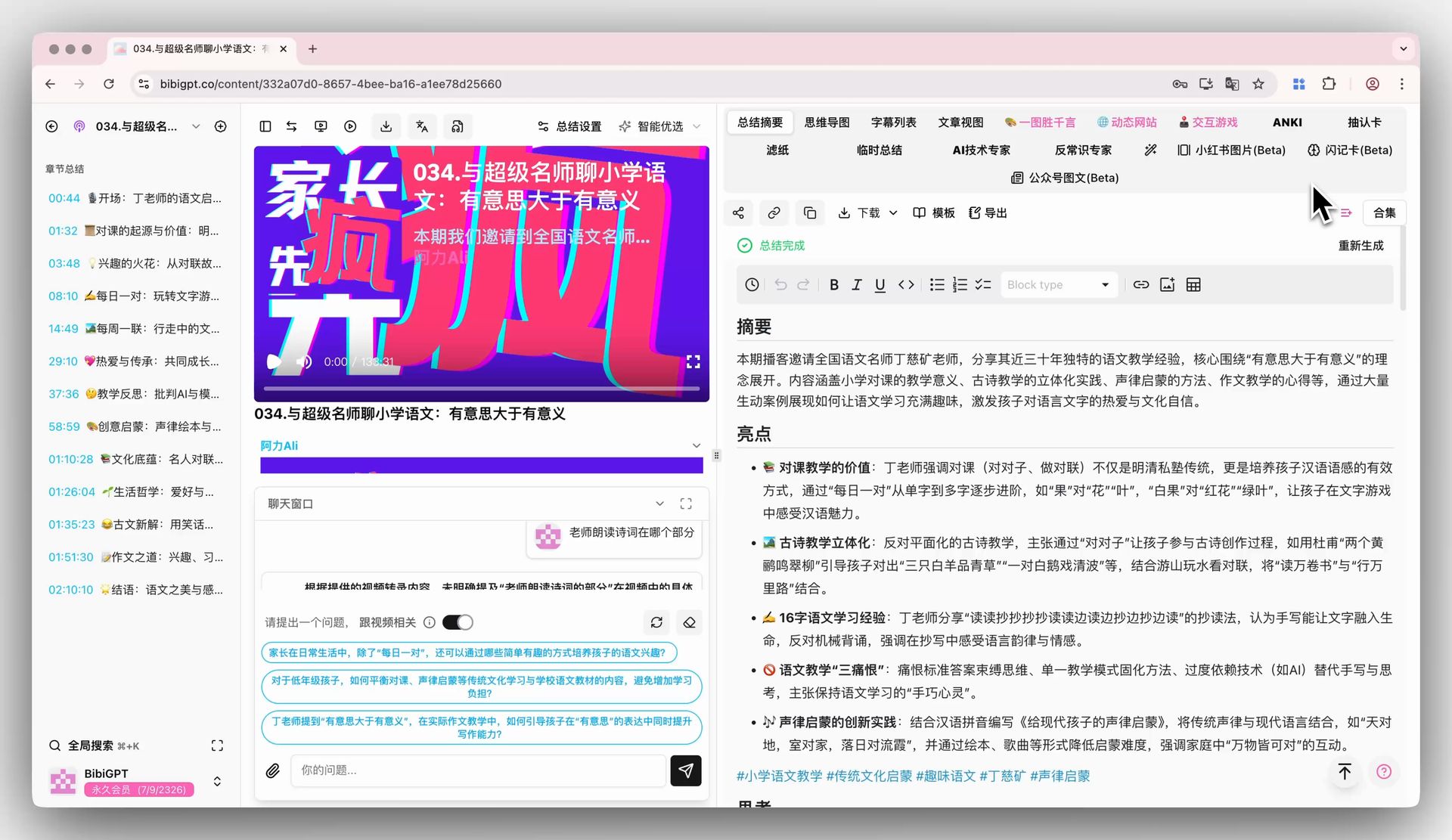
Flashcard self-testing: Turn definitions, formulas, and comparison points from the summaries into Q&A cards and review a set during your daily commute. The screenshot below shows the interface for auto-generating quiz questions from video content:

Automatically generate quiz questions from video key points — self-testing is far more effective than re-reading
AI follow-up Q&A: When you get stuck on a concept during review, ask about it directly in the chat window for that lesson — it is much faster than rewatching the video. The screenshot below shows the chat window for asking follow-up questions about video content:
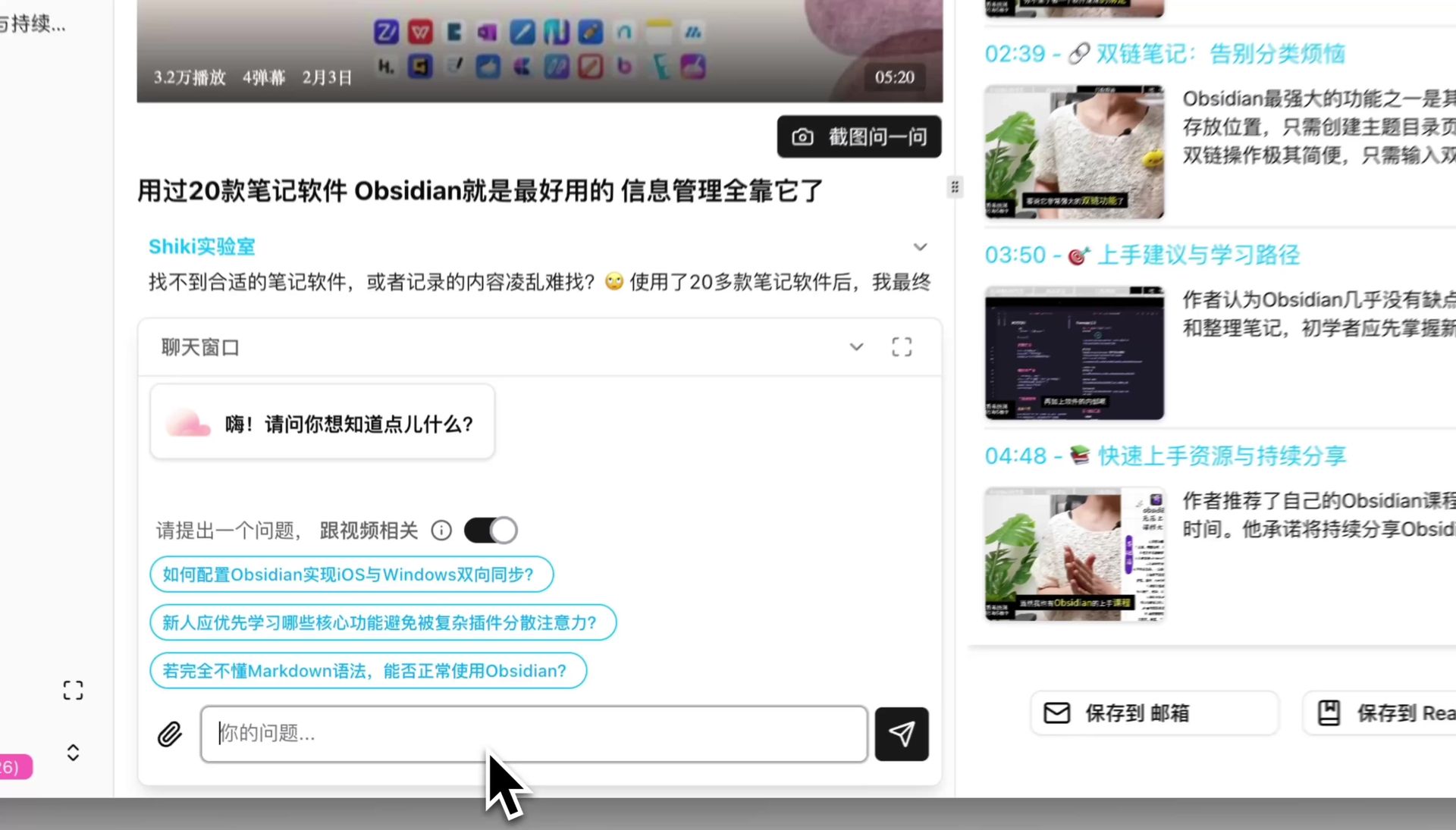
Ask questions directly about the video content and resolve confusion on the spot
If your review materials also include a large number of recorded lectures or live-session recordings, this note-taking method applies equally well. You can combine it with the exam-season lecture recording active recall workflow.
Practical rule: One week before the exam, stop taking in new content. Do only three things: scan the mind maps, review the flashcards, and ask follow-up questions on anything that is still unclear.
6. FAQ: Common Questions About Using AI Summaries for Coursera
Q1: Does using AI summaries to get through a course count as cheating? No — but there are boundaries. An AI summary is a tool for building understanding, similar to a high-quality set of course notes that help you construct a knowledge framework faster. Assignments, quizzes, and exams must still be completed on your own — both because Coursera’s honor code requires it and because it is in your own interest: summaries cannot replace problem-solving practice, and what carries you through the exam is what you have actually internalized.
Q2: A course with dozens of videos — won’t generating all the summaries take a long time? It is an order of magnitude faster than watching. A 15-minute video typically takes a few seconds to a minute or two to summarize; after submitting a batch, you can go do something else. BibiGPT has generated over 5 million summaries cumulatively, used by 1 million+ users for course completion, review, and similar purposes.
Q3: I struggle with English courses — can the summary output in another language? Yes. Paste the English course link and choose your preferred output language; key points and timestamps will all appear in that language. When you do focused watching, compare against the original English video — it effectively gives you a bilingual set of course notes.
Q4: Does this method work for platforms other than Coursera? Yes. edX, Udemy, YouTube open courseware, and podcast courses can all use the same three-step approach — the core is “summary first, selective watching, note system,” and it is platform-agnostic.
Q5: Can you pass the exam by only reading summaries and never watching videos? Not recommended. Summaries handle breadth; focused watching handles depth. As Neil Mosley’s analysis of the MOOC industry points out, the value of online courses is increasingly concentrated in certificates and skill validation — and passing that validation requires genuine mastery. The real intent of this method is to redirect the saved watching time into assignments and self-testing.
Try It Now
Paste the link of any Coursera video and get key points and important timestamps in one click. Within five minutes you will know whether that lesson is worth focused viewing — and that is the first brick in building your panoramic map.
Paste a Coursera video and try it
BibiGPT Team