Best Online Course Summarizer AI Tools 2026: 6 Tools Tested and Compared
Best Online Course Summarizer AI Tools 2026: 6 Tools Tested and Compared
You bought a Coursera specialization, or stockpiled dozens of hours of Udemy courses. The moment you open the course list, even 2x can’t save you — just finishing it takes weeks, let alone taking notes and reviewing. So you start looking for a tool that can “summarize first, then decide which parts are worth watching closely.”
But course summarizers vary widely: some are just a Chrome extension that handles short videos only; others go cross-platform, locate specific moments, and export notes. Pick wrong, and you’ll find it simply can’t swallow your two-hour-per-session course. This roundup tests and compares 6 mainstream tools for 2026, scored against real course-review needs, so you get it right the first time.
1. Why online courses need a dedicated summarizer
Online courses aren’t like the short videos you casually watch: they’re long, systematic, and have dependencies. One session can run 90 minutes, one course can have dozens of sessions. You don’t need a “one-line gist,” you need “chapter-level structured key points + jump back to the source + distill into review material.”
According to Creati.ai’s intro to course summary tools, the core value of these tools is compressing lengthy lectures into digestible summaries so busy learners can grab the key points fast — but whether it can handle long video and go cross-platform is the biggest divide between tools.
Practical rule: When picking a course summarizer, check one hard metric first — can it swallow a single session’s length of your course? Anything that can’t handle 90 minutes is eliminated.
The demo below walks through “turning a session of an online course into structured key points” — watch it once for intuition:
Source: YouTube · online-course AI summary and study demo
2. The lightweight camp: Chrome extension tools
The first type is browser extensions — install and a summary appears beside the course page, the fastest to start.
NoteGPT
NoteGPT uses transcript text with ChatGPT and Claude to summarize Udemy course videos; according to NoteGPT’s official intro, it can quickly generate summaries from timestamped transcripts. Good for the lightweight “single session, want a timestamped summary” scenario.
Lecture Summary (YouTube / Udemy / Coursera)
This is a Chrome extension covering YouTube, Udemy, and Coursera. But it has an obvious limit — per its store listing, the YouTube videos it supports must be under 28 minutes, with transcripts not exceeding 4000 words. Enough for short courses, but overwhelmed by long lectures.
Practical rule: Extension tools win on speed, but most have time / word-count caps — don’t expect them to hold up for long online courses.
When to use the extension camp
- Course sessions are short (under 30 minutes)
- You just want a quick summary on the current page
- No cross-platform, no long-term distillation needed
3. The specialist camp: single-platform deep tools
The second type digs deep into one platform, doing single-platform summary thoroughly.
According to Memories.ai’s Udemy summary tool, it analyzes content and generates accurate study notes, breaking Udemy courses into chapter-level key points and takeaways without rewatching. These tools are well-polished on single-platform experience, suited to people who “mainly use one platform.”
The limit is equally clear: once you study on Coursera, Udemy, and YouTube simultaneously, you have to switch between tools, with notes scattered everywhere.
Practical rule: Study on one platform only and pick a specialist tool; spanning multiple platforms, a single-platform tool will fragment your notes.
4. The all-in-one camp: BibiGPT cross-platform summary + knowledge base
The third type is all-in-one platforms, not tied to one course site but taking “video” itself as input. BibiGPT belongs here, supporting 30+ platforms including YouTube, Bilibili, and podcasts.
Just paste a course video link or upload a recording, and BibiGPT turns the whole session into timestamped structured key points; click a timestamp to jump back to the source and verify. The interactive demo below lets you paste a link and try:
Summarize any video in seconds
Pick a sample below to see the AI summary — TL;DR, key points, and jump-to timestamps.
TL;DR: Karpathy builds a GPT-style language model from scratch in code, explaining every piece — from a tiny character-level model up to the full Transformer.
Key points
- Start with a bigram model, then add self-attention so tokens can "talk" to each other
- A Transformer block = multi-head attention + feed-forward + residual connections + layer norm
- Training is just predicting the next token; scale and data do the rest
- The same architecture behind nanoGPT is what scales up to ChatGPT
Jump to
- 00:07 Why build GPT from scratch
- 08:23 Self-attention, intuitively
- 1:00:00 Assembling the Transformer block
- 1:35:00 From nanoGPT to ChatGPT
Demo: BibiGPT video summary feature
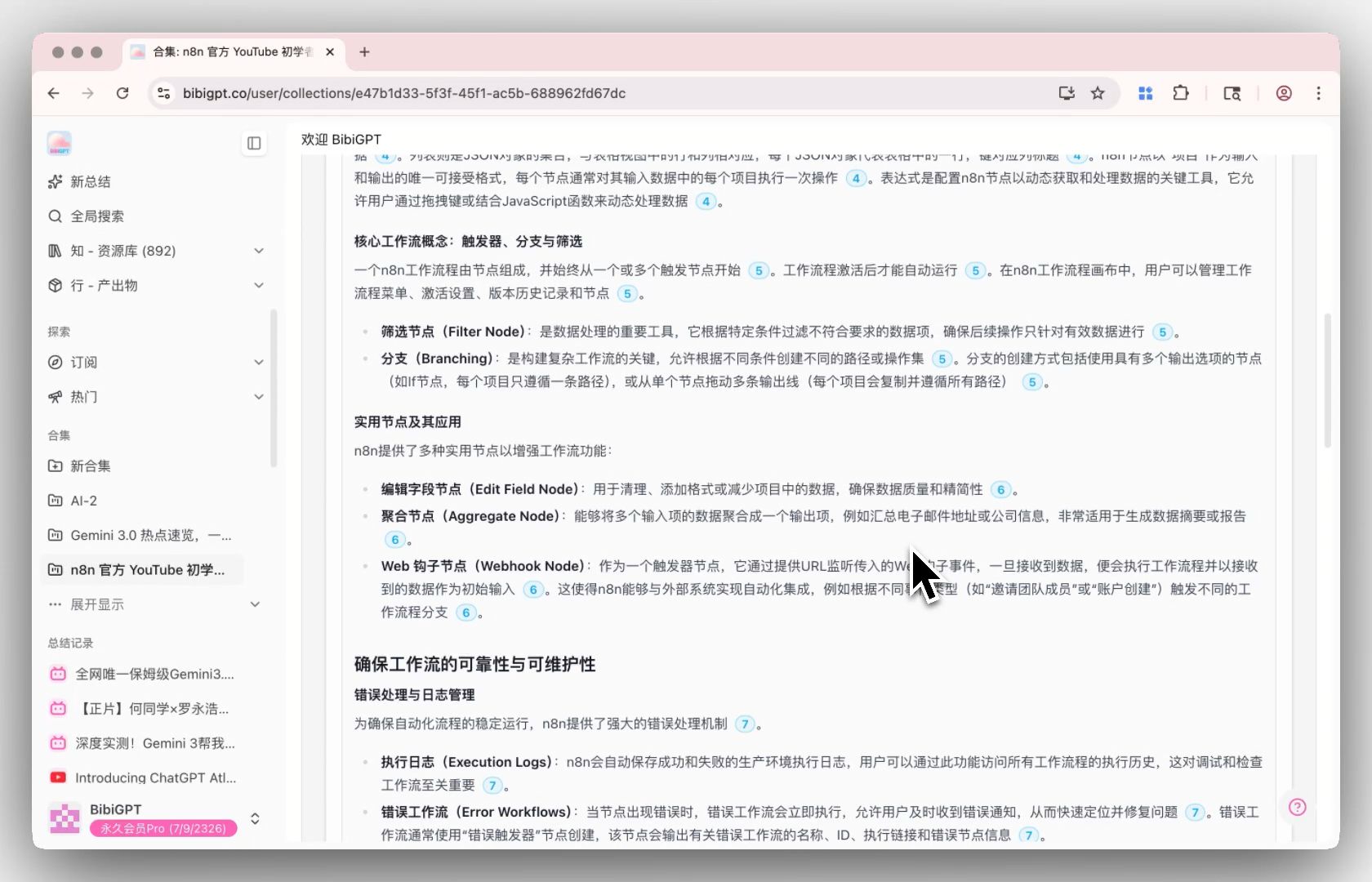
More importantly, BibiGPT can group a whole course’s multiple session videos into one collection, run a whole-course summary, and even question the entire collection — effectively turning a course into a conversational review knowledge base. The shot below is the overall synthesis screen from a collection summary:
Screenshot: BibiGPT · collection summary demo
You can first turn a session of an online course into structured key points for free and feel how smooth cross-platform summary is.
When to use the all-in-one camp
- You study on multiple platforms and want notes centralized in one place
- Courses are long, multi-session, needing chapter-level key points + whole-course synthesis
- You want to distill a course into a knowledge base you can review and question long-term
Practical rule: Spanning multiple platforms and wanting long-term review material distilled, an all-in-one platform is easier than extensions and single-platform tools.
5. The roundup scorecard: how to pick among 6 tools
Put the mainstream tools on one table and compare them on the dimensions that matter most for course review:
| Tool | Platform coverage | Long video | Jump to source | Whole-course synthesis | Best for |
|---|---|---|---|---|---|
| NoteGPT | Udemy etc. | Average | Timestamped | No | Single-session quick summary |
| Lecture Summary | YT/Udemy/Coursera | Capped | Partial | No | Short online courses |
| Memories.ai | Mainly Udemy | Decent | Partial | Chapter-level | Single-platform depth |
| Eightify | YouTube | Decent | Timestamped | No | YouTube quick summary |
| Coursera Summary ext. | Coursera | Average | Timestamped | No | Coursera only |
| BibiGPT | 30+ platforms | Strong | Click to jump | Collection summary | Cross-platform + long-term distillation |
Decision filter: Ask yourself two things first — how long is a single session? Do I span multiple platforms? Short and single-platform, use an extension; long and cross-platform, use all-in-one.
According to aitooldiscovery’s tool review, tools differ in emphasis — some push 60-second express summaries, some push long-form transcript precision. There’s no “absolute best,” only “best for your course.”
6. Advanced: turn course key points into a pre-exam review map
Summary is only the first step. Before an exam or when you need it for a project, a mind map laying out the whole course’s thread is often more efficient than re-reading a long summary. BibiGPT can produce a mind map alongside the summary, helping you see the course’s knowledge skeleton at a glance.
The interactive demo below lets you experience video-to-mind-map directly:
Turn a video into a mind map
A linear talk becomes a structured tree. Drag to pan, click nodes to fold.
Demo: BibiGPT video-to-mind-map
A practical online-course study combo
- Group a whole course’s videos into one collection
- Generate timestamped structured key points session by session
- Run a whole-course collection summary to see the big picture
- Before the exam, run through the thread with a mind map; on detail points, click the timestamp to jump back to the source
7. From “can’t finish” to “learn it deeply”: how to land it
Models are no longer scarce; whether you can quickly turn dozens of hours of online courses into “clear, jumpable, memorizable” review material is what truly decides your study efficiency. Compress picking and using a tool into 5 steps:
- Look at your course — single sessions short and only one platform? An extension is enough
- Long and across multiple platforms? Pick the all-in-one BibiGPT
- Group a whole course’s videos into one collection, generate key points session by session
- Run a collection summary to build a whole-course big-picture understanding
- Before the exam, review with a mind map; jump back to the source by timestamp for details
People who can learn don’t watch more, they grasp more precisely — using summaries to judge which parts deserve close watching, then spending energy on the truly important chapters. Pick the right course summarizer and those dozens of hours of courses stop being a burden and become knowledge you can call up anytime.
Try it now
Start with the longest online-course video you have on hand: paste the link, get structured key points in minutes, and see if it holds up.
Turn online-course videos into structured key points for free
BibiGPT Team
Popular tools
More in this series
- The AI Audio Briefing Wave: From Forbes Daily Top 3 to Turning Any Long Content Into a Listenable Podcast (2026)
- AI Podcast Summarizer Complete Guide 2026: From Transcript to Quote Cards
- AI Podcast Summarizer: 6 Tools Compared + BibiGPT Workflow (2026 Comprehensive Guide)
- AI Podcast Transcription Guide (2026): Turn Any Podcast Into Searchable Text With BibiGPT
- Best AI Lecture Summarizer Tools 2026: Compared for Students, Teachers & Self-Learners