Complete Guide to Bilibili Subtitle Extraction and Download: 5 Best Methods in 2026
Quick answer: The fastest way to download or extract subtitles from a Bilibili video is to paste the video link into BibiGPT — you get the full subtitle text plus an AI summary in 10–30 seconds, free to start, with no installation or Bilibili login required. For videos without official soft subtitles, OCR-based extraction (Method 4 below) is the fallback.
Bilibili is one of China’s largest video platforms, covering a vast range of content — learning tutorials, documentaries, tech talks, lifestyle vlogs, and more. But when you want to “capture” the key content from a video for study notes, content repurposing, or subtitle translation, there’s rarely a straightforward official way to do it.
This guide covers the 5 most practical methods for extracting and downloading Bilibili subtitles in 2026. Whether you’re a student, content creator, or working professional, you’ll find the approach that fits your workflow and helps you truly make the most of video content.
Why Extract Bilibili Subtitles? 5 Common Use Cases
Subtitles aren’t just “accessibility aids for people who can’t hear clearly” — they’re the structured text of video content. Once extracted, they create massive efficiency gains:
1. Efficient Learning and Note-Taking Reading through an exported subtitle transcript is often more effective than watching a lecture video once through. With subtitles in a document, you can highlight key points, add annotations, and multiply your learning speed.
2. Content Repurposing Converting video subtitles into articles, tweets, or social media posts is one of the most common workflows for independent content creators. Subtitles are the closest thing to a spoken draft — with light editing, they become publishable content.
3. Bilingual Subtitle Comparison Language learners often need to compare the original subtitles of a foreign-language Bilibili video against a Chinese translation. Once extracted, you can go sentence by sentence and understand vocabulary in context.
4. Accessibility in Noisy Environments In loud settings or situations where you can’t play audio, a text version of the subtitles lets you “silently browse” the core content of any video.
5. Video Search and Content Navigation Once subtitles are in text form, you can full-text search for keywords and jump directly to the part of the video you care about — especially useful for long lectures or technical demonstrations.
Practical rule: If you watch more than 5 hours of Bilibili videos per week, extracting subtitles to build a knowledge base is probably the highest-ROI learning optimization you can make.
Method 1: BibiGPT One-Click Extraction (Recommended)
The diagram below sketches the whole journey — from a Bilibili video link to usable subtitle text:
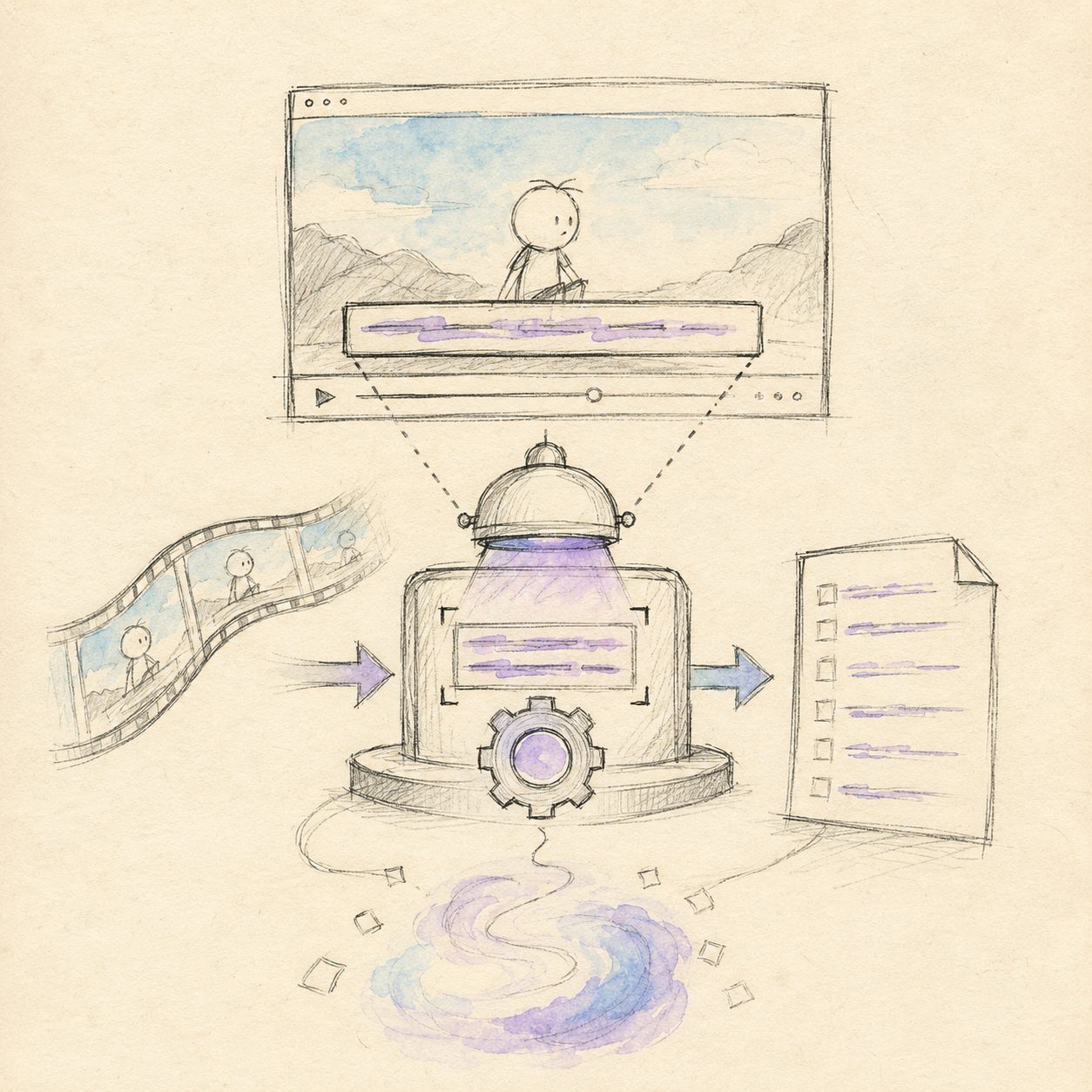
Illustration: drawn by the BibiGPT team
For most users, BibiGPT is the easiest way to extract Bilibili subtitles. No software installation required, no technical knowledge needed — just paste the video link and get subtitles and an AI summary in one click.
How to use:
- Open bibigpt.co
- Copy the Bilibili video link (supports standard URLs and BV numbers)
- Paste it into the input box and click “Start Analysis”
- Wait 10–30 seconds — subtitle text and AI summary appear together
Key advantages of BibiGPT:
- Subtitle extraction + AI summary in one pass: It doesn’t just give you the raw subtitle text — it automatically distills the video’s key points, saving you the time of reading through the subtitles and then summarizing
- Supports 30+ platforms: The same workflow works for YouTube, podcasts, Twitter Spaces, and other major platforms — one tool for all your needs
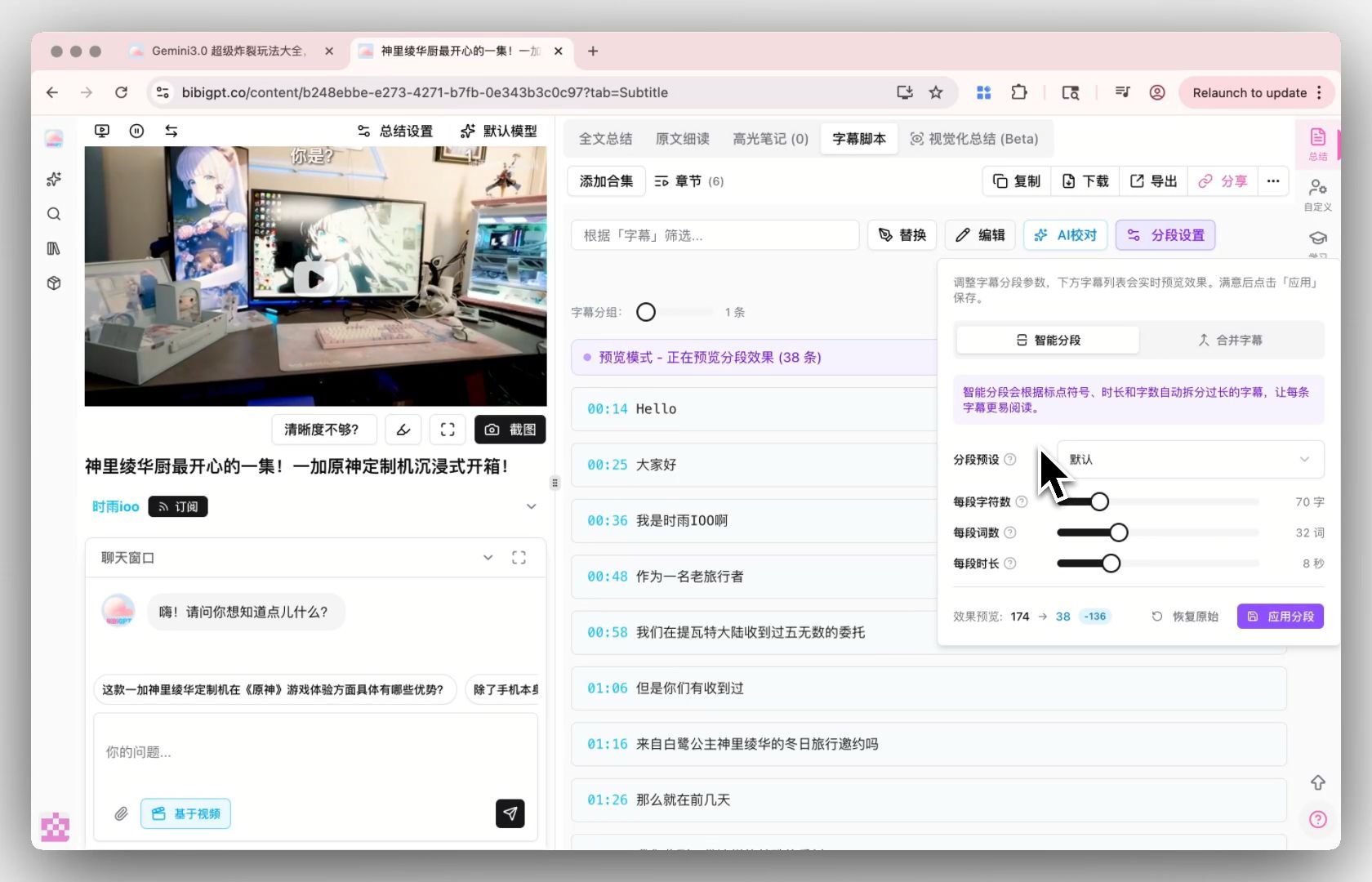
- Smart subtitle segmentation: Raw subtitles are often fragmented into short chunks. BibiGPT automatically identifies semantic boundaries and re-segments the text so it reads naturally
With the smart subtitle segmentation feature, BibiGPT reassembles timestamp-fragmented subtitles into readable paragraphs you can copy and use directly.
BibiGPT has served over 1 million users and processed over 5 million video summaries, making it the most widely used AI audio/video assistant among Chinese users.
Practical rule: For Bilibili videos under 30 minutes, BibiGPT typically completes subtitle extraction and summary generation within 60 seconds — far faster than manually downloading a subtitle file and reformatting it.
Method 2: Manual Extraction with Browser Developer Tools
If you have some technical background, you can use browser developer tools to directly capture subtitle data from Bilibili videos. This is the “raw” approach that doesn’t rely on any third-party tools.
Prerequisite: The video must have official soft subtitles provided by Bilibili (typically added by the uploader or auto-generated by Bilibili).
How to use:
- Open the target Bilibili video in Chrome or Edge
- Press
F12to open Developer Tools and switch to the “Network” panel - Type
subtitleorjsonin the filter box - Refresh the page or wait for the video to load, and watch for network requests to appear
- Find the request containing subtitle data (usually in
.jsonformat) and click to view the Response - Copy the JSON data and use a tool to convert it to SRT format
Limitations:
- Only works for videos that have official soft subtitles
- The process is tedious and easy to get wrong for non-technical users
- May break after Bilibili updates its API
Practical rule: If you don’t see any subtitle-related requests in Developer Tools, the video has no soft subtitles and you’ll need to use the “hard subtitle OCR extraction” method described below (Method 4).
Method 3: Third-Party Online Tools
Several online tools are specifically designed for Bilibili subtitle extraction, each with different strengths:
Common tool types:
| Tool Type | Best For | Main Limitation |
|---|---|---|
| Subtitle download sites | Quickly getting SRT files | Only works for videos with official subtitles |
| Browser extensions | Exporting while watching | Requires plugin installation, privacy concerns |
| AI summary tools (e.g. BibiGPT) | Subtitle extraction + intelligent summarization | Requires internet connection |
| Desktop video processing software | Batch processing, format conversion | Requires download and installation, complex setup |
When using third-party tools, keep these points in mind:
- Verify the tool is from a trustworthy source before submitting video links to unknown websites
- Some tools have video length limits (e.g. free tiers may only support videos under 10 minutes)
- Subtitle quality varies — AI-generated subtitles may contain recognition errors
You can also use BibiGPT’s video-to-text converter to turn video content directly into structured text, which is often more useful than a raw subtitle file.
Method 4: Hard Subtitle OCR Extraction (For Videos Without Soft Subtitles)
Many Bilibili videos — especially older uploads, livestream recordings, and re-edited content — only have “hard subtitles,” meaning the subtitles are burned directly into the video frame and can’t be retrieved as text data through an API.
In this case, standard subtitle extraction methods all fail. The only solution is hard subtitle OCR recognition — using image recognition technology to scan each video frame for text regions and extract the subtitle content.
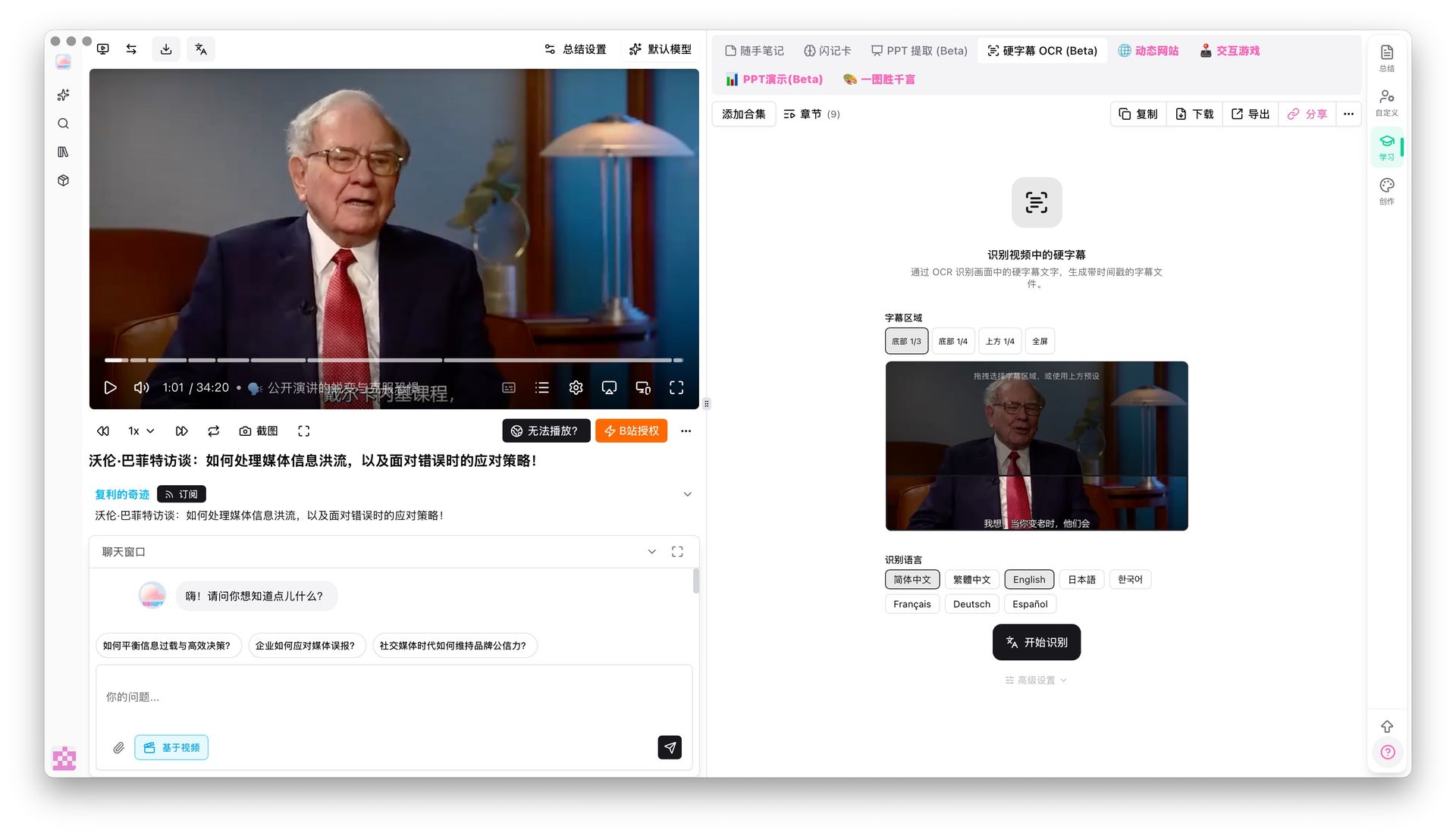
BibiGPT’s hard subtitle OCR extraction feature is built exactly for this scenario. It can:
- Automatically detect subtitle regions in the frame (no manual selection required)
- Recognize hard subtitles in Chinese, English, Japanese, and other languages
- Filter out title stickers, watermarks, and other interfering elements to focus on subtitle text
- Output complete subtitle text with timestamps
Example use cases:
- Old videos without official subtitles (content uploaded before 2018)
- Livestream recordings (live streams use hard subtitles)
- Re-edited content where the original subtitles have been “embedded” into the video frame
- TV broadcast clips
Practical rule: If you paste a Bilibili link and the subtitle extraction result is empty or garbled, the video likely only has hard subtitles. Switching to OCR mode usually solves the problem.
How to Choose the Right Extraction Method for You
The best method depends on your situation. Use this comparison table to decide quickly:
| Scenario | Recommended Method | Why |
|---|---|---|
| Everyday learning, quick note-taking | BibiGPT | Subtitles + summary in one place, highest efficiency |
| Need a standard SRT file format | BibiGPT or browser tools | Can export universal subtitle formats |
| Video has no soft subtitles (old video / livestream recording) | BibiGPT hard subtitle OCR | The only intelligent solution for hard subtitles |
| Technical users who want custom processing | Browser Developer Tools | Access to raw JSON data |
| Batch processing multiple videos | BibiGPT API or desktop tools | Supports bulk operations |
One-sentence decision rule:
Practical rule: If you just want to “turn video content into readable text,” BibiGPT is the most hassle-free choice. If you need “standard subtitle files for video production,” export SRT from BibiGPT. Only consider Developer Tools or local OCR software if you specifically need a completely offline, no-internet workflow.
Advanced Tips for Bilibili Subtitle Extraction
Once you’ve mastered the basics, these techniques can take your efficiency even further:
Tip 1: Combine with AI Chat to Go Deeper on Video Content
Extracting subtitles is just the first step. A more powerful approach is to “ask questions about the video content right after extraction.”
BibiGPT’s AI video dialog feature lets you ask questions about the video content after subtitle extraction — for example, “What was the third method mentioned in the video?” or “What’s the speaker’s core position on topic X?”
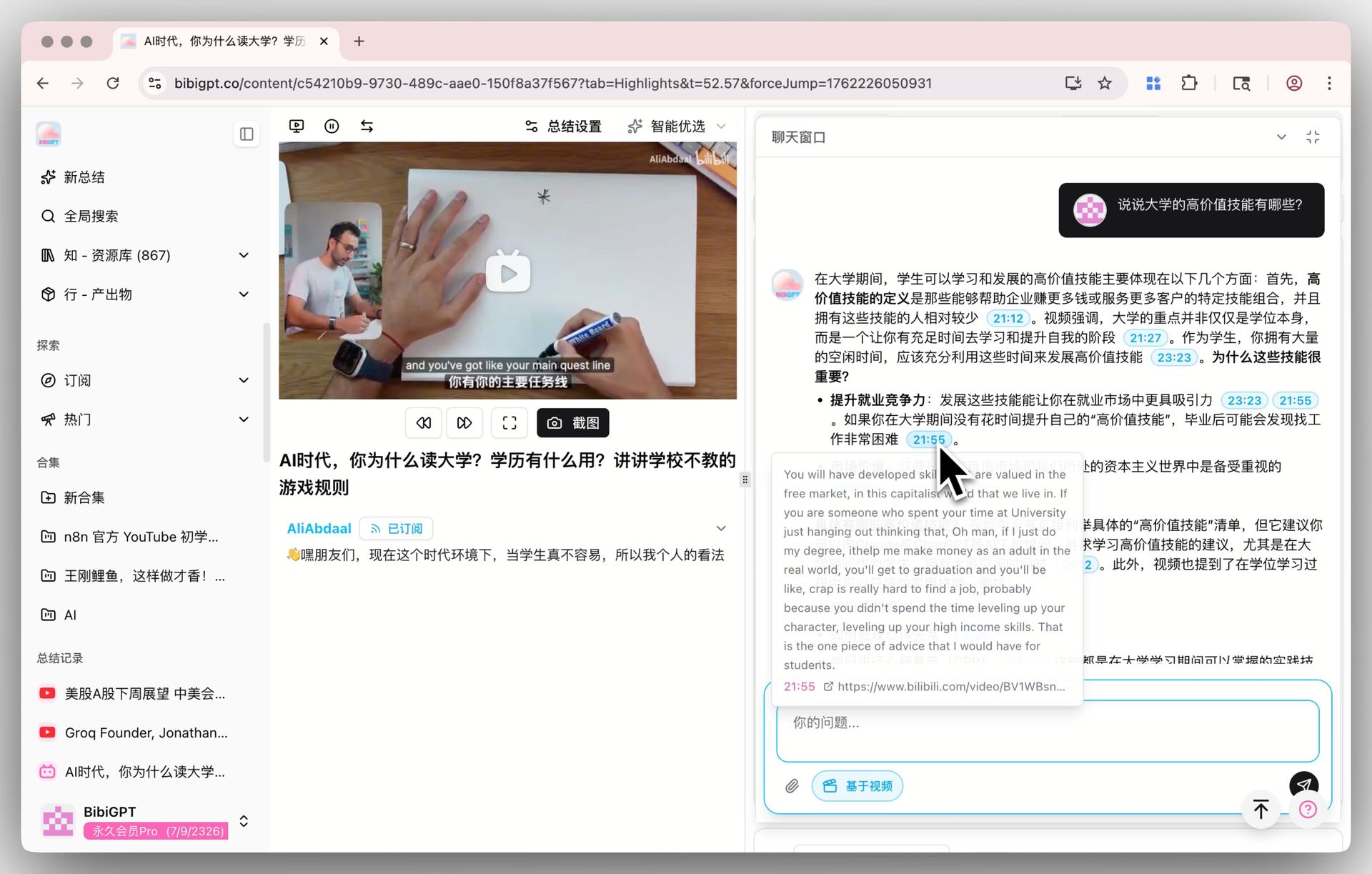
This combination of “subtitle extraction + intelligent Q&A” is far more efficient than reading through the subtitle text alone — especially for long lectures.
Tip 2: Batch Extract Subtitles from Multiple Videos
If you need to process a series of videos or a course from one creator, you can submit multiple video links in bulk to get all the subtitles and summaries at once. BibiGPT supports API access, so for users who need large-scale processing, you can call it programmatically.
Tip 3: Build a Personal Knowledge Base from Subtitle Text
Store extracted subtitle text in Notion, Obsidian, or other note-taking tools, combined with full-text search, to build a “searchable video knowledge base.” BibiGPT supports direct export to major note-taking tools with one-click sync.
Tip 4: Search for Relevant Bilibili Videos Before You Start
Before extracting subtitles, use the Bilibili video search feature to find high-quality target videos and filter for content truly worth a deep read — so you don’t waste time on low-quality videos.
Practical rule: Subtitle extraction is the starting point of “upgrading how you consume content,” not the endpoint. Integrating subtitles into your knowledge management system is what makes the content you’ve watched genuinely useful to you.
Free Video Summaries: A Universal Solution from Bilibili to Multi-Platform
Beyond Bilibili, the same needs for subtitle extraction and summarization exist on YouTube, podcast platforms, and more. BibiGPT’s free video summarizer covers 30+ major video platforms, whether it’s:
- Bilibili learning videos
- English technical tutorials on YouTube
- Podcast audio shows
- Meeting recordings or internal training videos
All handled through the same workflow. For users who regularly need to pull content across platforms, this dramatically reduces the cost of switching between tools.
Frequently Asked Questions
Q1: Can subtitles be extracted from all Bilibili videos?
Not all videos support direct soft subtitle extraction. Bilibili videos fall into two categories: those with official subtitles (added by the uploader or auto-generated by Bilibili) and those without (only hard subtitles or no subtitles at all). Videos with official subtitles can be extracted directly as text. Videos with only hard subtitles require OCR technology. Videos with no subtitles at all can have subtitles generated using speech recognition (BibiGPT supports this).
Q2: Can the extracted subtitles be exported as SRT format?
Yes. BibiGPT supports exporting extracted subtitle content as SRT, TXT, and other formats, making it easy to use for video editing, subtitle embedding, and other downstream tasks.
Q3: Do I need to log in to my Bilibili account to extract subtitles?
No, you don’t need to log in to your Bilibili account when using BibiGPT to extract subtitles — just paste the video link directly. However, for videos with access restrictions (such as premium member-only content), you may need the appropriate access to the video itself.
Q4: How fast is subtitle extraction? How long do I typically need to wait?
BibiGPT typically completes subtitle extraction and summary generation for a standard Bilibili video (under 30 minutes) within 10–60 seconds. Longer videos and higher server load will increase wait times. Hard subtitle OCR processing takes a bit longer since it requires frame-by-frame analysis.
Q5: How accurate is the extracted subtitle text? Will there be errors?
Soft subtitle extraction accuracy is close to 100% since it reads the subtitle text data directly. Hard subtitle OCR accuracy is affected by video quality, font type, and background color, but is typically above 90% — with occasional individual character recognition errors. AI-generated subtitles (speech-to-text) accuracy depends on audio quality; for clear Mandarin speech, accuracy is typically above 95%.
Q6: Can free BibiGPT users access the subtitle extraction feature?
BibiGPT offers a free trial quota — new users can experience subtitle extraction and AI summary features for free after registering. For more usage or advanced features (such as hard subtitle OCR and batch processing), you can upgrade to a Plus or Pro membership.
Q7: Besides Bilibili, what other video platforms does BibiGPT support?
BibiGPT currently supports 30+ major platforms, including: Bilibili (B站), YouTube, Douyin, Kuaishou, Xiaohongshu, Weibo Video, Tencent Video, iQiyi, Youku, Twitter/X, TikTok, Podcast, and more — covering virtually all the major platforms you’re likely to use day to day.
Q8: Will extracted subtitle content be saved or used for other purposes?
BibiGPT has a strict privacy protection policy for user data. Extracted subtitle content is used solely to provide summary services to users and will not be used for other commercial purposes. See the privacy policy page on the official website for details.
Try BibiGPT Now
🎯 Free trial — BibiGPT video summarizer — Paste a Bilibili link and extract subtitles and AI summaries in one click
📱 Supports Bilibili, YouTube, and 30+ platforms — watch faster, find content easily, and actually use what you’ve watched