How to Create Bilingual Subtitles With AI in 2026: 5-Step Workflow + 4 Tool Comparison (Free Options Included)
How to Create Bilingual Subtitles With AI in 2026: 5-Step Workflow + 4 Tool Comparison (Free Options Included)
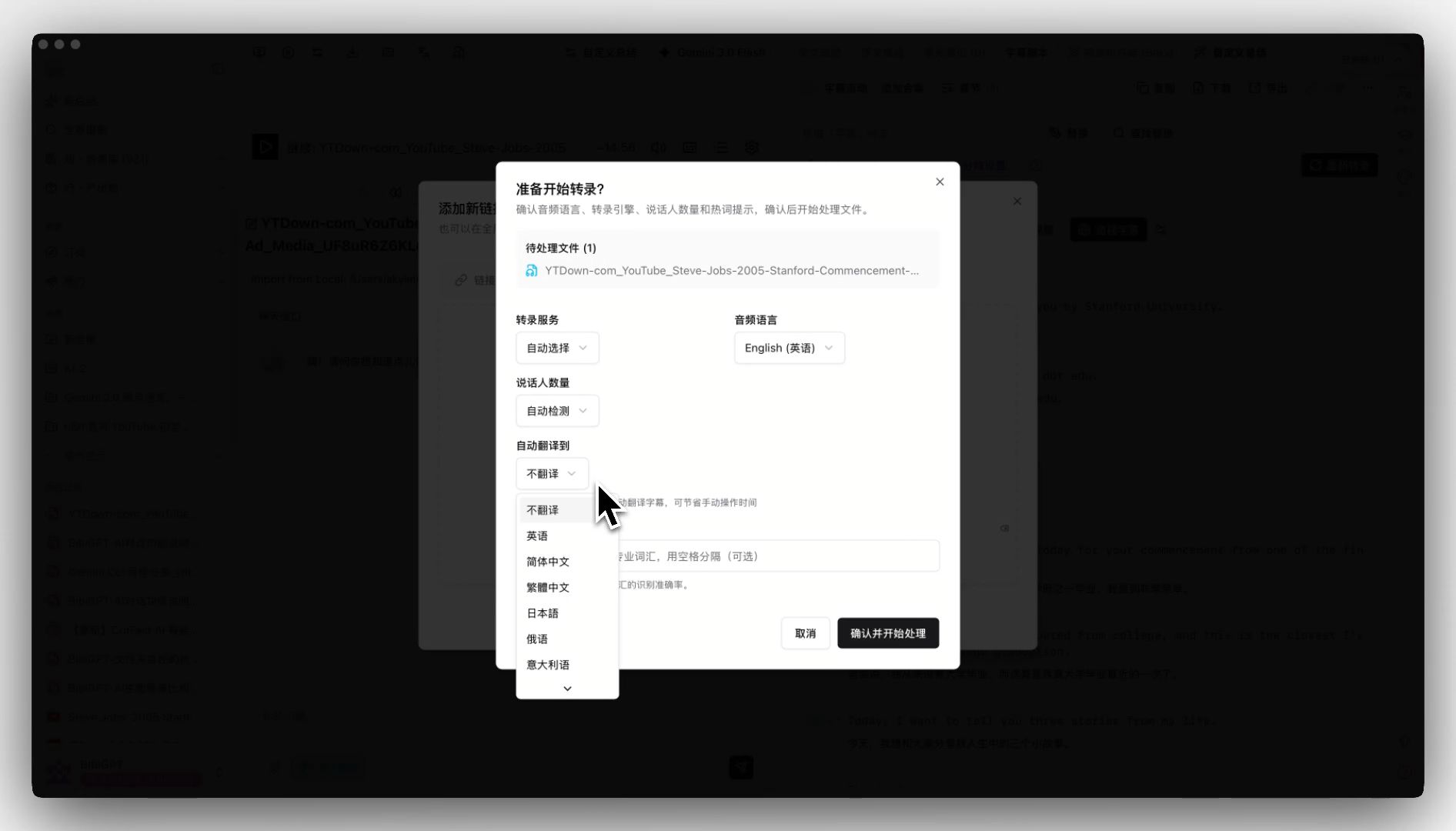
Short answer: the easiest way to create bilingual subtitles with AI is (1) open BibiGPT AI Subtitle Translation, (2) paste your video link (YouTube, Bilibili, or a local file), (3) get the source captions in 30 seconds, (4) one-click translate into a second language, and (5) export as SRT or burn directly into the video. No software install, no running Whisper yourself, no manual timeline tweaking. This guide walks through all 5 steps and compares the top 4 tools.
Table of Contents
- Short answer: the 5-step workflow
- Step 1: Extract the source captions
- Step 2: AI translate into the target language
- Step 3: Align timelines and clean up segmentation
- Step 4: Export SRT or burn-in
- Step 5: Quality review
- Tool comparison: BibiGPT / SubtitleEdit / CapCut / Kapwing
- FAQ
Short answer: the 5-step workflow
Turning a monolingual video into one with bilingual subtitles is really 5 connected steps: extract → translate → align → burn → review. BibiGPT fuses the first 4 into one click and leaves #5 for a human spot-check. This is the easiest workflow available in 2026.
- Extract: convert the audio track into time-stamped captions
- Translate: AI translates captions into the target language, keeping timestamps
- Align: merge both languages into one SRT file on the same timeline
- Burn: either burn captions into the frame (hard subs) or keep them external (soft subs)
- Review: human checks 3-5 spots for proper nouns and idioms
Step 1: Extract the source captions
There are three extraction paths:
- Platform captions: YouTube Auto-captions and some Bilibili uploaders provide CC captions ready to download
- AI speech recognition (ASR): when no captions exist, run an ASR model on the audio
- Hard-burned OCR: when captions are baked into the frame (common in variety shows), OCR reads them pixel-by-pixel

BibiGPT’s AI Subtitle Translation covers all three as fallbacks. You just paste a link — the system picks the right path.
Step 2: AI translate into the target language
Traditional translation tools (Google Translate, DeepL) break SRT workflows in two ways:
- Timestamps get lost: most tools only consume plain text, timelines scramble on paste-back
- Context breaks: SRT rows are 1-2 seconds each; isolated lines can mistranslate “He said” → wrong gender
AI subtitle tools fix this by translating in grouped windows (carrying forward context) and preserving timestamps verbatim. BibiGPT supports Chinese / English / Japanese / Korean inter-translation and auto-merges both languages into one SRT.
Step 3: Align timelines and clean up segmentation
Two common bilingual layouts:
- Stacked: both languages appear simultaneously (Chinese on top, English below, or vice versa)
- Alternating: Chinese in one line, English in the next — faster rhythm
BibiGPT defaults to stacked with a one-click switch to alternating. Segmentation uses semantic boundaries instead of hard 1-2 second cuts, preventing awkward mid-sentence breaks.
Step 4: Export SRT or burn-in
Soft vs hard subtitles:
| Format | Pros | Cons | Best for |
|---|---|---|---|
| Soft subs (external SRT) | Editable, toggleable, small | Requires player support | YouTube, Netflix, meeting recordings |
| Hard subs (burned) | Works on any player, self-contained | Uneditable, heavier | TikTok / Douyin / Xiaohongshu shorts |
BibiGPT supports both: direct SRT download or one-click MP4 export with customizable style (font, position, outline, background).
Step 5: Quality review
AI captions are good enough 90% of the time, but always human-review these:
- Proper nouns: product names, people, places are often transliterated wrong
- Idioms and slang: puns and dialects need interpretation, not literal translation
- Numbers and units: currency, metric vs imperial — localize as needed
Use VS Code or SubtitleEdit to spot-check 3-5 critical moments after downloading from BibiGPT.
Tool comparison: BibiGPT / SubtitleEdit / CapCut / Kapwing
| Tool | Source caption extraction | AI translation | Bilingual merge | Burn-in | Platforms | Price |
|---|---|---|---|---|---|---|
| BibiGPT | ASR + OCR + platform | zh/en/ja/ko | Stacked / alternating | One click | 30+ platforms + local | Subscription |
| SubtitleEdit | Local Whisper | External tool | Manual | No | Local files | Free, open-source |
| CapCut | Auto-captions | Basic | Yes | Yes | Local import | Free (CN) / Subscription (overseas) |
| Kapwing | Auto-captions | Yes | Yes | Yes | Local + URL | Free tier + Subscription |
Which to pick?
- End-to-end, least effort → BibiGPT (especially for YouTube / Bilibili / podcast URLs)
- Air-gapped, local files only → SubtitleEdit + local Whisper
- Already a CapCut user → stick with CapCut for local files
- Occasional use, little Chinese content → Kapwing free tier suffices
Short-video creators: BibiGPT for “link → bilingual SRT” + CapCut for burn-in. Long-form YouTube / Bilibili: BibiGPT end-to-end.
FAQ
Q1: How accurate are AI captions? 95%+ on clean recordings; 80-90% with heavy accents or noise — human review recommended.
Q2: Does bilingual always mean Chinese-on-top? No. Overseas audiences usually prefer their target language on top. BibiGPT lets you configure.
Q3: What about long videos (2h+)? BibiGPT uses million-context models like DeepSeek V4 Pro and Gemini Pro, handling 2h in one pass. See BibiGPT integrates DeepSeek V4 1M context.
Q4: Can I translate into languages beyond zh/en/ja/ko? Route via English for other languages with slight quality loss.
Q5: Is subtitle translation the same as subtitle summary? No. Translation preserves 1:1 timing; summary compresses the content. See AI subtitle translation bilingual workflow and AI podcast summary workflow.
Q6: Free tier enough for student research? Yes for short videos. Students can apply for extra quota; heavy or batch usage needs Plus.
Start now: paste a YouTube or Bilibili link into BibiGPT AI Subtitle Translation and get your first bilingual SRT in 30 seconds.
BibiGPT Team