2026 Students' Guide: How to Summarize Lecture Videos With AI — Turn 90-Minute Lectures Into 5-Minute Notes
2026 Students’ Guide: How to Summarize Lecture Videos With AI — Turn 90-Minute Lectures Into 5-Minute Notes
As of May 2026, whether it’s Coursera, edX, Khan Academy MOOCs or university recording platforms, students typically face 10–30 hours of lecture video each week. Traditional “1.5x speed + notes” can’t keep up with content growth.
Practical rule: “Watched it once” ≠ “Mastered it.” Exam season needs “structured notes you can pull up to review at any time,” not a “I’ve seen this video” browsing history.
This article gives you, from a university / MOOC learner’s perspective, an end-to-end workflow for compressing a 90-minute lecture into a 5-minute reviewable note with BibiGPT, including an error-prevention checklist and five real exam-season recipes.
1. Why Traditional Notes Can’t Keep Up With 2026 MOOC Pace
Picture your standard flow for a 90-minute lecture:
- Watch at 1.5× → 60 minutes
- Take notes while watching → another 20 minutes (frequent pauses)
- Organize key points → another 30 minutes
- Try to review a week later → can’t find the key concepts in your notes → re-watch 30 minutes
Total: ~140 minutes for a note that’s barely usable.
A typical student takes 5–8 courses a semester, each with 2–3 lectures per week. That’s 30+ hours per week just on notes — impossible.
Practical rule: The bottleneck isn’t “can I watch the video,” it’s “can I efficiently review the videos I’ve watched.”
2. How AI Summarization Actually Works on Lectures
To understand why AI tools save so much time, look at what they do:
- Transcript extraction: generate complete subtitles from audio (lecture audio usually transcribes very well)
- Structure recognition: identify chapters, key points, examples, derivations
- Key-point extraction: rank by academic density, isolate core definitions, theorems, formulas
- Timestamp linkage: every key point links to the corresponding second in the original video for one-click jumping
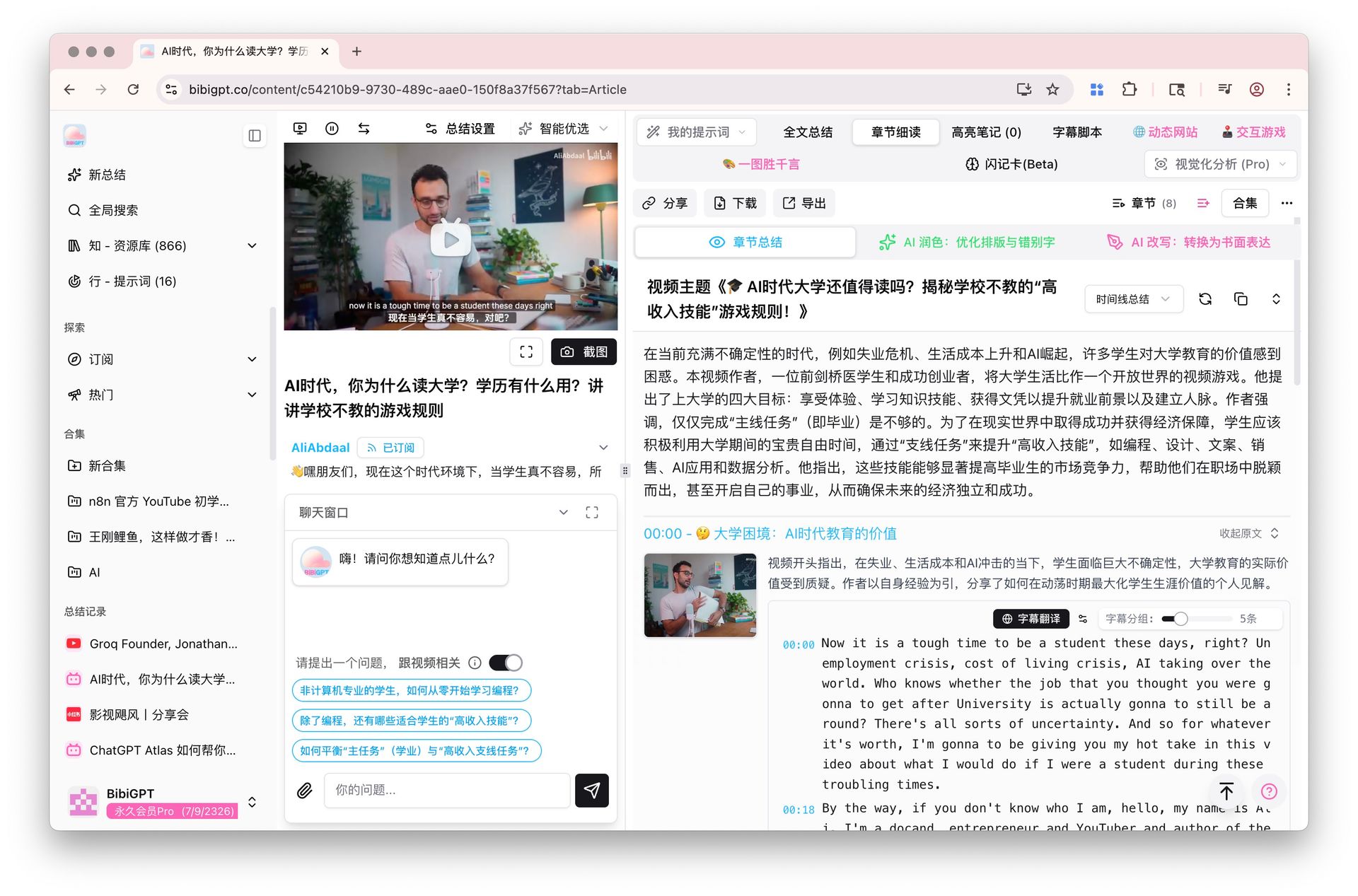
This works especially well for lectures because lectures have strong inherent structure: teachers organize content by pedagogical logic, and AI catches that logic. BibiGPT’s chapter deep reading feature is built for exactly this scenario — chapter summary, AI rewrite, and original subtitles in one focused-reading view.
3. Full BibiGPT Workflow (For University / MOOC Videos)
Step 1: Upload the lecture video or paste the link
Three entry points:
- Public platforms (YouTube / Bilibili): paste the link
- Coursera / edX / university platforms: use the browser extension or download then upload (the desktop client supports drag-and-drop)
- Multiple related lectures: build all lectures of a course into a video collection for unified management
Step 2: Pick a “learning mode” summary prompt
BibiGPT’s default prompt is creator-leaning. Students should customize a “learning notes” prompt:
Summarize in college-lecture-note format, including:
1. Core concepts (with definitions and applicable scenarios)
2. Key formulas / theorems (with derivation thinking)
3. Worked examples (with solution steps)
4. Easy-to-confuse points (where the instructor emphasized)
5. Connections to the previous lecture
Set it as default and every lecture summary follows that structure.
Step 3: Use mind map + timestamp jumping for intensive reading
After the summary, open the mind map view:
- Glance at the whole lecture’s logical structure
- Click a node → video jumps to the matching second
- Watch the unfamiliar parts at normal speed for 30 seconds, then come back
This is the core trick for “not watching the whole lecture but still mastering it.”
Step 4: Use AI chat for follow-ups
After reading the summary, use AI Video Dialog & Source Tracing to probe everything you didn’t fully get. Every answer carries a timestamp clickable back to the original lecture.
Example: “What’s the difference between dynamic programming and divide-and-conquer in this lecture?” → AI gives a contrast + cites lecture 12:30 and 28:45 for both explanations.
Step 5: Use highlight notes to extract exam points
Highlight exam-related passages with highlight notes; they collect into a notes tab. The week before exams, just scan these highlights.
4. Five Real Exam-Season Recipes
Recipe 1: STEM (calculus, linear algebra)
- Prompt focus: theorem + derivation + worked examples
- Use mind map for proof logic
- Use AI chat on examples to ask “why does this step work?”
- Pre-exam: scan highlights + rewatch flagged hard points by timestamp
Recipe 2: Humanities (history, political science)
- Prompt focus: timeline + cause-and-effect + key figures
- Use collections to organize a course by chapter
- Collection summary for cross-lecture chapter-wide reviews
Recipe 3: Programming (algorithms, data structures)
- Prompt focus: algorithm thinking + complexity + code templates
- AI chat: “when is this algorithm better than X?”
- Use enhanced export to dump code blocks straight into your repo
Recipe 4: Languages (English, Japanese)
- Prompt focus: grammar + phrases + cultural context
- Use subtitle translation for native-speaker lectures
- Bilingual side-by-side for language + subject in one shot
Recipe 5: Graduate exam sprint
- Build one big collection per graduate-exam subject
- For each lecture: summarize → highlight → use AI chat to generate practice questions
- Two weeks before the exam: scan highlights only + use deep search to query concepts inside transcripts
| Subject type | Prompt focus | Core BibiGPT features |
|---|---|---|
| Math | Theorem + derivation + examples | Mind map + AI chat |
| History | Timeline + causality + figures | Collection summary |
| Programming | Algorithm + complexity + code | Enhanced export + AI chat |
| Languages | Grammar + phrases + culture | Subtitle translation + bilingual view |
| Grad exam | Cross-subject | Big collections + deep search |
5. Five Common Mistakes and How to Prevent Them
Practical rule: AI summarization isn’t to “skip learning,” it’s to “make learning deeper and faster.”
- Mistake 1: Skip the original video entirely — even the best AI summary can’t replace hearing the professor explain the core concept once. Prevention: mark unfamiliar nodes on the mind map; those require original-video review
- Mistake 2: Copy summary to notes and call it done — copying without thinking equals no learning. Prevention: force yourself to generate 5–10 flashcards after every summary
- Mistake 3: Skip highlights → still need to re-watch everything at review time — defeats the point. Prevention: highlight at least 3 segments per lecture
- Mistake 4: All courses in one folder — you’ll find nothing in 3 months. Prevention: one collection per course, one sub-collection per chapter (PARA approach)
- Mistake 5: Start summarizing only before exams — too late for deep processing. Prevention: summarize within 24 hours of the lecture, following the forgetting curve
6. FAQ
Q1: Does BibiGPT support Chinese lecture videos? A: Fully supported. Chinese lectures’ subtitle accuracy is usually better than English (slower delivery + clearer pronunciation). Bilibili’s learning section is one of BibiGPT’s largest sources.
Q2: Is uploading Coursera videos paid? A: BibiGPT offers a free quota, with a daily cap. Heavy learners (20+ videos per week) should upgrade to Plus — far cheaper than the time it would otherwise take.
Q3: Will AI summaries miss key exam points? A: Possibly, which is why “Mistake 1” prevention matters — use the mind map to identify core nodes that must be heard from the original. AI is an assistant, not a replacement.
Q4: Can I export to Anki / Notion / Obsidian? A: BibiGPT supports export to Cubox, Obsidian, etc., and Anki via CSV. Flashcards export in Anki-compatible format directly.
Q5: Which platforms does BibiGPT support? A: BibiGPT supports 30+ major audio/video platforms including YouTube / Bilibili / Douyin / TikTok / Xiaohongshu / podcasts / NetEase Cloud Music — covering nearly every video source students use. Trusted by over 1 million users, with over 5 million AI summaries generated.
7. Try BibiGPT and Cut This Semester’s Lecture Time in Half
Learning is about absorbing knowledge, not burning time. BibiGPT collapses the “watch + take notes + organize” trio into one step, freeing time for problem sets, papers, or rest.
- Try BibiGPT AI video summary in one click
- Read Feynman technique + AI video notes full workflow
- Follow our WeChat channel “魔法司” for weekly study-hack tips
—— BibiGPT Team