
Microsoft 365 Copilot Study and Learn Agent vs BibiGPT for Students (2026 Comparison)
Microsoft 365 Copilot Study and Learn Agent vs BibiGPT for Students (2026 Comparison)
As of 2026-04-27, Microsoft has confirmed that the Study and Learn Agent inside Microsoft 365 Copilot is generally available to students aged 13+. The agent generates adaptive practice questions, flashcards, and mock tests from notes, PDFs, PowerPoint, and Word documents the student uploads. It’s Microsoft’s frontal response in K-12 and college spaces against NotebookLM and ChatGPT Edu (source: Microsoft official product page).
But the boundary of this agent is sharp: it serves students who already live inside Microsoft 365 with structured documents. If most of your study materials come from YouTube lectures, podcast episodes, classroom recordings shared in Teams, or any audio-video source — Study and Learn Agent does not help you.
This post compares Study and Learn Agent and BibiGPT across four dimensions for student use, and gives a recommendation per scenario.
1. Product positioning: Office-bound vs. independent AI assistant
| Dimension | Microsoft Study and Learn Agent | BibiGPT |
|---|---|---|
| Form factor | Agent inside Microsoft 365 Copilot | Independent web / browser extension / desktop / mobile |
| Entry requirement | Microsoft 365 + Copilot subscription | Just open the website or install the extension |
| Primary content | Word / PowerPoint / OneNote / Teams documents | YouTube / podcasts / Bilibili / TikTok / local audio-video |
| Ecosystem dependency | Strongly bound to Microsoft | Platform-neutral |
| Student base | US / Europe / schools that have deployed Microsoft 365 | Global, with strongest Chinese-language experience |
Core difference: Microsoft’s logic is “you already wrote notes in Office, so I’ll turn them into exercises.” BibiGPT’s logic is “your study material lives inside YouTube, podcasts, lectures — let me turn that into structured notes and learning cards.” They solve different segments of the learning path.
2. Data sources: structured documents vs. any audio-video
Microsoft Study and Learn Agent
Can ingest:
- Word documents (DOC/DOCX)
- PowerPoint presentations (PPT/PPTX)
- OneNote notes
- PDF files (via Copilot upload)
- Materials shared inside Teams classes
Cannot directly ingest:
- YouTube / Bilibili video URLs
- Podcast audio (unless first transcribed to a document)
- MP4 lecture recordings shared by professors
- Local audio recordings (interviews, lectures)
BibiGPT
Can ingest:
- 30+ platforms via URL: YouTube, Bilibili, TikTok, Apple Podcasts, Spotify, Xiaoyuzhou, Ximalaya
- Podcast RSS / single-episode links
- Local files: MP3 / WAV / MP4 / MOV / WEBM
- Phone recordings (Voice Memos, etc.)
- Long lectures, interviews, online courses (1-3 hours)
Student-side critical gap: A huge share of student learning content is lecture videos and podcasts — and Microsoft’s agent doesn’t process that segment.
Real scenario: you want to make review cards from an MIT 6.006 Introduction to Algorithms YouTube lecture. Study and Learn Agent needs you to first transcribe the video and upload as Word; BibiGPT lets you paste the URL and immediately get structured notes + auto-translated Chinese version + AI chat follow-up.
3. Upload support comparison
| Content type | Microsoft Study and Learn | BibiGPT |
|---|---|---|
| Word document | Native | Not directly (convert to PDF first) |
| Native | Partial via OCR | |
| Video URL (YouTube, etc.) | Not supported | One-click paste URL |
| Video file upload (MP4 / MOV) | Not supported | Native |
| Audio file (MP3 / WAV) | Not supported | Native |
| Podcast RSS / single episode | Not supported | Native |
| Multilingual recognition | Bound by Copilot | Bidirectional Chinese / English / Japanese / Korean |
| Long content (>1 hour) | Via Copilot long-doc support | 1-3 hour videos with auto chapter splits |
Cluster takeaway: Study and Learn turns “documents you already have” into “exercises.” BibiGPT turns “audio-video content” into “structured study material.” Stacking them is sensible — BibiGPT output → Markdown → fed into Microsoft Copilot Study and Learn for question generation.
4. Pricing and accessibility
| Item | Microsoft Study and Learn | BibiGPT |
|---|---|---|
| Starting price | Microsoft 365 + Copilot ($20/month personal) | Free tier |
| Student plans | School volume / Microsoft 365 Education | Plus plan student-friendly |
| Mainland China availability | Limited by Microsoft service availability | Directly accessible |
| Trial barrier | Need Copilot signup | Open the website and try |
Reality check for students in mainland China: many K-12 / college students do not have a paid Microsoft 365 + Copilot budget, and their schools may not deploy it. BibiGPT offers a “free start, upgrade as needed” path with a far lower barrier.
5. Privacy and compliance
Microsoft Study and Learn Agent
- Strength: mature enterprise compliance (GDPR, FERPA, COPPA)
- Limit: not open to under-13 students; data residency requirements vary by region
- Data use: governed by the Microsoft 365 data protection agreement; admins can control behavior
BibiGPT
- Strength: users can pick a custom transcription engine and bring their own API key (ElevenLabs Scribe / Whisper) for tighter data control
- Privacy practice: uploaded files are used to generate summaries, not for model training
- Mainland China access: students don’t need a VPN
6. Real-world student scenarios
Scenario A: An English reading material + want practice questions
Best tool: Microsoft Study and Learn Agent Reason: You already have the document; feed it to Copilot for multiple choice, fill-in-the-blank, concept matching. Shortest workflow.
Scenario B: A 90-minute English YouTube lecture
Best tool: BibiGPT Reason:
- Paste the URL into BibiGPT
- Enable auto-translate on upload with target = Chinese
- Get bilingual subtitles + chapter summaries + a mind map
- Use AI chat follow-up to test understanding: “Walk me through the time complexity derivation for this algorithm”
Scenario C: A teacher-shared MP4 lecture recording
Best tool: BibiGPT Reason: upload the MP4 directly; BibiGPT generates a full transcript + chapters + summary + study card prompts.
Scenario D: An English podcast for listening training
Best tool: BibiGPT Reason: 30+ platforms supported including Apple Podcasts and Xiaoyuzhou; paste the episode URL directly. Use Smart Deep Summary for term explanations and deep Q&A.
Scenario E: A course PPT → flashcards
Best tool: Microsoft Study and Learn Agent Reason: native PPT processing is Microsoft’s home court.
Scenario F: A 3-hour exam prep online course
Best tool: BibiGPT Reason: long-video chapter splits + timestamp jumping + mind maps — BibiGPT’s core scenario. Most exam prep courses live on Bilibili or training sites; URL paste works directly.
7. Combined workflow: BibiGPT + Microsoft Copilot
The ideal student workflow stacks both:
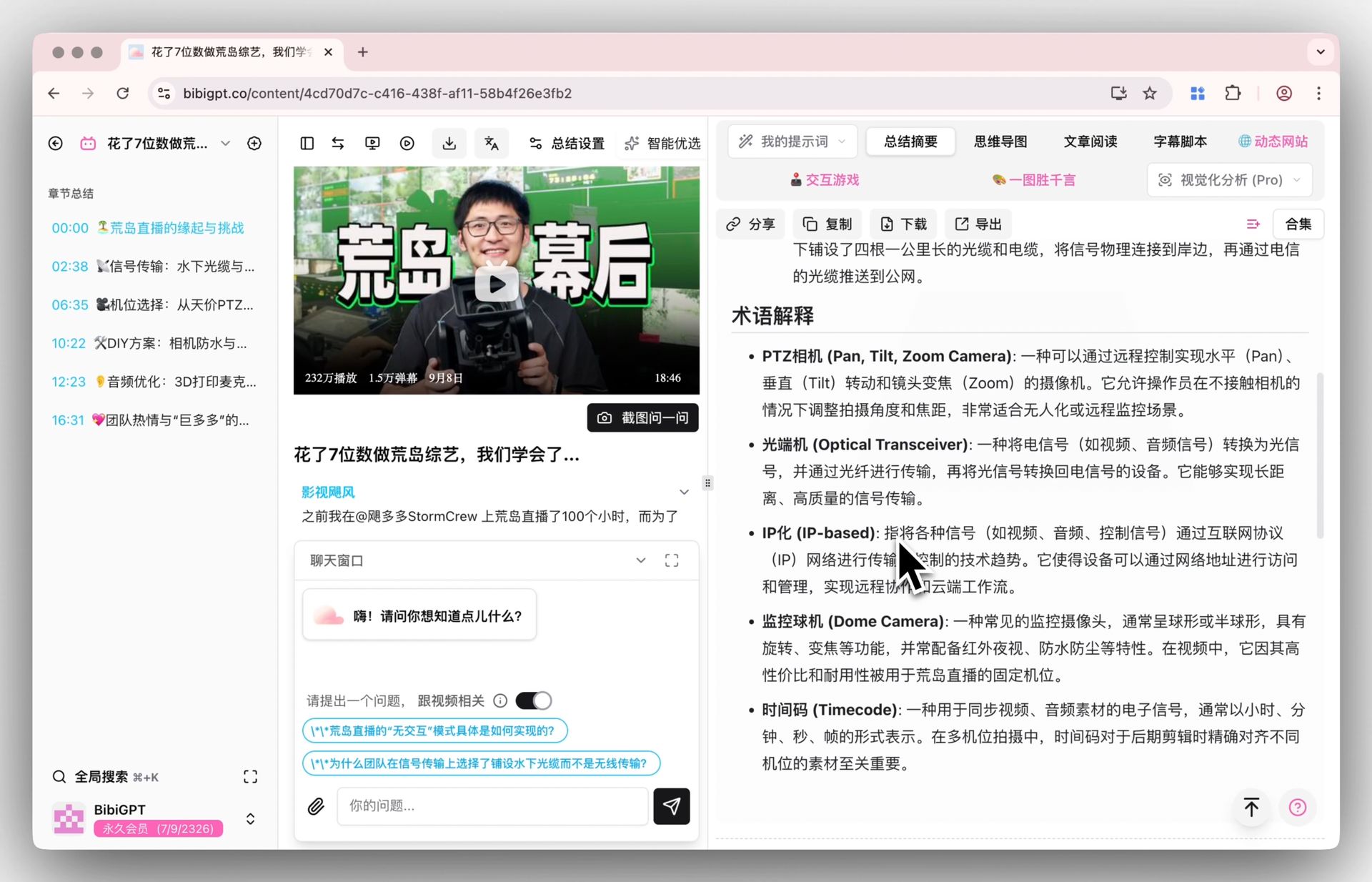
- Step 1: Use BibiGPT to process all audio-video study materials (YouTube, podcasts, Bilibili, MP4 recordings)
- Step 2: Copy the structured Markdown notes into OneNote / Word
- Step 3: Use Microsoft Study and Learn Agent on those notes to generate practice questions, flashcards, and quizzes
- Step 4: Drill into difficulties via BibiGPT chat (“I didn’t get this segment, expand it”)
This path uses BibiGPT’s “content ingestion” strength and Microsoft’s “exercise generation” strength together — more efficient than either alone.
8. BibiGPT’s core student capabilities
- 30+ platform URLs in one click: YouTube, Bilibili, TikTok, Apple Podcasts, Spotify, Xiaoyuzhou, Ximalaya
- Bidirectional Chinese / English / Japanese / Korean translation: English lectures into Chinese summaries; Japanese videos into Chinese notes
- Auto chapter splits + timestamp jumping: precise navigation in long courses
- AI chat follow-up + mind map: turn videos into a conversational knowledge base
- Multi-format export: Notion / Obsidian / Cubox / Markdown / PDF / Anki CSV
- Mainland China direct access: no VPN
BibiGPT is trusted by over 1 million users with over 5 million AI summaries generated, and is one of the most-used AI audio-video study assistants among students inside mainland China.
9. FAQ
Q1: Is Microsoft Study and Learn truly free for students? Not entirely. Students need Microsoft 365 + Copilot ($20/month personal) or their school must deploy Microsoft 365 Education.
Q2: Can BibiGPT generate exam mock questions? Yes. Open BibiGPT AI chat and prompt: “Based on this video, generate 10 multiple choice questions with answers and explanations.” The AI will produce them from the video content.
Q3: English lecture → Chinese summary → Chinese exercises — can BibiGPT do it end-to-end? Yes. First use BibiGPT auto-translate to get bilingual subtitles and a Chinese summary, then use the AI chat to produce Chinese exercises directly. If you also want Word/PPT outputs, hand off to Microsoft Study and Learn after that.
Q4: Can under-13 students use BibiGPT? Recommended only with parent / teacher supervision. BibiGPT does not enforce a hard 13+ age cap like Microsoft, but as a general AI tool, minors should use it under guidance.
Q5: Can BibiGPT process Bilibili member-only videos? It can process content your account can play. For login-required videos, BibiGPT’s authenticated video parsing handles them directly.
Q6: Does Microsoft Study and Learn support Chinese? Yes, but Chinese prompt fine-tuning trails English maturity; complex Chinese subjects (classical text, dialect content) can be unstable.
Q7: A 5-hour online course — how fast does BibiGPT process it? Depends on the chosen transcription engine. BibiGPT supports custom engines; a 5-hour course typically completes transcription + chapter splits + summary in 15-30 minutes.
Conclusion: pick the right tool, shorten the learning path
Microsoft Study and Learn Agent is great for students embedded in the Office ecosystem — but for students whose core study materials are audio-video, BibiGPT is the more natural entry point. Stacking the two is the optimal solution: BibiGPT turns audio-video into structured notes, Microsoft Copilot turns notes into exercises.
Try BibiGPT for student use cases
- Visit: aitodo.co
- Directly accessible inside mainland China without a VPN
- Bidirectional Chinese / English / Japanese / Korean
- 30+ platforms via URL paste
- Plus plan student-friendly
BibiGPT Team