NotebookLM x Google Classroom for Teachers (2026): How to Build a Video Knowledge Base vs BibiGPT
NotebookLM x Google Classroom for Teachers (2026): How to Build a Video Knowledge Base vs BibiGPT
As of 2026-04-24, Google Workspace has confirmed that starting 2026-04-06 it is gradually rolling out NotebookLM expanded capabilities to Education Plus and Teaching and Learning add-on institutions. The three pillars: the new three-column layout (Sources / Chat / Studio), the Studio content factory, and the direct integration with Google Classroom. For teachers who face dozens of lecture videos and hundreds of handouts a week, this is the single most direct update in three years (source: Google Workspace Updates).
Unlike our previous two posts (the three-column layout angle and the Gemini App angle), this one focuses specifically on the teacher and educator perspective: what Classroom integration changes for day-to-day teaching, and how BibiGPT’s video knowledge base workflow fits alongside it.
1. Background: Three rollout waves
The education rollout is not a single release — it’s a three-step sequence:
- 2026-04-06: Education Plus customers start seeing the three-column layout, Studio content factory, and Classroom as a Source input.
- Mid 2026-04: Teaching and Learning add-on institutions gradually get the same capabilities, but with slightly lower daily quotas (Audio Overview generation, Notebook count).
- Late 2026-04: Reverse direction — teachers publishing a Classroom assignment can embed a NotebookLM notebook directly as reference material.
Compared to 2024–2025 when teachers had to manually upload recordings and share links separately, Classroom rosters, course materials, and assignments are now readable as first-class NotebookLM Sources, and the AI cites specific page numbers or video timestamps. This is “lesson-level sync”, not “file-level sync”.
2. Deep analysis: three layers of impact
Technical: Source scope breaks the institutional wall
NotebookLM used to be bottlenecked by manual PDF / YouTube / pasted text as Sources. With Classroom as a first-class Source, two years of handouts, recordings, and assignment feedback become a cross-semester knowledge base. Teacher cost for reusing materials drops from “organize folders” to “pick a Classroom class”.
Market: Education procurement decisions get rewritten
Education Plus has never been cheap for school IT buyers. Now it ships with a built-in AI teaching assistant, which directly competes with Canvas, Blackboard, and Moodle’s AI plugins. “NotebookLM Classroom sync” becomes a checkbox item in Education Plus renewal negotiations.
Ecosystem: Third-party video tools get repositioned
Importantly, Classroom integration covers only Classroom-native resources (Google Drive, YouTube links). External video platforms — Bilibili, TikTok, podcasts, Xiaohongshu — remain outside the Source scope. This puts tools like BibiGPT not in replacement territory but in bridge territory: the middleware that feeds external video into NotebookLM.
3. What this means for BibiGPT users (by role)
K-12 teachers
Summarize a quality open course (Bilibili, YouTube) with BibiGPT → export PDF/Markdown → upload to Classroom → NotebookLM ingests it. External high-quality teaching content that Classroom AI previously couldn’t reach now flows into students’ AI Q&A surface.
University faculty and TAs
Batch-convert a semester of 16 weeks of lectures (internal LMS recordings, Bilibili open courses) with BibiGPT into structured notes with chapter timestamps, then auto-save into Obsidian for lesson planning. Classroom integration lets you push the same prep material to students, forming a two-layer knowledge base: instructor prep layer + student Q&A layer.
Education content creators
Course creators constantly get “how did you explain X in this video?” BibiGPT generates per-lecture chapter notes with timestamps plus an AI follow-up entry point — embed that on your website or Classroom sidebar and shrink the time cost of repetitive student questions.
4. BibiGPT playbook: Feeding external video into NotebookLM x Classroom
This is the most actionable section. Classroom integration can’t touch Bilibili — and that’s exactly BibiGPT’s home turf. Here’s a full workflow.
Step 1: Turn any external video into structured text
Paste any Bilibili / YouTube / Xiaoyuzhou podcast URL on bibigpt.co and get chapter timestamps, AI summary, and full transcript within 10 seconds.
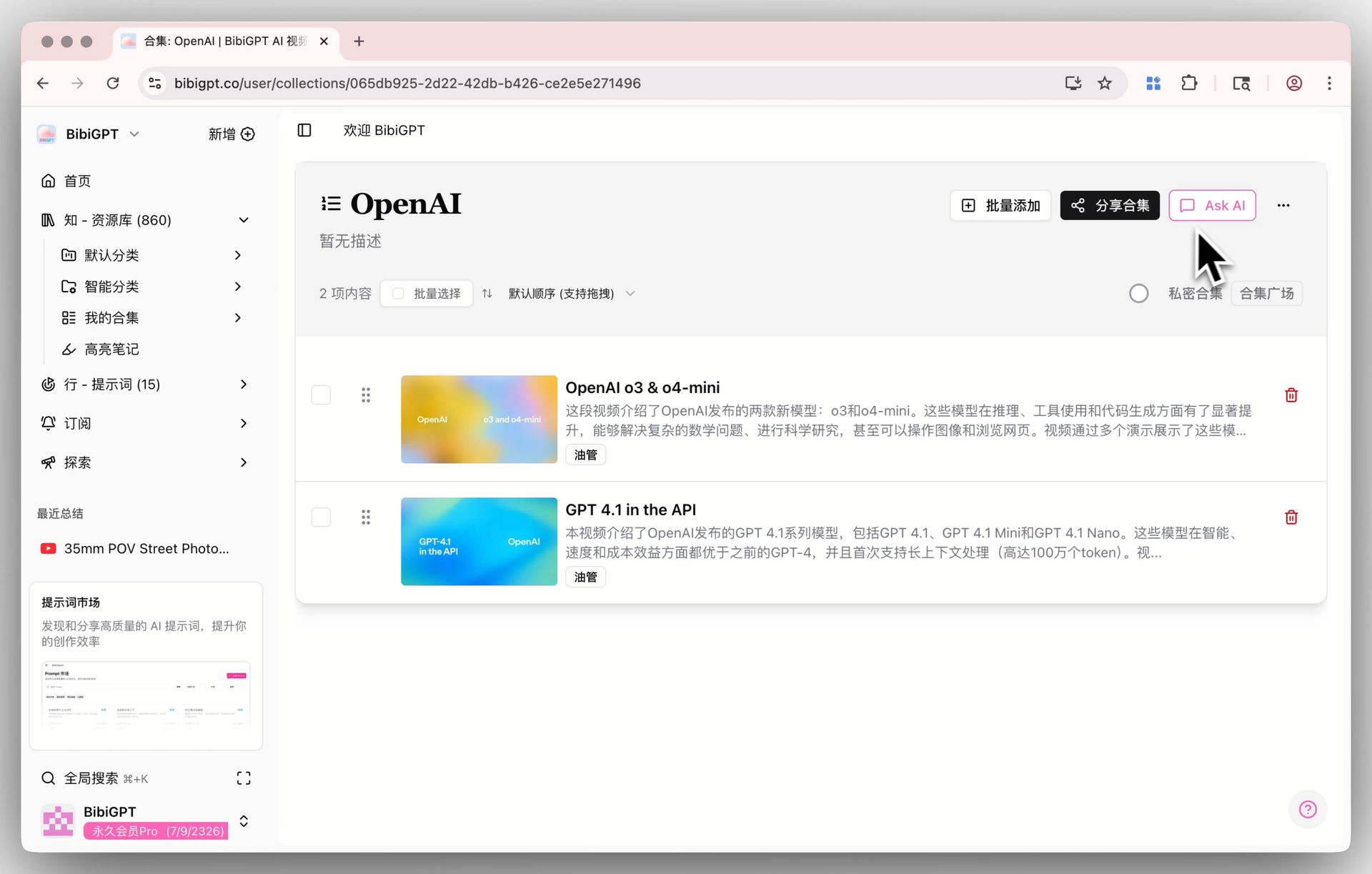
Step 2: Organize by course into Collections
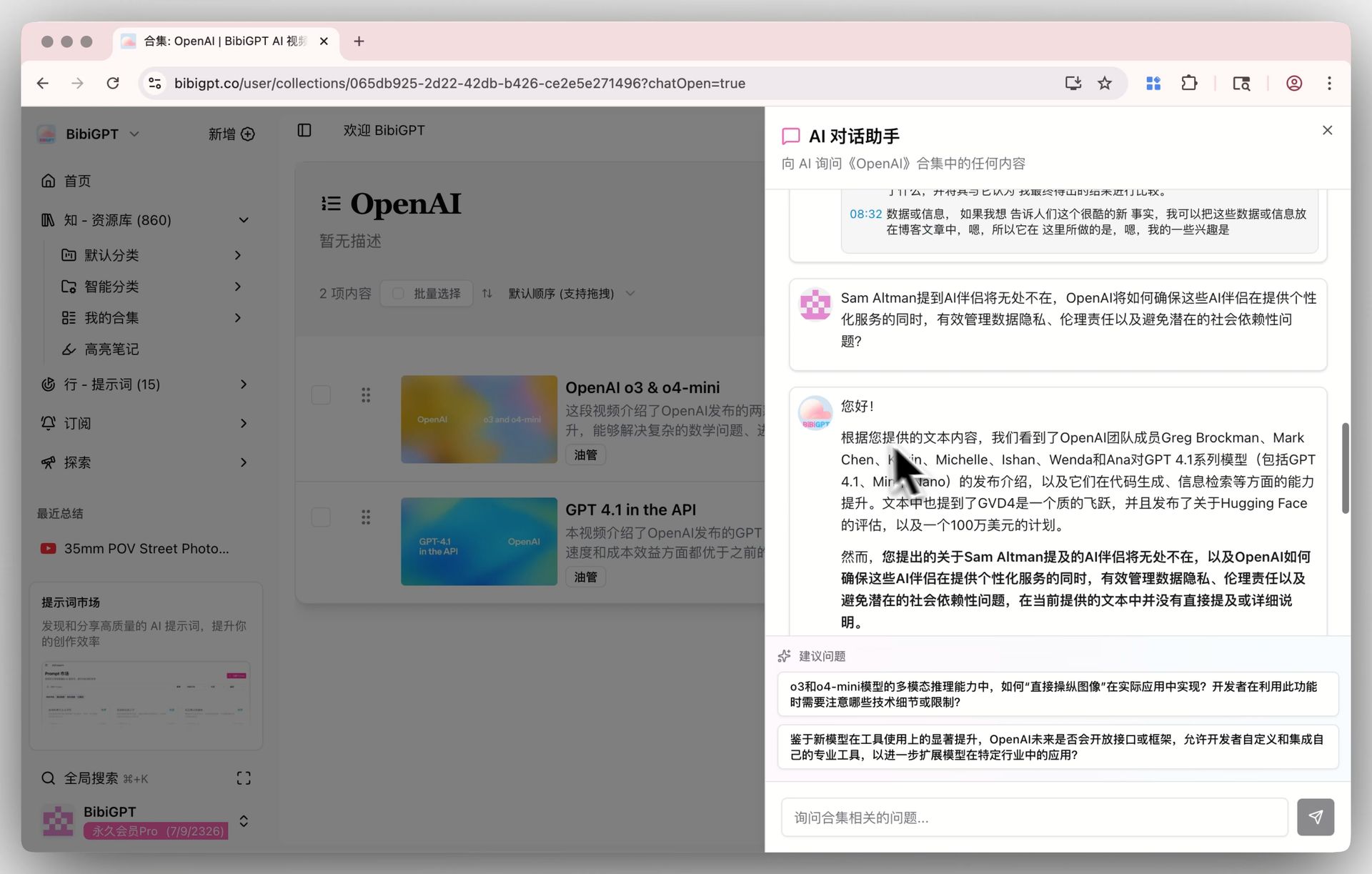
Group all videos for one course into a BibiGPT Collection. Collections support cross-video AI chat, so you and your students can ask “how is concept X explained across this course?”
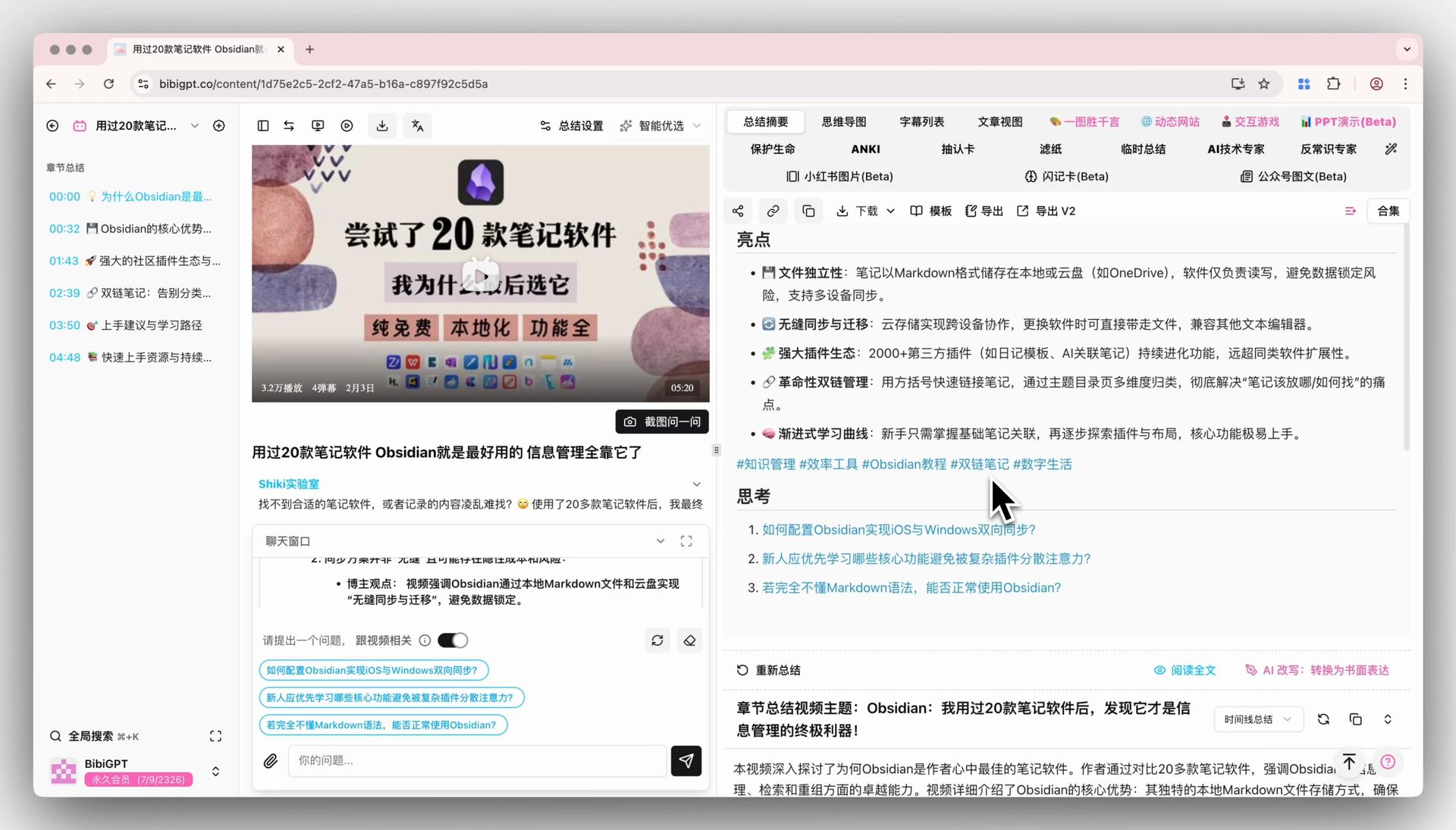
Step 3: Re-summarize with your teaching prompt
BibiGPT’s Custom Prompt Summary lets you apply your own teaching prompt (e.g. “generate layered questions per Bloom’s taxonomy”) with one click. Lesson prep speeds up by at least an order of magnitude vs manual note-taking.
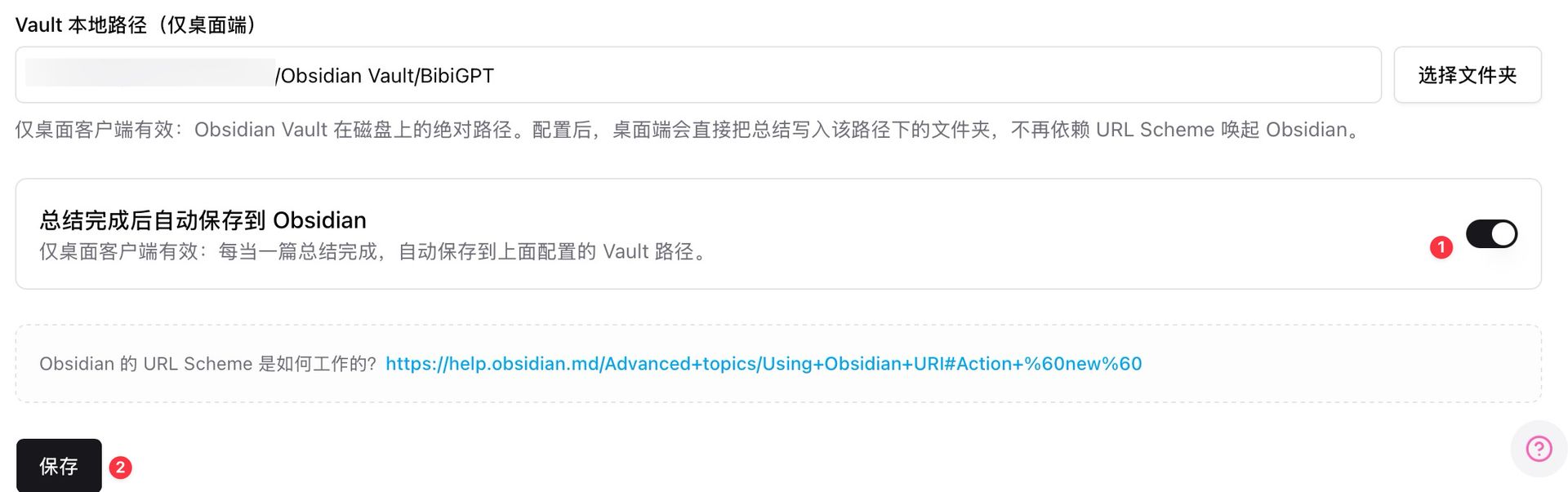
Step 4: Auto-save to Obsidian, then push to Classroom
The desktop client supports auto-saving summaries to a local Obsidian Vault path the moment a summary completes. From Obsidian, export PDF / Markdown and upload to Classroom — NotebookLM will ingest it into Sources.
Step 5: Let NotebookLM and BibiGPT do what each does best
- NotebookLM: the class-wide layer, handling student Q&A, citing school handouts and Classroom materials.
- BibiGPT: the teacher-production layer, processing external video, cross-collection Q&A, custom prompts, Obsidian/Lark/Yuque sync.
The two tools are not substitutes — they’re upstream/downstream partners.
5. Forecast: three predictions
- Classroom integration will extend to student-side tooling. Currently teacher-focused; likely expanding across all Google Workspace for Education tiers in 2026 H2.
- External video remains a long-term gap. Google won’t scrape Bilibili or TikTok transcripts — that ecosystem slot stays with third-party tools.
- Teaching AI will split into two tiers: institution-shared (NotebookLM) and individual-production (BibiGPT, Obsidian+AI plugins), connected via file/note standard protocols.
6. FAQ
Q1: Can regular teachers (without Education Plus) use NotebookLM Classroom integration?
Not yet. Google has confirmed the rollout is limited to Education Plus and Teaching and Learning add-on licenses. Free Classroom teachers need to wait for the next expansion wave.
Q2: Can I feed Bilibili video directly to NotebookLM?
No. NotebookLM currently only supports YouTube, PDFs, Google Docs, and other official-ecosystem Sources. External platforms like Bilibili, TikTok, Xiaohongshu, and podcasts need a third-party tool like BibiGPT to convert first.
Q3: How does BibiGPT’s Collections AI Chat compare to NotebookLM?
Collections AI Chat handles external heterogeneous video sources (Bilibili + YouTube + Xiaohongshu + podcasts + local files mixed). NotebookLM handles institution-internal structured resources. One covers the public web, the other covers school IP.
Q4: I’m already an Education Plus teacher — can I use it today?
Maybe. Google’s phased rollout is batch-based within a domain. Some accounts may not see the Classroom Source option until 2026-05. Ask your IT admin to verify NotebookLM feature flags.
Q5: What about data security for teacher lesson prep?
BibiGPT offers enterprise/education plans with private spaces, private links, and granular cloud sync controls. Sensitive classroom recordings should go through private-link mode; structured outputs then export to Classroom.
Q6: Chinese-language classroom support?
Yes. BibiGPT natively handles Chinese audio/video (including dialect recognition), and NotebookLM Classroom integration supports Chinese UI. The combination fits bilingual and international schools in China especially well.
Try it: give your Classroom an external-video on-ramp
Want to experience feeding a Bilibili course into NotebookLM? Start here:
Or see the output: what does a Bilibili open course look like after BibiGPT processes it?
More deep dives on this rollout:
- NotebookLM April 2026 Three-Column Layout vs BibiGPT
- NotebookLM Gemini App Integration vs BibiGPT 2026
- AI Video-to-Article Complete Guide 2026
Explore core features: Collections AI Chat, Custom Prompt Summary, Obsidian Auto-Save.
BibiGPT Team