TubeOnAI vs BibiGPT 2026 In-Depth Comparison: Features, Accuracy, and Platform Support
TubeOnAI vs BibiGPT 2026 In-Depth Comparison: Features, Accuracy, and Platform Support
Bottom line: TubeOnAI is an AI summarization tool focused on YouTube, designed for English-speaking users who want quick takeaways from YouTube videos. BibiGPT is a deep audio-video knowledge assistant supporting 30+ platforms and serving over 1 million users — covering not just YouTube but also Bilibili, Douyin, Xiaohongshu, podcasts, and other major Chinese-language platforms. If you almost exclusively watch English YouTube content and only need quick highlights, TubeOnAI is worth trying. If you need cross-platform coverage (especially Chinese platforms), subtitle extraction, AI follow-up conversations, video-to-article conversion, and other advanced capabilities, BibiGPT is the more complete choice in 2026.
1. Why Does Choosing an AI Video Summarizer Matter in 2026?
Over the past three years, AI video summarization has evolved from a “novelty tool” into essential infrastructure. Professionals need to skim through 10 industry YouTube videos before meetings; content creators need to transform competitor videos into topic ideas; students need to compress a semester of online lectures into reviewable knowledge cards.
Video content keeps exploding — in 2026, YouTube sees roughly 500 hours of video uploaded every minute, and Bilibili adds over 3 million new videos per day. Your time hasn’t increased, but the content you could watch has grown more than tenfold. The core value of AI summarization tools is trading compute for time.
The catch: not every tool fits every use case. TubeOnAI and BibiGPT are two products frequently compared in this space. This article provides an objective side-by-side evaluation across six dimensions to help you find the best fit for your workflow.
Practical rule: Before choosing an AI video summarizer, ask yourself two questions: “Which platforms do I mainly consume content on?” and “Do I need a quick skim, or do I need to truly understand and produce something?” Your answers to these two questions largely determine your choice.
2. Core Positioning of Each Tool
TubeOnAI: A YouTube-Focused Summarization Tool
TubeOnAI centers on the YouTube platform, offering AI-driven video summaries so users can quickly grasp a video’s key content. The product is positioned as a “lightweight speed-reader,” suited for English YouTube users who want to judge a video’s value before hitting play.
BibiGPT: A Cross-Platform Deep Audio-Video Knowledge Assistant
BibiGPT is China’s #1 AI audio-video assistant, serving 1 million+ users and generating 5 million+ AI summaries. The core workflow is simple: paste any audio or video link (or upload a local file), and get subtitles extracted and a structured AI summary in one click. Supported platforms include YouTube, Bilibili, Douyin, Xiaohongshu, TikTok, Apple Podcasts, Spotify, Xiaoyuzhou, and local files — 30+ major platforms in total.
BibiGPT is not positioned as a “speed-reading plugin” but as “the starting point of an audio-video knowledge workflow” — closing the loop from content consumption to knowledge creation.
3. Head-to-Head Feature Comparison Across Six Dimensions
| Feature | TubeOnAI | BibiGPT |
|---|---|---|
| Platforms Supported | Primarily YouTube | 30+ platforms (YouTube, Bilibili, Douyin, Xiaohongshu, TikTok, podcasts, etc.) |
| Summary Modes | AI quick summary | Multiple modes: core summary, chapter highlights, deep-dive questions, term explanations |
| Subtitle Extraction | Basic subtitle retrieval | Soft subtitle + hard subtitle OCR (dual-mode), with SRT sync export |
| AI Follow-Up Chat | Limited support | Deep AI video chat with timestamp-linked source playback |
| Export Formats | Text summary | Markdown / SRT / PDF / mind map / illustrated article |
| Multilingual Support | Primarily English | Multilingual summaries and translation (Chinese, English, Japanese, Korean, Traditional Chinese, etc.) |
| Bilibili Support | Not supported | Native support, including Bilibili video search |
| Video-to-Article | Not supported | Supported, with intelligent screenshot auto-extraction |
| Batch Processing | Not supported | Supports batch summarization and batch export of playlists |
| Hard Subtitle Recognition | Not supported | Supported — AI vision reads text subtitles burned into the video frame |
Practical rule: The more “Not supported” entries TubeOnAI has in that table, the clearer it becomes that its positioning as a “lightweight, single-platform YouTube tool” limits its usability. For Chinese-language users and cross-platform users, those “not supported” items are often the most common use cases.
4. Deep Dive into Key Capabilities
4.1 Platform Support: 30+ vs. Primarily YouTube
This is the most fundamental difference between the two tools.
TubeOnAI focuses primarily on YouTube and is designed for heavy English YouTube users. If 95% of your content consumption is English YouTube, that’s not a problem.
But the reality in 2026 is that Chinese users’ content ecosystem extends far beyond YouTube. Bilibili learning courses, Xiaoyuzhou podcasts, Douyin knowledge short-form videos, Xiaohongshu review videos — the volume of high-value content on these platforms is no less than on YouTube.
BibiGPT natively supports all of these platforms. Take Bilibili as an example: the free video summarizer feature lets users paste a Bilibili link directly and get a timestamped AI summary in one click — no video download, no manual transcription required.
4.2 Subtitle Extraction: Basic Extraction vs. Hard Subtitle OCR
Subtitle extraction is foundational to AI summarization, but many tools overlook a real-world problem: a large number of videos have subtitles “burned” directly into the video frame as hard subtitles, which defeats traditional extraction entirely.
BibiGPT’s hard subtitle OCR extraction uses AI vision technology to recognize text subtitles embedded in the video frame. This is especially critical for vertical-format Chinese short videos (Douyin, Kuaishou) and a significant portion of Bilibili videos.
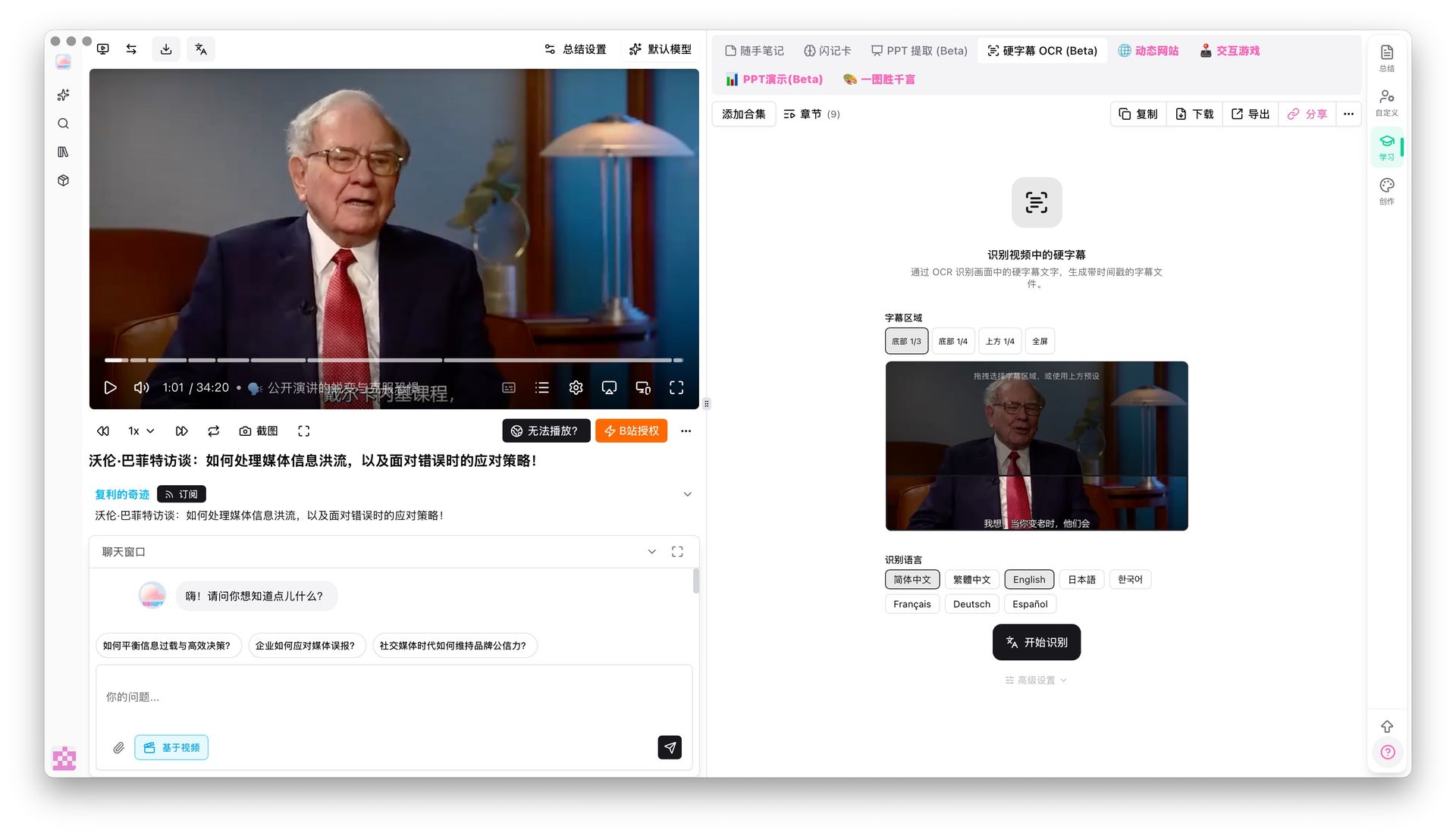
TubeOnAI mainly relies on the subtitle tracks provided by the YouTube platform and does not support OCR recognition of in-frame subtitles. For videos without a subtitle track, its capabilities simply end there.
4.3 AI Video Chat: Static Summary vs. Deep Interaction
“I read the summary and still don’t get it” is a persistent pain point for many users even after using summarization tools. The issue is that a summary can only tell you what the author wanted to convey — but “what you want to know” is often a more specific question.
BibiGPT’s AI video chat feature lets you ask questions directly about the video content, and the AI provides sourced answers with timestamps — click a timestamp and the video jumps directly to that moment, so you can verify the answer with the original footage.
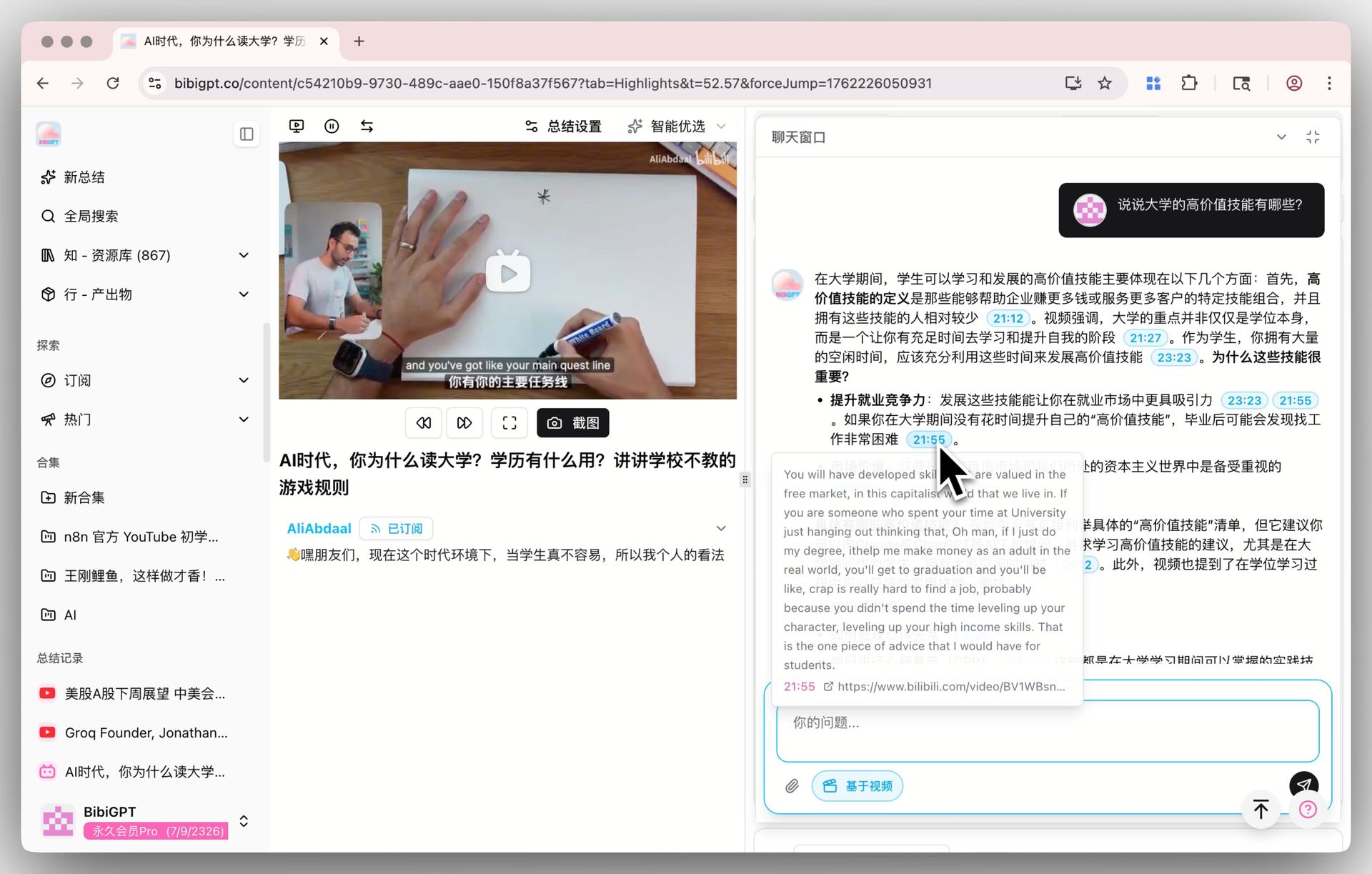
This “chat + source tracing” interaction model transforms a video from a one-time consumable into a queryable knowledge base. TubeOnAI’s summaries are static; BibiGPT’s video chat is dynamic and interactive.
4.4 Video Transcription and Multi-Format Export
For content creators, “watching a video” is not the end goal — “turning a video into usable content material” is.
BibiGPT’s video-to-text converter supports full video transcription and SRT timeline export. Combined with the AI video-to-article feature, you can generate illustrated articles and mind maps in one click, producing publication-ready content directly.
TubeOnAI is positioned as a “summarization tool” rather than a “content production tool,” and its output capabilities on the creation side are limited.
Practical rule: If you’re a content creator or a heavy knowledge-management user, the core question is “Can this tool turn a video directly into usable content?” TubeOnAI currently doesn’t have a complete answer to that question.
5. Pricing Comparison
| Plan | TubeOnAI | BibiGPT |
|---|---|---|
| Free Tier | Limited free usage | Yes, with daily free quota |
| Paid Subscription | Monthly plans available (see official website for current pricing) | Plus / Pro monthly plans; pay-as-you-go top-up also available |
| Enterprise / API | Available | Available — Pro users can enable batch API access |
| Pricing Transparency | Verify on official website | Pricing page is publicly available |
Since TubeOnAI’s pricing strategy may change at any time, we recommend visiting TubeOnAI’s official website for the latest prices. BibiGPT’s pricing is available at bibigpt.co/pricing, with a free tier so you can try before subscribing.
Practical rule: When comparing prices, don’t just look at the monthly fee — calculate the “cost per summary” and “number of features you can actually use.” If the features you need are locked behind the competitor’s highest tier, while BibiGPT’s base plan already covers them, the real value for money may be completely reversed.
6. Which Tool Should You Choose for Your Use Case?
| Use Case | Recommended | Reason |
|---|---|---|
| Only watch English YouTube, just need quick summaries | Either TubeOnAI or BibiGPT | Both tools largely overlap for this scenario |
| Chinese users primarily watching Bilibili / podcasts | BibiGPT | TubeOnAI does not support these platforms |
| Cross-platform content consumption (YouTube + Bilibili + Douyin) | BibiGPT | Native 30+ platform support is the core advantage |
| Videos with hard subtitles (text burned into the frame) | BibiGPT | Hard subtitle OCR extraction is a unique capability |
| Content creators who need video-to-article conversion | BibiGPT | AI video-to-article + multi-format export |
| Academic research requiring batch processing of multiple videos | BibiGPT | Playlist batch summarization + playlist AI chat |
| Multilingual translation of summaries (Chinese, English, Japanese, Korean) | BibiGPT | Multilingual summaries and subtitle translation |
| Enterprise batch processing requiring API access | BibiGPT | Pro users support batch API calls |
7. Frequently Asked Questions
Q1: Does TubeOnAI support Chinese YouTube videos?
TubeOnAI is primarily designed for the English YouTube ecosystem and does not support Chinese-language content — especially Chinese Bilibili videos. If you need to process Chinese YouTube videos or any content from Chinese-language platforms, BibiGPT is the more appropriate choice.
Q2: How good is BibiGPT’s YouTube support?
BibiGPT’s YouTube support is on par with dedicated YouTube tools, covering the full feature chain: subtitle extraction, deep summarization, AI follow-up chat, multilingual translation, and SRT export. Supporting 30+ other platforms does not diminish the quality of its YouTube processing.
Q3: What is hard subtitle OCR, and why does it matter?
Many videos don’t have a separate subtitle track — instead, the text is “burned” directly into the video frame (common in vertical-format short videos on Douyin and Kuaishou, and in some Bilibili videos). Standard subtitle extraction fails entirely on these videos. BibiGPT’s hard subtitle OCR extraction uses AI vision technology to read text from the frame, filling this critical gap.
Q4: Can I use both tools at the same time?
Yes. TubeOnAI can serve as a quick YouTube browser preview extension, while BibiGPT handles deep processing and cross-platform needs. The two don’t conflict, but if you want a single tool that covers all scenarios, BibiGPT has broader coverage.
Q5: How is BibiGPT’s AI video chat different from ordinary ChatGPT?
Regular ChatGPT, when asked about video content, relies on you manually pasting text and has no timestamp-based source tracing. BibiGPT’s AI video chat is built on a knowledge index derived from the video’s original content — the AI’s answers can pinpoint the exact minute and second in the video and trigger a jump to that moment. That’s the fundamental difference between a video-native AI conversation and a generic LLM Q&A.
Q6: What features can BibiGPT free users access?
BibiGPT offers a daily free quota that supports basic video summarization and AI chat. Full features — including batch processing, video-to-article conversion, advanced export formats, and longer video support — are unlocked with a Plus or Pro subscription. Visit bibigpt.co to register for free and try it out.
Q7: Is TubeOnAI suitable for Chinese users?
TubeOnAI is primarily designed for English YouTube users, and its product interface and content ecosystem are largely in an English-language context. For users who regularly use Bilibili, Douyin, Xiaohongshu, and other Chinese-language platforms, TubeOnAI’s coverage will feel quite limited.
Conclusion: How to Choose an AI Video Summarizer in 2026
TubeOnAI and BibiGPT fundamentally solve problems at different levels:
- TubeOnAI is a “quick reader” for a single platform — YouTube — suited for heavy English YouTube users who need rapid filtering.
- BibiGPT is a “deep audio-video knowledge assistant” for multiple platforms, suited for users who need cross-platform coverage, deep content digestion, and content creation output.
For Chinese-language users, support for Bilibili and domestic platforms is essentially a baseline requirement — and BibiGPT has an overwhelming advantage here. For users who want to improve efficiency across the full “video consumption → knowledge retention → content creation” pipeline, BibiGPT’s feature depth is also clearly a level above.
Try BibiGPT for free today — AI video summarization across 30+ platforms in one place:
Start Using BibiGPT for Free →
- Official site: bibigpt.co
- Feature overview: bibigpt.co/features/free-video-summarizer
- Pricing: bibigpt.co/pricing
BibiGPT Team