
WeChat's Native AI Assistant Xiaowei Is Here — But for External Video and Podcast Summaries, You Still Need BibiGPT (2026 Hands-On Comparison)
WeChat’s Native AI Assistant Xiaowei Is Here — But for External Video and Podcast Summaries, You Still Need BibiGPT (2026 Hands-On Comparison)
You just received a 40-page industry report in PDF format. Next to it sits a work group chat with 200 unread messages, a long Official Account article someone just forwarded, a 2-hour Bilibili interview that’s been sitting in your saved list for three days, and an English podcast you didn’t finish last night. Your finger scrolls back and forth across the screen, and you have one thought: which of these can actually give me a one-sentence answer to “what does this thing even say?” After June 2026, the answer to that question has started to split in two — the WeChat half, and the outside-WeChat half.
WeChat’s native AI assistant “Xiaowei” expanded its beta rollout starting June 20, bringing “content summarization” directly into a super app used by over a billion people monthly. You can send it a message and it will summarize files, group chats, Official Account articles, and Channels videos — just tap the top-left corner to get started. This is a significant move to bring AI capability into China’s most-used app. But you’ll quickly hit its boundary: that Bilibili interview, that YouTube course, that external podcast — Xiaowei can’t help with those for now. It reads what’s inside the WeChat ecosystem.
Most reviews either hype Xiaowei as an “all-in-one assistant” or rush to compare it with ChatGPT on model performance. This article does neither. We focus on one specific question: in the concrete scenario of “content summarization,” where does Xiaowei go, where does it stop, and who handles the external audio/video half? By the end, you’ll have a clear division-of-labor checklist — not “which one should I pick” anxiety.
1. What Is WeChat’s Xiaowei, and What Can It Actually Summarize? (Facts First, as of 2026-06-25)
Let’s get the facts straight — no hype, no dismissal.
“Xiaowei” is WeChat’s built-in native AI assistant. On June 20, 2026, Tencent’s official customer service channels confirmed an expanded beta test. Once you receive beta access and upgrade WeChat to version 8.0.75 or above, tap the “Xiaowei” icon in the top-left corner of the main interface (or swipe right from the main screen) to get started. It supports both text and voice commands to operate WeChat’s native features.
It does considerably more than a chatbot. According to Sina Tech’s report, Xiaowei integrates file summarization, reminders, music recommendations, and can send messages, make calls, and launch mini programs to order food — all through conversation. It can even “generate a mini program in one sentence”: describe what you need and it creates a working lightweight mini program prototype inside WeChat.
When it comes to the specific act of “summarizing,” its capabilities are quite solid:
- File summarization: Send it a PDF and ask for a summary — it returns a structured abstract along with its reasoning process
- Group chat summarization: For a work group you haven’t checked in a while, let it give you an overview before you decide whether to scroll through every message
- Official Account / Channels analysis: Tap “Xiaowei” directly on any Official Account article or Channels video page to get an analysis and summary of the current content
Practical rule: To decide whether Xiaowei can summarize a piece of content, ask one question — “Is it inside WeChat?” Files, group chats, Official Account articles, and Channels videos are. Bilibili, YouTube, Douyin, and external podcasts are not.
A fair point worth making: bringing AI summarization into WeChat means over a billion users can access “let AI read it first” capability with zero learning curve. That scale alone deserves to be taken seriously. According to Reuters/CNBC reporting, Tencent plans to roll out Xiaowei to more users in Q3 2026 — which means “file summarization” is about to become the default daily behavior for hundreds of millions of users.
Screenshot: Content summarization within the WeChat ecosystem — files, group chats, Official Accounts, Channels
2. What Xiaowei Can and Can’t Summarize (Including a Comparison Table)
Xiaowei’s summarization boundary is essentially WeChat’s ecosystem boundary. That’s not a flaw — it’s a product positioning choice. It’s WeChat’s native assistant, designed to handle “what happens inside WeChat.”
The table below breaks down “content summarization” by source type, so you can see at a glance who covers what:
| Content Type | WeChat Xiaowei | BibiGPT |
|---|---|---|
| WeChat files (PDF/Word) | ✅ Structured summary + reasoning | ⚠️ Requires export and upload first |
| WeChat group chat history | ✅ Native group chat summarization | ❌ Not applicable |
| Official Account articles | ✅ One-tap analysis on current page | ⚠️ Copy text and use article summarizer |
| Channels videos | ✅ Tap to analyze on current screen | ❌ Not applicable |
| Bilibili videos | ❌ Outside WeChat, not supported | ✅ Paste link to summarize |
| YouTube videos | ❌ Outside WeChat, not supported | ✅ Natively supported |
| Douyin / TikTok / Xiaohongshu/RED | ❌ Outside WeChat, not supported | ✅ 30+ platforms covered |
| External podcasts (Apple/Spotify) | ❌ Outside WeChat, not supported | ✅ Paste link, get summary |
See the pattern? The two tools’ coverage areas barely overlap. Xiaowei owns “private content inside WeChat”; BibiGPT covers “public audio/video outside WeChat.”
This is exactly the gap many real users face — your information comes from both inside WeChat (work groups, forwarded reports, Official Accounts) and outside it (content creators you follow, podcasts you subscribe to, online courses you study). Third-party analysis has noted this boundary too: 36Kr’s coverage points out that Xiaowei’s capability list is clear, but its limits — especially once you step outside the WeChat ecosystem — are where the real story lies.
Practical rule: Don’t expect one tool to handle every source. Split by “is the content inside or outside WeChat first,” then decide whether to hand it to Xiaowei or BibiGPT. That’s far more efficient than debating which tool is “better.”
3. External Audio/Video Summarization: How BibiGPT Fills the Gap (Paste Link → AI Summary Workflow)
The outside-WeChat half of content — especially video and podcasts — is exactly what BibiGPT has been built for. Its workflow is one sentence: paste any link → auto-extract transcript → AI summary. No downloads, no plugins required (though a browser extension and desktop client are also available).
For an external video, BibiGPT doesn’t just give you “a short paragraph.” It delivers a complete set of reusable outputs:
- Paste the link: Drop in a Bilibili / YouTube / Douyin / podcast URL
- Auto-extract: The system pulls the full transcript with timestamps
- AI summary: Generates TL;DR + section highlights + chapter summaries
- Mind map: See the content’s structure at a glance, with nodes that jump back to the original video segment
- Follow-up & export: Continue with AI chat Q&A about the content, or export to your note-taking system
Seeing is believing. The interactive demo below lets you pick a sample video and see what BibiGPT’s TL;DR, key points, and timestamps actually look like:
Summarize any video in seconds
Pick a sample below to see the AI summary — TL;DR, key points, and jump-to timestamps.
TL;DR: Karpathy builds a GPT-style language model from scratch in code, explaining every piece — from a tiny character-level model up to the full Transformer.
Key points
- Start with a bigram model, then add self-attention so tokens can "talk" to each other
- A Transformer block = multi-head attention + feed-forward + residual connections + layer norm
- Training is just predicting the next token; scale and data do the rest
- The same architecture behind nanoGPT is what scales up to ChatGPT
Jump to
- 00:07 Why build GPT from scratch
- 08:23 Self-attention, intuitively
- 1:00:00 Assembling the Transformer block
- 1:35:00 From nanoGPT to ChatGPT
Demo: BibiGPT · Video summary output (TL;DR + key points + timestamps)
If you prefer seeing it in action with a real walkthrough, the video below demonstrates the full “paste link → get structured summary” process from a different angle:
Video source: YouTube · BibiGPT feature demo
BibiGPT’s confidence here comes from scale: as a tool that has served over 1 million users and generated more than 5 million AI summaries, it supports 30+ major audio/video platforms. In short, if you can paste a link to an external video or podcast, it’s almost certainly within reach.
Decision filter: If the content you’re consuming this week spans three or more sources — Bilibili, YouTube, podcasts — don’t hunt for a separate tool for each platform. One BibiGPT account handles the entire outside-WeChat half.
And the two tools don’t have to be an either/or choice. A common workflow: use the free video summary tool to convert external videos and podcasts into structured text and mind maps, export the result as a file, send it into WeChat, and then let Xiaowei do a second-pass summary or share it in a group chat. External capture goes to BibiGPT; in-WeChat collaboration goes to Xiaowei.
4. Real Scenarios for Using Both Together (Students / Creators / Professionals)
Abstract “complementarity” is less convincing than concrete scenarios. Here’s how three common user types layer both tools together:
Students: Online Courses Are Outside WeChat, Course Materials Are Inside
A typical study day: spend 2 hours watching public lectures on Bilibili or YouTube during the day; in the evening, the teacher posts course PDFs and announcements in a WeChat group.
- External lectures → BibiGPT: paste the course link, get a timestamped transcript and mind map, click nodes to jump back to exactly the right moment while studying
- Group chat PDFs / announcements → Xiaowei: let it summarize the PDF handouts and group messages first to quickly surface key points and deadlines
Both streams converge into two clear sets of structured notes for the day’s learning input.
Content Creators: Ideas Come from Everywhere, Results Land in WeChat
If you create content, your inspiration is naturally cross-platform — but finished work and collaboration often live in WeChat.
- Topic research / deconstructing viral content → BibiGPT: convert reference YouTube / Douyin / Xiaohongshu/RED videos into illustrated article outlines to quickly break down structure and scripts
- Team communication / client feedback → Xiaowei: summarize feedback and forwarded materials from WeChat groups into action lists
Practical rule: The biggest trap for creators is “constantly switching between a dozen tools.” Lock in BibiGPT for grabbing external content and Xiaowei for managing in-WeChat communication — and your workflow stays stable.
Professionals: Meetings Are in WeChat, Industry Insights Come from Podcasts
The most typical dual-source structure for workplace users: internal collaboration relies heavily on WeChat, but external industry knowledge comes from podcasts, industry interviews, and long-form videos.
- Industry podcasts / interview videos → BibiGPT: convert podcasts you didn’t finish during your commute into text summaries for quick retrieval of key conclusions later
- Work groups / forwarded documents → Xiaowei: run a quick pass on long group chats and files you haven’t had time to read
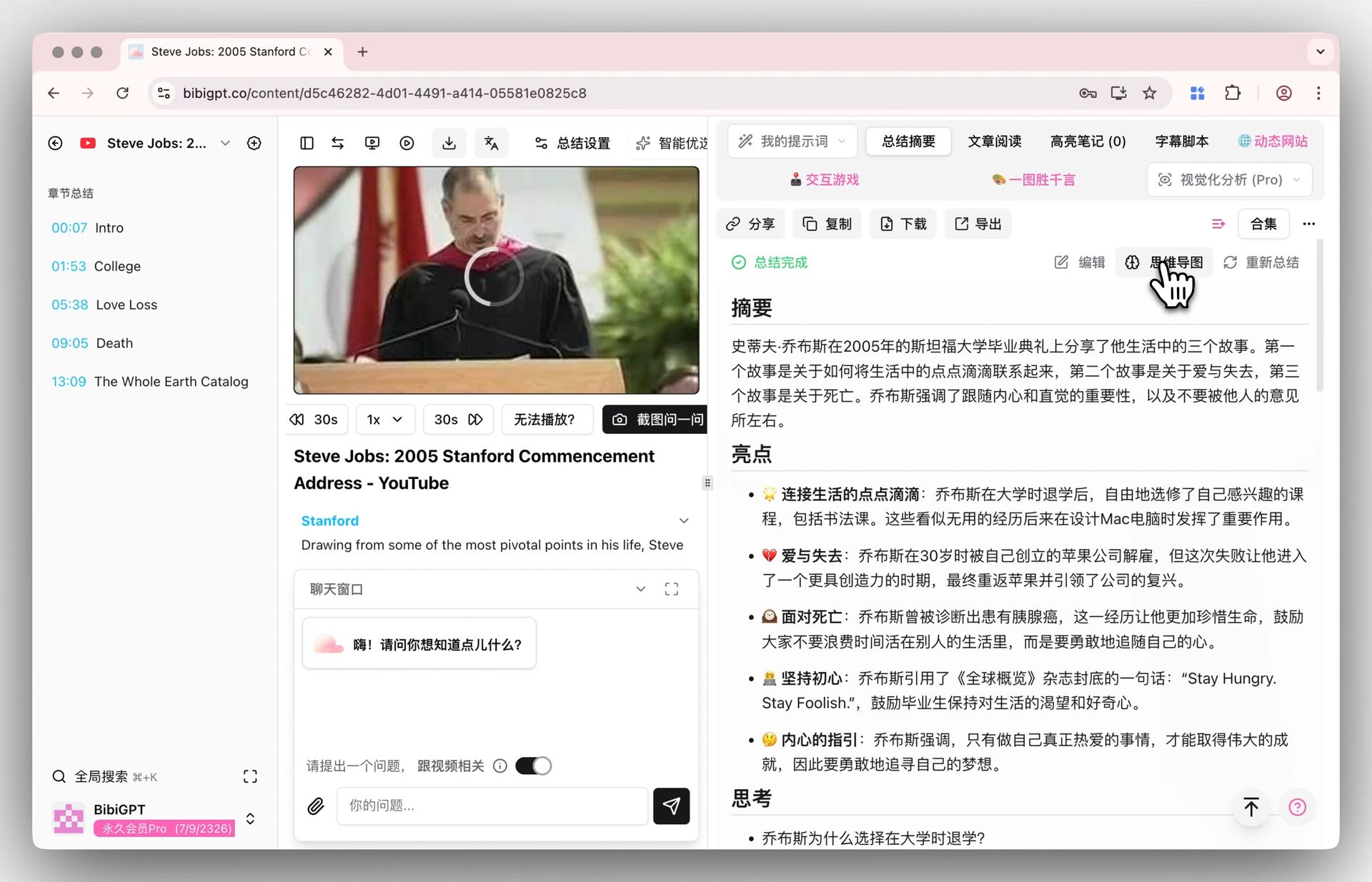
Screenshot: BibiGPT · Mind map feature demo
5. How to Choose: A Decision Checklist
No need to agonize — just match your current need to the right column:
| Your need | Recommended | Why |
|---|---|---|
| Summarize WeChat files / group chats | Xiaowei | WeChat-native, zero export or app-switching |
| Summarize Official Accounts / Channels | Xiaowei | One-tap analysis on the current screen |
| Summarize Bilibili / YouTube videos | BibiGPT | Paste link, get transcript + summary instantly |
| Summarize Douyin / Xiaohongshu/RED / podcasts | BibiGPT | Native support for 30+ platforms |
| Need mind map + timestamp navigation | BibiGPT | Nodes jump back to exact video segments |
| Trigger services inside WeChat with one sentence | Xiaowei | Launch mini programs, set reminders, send messages |
| Cross-platform learning / content creation hub | BibiGPT | One-stop shop for external audio/video |
One-line takeaway: use Xiaowei for summarizing content inside WeChat; use BibiGPT for summarizing audio/video outside WeChat. This isn’t a compromise — it’s each tool operating in its own strongest territory.
Decision filter: If 90% of your content lives inside WeChat, Xiaowei will likely cover you. But the moment you’re watching a few hours of external video or podcasts each week, BibiGPT is the other half of the puzzle.
Worth noting: according to CNBC, Xiaowei is powered by Tencent’s proprietary models supplemented by third-party models — which shows that even big tech is using a “multi-model coordination” approach for summarization. BibiGPT takes the same approach on the external audio/video side with automatic multi-model routing, ensuring consistent summary quality across different content types.
6. Frequently Asked Questions
Q1: Can Xiaowei summarize Bilibili or YouTube videos?
A: As of 2026-06-25, no. Xiaowei’s content analysis currently covers Official Account articles and Channels videos within the WeChat ecosystem. It does not support external sources like Bilibili, YouTube, Douyin, or external podcasts. For those, use BibiGPT — paste the link and you’ll have a summary.
Q2: What’s the difference between Xiaowei’s file summarization and BibiGPT’s article summarizer?
A: Xiaowei excels at summarizing files and group chats you receive directly in WeChat — no export needed. BibiGPT’s article summarizer is more oriented toward “converting external web pages and video content into structured notes.” If the file is already in WeChat, Xiaowei is the smoother choice.
Q3: Can the two tools be used together?
A: Yes, and it comes naturally. A common workflow is to use BibiGPT to convert external videos and podcasts into structured text and mind maps, export the result as a file, send it to WeChat, and then let Xiaowei do a second-pass summary or share it in a group. External capture and in-WeChat collaboration each handle their own segment.
Q4: What do I need to use Xiaowei?
A: You need to receive beta access and upgrade WeChat to version 8.0.75 or above, then tap the “Xiaowei” icon in the top-left corner of the main interface. It’s still in a limited beta and may not be available to all accounts yet.
Q5: Which external platforms does BibiGPT support?
A: BibiGPT supports YouTube, Bilibili, Douyin, TikTok, Xiaohongshu/RED, Apple Podcasts, Spotify, and 30+ other major audio/video platforms. Paste a link and you get an AI summary instantly. A browser extension and desktop client provide additional coverage across devices.
Q6: Can I export summaries to note-taking apps?
A: BibiGPT supports exporting summaries, transcripts, and mind maps in Markdown and other formats, with compatibility for Notion, Obsidian, and other knowledge management tools. Xiaowei’s outputs stay within WeChat.
7. Conclusion: Not Either/Or — Each Covers Its Half
People who truly know how to use tools never ask “which one should I use?” They ask “who should handle this piece of content?” Xiaowei has brought content summarization into the WeChat app used by over a billion people, giving files, group chats, Official Account articles, and Channels videos a native “let AI read it first” capability for the first time — that’s a genuinely remarkable thing. But the outside-WeChat half of the world — the creators you follow, the podcasts you subscribe to, the public courses you study — still needs a dedicated tool to fetch, transcribe, and summarize.
Try BibiGPT now: bibigpt.co. Paste a link to a Bilibili video or English podcast you’ve been meaning to watch but haven’t had time for. In 30 seconds you’ll have chapter summaries, a mind map, and an AI you can keep asking questions — turning the outside-WeChat half of your content into something just as easy to digest as anything inside WeChat.
BibiGPT Team
Popular tools
More in this series
- Bilibili AI Video Summary Tool: BibiGPT Summarizes 30+ Platforms Instantly (2026)
- Top 3 Douyin Video Summary Tools (2026 Update): AI-Powered Insights from Viral Clips
- Top 3 Xiaohongshu Video Summary Tools in 2026 (Paste Link, Get Notes in Seconds)
- 2026''s Best AI Video Summary Tool: How BibiGPT Covers Every Platform End-to-End
- Best Bilibili AI Video Summary Tool 2026: How BibiGPT Helps You Say Goodbye to "Hard Learning" Tutorials?