Paper → Mind Map → Knowledge Base: A 4-Step BibiGPT Method to Truly Absorb a Research Paper (2026)
Paper → Mind Map → Knowledge Base: A 4-Step BibiGPT Method to Truly Absorb a Research Paper (2026)
TL;DR: To actually absorb a research paper, the most effective workflow isn’t reading the PDF alone. It’s PDF + author lecture video + adjacent papers in parallel. The BibiGPT 4-step method: ① targeted reading of the paper → ② find the matching lecture/talk and AI-summarize it → ③ generate a clickable mind map → ④ collect everything into a knowledge base for cross-paper AI dialogue. After one pass you can search across papers and connect themes effortlessly.
The most painful experience reading research papers? I’ve asked 200+ users and the answers are nearly identical: “Close the laptop, 30 minutes later I can’t remember what the paper said.”
PDFs are the dead form of reading because they have:
- No timeline → you can’t tell which paragraph carries the core argument;
- No graph → conceptual relationships are buried in prose;
- No dialogue → confused passages mean re-reading the same lines;
- No accumulation → there’s a giant gap between this paper and the next.
This article gives you the BibiGPT 4-Step Paper Absorption Method — a methodology you can run starting tonight. Five real-world scenarios included.
The 4 Steps at a Glance
Step 1: Targeted reading of the paper (PDF stays the same — but driven by questions)
   ↓
Step 2: Find an author lecture / conference talk → AI summarize via BibiGPT
   ↓
Step 3: Generate a clickable mind map to visualize concept relationships
   ↓
Step 4: Drop all related papers + videos into a BibiGPT collection knowledge base for cross-paper AI Q&A
Each step has a concrete action with BibiGPT support.
Step 1: Targeted Reading (Questions Before PDF)
The biggest anti-pattern is “open the paper and read from abstract to references.” Studies show passive linear reading retains less than 20% of content.
Right move: write down 3 questions before reading.
Example: about to read the OpenAI o3 system card. Write:
- What’s the core architectural change vs o1?
- What trick enables the ARC-AGI score?
- What does this imply for how we use BibiGPT for video summarization?
Open the PDF carrying those questions. Stop and note when you hit answers. No tool needed yet — but this single discipline lifts your absorption in subsequent steps by 3-5x.
Step 2: Find the Author Lecture, AI Summarize It
90% of high-citation papers have author talks on NeurIPS / ICML / lab YouTube channels / podcast appearances. 30 minutes of the author speaking ≈ 50 PDF pages distilled.
Why? Lecture videos carry:
- Tone and repetition that signal what’s important (PDFs are flat);
- Q&A that exposes caveats not stated in the PDF;
- Visual diagrams (slides beat formulas at intuition).
With BibiGPT:
- Search YouTube / Bilibili for
"<paper title>" + "<author name>" + lecture/talk/session; - Paste the video URL into bibigpt.co;
- Pick Custom Prompt Summary with this template:
You are a research-paper reading assistant. Summarize as: 1. Core claim of the paper (single sentence) 2. Three most important experimental setups 3. Key differences vs prior methods (use a comparison table) 4. Caveats / boundary conditions the speaker mentions but the PDF underspecifies 5. Which paragraphs of the PDF should I re-read carefully? - Set this template as default via Pin Custom Summary so every paper-lecture video produces this structure automatically.
Felt impact: instead of 30-min talk + 90-min paper read, you now spend 15 min on AI summary + 30 min question-driven PDF deep dive. Time halved, retention doubled.
Step 3: Generate a Clickable Mind Map
After the talk + PDF, the most critical move is letting concept relationships emerge visually.
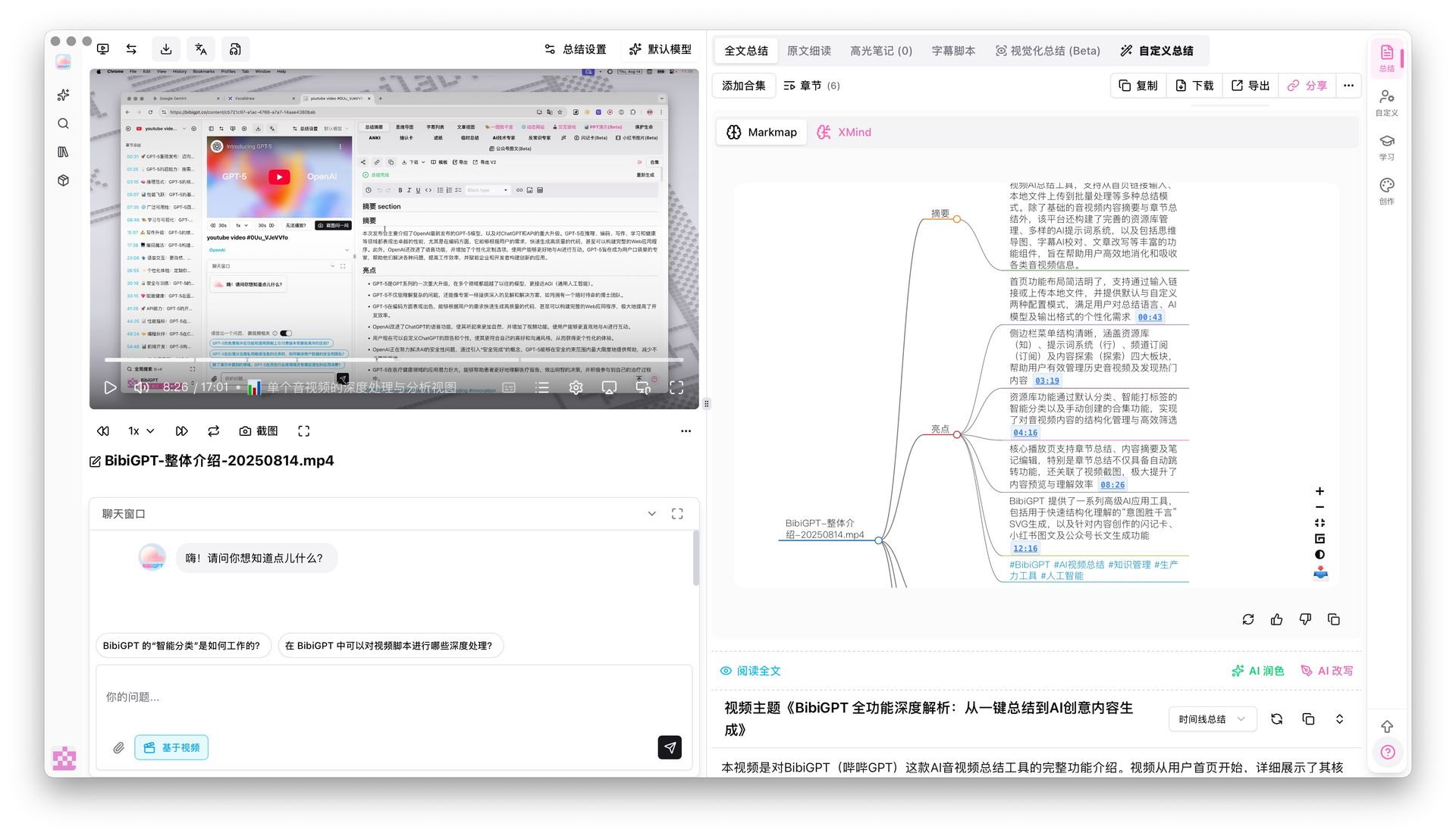
Transcripts are linear; knowledge is networked. BibiGPT’s Mindmap Timestamp Jump auto-converts the lecture into a clickable Markmap:
- Each node = one core concept from the paper;
- Edges = the argument chain inside the paper;
- Click a node → video jumps to that timestamp (you hear the original phrasing);
- Markdown export goes straight into Obsidian.
Advanced: export mind maps from multiple related papers and combine them into one diagram — you can directly see the conceptual intersections (shared methodology) and divergences (each paper’s unique innovation). Plain PDF reading can’t deliver this.
Step 4: Collection Knowledge Base — All Papers Become One AI Dialogue
By now you’ve probably read 5-10 papers + lecture videos. Next anti-pattern: each paper sits in isolation; next time you need a citation you re-open the PDF.
Right move: BibiGPT’s Collection AI Chat aggregates all papers + videos into a conversational knowledge base.
Concrete actions:
- Create a new collection in your BibiGPT library named
<research theme>, e.g. “AI Reasoning 2026”; - Drop every paper’s lecture summary, AI digest, and mind map into the collection;
- Use Collection Summary to generate a topic-level synthesis based on all videos in the collection;
- Ask cross-paper questions in the collection chat:
- “How does the definition of reasoning differ across these 5 papers?”
- “Which paper has the most rigorous experimental setup?”
- “If I write a survey, what citation order makes sense?”
- When drafting your own paper or survey, use Global Deep Search to query keywords across all collection transcripts.
Real compounding kicks in: every new paper you read makes your collection smarter about the field — your AI dialogue partner grows alongside you.
5 Real-World Scenarios
Scenario 1: CS PhD Tracking LLM Frontier
- 4 papers + 4 NeurIPS / ICML talks per week;
- All into “LLM Frontier 2026” collection;
- Friday: collection summary → “weekly digest” → email to advisor.
Scenario 2: PM Researching AI Product Trends
- Anthropic / OpenAI / Google launch event talks + matching system card PDFs;
- Collection name: “AI Product 2026”; weekly chat: “What features are worth building this week?”;
- Direct output: competitive analysis doc.
Scenario 3: Grad Student Preparing Thesis Proposal
- Feed 30 reference papers + corresponding YouTube author talks into BibiGPT;
- Use collection summary for “field landscape”;
- During proposal defense, use BibiGPT mind map as the slide spine — committee impressed.
Scenario 4: Content Creator Doing “Paper Walkthrough” Series
- BibiGPT-summarize the lecture videos with mind maps;
- Use Video to Article to generate Substack / blog deep dives;
- One paper → 1 video + 1 article + 1 mind map. Per-paper output triples.
Scenario 5: Cross-Field Learner Opening a New Domain
- Don’t open a paper cold;
- Watch 5 different-angle “domain primer” videos → BibiGPT summarize → identify the most-mentioned key concepts;
- Then deep-read 2-3 core papers using the 4-step method.
PKM Loop: BibiGPT to Obsidian / Notion
Many researchers already run Obsidian / Notion bidirectional-link systems. The 4-step output plugs in seamlessly:
- BibiGPT mind map Markdown export → Obsidian backlinks;
- Note export with original subtitles → Notion database (one row per paper);
- Cubox integration for instant archive of read responses;
- Full workflow: BibiGPT PKM Practical Guide.
FAQ
Q1: I don’t have 30 minutes for the lecture video. Can I just read the PDF?
You can, but try first turning the lecture into a 5-10 minute scannable Markdown via Video to Article, then go into the PDF question-driven.
Q2: What if there’s no lecture video for the paper?
Three fallbacks: ① a same-topic talk by someone else; ② a podcast interview (many AI researchers go on podcasts); ③ upload the PDF directly and use Local Privacy Mode for offline AI dialogue.
Q3: Can I use the BibiGPT mind map outside the video?
Yes — exported Markdown / Markmap files are standalone. You lose timestamp jump-back, though, so return to BibiGPT when you want to hear the original wording.
Q4: Will too many items in a collection slow down AI chat?
BibiGPT’s collection backend uses multi-model routing. Gemma 4 31B’s 256K context handles long collections well — even dozens of papers stay conversational.
Q5: Is this method only for AI / CS papers?
No. Users apply the same flow to legal opinions + court session videos, medical guidelines + clinical demos, earnings reports + earnings calls — any “long document + visual presentation” domain qualifies.
Related Reading
- Learning methodology: Feynman Technique + AI Video Learning
- Knowledge management: Active Recall in AI Video Learning
- Workflow deep dive: AI-Enhanced Course Slides Study Kanban
- Tooling: BibiGPT Complete Guide 2026
The biggest compounding effect of paper reading: every paper you finish makes the next one faster. The BibiGPT 4-step method moves this compounding from “willpower” to “tool-automated accumulation.” Open BibiGPT and paste the lecture video for the paper you’re reading right now.
— BibiGPT Team