Notion's Developer Platform + Workers Explained: How to Auto-Sync BibiGPT Video Summaries into a Notion Database
Notion’s Developer Platform + Workers Explained: How to Auto-Sync BibiGPT Video Summaries into a Notion Database
As of May 31, 2026: Notion threw two punches in May 2026 — a developer platform and Workers hosted runtime on May 13, then on May 25 it opened up to let AI assistants plug directly into the workspace. The piece BibiGPT users should care about most is the database sync that Workers brings: any API-backed data source can be synced automatically into a Notion database. In other words, “finish a video → its summary lands in my Notion knowledge base” just moved one step closer from “copy-paste by hand” to “automatic pipeline.”
1. What Notion actually changed
The first-hand facts
According to TechCrunch’s coverage, Notion turned its workspace into a “hub for AI agents.” The update has three layers:
- Developer platform: a fuller set of APIs so third-party tools can write data into Notion and read it back out.
- Workers hosted runtime: Notion hosts a lightweight slice of sync logic that pulls API-backed external sources into a Notion database on a schedule — no server of your own required.
- Native AI assistant access: from May 25, common AI coding assistants can sit inside the workspace as native agents and read/write directly in Notion.
It’s free during the beta; per Notion, Workers usage starts counting toward credits on August 11, 2026.
One timeline to get it
| Date | Event |
|---|---|
| May 13, 2026 | Notion developer platform + Workers hosted runtime go live |
| May 25, 2026 | Further opening for AI assistants to join the workspace as native agents |
| August 11, 2026 | Beta ends; Workers usage starts counting toward credits |
Practical rule: To judge whether a “platform update” matters to you, ask one thing — which repetitive step did it remove? The step Workers removes is “moving data into Notion by hand.”
2. My take: this complements BibiGPT, it doesn’t replace it
Conclusion first, then the why.
My take: this update is a strong complement for BibiGPT users, not a threat. Notion solves “how data gets into the database”; BibiGPT solves “how that hour of video content becomes a structured note worth filing.” The two don’t overlap — stitch them together and you get the full “video → knowledge base” loop.
What user pain does it solve
Most people’s Notion knowledge bases share one rot: a pile of saved video links that never actually got digested. The reason is simple — watching an hour of video, taking notes, and filing them into Notion is too heavy a routine, so the link just sits there gathering dust.
Workers’ database sync can, in theory, automate the “external content auto-files into the database” step. But it only moves data; it won’t read the video for you. A YouTube link synced into Notion is still just a link.
Its relationship to BibiGPT’s existing capabilities
This is exactly where BibiGPT fills the gap. BibiGPT is an AI audio/video assistant supporting 30+ platforms including Bilibili, YouTube, and podcasts, compressing “watch a full hour” into “skim three minutes of structured key points” — complete with chapter timestamps, an AI summary, and the full transcript.
You can try the demo below: pick a sample video and watch the AI break it into a TL;DR, key points, and timestamped structure. This is what the “finished note” worth syncing into a Notion database looks like.
Summarize any video in seconds
Pick a sample below to see the AI summary — TL;DR, key points, and jump-to timestamps.
TL;DR: Karpathy builds a GPT-style language model from scratch in code, explaining every piece — from a tiny character-level model up to the full Transformer.
Key points
- Start with a bigram model, then add self-attention so tokens can "talk" to each other
- A Transformer block = multi-head attention + feed-forward + residual connections + layer norm
- Training is just predicting the next token; scale and data do the rest
- The same architecture behind nanoGPT is what scales up to ChatGPT
Jump to
- 00:07 Why build GPT from scratch
- 08:23 Self-attention, intuitively
- 1:00:00 Assembling the Transformer block
- 1:35:00 From nanoGPT to ChatGPT
Demo: BibiGPT video summary output (pick a sample to try it)
My take: Notion Workers is the “pipe”; BibiGPT is the “clean water you pour into it.” Without structured summaries, even the smoothest sync pipe is just shuttling around a pile of links nobody has read.
Does BibiGPT need to react
No product change required. BibiGPT already exports to Markdown and connects to Notion, Obsidian, Cubox, SiYuan and more — it was always the “content production” end. Notion making “filing” smoother only amplifies the value of a BibiGPT summary.
3. The hands-on workflow: auto-collect video summaries into a Notion knowledge base
This flow is for anyone who wants to seriously maintain a video knowledge base. First watch a real demo of turning a video into a structured note, then build along:
The video below demonstrates, from a creator’s angle, how video content gets broken down into searchable notes — the same idea behind the workflow we’re building:
Video source: YouTube · Andrej Karpathy
The steps:
- Paste a link, get a summary: drop the video link into BibiGPT and get a timestamped AI summary plus the full transcript in one click.
- Tidy into a “finished note”: use BibiGPT’s mind-map view to scan the structure and confirm nothing’s missing.
- Export to Notion: use BibiGPT’s export panel to send the summary to Notion — title, key points, and timestamps in one shot, no manual formatting.
- Build a “video knowledge base” database in Notion: tag each summary with properties like source platform / topic tag / reviewed, so you can filter later.
- Let Workers handle incremental sync: connect your regular content sources into the Notion database so new items auto-file as placeholders, then have BibiGPT fill in the structured summaries.
- Review periodically: filter by “topic tag” in Notion to revisit every video’s key points under one theme at once — that’s the real value of a knowledge base.
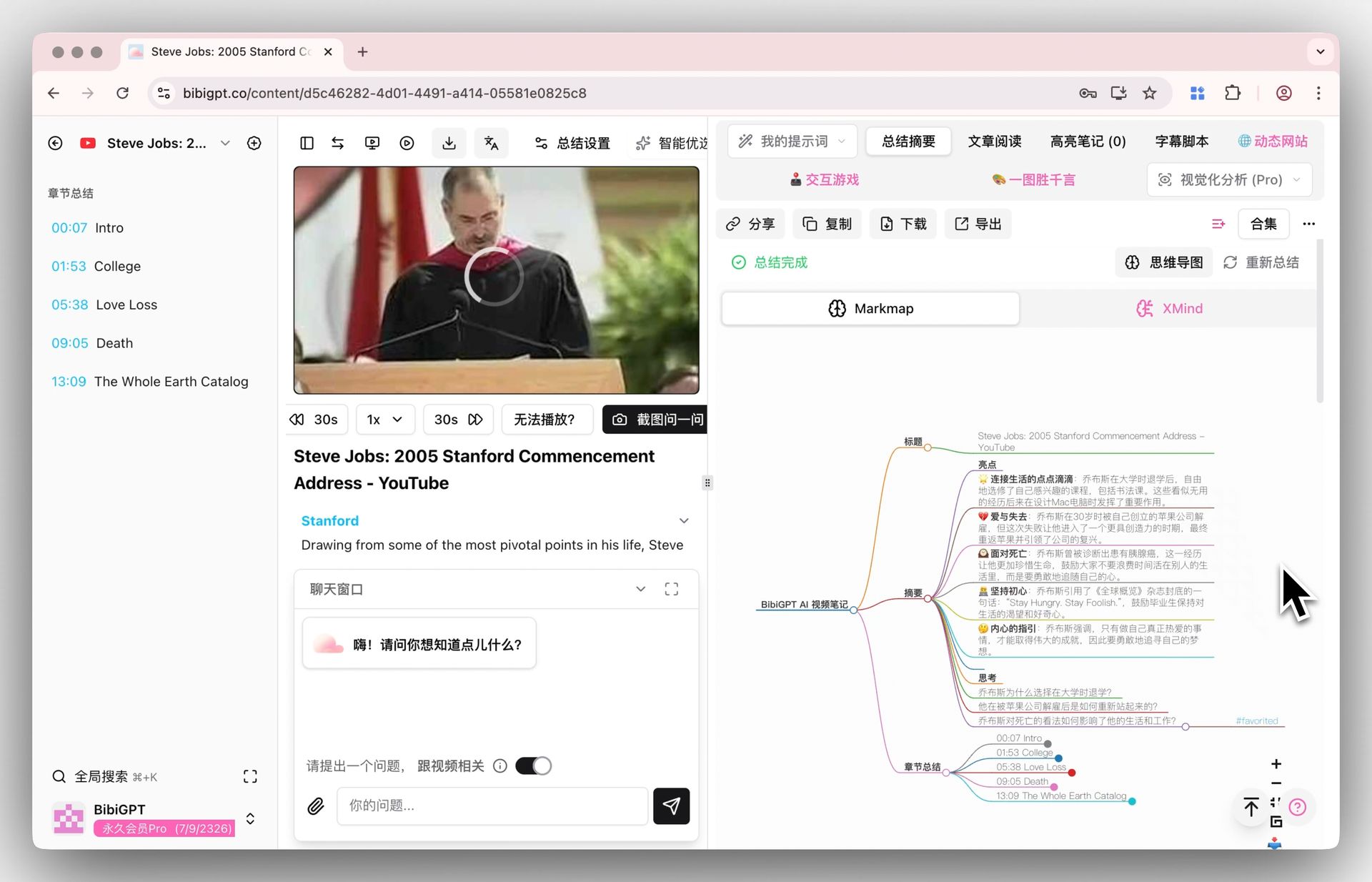
The image below shows BibiGPT’s mind-map view, so the whole structure is clear at a glance while you organize:
Screenshot: BibiGPT · inline mind-map feature demo
To turn video content into a fully searchable knowledge structure, try the mind-map demo below directly:
Turn a video into a mind map
A linear talk becomes a structured tree. Drag to pan, click nodes to fold.
Demo: BibiGPT video-to-interactive-mind-map
If you already use BibiGPT’s smart deep summary, this flow needs almost no learning curve — a few clicks in the export panel.
Practical rule: A knowledge base’s value isn’t “how much you stored,” it’s “whether you can pull it all up by topic.” Get the structured summary first, then talk about auto-sync — don’t reverse the order.
4. What it means for different users
The payoff of this update lands differently depending on who you are.
Content creators
People making Xiaohongshu posts, writing newsletters, or editing video often have to gather key points from a stack of reference videos. Use BibiGPT to turn each reference into structured points, then auto-collect them into a single Notion idea bank — next time you need material, one tag filter and it’s there, no scrolling browser history.
Students and researchers
Lecture recordings, open courses, academic podcasts all eat time to watch once. Compress them into key points and timestamps with BibiGPT first, then file into Notion by course. Come exam season, one database view shows a semester’s core conclusions. For more on this method, see 5 practical AI video summary workflows.
Teams and companies
Teams track a lot of industry videos, launch events, and competitor demos. File those summaries into a shared Notion database so anyone can search, filter, and cite them — instead of having them scattered across individual chat logs.
| User type | Core scenario | Value of BibiGPT + Notion |
|---|---|---|
| Content creators | Gathering ideas | Reference video points auto-collect into an idea bank |
| Students / researchers | Course review | A semester’s conclusions in one view |
| Teams | Industry intel | Searchable, citable team video intel |
My take: auto-sync only unlocks value when every item filed has already been “read.” Otherwise you’re just piling up unread material faster.
5. FAQ
Q1: Can BibiGPT already send summaries straight to Notion?
Yes. BibiGPT’s export panel connects to Notion and sends a video summary — title, key points, and timestamps — over together, no manual copy-paste.
Q2: Does Notion’s Workers replace BibiGPT?
No. Workers handles “moving external data into the database”; BibiGPT handles “turning video content into a structured note worth filing.” One does the pipe, one does the content — complementary.
Q3: Can I use this workflow without coding?
Yes. The core path here — BibiGPT paste-link-to-summary, export to Notion, build a Notion database view — needs no code at all. The Workers step is an optional add-on for advanced users with automation needs.
Q4: Besides Notion, which note tools can BibiGPT connect to?
It exports to Markdown and connects to Obsidian, Cubox, SiYuan and more — pick whatever fits your knowledge-management habit.
Q5: How long does a video summary take?
After you paste the link, you usually get a timestamped structured summary quickly, saving you from watching the whole thing minute by minute.
6. From “saving links” to “building a knowledge base”
Notion making “data into the database” smoother is a good thing. But it also reminds us of an old problem: however smooth the pipe, if what flows in are unread links, your knowledge base is just a tidier bookmark folder.
The real lever is turning each video into an “understood, structured summary” first, then letting it flow into Notion. The front half is what BibiGPT does — making consuming audio and video as fast as consuming text.
A minimal viable workflow you can set up today:
- Drop today’s must-watch videos into BibiGPT and get structured summaries.
- Export them to your Notion video knowledge base.
- Tag by topic, then review by tag next time in one pass.
Models are no longer scarce; what’s scarce is the speed to understand, file, and recall content on demand.
To make your Notion knowledge base hold “understood notes” instead of “unwatched links,” try BibiGPT smart video summary now — paste a link and watch it compress an hour into three minutes.
BibiGPT Team