
Foldable iPhone Split View Video Notes Workflow (2026)

You unfold a 7.6-inch inner screen, drop a lecture on the left and a notes app on the right, and feel like you finally have a pocket iPad. Then the video keeps playing as one mute rectangle. Your notes pane is a blank document. You still scrub, pause, rewind, and type what you think you heard. Split View gave you two windows. It did not give you a video notes workflow.
As of 11 September 2026, that is the actual product gap around Apple’s first foldable iPhone. Press coverage already answered “what is it, what does it cost, when can I buy one.” This piece answers a narrower question: can Split View on a foldable iPhone replace a video notes app, or do you still need to turn the video into searchable notes first?
Short answer: Split View is two apps side by side. A video notes app is a pipeline — transcript, chapters, timestamps, export. You can run that pipeline today on any phone or iPad. The foldable inner screen only makes the last step nicer. This article uses Apple’s public event materials and press coverage. It is not a hands-on review; we have not used a production iPhone Duo.
Summarize any video in seconds
Pick a sample below to see the AI summary — TL;DR, key points, and jump-to timestamps.
TL;DR: Karpathy builds a GPT-style language model from scratch in code, explaining every piece — from a tiny character-level model up to the full Transformer.
Key points
- Start with a bigram model, then add self-attention so tokens can "talk" to each other
- A Transformer block = multi-head attention + feed-forward + residual connections + layer norm
- Training is just predicting the next token; scale and data do the rest
- The same architecture behind nanoGPT is what scales up to ChatGPT
Jump to
- 00:07 Why build GPT from scratch
- 08:23 Self-attention, intuitively
- 1:00:00 Assembling the Transformer block
- 1:35:00 From nanoGPT to ChatGPT
Split View is two apps, not a video-notes workflow
Core answer: Apple’s first foldable iPhone adds iPhone Split View: two apps side by side on the 7.6-inch inner display, saved app pairs, and even two windows of the same app. That is multitasking. It is not “watch this YouTube lecture and leave with structured notes.”
Apple’s iPhone Duo newsroom post is explicit: Split View lets you “open two apps side by side on iPhone for the first time,” swap them, save pairs, open two windows of the same app (Safari for comparison shopping is the official example), and keep a Siri AI conversation on one half while content sits on the other. TechCrunch describes the vertical layout: pin a video on top and use other apps in the bottom half. The Verge restates the 7.6-inch inner / 5.4-inch outer split and the 23 October on-sale date.
None of those demos turn the video into notes. YouTube on the left + Notes on the right is the same pattern iPad users already have. The video is still a player. The notes app still does not know what was said at 14:32.
Practical rule: If the value is in what was said, two windows are not a notes system — a timestamped transcript is.
That distinction is the increment this article can own. Recapping the event as “Apple’s first foldable” is a commodity. Mapping Split View onto a video notes app is not.
What Apple actually shipped (public facts, as of 11 September 2026)
Core answer: On 9 September 2026, Apple’s Surprise and Shine event introduced a book-style foldable iPhone: 5.4-inch outer Super Retina XDR, 7.6-inch inner Super Retina XDR, A20 Pro, dual 48MP cameras, starting at $1,999 for 256GB, pre-orders 16 October, on sale 23 October. Apple Pencil (USB-C) is promised later this year, not at launch.
The official recap is short. Apple’s own three-minute film is the cleanest public walkthrough of the form factor — watch it below, then come back to the workflow gap the film does not cover:
Video source: YouTube · Apple · Introducing the new iPhone Duo
Facts we are using, and where they come from:
| Claim | Source | Hands-on? |
|---|---|---|
| 7.6” inner / 5.4” outer Super Retina XDR, ProMotion, up to 3,000 nits | Apple Newsroom | No — event + spec sheet |
| Inner display is 50% larger than iPhone 18 Pro Max | Same Apple post | No |
| Split View, saved app pairs, two windows of one app | Apple Newsroom + The Verge | Press, not our device |
| Up to 31 hours of video on the inner display, 44 hours on the outer | Apple, restated by TechCrunch | Rated hours, not our test |
| USB-C Apple Pencil arrives later this year | Apple Newsroom | Software update, not day one |
| $1,999 / 256GB; Star White and Night Sky; on sale 23 October | Apple + 9to5Mac | Pricing sheet |
Two caveats we will not bury. First, we have not held the device. Crease, hinge torque, and “how it feels to take notes for an hour” are out of scope. Second, do not search this topic as the naked phrase “iPhone Duo” if you care about search data — that cluster is polluted by Google Duo and MagSafe accessories. The live demand cluster is foldable iPhone / iPhone fold. We use the product name in prose because that is what Apple shipped; we do not treat it as the SEO head term.
Practical rule: Quote the spec sheet. Do not narrate a review you did not sit for.
Why the inner screen still leaves a notes gap
Core answer: A 7.6-inch inner screen is closer to an iPad Mini than to a phone. That helps you see a lecture. It does not timestamp the lecture, chapter it, or export it to Obsidian. The missing layer is the same one iPad Split View never solved: the video remains opaque until something turns it into text.
Three failure modes show up the moment you try to “just take notes” next to a player:
- You type slower than the speaker talks. Split View does not pause on key sentences. You either fall behind or you pause every 20 seconds and destroy the lecture’s flow.
- Your notes have no source. A week later, “the part about sample size” is a sentence in Apple Notes with no timestamp. You cannot jump back. A YouTube video to notes flow that keeps the timestamp next to the claim is a different artifact.
- Pencil is not here yet. Apple says USB-C Apple Pencil support lands later this year on both displays. Until that software update, “annotate the video like a PDF” is a rumor, not a shipping feature. Even after it ships, markup on frames is not a transcript.
This is why “youtube notes iPad” and “video notes app” already have search demand: people already own a big screen. They still need a tool that watches for them. The foldable iPhone does not retire that job. It just gives the job a larger second pane.
If you already take notes from long videos, the closest existing write-up on this site is how to take notes from video automatically — the method does not wait for a hinge.
Practical rule: Buy the screen for seeing. Buy the notes pipeline for keeping. Do not let the hinge sell you both.
A watch-then-capture workflow you can run today
Core answer: Run the notes pipeline before you care which device holds the two panes. Paste the URL, get chapters and a transcript, then optionally put the player and the notes side by side — on iPad now, on a foldable iPhone after 23 October.
This screenshot is the entry: one link in, structured output out — the step Split View never does for you.
Screenshot: BibiGPT · video-to-article demo
A workflow you can copy this afternoon:
- Paste the URL (YouTube, a course recording, a podcast) into BibiGPT. You do not need the foldable for this step.
- Read the chapter list before you press play. Decide whether the video is worth an hour. This is the “summarize first, then decide whether to watch” inversion we already use in AI video notes study workflows.
- Search the transcript instead of scrubbing. When a claim matters, jump to the timestamp. The screen below is that search surface — full-text over the talk, not over the title.
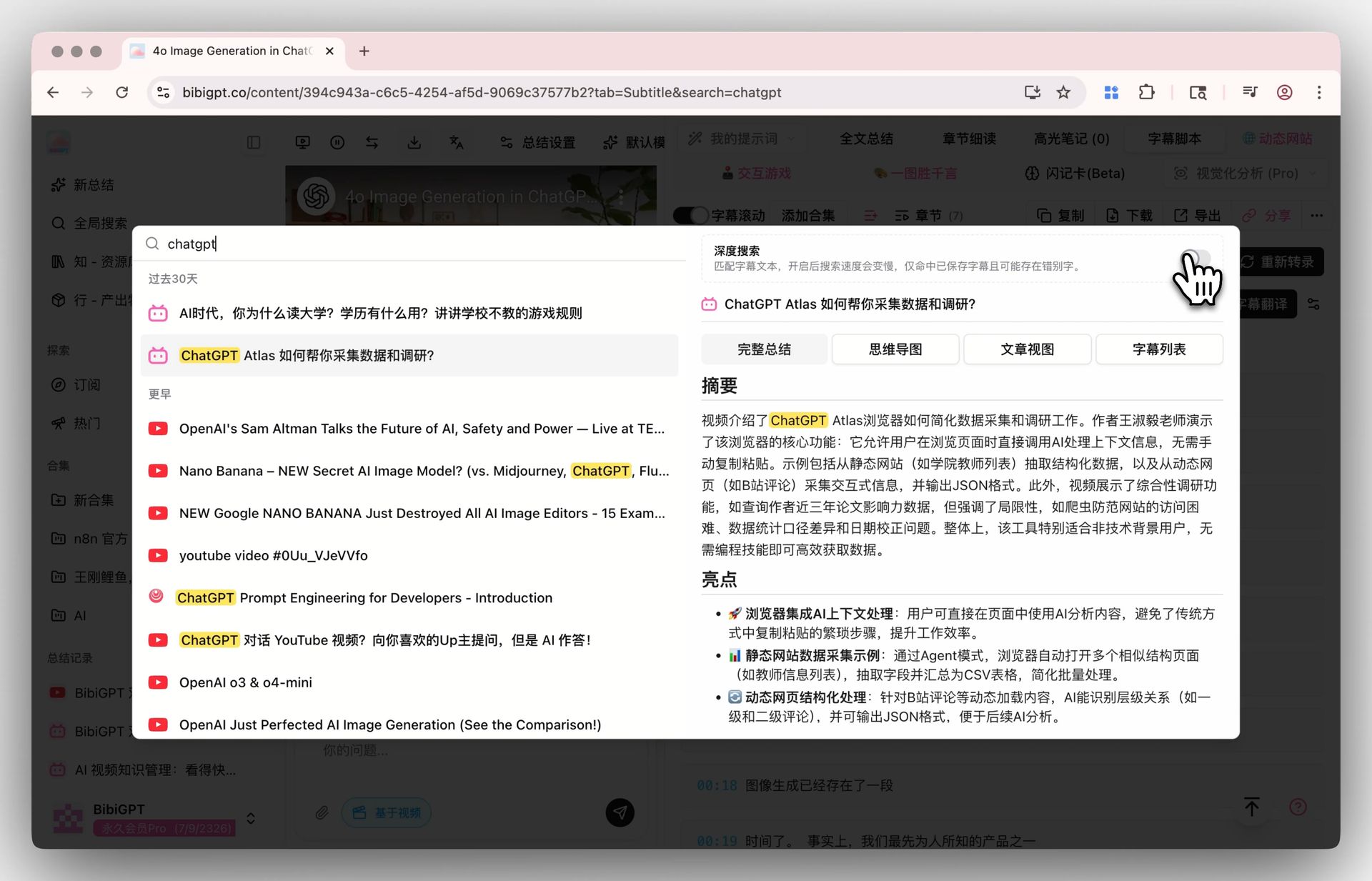
Screenshot: BibiGPT · Deep Search demo
- Only then open Split View. Left: the player at the timestamp. Right: your notes, or the BibiGPT summary. On iPad this is available today. On the foldable iPhone it becomes available when the device ships. The notes were already structured.
- Export once. Send Markdown to Obsidian via YouTube-to-Obsidian notes, or keep the AI YouTube summary with source tracing so every sentence can jump back to the clip.
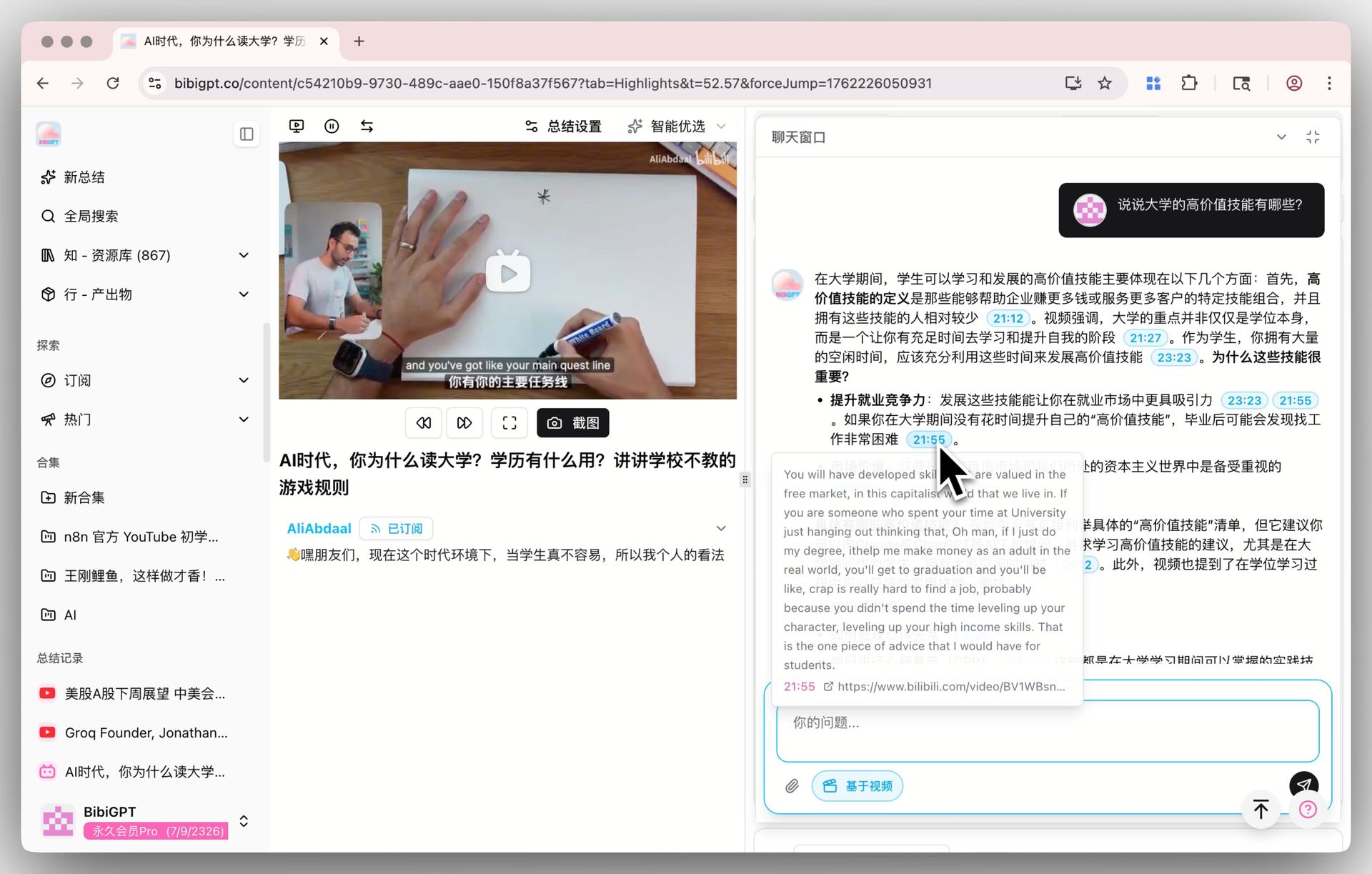
Screenshot: BibiGPT · AI video chat with source tracing
As of September 2026, BibiGPT has served more than 1 million users, generated more than 5 million AI summaries, and supports 30+ audio and video platforms. None of those numbers depend on a hinge. They depend on turning “listen and watch” into text you can search. For a longer PKM version of the same loop, see turning long videos into structured reading notes.
Decision filter: If you cannot find a sentence again in 10 seconds, you took minutes, not notes.
| Setup | What you see | What you keep | Best for |
|---|---|---|---|
| Player only | One video | Memory | Short clips |
| Split View (two apps) | Video + blank notes | Whatever you typed | Live reactions |
| Transcript + chapters first | Outline before play | Searchable notes + timestamps | Lectures, podcasts, briefings |
| Foldable inner screen + prepared notes | Large dual pane | Same notes, nicer layout | After 23 October, same pipeline |
Who this is for: students, creators, knowledge workers
Core answer: Students want a lecture they can search. Creators want a competitor livestream they can quote. Knowledge workers want a two-hour briefing they do not have to rewatch. The foldable iPhone helps all three display the work. It does not do the work.
Students. A 90-minute seminar on the inner display is easier on the eyes than on a 6.3-inch phone. It is still a 90-minute seminar. Generate the chapter list, mark the three segments that will be on the exam, and only then sit in Split View. Obsidian video notes is the archive half of that loop.
Creators. You are not trying to “experience” the competitor’s launch video. You are trying to steal the outline: claims, demo order, pricing slide. A video notes app that dumps timestamps beats a pretty two-pane layout you still have to watch linearly.
Knowledge workers. The 31-hour inner-display video rating Apple published is a battery number, not a permission slip to watch 31 hours. Treat it as “this screen can last a transoceanic flight.” Use the flight to review summaries, not to rewatch all-hands recordings.
Apple Pencil, when it arrives later this year, will matter most for markup: circling a chart, starring a slide. It will not invent a transcript. If your job is “what was said,” keep the text pipeline. If your job is “draw on this frame,” wait for the software update and do not pretend it shipped on 9 September.
What to check after 23 October (predictions you can falsify)
Core answer: The device goes on sale 23 October 2026. Until then, every “how it feels to take notes on the crease” sentence is fiction. Here are three claims we will be wrong or right about — with a date.
Claim 1 — before Pencil ships, most Duo note-taking is typing in Split View, not stylus markup on video. Apple Pencil support is a later software update. If reviews in November 2026 show people primarily circling frames instead of typing, this claim is wrong.
Claim 2 — by June 2027, at least one major video app will ship a native “notes pane” on iPhone Split View. YouTube, Notion, or a lecture app pinning a transcript beside the player would collapse part of the third-party gap. If that pane still does not exist next summer, the external video notes app remains the default.
Claim 3 — search demand stays on “foldable iPhone” and “video notes app,” not on the product code-name. “iPhone Duo” as a query is contaminated. If GSC six weeks after launch shows our traffic arriving on those two phrases rather than the model name, the keyword plan held.
We will not be shocked if the inner screen is excellent for 16:9 video. Press already said that. We will be shocked if Split View, by itself, produces notes you can search in a month.
Frequently Asked Questions (FAQ)
Q1: Is this a hands-on review of the foldable iPhone? No. As of 11 September 2026 we have not used a production unit. Specs and Split View behavior are from Apple’s newsroom and contemporaneous press. Anything about crease, heat, or “how it feels to write for an hour” is out of scope.
Q2: Does Split View on a foldable iPhone replace a video notes app? No. Split View places two apps side by side. A YouTube video to notes flow produces a transcript, chapters, and timestamps. You can combine them: generate notes first, then use the inner screen as a large dual pane.
Q3: When does Apple Pencil work on this phone? Apple says USB-C Apple Pencil support arrives later this year as a software update, on both displays. It is not a launch-day feature. Do not plan a “annotate while watching” workflow around 23 October.
Q4: What should I search if I want this setup? Use foldable iPhone, video notes app, or YouTube notes iPad. Avoid treating the model name as your only query — that cluster mixes in unrelated “Duo” products.
Q5: Can I practice the workflow before the phone ships? Yes. The notes pipeline is URL in, chapters out — same method as how to take notes from video automatically. iPad Split View is the rehearsal. The foldable inner screen is a larger stage for the same play.
Q6: Where do I start if I already have a long YouTube lecture? Paste it into BibiGPT, skim the chapters, then open only the segments you need. That is the whole method — hinge optional.
The foldable iPhone is a larger, folding screen with real Split View. That is enough news. It is not enough notes. Turn the video into text first, then enjoy the inner display for what it is: a better place to look at work you already captured.
Start your AI efficient learning journey now:
- 🌐 Official Website: https://aitodo.co
- 📱 Mobile Download: https://aitodo.co/app
- 💻 Desktop Download: https://aitodo.co/download/desktop
- ✨ Learn More Features: https://aitodo.co/features
BibiGPT Team
Popular tools
More in this series
- AI Competitive Intelligence Workflow: Build Industry Monitoring with BibiGPT Video Summaries
- Lessons From Shipping BiliGPT: Two Cold-Start Growth Tactics Behind a GPT-3 Side Project
- [BibiGPT Growth Series] Episode 1 | How AI Summaries for Bilibili Were Born
- BibiGPT Advanced Guide 2026: Download + AI-Summarize Videos from WeChat Channels, RedNote, TikTok, and Enterprise Intranet Sites
- Chat with Any Video: How to Ask AI Questions About Videos Instead of Watching the Whole Thing (2026)