
Cornell Note-Taking for AI Video Learning: The 2026 BibiGPT Method
Cornell Note-Taking for AI Video Learning: The 2026 BibiGPT Method
Quick answer: Cornell Note-Taking (cue column + notes column + summary column), invented by Cornell University’s Walter Pauk, is one of the most cognitively-backed note systems ever published. This article ports the method to AI video learning: use BibiGPT to auto-generate the notes column (structured summaries) and seed the cue column (thinking questions + glossary), while you handle the summary column for active recall. Marginal time per video drops from 30 minutes to 5, and your notes are immediately reviewable knowledge assets.
1. What Cornell Note-Taking is and why it works
Walter Pauk introduced the system at Cornell in the 1950s. The page is divided into three zones:
- Notes column (right top, ~70%) — facts, key points, examples captured live during class / reading / video.
- Cue column (left side, ~30%) — written after the session: keywords, questions, concept names. This is your “exam” during review.
- Summary column (bottom, ~15%) — 2-3 sentences in your own words. Forces active recall and synthesis.
Two cognitive mechanisms drive its effectiveness:
- Active recall — writing the cue and summary columns forces your brain to extract information from the notes column. Retrieval, not re-reading, is what cements long-term memory.
- Spaced repetition — the cue column naturally supports the “cover the right side, quiz with the left” practice loop.
Practical rule: Cornell’s essence isn’t the three-column layout. It’s the three actions — capture, extract, synthesize. In the AI video era, AI can do the first two; you must do the third.
The Cornell University Learning Strategies Center hosts the original template and examples.
2. Why classic Cornell breaks down on video
Video and lectures differ in one way: video can be paused, rewound, and sped up — but humans are lazy and nobody actually pauses 30 times during a 1-hour video to take notes.
Three failure modes:
- Capture lags behind — information density is too high; handwriting or typing can’t keep up with speech, so you only capture keywords and lose context.
- Rewind is costly — to verify a detail, you drag the timeline, hunting for the right second. 70% of learners give up at this step.
- No native structure — the chapters, glossary, and review questions live only inside your head, so organization eats most of your time.
Practical rule: The video-learning bottleneck isn’t ignorance of Cornell — it’s that the human cost of capture + organization is too high, so most people skip notes entirely.
That’s exactly where AI tools should step in.
3. BibiGPT × Cornell: auto-fill the busywork, you do the recall
The core move: let AI draft the notes and cue columns; you handle the summary column and the active recall pass.
3.1 Notes column → BibiGPT smart deep summary
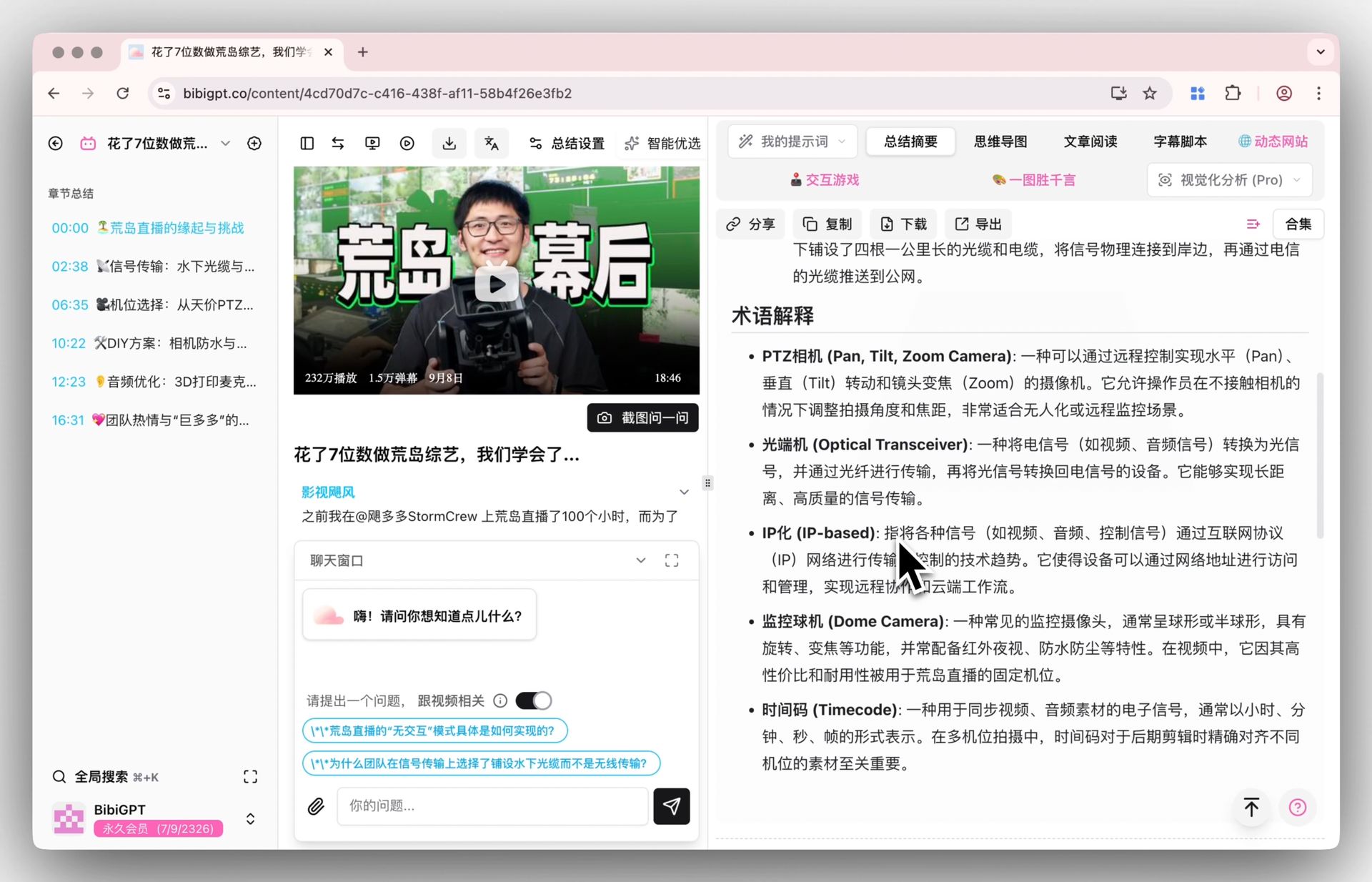
BibiGPT smart deep summary outputs a structured report by default: core summary, key highlights, chapter takeaways. That’s your notes column draft.
3.2 Cue column → thinking questions + glossary
The deep summary also produces thinking questions and a glossary. These are exactly what Cornell’s cue column needs — questions become “quiz items,” glossary entries become keyword anchors.
3.3 Summary column → 2-3 sentences, written by you
This is the one step AI cannot replace. After watching, cover the notes column, look only at the cues (questions + glossary), and write 2-3 sentences in your own words. This forced retrieval beats “re-read the AI summary three times” by a wide margin.
3.4 Timestamp jump = digital page-flipping
Cornell’s classic review involves flipping notebook pages. Every BibiGPT summary point carries a timestamp — click to jump to the exact video moment. The digital equivalent of flipping pages, 10x faster.
4. Full 7-step workflow
Example: studying a 1-hour MIT OpenCourseWare lecture on YouTube.
Step 1. Paste the YouTube link into BibiGPT, wait 2-5 minutes.
Step 2. Read the auto-generated “core summary” and “key highlights” — your notes column draft.
Step 3. Extract “thinking questions” + glossary into your cue column — one term per row, one question per row.
Step 4. Pause 5 minutes. Cover the notes column, look only at the cue column, and try to answer each question and explain each term in your own words.
Step 5. For the gaps you couldn’t fill, click the BibiGPT timestamp to jump back to the relevant video segment and confirm (this is the core active-recall move).
Step 6. Write 2-3 sentences in your summary column: “What’s the single most important idea in this lecture? Can I explain it in one sentence to someone else?”
Step 7. Export the whole note as Markdown into Notion / Obsidian / Logseq — your permanent knowledge base entry.
Practical rule: Steps 4 and 6 are the soul of Cornell. AI must not replace them. Skip these and you’re back to passive watching, not active learning.
5. Spaced repetition: turning notes into long-term memory
Pair Cornell with the Ebbinghaus forgetting curve:
- Within 24h — first review: cover the notes column, answer cue questions. Mark misses.
- 1 week — review again, focus on the previous misses.
- 1 month — third review. What you still remember is now long-term.
- 3 months — random spot checks.
BibiGPT collection AI chat lets you group a series of videos into a “course collection” and run cross-video questions for unified review — essentially merging the cue columns of an entire course.
Anthropic’s research on long-context learning and Google Research on spaced repetition consistently identify retrieval-based spacing as the most effective learning combo known to cognitive science.
6. Bonus: turn Cornell notes into publishable articles
If you create content, BibiGPT AI video-to-article lets your Cornell notes become a published piece:

Use the notes column + summary column as the skeleton, plug in screenshots from video-to-article, and ship a Medium / Substack / company-blog long-form in 10 minutes. Cornell’s payoff in the creator economy: private learning artifacts → public content assets.
7. FAQ
7.1 Cornell vs Zettelkasten — which is better for video?
Cornell wins for single video / single lecture depth. Zettelkasten wins for cross-video / cross-topic knowledge networks. Chain them: Cornell first, then distill atomic cards into a Zettelkasten system.
7.2 Could I just use a raw AI transcription tool?
You can, but it’s far less efficient. Raw transcripts are word-by-word streams, not structured note-column material. BibiGPT layers structure on top (chapters, highlights, glossary, thinking questions) — exactly the layer Cornell needs.
7.3 Does this work equally well for English vs Chinese videos?
Yes. BibiGPT optimizes ASR for Chinese specifically, and auto-translate on upload supports cross-lingual learning (English MIT OCW → Chinese notes column → Chinese summary column).
7.4 Can I use Cornell templates inside Notion / Obsidian?
Yes. Notion has ready-made Cornell templates; Obsidian supports several plugins. Paste BibiGPT’s Markdown output into the notes column, then write the cue and summary columns yourself.
7.5 How many videos can I process per day?
Beginners: 1-2 thirty-to-sixty-minute videos per day, quality over volume. Once practiced, use bulk export video summaries to batch 10+ videos at once — but always write summary columns one at a time, by hand.
8. Turn video learning into knowledge assets
Cornell was designed for pen and paper 60 years ago. In the 2026 AI video era, it remains one of the most cognitively-sound note systems — but only when you hand off the tedious capture work to AI and keep the extract / synthesize work for yourself.
Try BibiGPT smart deep summary free →
BibiGPT Team