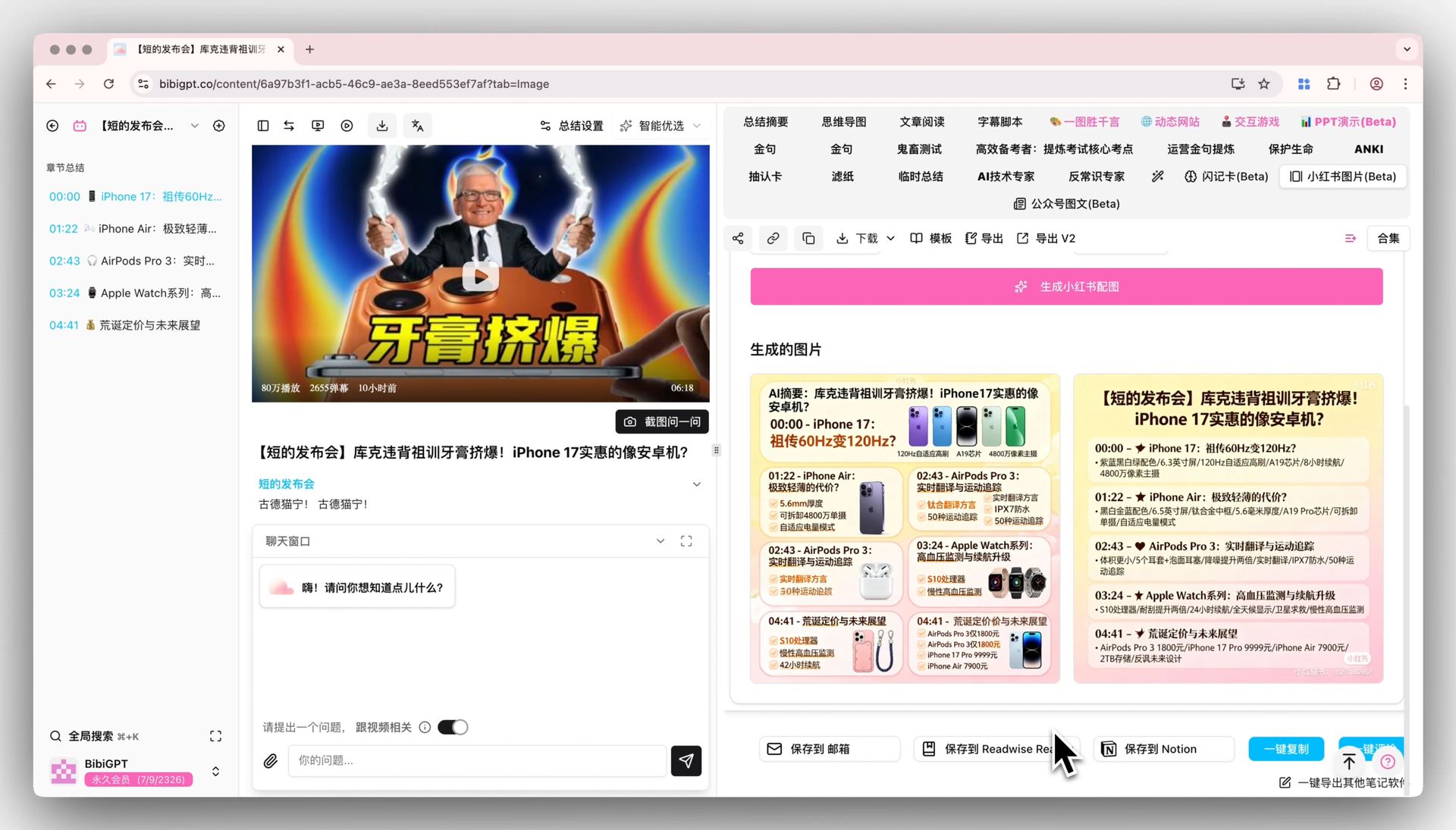
Video to Xiaohongshu Notes: Repurpose Long Videos into Viral Picture-Text Notes with AI (2026 Guide)
Video to Xiaohongshu Notes: Repurpose Long Videos into Viral Picture-Text Notes with AI (2026 Guide)
You come across a really good, content-rich video — maybe a 40-minute podcast, an online lecture, or a creator’s deep dive. After watching, you want to turn it into your own Xiaohongshu (Little Red Book) note and post it. But the moment you start, you realize: you have to scrub back and forth for the key moments, type out the points, place images one by one, brainstorm a title, lay it out… one note eats two hours, and your enthusiasm is long gone.
100-word direct answer: As of Q2 2026, the fastest path to turn a long video into a Xiaohongshu picture-text note is “AI breaks out the points → drop into a note template → add a cover image.” With BibiGPT, paste the video link and get structured, timestamped key points in minutes. Then fill in this article’s “hook headline + 3–5 takeaways + call to action” template, add an AI-generated cover image, and a single note drops from two hours to under 15 minutes.
This isn’t really a “note-writing” problem — it’s a content repurposing choice: with the same video, do you consume it once and forget it, or do you squeeze its value into a picture-text note that keeps growing your following? This article is about the latter — a repeatable “video → Xiaohongshu note” workflow.
Most “video to text” tutorials only teach you to grab a wall of subtitles, and then nothing happens. But a Xiaohongshu note isn’t a subtitle dump — it has its own shape: the hook has to land, the points have to be clear, the visuals have to be worth seeing, and the ending needs an action prompt. This guide doesn’t just teach extraction — it teaches you to fit the shape.
1. Why a video can’t be posted to Xiaohongshu directly — you have to “break it down” first
Xiaohongshu’s content logic is completely different from video platforms. Video is linear and takes time to consume; Xiaohongshu picture-text is fragmented, skimmable, and highly visual. A user gives your note less than 2 seconds of judgment in the feed — if the cover doesn’t hook and the first screen has no value, they swipe away.
So the core of “video to Xiaohongshu note” isn’t translation, it’s restructuring: compress a 40-minute linear narrative into 5 self-contained points, each one usable as the headline of an image card.
- Students: break online courses and open lectures into “3 key exam points” notes for one-glance review
- Professionals: break an industry podcast into a “3 trends this episode covered” post, and build your personal brand along the way
- Creators / influencers: turn someone else’s viral video into your own derivative note, building a topic-idea library
According to Buffer’s analysis of content repurposing, splitting one core piece of content into multiple formats for distribution is one of the most effective levers creators have to amplify output per unit of time — a single video’s value is far more than one play.
Practical rule: For video-to-Xiaohongshu notes, first ask “how many self-contained points can I pull out of this video,” not “how do I copy the subtitles over.” Points matter more than word count.
The demo below walks through “a video → structured key points” — watch once to get the intuition:
Source: YouTube · AI video summary and note-taking demo
2. Step one: use AI to break the video into structured key points
The most labor-intensive part of the whole workflow is “finding the highlights + recording the points.” Hand this to AI. Open BibiGPT video summary, paste the video link — it supports YouTube, Bilibili, TikTok, Xiaohongshu, podcasts, and 30+ platforms, and you can upload local recordings too. In minutes you get:
- A TL;DR: what the whole video is about, in 3–5 sentences
- Section-by-section points: the core argument of each segment + its timestamp
- Key quotes: lines you can use directly as note subheadings
A small trick here: don’t rush to use the points. First filter them by “can this become a card.” A 40-minute video might give you 10 sections, but a Xiaohongshu note holds at most 5–6 cards — so what you do is a second round of selection: pick the points that are most surprising, most counterintuitive, or most practical.
In the interactive demo below, pick a sample video yourself and see what the AI’s TL;DR + points + timestamps look like:
Summarize any video in seconds
Pick a sample below to see the AI summary — TL;DR, key points, and jump-to timestamps.
TL;DR: Karpathy builds a GPT-style language model from scratch in code, explaining every piece — from a tiny character-level model up to the full Transformer.
Key points
- Start with a bigram model, then add self-attention so tokens can "talk" to each other
- A Transformer block = multi-head attention + feed-forward + residual connections + layer norm
- Training is just predicting the next token; scale and data do the rest
- The same architecture behind nanoGPT is what scales up to ChatGPT
Jump to
- 00:07 Why build GPT from scratch
- 08:23 Self-attention, intuitively
- 1:00:00 Assembling the Transformer block
- 1:35:00 From nanoGPT to ChatGPT
Practical rule: The AI’s sections are “everything”; what you want is “the selection.” Better to nail 3 points thoroughly than to skim 8 superficially.
3. Step two: fit the points into a Xiaohongshu note template
Once you have your selected points, what actually decides whether the note pops is the shape. Xiaohongshu picture-text notes follow a relatively fixed high-conversion structure — just fit your content in:
Headline: the 3-second hook formula
A Xiaohongshu headline is essentially “one line that creates a reason to tap.” Common formulas:
- Number + pain point: “Watched a 40-min podcast — these 3 lines are all you need”
- Counterintuitive: “Turns out everyone’s been doing X wrong? This video explains it”
- Identity fit: “Must-watch for office workers | This episode finally made X clear”
Body: hook → value → action
- Opening hook: lead with the conclusion or pain point, no warm-up (Xiaohongshu’s first screen only shows the first few lines)
- 3–5 takeaways: each starting with an emoji + a one-line point, each mapping to an image card
- Closing action prompt: “Save this,” “Tell me in the comments which episode you want next,” “Follow for more”
Visuals: cover + inner cards
The cover decides click rate; the inner cards decide read-through rate. This is where AI image generation shines — use BibiGPT Xiaohongshu picture-text generation to generate styled picture-text cards for each point directly, no more dragging things around in Canva.
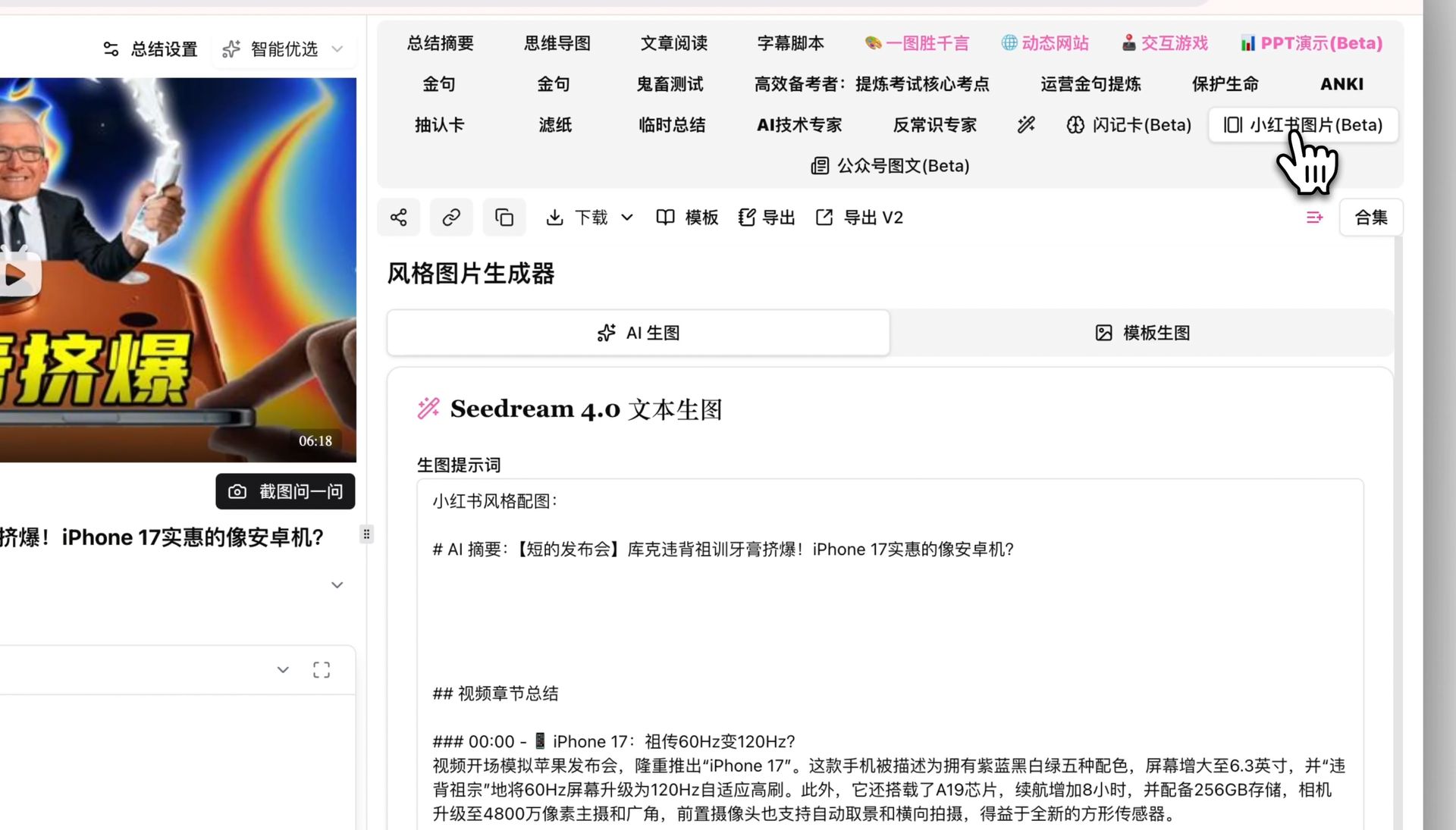
| Note component | Role | Content source |
|---|---|---|
| Cover image | Decides click rate | The most surprising point |
| Headline | Creates a reason to tap | AI quote + number/pain-point formula |
| Value cards | Decides read-through rate | The 3–5 selected points |
| Closing CTA | Decides engagement rate | ”Save this / Follow for more” |
4. Step three: use visual analysis to capture the info “in the frames”
Many videos hold value not just in “what’s said” but in “what’s shown” — the operation steps in a tutorial, the product shots at a launch, the whiteboard and charts in a lecture. Extracting subtitles alone misses this part.
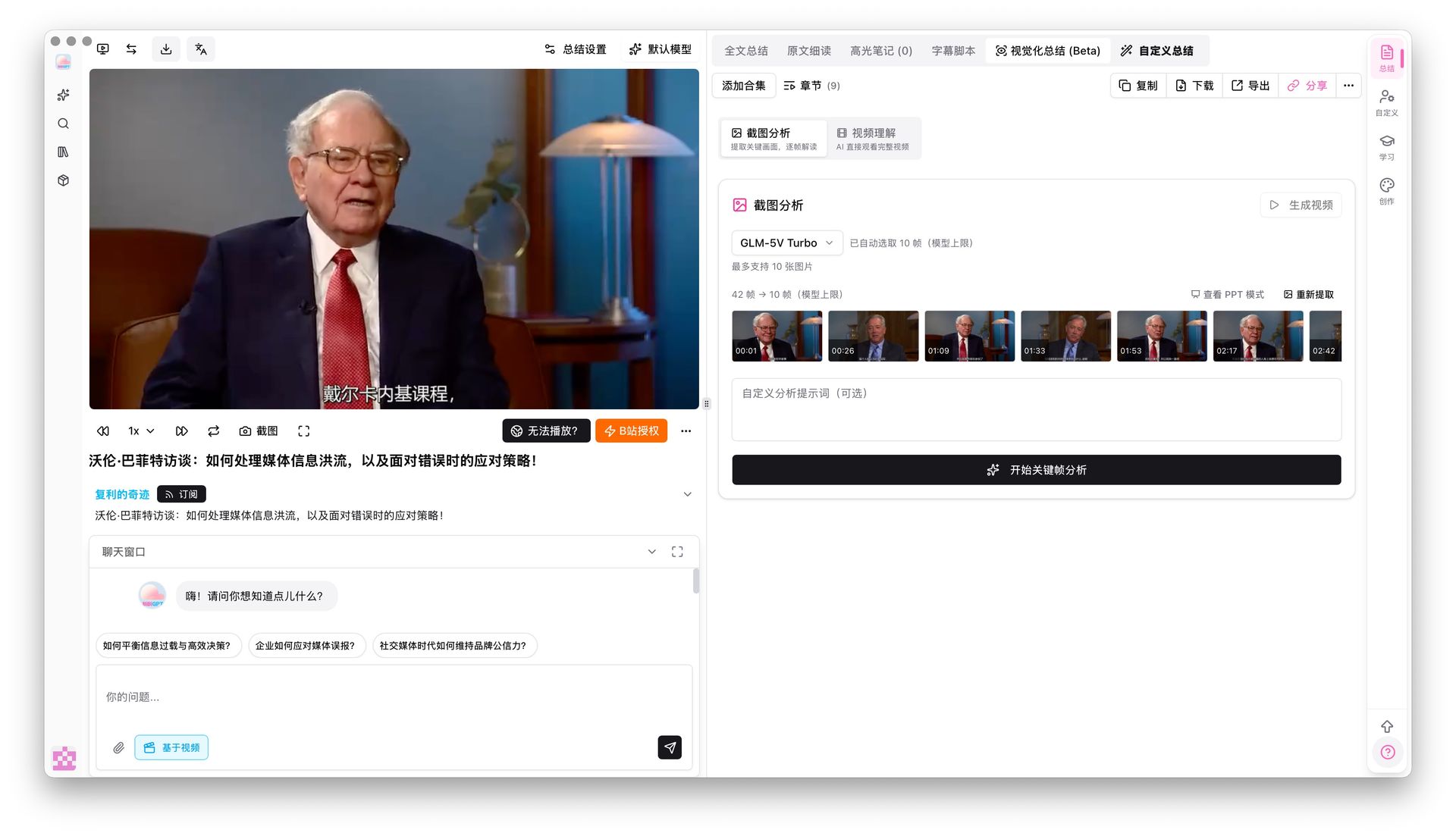
This is where BibiGPT visual analysis comes in — the AI automatically grabs key frames from the video and “describes what it sees,” turning the on-screen content into usable picture-text points too. For how-to and demo videos, this step can double your note’s information density.
The frame-analysis panel gives a picture-text reading for each frame, so you can pick them straight into note cards:
In the demo below, you can see how the AI reads on-screen information out of video key frames:
Turn video frames into illustrated notes
The AI looks at the picture too — slides, charts, on-screen text — and writes it up.
Key frames

On-screen text: nanoGPT
Karpathy live-codes the bigram model — the simplest language model, predicting the next character from the current one.
Practical rule: If a video has information that’s “shown but not said” (steps, charts, products), don’t just extract subtitles — let the AI read the frames too.
5. Step four: a pre-publish pitfall checklist and rhythm
With the technical work done, this final step decides whether the note survives.
- Don’t lift someone’s entire video content verbatim: derivative work needs your own perspective and synthesis — pure copying has no value and carries risk. Use the AI points as the skeleton; you grow the flesh
- Don’t make the cover pure text: Xiaohongshu is a visual platform — the cover needs at least color and layout
- Posting time: per Hootsuite’s research on social media timing, weekday lunch (12–1 pm) and evening (7–10 pm) are usually engagement peaks — schedule your posting rhythm accordingly
- Split one video into multiple notes: turning one podcast into 3 notes from different angles grows your following more than cramming it into one
Frequently Asked Questions (FAQ)
Can I post the AI-extracted content for video-to-Xiaohongshu notes directly?
Not recommended. The AI gives you structured key points (a skeleton), but a Xiaohongshu note needs your own perspective, adjusted tone, and a hook headline. Treat the AI as an assistant that removes 80% of the labor; you add the final 20% of “human touch” — that way it’s both fast and not cookie-cutter.
Which videos are best to break into Xiaohongshu notes?
Videos with high information density and a clear point-by-point structure work best: knowledge podcasts, online courses, industry analysis, product reviews, tutorials. Pure entertainment or narrative videos are harder to break down, because their value isn’t in “information points.”
How many notes can one long video become?
A content-rich video of 40 minutes or more can usually be split into 2–4 notes from different angles. For example, a podcast about “AI tools” can become “3 free tools,” “the 1 opinion this episode pushed back on,” and “a beginner-friendly entry path” — covering different search intents.
Do the visuals have to be AI-generated?
Not necessarily, but AI image generation removes the most time-consuming step. If you have your own design templates and taste, manual is fine; but if you just want to quickly turn points into presentable cards, AI-generated picture-text cards are the best value.
6. From “watch and forget” to “produce continuously”
String the four steps together and you have a repeatable content pipeline:
- See a good video → paste the link into BibiGPT
- Get points → AI outputs TL;DR + section points + on-screen info
- Make the selection → pick 3–5 self-contained points
- Fit the template → hook headline + value cards + action CTA
- Add visuals and publish → AI generates cover and inner cards, post on your rhythm
People who really know how to use content aren’t the ones who watch the most videos — they’re the ones who squeeze second-order value out of every good piece. BibiGPT has served over 1 million users, generated 5M+ AI summaries, and supports 30+ platforms — it exists to solve exactly this: make consuming a video fast enough that you can immediately turn it into your own creation.
Further reading:
- Video to Slides: Extract PPT from Any Video with AI
- What Claude Opus 4.8’s 1M context means for long-video summary
- Podcast to study notes: a 4-step spaced-review workflow
- AI Video to Article Generator — Complete Guide
Want to turn today’s video into a Xiaohongshu note right now? Open BibiGPT video summary, paste the link, and let the AI handle the rest.
BibiGPT Team