
How AI Helps Students Learn from Online Lectures and Course Videos (2026 Complete Guide)
How AI Helps Students Learn from Online Lectures and Course Videos (2026 Complete Guide)
The short answer: Using AI to learn from course videos isn’t about having it “watch for you” or “do your homework.” It’s about using it as an extraction-and-feedback engine: ① paste the video link to get a structured deep summary with key points, discussion questions, and term explanations; ② build a global framework with a mind map; ③ follow up with AI chat on anything you didn’t understand, then jump back to the original video to verify; ④ generate flashcards to fight forgetting. With BibiGPT, one link runs this entire learning loop. Here’s how to do it in four steps.
Students Are Using AI at Scale — But Most Are Doing It Wrong
AI in education is no longer a trend — it’s already the norm. Microsoft’s third annual AI in Education report (2026) found that 92% of students and education administrators, and 88% of teachers have already used AI in learning or teaching. A Gallup/Lumina 2026 State of Higher Education survey found that 57% of college students use AI for schoolwork at least once a week, and about 20% use it daily — most commonly to save time.
The problem: most people use AI as a “do it for me” tool, not a “help me learn” tool. In that same Microsoft report, 41% of students and 42% of teachers cited academic integrity as their top concern — because when AI is used to generate answers or write essays directly, knowledge never actually enters the student’s head. Learning gets bypassed, not enhanced.
The real leverage is on the other side: using AI at the two most cognitively demanding stages — comprehension and retention. Watching a two-hour lecture traditionally means listening start to finish with occasional note-taking. With AI, you can have the full structural overview in under a minute, then spend the time you saved asking “do I actually understand this?”
Practical rule: Use AI to submit work for you, and you gain zero knowledge. Use AI to compress input and amplify feedback, and knowledge actually sticks. The only test that matters: once you close the AI, can you clearly explain what you just learned?
Step 1: Turn an Entire Lecture Video into a Readable, Structured Summary
The biggest cost of learning from an unfamiliar topic video is not knowing how it’s organized. Get the full picture first, then decide where to go deep — that’s far more efficient than watching linearly and hoping the structure emerges.
Paste a YouTube lecture, a Bilibili talk, or even a Zoom or Coursera recording link into BibiGPT, and the Smart Deep Summary instantly generates a structured report — core summary, key highlights, deep-dive Q&A, and term explanations — without needing to write complex prompts or listen to the whole video first.
Here’s what the built-in “Discussion Q&A” section of the deep summary looks like — it’s naturally designed as a starting point for active recall:
Screenshot: BibiGPT — Smart Deep Summary
For technical content you need to verify word-for-word, you can also convert the video into a timestamped transcript and notes, then read alongside the original video and jump to any moment directly.
Step 2: Build a Knowledge Framework with Mind Maps and Chapter Deep Reading
Once you understand what’s being covered, the next step is connecting scattered points into a coherent structure. The brain remembers structures far better than isolated facts.
BibiGPT automatically generates a mind map from the video content, laying out the logical hierarchy of an entire lesson at a glance. Click any node on the map to jump directly to the corresponding timestamp in the video — if a section didn’t make sense, you go back to exactly that part.
Here’s the mind map — it flattens the entire video’s knowledge structure in one view:
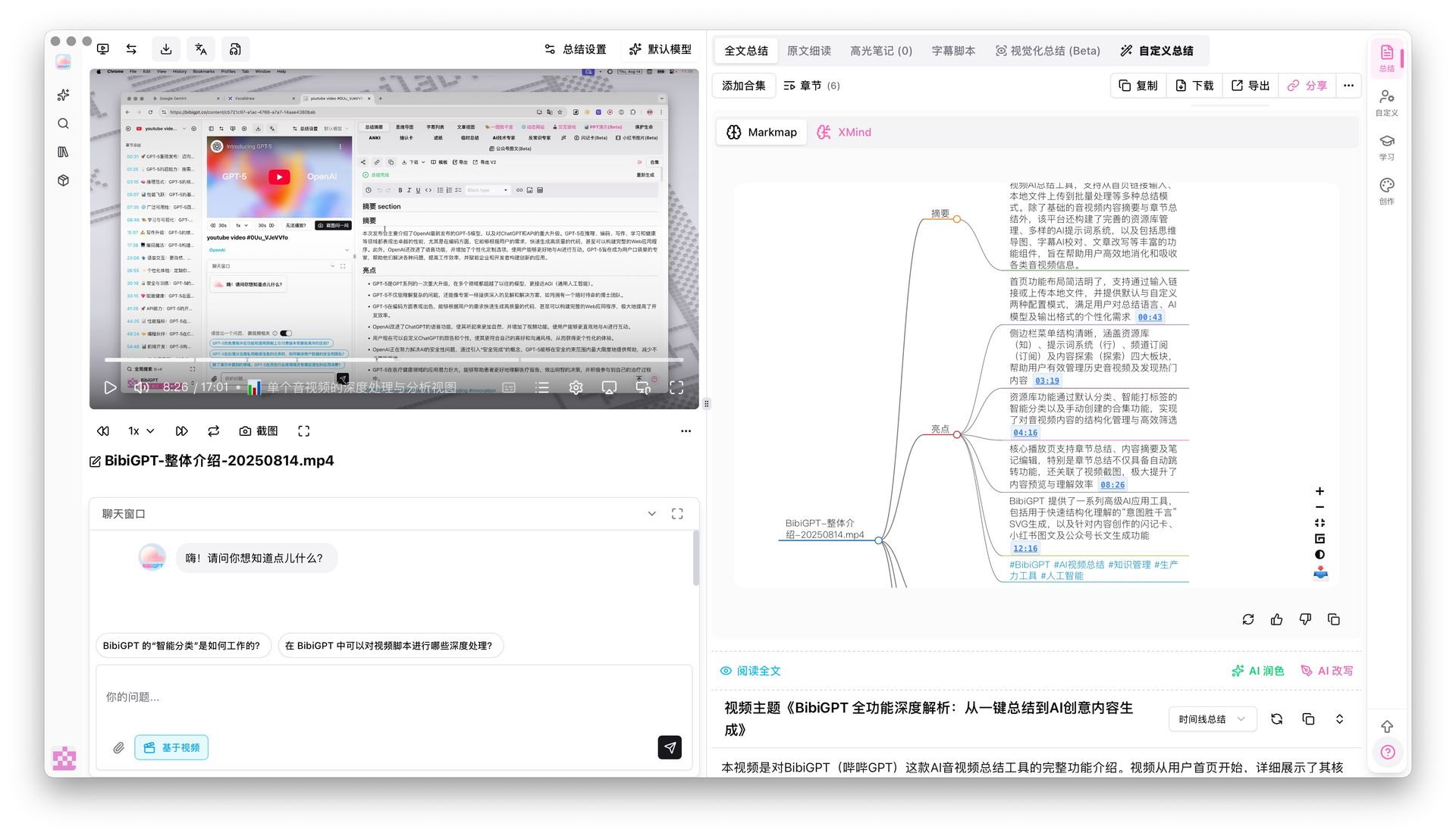
Screenshot: BibiGPT — Mind Map with Timestamp Navigation
When you need to read one chapter in depth, the “Chapter Deep Reading” mode brings chapter summaries, AI-polished transcripts, and subtitles into a single distraction-free reading area. Click any subtitle line for precise playback; the view auto-scrolls and highlights as the video plays. It’s especially well-suited for working through demanding sections of technical lectures.
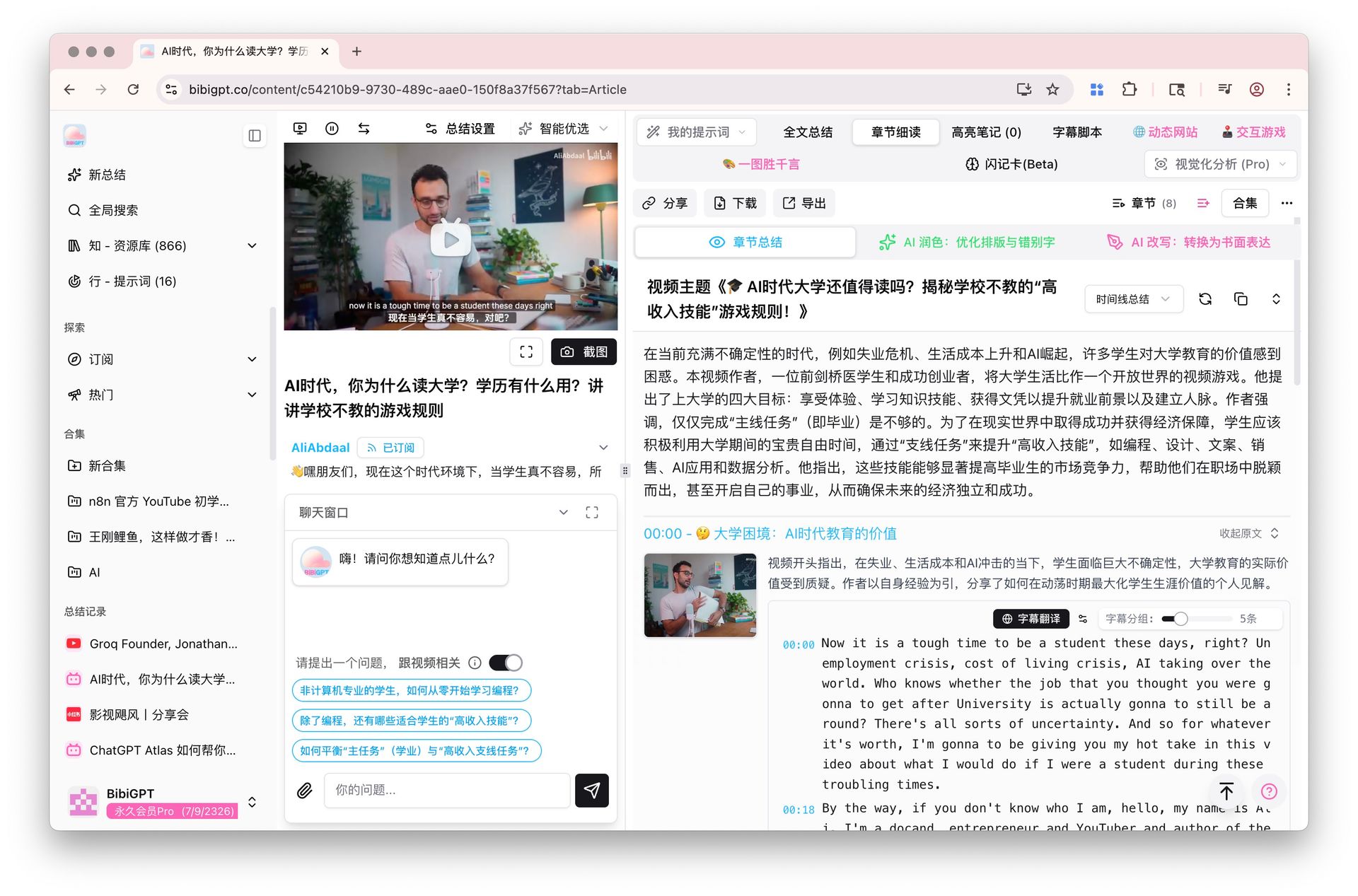
Screenshot: BibiGPT — Chapter Deep Reading
Practical rule: Build the framework with the mind map first, then drill into chapters for detail. Top-down learning from a video sticks far better than listening through it linearly from start to finish.
Step 3: Follow Up with AI Chat, Then Lock In Memory with Flashcards
Once the framework is in place, two things separate real learning from passive viewing: getting confused points to the point of clarity, and making sure what you understood stays remembered.
Get to clarity — AI conversation follow-up. For any concept in the video that didn’t click, ask directly in the chat window. BibiGPT answers based on the video’s content and includes clickable timestamps so you can jump back to the exact moment it was explained — closing the loop from “spotting a gap” to “precisely filling it,” rather than vaguely feeling like you might understand.
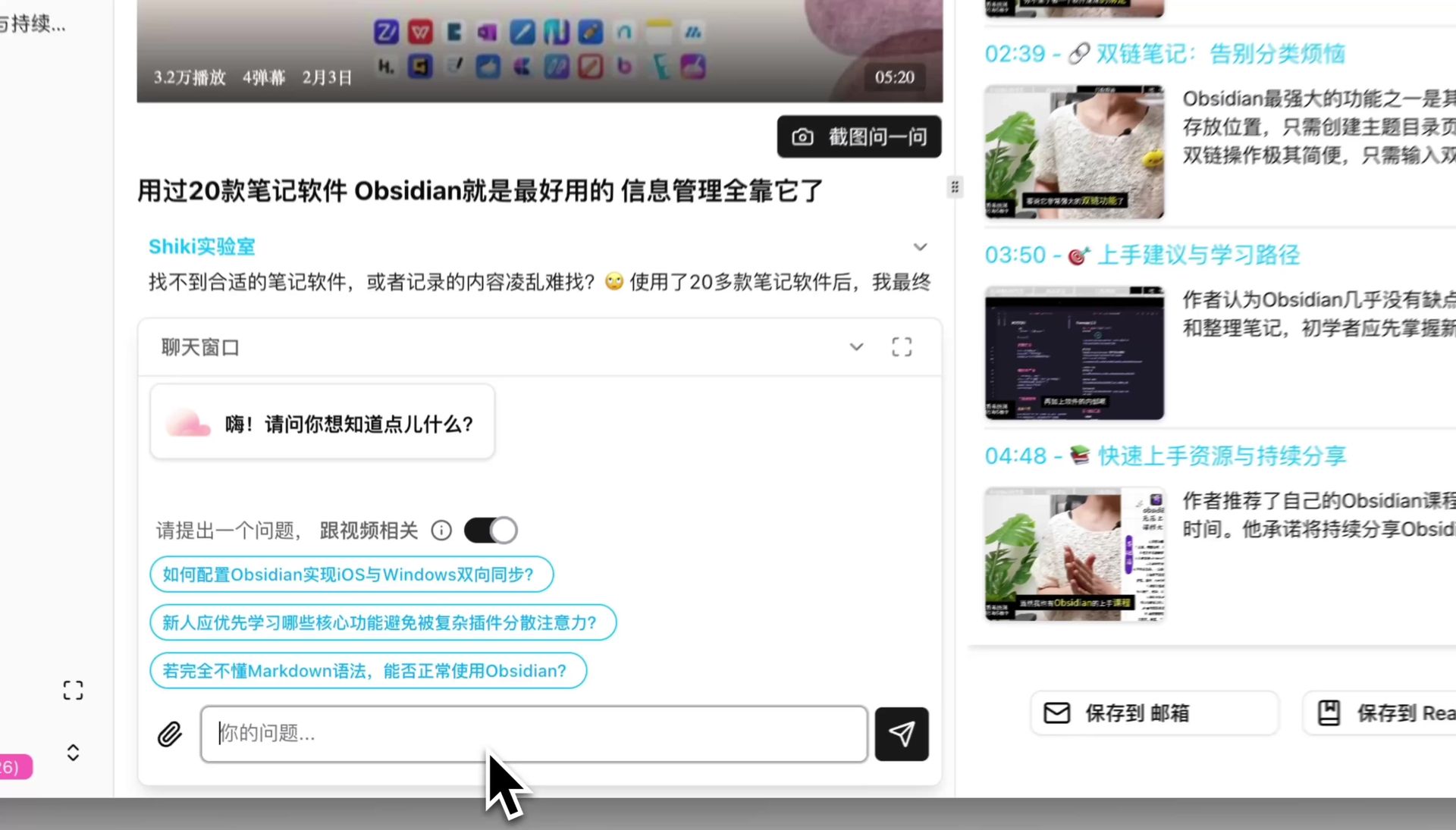
Screenshot: BibiGPT — AI Conversation Follow-Up
Stay remembered — flashcards against forgetting. Understanding something in the moment doesn’t mean you’ll remember it later. BibiGPT’s flashcards auto-generate a set of Q&A cards from the video content, tagged by difficulty and concept, so you can self-quiz right in the app. More importantly, they export to CSV with one click — import directly into Anki or any spaced-repetition system, and the forgetting curve works for you instead of against you.
Here’s the auto-generated flashcard interface — each card corresponds to a core concept from the video:

Screenshot: BibiGPT — Flashcard Generator
Practical rule: Right after finishing a video, cover the summary and try to recall it from memory. Then self-test with flashcards. Where you get stuck is exactly what to revisit next.
Protecting Academic Integrity: AI as a Learning Amplifier, Not a Substitute
The Microsoft report lists “academic integrity” as the top shared concern among both students and teachers — but what they’re worried about isn’t AI itself, it’s the pattern of using AI as a stand-in. Critically, 77% of students and 53% of teachers said they’ve never received formal training on how to use AI appropriately — meaning most people are figuring it out with no guidance on what “appropriate” even looks like.
The line is actually pretty clear: using AI to understand a video you genuinely watched, to test your comprehension, to follow up on what confused you — that’s learning. Using AI to generate an “answer” to content you never engaged with and submitting it — that’s cheating. The first makes you stronger; the second makes you weaker. The difference is whether you actively participated in extracting the knowledge.
For more systematic methods, see: Active Recall Video Learning Workflow on turning passive watching into active retrieval; and How to Add Chinese Subtitles and Summarize English MOOCs for breaking the language barrier. For a broader look at AI-powered video learning, see our AI Video Summary Guide.
Practical rule: Put AI at the “input compression” and “feedback and testing” ends of learning. Keep “thinking and retrieval” for yourself. Once you hold that line, the more powerful AI gets, the faster you learn — not the slower.
A Repeatable Video Learning Workflow
String the four steps above together and you have a learning loop that works for virtually any educational video. The video below demonstrates “studying smarter with AI” from a different angle — pair it with the comparison table for a clearer picture:
Video: YouTube · Jenny Hoyos · How I’d Use AI to Study Smarter (Not Harder)
| Stage | Traditional Video Learning | AI-Assisted Learning Loop |
|---|---|---|
| Before watching | Open and passively receive | Read the structured summary first to get the full picture |
| While watching | Listen start to finish, jot occasional notes | Mind map for framework + chapter deep reading for depth |
| When confused | Rewatch the whole section, rely on patience | AI chat follow-up + jump to exact timestamp to fill the gap |
| After watching | Close the tab and forget | Flashcard self-test + export to Anki for long-term retention |
| Academic integrity | Easy to slide into “let AI write it” | AI handles compression and feedback; thinking stays yours |
The entire workflow starts with one action: paste a video link. Summaries, mind maps, follow-up questions, and review cards are all handled on the same page — no switching between tools.
FAQ
Q1: Does using AI to learn from course videos count as cheating? It depends on how you use it. Using AI to help you understand, self-test, and follow up on content you genuinely watched is studying. Using AI to generate answers to content you’ve never engaged with and submitting that work is cheating. The core distinction is whether you actually participated in extracting the knowledge yourself.
Q2: Does it work with Zoom and Coursera recordings, not just YouTube? Yes. As long as you have the video or recording link (or upload a local file), BibiGPT can convert it into a summary, notes, mind map, and flashcards. YouTube lectures, Bilibili talks, Zoom recordings, and Coursera courses all work.
Q3: Can I import flashcards into Anki? Yes. Flashcards export to CSV with one click, which you can import directly into Anki or any other spaced-repetition tool. The system then schedules your reviews according to the forgetting curve, moving knowledge from short-term to long-term memory.
Q4: Will the AI summary miss or misrepresent key points? Every conclusion in the deep summary links back to the original video timestamp, so you can verify anything that matters. For important content, use the AI chat to follow up and check the original wording directly — don’t rely solely on the summary for your final understanding. Treat AI as an accelerator; keep the final judgment for yourself.
Q5: Which videos are worth going through this carefully? Core content you genuinely want to master — university courses, exam material, skill tutorials — is worth running the full loop. Informational or entertainment content is fine to watch once and move on. Put your attention into content you want to retain long-term.
Try It Now
Pick one lecture or course video you’ve been meaning to actually learn — not just watch. Paste the link into BibiGPT, get the structured summary and discussion Q&A as your self-test sheet, cover the answers and see how much you can recall, then lock in what you remember with flashcards.
Paste a video link and start your AI learning loop
BibiGPT Team
Popular tools
More in this series
- Outil de résumé vidéo IA pour Bilibili : BibiGPT résume 30+ plateformes instantanément (2026)
- Top 3 Douyin Video Summary Tools (2026 Update): AI-Powered Insights from Viral Clips
- Top 3 Xiaohongshu Video Summary Tools in 2026 (Paste Link, Get Notes in Seconds)
- 2026''s Best AI Video Summary Tool: How BibiGPT Covers Every Platform End-to-End
- Best Bilibili AI Video Summary Tool 2026: How BibiGPT Helps You Say Goodbye to "Hard Learning" Tutorials?