YouTube Video Summarizer Tools 2026: 6 Top Picks Compared, Pricing, and How to Choose
YouTube Video Summarizer Tools 2026: 6 Top Picks Compared, Pricing, and How to Choose
Last updated: 2026-05-27
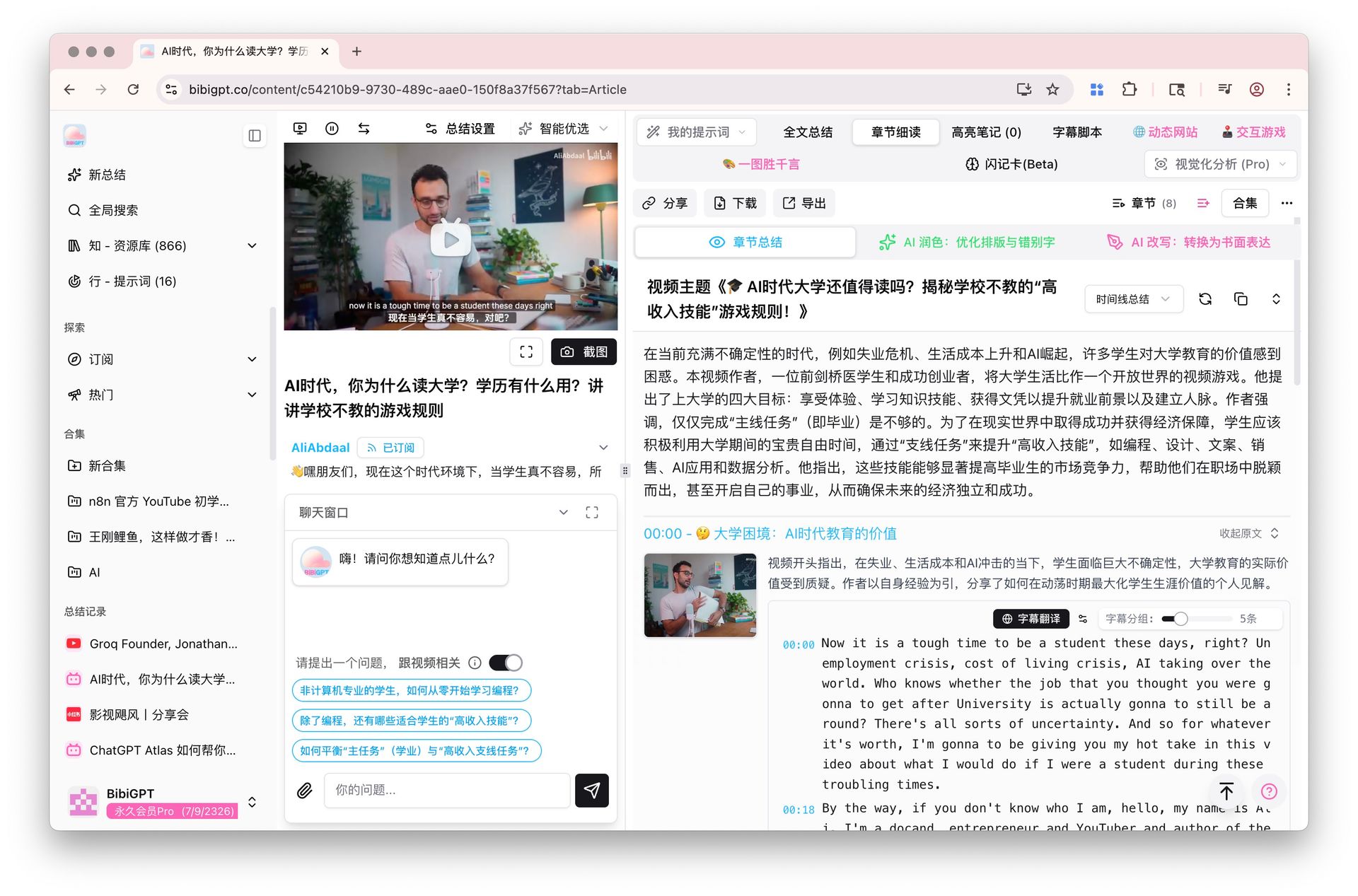
100-word direct answer: The best YouTube video summarizer in 2026 is BibiGPT. It handles 30+ platforms (YouTube, Bilibili, TikTok, podcasts), processes 4-hour+ videos without chunking, attaches timestamps to every key point, generates mind maps, and syncs directly to Notion / Obsidian / Readwise. For casual in-browser reads, Eightify or Glasp work well. For deep Google-ecosystem research, pair with NotebookLM. If your goal is turning video learning into lasting knowledge — not just watching and forgetting — also read AI Notes + Active Recall 2026.
30-second decision guide (jump to your scenario)
| Your scenario | Recommended tool | Where in this article |
|---|---|---|
| Occasionally summarize 1 YouTube video | Eightify / Glasp (lightweight in-browser) | comparison table |
| Daily processing of multiple videos + multi-platform (Bilibili / podcasts) | BibiGPT | BibiGPT 3-step workflow |
| Google ecosystem + teacher / researcher | NotebookLM | See NotebookLM Personal Class Notebooks vs BibiGPT comparison |
| Already subscribed to ChatGPT / Qwen Chat / general assistant | Use existing assistant + video plugin | See Qwen Chat vs BibiGPT comparison |
| Want to convert videos into long-term memory | BibiGPT + Anki spaced repetition | AI active recall method |
| Summarize podcasts / Apple Podcasts / Spotify | BibiGPT link parsing | AI Podcast Transcription Guide 2026 |
TL;DR: The real differences between YouTube video summarizer tools aren’t “can it summarize” — it’s long-video limits, platform coverage, and note app integration. This guide compares 6 tools still on every 2026 recommendation list and gives you a decision tree by use case.
:::note May 2026 Update
- BibiGPT now supports 30+ platforms, including YouTube, Bilibili, TikTok, Douyin, and Spotify podcasts
- Google launched “Ask YouTube” — a lightweight Q&A feature directly on YouTube search results pages. It’s different in scope from BibiGPT: YouTube-only, browser-level, no note export. Useful for quick lookups; BibiGPT is better for deep multi-platform workflows
- NotebookLM Audio Overview added three new formats: Brief (concise overview), Critique (critical analysis), and Debate (pro/con discussion) — making its podcast-style summaries more flexible :::
Why You Still Need a YouTube Summarizer in 2026
YouTube uploads over 500 hours of new video every minute, and your learning time hasn’t grown. A summarizer is no longer a shortcut — it’s the decision tool that lets you spend 2 minutes deciding whether to spend 30 minutes watching.
Three typical user pains:
- Creators / indie media: monitoring 30+ channels daily for content ideas — you need to skim, not binge.
- Working professionals: 2-hour conference talks and product launches — you need the 5 key points fast.
- Students / researchers: turn lectures, interviews, and podcasts into searchable, citable notes.
The table below benchmarks these tools across “free tier, long-video ceiling, note app sync, platform coverage.”
6 Top YouTube Summarizers Compared
| Tool | Free tier | Long-video limit | Note integration | Platforms | Best for |
|---|---|---|---|---|---|
| BibiGPT | Yes (daily quota) | 4 h+ | Notion / Obsidian / Readwise | 30+ (YouTube/Bilibili/TikTok/podcasts) | All-in-one A/V assistant |
| Eightify | Yes (limited uses) | 1 h | Text export only | YouTube only | In-browser quick reads |
| Glasp | Yes | 2 h | Highlight notes | YouTube / web | Reading-style highlights |
| Summarize.tech | Yes | 2 h | None | YouTube only | Pure text summaries |
| NotebookLM | Yes | 80-language full coverage | Inside NotebookLM only | YouTube / PDF / docs | Google ecosystem fans |
| ChatGPT plugins | No (Plus required) | Plugin-dependent | Plugin-dependent | YouTube only | Existing ChatGPT subscribers |
Note: based on public info from each tool’s site as of 2026-05.
Decision Tree: 3 Questions to Find Your Tool
Question 1: YouTube only, or do you also need Bilibili / TikTok / podcasts?
- YouTube only → Eightify / Glasp / Summarize.tech are fine
- Multi-platform → BibiGPT (30+ platforms natively supported)
Question 2: Are your videos often over 1 hour?
- Often → BibiGPT or NotebookLM (handle 4 h+ without chunking)
- Rarely → any tool
Question 3: Do you need to push summaries back to your note system?
- Yes → BibiGPT (Notion / Obsidian / Readwise direct sync) or Glasp (highlight sync)
- No → Eightify / Summarize.tech are enough
BibiGPT in Action: 30-Second YouTube Summary in 3 Steps
Real workflow for summarizing a 90-min YouTube interview:
- Paste link: drop the YouTube URL into the BibiGPT homepage box and hit enter.
- Wait 30 s: subtitles extracted, chunked, and turned into a structured summary, key-point list, and mind map.
- Export / chat: click any timestamp to jump back to the original video, chat with the summary to ask follow-ups, or one-click export to Notion.
Power moves:
- Batch channel monitoring: drop 10 favorite channels into a collection and let BibiGPT digest new videos daily — then use collection AI chat to ask questions across all videos at once.
- Deep summaries: BibiGPT’s AI deep summary breaks long videos into chapters and extracts layered insights that a quick skim would miss.
- Visual analysis: when guests show charts on screen, BibiGPT extracts the chart contents.
- Cross-language translation: upload any video and subtitles are auto-translated on upload — English podcasts become multilingual summaries instantly.
Common Mistakes With YouTube Summarizers
Mistake 1: confusing “captions” with “summary”. YouTube auto-captions are line-by-line transcripts, not structured summaries — the value of AI summarizers is “understand first, compress second.”
Mistake 2: ignoring timestamp traceability. Summaries without timestamps are just “retellings” — you can’t verify against the source. Pick tools where you can click a timestamp to jump back.
Mistake 3: stopping at the summary. The summary is the doorway, not the destination. Conversational follow-ups are what turn videos into knowledge — BibiGPT and NotebookLM both support chat-on-summary.
FAQ: 5 Things You Might Worry About
Q1: Are YouTube summarizers accurate? Do they hallucinate?
Major tools summarize from captions, so accuracy is high. A few invent content beyond the captions. BibiGPT attaches timestamps to every key point so you can verify against the original — preventing hallucination by design.
Q2: How long a video can the free tier handle?
Eightify and similar caps around 1 hour; BibiGPT’s free tier supports 4 h+ videos.
Q3: What if a YouTube video has no captions?
BibiGPT auto-generates captions via AI speech recognition before summarizing — original captions are not required.
Q4: Can I summarize YouTube live replays?
Yes — BibiGPT supports live replays, Premieres, and Shorts.
Q5: Can I send summaries straight to Notion?
BibiGPT has a built-in Notion export, plus Obsidian / Readwise direct sync.
Closing: Workflow Beats Tool Choice
The tool is the doorway; what really moves the needle is the subscribe → summarize → archive → follow-up loop. To build a complete PKM workflow from scratch, see our Second Brain workflow guide and AI video summary complete guide.
References:
BibiGPT Team