Glarity Alternative 2026: The 4 Limits of a Free Extension, and When to Actually Switch

Table of Contents
- Short answer: most people should not replace Glarity
- Credit where it is due: what Glarity does well
- The 4 real limits of the extension form factor
- Side by side: Glarity vs BibiGPT
- What BibiGPT adds
- Other alternatives worth a look
- How to choose: 3 questions
- FAQ
The short answer (as of 2026-07-16): If what you want is “read a summary while I browse YouTube, and translate the occasional web page,” Glarity is already good enough — and it is free. Don’t switch. Looking for an alternative only makes sense in four situations: (1) you need to process local video or audio files (an extension cannot read what was never on a page); (2) your source material lives on podcasts, Bilibili, TikTok, or Xiaohongshu rather than YouTube; (3) you don’t want to wire up your own API key just to unlock stronger models; (4) you don’t just want to understand the video — you want to turn it into something publishable: an article, a mind map, translated subtitles. In those four cases the extension form factor itself is the ceiling, and switching is rational.
Rule of thumb: Before picking an AI summarizer, ask one question — do you want to read and move on, or do you want to keep an artifact? Read and move on: a free extension is plenty. Keep an artifact (notes, articles, subtitles, mind maps): you need a workbench, not a reader.
Short answer: most people should not replace Glarity
Let’s be clear up front: this article is not here to talk you out of using Glarity.
Glarity is a solidly built free tool that solves a very specific, very frequent problem — you are already looking at something in your browser and you want to understand it faster. On that problem it is nearly frictionless: install the extension, open YouTube, and the summary appears in the sidebar. No copying links, no switching sites, no login.
So the position of this article is: acknowledge the strengths first, then map the edges. Switching is only rational once your needs genuinely cross one of those edges. Otherwise you are just paying for capability you don’t use.
Credit where it is due: what Glarity does well
According to Glarity’s own site and its Chrome Web Store listing, the feature surface is genuinely broad:
- YouTube summaries — timestamped highlights, output in a dozen-plus languages
- Translation — full-page, text-selection, PDF selection, and image translation across 90+ languages
- PDF Q&A — summarize an uploaded PDF and ask follow-ups
- Search augmentation — an AI answer next to your Google results
- Writing assistant — draft and rewrite emails and social posts
- Model choice — supports GPT-4o, Claude 3.5, Gemini and others
- Price — core features are free for life; unlocking the stronger models generally requires your own API key or an authorized account
That is a lot of value at zero cost. For the “consume information inside the browser” job, Glarity is close to a default answer — and being free means it costs nothing to try.
The 4 real limits of the extension form factor
Glarity’s strengths and its limits come from the same design decision: it is a browser extension, and its unit of work is “the current page.” That keeps it light. It also creates four edges you cannot engineer around.
Limit 1: It cannot see local files
An extension reads pages. The two-hour meeting recording on your laptop, the mp4 lecture your professor emailed you, the voice memo exported from your phone — none of these ever appeared on a web page, so there is nothing for the extension to attach to.
This is not Glarity being sloppy. It is the form factor: no page, no foothold.
Limit 2: Depth outside YouTube
YouTube is Glarity’s home turf. If your inputs are podcasts, Bilibili lectures, TikTok explainers, or Xiaohongshu posts, the experience varies a lot — every platform has its own subtitle mechanism, page structure, and anti-scraping behavior. A general-purpose extension can rarely go deep on all of them.
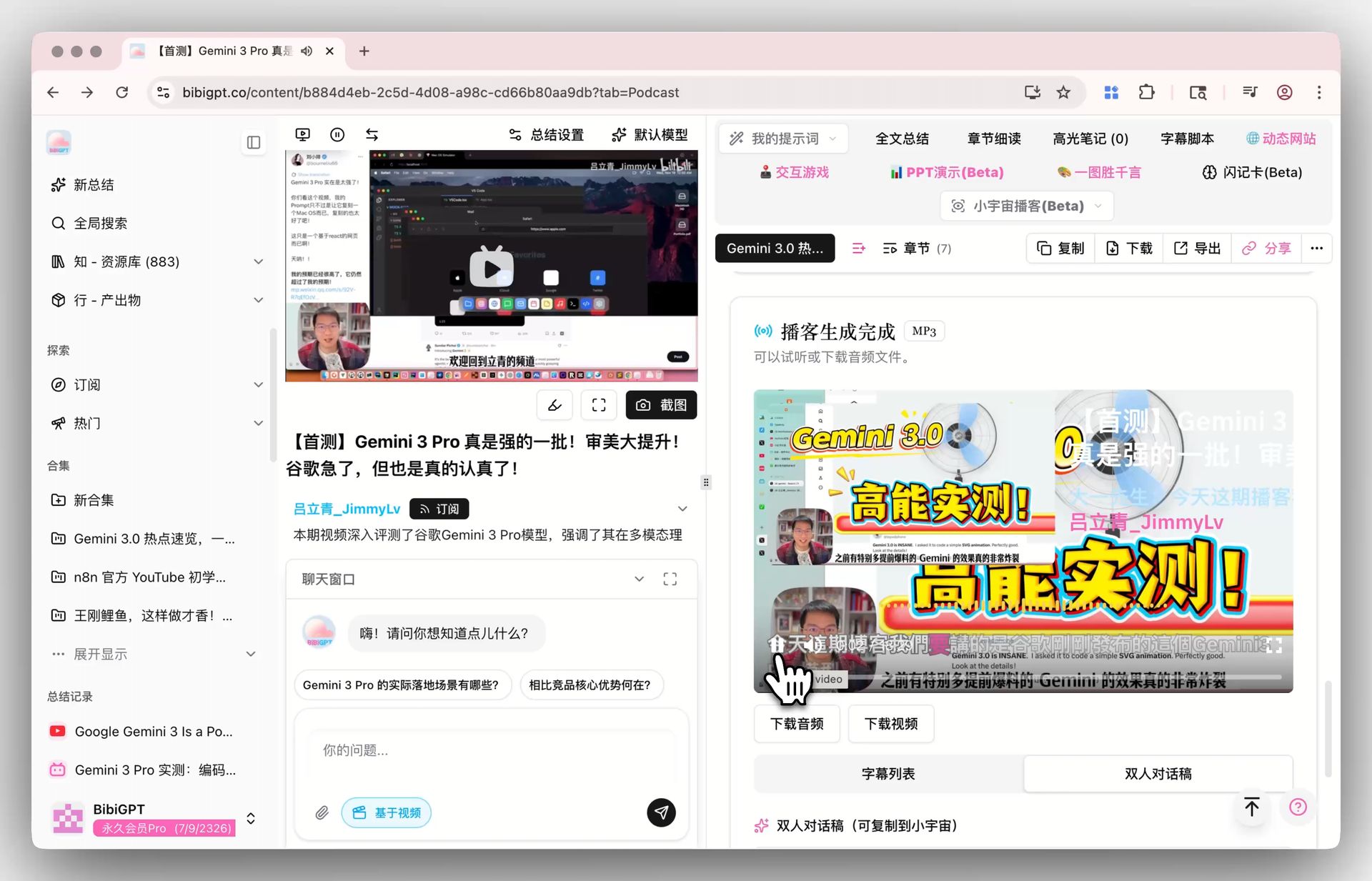
Podcasts are the clearest example: podcast audio is distributed through an entirely different pipeline than YouTube, and getting a clean transcript requires purpose-built support.
Screenshot: BibiGPT’s native support for podcast platforms
Limit 3: Stronger models mean bringing your own key
The price of free is that the stronger models usually require your own API key or authorized account. For developers this is nothing. For most people, “open an account, add a card, generate a key, paste it into the extension, and then watch your own usage” is a high-friction path that quietly ends adoption.
Limit 4: It helps you understand — not produce
This is the big one. Glarity’s output is a summary on your screen. You read it, you close the tab, it is over.
But for many people the real need starts on the next step: turn this podcast into a publishable article; turn this course into structured revision notes in Notion; translate these subtitles and burn them back into the video before publishing. Understanding is the middle state. The artifact is the destination.
Rule of thumb: To judge whether a tool is enough, ask whether its output can feed directly into your next step. If you have to copy, reformat, and rework it every time, it is a reader — not a workbench.
Side by side: Glarity vs BibiGPT
Mapping those edges onto concrete dimensions makes the difference clear:
| Dimension | Glarity | BibiGPT |
|---|---|---|
| Form factor | Browser extension (Chrome/Edge/Firefox/Safari…) | Web app + desktop client + extension |
| Home turf | YouTube + web pages + PDFs | 30+ platforms: YouTube, Bilibili, podcasts, TikTok, Xiaohongshu |
| Local files | ❌ An extension cannot read them | ✅ Upload audio/video directly |
| Works out of the box | ⚠️ Strong models usually need your own API key | ✅ Sign in and go — no key setup |
| Summary depth | Highlights + timestamps | Highlights + chapters + timestamps + follow-up Q&A |
| Mind map | ❌ | ✅ |
| Visual understanding | ❌ (text/subtitle driven) | ✅ Reads on-screen content |
| Publishable output | ❌ | ✅ Articles / social posts / slides / short-video scripts |
| Subtitle translate + burn-in | ❌ | ✅ |
| Notes integration | ❌ | ✅ Notion / Obsidian |
| Full-page translation | ✅ A real strength | ⚠️ Not its focus |
| Price | Free (bring your own key for strong models) | Free tier + Plus $19.8/mo / Pro $34.8/mo |
One thing to read carefully here: this is not a “whoever has more checkmarks wins” table. Glarity is clearly better at full-page translation — that is its home turf, and BibiGPT simply does not do it. The genuine overlap between the two is only video summarization.
What BibiGPT adds
If your needs fall outside those four edges, here is what the alternative actually buys you.
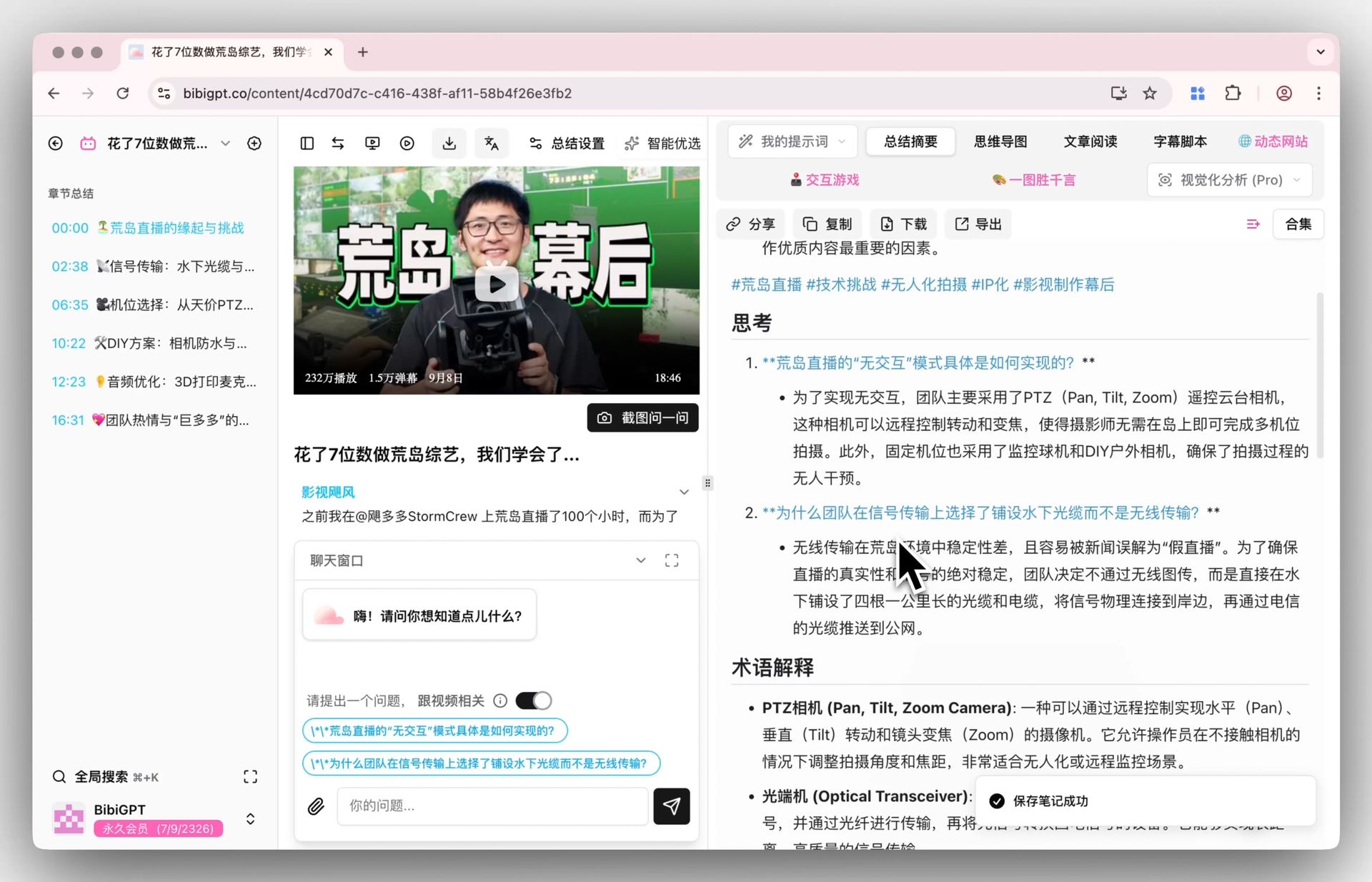
1. Summaries you can interrogate
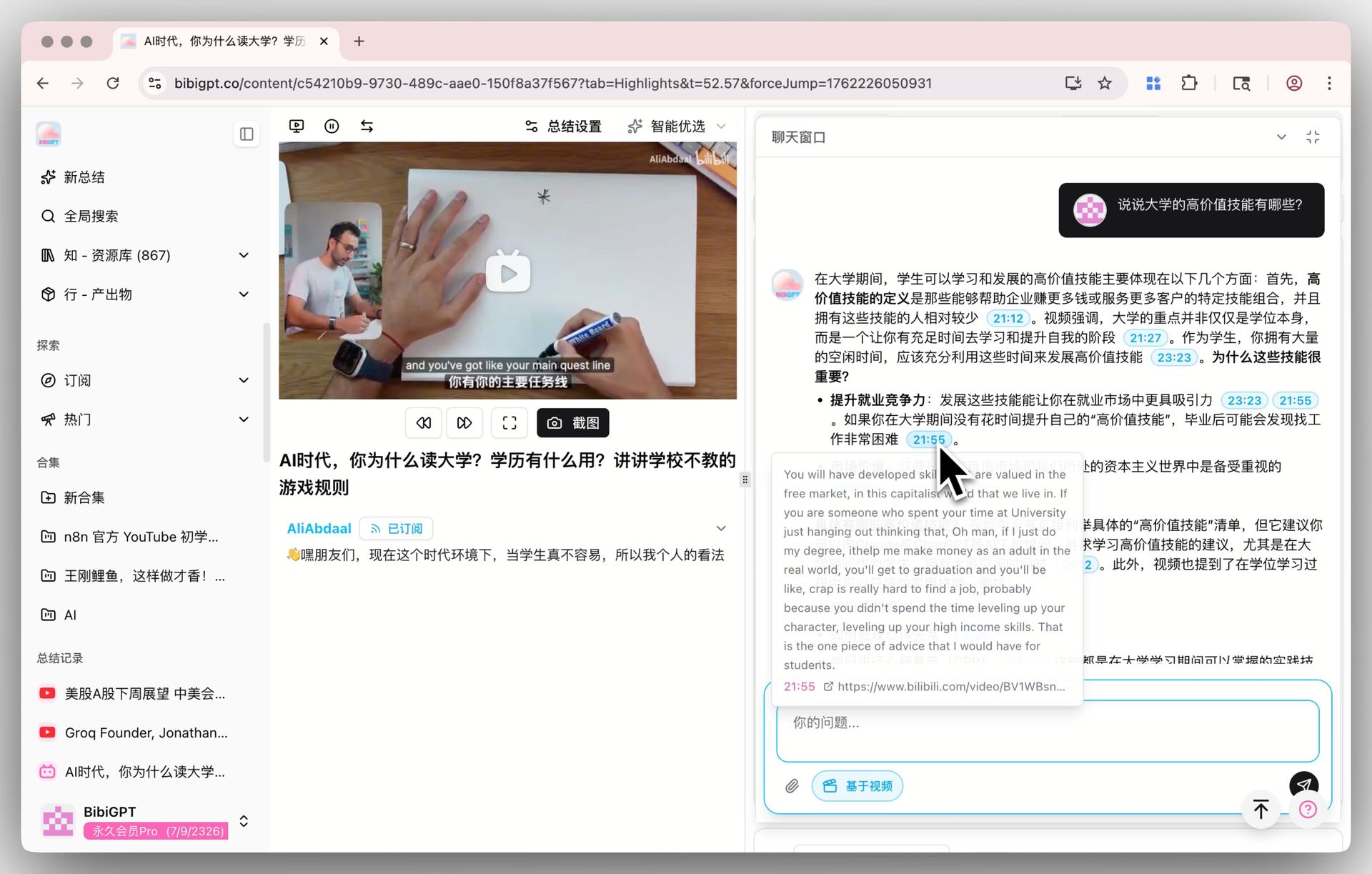
The core problem with any summary is that it decided for you what mattered. BibiGPT lets you ask follow-up questions right next to the summary — which sentence was unclear, what’s the evidence for a claim — and it jumps back to the exact timestamp in the source.
Screenshot: asking follow-up questions about any line in the video
2. One-click mind maps
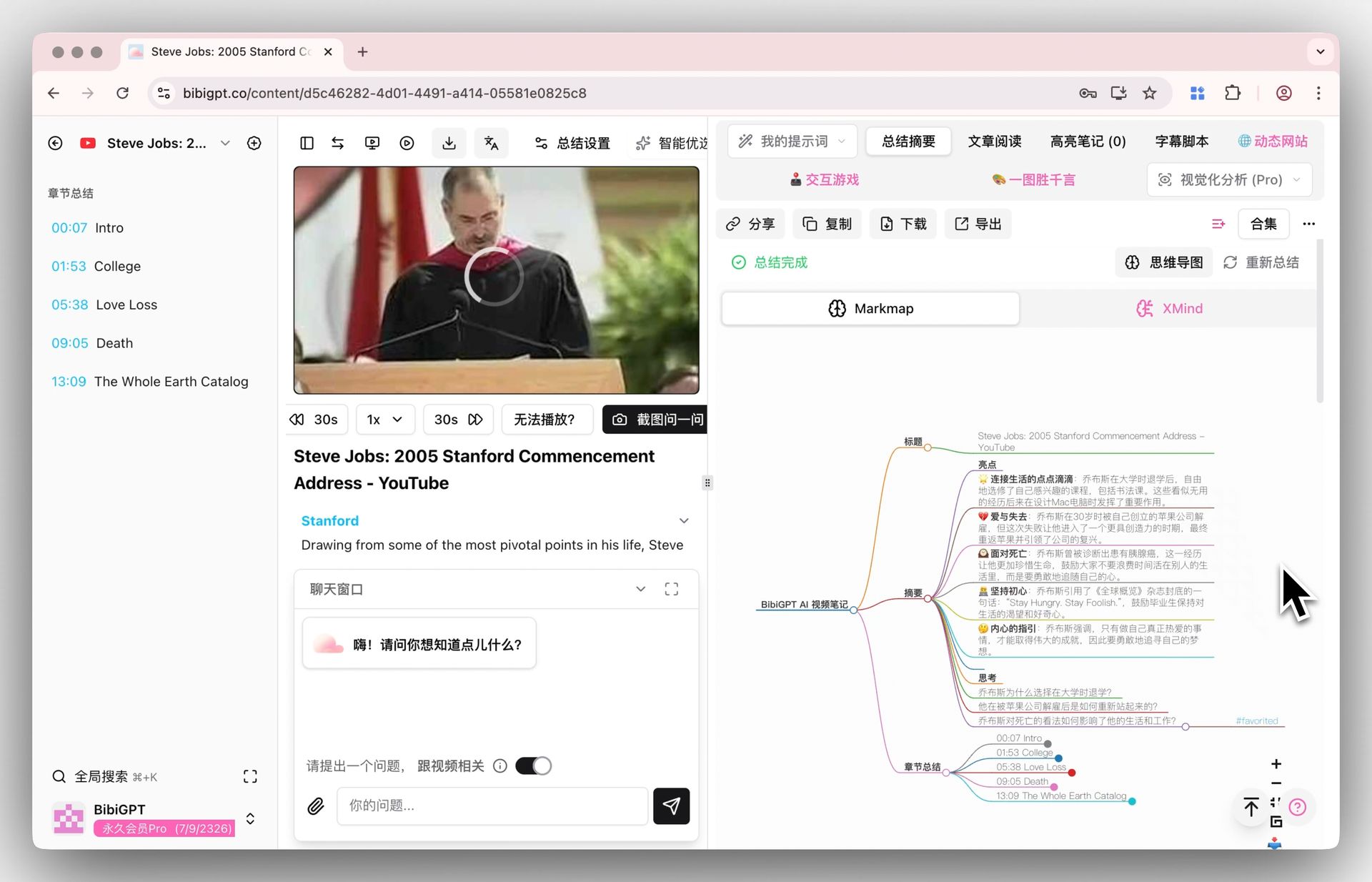
For long videos the structure is worth more than the conclusion. BibiGPT folds an entire episode into a map so you can see the skeleton first and then decide what deserves a deep read — especially useful past the two-hour mark. From there you can read chapter by chapter instead of rewatching the whole thing.
Screenshot: auto-generated mind map and chapter-level deep reading
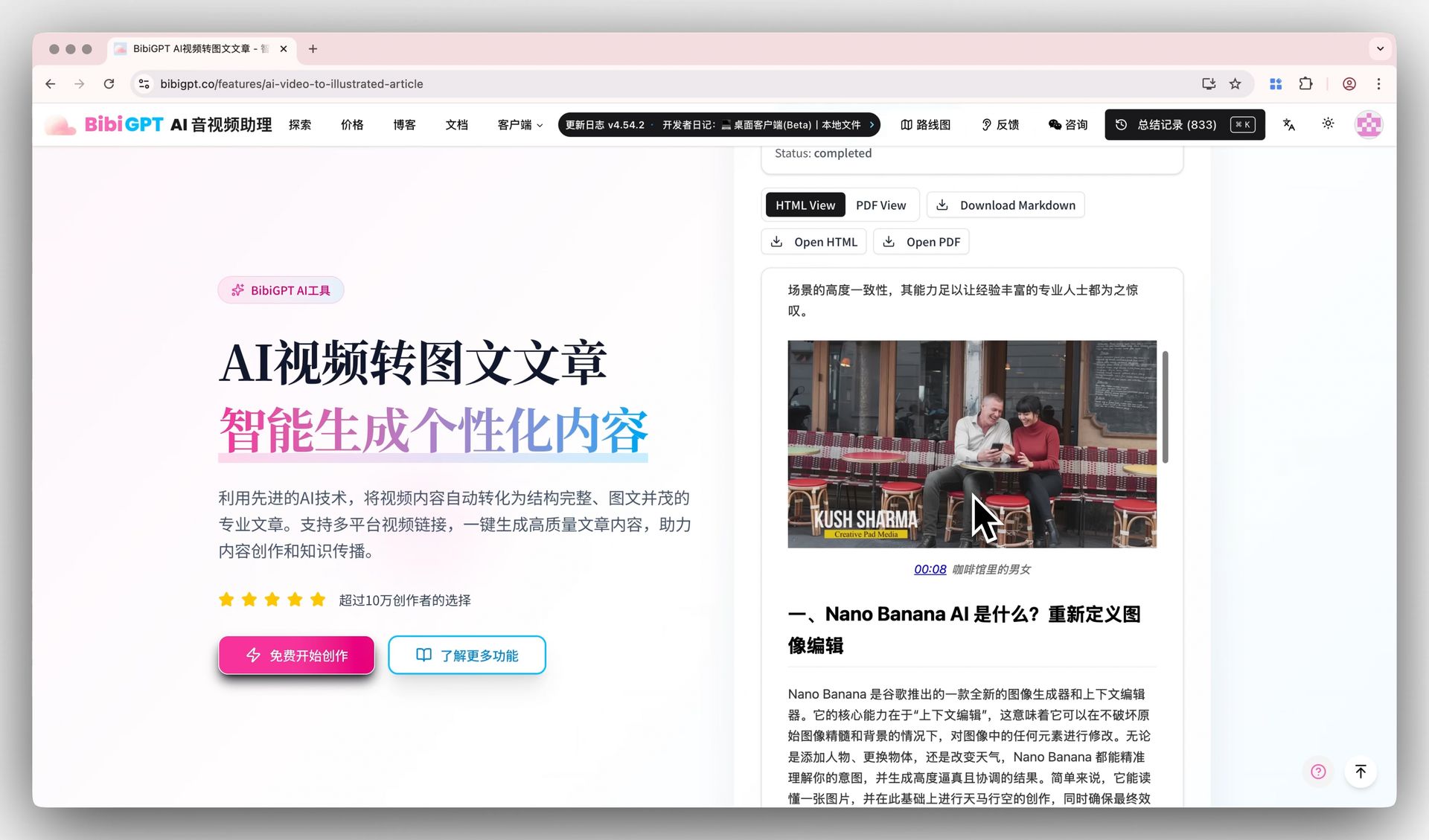
3. Turning a video into a publishable article
This is the part an extension can’t reach. BibiGPT reads the on-screen content too, and rewrites an episode into a structured, illustrated draft — ready for a blog, a social post, slides, or a short-video script. For creators, this removes an entire round of manual rework.
Screenshot: video rewritten into an article, ready to export
4. Subtitle translation and auto-captioning
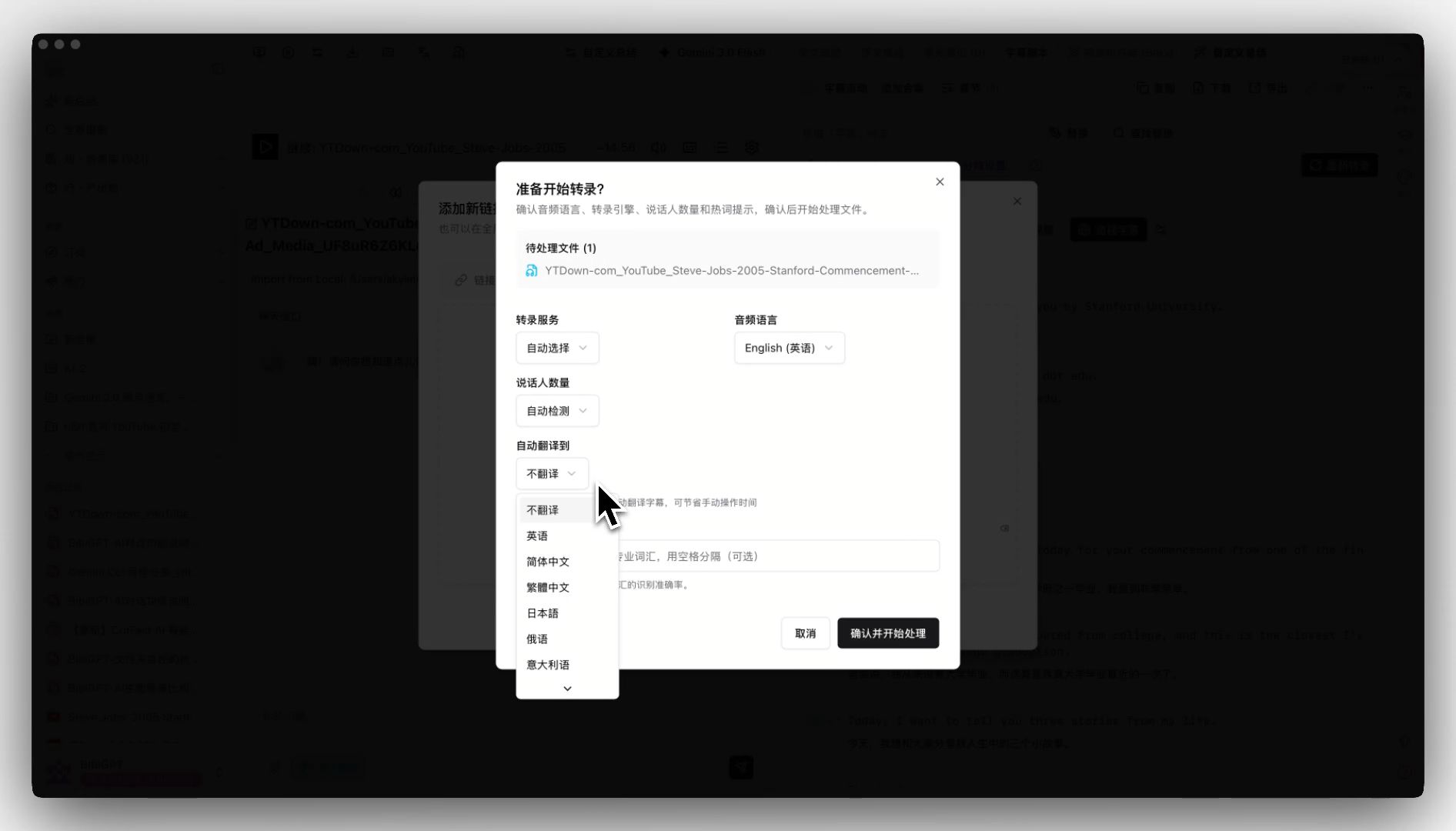
Upload and subtitles are translated automatically — side-by-side languages, exportable, and burnable back into the video. Anyone publishing across languages knows how long this step normally takes.
Screenshot: subtitles translated automatically on upload
If you want to try these directly: AI YouTube Summary, AI Bilibili Summary, Video Summarizer.
Other alternatives worth a look
In fairness, Glarity is not the only option, and it’s worth seeing the field:
- NotebookLM — Google’s tool, strong when you want to load a pile of sources and research across them. It is not designed for “summarize while I browse.”
- Eightify / NoteGPT and similar YouTube extensions — closest in form factor to Glarity; the differences are mostly free quota and output style.
- Large-vendor assistants (Qwen and similar) — Chinese-video understanding is improving fast, with generous free quotas; we compared one in detail in our Qwen long-video summary comparison.
- BibiGPT — if your center of gravity is local files, non-YouTube platforms, and producing artifacts, it covers the stretch an extension cannot reach.
For broader roundups see Top 10 YouTube AI Video Summary Tools and the complete AI video summary guide.
How to choose: 3 questions
You can settle this with three questions:
1. Where does your material live?
- Mostly YouTube and web pages → Glarity is enough
- Local files, podcasts, Bilibili, TikTok → you need something else
2. Are you willing to wire up an API key?
- Yes (or you already have one) → free + your own key is an excellent deal
- No → pick a hosted tool that works out of the box
3. Do you want to finish reading or produce something?
- Read and move on → Glarity
- Notes / articles / subtitles / mind maps → you need a workbench
If even one answer lands in the second bucket, an alternative is worth considering. If all three land in the first, don’t bother switching — the time you’d spend is worth more than the tool.
FAQ
1. Is Glarity really free? Any hidden costs?
The core features are genuinely free for life, and it is clean about it. The caveat: unlocking the stronger models generally requires your own API key or an authorized account — that cost tracks your own usage and is not charged by Glarity.
2. Can Glarity summarize Bilibili or podcasts?
YouTube is its home turf. Coverage and stability on other platforms is generally weaker — not because the extension is poorly built, but because each platform’s subtitle mechanism differs enough that a general-purpose extension can rarely go deep on all of them. If those platforms are your main input, a tool with native support will save you real friction.
3. Can I use both Glarity and BibiGPT?
Yes — and it’s a sensible combination. Use Glarity for frictionless, free, in-browser reading; use BibiGPT when you need an artifact (notes, an article, translated subtitles, or a local file processed). The overlap is only video summarization, so they don’t conflict.
4. Does BibiGPT require an API key?
No. Sign in and it works; model routing happens in the background. If you want to pick a specific model, that option exists — but it’s optional, not a prerequisite.
5. Is the free tier enough to evaluate it?
Yes. Start on the free tier, then look at Plus ($19.8/mo) or Pro ($34.8/mo) if it fits. Test it with your hardest piece of material first — if the worst case passes, everyday use will be fine.
6. Extension vs web app — what’s the actual difference?
The unit of work. An extension works on the current page, which makes it light, fast, and frictionless — but limited to what’s on that page. A web app or desktop client works on your material itself (including local files), so it can do heavier processing — at the cost of leaving the page you were on. That’s a trade-off, not a ranking.
Try it with your hardest piece of material
The fastest way to judge a tool is not reading reviews — it’s running your own material through it:
- Pick a long video you genuinely haven’t had time to finish (the longer the better — ideally a 1-hour-plus lecture or podcast)
- Summarize it with Glarity on YouTube and see whether the highlights are enough
- Run the same material (or a local file) through BibiGPT and try follow-up questions, the mind map, and the article rewrite
- Then answer one question: when you finished, what did you actually keep?
If the answer is “nothing — I just know roughly what it said,” then what you need may not be a better summary. It may be a workbench that produces something.
Further reading:
- The Complete AI Video Summary Guide 2026
- Top 10 YouTube AI Video Summary Tools
- Complete Guide to AI Podcast Summarizers
—— The BibiGPT Team
Popular tools
More in this series
- Adobe Acrobat Student Spaces vs BibiGPT: due strade per trasformare PDF e video in podcast AI (confronto 2026 sullo studio AI per studenti)
- AI Haoji vs BibiGPT 2026 Full Comparison: Use Case, Platform Coverage, Multilingual, Mind Map Depth, Pricing — Which Should You Pick?
- Confronto strumenti generatori di PPT con IA 2026: Qwen vs Gamma vs BibiGPT vs Tome — quale è giusto per te?
- AI Video Note Taker Comparison 2026: QuickQuill vs Mufal vs Memories.ai vs BibiGPT
- Ask YouTube's Conversational AI Search Rolls Out Wider This Summer: Can It Replace Video Summary Tools? (2026 Hands-On Review)